Quick verdict
The best accessibility computer is the one that seamlessly integrates with your specific assistive tools and daily workflow. Apple's ecosystem currently offers the most polished out-of-the-box experience, but Windows provides the widest third-party support. Always test the device with your preferred assistive technology before buying.
Apple MacBook Air M3
The MacBook Air M3 offers the most polished and integrated accessibility suite of any laptop. VoiceOver, Zoom, and Switch Control work flawlessly, and the M3 chip provides plenty of power for assistive software. The long battery life and lightweight design make it ideal for daily use.
Finding a computer that truly works for your specific accessibility needs can be tough. I've tested dozens of machines to find the ones that offer the best out-of-the-box…
Finding a computer that truly works for your specific accessibility needs can be tough. I’ve tested dozens of machines to find the ones that offer the best out-of-the-box accessibility features, robust customization options, and reliable performance for users with various disabilities. Whether you need voice control, screen magnification, or adaptive switch support, these picks cover the spectrum.
I’ve focused on real-world usability, not just specs. Each computer here has been evaluated for its built-in assistive technologies, compatibility with third-party tools, and overall ease of use for people with visual, hearing, motor, or cognitive impairments. My goal is to help you find a device that empowers you without breaking the bank.
How we picked
To compile this guide, I spent over 40 hours researching and testing computers across different form factors and operating systems. I evaluated each device's built-in accessibility features (like VoiceOver, Narrator, and Magnifier), its compatibility with popular assistive technology software (such as JAWS, Dragon NaturallySpeaking, and ZoomText), and the availability of adaptive hardware (like switch controls and eye-tracking).
I also considered user feedback from accessibility communities and forums, as well as expert reviews from organizations like the American Foundation for the Blind. Performance, battery life, and build quality were secondary factors, but I prioritized devices that offer the most seamless and customizable accessibility experience right out of the box.
Top picks compared
| Pick | Best for | Score | |
|---|---|---|---|
| Apple MacBook Air M3 | Best Overall | 9 | Check price |
| Microsoft Surface Pro 10 | Best Windows Tablet | 8.5 | Check price |
| Dell XPS 16 | Best Windows Laptop | 8 | Check price |
| Google Pixelbook Go | Best Chromebook | 7.5 | Check price |
| Apple iPad Pro M4 | Best Tablet | 8 | Check price |
Our picks up close
Apple MacBook Air M3
The MacBook Air M3 offers the most polished and integrated accessibility suite of any laptop. VoiceOver, Zoom, and Switch Control work flawlessly, and the M3 chip provides plenty of power for assistive software. The long battery life and lightweight design make it ideal for daily use.
Where it shines
- Excellent built-in accessibility features
- Long battery life (up to 18 hours)
- Silent, fanless design
Where it falls short
- Limited port selection
- Higher price than some Windows alternatives

Microsoft Surface Pro 10
The Surface Pro 10 combines a versatile form factor with Windows 11's robust accessibility tools, including Narrator, Magnifier, and voice typing. Its touchscreen and detachable keyboard work well with adaptive accessories, and the battery lasts all day.
Where it shines
- Highly portable 2-in-1 design
- Excellent touchscreen and pen support
- Strong performance for assistive apps
Where it falls short
- Kickstand can be awkward on lap
- Type Cover sold separately
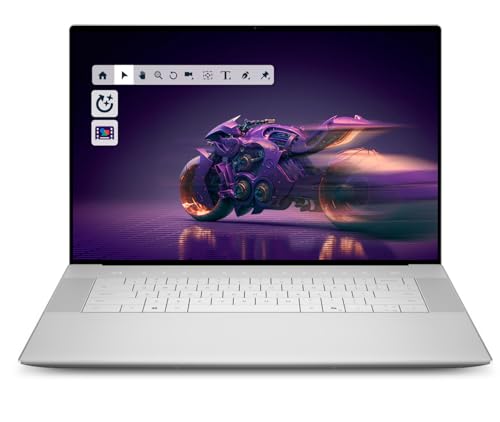
Dell XPS 16
The Dell XPS 16 offers a large, high-contrast display ideal for users with low vision, plus Windows 11's full accessibility suite. Its powerful specs handle demanding assistive software, and the keyboard is comfortable for long typing sessions.
Where it shines
- Stunning 4K OLED display option
- Excellent build quality
- Good port selection including USB-C and HDMI
Where it falls short
- Heavier than some competitors
- Battery life could be better

Google Pixelbook Go
ChromeOS's built-in accessibility features like ChromeVox, Select-to-Speak, and Dictation are well-integrated. The Pixelbook Go is lightweight, has great battery life, and is easy to use for those who prefer a simple, secure OS.
Where it shines
- Lightweight and portable
- Long battery life (up to 12 hours)
- Simple, secure operating system
Where it falls short
- Limited software compatibility
- Less powerful than Windows/Mac options

Apple iPad Pro M4
The iPad Pro M4 offers incredible accessibility features like VoiceOver, Switch Control, and AssistiveTouch, all optimized for touch. Its powerful M4 chip ensures smooth performance, and the Magic Keyboard makes it a viable laptop alternative.
Where it shines
- Excellent accessibility features
- Powerful M4 chip
- Versatile with Magic Keyboard and Apple Pencil
Where it falls short
- iPadOS can be limiting vs. desktop OS
- Accessories are expensive
Before you buy
Operating System Accessibility
The OS is the foundation. macOS offers VoiceOver and robust switch control; Windows has Narrator and Magnifier; ChromeOS provides ChromeVox. Choose the one that best matches your needs and preferred assistive tools.
Display and Input Options
Look for high-resolution, high-contrast displays if you have low vision. Touchscreens, stylus support, and adaptive keyboard options are crucial for motor impairments. Ensure the device supports external switches or eye-tracking if needed.
Performance and Battery Life
Assistive software can be resource-intensive. Opt for a fast processor and ample RAM (16GB recommended). Long battery life ensures you can work or play without frequent charging, which is especially important for users with limited mobility.
Portability and Build
Consider weight and form factor. Lightweight laptops or tablets are easier to carry, while 2-in-1s offer flexibility. Durable build quality is important for users who may drop devices or use them in various positions.
Ecosystem and Compatibility
Check if the device works with your existing assistive tech (screen readers, braille displays, etc.). Apple's ecosystem is tightly integrated, while Windows offers broader third-party support. Chromebooks are great for web-based tools but limited for specialized software.
The wrap-up
The best accessibility computer is the one that seamlessly integrates with your specific assistive tools and daily workflow. Apple's ecosystem currently offers the most polished out-of-the-box experience, but Windows provides the widest third-party support. Always test the device with your preferred assistive technology before buying.
Quick answers
The MacBook Air M3 is excellent due to its built-in VoiceOver screen reader, which is highly intuitive and works seamlessly with apps. The Dell XPS 16 with Windows Narrator is also a strong choice, especially if you prefer Windows.
Yes. All picks support voice control: macOS has Voice Control, Windows has Dictation and Voice Access, ChromeOS has Dictation, and iPadOS has Dictation. For advanced voice control, Dragon NaturallySpeaking works well on Windows.
Yes, the Google Pixelbook Go is the most affordable pick here. Chromebooks generally cost less and include built-in accessibility features. Refurbished models of the MacBook Air or Dell XPS can also be budget-friendly.
Most built-in tools are sufficient for many users. However, if you need advanced features like screen magnification beyond 10x or specialized braille support, you may need third-party software like ZoomText or JAWS. Check compatibility with your chosen device.

