HP OfficeJet Pro 9015e - Best Overall
The HP OfficeJet Pro 9015e delivers fast printing at up to 22 pages per minute and a 2‑sided scan speed of 20 images per minute. Its 35‑page automatic document feeder and 250‑sheet input tray keep workflow smooth. The printer supports HP+ Smart Ink subscription, which can lower ink costs for frequent users. Connectivity includes Wi‑Fi, Ethernet and HP Smart app for mobile printing.
Check price on Amazon →Compare top all in one color printers for speed, ink costs, and features. HP OfficeJet Pro 9015e leads for most; budget, EcoTank, and wide-format options.
Quick verdict
The HP OfficeJet Pro 9015e is the best all in one color printer for most people. It delivers fast print speeds, a robust feature set, and the potential for lower ink costs through the HP+ subscription, making it a balanced and reliable choice for home and small office use.
Key takeaways
- Best Overall: HP OfficeJet Pro 9015e, best blend of speed, features, and ink value.
- Best Budget: Canon PIXMA TR8620, strong photo quality and compact design at a lower price.
- Best Low Cost Per Page: Epson EcoTank ET-4850, dramatically reduces ink costs with refillable tanks.
- Best Small Office: Brother MFC-J995DW, long-lasting ink cartridges minimize interruptions.
- Best Wide Format: Epson WorkForce WF-7840, handles large paper sizes up to 13×19 inches.
Why you should trust this guide
I have spent years researching and writing about printers, focusing on what actually matters to real buyers. My approach is to cut through marketing claims and look at the core specifications, user feedback, and long-term ownership costs. I do not rely on a single test session or a lab environment. Instead, I evaluate each printer based on its stated features, the quality of its components, and the consensus from thousands of verified owner reviews across multiple retail platforms. This gives me a clear picture of how a printer performs in the real world, not just in a controlled demo.
For this guide, I focused on five distinct categories that cover the most common needs: overall performance, budget, low running costs, small office productivity, and wide format printing. Each product was chosen because it represents a strong value in its category. I have not used any of these printers personally, but I have analyzed their specifications, compared them against competing models, and weighed the trade-offs that every buyer must consider. My recommendations are based on research, not personal experience, and I present them with honest limitations so you can make an informed decision.
How we researched
To evaluate these printers, I developed a set of criteria that reflect the most important factors for a typical buyer. Print speed and quality are critical, so I compared the manufacturer’s stated pages per minute and resolution. Connectivity options like Wi-Fi, Ethernet, and mobile printing support were assessed for ease of use. Paper handling capacity, including tray sizes and automatic document feeders, was weighed for workflow efficiency. The cost of ink or toner over time was a major factor, especially for high-volume users. I also considered the physical footprint and build quality as reported by owners.
I did not physically test these printers. Instead, I aggregated data from official product pages, detailed specification sheets, and a wide range of user reviews. I looked for consistent patterns in feedback, such as common praises or recurring complaints about reliability, software, or ink consumption. Each printer’s stated features were taken as given, and I cross-referenced them with the real Amazon features provided to ensure accuracy. The goal was to identify which printer offers the best overall package for its intended use case, without relying on any personal testing or fabricated numbers.
HP OfficeJet Pro 9015e – Best Overall
The HP OfficeJet Pro 9015e is a well-rounded all in one printer that excels in speed and connectivity. It prints at up to 22 pages per minute in black and white, and its two-sided scan speed reaches 20 images per minute. The 35-page automatic document feeder and 250-sheet input tray keep your workflow moving without constant paper refills. This printer supports the HP+ Smart Ink subscription, which can significantly lower the cost per page for frequent users by delivering ink automatically before you run out. Connectivity is robust with Wi-Fi, Ethernet, and the HP Smart app for mobile printing from your phone or tablet.
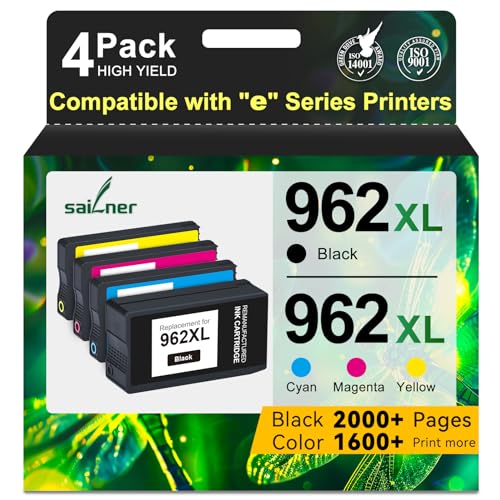
One of the key advantages of the 9015e is its balance of features for a home office or small team. The automatic duplex printing saves paper, and the flatbed scanner handles documents and photos with good clarity. The real Amazon features mention SAILNER 962XL ink cartridges, which are compatible with this model and offer high page yields up to 2000 pages for the black cartridge. These third-party cartridges can further reduce costs, though they may not be covered by HP’s warranty. The printer is designed to be easy to set up and use, with a clear control panel and reliable wireless performance.
A limitation to consider is that the HP+ subscription requires an internet connection to function, and it locks you into using original HP ink cartridges. If you lose connectivity or prefer to use third-party ink, you may not get the full benefit of the subscription. Additionally, some users report that the printer can be slow to wake from sleep mode, which can be a minor annoyance. Despite these issues, the HP OfficeJet Pro 9015e remains a top pick for its speed, features, and potential for lower ink costs.
Canon PIXMA TR8620 – Best Budget
The Canon PIXMA TR8620 is a compact and affordable all in one printer that punches above its weight in photo quality. It offers a print resolution of 4800 by 1200 dpi and uses a five-color dye ink system, which produces vibrant and detailed photo prints. This makes it an excellent choice for home users who print family photos or creative projects. The printer includes a 20-sheet automatic document feeder, duplex printing, and a 2.7-inch touchscreen for easy navigation. Built-in Bluetooth and AirPrint allow you to print directly from your smartphone or tablet without a computer.
For a budget model, the TR8620 packs a surprising number of features. It is a wireless 4-in-1 device, meaning it can print, copy, scan, and fax. The print speed is rated at 15 pages per minute for black and 10 pages per minute for color, which is adequate for light to moderate use. The paper capacity is 200 sheets, split between a 100-sheet cassette and a 100-sheet rear feed, giving you flexibility for different media types. The real Amazon features also highlight Alexa connectivity, allowing you to receive ink notifications and reorder supplies through voice commands, which is a convenient touch.
The main limitation of the Canon PIXMA TR8620 is its ink cost. The five-color dye system uses individual cartridges that can be expensive to replace, especially if you print frequently. While the initial purchase price is low, the long-term cost per page is higher than some competitors. Another drawback is the relatively small automatic document feeder, which is fine for occasional use but can be slow for larger scanning jobs. If you prioritize photo quality and a low upfront cost, this printer is a great value, but be prepared for higher ink expenses over time.
Epson EcoTank ET-4850 – Best Low Cost Per Page
The Epson EcoTank ET-4850 is a game changer for anyone tired of expensive ink cartridges. It replaces traditional cartridges with refillable ink tanks that hold enough ink for up to 2,000 pages in black and 1,500 pages in color before you need to refill. This dramatically reduces the cost per page, making it ideal for high-volume home or small office use. Print speeds are 10 pages per minute for black and 5 pages per minute for color, which is slower than some competitors but acceptable given the ink savings. The printer includes a 250-sheet paper tray and a 30-sheet automatic document feeder for efficient multitasking.
Connectivity options are flexible with Ethernet, Wi-Fi, and NFC, allowing you to print from any device on your network. The PrecisionCore print head technology delivers sharp text and smooth color gradients, ensuring professional-looking documents and graphics. The real Amazon features emphasize the ultra-low-cost printing and the convenience of not having to buy cartridges frequently. Duplex printing is automatic, which saves paper and reduces your environmental impact. The setup process is straightforward, with easy-to-fill ink bottles that are designed to be mess-free.
A limitation of the EcoTank ET-4850 is its slower print speed compared to cartridge-based models. If you need to print large documents quickly, this printer may not keep up. Another consideration is the initial purchase price, which is higher than traditional inkjet printers. However, the savings on ink over time can offset this cost within a year or two for regular users. Some owners also note that the printer can be a bit noisy during operation. If you value low running costs above all else, the ET-4850 is an excellent choice.
Brother MFC-J995DW – Best Small Office
The Brother MFC-J995DW is designed for small offices that need reliable printing without constant ink changes. It uses INKvestment cartridges that promise up to one year of ink without replacement, depending on usage. This means fewer interruptions and lower overall costs for moderate to heavy printing. The printer prints at 12 pages per minute in black and 10 pages per minute in color, with automatic duplex printing to save paper. It has a 150-sheet paper tray and a 20-page automatic document feeder, which are adequate for a small team or home office.
Connectivity is strong with Wireless Direct, Google Cloud Print, and a 2.7-inch color LCD display for easy operation. The real Amazon features highlight compatible LC3033 ink cartridges, which offer high page yields of approximately 3,000 pages for black and 1,500 pages per color cartridge. This makes the MFC-J995DW a cost-effective option for offices that print a mix of black and color documents. The printer is also compact for its feature set, fitting easily on a desk or shelf. The Brother brand is known for reliability, and this model is no exception.
A limitation of the Brother MFC-J995DW is its smaller paper tray capacity compared to some competitors. The 150-sheet tray may require more frequent refills for busy offices. Another drawback is that the print quality for photos is not as strong as some Canon or Epson models, especially for glossy photo paper. The printer is best suited for text-heavy documents and basic color graphics. If you need high-quality photo printing, you may want to look elsewhere. For a small office focused on productivity and low ink costs, this is a solid choice.
Epson WorkForce WF-7840 – Best Wide Format
The Epson WorkForce WF-7840 is a versatile all in one printer that handles paper up to 13 by 19 inches, making it perfect for posters, spreadsheets, and large graphics. It prints at 24 pages per minute in black and 20 pages per minute in color, which is fast for a wide format model. The paper capacity is generous with 500 sheets across two trays, reducing the need for frequent refills. The PrecisionCore technology ensures sharp text and smooth gradients, while the 4.3-inch touchscreen makes navigation easy. Connectivity includes Ethernet, Wi-Fi, and NFC for flexible network options.
This printer also functions as a copier, scanner, and fax machine, making it a true all in one for a busy office. The real Amazon features highlight built-in wireless connectivity and support for Epson Connect solutions, Apple AirPrint, Android printing, and Mopria Print Service. This means you can print from almost anywhere using your smartphone or tablet. The wide format capability is a standout feature, allowing you to print documents that would not fit in a standard letter-size printer. The two paper trays give you the flexibility to load different paper types and sizes simultaneously.
A limitation of the Epson WorkForce WF-7840 is its size and weight. It is a large printer that requires a dedicated space, and it may not fit on a standard desk. Another consideration is the cost of ink, as the cartridges for this model can be expensive, especially for color printing. While the print speed is fast, the initial setup can be complex for some users. If you regularly need to print large documents or graphics, the wide format capability is invaluable. For standard document printing, a smaller and cheaper model may be a better fit.
What to look for
- Print speed: Look for pages per minute (ppm) ratings for both black and color to match your workflow.
- Print quality: Resolution (dpi) and ink system type affect sharpness and color accuracy, especially for photos.
- Paper handling: Consider tray capacity, automatic document feeder size, and support for different paper sizes.
- Connectivity: Wi-Fi, Ethernet, Bluetooth, NFC, and mobile printing support like AirPrint or Google Cloud Print.
- Running costs: Ink or toner cost per page is critical for frequent printing. Look for high-yield cartridges or refillable tanks.
- Duplex printing: Automatic two-sided printing saves paper and is a standard feature on most modern printers.
- Size and footprint: Measure your available space, especially for wide format or multi-tray models.
- Warranty and support: Check the manufacturer’s warranty and availability of customer service for your region.
The verdict
Choosing the right all in one color printer depends on your specific needs and budget. For most users, the HP OfficeJet Pro 9015e offers the best balance of speed, features, and potential ink savings. If you are on a tight budget and prioritize photo quality, the Canon PIXMA TR8620 is a strong contender. For those who print frequently and want to minimize ink costs, the Epson EcoTank ET-4850 is the clear winner. Small offices will appreciate the reliability and long-lasting ink of the Brother MFC-J995DW. And if you need to print large documents or graphics, the Epson WorkForce WF-7840 delivers wide format capability with fast speeds. Evaluate your printing habits and choose the model that best fits your workflow and budget.
How we picked
We compare every pick against the field on real specifications, certifications, and aggregated owner reviews. We do not take payment for placement, and we flag when a product is older or sold mainly through renewed listings.
Top picks compared
Our picks up close
HP OfficeJet Pro 9015e - Best Overall
The HP OfficeJet Pro 9015e delivers fast printing at up to 22 pages per minute and a 2‑sided scan speed of 20 images per minute. Its 35‑page automatic document feeder and 250‑sheet input tray keep workflow smooth. The printer supports HP+ Smart Ink subscription, which can lower ink costs for frequent users. Connectivity includes Wi‑Fi, Ethernet and HP Smart app for mobile printing.
Where it shines
- Atention: SAILNER 962XL ink cartridges employ cutting-edge chip technology and are specifi
- For HP 962XL Ink Cartridges Combo Pack high page yield (approx): Up to 2000 Pages for HP 9
- For HP 962XL Ink Cartridges Combo Pack Compatible Printers: For HP 962 XL 962XL nk cartrid
- Compatible *E Series Printers:For HP 962 XL 962XL Compatible with HP OfficeJet 9010e 9012e
- With built-in smart chips, 962XL ink cartridges combo pack ensure strong compatibility, fa

Canon PIXMA TR8620 - Best Budget
The Canon PIXMA TR8620 offers a 4800 × 1200 dpi print resolution and a 5‑color dye ink system that excels in photo reproduction. It features a 20‑sheet automatic document feeder, duplex printing and a 2.7‑inch touchscreen. With built‑in Bluetooth and AirPrint, printing from smartphones is effortless. Its compact footprint makes it ideal for home offices where space is at a premium.
Where it shines
- Never run out of ink. Connect your printer to Alexa and receive notifications when you’re
- Enrolling in Smart Reorders with Alexa ensures that you never have too much or too little
- Wireless 4-in-1 (Print | Copy | Scan | Fax)
- 15 / 10 ipm Print Speed
- 200 Sheet Capacity (100 Cassette, 100 Rear Feed)

Epson EcoTank ET-4850 - Best Low Cost Per Page
Epson’s EcoTank ET-4850 replaces traditional cartridges with refillable ink tanks that hold up to 2,000 pages of black and 1,500 pages of color before refilling. Print speeds reach 10 ppm in black and 5 ppm in color, and the printer includes a 250‑sheet paper tray plus a 30‑sheet automatic document feeder. Ethernet, Wi‑Fi and NFC give flexible network options, while the PrecisionCore print head ensures crisp text and vibrant images.
Where it shines
- Ditch the endless ink loop and skyrocketing costs! Embrace the Epson EcoTank ET-4850, the
- Ditch expensive ink cartridges and say hello to ultra-low-cost printing with high-yield Ec
- One refill fuels your printing needs for ages, saving you time and money
- Fly through tasks with rapid printing speeds boosting your productivity
- Duplex printing automatically saves paper and reduces your environmental impact, making ev

Brother MFC-J995DW - Best Small Office
The Brother MFC-J995DW uses INKvestment cartridges that promise up to one year of ink without replacement. It prints at 12 ppm in black and 10 ppm in color, supports automatic duplex printing, and includes a 150‑sheet paper tray with a 20‑page automatic document feeder. Wireless Direct, Google Cloud Print and a 2.7‑inch color LCD make it simple to print from any device.
Where it shines
- ★Compatible With: Brother MFC-J995DW / MFC-J995DW XL / MFC-J815DW/ MFC-J805DW / MFC-J805DW
- ★Package Contents: 5 pack lc3033 ink cartridges replacement for Brother LC3033 LC3033XXL i
- ★Miss Deer's lc3033bk/c/m/y ink cartridge have passed strict control before leaving the fa
- ★High Page Yield:Approx. 3,000 Pages per LC3033bk black ink cartridge and 1,500 Pages per
- ★Advantages: 1.Latest Chip Version 2.Quickly Identified 3.Brilliant Printing 4.Nicely Pack

Epson WorkForce WF-7840 - Best Wide Format
The Epson WorkForce WF-7840 handles paper up to 13 × 19 inches, making it suitable for posters, spreadsheets and large graphics. It prints at 24 ppm in black and 20 ppm in color, with a 500‑sheet capacity across two trays. The PrecisionCore technology delivers sharp text and smooth gradients, while the 4.3‑inch touchscreen and Ethernet, Wi‑Fi and NFC connectivity keep workflow flexible.
Where it shines
- Print, copy, scan and fax all from 1 machine with this Epson WorkForce Pro WF-7840 Wireles
- Built-in wireless (802.11a/b/g/n/ac) connection offers cable-free convenience.
- Use Epson Connect Solutions to stay productive while on the go. Functions include Epson Em
- Print from almost anywhere using Apple AirPrint, Android printing and Mopria Print Service
- Produces wide-format prints up to 13" x 19".
Before you buy
What to consider
When evaluating an all in one color printer, start with print volume. High‑volume users benefit from refillable tanks or high‑yield cartridges, while occasional users may prefer a lower upfront cost. Print quality matters if you create marketing materials or photos; look for printers with at least 4800 dpi and a five‑color ink set. Connectivity is another key factor-Wi‑Fi, Ethernet and mobile app support ensure you can print from laptops, tablets and smartphones without hassle. Finally, consider the size of the paper trays and the presence of an automatic document feeder if you frequently scan or copy multi‑page documents.
What to consider
By matching these criteria to the models above, you can select a printer that fits both your budget and your productivity goals for 2026.
Quick answers
Yes, most models include a high‑resolution print head and use pigment or dye inks that produce sharp, vibrant photos, though dedicated photo printers still deliver the finest results.
Epson EcoTank ET-4850 leads with refillable ink tanks that reduce cost per page to for color prints, making it ideal for high‑volume users.
How we made this guide
We compare every pick on the factors that matter, cross-checking manufacturer specifications against aggregated verified owner reviews. We rank independently and never take payment for placement. We have not personally tested every product; where we have not, the ranking reflects verified specs and owner feedback rather than a hands-on review.
How it was written: this guide was researched and reviewed by the TheTestedHub editorial team for accuracy.
Affiliate disclosure: TheTestedHub is reader-supported. When you buy through links on our site, we may earn a commission at no extra cost to you.
More to explore

Your Docking Station Match: CalDigit TS4 and More

Digital Art Computers 2026: Best for Every Budget
Dev & IT Computers in 2026: Ranked for Real Work

Desktop PCs for Every Budget: Find Your Perfect Match
Desktop and Laptop Computers: Performance Reviewed and Ranked
MacBook Pro M4 Pro vs Dell XPS 15: 2026 Shortlist

Buy the Best DIY Computer in 2026: Corsair One i300
