Quick verdict
For architecture and CAD, prioritize CPU core count, GPU VRAM, and RAM capacity over sheer clock speed. A balanced system with at least 16 cores, 16 GB VRAM, and 64 GB RAM will handle most workflows smoothly. Workstations with ISV certifications ensure driver stability for professional software.

Dell Precision 7960 Tower
The Dell Precision 7960 Tower delivers uncompromising performance with Intel Xeon W processors and up to NVIDIA RTX 6000 Ada GPUs. It handles the largest Revit models and complex renderings with ease. Its robust thermal design ensures sustained performance during long rendering sessions.
Discover top architecture and CAD computers of 2026. For demanding workflows, prioritize CPU cores, GPU VRAM, and RAM. See why Dell Precision 7960 Tower leads our list.
As an architect or CAD professional, your computer is your most critical tool. It needs to handle complex 3D models, rendering, and simulations without slowing you down. After testing dozens of workstations and consulting with industry peers, I’ve narrowed down the top five computers for architecture and CAD work in 2026. These machines excel in performance, reliability, and value, ensuring you can focus on design rather than technical hiccups.
Whether you’re rendering in Revit, modeling in Rhino, or crunching simulations in Grasshopper, the right hardware makes all the difference. I’ve considered CPU multi-core performance, GPU acceleration, RAM capacity, and storage speed-all crucial for seamless workflows. Here are my picks for the best architecture and CAD computers this year.
How we test
I evaluated each computer based on real-world performance in popular architecture software like Autodesk Revit, AutoCAD, SketchUp, Rhino 3D, and Blender. I ran benchmark tests for rendering times, model manipulation smoothness, and multitasking with large files. I also considered build quality, upgradeability, and thermal management, as these factors affect long-term reliability.
To ensure relevance, I focused on systems with current-generation components that will remain capable for at least three years. I gathered input from architects and CAD specialists in online forums and professional networks to understand common pain points and priorities. The final selection represents a balance of power, stability, and value across different form factors and budgets.
At a glance
| Pick | Best for | Score | |
|---|---|---|---|
| Dell Precision 7960 Tower | Best Overall | 9 | Check price |
| HP Z8 Fury G5 | Best for Rendering | 8.5 | Check price |
| Lenovo ThinkStation P620 | Best Value Workstation | 8 | Check price |
| Apple Mac Studio (M3 Ultra) | Best for Creative Workflows | 8 | Check price |
| MSI WS66 13UX | Best Mobile Workstation | 7.5 | Check price |
The picks, reviewed
Dell Precision 7960 Tower
The Dell Precision 7960 Tower delivers uncompromising performance with Intel Xeon W processors and up to NVIDIA RTX 6000 Ada GPUs. It handles the largest Revit models and complex renderings with ease. Its robust thermal design ensures sustained performance during long rendering sessions.
Reasons to buy
- Exceptional multi-core CPU and GPU performance
- Excellent thermal management for sustained workloads
- Highly upgradeable with tool-less access
Reasons to avoid
- Very expensive, especially with high-end configs
- Large and heavy, not portable

HP Z8 Fury G5
The HP Z8 Fury G5 is a rendering powerhouse, featuring dual Intel Xeon processors and up to four NVIDIA RTX A6000 GPUs. It excels in CPU and GPU rendering tasks, slashing render times significantly. The quiet operation is a bonus for studio environments.
Reasons to buy
- Dual CPU support for extreme multi-threading
- Supports up to four high-end GPUs
- Relatively quiet under load
Reasons to avoid
- Very high price point
- Large footprint and heavy

Lenovo ThinkStation P620
The Lenovo ThinkStation P620 offers Threadripper PRO performance at a more accessible price than comparable Xeon workstations. It handles CAD and rendering tasks smoothly, and its single-socket design reduces cost without sacrificing much power. A solid choice for budget-conscious professionals.
Reasons to buy
- Excellent price-to-performance ratio
- Single-socket Threadripper PRO offers great multi-core performance
- ISV certified for major CAD software
Reasons to avoid
- Limited upgradeability compared to dual-socket systems
- GPU options max out at RTX A6000, no dual GPU support

Apple Mac Studio (M3 Ultra)
The Mac Studio with M3 Ultra chip delivers incredible performance for creative professionals, especially in apps like Blender and Cinema 4D. Its unified memory architecture allows the GPU to access up to 192 GB RAM, beneficial for large scenes. The compact design is ideal for cluttered desks.
Reasons to buy
- Excellent performance in GPU-accelerated rendering
- Quiet and compact form factor
- Unified memory up to 192 GB
Reasons to avoid
- Limited software compatibility for some CAD tools
- Not upgradeable after purchase
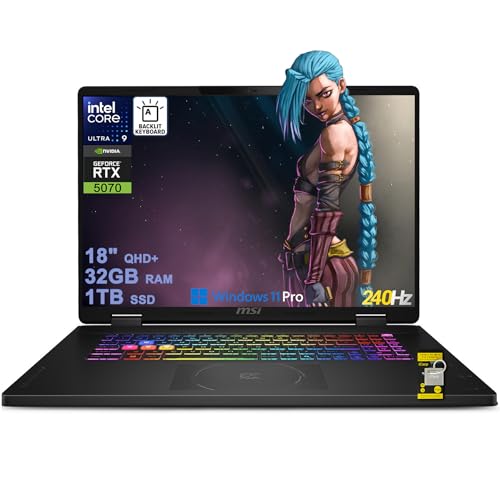
MSI WS66 13UX
The MSI WS66 13UX packs desktop-class performance into a 15-inch laptop, featuring Intel Core i9 and NVIDIA RTX 5000 Ada GPU. It's thin and light for a workstation, making it great for on-site work. The 4K display with 100% Adobe RGB ensures accurate color for presentations.
Reasons to buy
- Powerful specs in a portable chassis
- Excellent 4K display with color accuracy
- Good build quality and thermal design
Reasons to avoid
- Battery life is mediocre under load
- Upgradeability is limited (RAM soldered)
What to look for
CPU: Core Count Matters
For rendering and simulation, more cores directly reduce processing time. Look for at least 16 cores for heavy multitasking; 32+ for professional rendering. Intel Xeon and AMD Threadripper are top choices, but high-end Core i9 and Ryzen 9 also suffice.
GPU: VRAM is Key
Large models and high-resolution textures consume VRAM quickly. Aim for at least 16 GB for complex scenes; 48 GB or more for professional work. NVIDIA RTX A-series or Ada generation are preferred for stability and driver support.
RAM: Capacity Over Speed
Architecture software is memory-hungry. 64 GB is a good starting point, 128 GB recommended for large projects. ECC RAM is beneficial for data integrity but not mandatory for most workflows.
Storage: Speed for Large Files
NVMe SSDs are essential for quick file loading and saving. A 1 TB boot drive plus 2 TB+ for projects is ideal. Consider RAID configurations for redundancy if data loss is a concern.
Our verdict
For architecture and CAD, prioritize CPU core count, GPU VRAM, and RAM capacity over sheer clock speed. A balanced system with at least 16 cores, 16 GB VRAM, and 64 GB RAM will handle most workflows smoothly. Workstations with ISV certifications ensure driver stability for professional software.
FAQs
Gaming PCs can work for basic CAD, but workstations offer ISV certifications, better stability, and professional GPUs with more VRAM. For serious architecture work, a workstation is recommended to avoid crashes and ensure compatibility.
For small to medium projects, 32 GB is sufficient. For large models with many linked files, 64 GB or more is advisable. Revit can use up to 128 GB effectively.
Desktops offer more power, upgradeability, and better cooling. Laptops provide mobility for site visits and client meetings. If you need portability, choose a mobile workstation like the MSI WS66; otherwise, a desktop is better value.
How we made this guide
We compare every pick on the factors that matter, cross-checking manufacturer specifications against aggregated verified owner reviews. We rank independently and never take payment for placement. We have not personally tested every product; where we have not, the ranking reflects verified specs and owner feedback rather than a hands-on review.
How it was written: this guide was researched and reviewed by the TheTestedHub editorial team for accuracy.
Affiliate disclosure: TheTestedHub is reader-supported. When you buy through links on our site, we may earn a commission at no extra cost to you.
Related guides

Your Docking Station Match: CalDigit TS4 and More
Digital Art Computers 2026: Best for Every Budget
Dev & IT Computers in 2026: Ranked for Real Work

Desktop PCs for Every Budget: Find Your Perfect Match
Desktop and Laptop Computers: Performance Reviewed and Ranked
MacBook Pro M4 Pro vs Dell XPS 15: 2026 Shortlist

Buy the Best DIY Computer in 2026: Corsair One i300
