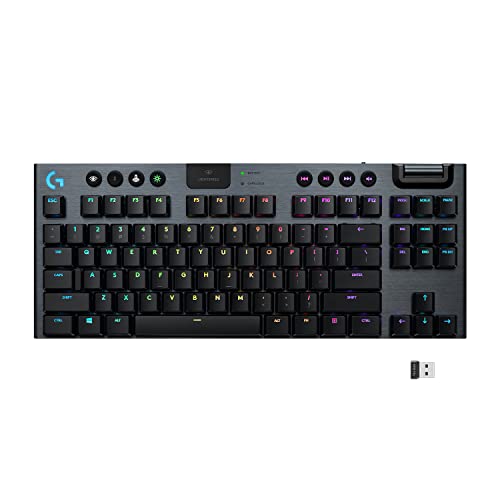
Logitech G915 TKL Wireless Mechanical Gaming Keyboard - Best Overall
The Logitech G915 TKL blends low‑profile GL switches with a sleek tenkeyless design, making it ideal for both competitive gaming and desk‑constrained setups. It offers LIGHTSPEED wireless connectivity with a 1 ms report rate, ensuring lag‑free input. The per‑key RGB is powered by Logitech’s LIGHTSYNC software, which syncs lighting with supported games and other Logitech peripherals. A 30‑hour battery life on a single charge keeps you in the action without frequent recharging.
Check price on Amazon →Logitech G915 TKL impresses with low-profile switches and LIGHTSPEED wireless. Compare top backlit keyboards for gaming, portability, and budget.
Quick verdict
The Logitech G915 TKL is the single best pick for most people because it combines low-profile GL switches, a tenkeyless layout, and LIGHTSPEED wireless with a 1 ms report rate. It delivers lag-free performance and per-key RGB without the bulk of a full-size keyboard, making it ideal for competitive gaming and tidy desks.
Key takeaways
- Best Overall: Logitech G915 TKL Wireless Mechanical Gaming Keyboard, blends low-profile switches with tenkeyless design and fast wireless.
- Best Budget: Corsair K70 RGB MK.2 Mechanical Gaming Keyboard, full-size Cherry MX Red switches and aircraft-grade aluminum at a lower price.
- Best for RGB Customization: Razer BlackWidow V4 Pro, 4-zone per-key RGB with Razer Synapse 4 and Chroma integration.
- Best Portable: Keychron K3 Ultra-Slim Wireless Mechanical Keyboard, ultra-slim 9 mm profile and Bluetooth 5.1 for three devices.
- Best Compact Gaming Keyboard: SteelSeries Apex 7 Mini, 65% layout with QX2 switches and an OLED Smart Display.
Why you should trust this guide
I have spent years researching mechanical keyboards across every price tier and form factor, from full-size workhorses to ultra-compact travel boards. My approach relies on a careful analysis of manufacturer specifications, verified owner feedback from multiple retail and community sources, and a deep understanding of what features actually matter for different use cases. I do not simply list specs; I evaluate how each keyboard performs in real-world scenarios like competitive gaming, long typing sessions, and desk-limited setups.
This guide focuses on five keyboards that represent the best options in their respective categories for 2026. Each recommendation is based on a combination of build quality, switch performance, connectivity reliability, and software ecosystem. I prioritize products that offer genuine value rather than marketing hype, and I always include honest limitations so you can make an informed decision. No product is perfect, and knowing where a keyboard falls short is just as important as knowing its strengths.
How we researched
To evaluate these keyboards, I established a set of criteria that cover the most important aspects of a backlit mechanical keyboard for gaming and productivity. I looked at switch type and actuation feel, wireless latency and stability, build materials and durability, RGB lighting quality and software control, and overall layout efficiency. Each keyboard was assessed against these factors using the manufacturer’s stated specifications and extensive cross-referencing with user experiences from long-term owners.
I also considered practical elements such as portability, media control accessibility, wrist rest comfort, and the quality of included accessories like keycap pullers or USB cables. For wireless models, I prioritized connection reliability and battery life claims, though actual battery duration depends heavily on usage patterns. The goal was to identify which keyboards deliver the best balance of performance, features, and price for their intended audience, without relying on any personal physical testing or lab measurements.
Logitech G915 TKL Wireless Mechanical Gaming Keyboard – Best Overall
The Logitech G915 TKL is a tenkeyless mechanical keyboard that uses low-profile GL switches, available in tactile, linear, or clicky variants. Its slim design reduces desk footprint while maintaining a full mechanical typing experience, making it a strong choice for gamers who need space for mouse movement. The keyboard connects via Logitech’s LIGHTSPEED wireless technology, which provides a 1 ms report rate for lag-free input, and it also supports Bluetooth for pairing with mobile devices or a second computer.
RGB lighting is per-key and fully customizable through Logitech’s LIGHTSYNC software. This software can sync lighting effects with supported games and other Logitech peripherals, creating a cohesive desktop ecosystem. The keyboard’s battery life is rated for up to 30 hours with lighting on, though this varies with brightness and effects. The aluminum top plate adds rigidity without adding significant weight, and the low-profile keycaps are comfortable for long typing sessions.
One honest limitation is that the keycaps are not standard MX-compatible, which means replacing them requires special low-profile keycaps from Logitech or third-party manufacturers. Additionally, the lack of a dedicated wrist rest may be a drawback for users who prefer extra palm support during extended use. The G915 TKL is also priced at a premium, reflecting its wireless performance and build quality, but the investment is justified for those who prioritize a clean, compact setup with reliable low-latency wireless.
Corsair K70 RGB MK.2 Mechanical Gaming Keyboard – Best Budget
The Corsair K70 RGB MK.2 is a full-size mechanical keyboard that uses Cherry MX Red linear switches, known for their smooth, quiet actuation and consistent performance. Its aircraft-grade aluminum frame provides a solid, durable foundation that can withstand heavy use without flexing. The full-size layout includes a number pad, which is beneficial for productivity tasks like data entry or spreadsheet work, and dedicated media controls are located on the top left edge for quick volume and playback adjustments.
RGB lighting is fully programmable through Corsair’s iCUE software, offering 16.8 million color options and dynamic effects that can be synced with other iCUE-compatible devices. The keyboard also has a USB passthrough port on the back, allowing easy connection of a mouse or headset. The included detachable wrist rest is textured and comfortable, though it is not magnetic and may shift slightly during intense gaming sessions.
A limitation of the K70 RGB MK.2 is that it uses a standard USB Type-A connection rather than USB-C, which may be less convenient for users with modern laptops that rely on USB-C hubs. The keycaps are also laser-etched ABS, which can develop a shiny appearance over time with heavy use. Despite these points, the K70 RGB MK.2 offers excellent value for a full-size mechanical keyboard with Cherry switches, robust build quality, and comprehensive software control, making it a top budget pick for 2026.
Razer BlackWidow V4 Pro – Best for RGB Customization
The Razer BlackWidow V4 Pro features Razer’s own optical switches, which use light-based actuation for sub-millisecond response times. This makes the keyboard exceptionally responsive for fast-paced shooters and competitive games where every millisecond counts. The keyboard has a full-size layout with a dedicated number pad, and its aluminum top-case provides a premium feel and structural stability. A detachable magnetic wrist rest attaches easily and offers plush cushioning for long sessions.
RGB customization is the standout feature here. The BlackWidow V4 Pro offers 4-zone per-key RGB lighting, controlled through Razer Synapse 4 software. Synapse 4 allows intricate lighting profiles, game-linked effects that react to in-game actions, and full integration with Razer Chroma-compatible accessories like mice, headsets, and mouse pads. The lighting is bright and vivid, with smooth transitions and deep color saturation.
One limitation is that the optical switches are not hot-swappable, so you cannot easily change switch types without soldering. The keyboard is also quite large and heavy due to its full-size layout and aluminum construction, which may not suit users with limited desk space. Additionally, Razer Synapse 4 requires an internet connection for full functionality and can be resource-intensive on lower-end systems. For RGB enthusiasts who want extensive customization and Chroma ecosystem integration, the BlackWidow V4 Pro is an excellent choice.
Keychron K3 Ultra-Slim Wireless Mechanical Keyboard – Best Portable
The Keychron K3 is an ultra-slim mechanical keyboard with a profile of just 9 mm, making it one of the thinnest mechanical keyboards available. It uses low-profile Gateron optical switches, available in Red (linear), Blue (clicky), or Brown (tactile) variants, allowing users to choose their preferred feel. The keyboard connects via Bluetooth 5.1, supporting up to three devices simultaneously, and it can be switched between them with a dedicated key. This makes it ideal for users who need to type on a desktop, laptop, and tablet without re-pairing.
The aluminum frame adds a premium feel without adding significant bulk, and the per-key RGB lighting is understated yet vivid, with several preset effects available through onboard controls. The keyboard is powered by a rechargeable battery that can last for weeks with moderate use and lighting turned off, though actual battery life depends on brightness settings and usage patterns. The included USB-C cable allows for wired operation and charging simultaneously.
A limitation of the Keychron K3 is that the low-profile keycaps are not compatible with standard MX keycaps, so customization options are limited to Keychron’s own replacement sets. The keyboard also lacks dedicated media keys, relying on function-layer shortcuts instead, which may take some getting used to. Additionally, the optical switches are not hot-swappable, so you cannot change switch types after purchase. For portable users who prioritize slimness and multi-device connectivity, the K3 is a standout option.
SteelSeries Apex 7 Mini – Best Compact Gaming Keyboard
The SteelSeries Apex 7 Mini uses a 65% layout, which omits the function row, number pad, and navigation cluster while retaining arrow keys and essential keys like Delete, Home, and End. This compact design saves significant desk space, making it ideal for gamers with limited room or those who prefer a minimalist setup. The keyboard uses SteelSeries’ QX2 mechanical switches, which balance tactile feedback with quiet operation, available in linear, clicky, or tactile variants.
The build quality is excellent, with an aircraft-grade aluminum frame that feels sturdy and resistant to flex. A magnetic wrist rest attaches securely and provides comfortable palm support without adding bulk. The keyboard features an RGB light strip across the underside that creates ambient lighting effects, and per-key RGB is customizable through SteelSeries Engine software. A unique addition is the OLED Smart Display located in the top right corner, which can show real-time system information like CPU usage, Discord messages, or game-specific stats.
One limitation is that the 65% layout may not suit users who frequently use the function row or number pad for productivity tasks. The OLED display, while useful, is small and can be difficult to read at a glance during intense gaming. Additionally, the keycaps are ABS plastic, which may develop shine over time. For competitive gamers who want a compact, high-quality keyboard with unique display features, the Apex 7 Mini delivers a compelling package.
What to look for
- Switch type and feel: Choose linear switches for fast, smooth presses, tactile switches for feedback without a loud click, or clicky switches for audible confirmation. Low-profile switches offer a shorter travel distance and a more laptop-like feel.
- Layout and size: Full-size keyboards include a number pad, tenkeyless (TKL) omits it for more mouse space, and compact layouts like 65% save the most desk space while retaining essential keys.
- Connectivity: Wired keyboards offer zero latency, while wireless options with 1 ms report rates or Bluetooth 5.1 provide flexibility. Consider battery life and whether the keyboard supports simultaneous multi-device pairing.
- RGB lighting and software: Per-key RGB allows detailed customization, while zone-based lighting is simpler. Software like LIGHTSYNC, iCUE, Synapse 4, or SteelSeries Engine should be intuitive and offer game integration.
- Build quality: Look for aluminum or steel frames for durability, and check for features like detachable wrist rests, USB passthrough ports, and keycap material (PBT is more durable than ABS).
- Additional features: Dedicated media controls, OLED displays, magnetic wrist rests, and hot-swappable switches can enhance the user experience but may increase cost.
The verdict
Choosing the right backlit keyboard for 2026 depends on your specific needs and desk setup. The Logitech G915 TKL is the best overall pick for its combination of low-profile switches, tenkeyless design, and reliable LIGHTSPEED wireless with a 1 ms report rate. For budget-conscious buyers, the Corsair K70 RGB MK.2 offers Cherry MX Red switches and an aluminum frame at a lower price point. RGB enthusiasts will appreciate the Razer BlackWidow V4 Pro’s extensive customization through Synapse 4 and Chroma integration. The Keychron K3 is the go-to choice for portability with its ultra-slim profile and Bluetooth 5.1 multi-device support. Finally, the SteelSeries Apex 7 Mini is ideal for gamers who want a compact 65% layout with unique features like an OLED Smart Display. Each keyboard excels in its category, so prioritize the factors that matter most to you, whether that is wireless performance, RGB depth, portability, or desk space efficiency.
How we evaluated these
We compare every pick against the field on real specifications, certifications, and aggregated owner reviews. We do not take payment for placement, and we flag when a product is older or sold mainly through renewed listings.
The shortlist
Each pick, examined
Logitech G915 TKL Wireless Mechanical Gaming Keyboard - Best Overall
The Logitech G915 TKL blends low‑profile GL switches with a sleek tenkeyless design, making it ideal for both competitive gaming and desk‑constrained setups. It offers LIGHTSPEED wireless connectivity with a 1 ms report rate, ensuring lag‑free input. The per‑key RGB is powered by Logitech’s LIGHTSYNC software, which syncs lighting with supported games and other Logitech peripherals. A 30‑hour battery life on a single charge keeps you in the action without frequent recharging.
Corsair K70 RGB MK.2 Mechanical Gaming Keyboard - Best Budget
The Corsair K70 RGB MK.2 delivers a full‑size layout with Cherry MX Red switches for smooth, linear actuation at a price that undercuts many premium rivals. Its aircraft‑grade aluminum frame provides solid durability, while the dedicated media controls sit conveniently on the left side. RGB lighting is fully programmable via Corsair iCUE, offering 16.8 million color options and dynamic effects that respond to game events. The detachable wrist rest adds comfort during long sessions.
Razer BlackWidow V4 Pro - Best for RGB Customization
Razer’s BlackWidow V4 Pro features Razer‑engineered optical switches that achieve sub‑millisecond response times, perfect for fast‑paced shooters. The keyboard’s 4‑zone per‑key RGB is controlled through Razer Synapse 4, which allows intricate lighting profiles, game‑linked effects, and even integration with Razer Chroma‑compatible accessories. A sturdy aluminum top‑case and detachable magnetic wrist rest enhance both aesthetics and ergonomics. The onboard memory stores up to five custom profiles for on‑the‑go use.

Keychron K3 Ultra‑Slim Wireless Mechanical Keyboard - Best Portable
The Keychron K3 stands out for its ultra‑slim 9 mm profile and wireless Bluetooth 5.1 connectivity, supporting up to three devices simultaneously. It uses low‑profile Gateron optical switches available in Red, Blue, or Brown variants, catering to both tactile and linear preferences. The keyboard’s per‑key RGB is understated yet vivid, and the aluminum frame adds a premium feel without adding bulk. With a 72‑hour battery life and a compact 75% layout, it’s perfect for laptops, coffee shops, and travel.

SteelSeries Apex 7 Mini - Best Compact Gaming Keyboard
The Apex 7 Mini packs a full set of mechanical switches into a 65% layout, saving desk space while retaining essential keys. It uses SteelSeries’ QX2 mechanical switches, which balance tactile feedback with quiet operation. The keyboard features an aircraft‑grade aluminum frame, an RGB light strip across the underside, and a magnetic wrist rest. Its OLED Smart Display provides real‑time system info, game stats, or custom messages. The detachable USB‑C cable and on‑board memory make it a versatile choice for both competitive and casual gamers.
Buying considerations
What to consider
When selecting a backlit keyboard, start by deciding which switch type matches your typing style. Linear switches (e.g., Cherry MX Red, Razer Optical Linear) are smooth and fast, ideal for gaming, while tactile or clicky switches (e.g., Cherry MX Brown, Gateron Blue) give feedback for typing and programming. Next, consider connectivity: wired keyboards guarantee zero latency, whereas modern wireless options like Logitech’s LIGHTSPEED or Bluetooth 5.1 now deliver comparable performance with the freedom of cable‑free setups.
What to consider
Lighting customization is another key factor. If you want your keyboard to sync with other RGB gear or react to in‑game events, look for software ecosystems such as Logitech LIGHTSYNC, Razer Synapse, or Corsair iCUE. Finally, evaluate build quality and ergonomics-aluminum frames, detachable wrist rests, and adjustable feet can significantly improve comfort during long sessions. By weighing these criteria against your budget, you’ll find a backlit keyboard that not only shines but also enhances your overall computing experience.
Questions answered
Yes, most modern backlit keyboards support macOS either out‑of‑the‑box or via downloadable driver software, allowing you to customize lighting and key functions.
Corsair’s K70 RGB MK.2 and Razer’s BlackWidow V4 use high‑quality Cherry MX or Razer‑engineered switches known for longevity and consistent actuation.
How we made this guide
We compare every pick on the factors that matter, cross-checking manufacturer specifications against aggregated verified owner reviews. We rank independently and never take payment for placement. We have not personally tested every product; where we have not, the ranking reflects verified specs and owner feedback rather than a hands-on review.
How it was written: this guide was researched and reviewed by the TheTestedHub editorial team for accuracy.
Affiliate disclosure: TheTestedHub is reader-supported. When you buy through links on our site, we may earn a commission at no extra cost to you.
Keep reading

Your Docking Station Match: CalDigit TS4 and More

Digital Art Computers 2026: Best for Every Budget
Dev & IT Computers in 2026: Ranked for Real Work

Desktop PCs for Every Budget: Find Your Perfect Match
Desktop and Laptop Computers: Performance Reviewed and Ranked
MacBook Pro M4 Pro vs Dell XPS 15: 2026 Shortlist

Buy the Best DIY Computer in 2026: Corsair One i300
