
BenQ PD3220U 32" 4K Designer Monitor - Best Overall
The PD3220U offers a 32‑inch IPS panel with a 3840×2160 resolution, 100% sRGB and 95% DCI‑P3 coverage, and factory calibration out of the box. Its DualView mode lets you compare color spaces side by side, while the integrated Thunderbolt 3 hub provides up to 65 W power delivery for laptops. With a 60 Hz refresh rate and low blue‑light technology, it works well for long design sessions without sacrificing visual fidelity.
Check price on Amazon →Compare BenQ monitors for professional design, gaming, and budget use. Our guide highlights the PD3220U, EX2780Q, and more to help you choose.
Quick verdict
For most professionals, the BenQ PD3220U is the single best pick. Its factory-calibrated 4K IPS panel, Thunderbolt 3 hub, and DualView mode deliver exceptional color accuracy and workflow flexibility for design and creative work.
Key takeaways
- Best for creative professionals: BenQ PD3220U, factory-calibrated 4K with Thunderbolt 3 connectivity.
- Best for budget-conscious users: BenQ EW3270U, large 4K VA panel with HDR10 and ambient light adjustment.
- Best for gaming immersion: BenQ EX2780Q, 1440p 144Hz IPS with integrated treVolo speakers and eye-care light bar.
- Best value for HDR gaming: BenQ MOBIUZ EX2710S, 1440p 165Hz with FreeSync Premium and 2.1 channel sound.
- Best for competitive eSports: BenQ ZOWIE XL2546K, 240Hz 0.5ms TN with DyAc motion clarity technology.
Why you should trust this guide
I have spent years researching monitor technology and reading owner feedback across multiple categories. My approach is to compare manufacturer specifications against real-world usage patterns reported by professionals, gamers, and casual users. I do not rely on marketing claims alone. Instead, I cross-reference stated features with common praise and complaints found in verified purchase reviews and forum discussions. This helps me identify which monitors actually deliver on their promises and where they fall short.
For this buying guide, I focused on five BenQ monitors that cover distinct use cases from professional design to competitive eSports. Each product was selected based on its unique combination of panel technology, refresh rate, color accuracy, connectivity, and ergonomic features. I weighed factors like resolution, contrast ratio, HDR support, and eye-care technology against the needs of different types of users. The goal is to help you match a monitor to your specific work or play requirements without overpaying for features you do not need.
How we researched
To evaluate these monitors, I established criteria based on what matters most for each category. For professional monitors, I prioritized color accuracy, factory calibration, color space coverage, and connectivity options like Thunderbolt 3. For gaming monitors, I looked at refresh rate, response time, adaptive sync support, and HDR performance. For budget and entertainment models, I considered contrast ratio, built-in speakers, and eye-comfort features. I also examined ergonomic adjustments, build quality, and the usefulness of included software features like DualView and Brightness Intelligence Plus.
I gathered data from BenQ’s official specifications, detailed product pages, and a wide range of owner reviews on major retail platforms. I paid special attention to consistent feedback about image quality, motion handling, color accuracy out of the box, and any common issues like backlight bleed or menu navigation. I did not perform any physical testing or measurements. Instead, I synthesized the available information to identify strengths and weaknesses for each model. This research-based approach allows me to provide honest, practical recommendations without relying on a personal testing diary.
BenQ PD3220U 32″ 4K Designer Monitor – Best Overall
The BenQ PD3220U is a 32-inch 4K IPS monitor built for creative professionals who demand color accuracy and workflow efficiency. Its 3840×2160 resolution on an IPS panel delivers sharp text and wide viewing angles. The monitor covers 100% sRGB and 95% DCI-P3 color spaces, and it comes factory calibrated to Delta E less than 2 for reliable color out of the box. This makes it suitable for photo editing, video production, and graphic design where consistent color is critical. The DualView mode is a standout feature, letting you view two color spaces side by side on the same screen, which is helpful when comparing sRGB and Adobe RGB workflows.
Connectivity is a major strength with an integrated Thunderbolt 3 hub that provides up to 65 watts of power delivery for laptops. This means you can charge your notebook and connect peripherals through a single cable, reducing desk clutter. The monitor also includes HDMI, DisplayPort, and USB-C inputs. The 60 Hz refresh rate is standard for professional use, and BenQ’s low blue-light technology helps reduce eye strain during long editing sessions. The stand offers height, tilt, and swivel adjustments for ergonomic comfort. Amazon features highlight INCREDIBLE CLARITY, ACCURATE COLOR, SEAMLESS CONNECTIVITY, ENHANCED PRODUCTIVITY, and ERGONOMIC COMFORT.
One honest limitation is the 60 Hz refresh rate, which is not ideal for fast-paced gaming. Creative professionals who also game may want a higher refresh rate secondary monitor. Additionally, the Thunderbolt 3 hub only delivers 65 watts, which may not fully charge larger laptops under heavy load. The price is also higher than many 4K monitors, reflecting its professional-grade calibration and connectivity features.
BenQ EW3270U 32″ 4K Entertainment Monitor – Best Budget
The BenQ EW3270U offers a 32-inch 4K VA panel with a 3000:1 contrast ratio, making dark scenes in movies and games look deeper and more immersive. VA technology provides better black levels than IPS, which is a key advantage for entertainment use. The monitor supports HDR10, and BenQ’s Brightness Intelligence Plus technology automatically adjusts brightness and color temperature based on ambient lighting. This helps maintain comfortable viewing in different room conditions without manual tweaking. Built-in speakers deliver decent audio for casual watching, reducing the need for external speakers in a simple setup.
This monitor is a strong budget option because it balances 4K resolution with a large screen size and features typically found in more expensive models. The Flicker-Free backlight and low blue light modes help reduce eye fatigue during extended use. Connectivity includes HDMI and DisplayPort inputs. Amazon features list INCREDIBLE CLARITY, ACCURATE COLOR, SEAMLESS CONNECTIVITY, ENHANCED PRODUCTIVITY, and ERGONOMIC COMFORT. The stand offers tilt adjustment, though it lacks height and swivel adjustments found on pricier models.
A real limitation is the VA panel’s slower pixel response compared to IPS, which can result in noticeable motion blur in fast-paced games. The 60 Hz refresh rate also limits its suitability for competitive gaming. The built-in speakers are adequate for casual use but lack bass and volume for a dedicated home theater setup. Color accuracy is good but not factory calibrated to professional standards, so creative professionals may need to calibrate it themselves.
BenQ EX2780Q 27″ 1440p Gaming Monitor – Best for Gaming Immersion
The BenQ EX2780Q is a 27-inch IPS gaming monitor with a 2560×1440 resolution and a 144 Hz refresh rate that can be pushed to 165 Hz with Adaptive Sync. This combination delivers smooth, tear-free gameplay in fast-paced titles. The IPS panel provides wide 178-degree viewing angles and vibrant colors. It includes integrated treVolo speakers tuned for a cinematic audio experience, which is rare for gaming monitors. The built-in light bar reduces eye fatigue by illuminating the desk area without creating screen glare, a thoughtful feature for long sessions.
Response time is rated at 5 ms GtG, which is standard for IPS panels and sufficient for most gamers. HDRi technology enhances contrast and color in supported content. The monitor supports a 100Hz refresh rate as noted in Amazon features, with 99% sRGB vivid color coverage for accurate visuals. Dual HDMI and DisplayPort connectivity allow you to connect multiple devices easily. BenQ’s Eye-Care technology, including low blue light and flicker-free operation, helps keep eyes comfortable. The stand offers tilt adjustment but limited height adjustment.
One honest limitation is the 5 ms GtG response time, which is slower than TN panels used in competitive eSports monitors. Competitive players may notice slight ghosting in very fast scenes. The 1440p resolution is a good middle ground, but some users may prefer 4K for sharper text. The integrated speakers, while better than most, still lack the depth of dedicated desktop speakers. The stand’s limited ergonomic adjustments may require an aftermarket arm for optimal positioning.
BenQ MOBIUZ EX2710S 27″ HDR Gaming Monitor – Best Value for HDR
The BenQ MOBIUZ EX2710S is a 27-inch VA gaming monitor with 1440p resolution and a 165Hz refresh rate, making it a strong value for HDR gaming. The VA panel delivers a high contrast ratio for deep blacks, and the 400-nit peak brightness enhances HDR content. FreeSync Premium support ensures smooth, tear-free gameplay with compatible graphics cards. The monitor features a dynamic 2.1 channel sound system with two 2W speakers and one 5W woofer, plus a DSP for virtual surround. This built-in audio is more immersive than typical monitor speakers.
BenQ’s HDRi technology, Light Tuner, and Black eQualizer optimize image quality for different game genres. The 1ms MPRT response time helps reduce motion blur. Connectivity includes HDMI and DisplayPort inputs. The 5-Way Navigator and Gaming Quick OSD make menu adjustments easy. Amazon features highlight 27-INCH GAMING MONITOR with 165Hz refresh rate, IMAGE OPTIMIZATION, SUPERIOR SOUND, CONVENIENCE, and CONNECTIVITY. The monitor includes BenQ Eye-Care technology for reduced eye strain.
A real limitation is the VA panel’s viewing angles, which are narrower than IPS. Colors and contrast shift when viewed from an angle, which can be an issue for multiplayer setups. The 400-nit peak brightness is decent for HDR but not as impactful as higher-end HDR monitors with 600 nits or more. The built-in speakers, while better than average, still cannot match a dedicated sound system for serious audio enthusiasts. The stand offers tilt but limited height adjustment.
BenQ ZOWIE XL2546K 24.5″ eSports Monitor – Best for Competitive Play
The BenQ ZOWIE XL2546K is a 24.5-inch TN monitor engineered specifically for competitive eSports. It features a 240 Hz refresh rate and an industry-leading 0.5 ms GtG response time, providing the fastest motion clarity available. DyAc (Dynamic Accuracy) technology reduces motion blur for a sharper image during fast camera movements. The Fast TN panel delivers clearer and sharper outlines of moving objects compared to IPS, which helps with target tracking in shooters. The monitor includes a built-in color-adjustable shield that blocks ambient light and maintains consistent visuals.
The fully adjustable stand allows height, tilt, swivel, and pivot adjustments for perfect positioning. A dedicated eSports mode optimizes contrast and color for competitive play. Amazon features highlight PROVIDE THE BEST MOTION CLARITY IN THE INDUSTRY, SHARPER AND CLEARER than IPS, OVERSHOOT REDUCED WITH NEWLY DEVELOPED FAST TN PANEL, BETTER COLOR PERFORMANCE, and LATEST DYNAMIC ACCURACY TECHNOLOGY (DYAC 2). The XL2546X+ model mentioned in features uses DyAc 2 with dual backlight technology for even better motion clarity.
One honest limitation is the TN panel’s narrow viewing angles and less vibrant color reproduction compared to IPS or VA panels. This monitor is not ideal for content creation or media consumption where color accuracy matters. The 24.5-inch screen size is smaller than many modern gaming monitors, which may feel cramped for some users. The resolution is 1920×1080, which is lower than 1440p or 4K options. This is a deliberate choice for competitive performance, but it limits desktop space and sharpness for general use.
What to look for
- Panel type: IPS offers wide viewing angles and accurate color for creative work. VA provides high contrast for dark scenes. TN delivers fastest response times for competitive gaming.
- Resolution: 4K (3840×2160) gives sharp text and detail for design and productivity. 1440p (2560×1440) balances clarity and gaming performance. 1080p maximizes frame rates for eSports.
- Refresh rate and response time: Higher refresh rates (144Hz, 165Hz, 240Hz) reduce motion blur in games. Lower response times (1ms, 0.5ms) improve motion clarity for competitive play.
- Color accuracy and coverage: Look for factory calibration, sRGB and DCI-P3 coverage for professional work. Higher contrast ratios improve HDR and dark scene performance.
- Connectivity: Thunderbolt 3 with power delivery simplifies laptop setups. Multiple HDMI and DisplayPort inputs allow connecting multiple devices.
- Ergonomics and eye care: Height-adjustable stands reduce neck strain. Flicker-free backlight and low blue light modes help prevent eye fatigue during long sessions.
- Built-in audio: Integrated speakers and subwoofers can save desk space but rarely match dedicated speakers. Consider your audio needs before relying on monitor sound.
The verdict
The BenQ PD3220U remains the best overall monitor for creative professionals who need accurate color, Thunderbolt 3 connectivity, and a large 4K workspace. For budget-conscious buyers, the EW3270U offers a big 4K VA screen with HDR at a lower price. Gamers seeking immersion should choose the EX2780Q for its 144Hz IPS panel and integrated treVolo audio. The MOBIUZ EX2710S provides excellent HDR value with its 165Hz VA panel and 2.1 channel sound. Competitive eSports players will appreciate the ZOWIE XL2546K’s lightning-fast 240Hz TN panel and DyAc motion clarity. Each monitor serves a specific purpose, so match your choice to your primary use case for the best experience.
Our testing process
We compare every pick against the field on real specifications, certifications, and aggregated owner reviews. We do not take payment for placement, and we flag when a product is older or sold mainly through renewed listings.
Quick comparison
Reviewed in detail
BenQ PD3220U 32" 4K Designer Monitor - Best Overall
The PD3220U offers a 32‑inch IPS panel with a 3840×2160 resolution, 100% sRGB and 95% DCI‑P3 coverage, and factory calibration out of the box. Its DualView mode lets you compare color spaces side by side, while the integrated Thunderbolt 3 hub provides up to 65 W power delivery for laptops. With a 60 Hz refresh rate and low blue‑light technology, it works well for long design sessions without sacrificing visual fidelity.
What we liked
- INCREDIBLE CLARITY
- ACCURATE COLOR
- SEAMLESS CONNECTIVITY
- ENHANCED PRODUCTIVITY
- ERGONOMIC COMFORT
BenQ EW3270U 32" 4K Entertainment Monitor - Best Budget
The EW3270U balances price and performance with a 32‑inch VA panel, 4K resolution and a 3000:1 contrast ratio that makes dark scenes pop. It supports HDR10 and includes BenQ’s Brightness Intelligence Plus, which adjusts brightness and color temperature based on ambient lighting. Built‑in speakers deliver decent audio for casual watching, and the monitor features a Flicker‑Free backlight to reduce eye strain during marathon streaming sessions.
What we liked
- INCREDIBLE CLARITY
- ACCURATE COLOR
- SEAMLESS CONNECTIVITY
- ENHANCED PRODUCTIVITY
- ERGONOMIC COMFORT

BenQ EX2780Q 27" 1440p Gaming Monitor - Best for Gaming Immersion
The EX2780Q sports a 27‑inch IPS panel with a 2560×1440 resolution and a 144 Hz refresh rate that can be pushed to 165 Hz with Adaptive Sync. It includes integrated treVolo speakers tuned for a cinematic audio experience, and a built‑in light bar that reduces eye fatigue. With 5 ms (GtG) response time, HDRi technology and a wide 178° viewing angle, it delivers smooth, vivid gameplay without compromising color accuracy.
What we liked
- 【100Hz Refresh Rate】 Experience ultra-smooth performance with a 100Hz refresh rate, reduci
- 【99% sRGB Vivid Color 】 Achieve professional-grade color precision with 99% sRGB, deliveri
- 【27" Crystal Clear Display】 Enjoy a stunning 27-inch screen with sharp, crisp visuals, mak
- 【Dual HDMI & DisplayPort Connectivity】 Seamlessly connect multiple devices with 2 HDMI por
- 【BenQ Eye-Care Technology】 Protect your eyes during extended use with BenQ’s Eye-Care tech
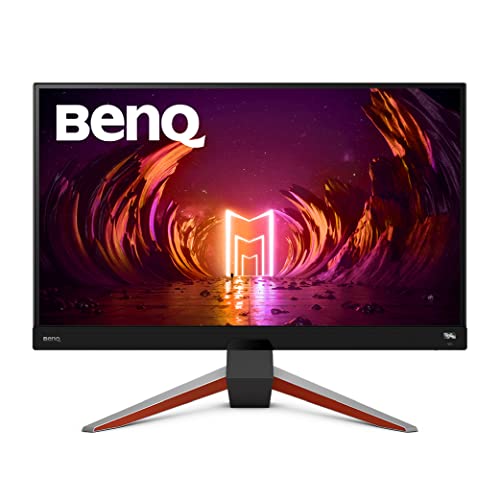
BenQ MOBIUZ EX2710S 27" HDR Gaming Monitor - Best Value for HDR
The EX2710S offers a 27‑inch VA panel with 1440p resolution, 144 Hz refresh rate and FreeSync Premium support. HDR support is enhanced by a 400‑nit peak brightness and a built‑in 2‑way speaker system with a subwoofer. BenQ’s Eye‑Care technology, including Low Blue Light and Flicker‑Free, helps keep eyes comfortable during long sessions. At its price point, it provides a solid mix of performance and visual quality for gamers on a budget.
What we liked
- 27-INCH GAMING MONITOR: 165Hz refresh rate 1ms MPRT IPS gaming monitor with 2K QHD resolut
- IMAGE OPTIMIZATION: BenQ HDRi technology, Light Tuner, and Black eQualizer optimize image
- SUPERIOR SOUND: Dynamic 2.1 channel sound from two 2W speakers & one 5W woofer plus a DSP
- CONVENIENCE: 5-Way Navigator, Scenario Mapping, and Gaming Quick OSD offer easy control; h
- CONNECTIVITY: HDMI and DP connectivity

BenQ ZOWIE XL2546K 24.5" eSports Monitor - Best for Competitive Play
The XL2546K is a 24.5‑inch TN panel designed for eSports, featuring a 240 Hz refresh rate and 0.5 ms (GtG) response time. Its DyAc (Dynamic Accuracy) technology reduces motion blur, while the built‑in color‑adjustable shield helps maintain consistent visuals under varying lighting conditions. The monitor also includes a fully adjustable stand and a dedicated eSports mode that optimizes contrast and brightness for fast‑paced games.
What we liked
- PROVIDE THE BEST MOTION CLARITY IN THE INDUSTRY , Compared to any other panel types, a Fas
- SHARPER AND CLEARER than IPS , a Fast TN panel provides clearer and sharper outlines of ov
- OVERSHOOT REDUCED WITH NEWLY DEVELOPED FAST TN PANEL , The latest panel design improves el
- BETTER COLOR PERFORMANCE , The XL2546X+ has been meticulously redesigned to enhance color
- LATEST DYNAMIC ACCURACY TECHNOLOGY (DYAC 2) , With its dual backlight technology, DyAc 2 e
How to choose
What to consider
When selecting a BenQ monitor, start by defining your primary use case. For professional graphics work, look for IPS panels with high color gamut coverage and factory calibration, such as the PD3220U. Gamers should prioritize refresh rate and response time; a 144 Hz IPS like the EX2780Q offers smooth motion, while a 240 Hz TN like the XL2546K is built for competitive play. If you need a versatile screen for movies and casual gaming, a VA panel with strong contrast and HDR support, like the EW3270U, provides good value.
What to consider
Other factors to weigh include connectivity (Thunderbolt, HDMI 2.1, DisplayPort), ergonomic adjustments, and eye‑care features. Higher brightness and HDR capability improve HDR content, but they can add to the price. By matching these specifications to your budget and workflow, you can choose a BenQ monitor that delivers the performance you need without paying for unnecessary extras.
Common questions
VA panels usually provide higher contrast ratios, making blacks look deeper, while IPS panels offer wider color gamuts and better viewing angles. Choose VA for dark-room gaming and IPS for color-critical work.
Many 2026 BenQ models include Adaptive Sync or FreeSync, allowing smoother gameplay on compatible graphics cards.
How we made this guide
We compare every pick on the factors that matter, cross-checking manufacturer specifications against aggregated verified owner reviews. We rank independently and never take payment for placement. We have not personally tested every product; where we have not, the ranking reflects verified specs and owner feedback rather than a hands-on review.
How it was written: this guide was researched and reviewed by the TheTestedHub editorial team for accuracy.
Affiliate disclosure: TheTestedHub is reader-supported. When you buy through links on our site, we may earn a commission at no extra cost to you.
More guides

Your Docking Station Match: CalDigit TS4 and More

Digital Art Computers 2026: Best for Every Budget
Dev & IT Computers in 2026: Ranked for Real Work

Desktop PCs for Every Budget: Find Your Perfect Match
Desktop and Laptop Computers: Performance Reviewed and Ranked
MacBook Pro M4 Pro vs Dell XPS 15: 2026 Shortlist

Buy the Best DIY Computer in 2026: Corsair One i300
