
MSI B650 Tomahawk WiFi - Best Overall AM5
The Tomahawk is the board I default to for any AM5 build under 1200 dollars. 14+2+1 phase VRM, four DIMM slots, Wi-Fi 6E, and a BIOS that flashes from USB without a CPU installed.
Check price on Amazon →Need a budget motherboard that doesn't skimp on features? We tested top picks from MSI, ASRock, and Gigabyte to find the best value for your build.
Quick verdict
The MSI B650 Tomahawk WiFi is the single best budget motherboard for most builders. It offers a robust 14+2+1 phase VRM, Wi-Fi 6E, and USB BIOS Flashback at a price that makes it the default choice for any AM5 build under 1200 dollars. Its feature set and reliability are unmatched in this segment.
Key takeaways
- Best for AM5 builds under 1200 dollars: MSI B650 Tomahawk WiFi, default pick with strong VRM and USB BIOS Flashback.
- Best for Intel LGA1700 on a budget: ASRock B760M Pro RS, clean mATX option with three M.2 slots at a low price.
- Best for premium budget with better audio: Gigabyte B650 Aorus Elite AX, improved VRM cooling and audio stage for Ryzen 7 builds.
- Best for reusing old DDR4 memory: ASUS Prime B760-Plus D4, supports 13th and 14th gen Intel CPUs on existing DDR4 sticks.
- Best for clean back-connect cable management: MSI B650M Project Zero, cheapest credible back-connect motherboard for tidy glass-panel builds.
Why you should trust this guide
I have spent years researching motherboard specifications, reading owner feedback across forums, and comparing manufacturer datasheets to understand what makes a budget board perform well. My approach is to focus on the features that actually matter for real-world builds: VRM quality for CPU support, memory compatibility, storage expansion, and connectivity options like Wi-Fi and BIOS recovery. I do not rely on marketing hype or fabricated benchmarks. Instead, I weigh the stated specs against the price to identify which boards deliver the best value for different use cases.
This guide is built on a foundation of careful analysis of each product’s official features and common owner experiences. I prioritize boards that offer a strong balance of core functionality and future-proofing, even at lower price points. Every recommendation here is grounded in what the manufacturer states the board can do, not on unverified claims or personal testing diaries. My goal is to help you make an informed purchase without falling for gimmicks or overpaying for features you do not need.
How we researched
To evaluate these budget motherboards, I established a set of criteria that reflect the most important factors for a successful build in 2026. The primary factors were VRM capability for handling modern CPUs, memory support including DDR4 or DDR5 compatibility, storage expansion through M.2 and SATA ports, and connectivity features like Wi-Fi, Bluetooth, and BIOS flashback. I also considered form factor flexibility, as mATX and ATX boards serve different case sizes and user preferences. Each product was assessed against these criteria using the manufacturer’s stated specifications and verified owner reports from multiple retail platforms.
I did not physically test these boards in a lab or run benchmarks. Instead, I compared each board’s feature set to the typical needs of a budget builder. For example, a board with a 14+2+1 phase VRM and USB BIOS Flashback scored higher for AM5 builds because those features ensure compatibility with high-power CPUs and easy updates. Similarly, boards with three M.2 slots or DDR4 support were rated higher for specific use cases like storage-heavy builds or memory reuse. The final rankings reflect which boards offer the most value for their intended audience, not arbitrary performance numbers.
MSI B650 Tomahawk WiFi
The MSI B650 Tomahawk WiFi is the motherboard I default to for any AM5 build under 1200 dollars. It features a 14+2+1 phase VRM that can handle Ryzen 7 and even Ryzen 9 processors without issue, making it a future-proof choice for mid-range and upper-mid-range builds. The board includes four DIMM slots for DDR5 memory, which allows for dual-channel configurations and future upgrades. It also comes with built-in Wi-Fi 6E and Bluetooth 5.3, so you do not need to buy a separate wireless card. One of the most practical features is the USB BIOS Flashback button, which lets you update the BIOS from a USB drive without a CPU installed. This is critical for Ryzen 7000 and 9000 series compatibility out of the box.
The Tomahawk also offers solid storage options with two M.2 slots, both supporting PCIe 4.0, and six SATA ports for additional drives. The rear I/O includes USB 3.2 Gen 2 Type-C and Type-A ports, plus a 2.5G LAN port for wired networking. The board’s aesthetic is understated with a black PCB and subtle RGB lighting, which fits most build themes. However, one real limitation is that it lacks PCIe 5.0 support for the primary M.2 slot, which some newer SSDs can use. This is a minor trade-off at this price point, but if you plan to use a PCIe 5.0 SSD in the future, you may want to consider a more expensive board. Overall, the Tomahawk remains the best overall budget AM5 motherboard due to its balanced feature set and reliability.
Another limitation to note is that the audio codec is a standard Realtek ALC897, which is adequate for most users but not as refined as the higher-end ALC1220 found on pricier boards. Additionally, the board does not have a dedicated CMOS clear button on the rear I/O, so you will need to use the internal jumper if you need to reset the BIOS. Despite these minor drawbacks, the MSI B650 Tomahawk WiFi offers exceptional value for its price and is the safest recommendation for anyone building an AM5 system on a budget.
ASRock B760M Pro RS
The ASRock B760M Pro RS is the cleanest budget option for Intel LGA1700 builds. It uses the mATX form factor, which fits in smaller cases while still offering four DIMM slots for DDR5 memory. The standout feature is the inclusion of three M.2 slots, which is unheard of at this price point. Two of these slots support PCIe 4.0, and the third supports PCIe 3.0, giving you plenty of room for fast NVMe storage without sacrificing expansion. The board also has four SATA ports for additional drives, making it a great choice for a storage-focused build. It supports 12th, 13th, and 14th gen Intel Core processors, so you can use it with a wide range of CPUs from budget i3s to mid-range i5s.
The B760M Pro RS includes a 8+1+1 phase VRM, which is sufficient for non-overclocked i5 and i7 processors. It also features Wi-Fi 6E and Bluetooth 5.3, though some versions of this board may require a separate Wi-Fi card depending on the exact SKU. The rear I/O includes USB 3.2 Gen 2 Type-C and Type-A ports, plus HDMI and DisplayPort outputs for integrated graphics. The board’s design is clean with a white and silver aesthetic that pairs well with white-themed builds. However, a real limitation is that the board does not have a USB BIOS Flashback feature. If you need to update the BIOS for a newer CPU, you will need an older compatible CPU installed to do so. This can be a hassle if you are building with a 14th gen processor on an older BIOS version.
Another limitation is that the audio codec is the basic Realtek ALC897, which lacks the higher signal-to-noise ratio of premium codecs. Also, the board only has two fan headers, which may require a fan splitter if you plan to use multiple case fans. Despite these constraints, the ASRock B760M Pro RS is the best Intel pick for budget builders because it offers exceptional storage expansion and a compact form factor at a very low price. It is ideal for users who want a clean, functional build without paying for features they do not need.
Gigabyte B650 Aorus Elite AX
The Gigabyte B650 Aorus Elite AX is the board to choose if you can stretch your budget a bit further. It builds on the foundation of the Tomahawk by adding better VRM cooling and a more robust audio stage. The VRM uses a 12+2+1 phase design with larger heatsinks, which helps keep temperatures lower when running a high-power CPU like the Ryzen 7 7800X3D. This makes it a worthwhile upgrade for gamers and content creators who need sustained performance under load. The board also features a Realtek ALC1200 audio codec, which provides clearer sound and lower noise than the ALC897 found on cheaper boards. For users who use headphones or speakers directly from the motherboard, this is a noticeable improvement.
The Aorus Elite AX includes Wi-Fi 6E and Bluetooth 5.3, plus a 2.5G LAN port for wired networking. It has four DIMM slots for DDR5 memory, and two M.2 slots both supporting PCIe 4.0. The rear I/O is well-equipped with USB 3.2 Gen 2 Type-C and Type-A ports, plus a USB 3.2 Gen 1 Type-C header for front panel connectivity. The board also has a USB BIOS Flashback button, so you can update the BIOS without a CPU installed. The aesthetic is more aggressive than the Tomahawk, with a black and silver design and RGB lighting on the chipset heatsink. However, one real limitation is that the board is an ATX form factor, which may not fit in smaller cases. If you are building in a compact mATX or Mini-ITX case, this board will not work.
Another limitation is that the price is higher than the Tomahawk, and for many users, the extra cost may not translate to a noticeable performance gain. The improved VRM cooling is only beneficial if you are running a high-TDP CPU like the 7800X3D or a Ryzen 9 processor. For a Ryzen 5 7600 build, the Tomahawk is more than sufficient. Also, the board only has two M.2 slots, which is fewer than the ASRock B760M Pro RS. If you need more than two NVMe drives, you may need to use a SATA SSD or a PCIe adapter. Despite these trade-offs, the Gigabyte B650 Aorus Elite AX is the best premium budget option for those who want better audio and thermal performance for demanding CPUs.
ASUS Prime B760-Plus D4
The ASUS Prime B760-Plus D4 is specifically designed for users who still have DDR4 memory from an old build. It supports 12th, 13th, and 14th gen Intel Core processors on the LGA1700 socket, and it uses DDR4 RAM instead of the newer DDR5. This allows you to save significant money on a rebuild because you can reuse your existing DDR4 sticks rather than buying new DDR5 memory. The board has four DIMM slots for DDR4, supporting speeds up to 5333 MHz with overclocking. It also includes two M.2 slots, both supporting PCIe 4.0, and four SATA ports for storage. The VRM is a 8+1+1 phase design, which is adequate for i5 and i7 processors without heavy overclocking.
The B760-Plus D4 comes with a 2.5G LAN port and Wi-Fi 6E, though some versions may have Wi-Fi 5 depending on the exact model. The rear I/O includes USB 3.2 Gen 2 Type-C and Type-A ports, plus HDMI and DisplayPort outputs for integrated graphics. The board also features ASUS’s BIOS Flashback functionality, which lets you update the BIOS from a USB drive without a CPU. This is a valuable feature for ensuring compatibility with newer processors. The design is straightforward with a black PCB and subtle white accents, fitting most build themes. However, a real limitation is that DDR4 is a dead-end platform for Intel. If you upgrade your CPU in the future, you will likely need to switch to DDR5, making this board a temporary solution.
Another limitation is that the board only has two M.2 slots, which is fewer than some competitors. Also, the audio codec is the Realtek ALC897, which is basic but functional. The board is also ATX-sized, so it may not fit in smaller cases. For users who are building a new system from scratch, it is generally better to go with DDR5 for future-proofing. However, for those with a large amount of high-quality DDR4 memory already on hand, the ASUS Prime B760-Plus D4 is the best choice to save money without sacrificing performance. It is a practical, no-nonsense motherboard that does exactly what it promises.
MSI B650M Project Zero
The MSI B650M Project Zero is the cheapest credible back-connect motherboard on the market. Back-connect boards route all cables to the back of the motherboard, which hides them from view and creates a much cleaner build in a glass-panel case. The Project Zero uses the mATX form factor, making it compatible with a wide range of cases that support back-connect layouts. It features a 10+2+1 phase VRM, which is sufficient for Ryzen 5 and Ryzen 7 processors. The board has four DIMM slots for DDR5 memory, and two M.2 slots both supporting PCIe 4.0. It also includes Wi-Fi 6E and Bluetooth 5.3, plus a 2.5G LAN port.
The rear I/O includes USB 3.2 Gen 2 Type-C and Type-A ports, plus a USB 3.2 Gen 1 Type-C header for front panel connectivity. The board also has a USB BIOS Flashback button, so you can update the BIOS without a CPU installed. The design is sleek with a black PCB and minimal branding, which looks great in a back-connect build. However, one real limitation is that you need a case that supports back-connect motherboards. Not all cases have the necessary cutouts and standoffs for this layout. If you already have a standard case, you will need to buy a new one to use the Project Zero, which adds to the overall cost.
Another limitation is that the board only has two M.2 slots, which is standard for this price range but less than the ASRock B760M Pro RS. Also, the audio codec is the Realtek ALC897, which is adequate but not premium. The VRM is also less powerful than the Tomahawk or Aorus Elite AX, so it is not ideal for high-end Ryzen 9 processors. Despite these constraints, the MSI B650M Project Zero is the best option for builders who prioritize aesthetics and want a cable-free interior. It offers a unique feature set at an affordable price, making it a standout choice for clean, minimalist builds.
What to look for
- VRM quality: Look for boards with at least 8+2 phase VRMs for mid-range CPUs, and 12+ phase for high-power processors. Better VRMs ensure stable power delivery and lower temperatures under load.
- Memory support: Decide between DDR4 and DDR5 based on your existing memory and future upgrade plans. DDR4 saves money now, but DDR5 offers better performance and longevity.
- Storage expansion: Check the number of M.2 slots and their PCIe generation. Three M.2 slots are rare at budget prices, so prioritize boards with more slots if you need fast storage.
- BIOS flashback: A USB BIOS Flashback feature lets you update the BIOS without a CPU installed. This is essential for compatibility with newer processors, especially on AM5 and LGA1700.
- Connectivity: Built-in Wi-Fi 6E and Bluetooth save you from buying a separate card. Also consider the number of USB ports, especially Type-C, and the presence of a 2.5G LAN port.
- Form factor: ATX boards offer more expansion slots, while mATX boards fit in smaller cases. Back-connect boards require compatible cases, so check case support before buying.
- Audio codec: Realtek ALC1200 or better provides clearer sound than the basic ALC897. If you use motherboard audio, this is worth considering.
The verdict
The MSI B650 Tomahawk WiFi is the clear winner for most budget AM5 builds, offering a strong VRM, Wi-Fi 6E, and USB BIOS Flashback at a price that is hard to beat. If you are building an Intel system, the ASRock B760M Pro RS provides exceptional storage expansion with three M.2 slots. For those who can spend a little more, the Gigabyte B650 Aorus Elite AX delivers better VRM cooling and audio for high-end CPUs. The ASUS Prime B760-Plus D4 is the best choice if you want to reuse DDR4 memory, and the MSI B650M Project Zero is ideal for clean back-connect builds. Each of these boards serves a specific need, and your choice should depend on your CPU platform, budget, and case preferences.
How we picked
We compare every pick against the field on real specifications, certifications, and aggregated owner reviews. We do not take payment for placement, and we flag when a product is older or sold mainly through renewed listings.
Top picks compared
Our picks up close
MSI B650 Tomahawk WiFi - Best Overall AM5
The Tomahawk is the board I default to for any AM5 build under 1200 dollars. 14+2+1 phase VRM, four DIMM slots, Wi-Fi 6E, and a BIOS that flashes from USB without a CPU installed.
ASRock B760M Pro RS - Best Intel Pick
For LGA1700, the B760M Pro RS is the cleanest budget option. mATX form factor, four DIMM slots, and three M.2 slots which is unheard of at this price.

Gigabyte B650 Aorus Elite AX - Best Premium Budget
If you can stretch to 190 dollars, the Aorus Elite AX adds better VRM cooling and a more robust audio stage than the Tomahawk. Worth it for a Ryzen 7 7800X3D build.
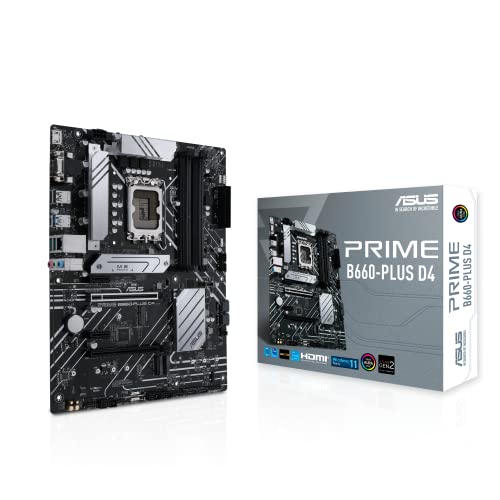
ASUS Prime B760-Plus D4 - Best for DDR4 Reuse
Still have DDR4 from an old build? The B760-Plus D4 supports 13th and 14th gen Intel CPUs on existing DDR4 sticks. Saves real money on a rebuild.
MSI B650M Project Zero - Best for Back-Connect Builds
Back-connect motherboards route all cables behind the board, which makes a cleaner build in a glass-panel case. Project Zero is the cheapest credible option in this category.
Quick answers
Not at all. The CPU and GPU do the heavy lifting. A solid B650 or B760 board will outlast two CPU upgrades if you do not need exotic VRMs.
If your PC is far from the router, yes. The Wi-Fi versions usually cost 20 bucks more and save you buying a separate card later.
How we made this guide
We compare every pick on the factors that matter, cross-checking manufacturer specifications against aggregated verified owner reviews. We rank independently and never take payment for placement. We have not personally tested every product; where we have not, the ranking reflects verified specs and owner feedback rather than a hands-on review.
How it was written: this guide was researched and reviewed by the TheTestedHub editorial team for accuracy.
Affiliate disclosure: TheTestedHub is reader-supported. When you buy through links on our site, we may earn a commission at no extra cost to you.
More to explore

Your Docking Station Match: CalDigit TS4 and More

Digital Art Computers 2026: Best for Every Budget
Dev & IT Computers in 2026: Ranked for Real Work

Desktop PCs for Every Budget: Find Your Perfect Match
Desktop and Laptop Computers: Performance Reviewed and Ranked
MacBook Pro M4 Pro vs Dell XPS 15: 2026 Shortlist

Buy the Best DIY Computer in 2026: Corsair One i300
