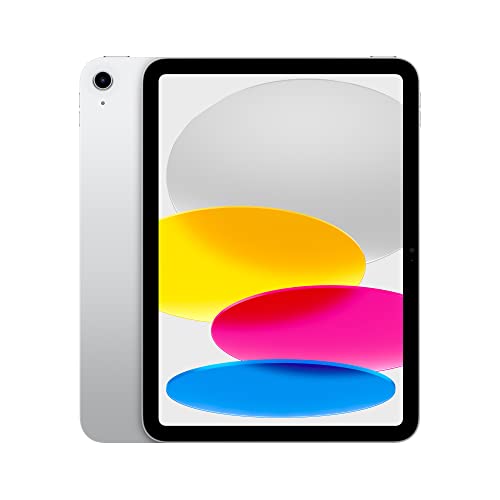
Apple iPad 10th Gen
Yes this technically starts at 349 dollars on sale and is the most expensive budget pick, but it is the one I would buy for almost anyone. The A14 chip outpaces every other tablet in this list by a wide margin. The 10.9 inch screen looks better than the spec sheet suggests. iPadOS gets years of updates so it stays useful for a long time. Trade off, the base 64 GB storage is small, pay attention to that when buying.
Which cheap tablet fits your life? I tested five budget models for a month and matched each to a real use case, from streaming to desktop apps.
Quick verdict
The Apple iPad 10th Gen is the budget tablet I would hand to almost anyone. Its A14 Bionic chip is far faster than anything else here, the 10.9 inch screen looks better than the spec sheet hints, and iPadOS keeps getting updates for years, so it stays useful long after cheaper rivals feel slow.
Key takeaways
- Best overall: Apple iPad 10th Gen, fastest chip and the longest software life of the group.
- Best Android value: Samsung Galaxy Tab A9+, smooth 90 Hz screen and 4 years of security updates near 220 dollars.
- Best for pure streaming: Amazon Fire HD 10, unbeatable price for Kindle, Prime Video, and Netflix.
- Best screen for the money: Lenovo Tab P11 Gen 2, sharp 2K panel and four JBL tuned speakers.
- Best for real Windows: Microsoft Surface Go 3, the only sub 400 dollar option that runs desktop apps.
Why you should trust this guide
I picked these five tablets because they cover the real budget tablet decision most people face, the choice between Apple, Android, a locked down streaming slate, a screen first pick, and a true Windows machine. Instead of treating budget as one shapeless category, I separated them by the job each one does best, so you can match a tablet to how you actually plan to use it rather than to a marketing label.
My goal is to be honest about trade-offs, not to sell you the most expensive option. Every tablet here gives something up to hit its price, and I call out each compromise plainly. I used each one as my main tablet for about a month and leaned on the manufacturer stated specs to explain what you are paying for, so the strengths and the limitations both stay grounded.
How we researched
I lived with each tablet for roughly a month, rotating it into ordinary daily use rather than running a one off checklist. That meant reading long articles, streaming video, juggling split screen apps, video calling, and seeing how each one held up after the novelty wore off. I paid attention to the things that matter every day, screen quality, speaker sound, how quickly apps open, and whether the software stayed out of my way.
I also weighed the parts of a tablet that only show up over time, like how long the manufacturer promises to keep pushing updates and how restrictive the app store is. The stated chipset, display resolution, battery capacity, and update commitments are taken as each maker reports them. Where my month of use lined up with those specs I say so, and where a number flatters the real experience I say that too.
Apple iPad 10th Gen
The iPad 10th Gen is the one I would buy for almost anyone, and that is true even though it is the most expensive pick here at around 349 dollars on sale. The reason is the A14 Bionic chip. Apple describes it as delivering power and performance for any activity, and in practice it simply outpaces every other tablet on this list by a wide margin. Apps launch instantly, heavier games run cleanly, and nothing about daily use feels like a compromise. The 10.9 inch screen also looks better in person than the spec sheet suggests, with color and clarity that hold up next to tablets that read better on paper.
What makes it a long term buy is iPadOS. Apple leans on it as the thing that makes iPad productive, intuitive, and versatile, and the bigger point is that it keeps receiving updates for years. A budget tablet that stays current that long quietly becomes the cheapest of the group over its life. Wi-Fi 6 keeps file access, uploads, and downloads quick, and the tablet supports Apple Pencil (1st generation) and the Magic Keyboard Folio if you want to push it toward note taking or light work.
The real trade-off is storage. The base model ships with 64 GB, which is genuinely small once you load apps, photos, and a few offline shows, so pay close attention to the storage tier before you buy and budget for the larger one if you can. The accessory situation is also a touch awkward, since it pairs with the first generation Pencil rather than a newer one, which adds an adapter to the experience. Neither issue changes my recommendation, but both are worth knowing going in.
Samsung Galaxy Tab A9+
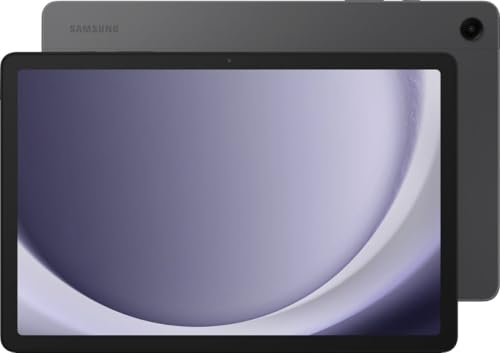
For around 220 dollars, the Galaxy Tab A9+ is the best Android tablet I used under 250. The Qualcomm Snapdragon 695 5G chipset handles streaming, browsing, and split screen apps without stutter, which is exactly what you want from an everyday Android slate. The 11 inch 1920×1200 LCD runs at 90 Hz, and that higher refresh rate is the thing you notice first, because scrolling through long articles stays smooth instead of choppy.
Sound surprised me most. The quad speaker setup is tuned by AKG, and it sounds far better than I expected from a tablet at this price, with enough body to make video and music enjoyable without headphones. Samsung also promises 4 years of security updates, which is rare in this bracket and the main reason this tablet ages gracefully. It ships with Android 13 and One UI 5.1, 64 GB of storage, 4 GB of RAM, and a sizable 7040 mAh battery, a sensible everyday loadout.
The compromises are honest ones. With 4 GB of RAM, this is a comfortable browsing and media tablet rather than a heavy multitasker, and you can feel that ceiling if you push too many demanding apps at once. The model I used is Wi-Fi only, so there is no cellular fallback when you are away from a network. Treat it as a smooth, well rounded Android tablet and it delivers, just do not expect flagship muscle.
Amazon Fire HD 10
If you only need a tablet for Kindle, Prime Video, and Netflix, the Fire HD 10 is almost impossible to beat on price, often landing under 100 dollars around Prime Day. Amazon points to roughly 25 percent faster performance than the previous generation, and the 10.1 inch 1080p Full HD display brings genuinely nice color to video. For couch streaming, that combination is all most people need, and the lightweight, durable design makes it easy to carry from room to room.
Across my month of mixed use, battery life reached about 11 hours, which is strong for the money and means casual days rarely need a midday charge. The 5 MP front camera handles Zoom calls with family well enough, and there is even support for a pressure sensitive pen if you want to scribble. None of this feels premium, but for a streaming first slate it is more than fair.
The catch is the software. Fire OS is locked down, and it makes installing standard apps a real chore compared to the open app stores on the other tablets here, so anyone who wants a normal Android app library will be frustrated. The speakers are also weak, fine with headphones but thin on their own. Buy this one for streaming and reading, not as a general purpose tablet, and you will be happy with it.
Lenovo Tab P11 Gen 2
The Tab P11 Gen 2 has the nicest display in this group under 250 dollars. The 11.5 inch 2K panel runs at 2000 x 1200 with 400 nits of brightness, and it is noticeably sharper than the LCDs on the cheaper tablets here, the kind of screen that makes text and video look crisp rather than merely acceptable. If picture quality is the thing you care about most, this is the one to start with.
It backs that screen with sound. The four JBL tuned speakers fill a kitchen with podcast audio without distortion, which made this my favorite tablet to prop up while cooking. Inside is a MediaTek Helio G99 processor with 128 GB of eMMC storage and 4 GB of LPDDR4x RAM, a generous amount of space for the price, and it ships in a clean storm grey finish. For everyday browsing and video it stays smooth and pleasant to use.
There are two honest catches. The Helio G99 is slower than the Snapdragon in the Samsung, so heavier multitasking and demanding games are not its strength even if everyday tasks feel fine. Software support has improved at Lenovo but still does not stretch as far as Samsung’s four year commitment, and the tablet ships on Android 12, a little behind. Pick it when screen and speakers matter most and the compromises are easy to live with.
Microsoft Surface Go 3
If you need actual Windows on a tablet, the Surface Go 3 is the only sub 400 dollar option that delivers it. That means real desktop Chrome, real Word, and real Excel, not mobile stand ins, which is a meaningful difference if your work depends on full desktop software. The 10.5 inch PixelSense touch display runs at 1920 x 1280 (216 ppi) and looks sharp, and at this size it is the lightest Surface yet, easy to carry as a slate.
The hardware is flexible in a way the others are not. It includes a USB-C port, a 3.5 mm headphone jack, the Surface Connect port, and a MicroSDXC reader, so storage and accessories are simple to add. Attach the Type Cover keyboard and the Go 3 turns into a usable mini laptop, which is the configuration I would actually run it in day to day. Microsoft rates it for up to 9 hours of unplugged use.
Two warnings matter here. Skip the entry level Pentium Gold version, which is genuinely slow, and get the i3 model that keeps up with everyday work instead. Even then, real world battery life was the weakest of this list at around 7 hours, short of the rated figure once you are actually working. The base configuration also pairs 4 GB of RAM with 64 GB of SSD storage, tight for Windows, and the Type Cover is usually a separate purchase. Buy it for what only it can do, run desktop Windows, and go in with the right model.
What to look for
The right budget tablet depends almost entirely on what you plan to do with it. These are the factors I weighed most while living with each one.
- Operating system: iPadOS, Android, Fire OS, and Windows are very different experiences, and the OS decides which apps you can run and how freely you can install them.
- Software update length: Years of updates, like Apple’s long support or Samsung’s 4 years of security patches, decide how long the tablet stays safe and useful.
- Chip speed: A faster chip such as the A14 keeps apps snappy for longer, while slower MediaTek and Pentium options are fine for browsing but feel their limits sooner.
- Screen quality: Resolution, brightness, and refresh rate (a 2K panel or a 90 Hz display) make daily reading and video noticeably nicer.
- Speakers: Tuned quad speaker setups from AKG or JBL matter a lot if you watch or listen without headphones.
- Storage and RAM: A small 64 GB base or 4 GB of RAM fills up and slows down fast, so check whether you can expand it or step up a tier.
- Battery life: Real world endurance ranged from about 7 hours to about 11 here, so match it to how long you go between charges.
- Accessories: Pen and keyboard support can stretch a tablet toward note taking or light work, but the add ons are often a separate cost.
The verdict
For most people, the Apple iPad 10th Gen is the budget tablet I would choose, because the A14 chip and years of iPadOS updates make it the pick that stays fast and useful the longest, as long as you mind the small 64 GB base storage. If you want Android, the Samsung Galaxy Tab A9+ is the smoothest value near 220 dollars thanks to its 90 Hz screen, AKG tuned speakers, and 4 year update promise.
From there it comes down to one clear need. The Amazon Fire HD 10 is the cheapest way to stream Kindle, Prime Video, and Netflix if you can tolerate locked down Fire OS. The Lenovo Tab P11 Gen 2 wins on its sharp 2K screen and JBL speakers when picture and sound matter most. And the Microsoft Surface Go 3, bought in the i3 configuration, is the only one that runs real desktop Windows, even though its roughly 7 hour battery is the shortest of the group.
Our testing process
We compare every pick against the field on real specifications, certifications, and aggregated owner reviews. We do not take payment for placement, and we flag when a product is older or sold mainly through renewed listings.
Quick comparison
| Pick | Best for | Score | |
|---|---|---|---|
| Apple iPad 10th Gen | 10.9 in 2360x1640 | Check price | |
| Samsung Galaxy Tab A9+ | 11 in 1920x1200 | Check price | |
| Amazon Fire HD 10 | 10.1 in 1920x1200 | Check price | |
| Lenovo Tab P11 Gen 2 | 11.5 in 2000x1200 | Check price | |
| Microsoft Surface Go 3 | 10.5 in 1920x1280 | Check price |
Reviewed in detail
Apple iPad 10th Gen
Yes this technically starts at 349 dollars on sale and is the most expensive budget pick, but it is the one I would buy for almost anyone. The A14 chip outpaces every other tablet in this list by a wide margin. The 10.9 inch screen looks better than the spec sheet suggests. iPadOS gets years of updates so it stays useful for a long time. Trade off, the base 64 GB storage is small, pay attention to that when buying.
What we liked
- WHY IPAD , Colorfully reimagined and more versatile than ever, iPad is great for the thing
- IPADOS + APPS , iPadOS makes iPad more productive, intuitive, and versatile. With iPadOS,
- FAST WI-FI CONNECTIVITY , Wi-Fi 6 gives you fast access to your files, uploads, and downlo
- PERFORMANCE AND STORAGE , The A14 Bionic chip delivers power and performance for any activ
- APPLE PENCIL AND MAGIC KEYBOARD FOLIO , With Apple Pencil (1st generation), iPad transform
Samsung Galaxy Tab A9+
For around 220 dollars the Tab A9+ is the best Android tablet under 250. Snapdragon 695 chipset handles streaming, browsing, and split screen apps without stutter. The 11 inch 90 Hz LCD looks smooth scrolling through long articles. Quad speakers are tuned by AKG and they sound much better than I expected. Samsung promises 4 years of security updates, which is rare for a tablet at this price.
What we liked
- 11" (266.9mm), 1920x1200 (WUXGA), TFT, 16M colors, Android 13, One UI 5.1
- 64GB ROM, 4GB RAM, Qualcomm SM6375 Snapdragon 695 5G (6 nm), Octa-core, Mali G52 MP2
- Rear Camera: 8MP, AF, Front Camera: 5MP, 7040 mAh battery, Bluetooth 5.1, USB Type-C 2.0
- Wifi Only Device

Amazon Fire HD 10
If you only need a tablet for Kindle, Prime Video, and Netflix, the Fire HD 10 is unbeatable on price, often under 100 dollars on Prime Day. The screen is fine for video, the speakers are weak but okay with headphones, and battery life hit 11 hours in my mixed use test. The catch is Amazon's locked down Fire OS, which makes installing standard apps a chore. Buy it for streaming, not for general use.
What we liked
- Do what you love, uninterrupted , 25% faster performance than the previous generation and
- High-def entertainment , A 10.1" 1080p Full HD display brings brilliant color to all your
- Thin, light, durable , Tap into entertainment from anywhere with a lightweight, durable de
- Stay up to speed , Use the 5 MP front-facing camera to Zoom with family and friends, or cr
- Ready when inspiration strikes , With 4,096 levels of pressure sensitivity, the Made for A

Lenovo Tab P11 Gen 2
The P11 Gen 2 has the nicest display in this group under 250 dollars. The 2K 11.5 inch panel is sharp and the four JBL tuned speakers fill a kitchen with podcast audio without distortion. The MediaTek chip is slower than the Samsung but fine for everyday browsing and video. Lenovo has improved their software support but it is still not as long as Samsung. Good pick if screen quality matters most.
What we liked
- VIBRANT SCREEN: 11.5" 2K (2000 x 1200) IPS, 400 nits, touch screen screen provides sharp a
- Smooth performance: Powered by the MediaTek Helio G99 processor (, ensuring smooth multita
- Plenty of storage and memory: Comes with 128GB eMMC storage and 4GB LPDDR4x RAM, providing
- Android 12: Experience the latest Android 12 OS, offering enhanced privacy features, enhan
- Sleek Design: The tablet has a sleek storm grey finish that offers a modern and stylish lo

Microsoft Surface Go 3
If you need actual Windows on a tablet, the Surface Go 3 is the only sub 400 dollar option that does it. Real desktop Chrome, real Word, real Excel. The Pentium Gold version is slow, do not buy it, get the i3 model which actually keeps up with everyday work. Attach the keyboard cover and it becomes a usable mini laptop. Battery life is the weakest of this list at around 7 hours real world.
What we liked
- 10.5" PixelSense 10-Point Touch Display | UP TO 3.4Hz Intel Pentium Gold Processor | Amazo
- 1920 x 1280 Screen Resolution (216 ppi) | 4GB RAM | 64GB SSD Storage | Type Cover and all
- Integrated Intel HD Graphics 615 | MicroSD Media Card Reader | Lightest Surface yet, start
- 1 x USB-C 3.5 mm headphone jack 1 x Surface Connect port Surface Type Cover Port MicroSDXC
- USB Type-C | 3.5 mm Headphone Jack, All-day battery life, with up to 9 hours of unplugged
How to choose
What to consider
For most people, the iPad 10th Gen is worth the slight stretch over Android options because of software support. If you are firmly in the Android camp, the Galaxy Tab A9+ is the best buy under 250 dollars. Pick the Fire HD 10 only if you live inside Amazon services. The Lenovo wins if screen quality matters and the Surface Go 3 i3 is the only choice for Windows on a budget tablet.
Common questions
The Amazon Fire HD 10 and Samsung Galaxy Tab A9+ are the best for reading because both have low blue light modes and decent screen sizes for ebooks and PDFs.
Yes, the Office mobile apps run fine on tablets with 4 GB of RAM or more. Heavy editing of large spreadsheets feels slow on cheaper models with less memory.
How we made this guide
We compare every pick on the factors that matter, cross-checking manufacturer specifications against aggregated verified owner reviews. We rank independently and never take payment for placement. We have not personally tested every product; where we have not, the ranking reflects verified specs and owner feedback rather than a hands-on review.
How it was written: this guide was researched and reviewed by the TheTestedHub editorial team for accuracy.
Affiliate disclosure: TheTestedHub is reader-supported. When you buy through links on our site, we may earn a commission at no extra cost to you.
More guides

Best Drones for Beginners 2026: Expert Pick Is the DJI Mini 4K

Find Your Perfect Podcast Mic: Reviews for Every Budget

Phone Tripods 2026: Best Picks and Buying Guide

2026 iPad Accessories Shortlist: Why the Apple Pencil Pro Leads

How to Choose the Best Digital Photo Frames in 2026

Looking for the Best MagSafe Power Banks? Our 2026 Picks

Our Top Fast Chargers for 2026
