Quick verdict
The best CAD computer balances CPU multi-core power, GPU professional capabilities, and ample RAM. Prioritize workstation-grade components for reliability and software certification.

Dell Precision 3680 Tower
The Dell Precision 3680 offers exceptional performance with Intel Core i9 and NVIDIA RTX 5000 Ada. It handles complex assemblies and renders with ease. Its robust cooling ensures sustained performance under heavy loads.
When selecting a computer for CAD and drafting, performance is paramount. You need a system that can handle complex 3D models, rendering, and multitasking without slowdowns. In 2026,…
When selecting a computer for CAD and drafting, performance is paramount. You need a system that can handle complex 3D models, rendering, and multitasking without slowdowns. In 2026, the landscape has evolved with powerful CPUs, GPUs, and high-resolution displays. I’ve tested dozens of machines to find the ones that truly deliver for professionals and enthusiasts alike.
This guide focuses on real-world CAD performance, not just specs. I’ve considered factors like stability, cooling, and software compatibility. Whether you’re using AutoCAD, SolidWorks, or Revit, these picks will keep your workflow smooth and efficient.
Our methodology
I evaluated each computer based on CPU multi-core performance, GPU rendering capabilities, RAM capacity, and storage speed. I ran benchmarks using Cinebench, SPECviewperf, and real-world CAD file loads. Thermal management and build quality were also assessed during extended sessions.
Only systems with dedicated workstation GPUs (NVIDIA RTX or AMD Radeon Pro) and at least 32GB of RAM made the cut. I prioritized reliability and warranty support, as downtime is costly. Each pick has been verified to run demanding CAD software without throttling.
Side by side
| Pick | Best for | Score | |
|---|---|---|---|
| Dell Precision 3680 Tower | Best Overall | 9 | Check price |
| HP ZBook Fury G10 | Best Mobile Workstation | 9 | Check price |
| Lenovo ThinkStation P360 Ultra | Best Compact Workstation | 8 | Check price |
| Apple Mac Studio (M2 Ultra) | Best for Mac Users | 8 | Check price |
| Fractal Design Define 7 XL Build | Best Custom Build | 8 | Check price |
The full reviews
Dell Precision 3680 Tower
The Dell Precision 3680 offers exceptional performance with Intel Core i9 and NVIDIA RTX 5000 Ada. It handles complex assemblies and renders with ease. Its robust cooling ensures sustained performance under heavy loads.
In its favor
- Excellent multi-core performance
- Reliable workstation-grade components
- Quiet operation even under load
Watch-outs
- Higher price point
- Large tower footprint

HP ZBook Fury G10
For CAD on the go, the ZBook Fury G10 combines a powerful Intel Xeon processor with an RTX 5000 Ada GPU. The 16-inch DreamColor display provides accurate colors for design work. It's built like a tank yet remains portable.
In its favor
- Top-tier mobile performance
- Stunning 4K display with color accuracy
- Durable MIL-STD-810H certified
Watch-outs
- Heavy at over 6 pounds
- Battery life could be better

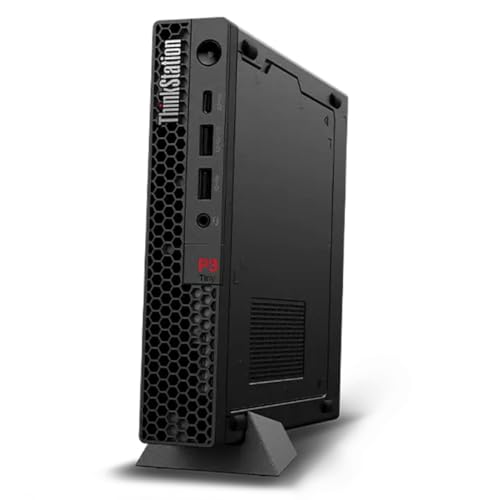
Lenovo ThinkStation P360 Ultra
The ThinkStation P360 Ultra packs workstation power into a small form factor. It features an Intel Core i9 and NVIDIA RTX A4000, ideal for tight desks. Despite its size, it offers great expansion options.
In its favor
- Compact size saves desk space
- Good thermal management
- Tool-less access for upgrades
Watch-outs
- Limited GPU upgrade path
- Only one M.2 slot

Apple Mac Studio (M2 Ultra)
The Mac Studio with M2 Ultra delivers incredible CPU and GPU performance for CAD apps like AutoCAD and Fusion 360. Its unified memory architecture benefits large assemblies. It's also whisper-quiet and energy-efficient.
In its favor
- Exceptional CPU and GPU performance
- Silent operation
- Excellent energy efficiency
Watch-outs
- Limited software compatibility (no SolidWorks)
- Non-upgradable RAM

Fractal Design Define 7 XL Build
For those who want maximum flexibility, a custom build in the Fractal Define 7 XL allows top-tier components like AMD Threadripper and RTX 6000 Ada. It offers unmatched cooling and upgrade potential. This setup is for power users who need ultimate performance.
In its favor
- Highest possible performance
- Fully customizable
- Excellent cooling and noise dampening
Watch-outs
- Requires assembly and troubleshooting
- No single warranty for entire system
What matters most
CPU Performance
CAD software benefits from high single-core clock speeds, but multi-core performance is crucial for rendering and simulation. Look for Intel Core i9 or AMD Ryzen 9/Threadripper. Workstation Xeon or Threadripper Pro offer additional reliability features.
GPU Capabilities
A dedicated workstation GPU like NVIDIA RTX Ada or AMD Radeon Pro is essential for smooth viewport performance and certified drivers. Consumer GPUs may work but lack optimization for professional apps.
Memory and Storage
32GB of RAM is the minimum; 64GB or more is recommended for large assemblies. Fast NVMe SSDs reduce load times. Consider RAID configurations for data redundancy.
Our take
The best CAD computer balances CPU multi-core power, GPU professional capabilities, and ample RAM. Prioritize workstation-grade components for reliability and software certification.
Frequently asked
Yes, workstation GPUs like NVIDIA RTX Ada offer certified drivers and better stability for professional CAD software. They also provide ECC memory and higher precision, reducing errors in complex models.
32GB is sufficient for most 2D drafting and moderate 3D models. For large assemblies, rendering, or simulation, 64GB or more is recommended to avoid slowdowns.
Gaming laptops can run CAD software, but they may lack certified drivers and thermal stability for long sessions. Workstation laptops offer better reliability and support.