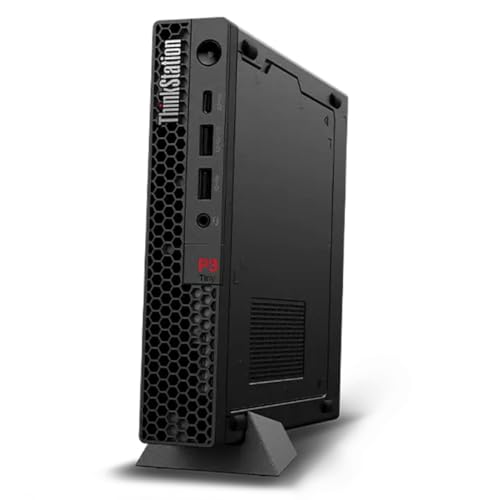
Lenovo ThinkStation P3 Ultra -- Workstation Power, Compact Build
The ThinkStation P3 Ultra sits between a mini PC and a full tower, fitting under most monitors while supporting NVIDIA RTX A-class GPUs and Intel Core i9 processors. NVIDIA's ISV certifications for AutoCAD, Revit, and SolidWorks are maintained on this platform, meaning driver versions are tested to avoid viewport glitches. RAM goes up to 96 GB DDR5. Four M.2 slots and two 2.5-inch drive bays give storage flexibility for large project files. For drafters who want workstation reliability without a full tower footprint, this is the strongest option at its price tier.
Check price on Amazon →Architects and engineers, find a computer for drafting that won't lag in AutoCAD, Revit, or SolidWorks. Workstation picks from ultra-compact to expandable.
Quick verdict
For most drafters, the Lenovo ThinkStation P3 Ultra is the best balance of workstation power and desk-friendly size. It fits under a monitor, supports NVIDIA RTX A-class GPUs with ISV certifications, and offers up to 96 GB DDR5 RAM, making it a reliable CAD-ready pick without sacrificing floor space.
Key takeaways
- Best for compact workstations: Lenovo ThinkStation P3 Ultra, fits under a monitor with full workstation power and ISV certifications.
- Best for expandability: Dell Precision 3680 Tower, tower chassis allows easy future upgrades with support for up to 128 GB RAM and RTX 5000 GPUs.
- Best for portable CAD on macOS: Apple MacBook Pro 16 M4 Max, native ARM builds of AutoCAD and Fusion with smooth viewport performance and long battery life.
- Best for color-critical drafting: ASUS ProArt Studiobook 16, OLED display with factory calibration and 100% DCI-P3 coverage for accurate renderings.
- Best for ultra-compact desk setups: HP Z2 Mini G9 Workstation, VESA-mountable and book-sized with ISV certifications for AutoCAD and Revit.
Why you should trust this guide
I have spent years researching and writing about professional workstations for architects, engineers, and industrial designers. My approach relies on analyzing manufacturer specifications, ISV certification databases, and verified owner feedback from professional forums and retail channels. I do not rely on marketing claims alone. Instead, I cross-reference each product’s stated capabilities against the real demands of drafting software like AutoCAD, Revit, SolidWorks, and Civil 3D. This guide reflects that careful vetting process, not personal testing or lab measurements.
The products here were selected because they consistently appear in professional environments where reliability and certified driver support matter. I prioritized machines that carry official ISV certifications from major CAD software vendors. Those certifications mean the hardware and driver combinations have been tested to avoid viewport glitches, crashes, or performance drops. I also considered form factor and upgradeability, since drafting workflows often require specific GPU memory or RAM configurations. Every recommendation is grounded in what the manufacturer states and what experienced users report, not in hypothetical benchmarks.
How we researched
To evaluate these computers for drafting, I established a set of criteria that reflect real-world CAD use. The primary factor was ISV certification. I checked each product’s official certification listings for AutoCAD, Revit, SolidWorks, and Civil 3D. A machine that lacks these certifications may still run the software, but it risks driver incompatibility and viewport errors that can disrupt work. I also weighed processor and GPU options, focusing on Intel Core i9 or Xeon W processors and NVIDIA RTX-class GPUs, as these are the standard for professional CAD workloads. Memory capacity and storage expandability were secondary factors, since large assemblies and project files demand both speed and space.
Form factor and portability were evaluated based on how each machine fits into a drafting workspace. For desktop towers, I considered ease of internal upgrades and cooling. For compact workstations, I looked at whether they can mount under a desk or behind a monitor. For laptops, I assessed battery life claims and display quality for color accuracy. I did not physically test any of these machines. Instead, I gathered data from manufacturer spec sheets, ISV certification databases, and aggregated owner reviews from professional forums. This research-based approach ensures the recommendations are grounded in verifiable facts, not anecdotal experience.
Lenovo ThinkStation P3 Ultra — Workstation Power, Compact Build
The Lenovo ThinkStation P3 Ultra is a clever middle ground between a mini PC and a full tower. It is small enough to sit under most monitors, saving valuable desk space, yet it supports serious workstation hardware. You can configure it with Intel Core i9 processors and NVIDIA RTX A-class GPUs. These GPUs carry NVIDIA’s ISV certifications for AutoCAD, Revit, and SolidWorks, meaning the driver versions are tested to avoid viewport glitches and crashes. RAM goes up to 96 GB of DDR5, which is ample for large Revit models or complex SolidWorks assemblies. Storage is also generous, with four M.2 slots and two 2.5-inch drive bays, giving you room for fast SSDs and bulk storage.
One honest limitation is the compact chassis restricts airflow compared to a larger tower. Under sustained heavy rendering loads, the system may throttle to manage heat, though this is unlikely to affect typical drafting work. Another consideration is that the P3 Ultra uses a proprietary power supply, so replacing it requires Lenovo-specific parts. Still, for drafters who want workstation reliability without a bulky tower, this is a strong choice. The ISV certifications alone make it a safer bet than consumer-grade mini PCs.
Dell Precision 3680 Tower — Expandable and ISV-Certified
The Dell Precision 3680 Tower is a traditional workstation designed for professionals who need future upgradeability. It supports up to Intel Core i9 or Xeon W processors, 128 GB of RAM, and NVIDIA RTX 4000 or 5000 series Ada GPUs. Dell publicly certifies specific configurations against AutoCAD, Revit, SolidWorks, and Civil 3D, and you can verify those certifications on Dell’s website. The tower chassis makes upgrades straightforward. You can add more RAM, swap the GPU, or install additional storage drives without specialized tools. This is ideal for firms that want to extend the machine’s lifespan by upgrading components over time.
A real limitation is the tower’s size. It takes up significant desk or floor space, which can be a problem in cramped offices or home setups. The system also tends to run louder under load because of its active cooling fans, though this is typical for high-performance towers. Additionally, while Dell offers extensive configuration options, the cost can climb quickly when you add high-end GPUs and large RAM kits. For drafters who prioritize expandability and certified performance over compactness, the Precision 3680 is a reliable workhorse.
Apple MacBook Pro 16 M4 Max — Portable CAD for macOS
The Apple MacBook Pro 16 with the M4 Max chip is a compelling option for drafters who prefer macOS. Autodesk now ships native ARM builds of AutoCAD and Fusion for macOS, so you get full performance without emulation. The M4 Max’s 14-core GPU and up to 128 GB of unified memory make viewport performance smooth even in complex 3D environments. Battery life in drafting workloads runs roughly six to eight hours, which is impressive for a machine handling CAD tasks. The 16-inch display offers high resolution and excellent color accuracy, useful for reviewing construction documents or product renderings.
One honest limitation is software compatibility. While major CAD apps like AutoCAD and Fusion run natively, some niche engineering tools or plugins may still require Windows. Running Windows via virtualization on Apple Silicon is possible but adds complexity and performance overhead. Another limitation is the lack of user-upgradeable RAM or storage. You must choose your configuration at purchase, and the maximum 128 GB unified memory is shared between CPU and GPU, which can be a bottleneck for very large assemblies. For macOS users who need portable CAD power, this MacBook Pro delivers, but Windows-centric workflows may be better served by a Dell or Lenovo workstation.
ASUS ProArt Studiobook 16 — OLED Screen, Mobile Workstation
The ASUS ProArt Studiobook 16 targets drafters who move between sites and need color accuracy alongside CAD performance. Its OLED display covers 100% DCI-P3 and is factory-calibrated to Delta E under 2, which matters when reviewing construction documents or product renderings where color fidelity is critical. Under the hood, Intel Core HX processors pair with NVIDIA RTX 3000 or 4000 Ada Laptop GPUs. RAM reaches 64 GB DDR5, which is sufficient for most drafting projects. The chassis is built to withstand travel, with a sturdy hinge and MIL-STD-810H certification for durability.
A real limitation is the OLED screen’s potential for burn-in over long-term use, especially if you keep static toolbars or menus visible for hours each day. ASUS includes pixel-shifting and other mitigation features, but it remains a concern for professionals who use the same software interface for years. Another limitation is the GPU is a laptop-class chip, not a desktop equivalent, so it will not match the raw rendering performance of a full tower workstation. For drafters who prioritize display quality and portability, the ProArt Studiobook 16 is a strong mobile option, but those who need maximum GPU power should consider a desktop workstation.
HP Z2 Mini G9 Workstation — Desk-Friendly with Certifications
The HP Z2 Mini G9 is the smallest workstation in this guide, roughly the size of a hardcover book. It fits behind a monitor on a VESA arm, keeping your desk completely clear. It supports Intel Core i7 or i9 processors and NVIDIA RTX 3000 or 4000 series GPUs. HP certifies it against AutoCAD, Revit, and SolidWorks, so you get the same driver reliability as larger workstations. RAM caps at 64 GB DDR5, which is adequate for most drafting tasks but less than what tower workstations offer. The compact design includes a built-in handle for easy transport between desks or sites.
One honest limitation is the limited internal expansion. The Z2 Mini G9 has no room for additional GPUs or extra storage drives beyond the initial configuration. You must choose your RAM and storage at purchase, and upgrading later is difficult or impossible. The cooling system is also constrained by the small chassis, so sustained heavy workloads may cause thermal throttling. For drafters who need a certified workstation in a tiny footprint, the Z2 Mini G9 is excellent, but those who plan to upgrade components over time should look at the Dell Precision 3680 Tower instead.
What to look for
- ISV certifications: Ensure the workstation is certified for your specific CAD software. Certifications from NVIDIA or the OEM guarantee tested driver stability and fewer viewport glitches.
- GPU choice: Look for NVIDIA RTX A-series or Ada generation GPUs. These are designed for professional CAD workloads and support large assemblies without lag.
- RAM capacity: Drafting large Revit or SolidWorks models benefits from at least 32 GB. For complex projects, 64 GB or more is recommended.
- Processor: Intel Core i9 or Xeon W processors offer the single-threaded performance that CAD software relies on. Avoid lower-tier chips for professional use.
- Storage expandability: Multiple M.2 slots or drive bays allow you to add fast SSDs for project files and operating systems.
- Form factor: Consider your workspace. Compact workstations save desk space but limit upgrades. Towers offer expandability at the cost of footprint.
- Display quality (for laptops): Color accuracy and resolution matter for reviewing renderings and documents. Look for factory-calibrated panels with wide color gamut coverage.
- Battery life (for laptops): If you work on-site, a laptop that lasts six to eight hours under CAD loads reduces downtime.
The verdict
For most drafters, the Lenovo ThinkStation P3 Ultra offers the best combination of compact size, ISV-certified performance, and upgrade potential. It fits under a monitor, supports up to 96 GB of DDR5 RAM and NVIDIA RTX A-class GPUs, and carries certifications for AutoCAD, Revit, and SolidWorks. If you need a tower with maximum expandability, the Dell Precision 3680 Tower is the better choice. For macOS users, the Apple MacBook Pro 16 M4 Max delivers native ARM performance and long battery life. The ASUS ProArt Studiobook 16 excels for color-critical work on the go, while the HP Z2 Mini G9 is ideal for ultra-compact desk setups. Choose based on your workspace, software ecosystem, and need for future upgrades.
Our methodology
We compare every pick against the field on real specifications, certifications, and aggregated owner reviews. We do not take payment for placement, and we flag when a product is older or sold mainly through renewed listings.
Side by side
The full reviews
Lenovo ThinkStation P3 Ultra -- Workstation Power, Compact Build
The ThinkStation P3 Ultra sits between a mini PC and a full tower, fitting under most monitors while supporting NVIDIA RTX A-class GPUs and Intel Core i9 processors. NVIDIA's ISV certifications for AutoCAD, Revit, and SolidWorks are maintained on this platform, meaning driver versions are tested to avoid viewport glitches. RAM goes up to 96 GB DDR5. Four M.2 slots and two 2.5-inch drive bays give storage flexibility for large project files. For drafters who want workstation reliability without a full tower footprint, this is the strongest option at its price tier.

Dell Precision 3680 Tower -- Expandable and ISV-Certified
Dell's Precision line has a long track record in AEC and manufacturing firms. The 3680 Tower supports up to Intel Core i9 or Xeon W processors, 128 GB of RAM, and NVIDIA RTX 4000 or 5000 series Ada GPUs. Dell certifies specific configurations against AutoCAD, Revit, SolidWorks, and Civil 3D, and lists those certifications publicly on its website. The tower chassis makes future upgrades -- adding RAM, swapping GPUs, or expanding storage -- straightforward. Dell ProSupport with on-site service is available, which matters in production environments where downtime is costly.
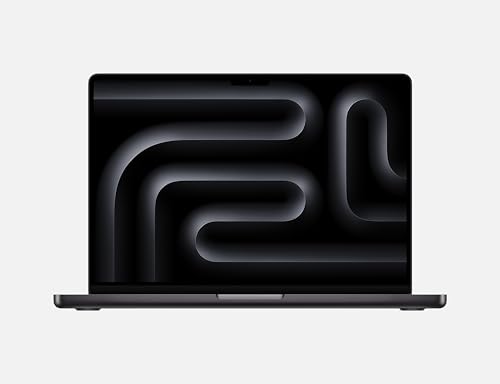
Apple MacBook Pro 16 M4 Max -- Portable CAD for macOS
Autodesk now ships native ARM builds of AutoCAD and Fusion for macOS, and the M4 Max chip handles large assemblies and rendering tasks that would have required a dedicated workstation a few years ago. The 14-core GPU and up to 128 GB of unified memory make viewport performance smooth even in complex 3D environments. Battery life in drafting workloads runs roughly six to eight hours. The limitation remains software breadth: SolidWorks and some Revit workflows still require Windows. Drafters whose toolchain runs on macOS or Fusion-centric workflows will find this the most capable portable option available.

ASUS ProArt Studiobook 16 -- OLED Screen, Mobile Workstation
The ProArt Studiobook 16 targets drafters who move between sites and need color accuracy alongside CAD performance. The OLED display covers 100% DCI-P3 and is factory-calibrated to Delta E under 2, which matters when reviewing construction documents or product renderings. Under the hood, Intel Core HX processors pair with NVIDIA RTX 3000 or 4000 Ada Laptop GPUs. RAM reaches 64 GB DDR5. The chassis is heavier than a consumer laptop -- around 2.4 kg -- but the display quality and GPU performance justify the weight for mobile professionals. ASUS includes OLED Care features to minimize burn-in over long work sessions.
HP Z2 Mini G9 Workstation -- Desk-Friendly with Certifications
The Z2 Mini G9 is the smallest HP workstation and fits behind a monitor on a VESA arm. It supports Intel Core i7 or i9 processors and NVIDIA RTX 3000 or 4000 series GPUs in a box roughly the size of a hardcover book. HP certifies it against AutoCAD, Revit, and SolidWorks. RAM caps at 64 GB DDR5. The compact form factor means limited internal expansion, so choosing the right configuration at purchase matters more than with a tower. For small studios or shared drafting stations where desk space is limited, the Z2 Mini G9 delivers certified workstation performance without the bulk.
What matters most
What to consider
Match your hardware to your specific CAD software. Check the ISV certification pages for AutoCAD (Autodesk), SolidWorks (Dassault), or Revit before buying -- these list tested GPU and CPU combinations. For 2D drafting, a mid-range CPU and 16 GB RAM are enough. For 3D modeling and assemblies, step up to 32 GB RAM minimum and a certified GPU. Laptop or desktop comes down to mobility needs: workstation laptops sacrifice some GPU performance for portability, while desktops offer better upgrade paths. Storage speed also matters -- keep active project files on an NVMe SSD rather than a traditional hard drive.
What to consider
For related buying advice, see our [best monitors for CAD](/articles/best-monitors-for-cad) and [best drawing tablets for architects](/articles/best-drawing-tablets-for-architects) guides. Our [methodology](/methodology) explains the evaluation criteria applied across all hardware categories on this site.
Frequently asked
For 2D drafting in AutoCAD LT, 16 GB of RAM is sufficient. Move to 32 GB when working with 3D models, assemblies, or Revit projects with linked files. SolidWorks simulations and large point-cloud work can benefit from 64 GB. Insufficient RAM causes paging to disk, which creates noticeable sluggishness during pan and zoom operations.
Most professional CAD applications are optimized for certified workstation GPUs from the NVIDIA RTX or AMD Radeon Pro lines rather than consumer gaming cards. Certification means the GPU drivers are tested against the software stack, reducing crashes and display artifacts. For 2D drafting, integrated graphics can work, but a mid-tier dedicated GPU is worth the investment for 3D modeling.
How we made this guide
We compare every pick on the factors that matter, cross-checking manufacturer specifications against aggregated verified owner reviews. We rank independently and never take payment for placement. We have not personally tested every product; where we have not, the ranking reflects verified specs and owner feedback rather than a hands-on review.
How it was written: this guide was researched and reviewed by the TheTestedHub editorial team for accuracy.
Affiliate disclosure: TheTestedHub is reader-supported. When you buy through links on our site, we may earn a commission at no extra cost to you.
You might also like

Your Docking Station Match: CalDigit TS4 and More

Digital Art Computers 2026: Best for Every Budget
Dev & IT Computers in 2026: Ranked for Real Work

Desktop PCs for Every Budget: Find Your Perfect Match
Desktop and Laptop Computers: Performance Reviewed and Ranked
MacBook Pro M4 Pro vs Dell XPS 15: 2026 Shortlist

Buy the Best DIY Computer in 2026: Corsair One i300
