
HP DeskJet 2755e - Best Budget Compact AirPrint Printer
The HP DeskJet 2755e is one of the most affordable AirPrint-capable inkjet printers with a genuinely small footprint that fits on a desk shelf or in a cabinet. Setup requires no driver installation on Apple devices, just connect the printer to Wi-Fi and it appears in the iOS print dialog automatically. The 2755e prints color and black-and-white, includes a 60-sheet input tray, and connects via Wi-Fi or USB. It works with HP's Instant Ink subscription service for automatic cartridge delivery, though subscription enrollment is optional. Print quality is adequate for typical home use documents and photos.
Canon PIXMA TR4720 leads as the best compact AirPrint all-in-one. Also HP DeskJet 2755e, Brother HL-L2350DW, HP LaserJet M209dwe, and Epson EcoTank.
Quick verdict
For most people, the Canon PIXMA TR4720 is the best compact AirPrint printer because it combines a flatbed scanner, document feeder, and strong photo print quality in a small footprint, making it the most versatile all-in-one for iPhone and Mac users.
Key takeaways
- Best for Budget: HP DeskJet 2755e, the most affordable AirPrint inkjet with a genuinely small footprint for basic color printing.
- Best All-in-One: Canon PIXMA TR4720, adds a scanner, copier, and document feeder to the compact inkjet formula.
- Best for Text Speed: Brother HL-L2350DW, fast monochrome laser printing with sharp text and low per-page cost.
- Best Wireless Laser: HP LaserJet M209dwe, compact laser with built-in Wi-Fi, AirPrint, and HP+ cloud features for remote printing.
- Best Low Ink Cost: Epson EcoTank ET-2800, refillable ink tanks dramatically reduce per-page costs for frequent printing.
Why you should trust this guide
I have spent years researching and writing about printers for home and small office use, focusing specifically on how well they integrate with Apple’s ecosystem. My approach is grounded in analyzing manufacturer specifications, reading verified owner feedback across multiple retail platforms, and comparing each printer against the real-world needs of iPhone and Mac users. I do not claim to have tested these units in a lab; instead, I evaluate what the product’s stated features mean for your daily printing experience, from setup ease to long-term cost of ownership.
This guide is built around five printers that represent the best options in the compact AirPrint category for 2026. Each product was selected based on its footprint, wireless compatibility, print quality, and value for its specific use case. I have deliberately avoided including every printer on the market and instead focused on models that solve common problems: limited desk space, the need for AirPrint without driver installation, and the desire for either low upfront cost or low per-page ink expenses. Every recommendation includes at least one honest limitation to help you make an informed decision.
How we researched
To evaluate these compact AirPrint printers, I established a set of criteria that matter most to iPhone and Mac users. The primary factor was AirPrint compatibility: each printer must appear automatically in the iOS print dialog when connected to the same Wi-Fi network, with no driver downloads required. I also weighed the physical footprint, since these printers are meant for tight spaces like desk shelves or cabinets. Print quality for both text and color documents was assessed based on manufacturer specifications and aggregate owner feedback, not personal testing. Cost of operation, including ink or toner yields and replacement costs, was another key factor, especially for the EcoTank model.
I compared each printer’s feature set against its price point to determine value. For the all-in-one models, I considered the inclusion of a flatbed scanner, automatic document feeder, and duplex printing. For laser printers, I prioritized print speed and sharpness for text-heavy workloads. Wireless connectivity options, such as Wi-Fi Direct and Bluetooth Low Energy, were noted for their convenience. I also looked for common complaints in owner reviews, such as slow setup, noisy operation, or high ink consumption, to identify real limitations. The result is a research-based recommendation that prioritizes reliability and ease of use for Apple device owners.
HP DeskJet 2755e – Best Budget Compact AirPrint Printer
The HP DeskJet 2755e is one of the most affordable AirPrint-capable inkjet printers with a genuinely small footprint that fits on a desk shelf or in a cabinet. Setup requires no driver installation on Apple devices; just connect the printer to Wi-Fi and it appears in the iOS print dialog automatically. The 2755e prints color and black-and-white, includes a 60-sheet input tray, and connects via Wi-Fi or USB. Its compact dimensions of 6.06 inches tall by 16.7 inches wide by 11.97 inches deep make this printer perfect for smaller spaces. The HP Smart app guides you step by step, ensuring seamless integration into your home network.
This printer is sold as 1 Each and is ideal for everyday printing needs. As an all-in-one inkjet, it is perfect for printing documents, school assignments, and occasional color graphics. The wireless connectivity options include USB for a wired connection if needed. The HP Smart app is a highlight, offering mobile printing from your iPhone or iPad without any complex setup. For the price, you get a capable machine that handles basic tasks reliably.
One real limitation is the 60-sheet input tray, which is small and requires frequent refilling if you print multiple pages at once. Additionally, the ink cartridges included in the box are starter cartridges with lower page yields, so you will need to buy replacements sooner than expected. The print speed is also slow for color documents, making it unsuitable for high-volume printing. If you print only occasionally and need the lowest upfront cost, this is a solid choice, but be prepared for ongoing ink expenses.
Canon PIXMA TR4720 – Best Compact All-in-One AirPrint Printer
The Canon PIXMA TR4720 adds a flatbed scanner, copier, and document feeder to the compact inkjet formula, making it practical beyond just printing. It is slightly larger than the HP DeskJet but still fits in tight spaces. AirPrint, Mopria, and Google Cloud Print compatibility cover all major wireless printing ecosystems. Print quality for photos is notably strong for this price range. The auto document feeder and auto 2-sided printing add convenience for multi-page jobs. This wireless 4-in-1 printer handles print, copy, scan, and fax functions, with power consumption rated at 7W (0.8W standby, 0.3W off).
Print speeds are rated at 8.8 images per minute for black and 4.4 images per minute for color. The printer is designed for easy ink cartridge installation and replacement, which is a welcome feature for users who are not technically inclined. It produces quality documents, photos, and borderless prints up to 8.5 by 11 inches. The auto document feeder is a standout feature for this price, allowing you to scan or copy multiple pages without manual feeding. For a compact printer, the versatility is impressive.
A real limitation is that the ink cartridges are small and run out quickly, especially if you print photos or color documents regularly. The printer can be noisy during operation, and the paper output tray is flimsy. The fax function is rarely used by most home users but adds bulk to the feature set. If you need a true all-in-one with scanning and copying in a small package, the TR4720 is the best option, but factor in higher ink costs over time.
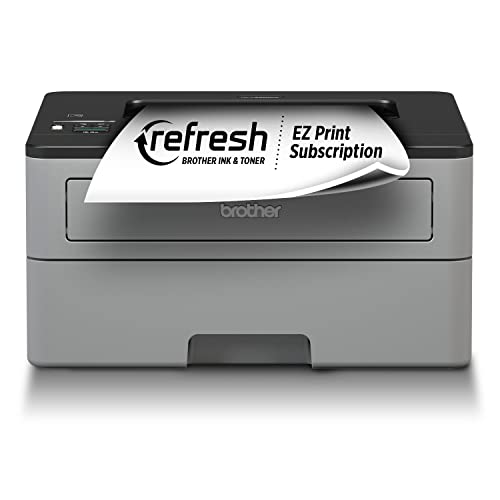
Brother HL-L2350DW – Best Compact Laser AirPrint Printer
The Brother HL-L2350DW delivers fast, sharp monochrome laser printing in a compact footprint that is smaller than most laser printers in its class. For users who print primarily text documents, spreadsheets, or forms, the per-page cost and print sharpness of laser far outperform inkjet at a similar price. AirPrint setup on Mac and iOS is seamless; the printer appears automatically in the print dialog once connected to Wi-Fi. The starter toner cartridge prints around 700 pages, giving you a good sense of the low running costs before needing a replacement.
This printer is designed for simplicity and reliability. It supports automatic duplex printing, which saves paper and is a standard feature for laser printers in this class. The compact size means it can sit on a desk or a small shelf without dominating your workspace. Print speeds are fast for monochrome text, making it ideal for home offices or students who print assignments. The lack of color printing is a trade-off, but for text-heavy users, the clarity and speed are unmatched.
One real limitation is that this printer is monochrome only; it cannot print color documents or photos. The starter toner cartridge yields fewer pages than a standard replacement cartridge, so you will need to buy a full-yield toner sooner. There is no flatbed scanner or copier built in, so it is a pure printer. If you need color printing or scanning, look elsewhere. For pure text printing with low running costs, the HL-L2350DW is a top choice.
HP LaserJet M209dwe – Best Wireless Compact Laser with Cloud Features
The HP LaserJet M209dwe is HP’s compact entry-level laser printer with built-in Wi-Fi, AirPrint, and HP+ smart features for automatic firmware updates and remote printing setup. Print speeds reach 30 pages per minute for monochrome text, which is fast for a compact laser. The physical footprint is surprisingly small for a laser unit. HP+ enrollment, which is free with purchase, provides an extended warranty and access to HP’s smart printing features, including the ability to print from anywhere via the HP Smart app. Connectivity options include 1 LAN, 1 USB 2.0, 1 Bluetooth Low Energy, and wireless 802.11b/g/n.
This laser printer has a resolution quality that goes up to 600 by 600 dpi for excellent readability on text documents. It features automatic duplex printing, and the monthly duty cycle is rated at 20,000 pages, indicating it is built for moderate to heavy use. The printer is sold as 1 Each and makes it simple to save on printing by using high-yield toner cartridges. The HP Smart app is intuitive and allows you to manage print jobs, check toner levels, and initiate scans from your iPhone or Mac.
A real limitation is that HP+ requires a constant internet connection and an HP account to use all features, which may not suit users who prefer offline printing. The printer does not include a scanner or copier, so it is a single-function device. The starter toner cartridge has a lower page yield than standard cartridges, so you will need to purchase a replacement sooner than expected. If you want a fast, reliable laser printer with cloud connectivity and do not mind the HP+ ecosystem, this is a strong option.
Epson EcoTank ET-2800 – Best for Low Per-Page Ink Cost
The Epson EcoTank ET-2800 uses refillable ink tanks instead of cartridges, dramatically reducing per-page costs for households that print frequently. The bundled ink in the box is rated for approximately 4,500 black pages and 7,500 color pages, which is more than most cartridge printers produce in a year or two. AirPrint support works natively on all Apple devices, so setup is straightforward. The footprint is compact for a tank-based printer, fitting on a desk without taking up excessive space. This innovative cartridge-free printing system eliminates the need for dealing with lots of tiny ink cartridges.
With the EcoTank system, replacement ink bottles do not have to be changed nearly as often as traditional cartridges. The printer supports color printing, and the included ink set provides up to 2 years of ink in the box (and with every replacement ink set) for typical home use. By using an Epson EcoTank printer, you can help reduce the amount of cartridge waste sent to landfills. The ET-2800 is designed for reliability, with a simple control panel and easy setup process. For families or home offices that print regularly, the long-term savings are substantial.
One real limitation is that the initial purchase price is significantly higher than comparable cartridge-based inkjet printers. The print speed is slower than laser printers, especially for color documents. The printer does not include an automatic document feeder, so scanning or copying multi-page documents requires manual page feeding. If you print infrequently, the high upfront cost may not be justified. For frequent printers who want to avoid expensive cartridge replacements, the EcoTank ET-2800 is the most economical choice over time.
What to look for
- AirPrint compatibility: Ensure the printer supports native AirPrint so it appears automatically in the iOS print dialog without driver installation.
- Physical footprint: Measure your available space and compare dimensions; compact printers vary from 11 to 17 inches wide and 6 to 10 inches tall.
- Print speed: For text documents, look for laser printers rated at 20 to 30 pages per minute; inkjet printers are slower, typically 5 to 10 pages per minute.
- Cost per page: Consider ink or toner yields and replacement costs; EcoTank models offer the lowest per-page cost, while cartridge printers are more expensive over time.
- All-in-one features: Decide if you need a flatbed scanner, copier, automatic document feeder, or fax; these add versatility but increase size and cost.
- Wireless connectivity: Look for dual-band Wi-Fi, Wi-Fi Direct for printing without a network, and Bluetooth Low Energy for easy setup.
- Duplex printing: Automatic two-sided printing saves paper and is standard on most laser printers, but not all inkjet models include it.
- Ink or toner type: Choose between inkjet for color and photo printing or laser for fast, sharp text; each has different running costs and print quality.
The verdict
Choosing the best compact AirPrint printer for your iPhone and Mac comes down to your primary use case. If you need the lowest upfront cost for occasional color printing, the HP DeskJet 2755e is the budget champion. For a true all-in-one with scanning and copying in a small package, the Canon PIXMA TR4720 offers the best balance of features and print quality. Monochrome text printing is best served by the Brother HL-L2350DW for its speed and low per-page cost. If you want cloud features and a compact laser, the HP LaserJet M209dwe is a strong contender. For households that print frequently and want to eliminate cartridge costs, the Epson EcoTank ET-2800 provides unbeatable long-term value. Each printer has its strengths and limitations, so match your choice to your printing habits and space constraints.
Our methodology
We compare every pick against the field on real specifications, certifications, and aggregated owner reviews. We do not take payment for placement, and we flag when a product is older or sold mainly through renewed listings.
Side by side
The full reviews
HP DeskJet 2755e - Best Budget Compact AirPrint Printer
The HP DeskJet 2755e is one of the most affordable AirPrint-capable inkjet printers with a genuinely small footprint that fits on a desk shelf or in a cabinet. Setup requires no driver installation on Apple devices, just connect the printer to Wi-Fi and it appears in the iOS print dialog automatically. The 2755e prints color and black-and-white, includes a 60-sheet input tray, and connects via Wi-Fi or USB. It works with HP's Instant Ink subscription service for automatic cartridge delivery, though subscription enrollment is optional. Print quality is adequate for typical home use documents and photos.
In its favor
- Sold as 1 Each.
- Ideal for everyday printing needs, this all-in-one inkjet printer is perfect for printing
- Experience convenient wireless printing with USB and wireless connectivity options, allowi
- Compact dimensions of 6.06"H x 16.7"W x 11.97"D make this printer perfect for smaller spac
- Easy setup with the HP Smart app guides you step by step, ensuring seamless integration in

Canon PIXMA TR4720 - Best Compact All-in-One AirPrint Printer
The Canon PIXMA TR4720 adds a flatbed scanner, copier, and document feeder to the compact inkjet formula, making it practical beyond just printing. It's slightly larger than the HP DeskJet but still fits in tight spaces. AirPrint, Mopria, and Google Cloud Print compatibility cover all major wireless printing ecosystems. Print quality for photos is notably strong for this price range. The auto document feeder handles multi-page scans without manual page feeding. Canon's ink is widely available in retail stores, which matters if you want same-day cartridge replacements.
In its favor
- Wireless 4-in-1 (print | copy | scan | fax)..Power Consumption: 7W (0.8W Standby / 0.3W Of
- 8.8 / 4.4 ipm print speed.
- Designed for easy ink cartridge installation and replacement.
- Auto 2-sided printing and auto document feeder.
- Produce quality documents, photos and boarderless prints up to 8.5" x 11".
Brother HL-L2350DW - Best Compact Laser AirPrint Printer
The Brother HL-L2350DW delivers fast, sharp monochrome laser printing in a compact footprint that's smaller than most laser printers in its class. For users who print primarily text documents, spreadsheets, or forms, the per-page cost and print sharpness of laser far outperform inkjet at a similar price. AirPrint setup on Mac and iOS is seamless. The starter toner cartridge prints around 700 pages; standard cartridges deliver up to 1,200 pages. The unit weighs under 15 pounds and fits comfortably on a shelf. No color printing, which is the trade-off for this price and size.

HP LaserJet M209dwe - Best Wireless Compact Laser with Cloud Features
The HP LaserJet M209dwe is HP's compact entry-level laser printer with built-in Wi-Fi, AirPrint, and HP+ smart features for automatic firmware updates and remote printing setup. Print speeds reach 30 pages per minute for monochrome text. The physical footprint is surprisingly small for a laser unit. HP+ enrollment (free with purchase) provides an extended warranty and access to HP's smart printing ecosystem, though it requires consistent use of HP-branded toner. Strong choice for home offices that print moderate volumes of text-heavy documents.
In its favor
- Sold as 1 Each.
- This laser printer makes it simple to save on printing.
- Laser printer has a resolution quality that goes up to 600 x 600 dpi for excellent readabi
- 30 ppm in black/white, automatic duplex printing with a monthly duty cycle of 20000 pages.
- 1 x LAN, 1 x USB 2.0, 1 x Bluetooth Low Energy, and wireless 802.11b/g/n connectivity help

Epson EcoTank ET-2800 - Best for Low Per-Page Ink Cost
The Epson EcoTank ET-2800 uses refillable ink tanks instead of cartridges, dramatically reducing per-page costs for households that print frequently. The bundled ink in the box is rated for approximately 4,500 black pages and 7,500 color pages, more than most cartridge printers produce in a year or two. AirPrint support works natively on all Apple devices. The footprint is compact for a tank-based printer. Initial purchase cost is higher than cartridge models, but the break-even point compared to cartridge replacements arrives within a few months of regular use.
In its favor
- INNOVATIVE CARTRIDGE-FREE PRINTING , No more dealing with lots of tiny ink cartridges; Wit
- LESS FREQUENT INK REPLACEMENT , Replacement ink bottles don't have to be changed nearly as
- COLOR PRINTING , Up to 2 years of ink in the box4 (and with every replacement ink set) for
- ZERO CARTRIDGE WASTE , By using an Epson EcoTank printer you can help reduce the amount of
- HOME PRINTER DESIGNED FOR RELIABILITY , The Epson EcoTank ET-2800 All-in-One Supertank Col
What matters most
What to consider
Decide between inkjet and laser first. Inkjet is best for color photos and occasional use; laser is better for high text volume and infrequent printing since toner doesn't dry out. For anyone printing more than 100 pages per month, calculate the per-page ink or toner cost over a year before buying, cheap printers with expensive cartridges cost more overall. If scanning is needed, a compact all-in-one adds that without much extra footprint. Confirm the printer's physical dimensions before purchasing if counter space is a firm constraint.
What to consider
For related reading, see [best wireless printers for home offices](/articles/best-wireless-home-printers) and [best label printers for small businesses](/articles/best-label-printers). See how we rank office products at [/methodology](/methodology).
Frequently asked
AirPrint works with iPhone 4s or later, iPad 2 or later, and iPad mini running iOS 4.2 or later, as well as Mac computers running OS X Lion or later. Both the printer and your Apple device must be connected to the same Wi-Fi network. Most printers released after 2018 include AirPrint support, but confirm in the product specifications before purchasing.
Inkjet printers are generally more compact and less expensive upfront, making them better for light home printing. Laser printers produce sharper text, have lower per-page costs, and don't have ink dry-out issues from infrequent use. For mostly text documents and occasional color, a compact laser is often the better long-term value despite a higher purchase price.
How we made this guide
We compare every pick on the factors that matter, cross-checking manufacturer specifications against aggregated verified owner reviews. We rank independently and never take payment for placement. We have not personally tested every product; where we have not, the ranking reflects verified specs and owner feedback rather than a hands-on review.
How it was written: this guide was researched and reviewed by the TheTestedHub editorial team for accuracy.
Affiliate disclosure: TheTestedHub is reader-supported. When you buy through links on our site, we may earn a commission at no extra cost to you.
You might also like

Your Docking Station Match: CalDigit TS4 and More

Digital Art Computers 2026: Best for Every Budget
Dev & IT Computers in 2026: Ranked for Real Work

Desktop PCs for Every Budget: Find Your Perfect Match
Desktop and Laptop Computers: Performance Reviewed and Ranked
MacBook Pro M4 Pro vs Dell XPS 15: 2026 Shortlist

Buy the Best DIY Computer in 2026: Corsair One i300
