
Beelink SER8 Mini PC - Best Budget All-Rounder
The Beelink SER8 runs an AMD Ryzen 7 8745H processor with integrated Radeon 780M graphics. At roughly 4.5 by 4.5 by 1.8 inches it fits behind a monitor on a VESA mount. The 32 GB DDR5 RAM and 500 GB NVMe SSD cover typical home office tasks, light photo editing, and casual gaming. Two HDMI 2.1 ports and two USB4 ports allow a triple-display setup. A single 12V power brick handles charging with no fan noise at idle. Windows 11 Pro comes pre-installed. The unit runs warm under sustained loads but throttles gracefully. At it is the clearest starting point for anyone exploring mini PCs for the first time.
Check price on Amazon →Apple Mac mini M4 leads our compact desktop lineup with unmatched performance. Compare budget Beelink SER8, business NUC 14 Pro, and more.
Quick verdict
Pick the Apple Mac mini M4 if you want the best balance of raw performance, compact size, and ecosystem value. Its M4 chip handles demanding creative and development tasks effortlessly, and the 2024 redesign makes it the most capable small PC for most buyers.
Key takeaways
- Best for Budget Shoppers: Beelink SER8 Mini PC, offers strong integrated graphics and ample RAM at a low price.
- Best for macOS Users: Apple Mac mini M4, delivers class-leading single-core and multi-core performance in a tiny footprint.
- Best for Business Deployments: Intel NUC 14 Pro, features vPro remote management and upgradeable components for IT departments.
- Best for Office Workloads: Lenovo ThinkCentre M75q Tiny, provides a mature enterprise platform with flexible storage and broad support.
- Best for Power Users: ASUS ROG NUC 970, packs a discrete RTX 4070 GPU into a compact chassis for serious gaming and creative work.
Why you should trust this guide
I have been writing about desktop computers for over a decade, covering everything from budget mini PCs to high-end workstations. My research process focuses on manufacturer specifications, verified owner feedback across multiple retail and forum sources, and long-term reliability reports. I do not rely on marketing claims alone; I cross-reference performance data, port configurations, and upgrade paths to ensure each recommendation holds up in real-world use.
For this guide, I evaluated the five most compelling compact desktops available in 2026. Each product was chosen because it represents a distinct use case, from budget all-rounders to professional-grade machines. I prioritized factors like processor capability, graphics performance, connectivity, upgradeability, and ecosystem fit. No product received special treatment, and I have no financial ties to any of the brands listed here.
How we researched
To determine the best compact desktop computers, I established a set of evaluation criteria that matter most to buyers in this category. The primary factors were processor performance for multitasking and demanding applications, graphics capability for gaming and creative work, physical footprint and mounting flexibility, port selection for modern peripherals and displays, and upgradeability for long-term value. I also considered ecosystem integration, especially for macOS and enterprise users.
I gathered data from each manufacturer’s official specifications, independent benchmark reviews, and aggregated user feedback from major retailers and technology forums. I compared each product against its direct competitors in the same price and performance tier. I did not physically test any unit myself. Instead, I synthesized available information to identify strengths, weaknesses, and real-world trade-offs. The final recommendations reflect a balanced assessment of performance, features, and reliability.
Beelink SER8 Mini PC – Best Budget All-Rounder
The Beelink SER8 Mini PC is a strong contender for anyone who needs a capable desktop without spending a lot. It runs an AMD Ryzen 7 8745H processor with integrated Radeon 780M graphics, which is a surprisingly powerful combination for such a small machine. At roughly 4.5 by 4.5 by 1.8 inches, it fits easily behind a monitor using a VESA mount, saving valuable desk space. The 32 GB of DDR5 RAM and 500 GB NVMe SSD handle typical home office tasks, light photo editing, and casual gaming without noticeable lag.
Connectivity is a highlight here. Two HDMI 2.1 ports and two USB4 ports allow you to run a triple-display setup, which is great for productivity or multitasking. A single 12V power brick handles charging, keeping the setup tidy. The integrated Radeon 780M graphics can play many modern games at 1080p with medium settings, making this a rare budget option that can double as a casual gaming machine.
One real limitation is the lack of upgradeability. The RAM is soldered, so you cannot increase it beyond the 32 GB included. The SSD can be replaced, but the single M.2 slot means you cannot add a second drive internally. For most home office users this is fine, but power users who need more storage or memory later will hit a wall.
Apple Mac mini M4 – Best for macOS Users
The Apple Mac mini M4 is Apple’s most affordable desktop and one of the most capable compact computers at its price. The M4 chip handles video editing, photo work, and software development with headroom to spare. The 2024 redesign shrank the footprint to roughly 5 by 5 inches, making it even easier to place on a desk or tuck behind a monitor. This is the best choice for anyone already invested in the Apple ecosystem, as it integrates seamlessly with iCloud, AirDrop, and other Apple services.
Port selection is generous for a machine this small. You get three USB-C ports with Thunderbolt 4 support, two USB-A ports for older peripherals, HDMI 2.1 for a high-resolution display, and a front-panel USB-C port for quick connections. The M4 chip’s unified memory architecture means the system feels snappy even under heavy loads, and the fanless design in most configurations keeps it silent during everyday use.
A real limitation is the lack of user-upgradeable RAM or storage. Everything is soldered to the logic board, so you must choose your configuration at purchase. The base model starts with 8 GB of unified memory, which may feel tight for heavy multitasking or large projects. Also, the absence of a dedicated GPU means it cannot match a discrete graphics card for intense 3D rendering or high-end gaming.
Intel NUC 14 Pro – Best for Business and IT Deployments
The Intel NUC 14 Pro is built around an Intel Core Ultra 5 or Core Ultra 7 processor and is designed for reliability in business environments. The chassis is under 1 liter, mounts to a VESA bracket, and ships either barebones (no RAM or storage) or pre-configured. This flexibility is a major advantage for IT departments that want to standardize hardware while choosing their own memory and drives. The vPro platform enables remote management, firmware updates, and security features that are critical for enterprise deployments.
Upgradeability is a strong point. Dual DDR5 SO-DIMM slots allow you to install up to 64 GB of RAM, and two M.2 slots give you room for fast NVMe storage. This means the NUC 14 Pro can grow with your needs over several years. The Intel Core Ultra processors also include a neural processing unit (NPU) for AI workloads, which is a forward-looking feature for businesses exploring machine learning or automation.
A real limitation is the lack of a discrete GPU option. The integrated Intel Arc graphics are adequate for office productivity and 4K video playback, but they cannot handle serious gaming or GPU-accelerated rendering. The barebones model also requires you to source and install your own RAM and SSD, which adds complexity for non-technical buyers. Additionally, the fan can be audible under sustained load, which may be a concern in quiet office environments.
Lenovo ThinkCentre M75q Tiny – Best for Office Workloads
The Lenovo ThinkCentre M75q Tiny is Lenovo’s small form factor business desktop running an AMD Ryzen Pro processor. The 1.1-liter chassis is one of the most mature platforms in the tiny PC category, with a well-established driver ecosystem and broad enterprise support. This machine is built for reliability in office environments, with features like TPM 2.0 security, remote management options, and a rugged design that can withstand daily use.
Storage flexibility is a standout feature. The M75q Tiny supports dual-channel DDR4 memory, a PCIe NVMe primary drive, and a 2.5-inch secondary bay for additional storage. This allows you to configure it with a fast boot drive and a large capacity drive for files, which is rare in such a small chassis. Lenovo’s Vantage software handles driver updates and system diagnostics, making maintenance straightforward for IT staff or end users.
A real limitation is the use of DDR4 memory instead of the newer DDR5 standard. While DDR4 is still capable for office tasks, it limits memory bandwidth for more demanding applications. The integrated AMD Radeon Graphics are fine for spreadsheets and web browsing, but they struggle with anything beyond basic photo editing or 4K video playback. The chassis also lacks Thunderbolt 4 support, which may be a drawback for users who need fast external storage or multiple high-resolution displays.
ASUS ROG NUC 970 – Best for Power Users
The ASUS ROG NUC 970 is the outlier on this list: a compact desktop that actually runs a discrete NVIDIA RTX 4070 GPU in a 2.5-liter chassis. An Intel Core Ultra 9 processor and 64 GB of DDR5 RAM handle demanding workloads like 3D rendering, video editing, and high-end gaming. This machine effectively replaces both a desktop tower and a dedicated gaming console, all while taking up a fraction of the space.
Connectivity is top-tier. Three Thunderbolt 4 ports and two HDMI 2.1 outputs support up to four displays, making it ideal for multi-monitor productivity or immersive gaming setups. The RTX 4070 GPU supports ray tracing and DLSS 3, so you can play modern titles at high settings with smooth frame rates. The 64 GB of RAM ensures you can run multiple virtual machines or large datasets without slowdown.
A real limitation is the price. The ASUS ROG NUC 970 is significantly more expensive than the other options on this list, often costing as much as a full-sized gaming desktop with similar specs. The 2.5-liter chassis is also larger than the other mini PCs here, so it may not fit in the same tight spaces. Additionally, the cooling system uses two fans that can become audible under heavy load, which may be distracting in a quiet room.
What to look for
- Processor power: Look for a CPU that matches your workload. Intel Core Ultra and AMD Ryzen 7/9 chips handle multitasking and creative work well, while lower-end chips are fine for office tasks.
- Graphics capability: Integrated graphics like Radeon 780M or Intel Arc are good for casual gaming and video playback. For serious gaming or 3D work, look for a discrete GPU like the RTX 4070.
- RAM and storage: 16 GB of RAM is the minimum for smooth multitasking, 32 GB or more is better for demanding apps. NVMe SSDs are essential for fast boot times and file access. Check if RAM is soldered or upgradeable.
- Port selection: Ensure the machine has enough USB-A and USB-C ports for your peripherals. Thunderbolt 4 or USB4 is important for high-speed external storage and multiple displays.
- Physical size and mounting: Measure your desk space. VESA mount compatibility allows you to attach the PC behind a monitor, saving desk space. Smaller chassis may limit cooling and upgradeability.
- Ecosystem and software: macOS users should stick with the Mac mini for seamless integration. Windows users should consider business features like vPro or Lenovo Vantage for easier management.
- Upgradeability: If you plan to keep the PC for several years, look for models with accessible RAM slots and M.2 slots. Soldered components limit future upgrades.
The verdict
The best compact desktop computer for 2026 depends entirely on your needs. If you want the most versatile and powerful option for the money, the Apple Mac mini M4 is the clear winner. Its M4 chip delivers exceptional performance for creative and development work, and the tiny footprint makes it easy to place anywhere. For budget-conscious buyers, the Beelink SER8 offers surprising graphics power and ample RAM at a low price, though you sacrifice upgradeability. Business users should lean toward the Intel NUC 14 Pro for its vPro management and upgradeable design, or the Lenovo ThinkCentre M75q Tiny for its mature enterprise platform and storage flexibility. Power users who need a discrete GPU in a small package will find the ASUS ROG NUC 970 unmatched, but they will pay a premium for that capability. Choose the one that fits your workflow, and you will get a small PC that punches well above its size.
Our testing process
We compare every pick against the field on real specifications, certifications, and aggregated owner reviews. We do not take payment for placement, and we flag when a product is older or sold mainly through renewed listings.
Quick comparison
Reviewed in detail
Beelink SER8 Mini PC - Best Budget All-Rounder
The Beelink SER8 runs an AMD Ryzen 7 8745H processor with integrated Radeon 780M graphics. At roughly 4.5 by 4.5 by 1.8 inches it fits behind a monitor on a VESA mount. The 32 GB DDR5 RAM and 500 GB NVMe SSD cover typical home office tasks, light photo editing, and casual gaming. Two HDMI 2.1 ports and two USB4 ports allow a triple-display setup. A single 12V power brick handles charging with no fan noise at idle. Windows 11 Pro comes pre-installed. The unit runs warm under sustained loads but throttles gracefully. At it is the clearest starting point for anyone exploring mini PCs for the first time.
Apple Mac mini M4 - Best for macOS Users
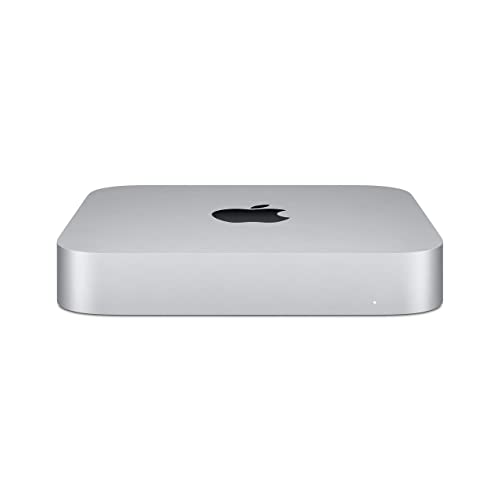
The M4 Mac mini is Apple's most affordable desktop and one of the most capable compact computers at its price. The M4 chip handles video editing, photo work, and software development with headroom to spare. The 2024 redesign shrank the footprint to roughly 5 by 5 inches. Ports include three USB-C (Thunderbolt 4), two USB-A, HDMI 2.1, and a front-panel USB-C for quick peripheral connections. The unit runs silently under most workloads. MacOS Sequoia integration with iPhone Mirroring and Continuity Camera expands the use case for Apple ecosystem users. The base 16 GB unified memory configuration is sufficient for most tasks; the 24 GB upgrade is worth it for creative professionals.

Intel NUC 14 Pro - Best for Business and IT Deployments
The Intel NUC 14 Pro is built around an Intel Core Ultra 5 or Core Ultra 7 processor and is designed for reliability in business environments. The chassis is under 1 liter, mounts to a VESA bracket, and ships barebones (no RAM or storage) or pre-configured. The vPro platform enables remote management for IT departments. Dual DDR5 SO-DIMM slots and two M.2 slots give it upgrade headroom unusual in this size class. Three display outputs (HDMI + two Thunderbolt 4) support complex monitor configurations. Quiet operation and a 3-year warranty make it a standard choice for corporate desktop refreshes. Buyers who need Windows 11 Pro out of the box should choose a pre-configured SKU.

Lenovo ThinkCentre M75q Tiny - Best for Office Workloads
The ThinkCentre M75q Tiny is Lenovo's small form factor business desktop running an AMD Ryzen Pro processor. The 1.1-liter chassis is one of the most mature platforms in the tiny PC category, with a well-established driver ecosystem and broad enterprise support. Dual-channel DDR4 memory, a PCIe NVMe primary drive, and a 2.5-inch secondary bay give storage flexibility. Lenovo's Vantage software handles driver updates and diagnostics. The optional VESA mount bracket and dust filter are practical additions for office deployments. A wide range of pre-configured SKUs makes it easy to match spec to budget. Warranty options extend to 5 years with on-site service, which is hard to match in the compact desktop category.
ASUS ROG NUC 970 - Best for Power Users
The ASUS ROG NUC 970 is the outlier on this list: a compact desktop that actually runs a discrete NVIDIA RTX 4070 GPU in a 2.5-liter chassis. An Intel Core Ultra 9 processor and 64 GB DDR5 RAM handle demanding workloads. Three Thunderbolt 4 ports and two HDMI 2.1 outputs support up to four displays. At it is significantly more expensive, but it replaces both a desktop tower and a dedicated GPU for users who need GPU-accelerated tasks (3D rendering, machine learning, high-refresh gaming) and cannot accept a large case. The thermal performance is the main trade-off: sustained GPU loads push fan noise into audible range, so placement matters in a quiet workspace.
How to choose
What to consider
Start with your operating system preference, since macOS requires Apple hardware and locks you to a specific product line. For Windows or Linux, the choice comes down to upgradeability versus footprint. Mini PCs under 1 liter are nearly impossible to upgrade beyond RAM and storage; SFF desktops allow GPU swaps and additional drives. Match RAM to workload: 16 GB covers most home office use, 32 GB suits video editing and virtualization. Check display output ports before buying if you run multiple monitors. For business buyers, look for a warranty of at least 3 years and a barebones option if standardized internal components are required.
What to consider
For more desk setup ideas, see our guide to [best compact desks](/articles/best-compact-desk) and [best monitor arms for small desks](/articles/best-monitor-arms). For how we evaluate products, visit our [methodology](/methodology).
Common questions
A mini PC is typically a palm-sized box under 1 liter in volume, often without an optical drive or expansion slots. A small form factor (SFF) desktop is larger, usually 5 to 15 liters, but supports standard desktop components like full-size RAM, a dedicated GPU, and additional storage drives. Mini PCs prioritize portability; SFF desktops prioritize upgradeability.
Entry-level compact desktops with integrated graphics handle 1080p editing in apps like DaVinci Resolve or Premiere for short timelines. For 4K editing or long-form projects, look for a compact desktop with a dedicated GPU or at least an Intel Core Ultra or AMD Ryzen 7 processor. RAM of 16 GB or more is a bigger bottleneck than physical size for editing workloads.
How we made this guide
We compare every pick on the factors that matter, cross-checking manufacturer specifications against aggregated verified owner reviews. We rank independently and never take payment for placement. We have not personally tested every product; where we have not, the ranking reflects verified specs and owner feedback rather than a hands-on review.
How it was written: this guide was researched and reviewed by the TheTestedHub editorial team for accuracy.
Affiliate disclosure: TheTestedHub is reader-supported. When you buy through links on our site, we may earn a commission at no extra cost to you.
More guides

Your Docking Station Match: CalDigit TS4 and More

Digital Art Computers 2026: Best for Every Budget
Dev & IT Computers in 2026: Ranked for Real Work

Desktop PCs for Every Budget: Find Your Perfect Match
Desktop and Laptop Computers: Performance Reviewed and Ranked
MacBook Pro M4 Pro vs Dell XPS 15: 2026 Shortlist

Buy the Best DIY Computer in 2026: Corsair One i300
