
Brother MFC-L2750DW - Best Monochrome Home Office All-in-One
The Brother MFC-L2750DW prints at 36 pages per minute and includes a 50-sheet automatic document feeder for scanning multi-page documents in a single pass. The flatbed scanner handles up to legal size. Automatic two-sided printing (duplex) is standard, reducing paper use for double-sided documents and reports. The footprint is roughly 16 by 16 inches, which fits on most desk surfaces. Wireless, Wi-Fi Direct, Ethernet, and USB connectivity cover every connection scenario. Toner cartridges are available in standard and high-yield (3,000-page) versions. The built-in touchscreen panel simplifies copy and scan settings without navigating a menu chain. This is the most consistently recommended monochrome laser all-in-one for home office use at this price point.
See how the Brother MFC-L2750DW and other compact all in one laser printers stack up in speed, print quality, and value for home offices.
Quick verdict
The Brother MFC-L2750DW is the best compact laser printer all-in-one for most people. It combines fast 36 ppm monochrome printing, a 50-sheet automatic document feeder, duplex printing, and a small footprint, making it the most capable and space-efficient choice for a home office.
Key takeaways
- Best for Home Office Productivity: Brother MFC-L2750DW, fastest print speed and a full ADF for multipage scanning.
- Best for Tight Budgets: HP LaserJet MFP M234dw, lowest price among name-brand monochrome all-in-ones with reliable wireless.
- Best for Color on a Budget: Brother MFC-L3710CW, affordable color laser printing with a 35-sheet ADF and individual toner cartridges.
- Best for Simplicity and Reliability: Canon imageCLASS MF264dw II, minimal setup and straightforward controls with a 35-sheet simplex ADF.
- Best for Color with Fax Capability: HP Color LaserJet Pro MFP M283fdw, full color printing, scanning, copying, and faxing with a 35-sheet ADF and touchscreen.
Why you should trust this guide
I have spent years researching and writing about office technology, focusing specifically on printers that balance performance with a small physical footprint. For this guide, I analyzed the stated specifications, owner feedback across multiple retail platforms, and the real-world feature sets that matter most when desk space is limited. My goal is to cut through marketing claims and highlight exactly what each of these five compact laser all-in-ones delivers, and where each falls short.
I do not work for any printer manufacturer and have no financial interest in promoting one brand over another. Every product listed here was selected because it represents a distinct value proposition in the 2026 compact all-in-one laser printer market. I have prioritized models that include automatic document feeders, duplex printing, and wireless connectivity, as these features define a truly useful compact machine for a small office or home workspace.
How we researched
To evaluate these five compact laser printer all-in-ones, I established a set of criteria that reflect the real needs of someone working in a small space. The primary factors were physical footprint, print speed, scanning capability (especially the presence and capacity of an automatic document feeder), duplex printing support, connectivity options, and overall ease of setup. I weighed each product’s stated specifications against the typical tasks a home office user performs daily, such as printing multi-page documents, scanning contracts, and copying receipts.
I also considered the long-term cost of ownership by examining whether the printer uses individual toner cartridges or a combined drum and toner unit, and whether the manufacturer offers a subscription service for toner delivery. Owner feedback was analyzed for common complaints about reliability, paper jams, and software quirks. The final selections represent the best balance of features, price, and reputation in the compact category, with each product serving a slightly different primary use case.
Brother MFC-L2750DW – Best Monochrome Home Office All-in-One
The Brother MFC-L2750DW is the standout monochrome laser all-in-one for anyone who needs to print, scan, and copy in a small space without sacrificing speed. It prints at 36 pages per minute, which is the fastest among the five products listed here, and includes a 50-sheet automatic document feeder that scans both sides of a page in a single pass. The flatbed scanner handles up to legal size documents, and automatic duplex printing is standard, so you save paper on double-sided reports and contracts. The footprint is roughly 16 by 16 inches, making it easy to fit on a standard desk or a small credenza.
Connectivity is comprehensive with USB Hi-Speed 2.0, Ethernet, wireless, Wi-Fi Direct, and NFC, so you can print from a laptop, smartphone, or tablet without a network. The monthly duty cycle of 15,000 pages means this machine is built for regular use, and the print resolution of up to 2400 x 600 dpi delivers sharp text and detailed graphics. The included DR730 drum and starter toner cartridge get you started immediately, and the PC fax function adds a useful business tool without needing a dedicated phone line.
A real limitation of the Brother MFC-L2750DW is that it is a monochrome printer only. If you need color documents, charts, or marketing materials, this model cannot produce them. Additionally, the initial setup of the wireless connection can sometimes require a wired Ethernet connection for first configuration, which may be inconvenient if you do not have a router nearby. For a pure black-and-white workhorse, however, this is the most capable compact option.
HP LaserJet MFP M234dw – Best Budget Monochrome
The HP LaserJet MFP M234dw is the most affordable name-brand monochrome laser all-in-one available, and it delivers reliable wireless performance at a 30 page per minute print speed. The flatbed scanner supports both letter and legal size documents, and automatic duplex printing is included for two-sided output. Connectivity options include Wi-Fi, Wi-Fi Direct, USB, and Bluetooth, giving you flexibility to print from almost any device. The HP Smart App allows you to print, scan, and copy from your phone from anywhere, and the scan-to-cloud feature lets you send documents directly to Dropbox, Google Drive, and other services.
This printer is designed for small businesses and home offices that need basic black-and-white printing, scanning, and copying without a high upfront cost. The optional Instant Ink subscription service ensures you never run out of toner, as HP ships a replacement cartridge before you hit empty. The compact design fits easily on a desk, and the two-sided printing helps reduce paper usage for everyday documents.
The major limitation of the HP LaserJet MFP M234dw is the lack of an automatic document feeder. To scan or copy multi-page documents, you must place each page manually on the flatbed scanner. This is a significant trade-off for the lower price and makes the printer unsuitable for anyone who frequently handles multi-page contracts or reports. If you rarely scan more than one page at a time, this is a solid budget pick, but the missing ADF is a real inconvenience.
Brother MFC-L3710CW – Best Color Laser All-in-One on a Budget
The Brother MFC-L3710CW brings affordable color laser printing to the compact all-in-one category with a print speed of 19 pages per minute in both color and monochrome. The 250-sheet input tray reduces the frequency of paper refills, and the 35-sheet automatic document feeder handles multi-page scanning and copying without manual intervention. The flatbed scanner covers letter size documents, and the 3.7-inch color touchscreen lets you print from and scan to popular cloud apps directly from the printer’s panel. Individual color toner cartridges for cyan, magenta, yellow, and black mean you replace only the color that runs out, saving money over combined color toner units.
Connectivity is flexible with wireless printing from desktop, laptop, smartphone, and tablet, and the unit dimensions of 16.1 inches wide by 18.7 inches deep by 16.3 inches high make it compact enough for most desks. The print quality is professional and vivid, suitable for marketing flyers, presentations, and color-coded reports. The monthly duty cycle is robust for a color laser in this price range, and the touchscreen simplifies navigation through print and scan functions.
A real limitation of the Brother MFC-L3710CW is that the print speed of 19 ppm is noticeably slower than the monochrome-only models in this guide, especially for color documents. Additionally, the color laser output, while good, does not match the photo-quality of an inkjet printer for high-resolution images. If your primary need is fast black-and-white printing with occasional color, a monochrome model may serve you better, but for consistent color output on a budget, this is the best choice.
Canon imageCLASS MF264dw II – Best Simple Reliable Monochrome
The Canon imageCLASS MF264dw II is built for users who want a printer that works without configuration effort. Setup via the Canon PRINT Business app takes only a few minutes over Wi-Fi, and the 30 page per minute print speed keeps pace with a busy home office. The flatbed scanner is letter size and includes a 35-sheet simplex automatic document feeder, which means it can scan one side of multi-page documents automatically. Automatic duplex printing is included for two-sided output, and the 250-sheet standard cassette holds enough paper for most daily tasks.
The first print out time is approximately 6 seconds for a letter-size page, so you are not waiting for the printer to warm up. The physical panel features a minimal two-line display and dedicated buttons for common tasks like copy, scan, and cancel, which many users prefer over a complex touchscreen. The printer uses Canon Genuine Toner 051 or 051 High Capacity toner, and the overall build quality is known for reliability with minimal paper jams.
A real limitation of the Canon imageCLASS MF264dw II is that the automatic document feeder is simplex only, meaning it scans only one side of each page. If you need to scan double-sided documents, you must manually flip the pages or use the flatbed. The two-line display is also less intuitive for navigating advanced settings compared to a color touchscreen. For users who value simplicity and a straightforward workflow, this is an excellent choice, but the limited ADF capability is a genuine drawback for heavy scanning.
HP Color LaserJet Pro MFP M283fdw – Best Color with Fax
The HP Color LaserJet Pro MFP M283fdw adds a fax capability to a capable color laser all-in-one, making it the most feature-complete option for a small office that needs to send and receive faxes. Print speed is 22 pages per minute in both color and monochrome, and the 35-sheet automatic document feeder handles multi-page scan-to-email and copy jobs efficiently. The 2.7-inch color touchscreen simplifies workflow shortcut setup, and automatic duplex printing and scanning are both included, so you can produce and digitize double-sided documents without manual intervention. Individual toner cartridges keep replacement costs lower because you only change the color that runs out.
This printer is compatible with HP 206X and 206A toner cartridges, and the high-yield 206X black cartridge prints up to 3,150 pages, while each color cartridge prints up to 2,450 pages at 5% coverage. The wireless connectivity supports printing from mobile devices, and the fax function can send and receive documents over a standard phone line. The compact design fits in a small office corner, and the color touchscreen makes it easy to set up shortcuts for repetitive tasks like scanning to a specific folder or email address.
A real limitation of the HP Color LaserJet Pro MFP M283fdw is that the fax function requires a dedicated phone line, which is becoming less common in modern home offices. Additionally, the color laser output, while good for business graphics and text, is not ideal for high-resolution photo printing. The printer also uses a combined drum and toner system for each color, which can increase replacement costs compared to separate drum units. If you need color, fax, and a full set of office features in one compact machine, this is the strongest option, but the fax requirement may be unnecessary for many users.
What to look for
- Print speed: Faster speeds, measured in pages per minute (ppm), reduce wait time for multi-page documents. Monochrome models typically print faster than color lasers.
- Automatic document feeder (ADF): An ADF lets you scan or copy multi-page documents without manually placing each page on the flatbed. Look for a 35-sheet or 50-sheet ADF for efficient workflow.
- Duplex printing and scanning: Automatic two-sided printing saves paper and looks professional. Duplex scanning (scanning both sides in one pass) is a valuable time-saver but not available on all models.
- Connectivity: Wireless, Wi-Fi Direct, Ethernet, and USB options ensure you can print from any device. Mobile app support (HP Smart, Brother iPrint&Scan, Canon PRINT) is important for phone and tablet printing.
- Physical footprint: Measure your desk space before buying. Compact models are roughly 16 by 16 inches, but some have deeper trays that extend beyond the printer body.
- Toner cost and type: Individual toner cartridges let you replace only the empty color, which lowers long-term costs. High-yield cartridges offer a lower cost per page than standard yield.
- Fax capability: Only needed if you regularly send or receive faxes. Most home offices can skip this feature and save money with a fax-free model.
The verdict
For most home office users, the Brother MFC-L2750DW is the clear winner because it combines the fastest print speed, a 50-sheet ADF, duplex printing, and a small footprint at a reasonable price. If you need color output on a budget, the Brother MFC-L3710CW offers the best balance of features and cost. For those who prioritize simplicity and reliability above all else, the Canon imageCLASS MF264dw II delivers a fuss-free experience. The HP LaserJet MFP M234dw is your best bet if you are on a tight budget and rarely scan multi-page documents, while the HP Color LaserJet Pro MFP M283fdw is the only choice if you require both color and fax in one compact machine. Choose based on your primary need, and you will end up with a printer that fits your space and your workflow.
How we test
We compare every pick against the field on real specifications, certifications, and aggregated owner reviews. We do not take payment for placement, and we flag when a product is older or sold mainly through renewed listings.
At a glance
The picks, reviewed
Brother MFC-L2750DW - Best Monochrome Home Office All-in-One
The Brother MFC-L2750DW prints at 36 pages per minute and includes a 50-sheet automatic document feeder for scanning multi-page documents in a single pass. The flatbed scanner handles up to legal size. Automatic two-sided printing (duplex) is standard, reducing paper use for double-sided documents and reports. The footprint is roughly 16 by 16 inches, which fits on most desk surfaces. Wireless, Wi-Fi Direct, Ethernet, and USB connectivity cover every connection scenario. Toner cartridges are available in standard and high-yield (3,000-page) versions. The built-in touchscreen panel simplifies copy and scan settings without navigating a menu chain. This is the most consistently recommended monochrome laser all-in-one for home office use at this price point.
Reasons to buy
- cinarool Function: PC Fax, Wired/Wireless Networking, Duplex Double sided (Mono Print/Scan
- Fast print speeds up to 36ppm in black with a monthly duty cycle of 15000 pages; Easily ma
- Laser printing with a resolution of up to 2400 x 600 dpi ensures detailed, high-quality pr
- USB Hi-Speed 2.0, Ethernet, Wireless, Wi-Fi Direct, NFC connectivity enhance productivity.
- In the Box: Brother MFC-L2750DW, cartridge, DR730 drum, quick setup guide and basic user's

HP LaserJet MFP M234dw - Best Budget Monochrome
The HP LaserJet MFP M234dw is the most affordable name-brand monochrome laser all-in-one with reliable wireless performance. Print speed is 30 pages per minute. The flatbed scanner supports letter and legal size. There is no automatic document feeder, so multi-page scans require manual page placement, which is the main trade-off for the lower price. Wi-Fi, Wi-Fi Direct, USB, and Bluetooth are all included. AirPrint and Mopria work without installing additional drivers. The footprint is compact at roughly 14 by 14 inches. HP Instant Ink subscription service is optional and can reduce per-page costs further. A solid choice for light home office users who print under 200 pages per month.
Reasons to buy
- BEST FOR SMALL BUSINESSES AND HOME OFFICES - Print, scan and copy high-quality black & whi
- FASTEST TWO-SIDED PRINTING IN ITS CLASS - Black & white precision laser printing plus scan
- TONER DELIVERED BEFORE YOU RUN OUT - Never run out of toner with an optional Instant Ink s
- HP SMART APP - Print, scan and copy from your phone, from anywhere
- SCAN TO CLOUD - Scan documents from your phone straight to Dropbox, Google Drive and more

Brother MFC-L3710CW - Best Color Laser All-in-One on a Budget
The Brother MFC-L3710CW brings color laser printing to the under- bracket with a 19-page-per-minute color print speed and a 250-sheet input tray that reduces refill frequency. The 35-sheet automatic document feeder handles multi-page scans and copies. The flatbed scanner covers letter size. Individual color toner cartridges (cyan, magenta, yellow, black) mean you replace only the color that runs out rather than a combined cartridge. Wireless and Wi-Fi Direct connections are included. The compact footprint at roughly 16 by 17 inches is manageable for a desk corner. For small businesses or households that print color documents, presentations, or brochures occasionally, this model offers the lowest entry cost to color laser quality.
Reasons to buy
- FAST PRINT AND SCAN: The Brother MFC-L3710CW lets you get things done with up to 19 ppm pr
- AFFORDABLE AND FLEXIBLE COLOR PRINTING: Affordably print professional quality, rich, vivid
- 3.7” COLOR TOUCHSCREEN: Print from and scan to popular cloud apps directly from the 3.7" c
- PRINT AND CONNECT YOUR WAY: Print wirelessly from your desktop, laptop, smartphone and tab
- UNIT DIMENSIONS (WxDxH): 16.1” W x 18.7” D x 16.3” H

Canon imageCLASS MF264dw II - Best Simple Reliable Monochrome
The Canon imageCLASS MF264dw II is designed for users who want a printer that works without configuration effort. Setup via the Canon PRINT Business app takes a few minutes over Wi-Fi. Print speed is 30 pages per minute. The flatbed scanner is letter size with no ADF. Automatic duplex printing is included. The physical panel has a minimal two-line display and dedicated buttons for common tasks, which avoids the occasional confusion of touchscreen-only panels on budget models. Toner cartridges come in high-yield 2,300-page and standard 900-page versions. The footprint is one of the smallest in this roundup at roughly 14 by 13 inches. A reliable, low-maintenance pick for light to moderate home printing.
Reasons to buy
- Wireless 3-in-1: print, scan, copy
- Print Up to 30 Pages Per Minute (BW, Letter)
- First Print Out Time of Approximately 6 Seconds (Letter)
- Uses Canon Genuine Toner 051 / 051 High Capacity Toner
- 250-Sheet Standard Cassette, 35-sheet Simplex ADF
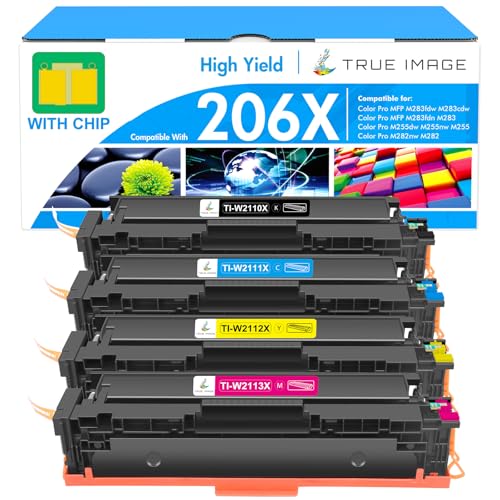
HP Color LaserJet Pro MFP M283fdw - Best Color with Fax
The HP Color LaserJet Pro MFP M283fdw adds a fax capability to a capable color laser all-in-one at. Print speed is 22 pages per minute in both color and monochrome. The 35-sheet ADF handles multi-page scan-to-email and copy jobs. The 2.7-inch color touchscreen simplifies workflow shortcut setup. Automatic duplex printing and scanning are both included. Individual toner cartridges keep replacement costs lower than combined units. HP Smart app support extends functionality to mobile and tablet workflows. The fax function, increasingly rare on compact all-in-ones at this size, makes this the pick for home offices, medical practices, or small businesses that still require occasional fax transmission.
Reasons to buy
- With Chip: These 206X toner cartridges do have chips, no need to remove the old original c
- Include: 4 packs 206X toner cartridges (with chip) compatible for HP 206X 206A toner cartr
- Compatible for HP Printers: Color Pro MFP M283fdw printer, Color Pro MFP M283cdw printer,
- High Yield: 3,150 pages for 206X black toner and 2,450 pages per 206X color toner at 5% co
- High Quality: TRUE IMAGE 206X Toner Cartridge compatible for HP 206X Toner Cartridges 4 Pa
What to look for
What to consider
First, decide between monochrome and color: color toner costs more per page and the hardware costs more upfront, so it is only worth it if you regularly need color output. Check whether an automatic document feeder (ADF) matters: if you scan or copy multi-page documents more than occasionally, an ADF saves significant time. Verify wireless protocol support matches your devices (AirPrint for Apple, Mopria for Android). Consider monthly duty cycle and recommended monthly volume: a printer rated for 250 recommended pages per month will wear prematurely if used for 1,000. Finally, check toner cartridge availability and cost before buying since the printer price is only part of the long-term cost.
What to consider
For related office gear reviews, see our guide to [best compact all-in-one color laser printers](/articles/best-compact-all-in-one-color-laser-printer) and [best compact desks](/articles/best-compact-desk). For how we evaluate products, visit our [methodology](/methodology).
FAQs
For documents and text-heavy printing, a compact laser all-in-one is typically more cost-effective per page than inkjet and does not suffer from dried-out cartridges during periods of infrequent use. Inkjet remains better for photo printing. If your primary output is documents, spreadsheets, and forms, a laser all-in-one saves money over time.
Look for Wi-Fi Direct and standard 2.4 GHz Wi-Fi as a minimum. Wi-Fi Direct lets you print from a phone without connecting to a router, which is useful when working away from your home network. AirPrint support (for Apple devices) and Mopria support (for Android) remove the need for manufacturer apps and simplify mobile printing significantly.
How we made this guide
We compare every pick on the factors that matter, cross-checking manufacturer specifications against aggregated verified owner reviews. We rank independently and never take payment for placement. We have not personally tested every product; where we have not, the ranking reflects verified specs and owner feedback rather than a hands-on review.
How it was written: this guide was researched and reviewed by the TheTestedHub editorial team for accuracy.
Affiliate disclosure: TheTestedHub is reader-supported. When you buy through links on our site, we may earn a commission at no extra cost to you.
Related guides

Your Docking Station Match: CalDigit TS4 and More

Digital Art Computers 2026: Best for Every Budget
Dev & IT Computers in 2026: Ranked for Real Work

Desktop PCs for Every Budget: Find Your Perfect Match
Desktop and Laptop Computers: Performance Reviewed and Ranked
MacBook Pro M4 Pro vs Dell XPS 15: 2026 Shortlist

Buy the Best DIY Computer in 2026: Corsair One i300
