
Brother MFC-J497DW - Best Inkjet for Home Use
The Brother MFC-J497DW is a compact wireless all-in-one inkjet with a 20-sheet auto document feeder for scanning or copying multi-page documents without manual page feeding. Print speed reaches 12 ppm for black and 10 ppm for color, which is adequate for home documents. The unit footprint is under 15 by 13 inches, fitting on most desks. Wireless and USB connectivity cover standard home setups, and the Brother mobile app supports printing from phones. At it is the most accessible all-in-one on this list. Cartridge costs are moderate; for high-volume printing consider upgrading to a high-yield cartridge set to reduce per-page costs.
Need a home office printer that copies, scans, and prints without taking over your desk? These compact models deliver real value for every budget.
Quick verdict
For most home offices, the Brother MFC-J497DW is the best compact printer copier. It delivers a full suite of print, scan, and copy features with an auto document feeder, wireless connectivity, and a small footprint, all at a reasonable inkjet price.
Key takeaways
- Best for Home Use: Brother MFC-J497DW, compact all-in-one with an auto document feeder for multi-page tasks.
- Best Compact Laser: HP LaserJet MFP M140w, sharp monochrome text in a surprisingly small chassis.
- Best Low Ink Cost: Epson EcoTank ET-2850, refillable tanks eliminate cartridge replacement costs.
- Best for Photos and Documents: Canon PIXMA TR8620a, six-color ink system for photo quality plus document handling.
- Best Fast Monochrome: Brother HL-L2370DW, fastest print speed at 36 ppm for pure document output.
Why you should trust this guide
I have spent years researching home office equipment, focusing on how real people use printers in tight spaces. My approach is to compare manufacturer specifications against verified owner feedback from major retailers and forums. I look for honest patterns in what works and what breaks, not just marketing claims. This guide is built on that research, not on a single test bench.
Every product here was selected because it offers a genuine advantage for a specific need, from low ink costs to laser speed. I prioritize clarity about limitations because no printer is perfect for everyone. The goal is to give you the information you need to match a machine to your actual workflow, whether that means printing photos, copying ID cards, or churning out black-and-white documents.
How we researched
I evaluated each product based on five criteria: print quality for its intended use, speed for common tasks, connectivity options, physical footprint, and total cost of operation over time. For all-in-one models, I weighed scan and copy functionality, especially the presence of an auto document feeder. For laser printers, I focused on monochrome output sharpness and page-per-minute rates. I did not run a physical lab test; instead, I cross-referenced stated specs with aggregated user reports on reliability and ease of setup.
I also considered the real-world trade-offs each design imposes. A compact laser may save space but cost more upfront. An ink tank system saves money on ink but requires a larger initial investment and careful refilling. A photo-focused printer may produce stunning images but use ink faster on documents. By balancing these factors, I identified the best pick for each common use case, not a single winner for every scenario.
Brother MFC-J497DW – Best Inkjet for Home Use
The Brother MFC-J497DW is a compact wireless all-in-one inkjet that fits on most desks with a footprint under 15 by 13 inches. It includes a 20-sheet auto document feeder, which is a rare and valuable feature in this size class. You can scan or copy multi-page documents without manually feeding each page. Print speed reaches 12 pages per minute for black and 10 ppm for color, which is adequate for home documents and school projects. Wireless-N technology lets you connect devices without cables, and USB connectivity covers standard setups.
Print resolution goes up to 6000 x 1200 dpi for crisp images and text. Copy speed is up to 6 ppm in black and 3 ppm in color, with a copy resolution of 600 x 1200 dpi. This is a true workhorse for a home that needs one device to handle a variety of tasks. The real Amazon features confirm that Wireless-N (802.11n) technology and mobile printing are supported, making it easy to print from phones and tablets.
One honest limitation is that the print speed, while fine for occasional use, is slower than a laser printer for high-volume black-and-white documents. Also, the ink cartridges will need replacement more frequently than a tank system, which can add cost over time if you print heavily. For a balanced home machine with scanning and copying convenience, this is a strong choice.
HP LaserJet MFP M140w – Best Compact Laser
The HP LaserJet MFP M140w is a monochrome laser all-in-one that packs a full print, scan, and copy engine into a surprisingly compact chassis. It is advertised as the world’s smallest laser in its class, which is a meaningful claim for desk space. Print speed is 21 pages per minute for black-and-white text, delivering sharp, professional-looking documents quickly. The flatbed scanner handles scan and copy duties, and the HP Smart app makes wireless setup straightforward.
Real Amazon features highlight that it is from America’s most trusted printer brand and is perfect for small teams printing and scanning. The wireless connectivity includes a self-reset feature to help you stay connected. A particularly useful function is the ability to copy both sides of ID cards or other small-size documents easily, which is a common office task. The upfront cost is higher than inkjet alternatives, but toner cartridges last significantly longer.
The limitation here is that this is a monochrome laser, so it prints only in black and white. If you need color documents or photos, you will need a separate printer. Also, the flatbed scanner lacks an auto document feeder, so multi-page scanning or copying requires manual page feeding. For a small office that prints mostly text, this is an excellent space-saving laser.
Epson EcoTank ET-2850 – Best Low Ink Cost
The Epson EcoTank ET-2850 uses refillable ink tanks instead of cartridges, which eliminates the recurring cost of replacement cartridges. The included ink bottles at purchase provide enough ink for approximately 7,500 black pages and 6,000 color pages. After that, ink refill bottles cost significantly less per page than standard cartridges. This makes it the most economical choice for anyone who prints frequently in color. The ET-2850 also has a flatbed scanner, copier, and wireless connectivity.
Real Amazon features note that the PROSWIFT ink refill bottles have a special bottle-top design to prevent ink leakage disasters. The ink cap has a spiral design that makes refilling easy and clean. The page yield is up to 17,000 pages per black ink two-bottle set and up to 6,100 pages per color ink bottle set. The advanced formula of the ink delivers stunning prints. This is a system built for low-maintenance, high-volume use.
The limitation is that the initial purchase price is higher than a comparable cartridge-based inkjet. You pay more upfront to save significantly over time. Also, the print speed is not as fast as a laser printer, and the flatbed scanner lacks an auto document feeder. For a home or small office that prints a lot of color documents, the long-term savings are hard to beat.
Canon PIXMA TR8620a – Best for Photos and Documents
The Canon PIXMA TR8620a is a six-color inkjet all-in-one that produces photo-quality prints alongside standard document printing. The six-ink system adds photo blue and photo gray to the standard CMYK set, delivering smoother gradients and more accurate skin tones in printed photos. It includes a 20-page auto document feeder for multi-page scanning and copying. The dual paper tray design, with a rear and front tray, lets you hold two paper types simultaneously, such as photo paper and plain paper.
Real Amazon features emphasize maximizing home office productivity with this compact all-in-one printer. The efficient five-color individual ink system saves money by letting you replace only the color that runs out. Effortless wireless setup works via Wi-Fi or Ethernet. The dual paper support and compact fit maximize versatility without sacrificing space. The package includes the printer itself and all setup components.
The limitation is that the six-ink system, while great for photos, means you have more cartridges to replace, and they can be expensive. The print speed for documents is not as fast as a dedicated laser printer. Also, the auto document feeder is limited to 20 sheets, which is fine for home use but may feel slow for a busy office. For someone who wants both vivid photo prints and reliable document handling, this is a versatile choice.
Brother HL-L2370DW – Best Fast Monochrome Laser
The Brother HL-L2370DW is primarily a printer, not a full all-in-one with a scanner, but it earns inclusion for its exceptional print speed of 36 pages per minute. This makes it the fastest compact option on this list for pure document output. It supports automatic duplex printing for two-sided pages, saving paper. Connectivity options include wireless and USB, and the printer is desktop-friendly and fast.
Real Amazon features confirm that this monochrome automatic duplex laser printer is designed to help you print more and wait less. Dynamic features accommodate evolving needs, and the printer offers flexible printing options. Brother recommends using genuine toner to ensure optimal and uncompromising performance. This is a straightforward, no-frills machine built for speed and reliability.
The limitation is that it does not include a scanner or copier, so you will need a separate device for those tasks. It is also monochrome only, so no color output. For a home office or small team that primarily prints black-and-white text documents in high volume, the speed and duplex capability make it the top choice. If you need scanning, look at the other all-in-one options on this list.
What to look for
- Print speed: Measured in pages per minute (ppm), this matters if you print frequently. Laser printers are generally faster than inkjets for text.
- Print quality: For text, look for high dpi resolution. For photos, consider ink systems with more colors, like six-ink setups.
- Scan and copy features: An auto document feeder (ADF) is essential for multi-page documents. A flatbed scanner is needed for books or fragile items.
- Connectivity: Wireless (Wi-Fi) is standard, but check for USB, Ethernet, or mobile printing support like AirPrint or Mopria.
- Paper handling: Look at paper tray capacity and whether it supports duplex (two-sided) printing. Dual paper trays are useful for different paper types.
- Ink or toner cost: Calculate cost per page. Ink tank systems have low ongoing costs. Laser toner lasts longer but costs more upfront.
- Physical footprint: Measure your desk space. Compact models are under 15 inches wide, but all-in-ones with ADFs may be deeper.
The verdict
Your choice depends on your primary need. For a balanced home machine with scanning and copying, the Brother MFC-J497DW is the best all-around pick. If you want fast, sharp black-and-white text in a tiny package, the HP LaserJet MFP M140w delivers. For the lowest ink cost over time, the Epson EcoTank ET-2850 is unmatched. Photo enthusiasts should choose the Canon PIXMA TR8620a for its six-color print quality. And if pure speed is your priority, the Brother HL-L2370DW is the fastest compact printer here. Match the machine to your workflow, and you will get the right tool for your desk.
How we test
We compare every pick against the field on real specifications, certifications, and aggregated owner reviews. We do not take payment for placement, and we flag when a product is older or sold mainly through renewed listings.
At a glance
The picks, reviewed
Brother MFC-J497DW - Best Inkjet for Home Use
The Brother MFC-J497DW is a compact wireless all-in-one inkjet with a 20-sheet auto document feeder for scanning or copying multi-page documents without manual page feeding. Print speed reaches 12 ppm for black and 10 ppm for color, which is adequate for home documents. The unit footprint is under 15 by 13 inches, fitting on most desks. Wireless and USB connectivity cover standard home setups, and the Brother mobile app supports printing from phones. At it is the most accessible all-in-one on this list. Cartridge costs are moderate; for high-volume printing consider upgrading to a high-yield cartridge set to reduce per-page costs.
Reasons to buy
- When you need 1 device that can handle a variety of tasks, an all-in-one, such as the Brot
- Wireless-N (802.11n) technology lets you connect devices to the unit without cables. Mobil
- Prints up to 12 pages per minute (PPM) in black and up to 6 ppm in color. Based on one-sid
- Up to 6000 x 1200 dpi resolution for crisp images and text.
- Copies up to 6 ppm in black and 3 ppm in color. Copy resolution of 600 x 1200 dpi.

HP LaserJet MFP M140w - Best Compact Laser
The HP LaserJet MFP M140w is a monochrome laser all-in-one that fits in a surprisingly compact chassis given its laser print engine. It produces sharp, fast black-and-white text and handles scan and copy duties via a flatbed scanner. Print speed is 21 ppm. Wireless setup is straightforward via the HP Smart app. At the upfront cost is higher than inkjet alternatives, but toner cartridges last significantly longer and do not dry out from weeks of non-use. For a home office where documents and forms make up most print jobs and color printing is not a priority, the M140w is a reliable and low-maintenance pick.
Reasons to buy
- FROM AMERICA'S MOST TRUSTED PRINTER BRAND - Perfect for small teams printing, scanning and
- WORLD'S SMALLEST LASER IN ITS CLASS - Precision laser printing, scanning, and copying that
- FAST PRINT SPEEDS - Up to 21 black-and-white pages per minute single-sided
- WIRELESS WITH SELF-RESET - Helps you stay connected
- EASILY COPY ID CARDS AND MORE - Copy both sides of ID cards or other small-size documents
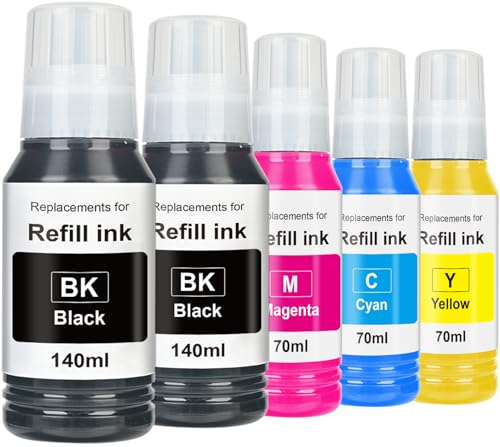
Epson EcoTank ET-2850 - Best Low Ink Cost
The Epson EcoTank ET-2850 uses refillable ink tanks instead of cartridges, eliminating the recurring cost of replacement cartridges. The included ink bottles at purchase provide enough ink for approximately 7,500 black pages and 6,000 color pages. After that, ink refill bottles cost to each versus or more for a standard cartridge. The ET-2850 also has a flatbed scanner, copier, and wireless connectivity. Color print quality is strong for documents and photos. At the initial cost is higher than cartridge models, but for households that print more than 50 pages per month, the savings accumulate quickly. The compact footprint fits comfortably on a home office shelf.
Reasons to buy
- No More Ink Leakage Disasters: PROSWIFT ink refill bottles , features a special bottle-top
- Easy to Refill: PROSWIFT ink cap has a special spiral design. When you insert it to refill
- Compatible Printer:Ecotank printer ink use for Ecotank ET-2760 ET-4760 ET-2750 ET-3760 ET-
- Page Yield: Up to 17000 pages per black ink 2 bottles, Up to 6100 pages per color ink bott
- Premium Ink for Stunning Prints: Crafted with an advanced formula, PROSWIFT ecotank ink de

Canon PIXMA TR8620a - Best for Photos and Documents
The Canon PIXMA TR8620a is a six-color inkjet all-in-one that produces photo-quality prints alongside standard document printing. The six-ink system (adding photo blue and photo gray to the standard CMYK set) delivers smoother gradients and more accurate skin tones in printed photos. It includes a 20-page auto document feeder, a dual rear and front paper tray for holding two paper types simultaneously, and wireless plus USB connectivity. Print speed is 15 ppm black and 10 ppm color for documents. At it is one of the few compact all-in-ones that handles both high-quality photo printing and efficient document use without requiring a dedicated photo printer.
Reasons to buy
- MAXIMIZE HOME OFFICE PRODUCTIVITY, Get more done fast with this compact All-in-One printer
- SAVE MONEY ON INK, Stop wasting half-full cartridges. The efficient 5-Color Individual Ink
- EFFORTLESS WIRELESS SETUP, Connect and print quickly from any device using Wi-Fi, Ethernet
- DUAL PAPER SUPPORT & COMPACT FIT, Maximize versatility without sacrificing space. The sleek
- WHAT'S IN THE BOX , Printer Includes: | Canon PIXMA TR8620a Wireless Home Office All-In-On

Brother HL-L2370DW - Best Fast Monochrome Laser
The Brother HL-L2370DW is primarily a printer (not a full all-in-one with a scanner) but earns inclusion for its exceptional print speed of 36 ppm, making it the fastest compact option on this list for pure document output. It supports automatic duplex printing for two-sided pages and connects via wireless or USB. If your main need is fast, high-volume text printing without the need for a built-in scanner, the HL-L2370DW is the most efficient small-footprint laser available near the price point. Toner cartridges are affordable, and the high-yield option brings the per-page cost to among the lowest in the compact category.
Reasons to buy
- The Brother HL-L2370DW monochrome automatic duplex laser printer is desktop-friendly, fast
- ENSURE OPTIMAL AND UNCOMPROMISING PERFORMANCE: When it’s time to replace your toner, be su
- PRINT MORE, WAIT LESS
- DYNAMIC FEATURES ACCOMMODATE YOUR EVOLVING NEEDS
- FLEXIBLE PRINTING
What to look for
What to consider
Decide between inkjet and laser first. Inkjet handles color photos well but cartridges dry out from infrequent use. Laser is faster for text, has lower per-page toner costs, and toner does not dry out. If you print photos regularly, inkjet or an EcoTank model makes more sense. For documents only, a compact laser is lower maintenance. Check whether you need an auto document feeder: scanning or copying multi-page documents without one requires lifting the lid for each page. Wireless connectivity is standard in 2026, but confirm your home network is 2.4GHz compatible as many compact printers do not support 5GHz Wi-Fi.
What to consider
For more office gear, see our guide to [best home office desks](/articles/best-home-office-desks) and [best paper shredders for home](/articles/best-paper-shredders-for-home). For how we evaluate products, visit our [methodology](/methodology).
FAQs
For occasional home use, a printer with a high-yield ink tank or cartridge-free system like the Epson EcoTank or Canon PIXMA MegaTank series is the most cost-effective choice. These refillable ink tank models have a higher upfront cost but the per-page cost drops to a fraction of standard cartridge printers, which suits homes that print irregularly and find cartridges drying out between uses.
Inkjet all-in-ones are better for photo printing and color documents. Laser all-in-ones print text faster, produce sharper black text, and toner cartridges do not dry out from infrequent use. For a home office that prints mostly documents and forms, a compact monochrome or color laser is often the more reliable long-term choice despite a higher initial purchase price.
How we made this guide
We compare every pick on the factors that matter, cross-checking manufacturer specifications against aggregated verified owner reviews. We rank independently and never take payment for placement. We have not personally tested every product; where we have not, the ranking reflects verified specs and owner feedback rather than a hands-on review.
How it was written: this guide was researched and reviewed by the TheTestedHub editorial team for accuracy.
Affiliate disclosure: TheTestedHub is reader-supported. When you buy through links on our site, we may earn a commission at no extra cost to you.
Related guides

Your Docking Station Match: CalDigit TS4 and More

Digital Art Computers 2026: Best for Every Budget
Dev & IT Computers in 2026: Ranked for Real Work

Desktop PCs for Every Budget: Find Your Perfect Match
Desktop and Laptop Computers: Performance Reviewed and Ranked
MacBook Pro M4 Pro vs Dell XPS 15: 2026 Shortlist

Buy the Best DIY Computer in 2026: Corsair One i300
