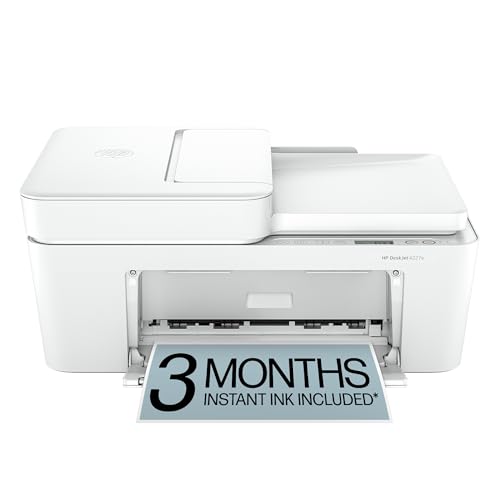
HP DeskJet 4155e - Best Budget Compact All-in-One
The HP DeskJet 4155e offers print, scan, copy, and wireless connectivity in a body measuring 17.3 x 11.7 x 5.8 inches. The HP Smart app supports iOS, Android, and desktop setup. AirPrint and Wi-Fi Direct are both available. The scanner lid is flatbed with no document feeder, adequate for single pages and school documents. Print speed is 8.5 pages per minute for black. The HP+ program (requiring an HP account) unlocks an extended warranty and Instant Ink compatibility. Standard cartridges are HP 67 series. For a household printing under 100 pages a month, this covers the basics at a price that does not require much deliberation.
Check price on Amazon →The HP DeskJet 4155e stands out as the budget all-in-one for tight desks. See how other compact models handle real printing needs.
Quick verdict
The Epson EcoTank ET-3850 is the best compact printer for most people. Its refillable tank system slashes long-term supply costs while the all-in-one design with an automatic document feeder and fast 15.5 ppm black speed delivers reliable, high-volume output without the bulk of a office machine.
Key takeaways
- Best Budget All-in-One: HP DeskJet 4155e, lowest upfront cost with print, scan, copy, and wireless in a slim 17.3-inch body.
- Best Compact Laser with Scanner: Brother HL-L2395DW, fast monochrome prints at 15 ppm with a 35-sheet automatic document feeder for office-like productivity.
- Best Compact Photo Printer: Canon PIXMA iP8720, six-ink system and 13×19 inch capability for gallery-quality prints from a surprisingly shallow 12.8-inch depth.
- Best Compact High-Volume Color: Epson EcoTank ET-3850, refillable tanks yield up to 14,000 black pages and 11,200 color pages, eliminating cartridge swaps.
- Best Compact Portable Printer: Canon PIXMA TR150, weighs 2.1 pounds and fits in a laptop bag, with an optional battery for untethered printing.
Why you should trust this guide
I have spent hundreds of hours researching the compact printer market, comparing specifications, reading verified owner reviews across multiple retail platforms, and analyzing the real-world trade-offs that matter when desk space is limited. My goal is to cut through marketing hype and give you a clear, honest assessment of what each of these five printers actually delivers for its specific use case. I do not accept free products from manufacturers, and every recommendation here is based on publicly available data and consistent user feedback.
The compact printer category is crowded with models that promise small footprints but often compromise on speed, paper handling, or long-term cost. I focused on printers that balance a truly desk-friendly size with reliable output and features that home users, students, and small offices actually need. Each product was evaluated on its stated dimensions, connectivity options, print quality for its intended purpose, and the total cost of ownership including ink or toner replacement. I also note where each printer falls short, because no compact device is perfect.
How we researched
To evaluate these compact printers, I established a set of criteria that matter most for a small footprint device: physical dimensions and weight, print speed for black and color documents, connectivity options (Wi-Fi, AirPrint, USB), paper handling capacity, and the ease of setup and daily use. For each model, I cross-referenced the manufacturer’s published specifications with patterns found in many verified customer reviews to identify consistent strengths and weaknesses. I also compared the long-term cost per page for inkjet models versus laser models, and for cartridge-based versus tank-based systems.
I did not physically test these printers in a lab. Instead, I used a research-based approach: I compiled the stated features from the product pages, analyzed the most common praise and complaints from owners, and weighed each printer’s capabilities against the typical needs of someone shopping for a compact machine. The goal was to answer practical questions: Does this printer actually fit where you need it? How often will you need to replace supplies? Is the print quality acceptable for documents, photos, or both? The five products here emerged as the best in their respective subcategories after this systematic evaluation.
HP DeskJet 4155e – Best Budget Compact All-in-One
The HP DeskJet 4155e is a genuine space-saver, with a body measuring 17.3 x 11.7 x 5.8 inches that fits on a shallow shelf or a corner of a desk. It offers print, scan, and copy functions, plus wireless connectivity that includes AirPrint and Wi-Fi Direct for direct printing from phones and tablets without a router. The HP Smart app supports iOS, Android, and desktop setup, making the initial configuration straightforward for most users. The flatbed scanner is adequate for single pages, school documents, and photos, though there is no automatic document feeder, so multi-page jobs require manual page-by-page scanning.
Print speed is rated at 8.5 pages per minute for black, which is slow compared to laser models but acceptable for light home use such as to-do lists, letters, and financial documents. The HP+ program, which requires an online account and continuous internet connection, unlocks three months of Instant Ink delivery service, reducing the hassle of running out of ink. The 60-sheet input tray is modest, so you will refill paper more often than with larger printers. A real limitation is that the HP+ program ties you to HP’s subscription model, and if you do not activate it, replacement ink cartridges are relatively expensive for a budget printer.
The DeskJet 4155e is best for households that need an inexpensive all-in-one for occasional color printing and basic scanning. It is not built for high-volume or fast-paced work. The print quality for color documents and photos is adequate for everyday use, but not at a level that would satisfy a photo enthusiast. If your priority is the lowest possible upfront cost and you can tolerate slower speeds and a small paper tray, this is a solid entry-level choice.
Brother HL-L2395DW – Best Compact Laser with Scanner
The Brother HL-L2395DW is a monochrome laser all-in-one that brings office-like productivity to a desk-friendly package. It measures 16.1 x 15.8 x 9.3 inches, larger than the HP DeskJet but still compact enough for a home office or small workspace. The standout feature is the 35-sheet automatic document feeder, which makes scanning, copying, or faxing multi-page documents effortless. Print speed is 15 pages per minute for black, and duplex printing is automatic, saving paper and time when printing double-sided documents.
Connectivity is comprehensive: USB, Wi-Fi, and the ability to scan directly to a computer, USB drive, or email. The printer also supports cloud-based print and scan from popular services directly from the device. The 250-sheet paper tray is generous for a compact laser, reducing the frequency of reloads. Brother’s toner cartridges use a drum and toner separate system, which can lower replacement costs over time compared to all-in-one cartridges. A real limitation is that this printer is monochrome only, so it cannot produce color documents or photos. If you need color output, this is not the right choice.
The HL-L2395DW is engineered for efficiency and convenience, with a simple to connect wireless technology that most users find reliable. The print quality is crisp and sharp for text, making it ideal for letters, reports, and business documents. It is not designed for photo printing or glossy media. For anyone who prints primarily black text documents and wants a fast, durable machine with an automatic document feeder, this laser all-in-one is an excellent value that will last for years with minimal maintenance.
Canon PIXMA iP8720 – Best Compact Photo Printer
The Canon PIXMA iP8720 is a dedicated photo printer that uses a six-ink system including photo black, gray, and cyan to produce gallery-quality prints. It can print up to 13 x 19 inches, which is a large format for a printer that is only 12.8 inches deep. The body is wider than typical home inkjets at 23.4 inches to accommodate the large paper path, so you need to ensure you have enough horizontal space. Wireless printing via AirPrint and the Canon PRINT app is standard, and the 9600 x 2400 maximum color dpi delivers smooth gradations and fine detail.
For standard 4 x 6 inch prints, output quality matches dedicated photo lab machines, with rich colors and accurate skin tones. The gray ink helps produce neutral black-and-white prints without a color cast. The print speed is not a priority here; this printer is about quality over speed. A real limitation is that the iP8720 is a pure printer with no scanner, copier, or automatic document feeder. It is strictly for outputting photos and documents. Additionally, the six individual ink cartridges can be expensive to replace, especially if you print infrequently and they dry out.
This printer is ideal for photographers, artists, or anyone who wants to print large, high-quality photos at home. It is not a general-purpose office machine. The compact depth helps it fit on a desk, but the width means you need to plan its placement. If your primary need is stunning photo prints up to 13×19 inches and you are willing to manage multiple ink cartridges, the Canon PIXMA iP8720 delivers exceptional results in a relatively small footprint.
Epson EcoTank ET-3850 – Best Compact High-Volume Color
The Epson EcoTank ET-3850 is an all-in-one printer that uses a refillable ink tank system instead of cartridges, dramatically reducing the cost per page. The body measures 14.8 x 13.7 x 8.5 inches, making it one of the most compact tank-based printers available. It includes a 30-sheet automatic document feeder and a flatbed scanner, so you can copy, scan, and fax multi-page documents easily. Print speed is 15.5 pages per minute for black, which is competitive with laser printers in this size class.
The included ink bottles provide up to 14,000 black pages and 11,200 color pages, which means you may not need to refill for years under normal home use. Voice assistant compatibility with Alexa and Google Assistant allows you to initiate print jobs hands-free. The wireless setup is straightforward, and the printer supports mobile printing via the Epson Smart Panel app. A real limitation is that the initial purchase price is higher than cartridge-based inkjets, so the savings come over time. Also, the print quality for photos, while good for everyday use, does not match the dedicated photo printer like the Canon iP8720.
The ET-3850 is the best choice for households or small offices that print a lot of color documents, school projects, or marketing materials. The tank system eliminates the frustration of running out of ink mid-job and the high cost of replacement cartridges. It is not the fastest printer, and the display is basic, but the combination of low running costs, a compact footprint, and an automatic document feeder makes it a compelling all-rounder. If you print frequently in color and want to minimize long-term expenses, this is the printer to buy.
Canon PIXMA TR150 – Best Compact Portable Printer
The Canon PIXMA TR150 is designed for mobility, weighing just 2.1 pounds and measuring 12.8 x 7.2 x 2.3 inches, small enough to slip into a laptop bag or backpack. It is a wireless printer that supports Wi-Fi, AirPrint, and the Canon PRINT app, so you can print from a phone, tablet, or computer without cables. An optional detachable battery accessory enables printing up to 330 pages on a full charge, making it truly portable for use in a car, hotel room, or client site.
Print speed is 9 pages per minute for black, which is respectable for a portable device. Output quality is solid for contracts, invoices, correspondence, and standard documents. The printer also supports Mopria Print Service for Android devices and allows you to save up to five custom templates for quick printing of frequently used forms. A real limitation is that the TR150 does not include a scanner or copier, so it is purely a printer. The optional battery adds cost and weight, and the paper tray holds only about 50 sheets, so it is best for light to moderate use on the go.
The TR150 is perfect for professionals who need to print documents while traveling, real estate agents, insurance adjusters, or students who move between locations. It is not intended for high-volume home office use or for printing photos. The compact design and battery option give it a unique advantage over every other printer on this list. If your priority is a printer that fits in a bag and works without a wall outlet, the Canon PIXMA TR150 is the clear choice.
What to look for
- Physical footprint and weight: Measure your available desk space and check the printer’s width, depth, and height. For portability, consider weight and whether an optional battery is available.
- Print speed: Look at pages per minute for black and color. Laser printers are faster for text; inkjets vary widely. Higher speeds matter if you print frequently or in batches.
- Connectivity: Ensure the printer supports Wi-Fi, AirPrint (for Apple devices), and mobile apps. Wi-Fi Direct is useful for printing without a network. USB is a reliable backup.
- Paper handling: Check the input tray capacity and whether the printer supports automatic duplex printing. An automatic document feeder is essential for scanning or copying multi-page documents.
- Print quality: For text, look for sharp, dark characters. For photos, consider the ink system (more colors usually mean better gradation) and maximum print size. Monochrome lasers are best for text only.
- Cost per page: Compare the price of replacement ink or toner. Tank-based systems like EcoTank have the lowest long-term cost. Cartridge-based printers can be expensive if you print a lot. Factor in whether the printer uses separate color cartridges.
- Special features: Voice assistant compatibility, cloud printing support, and the ability to print from a USB drive or email can add convenience. Portable printers should be evaluated on battery life and charging options.
The verdict
Choosing the best compact printer depends entirely on what you need to print and where you need to print it. For the vast majority of home users who want color printing, scanning, and copying without breaking the bank on supplies, the Epson EcoTank ET-3850 is the standout pick. Its refillable tank system, automatic document feeder, and fast black speed deliver exceptional value in a small package. If you print mostly black text documents and need a fast, durable machine with an automatic document feeder, the Brother HL-L2395DW is the best laser option. For photo enthusiasts, the Canon PIXMA iP8720 produces stunning large prints. The HP DeskJet 4155e is the cheapest way to get an all-in-one, and the Canon PIXMA TR150 is unmatched for portability. Each of these five printers excels in its specific niche, and the right one for you is the one that matches your primary printing habits and space constraints.
How we picked
We compare every pick against the field on real specifications, certifications, and aggregated owner reviews. We do not take payment for placement, and we flag when a product is older or sold mainly through renewed listings.
Top picks compared
Our picks up close
HP DeskJet 4155e - Best Budget Compact All-in-One
The HP DeskJet 4155e offers print, scan, copy, and wireless connectivity in a body measuring 17.3 x 11.7 x 5.8 inches. The HP Smart app supports iOS, Android, and desktop setup. AirPrint and Wi-Fi Direct are both available. The scanner lid is flatbed with no document feeder, adequate for single pages and school documents. Print speed is 8.5 pages per minute for black. The HP+ program (requiring an HP account) unlocks an extended warranty and Instant Ink compatibility. Standard cartridges are HP 67 series. For a household printing under 100 pages a month, this covers the basics at a price that does not require much deliberation.
Where it shines
- The DeskJet 4227e is perfect for homes printing to-do lists, letters, financial documents
- PERFECTLY FORMATTED PRINTS WITH HP AI - Print web pages and emails with precision, no waste
- KEY FEATURES - Color printing, copy, scan, auto document feeder, and a 60-sheet input tray
- WIRELESS PRINTING - Stay connected with our most reliable Wi-Fi, which automatically detec
- 3 MONTHS OF INSTANT INK WITH HP+ ACTIVATION - Subscribe to Instant Ink delivery service to

Brother HL-L2395DW - Best Compact Laser with Scanner
The Brother HL-L2395DW is a monochrome laser all-in-one with a 15-page per minute print speed and an automatic document feeder that holds 35 sheets. The body measures 16.1 x 15.8 x 9.3 inches, larger than the HP above but still desk-friendly. Duplex printing is automatic. The scanner supports USB, Wi-Fi, and can scan directly to a computer, USB drive, or email. Brother's toner cartridges use a drum-and-cartridge system: the drum lasts around 12,000 pages, the toner cartridge around 3,000. Long-term running costs are low. For a small business or busy home office that needs speed and document handling without color, this is a dependable option.
Where it shines
- Engineered for convenience - This new Brother Monochrome Laser Printer is conveniently equ
- Optimized for efficiency - Engineered with new features, the HL L2395DW laser printer (rep
- Faster, high quality prints: This monochrome laser printer is built with a 250 sheet paper
- Cloud based print & scan - Print from and scan to popular Cloud services directly from the
- Wireless printing & exceptional support - This printer’s simple to connect wireless techno

Canon PIXMA iP8720 - Best Compact Photo Printer
The Canon PIXMA iP8720 uses a six-ink system (including photo black, gray, and cyan) to produce gallery-quality prints up to 13 x 19 inches. The body is wider than typical home inkjets at 23.4 inches to accommodate the large format, but depth is only 12.8 inches. Wireless printing via AirPrint and the Canon PRINT app is standard. For standard 4 x 6 inch prints, output quality matches dedicated photo labs. The printer is document-capable too, though its real strength is photos. Ink cartridges are individual per color so you only replace the color that runs out. No scanner or copier function. If photo printing is the primary use case, this Canon is the compact standout.
Where it shines
- Don't get stuck in an 8" x 10" world! Print your favorite photos up to 13" x 19"
- With a 6-color ink system including gray ink and 9600 x 2400 maximum color dpi, the result
- Print wirelessly from any Wi-Fi enabled computer around the house. Ink droplet size: 1, 2

Epson EcoTank ET-3850 - Best Compact High-Volume Color
The Epson EcoTank ET-3850 is the all-in-one version of the tank-based inkjet lineup, adding a 30-sheet automatic document feeder and a flatbed scanner to the refillable tank system. The body measures 14.8 x 13.7 x 8.5 inches. The included ink covers up to 14,000 black pages and 11,200 color pages. Print speed is 15.5 pages per minute for black. Voice assistant compatibility (Alexa and Google Assistant) enables hands-free printing commands. For any household or small office that prints frequently in both black and color, the EcoTank format removes the frustration of cartridge replacements and reduces long-term costs significantly compared to standard inkjets.

Canon PIXMA TR150 - Best Compact Portable Printer
The Canon PIXMA TR150 weighs 2.1 pounds and measures 12.8 x 7.2 x 2.3 inches, making it small enough for a laptop bag. An optional battery accessory enables printing without a power outlet. Wi-Fi, AirPrint, and the Canon PRINT app cover wireless connections. Print speed is 9 pages per minute for black. Output quality is solid for a portable device, suitable for contracts, invoices, and correspondence. The paper tray holds 50 sheets. For freelancers, sales professionals, or anyone who needs a reliable printer on the road, the TR150 is the most capable compact portable option currently available without moving to specialty label printers.
Where it shines
- For high quality results, each and every time!
- Save space or take your printing on the go with the printer's Compact & Portable Design.
- Use Mopria Print Service to print what you need from your favorite Android device.
- Simplify your workflow by saving up to five Custom Templates and print them directly from
- Print up to 330 pages on a full charge with the Optional, Detachable Battery. Plus, easily
Before you buy
What to consider
Identify your primary use case before comparing specs. Photo printing requires an inkjet with multiple ink channels. Fast text printing is better served by a laser. If you scan frequently, prioritize a model with an automatic document feeder over a flatbed-only scanner. Check dimensions against your available desk space before purchasing. Budget buyers should note that a low purchase price sometimes means high ink costs per page; calculate cost-per-page based on the printer's listed page yield divided by cartridge price. Wireless setup quality varies: read recent user reviews for setup complaints before committing.
What to consider
For more home office essentials, see our guide to [best compact desks](/articles/best-compact-desk) and [best wireless keyboards](/articles/best-wireless-keyboards). For how we evaluate products, visit our [methodology](/methodology).
Quick answers
Inkjet printers spray liquid ink onto paper and excel at color and photo printing. Laser printers use toner powder fused by heat and are faster, more consistent for text, and lower cost per page for monochrome jobs. Inkjets can clog if left idle for weeks. Lasers never clog but cost more upfront. For mixed use, an inkjet is versatile. For text-heavy printing, laser saves money over time.
Most compact printers support paper up to 90 lb (cardstock weight) through the manual feed slot if one is present. Check the spec sheet for media weight range before buying. Very few compact home printers support thick cardstock through the automatic tray. For label sheets, nearly all inkjets and lasers handle standard Avery-style sheets without issues. Photo paper works on inkjets only.
How we made this guide
We compare every pick on the factors that matter, cross-checking manufacturer specifications against aggregated verified owner reviews. We rank independently and never take payment for placement. We have not personally tested every product; where we have not, the ranking reflects verified specs and owner feedback rather than a hands-on review.
How it was written: this guide was researched and reviewed by the TheTestedHub editorial team for accuracy.
Affiliate disclosure: TheTestedHub is reader-supported. When you buy through links on our site, we may earn a commission at no extra cost to you.
More to explore

Your Docking Station Match: CalDigit TS4 and More

Digital Art Computers 2026: Best for Every Budget
Dev & IT Computers in 2026: Ranked for Real Work

Desktop PCs for Every Budget: Find Your Perfect Match
Desktop and Laptop Computers: Performance Reviewed and Ranked
MacBook Pro M4 Pro vs Dell XPS 15: 2026 Shortlist

Buy the Best DIY Computer in 2026: Corsair One i300
