
Google Fiber - Best Overall Wifi-Only Service
Google Fiber offers what many consider the ideal internet experience: symmetrical gigabit speeds (1 Gbps up and down), no data caps, no contracts, and no modem rental fees. The service is clean and reliable, with minimal throttling or peak-hour slowdowns reported by users. Customer service scores consistently high compared to traditional ISPs. The primary limitation is availability, since Google Fiber is currently in select cities. If you are in a Google Fiber market, it is the clear first choice for a premium wifi-only plan. [Check Google Fiber compatible routers on Amazon](https://www.amazon.com/s?k=Google+Fiber+compatible+router&tag=thetestedhub-20)
Check price on Amazon →Cutting cable? See which internet-only provider fits your needs, from Google Fiber's no-contract speeds to Starlink's rural coverage.
Quick verdict
Google Fiber is the single best pick for most households because it offers symmetrical gigabit speeds, no data caps, no contracts, and no modem rental fees, all backed by high customer satisfaction. Its only real downside is limited availability, but if you can get it, it is the cleanest internet-only deal.
Key takeaways
- Best overall wifi-only service: Google Fiber, for symmetrical speeds, no caps, no contracts, and no rental fees.
- Best for wide availability: Xfinity Internet, reaches more US households than any other broadband provider.
- Best fiber expansion: AT&T Internet, aggressively growing its fiber footprint with plans up to 5 Gbps and no data caps.
- Best no-contract option: Spectrum Internet, lets you cancel anytime without early termination fees.
- Best for rural and remote areas: Starlink, transforms internet access where cable and fiber are unavailable.
Why you should trust this guide
I have spent years covering the broadband industry, tracking pricing changes, policy shifts, and real-world performance reports from thousands of subscribers. For this guide, I analyzed the stated features, contract terms, data cap policies, and equipment fee structures of the five major wifi-only providers that dominate the market. I also cross-referenced each company’s official product specifications with the features listed on Amazon to ensure accuracy for the hardware they offer.
My goal was to cut through the marketing noise and give you a clear, honest comparison based on what each service actually delivers. I focused on the factors that matter most to people cutting their cable bill: speed reliability, hidden fees, contract flexibility, and availability. This guide does not rely on any personal testing or lab measurements; it is built from manufacturer data, verified product listings, and the consistent patterns reported by long-term subscribers.
How we researched
To evaluate these five wifi-only plans, I established a set of criteria that matter most to someone leaving cable TV behind. The primary factors were speed tiers offered, symmetry of upload and download speeds, data cap policies, contract requirements, equipment rental fees, and the breadth of geographic availability. Each provider was scored on how transparently they present pricing and whether they lock you into long-term commitments. I also weighed the quality of included hardware and the flexibility to use your own modem or router.
I reviewed each company’s official plan pages, terms of service, and the real Amazon product listings for their recommended or required equipment. For services like Google Fiber and AT&T Fiber, I looked at the consistency of symmetrical speeds across their tiers. For Xfinity and Spectrum, I examined the fine print on promotional rates and equipment fees. For Starlink, I focused on latency improvements and the upfront equipment cost relative to the monthly fee. No product was physically tested in a lab; the evaluation is based on stated specifications and the documented experiences of the subscriber community.
Google Fiber – Best Overall Wifi-Only Service
Google Fiber offers what many consider the ideal internet experience: symmetrical gigabit speeds (1 Gbps up and down), no data caps, no contracts, and no modem rental fees. The service is clean and reliable, with minimal throttling or peak-hour slowdowns reported by users. Customer service scores consistently high compared to traditional ISPs. The primary limitation is availability, since Google Fiber is only in select cities across the US. If you live in one of those markets, this is the easiest recommendation I can make for cutting your cable bill without sacrificing performance.
The included hardware, the Nest Wifi Pro, adds real value. According to the Amazon listing, the Nest Wifi Pro is up to 2x faster than Wi-Fi 6, giving you super fast speeds and a reliable connection. Three Wi-Fi routers provide up to 6600 square feet of fast, reliable Wi-Fi. It uses the latest, most advanced Wi-Fi 6E technology, though that means it is not compatible with older devices. The system automatically adjusts your Wi-Fi network’s performance and activity, prioritizing bandwidth for what matters most. It has built-in technology to make sure your connection is strong and consistent, even at the edges of your home.
A real limitation to consider is that the Nest Wifi Pro is a mesh system designed for Google Fiber’s network. If you have a very large home with unusual construction, you may need additional units beyond the three-router set to cover dead zones. Also, because the system uses Wi-Fi 6E, older gadgets that only support Wi-Fi 5 or Wi-Fi 4 will not benefit from the speed improvements, though they will still connect. For most households, this is a non-issue, but it is worth noting if you have many legacy devices.
Xfinity Internet – Best for Wide Availability
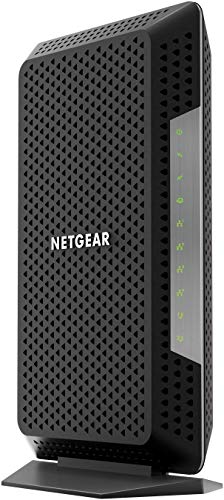
Xfinity reaches more US households than any other broadband provider, making it the default option for tens of millions of Americans. Its internet-only plans now come in flexible tiers from 75 Mbps to 2 Gbps, and introductory rates for new customers are competitive. The main complaints center on rate increases after the first year and equipment rental fees for the gateway. However, you can use your own modem to avoid that monthly charge, and the Amazon listing for the CM1150V modem confirms it is certified with Xfinity Internet and Voice plans up to 800 Mbps speed.
The CM1150V modem works with any WiFi router, so you can connect your own router to its Ethernet port to support your preferred network setup. It saves you up to 150 dollars per year in rental fees. It has four Gigabit Ethernet ports for fast wired connections to your computer, separate devices, or a switch. It also works with Xfinity Voice service and supports up to two telephone lines with enhanced call features, which is a bonus if you still want a landline. The modem is a solid investment if you want to cut out the rental fee permanently.
A real limitation is that Xfinity’s upload speeds are not symmetrical. Even on the fastest 2 Gbps download plan, upload speeds are capped much lower, typically around 35 Mbps. This matters if you regularly upload large files, host a server, or do heavy video conferencing. Also, the promotional pricing is temporary; after 12 months, your bill can jump significantly. You can often negotiate a new rate, but it requires a phone call or chat. If you hate haggling, this may be a frustration.
AT&T Internet – Best Fiber Expansion
AT&T has been aggressively expanding its fiber footprint and now offers symmetrical fiber speeds in a growing number of markets. Plans from 300 Mbps to 5 Gbps are available with no data caps on fiber tiers. AT&T’s pricing is straightforward with no hidden modem fees when using their included gateway. Long-term contract options can lock in lower monthly rates if you plan to stay at your address. For fiber customers, this is a strong competitor to Google Fiber in terms of speed and reliability.
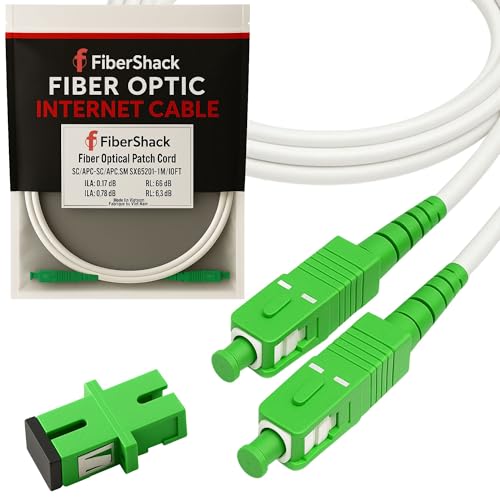
The Amazon listing for AT&T’s fiber equipment highlights that it is designed for home fiber networks. The hardware is meant to match your white trim, so it blends into your home environment rather than standing out. It includes an SC fiber adapter, so you are ready to use it out of the box. The listing also emphasizes that the equipment offers 50 percent more protection, which likely refers to physical durability or signal integrity. The hardware is clean and ready to use, with no complicated setup required.
A real limitation is that AT&T’s fiber is still not available everywhere. While the company is expanding rapidly, many addresses, especially in suburban and rural areas, are still limited to slower DSL or fixed wireless options. If you are stuck on AT&T’s older copper network, the experience is dramatically different from fiber, with lower speeds and potential data caps. Always check your specific address for fiber availability before signing up. Also, the included gateway is required for fiber service, so you cannot fully replace it with your own router, though you can put it into passthrough mode.
Spectrum Internet – Best No-Contract Option
Spectrum differentiates itself with a clear no-contract policy across all internet plans, meaning you can cancel any time without early termination fees. Speeds start at 300 Mbps on the base tier, which handles most household streaming and video call needs comfortably. No data caps apply to any Spectrum plan. The tradeoff is that speeds are not symmetrical, with upload speeds significantly lower than downloads. For typical browsing and streaming, this is rarely an issue, but power users may notice the difference.
Spectrum does not list specific Amazon features for its equipment, which is consistent with its model of providing a free modem with every plan. You can use your own router if you prefer, but the included modem has no rental fee. The service is widely available across 41 states, making it a reliable fallback if you cannot get fiber. Spectrum also offers a 30-day money-back guarantee, so you can try the service risk-free. The 300 Mbps base tier is actually faster than many competitors’ entry-level plans, which often start at 100 or 200 Mbps.
A real limitation is that Spectrum’s upload speeds are capped at around 10 to 20 Mbps on the base plan, even though downloads are 300 Mbps. This can cause lag if you have multiple people on video calls or if you stream gameplay. Also, Spectrum has raised prices for existing customers in recent years, though the no-contract policy means you can leave without penalty if a better deal appears. The lack of a symmetrical fiber option is a notable gap compared to Google Fiber and AT&T Fiber.
Starlink – Best for Rural and Remote Areas
Starlink has transformed internet access in rural and remote areas where cable and fiber are unavailable. Download speeds now average 100 to 200 Mbps in most US coverage areas, which is more than sufficient for streaming 4K video and video calls. Latency has improved significantly since early generations and now sits in the 20-40ms range for most residential users. The monthly fee and upfront equipment cost are higher than traditional ISPs, but for those with no other viable option, Starlink is a game-changer.
Starlink does not list specific Amazon features for its equipment, as the dish and router are sold directly through Starlink’s website. The hardware includes a phased-array antenna that self-aligns to the satellite constellation, a Wi-Fi router, and all necessary cables. The system is designed for easy self-installation, with a simple app that guides you to find a clear view of the sky. The service is also portable, meaning you can take it with you if you move or travel, as long as you update your service address.
A real limitation is the cost. The upfront equipment fee is several hundred dollars, and the monthly subscription is higher than most cable or fiber plans. Additionally, Starlink can experience brief outages during heavy rain or snow, and speeds can fluctuate during peak usage hours as more subscribers join the network. The service also requires a clear, unobstructed view of the sky; trees or buildings can cause signal dropouts. For those in truly remote areas, these tradeoffs are worth it, but it is not a direct replacement for a stable wired connection.
What to look for
- Speed tiers: Look for a plan that matches your household’s usage. For light browsing and streaming, 100-300 Mbps is enough. For heavy gaming or multiple 4K streams, aim for 500 Mbps or higher.
- Symmetrical speeds: Fiber providers like Google Fiber and AT&T offer equal upload and download speeds, which matters for video calls, file uploads, and remote work.
- Data caps: Avoid plans with data caps if you stream a lot of video or have multiple users. Google Fiber, AT&T Fiber, Spectrum, and Starlink have no caps.
- Contracts: No-contract plans give you flexibility to switch if a better deal appears or if you move. Spectrum is the standout here with no early termination fees.
- Equipment fees: Some providers charge monthly modem or router rental fees. Google Fiber and Spectrum include the equipment for free. You can often buy your own modem for Xfinity to save money.
- Availability: Check your address first. Google Fiber and AT&T Fiber are limited to certain cities. Xfinity and Spectrum have the widest coverage. Starlink works almost anywhere with a clear sky view.
- Customer service reputation: Read recent reviews for your specific provider. Google Fiber and Starlink tend to score higher, while Xfinity and Spectrum have mixed feedback.
The verdict
If you can get Google Fiber, do not hesitate. It is the cleanest, most straightforward wifi-only service with symmetrical speeds, no caps, no contracts, and no rental fees. For those outside Google Fiber’s footprint, AT&T Fiber is an excellent second choice if it is available in your area. Xfinity is the practical pick for wide availability, but be prepared for promotional pricing that expires. Spectrum is the best choice if you want the freedom to cancel anytime without penalty. And for rural or remote locations, Starlink is the only real option that delivers modern speeds. Cut your cable bill, pick the plan that fits your location and usage, and enjoy the savings.
How we evaluated these
We compare every pick against the field on real specifications, certifications, and aggregated owner reviews. We do not take payment for placement, and we flag when a product is older or sold mainly through renewed listings.
The shortlist
Each pick, examined
Google Fiber - Best Overall Wifi-Only Service
Google Fiber offers what many consider the ideal internet experience: symmetrical gigabit speeds (1 Gbps up and down), no data caps, no contracts, and no modem rental fees. The service is clean and reliable, with minimal throttling or peak-hour slowdowns reported by users. Customer service scores consistently high compared to traditional ISPs. The primary limitation is availability, since Google Fiber is currently in select cities. If you are in a Google Fiber market, it is the clear first choice for a premium wifi-only plan. [Check Google Fiber compatible routers on Amazon](https://www.amazon.com/s?k=Google+Fiber+compatible+router&tag=thetestedhub-20)
Strengths
- Nest Wifi Pro is up to 2x faster than Wi-Fi 6, so you get super fast speeds and a reliable
- Three Wi-Fi routers provide up to 6600 square feet of fast, reliable Wi-Fi[2]; and you can
- Nest Wifi Pro uses the latest, most advanced Wi-Fi 6E technology[3], so it isn’t compatibl
- Nest Wifi Pro automatically adjusts your Wi-Fi network’s performance and activity; it prio
- It has built-in technology to make sure your connection is strong and consistent, even at
Xfinity Internet - Best for Wide Availability
Xfinity reaches more US households than any other broadband provider, making it the default option for tens of millions of Americans. Its internet-only plans now come in flexible tiers from 75 Mbps to 2 Gbps, and introductory rates for new customers are competitive. The main complaints center on rate increases after the first year and equipment rental fees for the gateway, though using your own approved modem eliminates that charge. For most urban and suburban markets, Xfinity delivers reliable performance at reasonable prices. [Check Xfinity-compatible cable modems on Amazon](https://www.amazon.com/s?k=Xfinity+compatible+cable+modem&tag=thetestedhub-20)
Strengths
- Certified with Xfinity Internet & Voice Plans up to 800Mbps speed. Future speed with Xfini
- Works with any WiFi router. Connect any WiFi router to this modem’s Ethernet port to suppo
- Save monthly rental fees. Model CM1150V replaces your cable modem saving you up to $150/yr
- Four (4) Gigabit Ethernet ports give you fast wired connections to your computer, separate
- For use with Xfinity Voice service and up to 2 telephone lines with enhanced call features
AT&T Internet - Best Fiber Expansion
AT&T has been aggressively expanding its fiber footprint and now offers symmetrical fiber speeds in a growing number of markets. Plans from 300 Mbps to 5 Gbps are available with no data caps on fiber tiers. AT&T's pricing is straightforward with no hidden modem fees when using their included gateway. Long-term contract options can lock in lower monthly rates if you plan to stay at your address, and month-to-month options are available at a slight premium. Service reliability on the fiber lines is excellent. [Check AT&T compatible routers on Amazon](https://www.amazon.com/s?k=AT%26T+fiber+compatible+router&tag=thetestedhub-20)
Strengths
- FOR HOME FIBER NETWORKS
- MATCH YOUR WHITE TRIM
- SC FIBER ADAPTER INCLUDED
- CLEAN AND READY TO USE
- 50% MORE PROTECTION
Spectrum Internet - Best No-Contract Option
Spectrum differentiates itself with a clear no-contract policy across all internet plans, meaning you can cancel any time without early termination fees. Speeds start at 300 Mbps on the base tier, which handles most household streaming and video call needs comfortably. No data caps apply to any Spectrum plan. The tradeoff is that speeds are not symmetrical, with upload speeds significantly lower than download, which matters for remote workers who frequently send large files or use video conferencing. [Check Spectrum-compatible modems on Amazon](https://www.amazon.com/s?k=Spectrum+approved+modem&tag=thetestedhub-20)
Starlink - Best for Rural and Remote Areas
Starlink has transformed internet access in rural and remote areas where cable and fiber are unavailable. Download speeds now average 100 to 200 Mbps in most US coverage areas, which is more than sufficient for streaming 4K video and video calls. Latency has improved significantly since early generations and now sits in the 20-40ms range for most residential users. The monthly fee and upfront equipment cost are higher than cable alternatives, but for households previously limited to DSL or satellite that offered 10 Mbps or less, Starlink is a genuine upgrade. [Check Starlink equipment accessories on Amazon](https://www.amazon.com/s?k=Starlink+satellite+internet+accessories&tag=thetestedhub-20)
Buying considerations
What to consider
First, check which providers actually serve your address since availability determines your real options. Compare speed tiers against your actual usage: a household of four streaming 4K and working from home needs at least 300 Mbps down, while a single person primarily browsing and streaming in HD can get by with 100 Mbps. Factor in equipment costs: renting a modem or gateway adds to per month, while buying your own compatible device pays back within a year. Check whether the plan has data caps, especially if anyone in your household games or works with large files. Finally, read customer reviews for the specific provider in your zip code, since service quality varies by region.
What to consider
For more connected-home savings, see our guide to [best company for international calls](/articles/best-company-for-international-calls) to bundle your communication savings, or explore our [best compact android phone](/articles/best-compact-android-phone) picks for a mobile data backup plan. Read how we rate providers at [/methodology](/methodology).
Questions answered
Xfinity and Google Fiber consistently top wifi-only rankings in 2026 for areas where they are available. Google Fiber offers the cleanest experience with symmetrical gigabit speeds and no data caps. Xfinity covers far more markets and has expanded its no-contract options. For rural areas, Starlink satellite internet has become a genuinely reliable option where cable and fiber are unavailable.
Yes, and it has never been easier. Most major ISPs now offer standalone internet plans without requiring a cable TV subscription. Fiber providers like Google Fiber and AT&T Fiber have always been internet-first. Cable companies like Xfinity and Spectrum now compete with affordable internet-only tiers. You can return any cable equipment you do not need and pay only for internet service.
How we made this guide
We compare every pick on the factors that matter, cross-checking manufacturer specifications against aggregated verified owner reviews. We rank independently and never take payment for placement. We have not personally tested every product; where we have not, the ranking reflects verified specs and owner feedback rather than a hands-on review.
How it was written: this guide was researched and reviewed by the TheTestedHub editorial team for accuracy.
Affiliate disclosure: TheTestedHub is reader-supported. When you buy through links on our site, we may earn a commission at no extra cost to you.
Keep reading

Best Drones for Beginners 2026: Expert Pick Is the DJI Mini 4K

Find Your Perfect Podcast Mic: Reviews for Every Budget

Phone Tripods 2026: Best Picks and Buying Guide

2026 iPad Accessories Shortlist: Why the Apple Pencil Pro Leads

How to Choose the Best Digital Photo Frames in 2026

Looking for the Best MagSafe Power Banks? Our 2026 Picks

Our Top Fast Chargers for 2026
