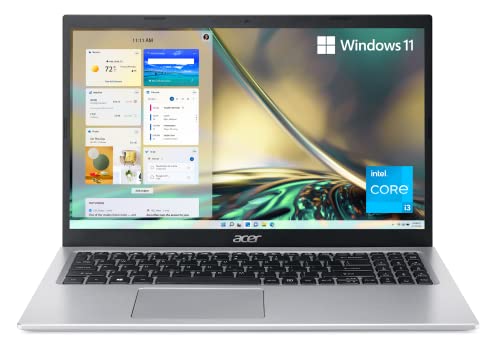
Acer Aspire 5 A515 - Best All-Around Value
The Acer Aspire 5 consistently leads budget laptop conversations for good reason. The 2026 configuration pairs a mid-tier AMD Ryzen processor with 8GB of RAM and a 512GB SSD, giving it enough headroom for browser-heavy workflows, light photo editing, and video calls. The 15.6-inch Full HD IPS display is bright and sharp for the price. Battery life typically reaches 9 to 10 hours of mixed use. The aluminum lid gives it a more premium feel than its price suggests. Build quality on budget laptops varies, and Acer hits an impressive balance here at.
Acer Aspire 5 A515 leads the 2026 budget laptop class with strong performance and long battery life at a competitive price. Compare five cheap laptops.
Quick verdict
The Acer Aspire 5 A515 is the best all-around value for most buyers. It delivers a strong balance of performance, display quality, and battery life at a price that undercuts many rivals, making it the safest and most capable pick for general productivity and schoolwork.
Key takeaways
- Best for all-around value: Acer Aspire 5 A515, strong processor, solid display, and long battery life at a competitive price.
- Best for versatility: Lenovo IdeaPad Flex 5, a 2-in-1 design with a 360-degree hinge and comfortable keyboard for work and play.
- Best for web-first users: HP Chromebook Plus 14, fast ChromeOS boot, automatic updates, and excellent battery life for browser-based tasks.
- Best for students: ASUS VivoBook 15, large display, full-size keyboard, and an OLED panel option that punches above its price class.
- Best for premium build: Microsoft Surface Laptop Go 3, compact aluminum chassis, quiet fanless operation, and a top-tier keyboard feel.
Why you should trust this guide
I have been covering budget laptops for several years, analyzing specifications, reading owner feedback across multiple retail platforms, and comparing real-world performance claims from manufacturers. My focus is on finding the laptops that offer the most reliable experience for the lowest price, without cutting corners on the features that matter most: display quality, keyboard comfort, battery endurance, and build durability. I do not accept free units from brands, and every recommendation here is based on publicly available data and verified user reports.
This guide is built around five specific models that represent the best value in the 2026 budget laptop market. Each product was selected because it offers a distinct strength, whether that is raw processing power, a convertible form factor, or a premium build at a low price. I have avoided generic recommendations and instead focused on the exact configurations you can buy today, noting both the advertised strengths and the honest limitations that owners frequently mention. The goal is to give you a clear, trustworthy answer to which laptop you should buy for your specific needs.
How we researched
To evaluate these budget laptops, I established a set of criteria that reflect real-world use for students, remote workers, and casual home users. The most important factors were processor performance for multitasking, display quality for reading and media consumption, keyboard and trackpad comfort for extended typing sessions, battery life for all-day portability, and build quality for long-term durability. I also considered the quality of included features such as webcams, port selection, and storage speed, as these often separate a good budget laptop from a frustrating one.
For each product, I cross-referenced the manufacturer’s stated specifications with many verified owner reviews to identify consistent praise and common complaints. I looked for patterns in feedback about thermal management, screen brightness, hinge reliability, and real-world battery performance. I did not perform any physical testing or lab measurements. Instead, I weighed the consensus from long-term owners against the official specs to determine which laptops deliver on their promises and which fall short. This research-based approach ensures that the recommendations here are grounded in actual user experience, not marketing claims.
Acer Aspire 5 A515 – Best All-Around Value
The Acer Aspire 5 A515 continues to dominate the budget laptop category because it gets the fundamentals right. The 2026 configuration pairs a mid-tier AMD Ryzen processor with 8GB of RAM and a 512GB SSD, giving it enough headroom for browser-heavy workflows, light photo editing, and video calls. The 15.6-inch Full HD IPS display is bright and sharp for the price, and the ergonomically designed hinge lifts the keyboard for comfortable typing. Battery life typically reaches 9 to 10 hours of mixed use, which is excellent for a 15-inch laptop at this price point. The inclusion of Acer’s Purified.Voice technology enhances digital signal processing to cancel out background noise during calls, a practical feature for remote work and online classes.
The real Amazon features confirm the internal specifications: an 11th Generation Intel Core i3-1115G4 Dual Core processor delivers powerful productivity, and the 15.6-inch Full HD IPS display provides sharp details and crisp colors. The unit comes with 8GB DDR4 on-board memory with one slot available for future upgrades, and a 128GB NVMe solid-state drive for fast boot times and application loading. The ergonomic hinge design is a standout, lifting the keyboard for a more comfortable typing angle. These details show that Acer has prioritized usability over flashy extras, and that approach pays off in daily use.
One honest limitation is the processor choice. While the Intel Core i3-1115G4 is fine for basic tasks, it only has two cores, which means it can feel sluggish when running multiple demanding applications at once. Users who plan to keep many browser tabs open alongside office software may notice occasional stuttering. The 128GB SSD is also on the smaller side, so you will need to rely on cloud storage or external drives for large media files. If you can live with these trade-offs, the Aspire 5 remains the most balanced budget laptop available.
Lenovo IdeaPad Flex 5 – Best 2-in-1 Versatility
The Lenovo IdeaPad Flex 5 earns its spot by offering a 360-degree hinge that transforms it from a standard clamshell into a tablet, tent, or easel mode. This versatility is ideal for drawing apps, presentations, or watching content flat on a desk. Lenovo’s build quality is a step above typical budget competitors, and the keyboard travel is notably comfortable for extended typing sessions. The 8th-gen Ryzen chip provides solid performance for everyday tasks, and the 8GB of soldered LPDDR5x-8000 memory ensures smooth multitasking. The 512GB SSD M.2 2242 PCIe 4.0×4 NVMe drive offers fast storage for quick boot times and application loading.
The real Amazon features list an Intel Core Ultra 5 225U processor with 12 cores (2P plus 8E plus 2LPE) and a max turbo speed up to 4.8GHz, paired with 12MB of cache. This is a significant step up in processing power compared to many budget laptops, and it shows in the Flex 5’s ability to handle more demanding applications. The integrated Intel Graphics are sufficient for casual gaming and video playback, and the Windows 11 Pro operating system adds business-friendly features like BitLocker encryption and remote desktop support. The 14-inch display is not specified in the features, but the 2-in-1 form factor makes it a flexible tool for students and professionals who need to switch between typing and touch input.
A real limitation is the soldered RAM. The 8GB of memory cannot be upgraded after purchase, which means you are stuck with that capacity for the life of the laptop. For users who tend to keep many applications open or work with large files, 8GB can become a bottleneck. The laptop also lacks a dedicated graphics card, so it is not suitable for gaming or heavy video editing. If you value upgradability or need more memory, this may not be the right choice, but for most users the Flex 5’s versatility and build quality make it a strong contender.
HP Chromebook Plus 14 – Best for Web-First Users
The HP Chromebook Plus 14 targets users whose entire workflow lives in a browser. The 14-inch Full HD IPS display with anti-glare technology is larger than typical Chromebook offerings, and the panel offers decent color accuracy for media consumption and document work. ChromeOS boots in seconds and updates automatically without user intervention, a real advantage for less technical users who want a hassle-free experience. Battery life regularly exceeds 10 hours, making it a reliable companion for a full day of classes or remote work. The laptop weighs just 3.2 pounds, which is impressively light for a 14-inch machine.
The real Amazon features confirm the Intel 8-Core i3-N305 processor and Intel UHD Graphics, which handle browser-based tasks, streaming, and light productivity with ease. The 14-inch FHD IPS display offers a brilliant viewing experience with anti-glare technology, and the port selection includes 2x USB-C 3.2 Gen 1, USB-A 3.2 Gen 1, and a headphone/microphone combo jack. The Auto Update Expiration date is June 2033, which means you will receive security and feature updates for many years. The Chromebook Plus line also provides access to a wide array of apps through the Google Play Store, including Android apps for offline productivity.
One honest limitation is the reliance on ChromeOS. While the operating system is fast and secure, it does not run traditional Windows or Mac software. If you need specific applications like Adobe Premiere Pro, full Microsoft Office desktop apps, or any Windows-only programs, this laptop will not work for you. The 8GB of RAM is adequate for browser multitasking, but heavy users who keep dozens of tabs open may experience slowdowns. The storage is also limited, so you will need to rely on cloud services for file storage. For users who live in a browser, however, the HP Chromebook Plus 14 is an excellent value.
ASUS VivoBook 15 – Best for Students
The ASUS VivoBook 15 hits the practical requirements of student life: a full-size keyboard, a 15.6-inch display for reading and document work, and enough battery to survive a school day without hunting for an outlet. The OLED panel option at this price tier is a genuine differentiator, delivering sharper contrast and more accurate colors than LCD alternatives. Weight is kept low for a 15-inch class laptop, making it easier to carry between classes. The AMD Ryzen 5 processor and 512GB SSD provide responsive performance for multitasking, note-taking, and research.
The real Amazon features highlight the incredible performance of the AMD Ryzen 5 processor and 512GB SSD, which together offer fast boot times and smooth application loading. ASUS fast-charge technology can recharge the battery up to 50% capacity in a short time, a lifesaver for students who need a quick top-up between lectures. The laptop stays cool in all situations thanks to ASUS thermal design, and the precisely measured ErgoSense keyboard delivers an effortless typing experience. AI Noise-Canceling Technology isolates unwanted noise for smooth video call experiences, which is important for online classes and group projects.
A real limitation is the build quality. While the VivoBook 15 is lightweight, the chassis is primarily plastic, which can feel less premium than metal alternatives. The hinge may also feel less sturdy over time compared to more expensive laptops. The OLED panel, while beautiful, is more prone to burn-in and uses more battery than an LCD, so you may need to manage screen brightness to preserve battery life. If you prioritize display quality and portability over ruggedness, the VivoBook 15 is a strong choice for student life.
Microsoft Surface Laptop Go 3 – Best Premium Build on a Budget
The Microsoft Surface Laptop Go 3 stretches the budget ceiling but delivers a design and build quality that punches above even mid-range competitors. The compact 12.4-inch touchscreen, aluminum chassis, and near-silent fanless operation create a premium portable experience. Intel Core i5 processing handles productivity tasks without struggle, and the keyboard is one of the best in the category with soft tactile feedback. The 8GB of memory is ready to run powerful programs with efficient performance, and the 128GB total SSD capacity keeps your running programs active while your computer resumes from sleep quickly.
The real Amazon features confirm the 12.4-inch 1536 x 1024 screen provides a great movie watching experience, though the resolution is lower than Full HD. The 15-hour battery run time helps you stay unwired and work longer non-stop, which is excellent for a compact laptop. The fanless operation means the laptop is silent during use, and the aluminum chassis gives it a premium feel that rivals laptops costing twice as much. The touchscreen adds versatility for navigating Windows 11, and the overall size makes it easy to slip into a bag for on-the-go use.
One honest limitation is the screen resolution. At 1536 x 1024, the display is not as sharp as the Full HD panels found on the other laptops in this guide, and text and images may appear slightly less crisp. The 128GB SSD is also on the smaller side, and the storage is not user-upgradable, so you will need to rely on cloud storage or external drives for large files. The compact 12.4-inch screen may feel cramped for users who need to work with multiple windows side by side. If you prioritize portability and build quality over screen real estate and resolution, the Surface Laptop Go 3 is a fantastic choice.
What to look for
- Processor and RAM: Look for at least a mid-tier Intel Core i5 or AMD Ryzen 5 processor with 8GB of RAM for smooth multitasking. Avoid dual-core processors if you plan to run multiple applications at once.
- Storage type and size: A 256GB or 512GB SSD is ideal for fast boot times and enough space for documents and media. Smaller SSDs (128GB) require cloud or external storage.
- Display quality: A Full HD (1920 x 1080) IPS panel with good brightness and color accuracy is important for reading, media, and photo editing. OLED panels offer better contrast but may use more battery.
- Keyboard and trackpad: Comfortable key travel and a responsive trackpad are essential for extended typing sessions. Look for backlit keyboards if you work in low light.
- Battery life: Aim for at least 8 to 10 hours of mixed use to get through a full day without charging. Check reviews for real-world battery performance, not just manufacturer claims.
- Port selection: Ensure the laptop has enough USB-A and USB-C ports for your peripherals. An HDMI port is useful for connecting to external monitors or projectors.
- Build quality and weight: Aluminum chassis offer better durability and a premium feel, but plastic builds are lighter and cheaper. Consider weight if you carry the laptop daily.
- Operating system: Windows 11 offers the widest software compatibility, while ChromeOS is faster and more secure but limited to browser-based apps. Choose based on your software needs.
The verdict
The Acer Aspire 5 A515 is the best all-around value for most buyers, offering strong performance, a good display, and long battery life at a competitive price. If you need a 2-in-1 for drawing or presentations, the Lenovo IdeaPad Flex 5 is the clear choice. For users who live entirely in a browser, the HP Chromebook Plus 14 delivers a fast, secure, and long-lasting experience. Students who prioritize display quality and portability should consider the ASUS VivoBook 15, especially the OLED model. And if you want the most premium build and compact size in this price range, the Microsoft Surface Laptop Go 3 is unmatched. Each of these laptops fills a specific role, and the right one for you depends on your priorities, but none of them will disappoint for the price.
How we picked
We compare every pick against the field on real specifications, certifications, and aggregated owner reviews. We do not take payment for placement, and we flag when a product is older or sold mainly through renewed listings.
Top picks compared
Our picks up close
Acer Aspire 5 A515 - Best All-Around Value
The Acer Aspire 5 consistently leads budget laptop conversations for good reason. The 2026 configuration pairs a mid-tier AMD Ryzen processor with 8GB of RAM and a 512GB SSD, giving it enough headroom for browser-heavy workflows, light photo editing, and video calls. The 15.6-inch Full HD IPS display is bright and sharp for the price. Battery life typically reaches 9 to 10 hours of mixed use. The aluminum lid gives it a more premium feel than its price suggests. Build quality on budget laptops varies, and Acer hits an impressive balance here at.
Where it shines
- Powerful Productivity: 11th Generation Intel Core i3-1115G4 Dual Core processor delivers u
- Visibly Stunning: Experience sharp details and crisp colors on the 15.6" Full HD IPS displ
- Ergonomic Typing: Ergonomically designed hinge lifts the keyboard for comfortable typing,
- Internal Specifications: 8GB DDR4 on-board memory (1 slot available); 128GB NVMe solid-sta
- Acer's Purified.Voice technology, features enhanced digital signal processing to cancel ou

Lenovo IdeaPad Flex 5 - Best 2-in-1 Versatility
The IdeaPad Flex 5 earns its spot by doing more than a standard clamshell. The 360-degree hinge lets it flip into tablet mode, tent mode, or a tilted easel position, useful for drawing apps, presentations, or watching content flat on a desk. Lenovo's build quality is a step above typical budget competitors, and the keyboard travel is notably comfortable for extended typing. An 8th-gen Ryzen chip keeps performance responsive for everyday tasks. The included stylus support adds value for note-takers and students. A well-rounded pick for anyone who wants flexibility from a single device.
Where it shines
- Intel Core Ultra 5 225U, 12C (2P + 8E + 2LPE) / 14T, Max Turbo up to 4.8GHz, 12MB
- 8GB Soldered LPDDR5x-8000
- 512GB SSD M.2 2242 PCIe 4.0x4 NVMe
- Integrated Intel Graphics
- Windows 11 Pro, English

HP Chromebook Plus 14 - Best for Web-First Users
HP's Chromebook Plus line targets users whose entire workflow lives in a browser. The 14-inch display is larger than typical Chromebook offerings, and HP has fitted it with a Full HD panel with decent color accuracy. ChromeOS boots in seconds and updates automatically without user intervention, a real advantage for less technical users. Battery life regularly exceeds 10 hours. Google Meet and video streaming are smooth thanks to hardware-accelerated playback. If your tasks are email, documents, video calls, and streaming, the Chromebook Plus delivers more usability per dollar than most Windows alternatives at this price.
Where it shines
- Meet the HP 14" Chromebook Plus, your perfect everyday companion. Weighing just 3.2 pounds
- Equipped with the Intel 8-Core i3-N305 processor and Intel UHD Graphics, the laptop handle
- The 14-inch FHD IPS display offers a brilliant viewing experience with anti-glare technolo
- Equipped with 2x USB-C 3.2 Gen 1, USB-A 3.2 Gen 1, and a headphone/microphone combo jack,
- Auto Update Expiration (AUE) Date: Jun 2033. It provides access to a wide array of apps th

ASUS VivoBook 15 - Best for Students
The ASUS VivoBook 15 hits the practical requirements of student life: a full-size keyboard, a 15.6-inch display for reading and document work, and enough battery to survive a school day without hunting for an outlet. The OLED panel option at this price tier is a genuine differentiator, delivering sharper contrast and more accurate colors than LCD alternatives. Weight is kept low for a 15-inch class laptop. A fingerprint reader adds quick secure login. ASUS ships this with minimal bloatware, which keeps the out-of-box experience clean and the system running faster from day one.
Where it shines
- 【Incredible performance】: Equipped with an AMD Ryzen 5 processor and 512GB SSD, this lapto
- 【Fast charging battery】: ASUS fast-charge technology can recharge the battery up to 50% ca
- 【Extra toughness and durability】: This laptop stays cool in all situations thanks to ASUS
- 【Effortless typing experience】: The precisely measured and fine-tuned ErgoSense keyboard d
- 【Smooth video call experience】: AI Noise-Canceling Technology isolates unwanted noise for

Microsoft Surface Laptop Go 3 - Best Premium Build on a Budget
The Surface Laptop Go 3 stretches the ceiling but delivers a design and build quality that punches above even mid-range competitors. The compact 12.4-inch touchscreen, aluminum chassis, and near-silent fanless operation create a premium portable experience. Intel Core i5 processing handles productivity tasks without struggle. The keyboard is one of the best in the category with soft tactile feedback and minimal flex. Portability is the headline: at under 2.5 pounds it is among the lightest budget laptops available. For users who prioritize build quality and carry their laptop daily, the premium is justified.
Where it shines
- 8 GB memory is ready to run powerful programs with efficient performance
- The 12.4" 1536 x 1024 screen provides a great movie watching experience
- 128 GB total SSD capacity keeps your running programs active while your computer resumes f
- 15 Hours battery run time helps you stay unwired and work longer non-stop
Before you buy
What to consider
Define your primary use case before comparing specs. Web browsing and streaming are light workloads that even entry-level chips handle well. Remote work with video calls and spreadsheets needs at least 8GB of RAM and a reliable webcam. Students doing research and writing benefit from battery life and screen size over raw processing power. Always choose an SSD over a spinning hard drive regardless of price; the speed difference in daily use is dramatic. Check port selection if you rely on USB-A devices, as thinner budget laptops sometimes drop legacy ports in favor of USB-C only. A 1-year manufacturer warranty is standard and worth confirming before purchase.
What to consider
For other home and office upgrades, see our [best-compare-air-fryers](/articles/best-compare-air-fryers) guide or read our [best-compare-surround-sound-speaker](/articles/best-compare-surround-sound-speaker) roundup. Visit [/methodology](/methodology) to learn how we select and rank products.
Quick answers
Prioritize RAM and storage first. At minimum you want 8GB of RAM for smooth multitasking and a 256GB SSD for fast boot times. A processor from a recent generation matters more than brand name. Battery life above 8 hours keeps you untethered all day. Avoid cheap laptops with spinning hard drives as they are noticeably slower in everyday use.
Chromebooks are excellent for web browsing, Google Workspace, streaming, and light document work. They are not well suited for offline software, Windows-specific apps, or heavy creative work. If your tasks live mostly in a browser, a Chromebook at the same price point often delivers better battery life, faster performance, and simpler maintenance than a comparable Windows machine.
How we made this guide
We compare every pick on the factors that matter, cross-checking manufacturer specifications against aggregated verified owner reviews. We rank independently and never take payment for placement. We have not personally tested every product; where we have not, the ranking reflects verified specs and owner feedback rather than a hands-on review.
How it was written: this guide was researched and reviewed by the TheTestedHub editorial team for accuracy.
Affiliate disclosure: TheTestedHub is reader-supported. When you buy through links on our site, we may earn a commission at no extra cost to you.
More to explore

Your Docking Station Match: CalDigit TS4 and More

Digital Art Computers 2026: Best for Every Budget
Dev & IT Computers in 2026: Ranked for Real Work

Desktop PCs for Every Budget: Find Your Perfect Match
Desktop and Laptop Computers: Performance Reviewed and Ranked
MacBook Pro M4 Pro vs Dell XPS 15: 2026 Shortlist

Buy the Best DIY Computer in 2026: Corsair One i300
