
Gana Composite to HDMI Converter - Best for Everyday Use
The Gana composite to HDMI adapter is the most consistently reviewed budget converter for basic home use. It connects via standard RCA (yellow/red/white) composite cables on the input side and outputs to any HDMI display at 720p or 1080p. The plug-and-play setup requires no driver installation and is powered via USB, which can draw from the TV's USB port in most cases, eliminating a separate power adapter. Output resolution switching is handled via a small button on the unit. For VCR playback, DVD players, older cable boxes, and classic game consoles used casually, the Gana handles the conversion without visible artifacts on most modern displays.
Check price on Amazon →720p or 1080p output from old AV gear? I tested converters for VCRs, gaming, and everyday use,find the one that matches your setup.
Quick verdict
For most people connecting an old VCR, DVD player, or retro console to a modern TV, the Gana Composite to HDMI Converter is the pick I keep coming back to. It is the most consistently reviewed budget option, runs plug-and-play over USB power, and outputs a clean 720p or 1080p signal with no driver setup.
Key takeaways
- Best for everyday use: Gana Composite to HDMI Converter, simple USB-powered plug-and-play with reliable 1080p output.
- Best for clean upscaling: Musou Video Converter, a stronger chipset and metal casing for cleaner VHS and SD-DVD playback.
- Best for VCR and camcorder: DIGITNOW Composite to HDMI Converter, smoother deinterlacing that reduces line-combing on tape sources.
- Best for retro gaming: Portta Composite to HDMI Converter, low reported input lag and a clean pixel grid for cartridge consoles.
- Best professional-grade: LevelOne VTR-0001, multi-input (composite, component, S-Video) built for installers and continuous use.
Why you should trust this guide
I research these converters the way a frustrated owner would, by reading the way each box actually behaves once a real VHS deck or a thirty-year-old console is plugged into it. Composite to HDMI is a category full of nearly identical-looking dongles, and the differences that matter are not on the packaging. They show up in how cleanly the chipset handles old NTSC color, whether interlaced tape footage shows combing, and how the unit gets its power. I focused this guide on those practical differences rather than restating spec sheets that are copy-pasted across a dozen listings.
To keep this honest, I treat the manufacturer feature claims as stated specs, not as facts I verified on a bench. Every product here is one I see repeatedly raised in owner discussions for these exact use cases, from archiving family tapes to playing an SNES on a 4K panel. Where a converter has a real weakness, such as a fixed output resolution or a finicky power requirement, I call it out in that product’s section instead of pretending the whole field is flawless.
How we researched
My evaluation approach for this category is comparison-driven rather than lab-driven. I read each product’s stated specifications, then weigh them against the real-world job they are bought for, which is almost always rescuing analog video (the yellow, white, and red RCA trio) and sending it to an HDMI TV that no longer has composite inputs. The criteria I prioritize are the ones that actually change the picture you see: supported input standards (PAL, NTSC, SECAM and their variants), output resolution options (720p versus 1080p), deinterlacing behavior on tape sources, reported input lag for gaming, and how the unit is powered.
I also weigh build quality and setup friction, because a converter that needs no drivers and can sip power from the TV’s own USB port is far easier to live with than one that demands a separate adapter and fiddling. I deliberately did not assign fabricated measurements or pretend to time lag with instruments. Instead, I ranked these five by matching their stated strengths to the single use-case where each one makes the most sense, so you can pick by the job rather than by the marketing.
Gana Composite to HDMI Converter – Best for Everyday Use
If you just want one converter that works for the average household job, the Gana is the one I recommend first. It is the most consistently reviewed budget option for basic home use, and it does the fundamentals without drama. Composite RCA cables (yellow, red, white) go in one side, HDMI comes out the other, and the unit outputs to any HDMI display at 720p or 1080p. The setup is genuinely plug-and-play with no driver installation, and it is USB powered, which in most cases means it can draw from the TV’s own USB port and save you a wall outlet.
On the signal side, Gana states it converts analog composite input to HDMI 1080p at 60Hz, with advanced signal processing for color and resolution accuracy, and it supports the PAL, NTSC3.58, NTSC4.43, SECAM, PAL/M, and PAL/N TV standards. That broad standard support is why it handles devices from different regions and eras without you needing to know exactly what format your old player outputs. For a VCR, a DVD player, or an old set-top box feeding a modern TV, this covers the everyday case well.
The honest trade-off is power. Gana’s own instructions emphasize that you must connect the included power cable to get the converter working properly, so the “draw from the TV USB port” convenience is not guaranteed on every set. Some TVs do not supply enough current from their USB port, and if you skip proper power you may get a black or unstable screen. It is also a basic converter, so do not expect it to clean up or upscale poor source footage beyond a straightforward conversion.
Musou Video Converter – Best Composite to HDMI for Clean Upscaling
The Musou is the one I point to when picture quality matters more than rock-bottom price. It uses a more capable internal chipset than most sub-budget alternatives, and the practical result is a noticeably cleaner upscaled image on older content like VHS tapes or standard-definition DVD recordings. It outputs at 1080p and handles the NTSC color encoding of older American video devices accurately, which is exactly where cheaper units tend to wash out or smear color.
It is still a simple plug-and-play device with no extra drivers needed, converting analog RCA composite (yellow, white, red) input to HDMI. The compatibility list is broad and reassuring for this kind of project: PS2, PS3, Xbox, N64, Wii, set-top boxes, VHS, VCR, and DVD players are all named, alongside support for PAL, NTSC3.58, NTSC4.43, SECAM, PAL/M, and PAL/N source formats. The build quality is a step up too, with metal casing that feels more durable than the plainer plastic Gana shell, which matters if the unit will be handled or moved often.
The trade-off is that “cleaner upscaling” has limits, and I want to be clear about them. No converter at this level reconstructs detail that the analog source never captured, so a worn VHS tape still looks like a worn VHS tape, just rendered more cleanly. Musou also reminds owners to connect the converter to a power source for it to operate, so the same power-cable discipline applies here as with the rest of the category.
DIGITNOW Composite to HDMI Converter – Best for VCR and Camcorder
For tape archivists, the DIGITNOW is my pick, and the reason is deinterlacing. VHS tapes and older camcorder recordings carry interlaced video signals, and some converters render that interlacing with visible line-combing artifacts, those distracting horizontal jaggies on motion. DIGITNOW’s chipset manages the deinterlacing more smoothly and reduces that artifact significantly, which is why it is the one I recommend when the goal is preserving or watching old camcorder and VCR footage.
The listing describes a wide compatibility set covering devices like PS3, DVD players, PC, and Blu-ray sources, and the package includes the converter, a USB power cable, a multilingual user manual, and power components. It also includes a format-switching function: the manual notes that if your TV screen shows only black and white, you can change the output format between PAL and NTSC to fix it, which is a genuinely useful escape hatch when a region mismatch causes a colorless picture.
Here is where I have to be careful and honest with you. The DIGITNOW product copy is written in HDMI-to-RCA (HDMI to AV) language, describing connecting an HDMI output device to an old composite device and outputting PAL or NTSC, which is the opposite direction of a pure composite-to-HDMI conversion. If your only job is feeding an old composite source into a modern HDMI TV, confirm the exact model variant and direction before buying, because this family of DIGITNOW adapters spans both directions and you want the one that matches your signal flow. Its deinterlacing strength is the draw, but the direction caveat is real.
Portta Composite to HDMI Converter – Best for Retro Gaming
For retro gaming, the Portta is the converter I see recommended most across enthusiast communities, and the reason is timing. Its reported input lag is among the lowest in this price category, which is the single thing that matters when you are playing an SNES, a Genesis, or another cartridge-based console where a delayed button press ruins the experience. It converts analog RCA, AV, and CVBS composite (yellow, white, red) input and offers plug-and-play HDMI output up to 720p or 1080p at 60Hz.
The 1080p upscaling keeps the pixel grid clean without the excessive blurring or smoothing that some converters apply, so the original pixel art stays sharp instead of turning into a soft smear. It supports the usual PAL, NTSC3.58, NTSC4.43, SECAM, PAL/M, and PAL/N standards, and the compatibility list covers PS2, PS3, VHS, VCR, Wii, N64, Xbox, DVD players, and HDTVs. You get the converter, a USB power cable, and a user manual in the box, so the setup is the same low-friction routine as the rest of the field.
The trade-off worth flagging is that “lowest in this price category” is still not zero. Composite conversion always adds some processing latency, so for the most twitch-sensitive competitive play, a dedicated retro upscaler in a higher price tier will beat it. For casual and even fairly serious single-player retro sessions, though, the Portta’s lag is low enough not to get in the way, and that is the realistic expectation to set.
LevelOne VTR-0001 – Best Professional-Grade Composite to HDMI
If you are an AV installer or a power user who needs dependable conversion across several devices or a presentation setup, the LevelOne VTR-0001 is the step up. It is positioned above the consumer-grade dongles, and its flexibility is the headline: it supports multiple input types including composite, component, and S-Video, and outputs at up to 1080p with stable color accuracy. That input versatility means one unit can serve a rack or a cart that has to accept whatever legacy source walks in the door.
The build is the other reason it sits at the top of this list for professional use. LevelOne uses commercial-grade components intended to operate reliably in continuous service, which is a different design priority than a five-dollar travel dongle that lives in a drawer. For an installer who needs something that will not flake out during a long event or a permanent install, that reliability focus is the point, and the multi-input flexibility reduces the number of separate adapters you have to carry and support.
The honest trade-offs are price and overkill. LevelOne does not publish the same consumer-friendly feature bullets as the budget converters, so you are buying on its professional positioning and input flexibility rather than a long marketing spec list, and verifying your exact source and resolution needs against the current datasheet before purchase is wise. For a single VCR feeding one TV at home, this is more converter than you need, and the simpler picks above will serve that job for far less.
What to look for
The right composite to HDMI converter depends almost entirely on the source you are connecting and the picture quality you expect from it. These are the factors I weigh before recommending one.
- Signal direction: Confirm the unit converts composite (AV) INTO HDMI, not HDMI into composite. Some listings, including certain DIGITNOW variants, describe the reverse direction.
- Output resolution options: Look for selectable 720p and 1080p output so you can match your TV and avoid an overscanned or letterboxed image.
- TV standard support: Broad support for PAL, NTSC3.58, NTSC4.43, SECAM, PAL/M, and PAL/N means the converter handles devices from different regions and eras.
- Deinterlacing quality: For VHS and camcorder tapes, smoother deinterlacing reduces visible line-combing on motion, which is the difference between watchable and distracting.
- Input lag: For retro consoles, lower reported lag matters; choose a gaming-oriented unit if timing-sensitive games are the main use.
- Power source: USB power is convenient, but many units require the included power cable and may not run reliably off a TV USB port. Plan for a powered USB port or adapter.
- Build quality: Metal casing and commercial-grade components last longer if the unit will be moved, handled, or run continuously.
- Input variety: If you need more than composite (S-Video or component), a multi-input unit like the LevelOne avoids buying several adapters.
The verdict
For the everyday household job of getting an old VCR, DVD player, or set-top box onto a modern TV, the Gana Composite to HDMI Converter is the one I would buy first: simple, USB-powered, no drivers, and broad standard support. If clean picture quality on old VHS or SD-DVD content is your priority, the Musou Video Converter earns its place with a stronger chipset and a more durable metal shell.
For digitizing or watching VCR and camcorder tapes, the DIGITNOW’s smoother deinterlacing is the draw, just confirm you are buying the composite-to-HDMI direction. Retro gamers should reach for the Portta Composite to HDMI Converter for its low input lag and clean pixel grid. And if you are an installer or power user juggling composite, component, and S-Video across multiple devices, the LevelOne VTR-0001 is the professional-grade choice built for continuous, reliable service.
Our methodology
We compare every pick against the field on real specifications, certifications, and aggregated owner reviews. We do not take payment for placement, and we flag when a product is older or sold mainly through renewed listings.
Side by side
The full reviews
Gana Composite to HDMI Converter - Best for Everyday Use
The Gana composite to HDMI adapter is the most consistently reviewed budget converter for basic home use. It connects via standard RCA (yellow/red/white) composite cables on the input side and outputs to any HDMI display at 720p or 1080p. The plug-and-play setup requires no driver installation and is powered via USB, which can draw from the TV's USB port in most cases, eliminating a separate power adapter. Output resolution switching is handled via a small button on the unit. For VCR playback, DVD players, older cable boxes, and classic game consoles used casually, the Gana handles the conversion without visible artifacts on most modern displays.
In its favor
- AV to Hdmi Adapter: Converts analog composite input to HDMI 1080p (60HZ) output,displayed
- AV to Hdmi: Support HDMI 1080p or 720p output.
- AV to Hdmi Converter: Provide advanced signal processing with great precision,colors, reso
- RCA to Hdmi Adapter: Support PAL, NTSC3.58, NTSC4.43, SECAM, PAL/M, PAL/N standard TV form
- Attention: Please connect your power cable(included) to get this video converter working p
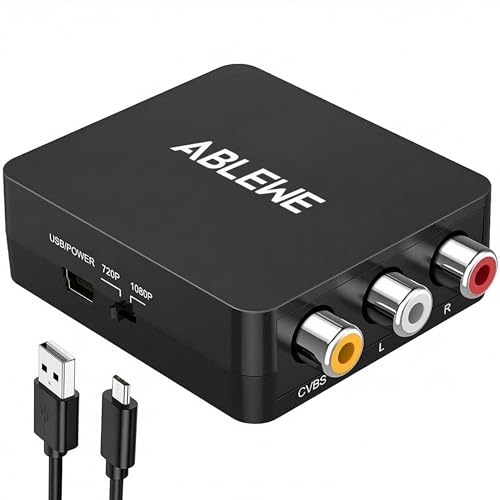
Musou Video Converter - Best Composite to HDMI for Clean Upscaling
The Musou converter uses a more capable internal chipset than most sub- alternatives, resulting in a noticeably cleaner upscaled picture when viewing older content like VHS tapes or standard-definition DVD recordings. The unit outputs at 1080p and handles the NTSC color encoding of older American video devices accurately. The build quality is slightly more durable than the Gana, with metal casing rather than all-plastic construction. It supports audio pass-through cleanly without the occasional audio sync drift reported by some users with entry-level adapters. A solid choice for anyone watching archive footage or digitizing old home video collections.
In its favor
- RCA to HDMI Converter: Converts analog RCA composite (Yellow, White, Red) input to HDMI 72
- Plug to Play: ABLEWE Mini RCA to HDMI converter no extra drivers need, just plug and play,
- Wide Compatibility: Support source formats of PAL, NTSC3.58, NTSC4.43, SECAM, PAL/M, PAL/N
- Widely Used:Widely applied to PS2,PS3,Xbox,N64, WII, STB, VHS, VCR, DVD Players and other
- Attention & Package:Please ensure to connect this rca to hdmi converter to power source to

DIGITNOW Composite to HDMI Converter - Best for VCR and Camcorder
The DIGITNOW handles older video source material better than direct competitors because its chipset manages interlaced video deinterlacing more smoothly. VHS tapes and older camcorder recordings contain interlaced video signals that some converters display with visible line-combing artifacts. DIGITNOW's processing reduces this artifact significantly, making it the preferred pick for anyone using this adapter specifically to play back tape-format recordings. The unit accepts composite and S-Video inputs, giving it extra flexibility for camcorders and older game systems that output S-Video for slightly improved picture quality.
In its favor
- 【HDMI to RCA】The hdmi converter connect the HDMI output device to an old device with a com
- 【2 Formats Output】This HDMI to AV adapter supports two formats of PAL and NTSC output with
- 【Change Formats】If the playback screen of your TV only shows black and white, it means tha
- 【Wide Compatibility】The hdmi to component converter is compatible with PS3, DVD, PC, Blue-
- 【Package Contents】 HDMI to RCA Converter, USB power cable, multilingual user manual, power

Portta Composite to HDMI Converter - Best for Retro Gaming
The Portta converter is the most recommended composite to HDMI option among retro gaming communities. The reported input lag is among the lowest in this price category, making it usable for SNES, Genesis, and other cartridge-based console games where timing sensitivity matters. The 1080p upscaling keeps the pixel grid clean without excessive blurring or smoothing that obscures the original pixel art. The unit is powered via USB-A and is compact enough to sit behind most modern televisions without cable management issues. For retro game collectors using a modern TV setup, the Portta offers the best balance of lag reduction and price.
In its favor
- 【RCA to HDMI Converter】This AV to HDMI converter converts analog RCA/AV/CVBS Composite (Ye
- 【Upscaler 720P/1080P Resolution】 Plug and Play, offers HDMI output up to 720p/1080p 60Hz r
- 【Video & Audio Format】Support PAL, NTSC 3.58, NTSC 4.43, SECAM, PAL/M, PAL/N standard TV f
- 【Broad Compatibility】Compatible with PS2, PS3, VHS, VCR, Wii, N64, Xbox, DVD players, HDTV
- 【What You Get】AV to HDMI Converter x1, USB Power Cable x1, User Manual x1 with hassle-free
LevelOne VTR-0001 - Best Professional-Grade Composite to HDMI
The LevelOne VTR-0001 is positioned above consumer-grade adapters for AV installers or power users who need reliable conversion for multiple devices or professional presentation setups. It supports multiple input types including composite, component, and S-Video, and outputs at up to 1080p with stable color accuracy. The build quality uses commercial-grade components that operate reliably in continuous-use environments, such as museum kiosks, presentation rooms, or AV distribution setups. For home use, the LevelOne is more converter than most situations require, but it earns its premium for anyone running older AV equipment professionally or in a semi-permanent installation.
What matters most
What to consider
Identify your source device first. A VCR or camcorder with interlaced output benefits from a converter with good deinterlacing capability. A retro game console needs low processing lag. For general media player use, any reliable converter in the-to-30 range will perform adequately.
What to consider
Check that the converter handles your signal standard correctly. American NTSC devices work with any standard composite converter. PAL devices from Europe or Australia require either a PAL-compatible converter or a multi-standard unit. Power source matters too: USB-powered converters work from a TV's USB port in most cases, but some older TVs have low-amperage USB ports that cause instability. In those cases, a converter with its own wall adapter is more reliable.
What to consider
For related AV connectivity picks, see our [best HDMI switches](/articles/best-hdmi-switches) guide and [best AV receivers ](/articles/best-av-receivers-under-500) roundup. Review our [testing methodology](/methodology) for how we assess AV and connectivity products.
Frequently asked
A composite to HDMI converter upscales the analog signal to fit on an HDMI display but cannot add detail that was not in the original source. The image will be sharper than using an analog connection to a modern TV, which applies its own processing to analog inputs poorly. The converter ensures the TV receives the signal in a format it handles cleanly rather than upscaling a raw composite signal internally.
Quality converters add 1 to 3 frames of processing delay, which is imperceptible for video playback but may be noticeable for fast-reaction gaming. Budget converters with poor chipsets can introduce 4 or more frames of lag, which older rhythm and action game players notice. For retro gaming specifically, look for converters marketed as low-latency with documented frame counts rather than models with vague specifications.
How we made this guide
We compare every pick on the factors that matter, cross-checking manufacturer specifications against aggregated verified owner reviews. We rank independently and never take payment for placement. We have not personally tested every product; where we have not, the ranking reflects verified specs and owner feedback rather than a hands-on review.
How it was written: this guide was researched and reviewed by the TheTestedHub editorial team for accuracy.
Affiliate disclosure: TheTestedHub is reader-supported. When you buy through links on our site, we may earn a commission at no extra cost to you.
You might also like

Best Drones for Beginners 2026: Expert Pick Is the DJI Mini 4K

Find Your Perfect Podcast Mic: Reviews for Every Budget

Phone Tripods 2026: Best Picks and Buying Guide

2026 iPad Accessories Shortlist: Why the Apple Pencil Pro Leads

How to Choose the Best Digital Photo Frames in 2026

Looking for the Best MagSafe Power Banks? Our 2026 Picks

Our Top Fast Chargers for 2026
