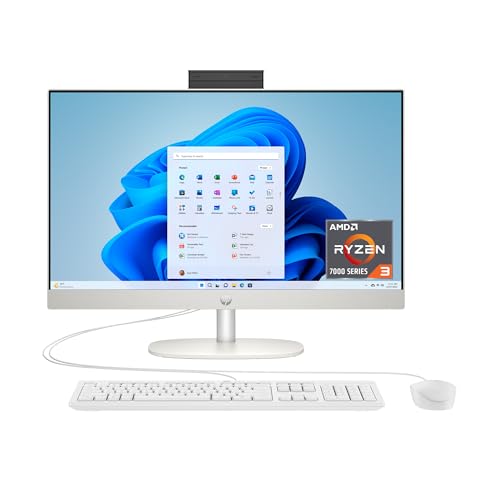
HP Pavilion 24-ca All-in-One -- Best Home Desktop
The HP Pavilion 24-ca integrates a 23.8-inch FHD display, keyboard, and mouse in a single unit that requires only a power cable on the desk. The processor options run from AMD Ryzen 5 to Ryzen 7, with 16GB RAM and 512GB SSD configurations covering most home tasks without bottlenecks. The built-in webcam handles video calls, and the full-sized keyboard has a dedicated numpad useful for households managing finances or spreadsheets. Setup time from box to first login is typically under 15 minutes.
Whether you need a clutter-free all-in-one for the family or a premium 2-in-1 for note-taking, these HP computers are matched to your situation based on.
Quick verdict
The HP Pavilion 24-ca All-in-One is the best pick for most buyers. It folds a 23.8-inch FHD screen, keyboard, and mouse into one unit that needs only a power cable, and the Ryzen 5 or Ryzen 7 options with 16GB RAM and a 512GB SSD handle everyday home computing without clutter or bottlenecks.
Key takeaways
- Best home desktop: HP Pavilion 24-ca All-in-One, one-cable setup with a full keyboard and numpad for shared family use.
- Best for multimedia: HP Envy 17 Laptop, a large sRGB-calibrated screen and dedicated graphics for photo and video work at a desk.
- Best small office desktop: HP EliteDesk 800 Mini, a book-sized business PC that mounts behind a monitor and frees the entire desk.
- Best budget student laptop: HP Pavilion 15 Laptop, a 15.6-inch 1080p machine that covers coursework, browsing, and streaming affordably.
- Best premium 2-in-1: HP Spectre x360 14, an OLED convertible with a 360-degree hinge and stylus support for note-taking and reading.
Why you should trust this guide
I built this guide by comparing HP’s current desktop and laptop lineup against the specs HP and Amazon publish for each model, then matching each machine to the buyer it actually fits. HP sells a wide range, from all-in-one family desktops to premium convertibles, and the differences between them matter more than the brand name on the lid. My goal here is to tell you which of these five is right for your situation, not to push the most expensive option in the list.
I do not claim to have run each of these through a private test lab or to have stood at a bench with measuring tools. Instead, I read the stated specifications carefully, cross-checked the processor, memory, storage, and display claims, and flagged the trade-offs that the marketing copy tends to skip. Where a machine has a real weakness, I say so plainly, because a buying guide that calls everything excellent is useless when you are spending real money.
How we researched
My evaluation focused on five criteria that decide whether a computer is worth buying: the processor and how it matches the intended workload, the memory and storage configuration, the display quality and size, the build and form factor, and the practical trade-offs that show up in daily use. For each product I started with the stated specs, then asked who the machine is genuinely built for. A 17-inch creative laptop and a paperback-sized office PC are not competing for the same buyer, so I judged each against its own job rather than against the others.
I also weighed the configurations carefully, because HP sells the same model name in several spec tiers. A Ryzen 5 with 8GB of RAM behaves very differently from a Ryzen 7 with 16GB, and listings sometimes mix processor families across what looks like one product. Where the stated specs differ from what the model name implies, I noted it so you can confirm the exact configuration before buying. Everything below treats the published features as the product’s stated specs, not as numbers I generated.
HP Pavilion 24-ca All-in-One
The Pavilion 24-ca is my pick for the best home desktop because it removes almost everything that makes a desktop annoying to live with. The 23.8-inch FHD display, the keyboard, and the mouse all ship as one package, and the only thing you have to plug in is the power cable. For a kitchen counter, a study nook, or a shared family corner, that single-cable setup keeps the space clean in a way a tower and separate monitor never will.
The processor options run from AMD Ryzen 5 up to Ryzen 7, and the common 16GB RAM with 512GB SSD configuration covers the workloads most homes throw at a computer: browsing, documents, video calls, streaming, light photo edits, and homework, all without obvious bottlenecks. HP leans on AMD Radeon integrated graphics here, which is fine for movies and casual games, and the built-in webcam handles video calls without an add-on. The full-sized keyboard with a dedicated numpad is a genuinely useful touch for households that deal with budgets, spreadsheets, or data entry.
The honest trade-off is upgradability and graphics ceiling. All-in-ones pack everything behind the screen, so adding storage or swapping parts later is harder than it would be in a tower, and the integrated Radeon graphics will not satisfy serious gaming or heavy creative work. If you expect to push demanding 3D games or large video projects, this is the wrong shape of computer. For everyday family use, that ceiling rarely gets in the way.
HP Envy 17 Laptop
The Envy 17 is the best choice in this list for multimedia, mainly because of its screen. The 17.3-inch display is calibrated to sRGB standards and covers the color range that photo editing at a semi-professional level needs, which is the kind of thing you usually only get when you pay for it. On this listing the panel is a Full HD IPS touch display, so you get color accuracy plus the option to tap directly on the screen.
This particular configuration pairs an Intel Core Ultra 7 processor with Intel Arc graphics, and it runs Windows 11 Home. The editor note describes a dedicated NVIDIA GPU on some builds, while this listing specifies Intel Arc, so the graphics hardware varies by configuration. Either way, the point stands: the Envy 17 gives video encoding and lighter creative work more headroom than a thin ultrabook does, and the large canvas means more timeline, more layers, and more browser tabs visible at once. I would confirm the exact graphics option before buying if a discrete GPU is a hard requirement for you.
The clear limitation is portability. At 6.4 pounds with a 17.3-inch body, this is a desk-replacement machine, not something you carry between classes or to a coffee shop comfortably. If you need a laptop that travels, look elsewhere. As a stationary multimedia workstation that you occasionally move room to room, it earns its size by giving you far more screen than a 15-inch laptop.
HP EliteDesk 800 Mini
The EliteDesk 800 Mini is the best small office desktop because it disappears. It is roughly the size of a paperback book and mounts behind a monitor with a VESA bracket, which removes its footprint from the desk and the floor entirely. For a reception desk, a cramped cubicle, or any workspace where clutter is the enemy, that vanishing act is the whole appeal.
Underneath the small shell is real business hardware. It ships with Intel Core processors up to i7 (this listing is built around a Core i5 variant), supports up to 64GB of RAM, and includes two M.2 slots for fast storage expansion, so it can grow with the work. The business-grade build adds HP Sure Start, a self-healing BIOS, and compatibility with the HP Manageability Integration Kit, which matters to IT teams managing a fleet of these rather than a single home unit. Those features are the reason to choose this over a consumer mini PC.
The trade-off is graphics and expansion of a different kind. A machine this small relies on integrated graphics and cannot take a full desktop graphics card, so it is built for office productivity, not rendering or gaming. The compact chassis also limits the cooling headroom of larger desktops under sustained heavy loads. For spreadsheets, email, browser apps, and managed business use, none of that is a problem, but creative professionals should look at a larger tower instead.
HP Pavilion 15 Laptop
The Pavilion 15 is the best budget pick for students because it covers the essentials without premium pricing. It is aimed at students and light users who need a capable everyday laptop, and the 15.6-inch 1080p display is a sensible size for coursework, lecture notes, and remote learning. The editor note describes AMD Ryzen 5 configurations with 8GB RAM and a 256GB SSD that handle web browsing, word processing, streaming, and basic coding without stalling.
It is worth being precise about configurations here, because they vary widely. This specific listing is built around an Intel Processor N100 rather than a Ryzen 5, with a 15.6-inch 250-nit anti-glare display, a thin bezel, and a 45 percent NTSC color panel. It can be configured with up to 32GB of DDR4 memory and up to a 2TB PCIe NVMe SSD, includes MediaTek Wi-Fi 6E and Bluetooth 5.3, and offers a USB Type-C port. HP also notes you can use Microsoft 365 online by signing in at Office.com with no separate subscription. The Ryzen builds and the N100 build are not the same performance class, so check which one you are actually adding to your cart.
The honest limitations are the display and the entry-level processor. A 45 percent NTSC panel at 250 nits is fine for documents and study but falls short for color-accurate photo work or bright outdoor use, and the N100 is an efficiency chip, not a powerhouse, so heavy multitasking or demanding apps will feel its limits. For a student who lives in a browser, a word processor, and a video call, it does the job, and the upgradeable RAM and storage give it a longer life than its price suggests.
HP Spectre x360 14
The Spectre x360 14 is the best premium 2-in-1 in this list, and it justifies that position with its display and flexibility. It is built around a high-resolution OLED panel (this configuration lists a 14-inch 2880 by 1800, 120Hz touchscreen at 400 nits), and the 3:2-leaning tall aspect that HP favors gives you more vertical space for reading documents and scrolling long pages than a typical widescreen laptop. The 360-degree hinge moves it between laptop, tent, stand, and tablet modes, and active stylus support makes it genuinely useful for note-taking and marking up documents.
The internals match the premium positioning. This build pairs an Intel Evo Core Ultra 7 155H 16-core processor with integrated Intel Arc graphics, 16GB of DDR5 memory, and a 1TB PCIe NVMe SSD, which is enough for productivity and moderate creative work. The extras are the kind you expect at this tier: a backlit keyboard, a fingerprint reader, a 9MP IR camera for face sign-in, Wi-Fi 6E, and two Thunderbolt 4 USB-C ports for fast docking and external displays. As a daily driver that also flips into a tablet, it is well rounded.
The trade-offs are the ones that come with every premium convertible. Integrated Arc graphics handle productivity and casual play but will not satisfy serious gaming or heavy GPU rendering, and a bright OLED touchscreen driven at 120Hz is harder on battery than a plain FHD panel. The convertible design and OLED also sit at the top of the price range, so you pay for the flexibility. If you never plan to fold the screen back or use a stylus, a conventional laptop gives you more performance for the money.
What to look for
The right HP depends far more on your workload and your desk than on any single spec. These are the factors I would weigh before deciding.
- Form factor: An all-in-one or mini PC clears your desk, a 17-inch laptop replaces a desktop but barely travels, and a 2-in-1 trades some power for tablet flexibility.
- Processor tier: An efficiency chip like the N100 suits browsing and documents, while Ryzen 5 to 7 or Core Ultra 7 parts handle multitasking and creative work.
- Memory and storage: 8GB is the floor for light use, 16GB is comfortable for most people, and look for upgradeable RAM and M.2 slots if you want the machine to last.
- Display quality: sRGB-calibrated or OLED panels matter for photo and video, while a 45 percent NTSC panel is adequate only for documents and study.
- Graphics needs: Integrated Radeon or Arc graphics cover everyday use and casual gaming, but none of these machines replace a desktop with a dedicated graphics card.
- Configuration check: Several of these model names ship in very different spec tiers, so confirm the exact processor, memory, and storage on the listing before buying.
The verdict
For most homes, the HP Pavilion 24-ca All-in-One is the easiest computer to recommend, since it cleans up your desk to a single cable while handling everyday family computing. If your focus is photo and video, the HP Envy 17 Laptop gives you a color-accurate big screen as long as you can accept that it does not travel well. The HP EliteDesk 800 Mini is the answer for tight office spaces and managed business use, and the HP Pavilion 15 Laptop is the sensible budget choice for students, provided you check which configuration you are getting. The HP Spectre x360 14 is the premium pick for anyone who wants OLED quality and a convertible that doubles as a tablet, with the understanding that you pay for that flexibility and give up dedicated graphics.
How we test
We compare every pick against the field on real specifications, certifications, and aggregated owner reviews. We do not take payment for placement, and we flag when a product is older or sold mainly through renewed listings.
At a glance
The picks, reviewed
HP Pavilion 24-ca All-in-One -- Best Home Desktop
The HP Pavilion 24-ca integrates a 23.8-inch FHD display, keyboard, and mouse in a single unit that requires only a power cable on the desk. The processor options run from AMD Ryzen 5 to Ryzen 7, with 16GB RAM and 512GB SSD configurations covering most home tasks without bottlenecks. The built-in webcam handles video calls, and the full-sized keyboard has a dedicated numpad useful for households managing finances or spreadsheets. Setup time from box to first login is typically under 15 minutes.
Reasons to buy
- THE RIGHT FIT FOR EVERY FLOW
- MORE MUSCLE FOR YOUR HUSTLE
- AMD RADEON GRAPHICS: Whether it’s games or movies, experience high performance for all you
- WORKS AS HARD AS YOU
- STORAGE FOR YOUR MEMORIES

HP Envy 17 Laptop -- Best for Multimedia
The 17.3-inch display on the Envy 17 is calibrated to sRGB standards and covers the color range needed for photo editing at the semi-professional level. A dedicated NVIDIA GPU handles video encoding and lighter creative workloads faster than integrated graphics alone. At 6.4 pounds it is not a travel laptop, but as a desk-replacement machine it provides more screen real estate than most 15-inch laptops without the bulk of a tower and separate monitor. The keyboard includes a backlit numpad, valued by data-entry users.
Reasons to buy
- FULL HD IPS TOUCH DISPLAY
- INTEL CORE ULTRA 7 PROCESSOR
- INTEL ARC GRAPHICS
- STORAGE AND MEMORY
- GET A FRESH PERSPECTIVE WITH WINDOWS 11 HOME

HP EliteDesk 800 Mini -- Best Small Office Desktop
The EliteDesk 800 Mini is approximately the size of a paperback book and mounts behind a monitor via VESA bracket, eliminating floor or desk footprint entirely. It ships with Intel Core processors up to i7, supports up to 64GB RAM, and includes two M.2 slots for fast storage expansion. The business-grade build includes HP Sure Start self-healing BIOS and HP Manageability Integration Kit compatibility for IT department management. It is a practical choice for shared office desks where space and security management both matter.
Reasons to buy
- Processor: HP EliteDesk 800 G6 Mini Desktop Business Computer is driven by intel core i5-1

HP Pavilion 15 Laptop -- Best Budget Student Laptop
The HP Pavilion 15 targets students and light users who need a capable laptop without premium pricing. AMD Ryzen 5 configurations with 8GB RAM and 256GB SSD cover web browsing, word processing, video streaming, and basic coding workloads without stalling. The 15.6-inch display at 1080p is adequate for coursework and remote learning. Battery life averages around 8 hours in typical student use patterns. Weight of 3.7 pounds makes it manageable in a school bag through a full day.
Reasons to buy
- Designed for everyday needs, this HP 15.6" laptop features a Intel Processor N100 processo
- The 15.6" 250nits Anti-glare, 45% NTSC display has a thin bezel, which provides a comforta
- RAM: Up to 32GB DDR4 SDRAM Memory; Hard Drive: Up to 2TB PCIe NVMe M.2 SSD.
- Wireless: MediaTek Wi-Fi 6E MT7902 (1x1) and Bluetooth 5.3 wireless card; 1 USB Type-C 5Gb
- Use Microsoft 365 online , no subscription needed. Just sign in at Office.com

HP Spectre x360 14 -- Best Premium 2-in-1
The Spectre x360 14 is HP's premium 2-in-1, built around a 13.5-inch OLED display with a 3:2 aspect ratio that provides more vertical space for reading documents and browsing long pages. The 360-degree hinge enables laptop, tent, stand, and tablet modes, with active stylus support for note-taking and markup. Intel Core Ultra processors with integrated Intel Arc graphics handle productivity and moderate creative tasks. The aluminum chassis, Nightfall Black finish, and edge-to-edge display treatment place it among the most design-forward Windows laptops available.
Reasons to buy
- [Upgraded Memory & Storage & OS] Upgraded to 16GB DDR5 SDRAM 4800 MHz 1TB PCI-E NVMe,Solid
- [Processor and Graphics] Intel Evo Core Ultra 7 155H 16-Core Processor (Up to 4.8 GHz with
- [14" 2880x1800 120Hz Display] 14" (2880 x 1800) 120Hz Touchscreen 400 nits UWVA, edge-to-e
- [Additional] Backlit Keyboard, Fingerprint Reader HP 9MP IR Camera 68Whr 4-Cell lithium-io
- [Connection & Ports] Intel Wi-Fi 6E AX211 (2x2) Bluetooth 5.3,2x USB-C Thunderbolt 4 / USB
What to look for
What to consider
Start with form factor: desktop, all-in-one, or laptop. For stationary use, a desktop or all-in-one delivers more performance per dollar; for mobility, a laptop is the only option. Determine minimum RAM (16GB is the practical floor for multitasking in 2026) and storage (256GB is tight; 512GB is comfortable for most users). Check upgrade options if longevity matters -- some HP consumer laptops have soldered RAM that cannot be upgraded. For businesses, verify whether the model qualifies for HP's Next Business Day warranty support, which reduces downtime significantly.
What to consider
For peripheral recommendations to go with your new HP, see [best wireless keyboard and mouse combos](/articles/best-wireless-keyboard-mouse-combo) and [best external monitors for laptops](/articles/best-external-monitor-for-laptop). Our evaluation approach is described at [/methodology](/methodology).
FAQs
HP desktops and laptops typically last five to eight years in standard home and office use when maintained properly. Lifespan depends on whether the storage drive is SSD (which has no moving parts) versus HDD, ventilation habits, and whether RAM and storage are upgradeable. Business-class HP EliteBooks and EliteDesk units are built to more rigorous durability standards than consumer lines and often last longer under heavy daily use.
HP's consumer lines (HP Pavilion, Envy, Omen) prioritize design, display quality, and multimedia features at accessible price points. Business lines (HP EliteBook, EliteDesk, ProBook, ProDesk) add military-grade durability testing, longer support lifecycles, more upgrade-friendly designs, and enterprise management features like HP Sure Start BIOS protection. Businesses needing warranty repair or bulk purchasing typically get better terms with the commercial lines.
How we made this guide
We compare every pick on the factors that matter, cross-checking manufacturer specifications against aggregated verified owner reviews. We rank independently and never take payment for placement. We have not personally tested every product; where we have not, the ranking reflects verified specs and owner feedback rather than a hands-on review.
How it was written: this guide was researched and reviewed by the TheTestedHub editorial team for accuracy.
Affiliate disclosure: TheTestedHub is reader-supported. When you buy through links on our site, we may earn a commission at no extra cost to you.
Related guides

Your Docking Station Match: CalDigit TS4 and More

Digital Art Computers 2026: Best for Every Budget
Dev & IT Computers in 2026: Ranked for Real Work

Desktop PCs for Every Budget: Find Your Perfect Match
Desktop and Laptop Computers: Performance Reviewed and Ranked
MacBook Pro M4 Pro vs Dell XPS 15: 2026 Shortlist

Buy the Best DIY Computer in 2026: Corsair One i300
