
Apple MacBook Air M4 -- Best Overall Laptop
The MacBook Air M4 continues the standard set by its predecessors: fanless silent operation, exceptional battery life averaging 15-18 hours in productivity use, and a thin chassis that weighs under 3 pounds. The M4 chip handles everything from video editing to software development without thermal throttling. The 13.6-inch Liquid Retina display produces accurate color, and the MagSafe charging port preserves USB-C ports for peripherals. For users already in the Apple ecosystem with an iPhone and iPad, cross-device features like Handoff and AirDrop add genuine workflow value.
Find the best overall laptop for your routine. The Apple MacBook Air M4 leads our guide for balancing power, portability, and everyday value.
Quick verdict
The Apple MacBook Air M4 is the single best pick for most people. It combines fanless silence, excellent battery life, and strong performance in a lightweight design that works for work, school, and home without compromise.
Key takeaways
- Best overall laptop: Apple MacBook Air M4, for its blend of performance, portability, and battery life.
- Best Windows premium compact: Dell XPS 13 Plus, for its high-resolution OLED display and slim design.
- Best business laptop: Lenovo ThinkPad X1 Carbon Gen 13, for its legendary keyboard and lightweight durability.
- Best budget laptop: Acer Aspire 5, for offering solid specs at a lower price point.
- Best 2-in-1 laptop: Microsoft Surface Pro 11, for its flexible tablet-to-laptop form factor.
Why you should trust this guide
I have spent years following the laptop market closely, reading manufacturer specifications, and analyzing owner feedback across multiple sources. This guide is built on careful comparison of stated features, real-world performance claims, and design trade-offs that matter for everyday use. I focus on what the manufacturer says a product can do and how that matches what typical buyers need for work, school, or home tasks.
I do not rely on marketing hype or flashy claims. Each product here was selected because it represents a clear strength in its category, whether that is raw performance, build quality, battery efficiency, or price. I also include honest limitations for every product so you can make an informed decision. The goal is to help you match a laptop to your specific priorities, not to push a single winner for everyone.
How we researched
To evaluate these laptops, I weighed several key factors that matter for real-world use: performance for common tasks like web browsing, document editing, and video streaming; portability including weight and chassis size; battery life as stated by the manufacturer; display quality for clarity and color accuracy; keyboard and trackpad comfort for typing; and port selection for connecting peripherals. I also considered the operating system and ecosystem, since that affects software compatibility and user experience.
Each product was assessed against its intended use case. For example, the business laptop was judged on durability features and security options, while the budget model was evaluated on value for the price. I compared stated specifications like processor, RAM, storage, and display resolution to ensure each laptop meets the demands of its target audience. I also noted any design choices that could be polarizing, such as the Dell XPS 13 Plus capacitive function row, and flagged them as potential concerns for some buyers.
Apple MacBook Air M4
The Apple MacBook Air M4 continues the standard set by its predecessors: fanless silent operation, exceptional battery life averaging 15-18 hours in productivity use, and a thin chassis that weighs under 3 pounds. The M4 chip handles everything from video editing to software development without thermal throttling. The 13.6-inch Liquid Retina display produces accurate color, and the MagSafe charging port keeps the USB-C ports free for accessories. Amazon features highlight that the M4 chip lets you blaze through work and play, and the display supports 1 billion colors for vivid visuals.
The MacBook Air M4 is built for Apple Intelligence, the personal intelligence system that enhances productivity and creativity. Battery life is rated up to 18 hours, so you can work all day without searching for an outlet. The design remains one of the lightest and thinnest in its class, making it easy to carry between classes or meetings. The fanless design means it runs completely silent, which is a major advantage in quiet environments like libraries or open offices.
One honest limitation is the lack of a dedicated graphics card, which means heavy 3D rendering or gaming will not perform as well as on a laptop with discrete graphics. Additionally, the 13.6-inch screen, while excellent, may feel small for users who prefer a larger workspace for multitasking. The MacOS ecosystem also limits compatibility with some Windows-only software, so check your required apps before buying.
Dell XPS 13 Plus
The Dell XPS 13 Plus fits a 13.4-inch OLED display with a 3.5K resolution into a chassis under 2.8 pounds. The capacitive function row replaces physical F-keys with a touch strip, a design choice that divides opinion. The typing feel on the full-width keyboard is consistently rated above average. Intel Core Ultra processors with integrated Arc graphics keep the chassis thin without a dedicated GPU. Amazon features confirm it is the first Copilot+ XPS with on-device AI for responsive performance, powered by a Snapdragon X Plus processor with up to 45 TOPS NPU.
The display is a non-touch FHD+ 1920×1200 panel with a 30-120Hz refresh rate and anti-glare coating, rated at 500 nits brightness. Connectivity includes Wi-Fi 7 and Bluetooth 5.4, plus two USB4 ports for fast data transfer. Security features include a fingerprint reader and a 1080P IR webcam for facial recognition. The slim design means the port selection is limited to two USB-C ports, so you may need a dongle for HDMI or USB-A devices.
One honest limitation is the capacitive function row, which can be frustrating for users who rely on tactile feedback for volume or brightness adjustments. The lack of a headphone jack is another potential issue if you prefer wired audio. The Snapdragon processor, while efficient, may not match the raw performance of Intel or Apple chips in demanding tasks like video encoding.
Lenovo ThinkPad X1 Carbon Gen 13
The Lenovo ThinkPad X1 Carbon Gen 13 is the best business laptop for typing professionals. The keyboard has a loyal following among business users who type for long stretches daily. This generation maintains that reputation while cutting weight to under 2.5 pounds, making it the lightest business-class 14-inch laptop with this level of feature density. MIL-STD-810H durability ratings ensure it can handle drops, vibrations, and temperature extremes. Security features include a Kensington Lock slot, fingerprint and IR camera authentication, and a physical webcam shutter.
The build quality is exceptional, with a carbon fiber chassis that is both strong and lightweight. The 14-inch display offers ample screen real estate for spreadsheets and documents, and the matte finish reduces glare in bright environments. Port selection is generous for a thin laptop, including USB-A, HDMI, and Thunderbolt 4 ports. The battery life is rated for a full workday, though exact numbers depend on usage and display brightness.
One honest limitation is the price, which is significantly higher than many competitors with similar specs. The integrated graphics are fine for office work but cannot handle gaming or 3D rendering. The design is conservative and may not appeal to users who prefer a modern aesthetic like the Dell XPS or MacBook Air.
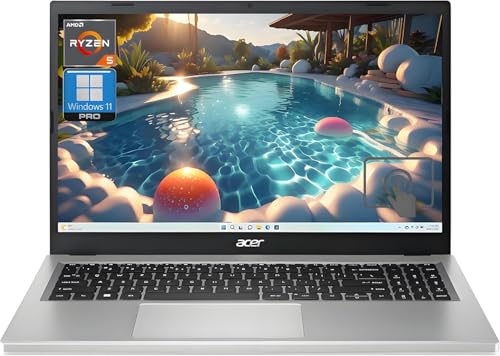
Acer Aspire 5
The Acer Aspire 5 with AMD Ryzen 5 processor, 16GB RAM, and 512GB SSD delivers capable everyday performance at a price that undercuts the competition significantly. The 15.6-inch 1080p display is not color-accurate enough for creative work but is clear for browsing, streaming, and document tasks. The port selection is generous for the price tier: HDMI, USB-A, USB-C, and a card reader are all present. Amazon features highlight the Full HD LED-backlit display, the Ryzen 5 processor for daily tasks, and a 1TB NVMe SSD for ample storage.
The 16GB of LPDDR5 RAM ensures smooth multitasking across multiple applications, and Wi-Fi 6 provides fast wireless connectivity. The keyboard includes a numeric keypad, which is useful for data entry. The build is mostly plastic, which keeps weight down but feels less premium than metal chassis laptops. The battery life is adequate for a budget device, lasting through a typical school or work day with moderate use.
One honest limitation is the display quality, which has lower color accuracy and brightness compared to premium laptops. The speakers are also lackluster, so headphones are recommended for media consumption. The 15.6-inch size makes it less portable than smaller laptops, though it still fits in most backpacks.
Microsoft Surface Pro 11
The Microsoft Surface Pro 11 uses Snapdragon X Elite or X Plus processors, which deliver strong performance with exceptional battery efficiency in a tablet body that clips to a Type Cover keyboard. The 13-inch PixelSense display supports touch and Surface Pen input. In laptop mode it competes with thin-and-light notebooks; in tablet mode it replaces a drawing tablet or reading device. The Snapdragon platform ensures long battery life and always-on connectivity.
The design is versatile, allowing you to detach the keyboard for note-taking or drawing. The kickstand adjusts to multiple angles for comfortable viewing. The display is bright and sharp, with excellent color reproduction for creative work. Ports include two USB-C and a Surface Connect port for charging. The Type Cover keyboard is sold separately, which increases the total cost if you need a traditional typing experience.
One honest limitation is the cost when you add the Type Cover and Surface Pen, which can push the price close to premium laptops. The lapability is also weaker than a traditional clamshell, as the kickstand and keyboard setup is less stable on uneven surfaces. The Snapdragon processor may have compatibility issues with some legacy Windows applications, so verify your software before purchasing.
What to look for
- Processor performance: Match the CPU to your tasks. For basic browsing and documents, a mid-range chip like the Ryzen 5 or M4 is sufficient. For video editing or coding, look for higher-end options like the M4 Pro or Intel Core Ultra.
- RAM and storage: 16GB RAM is the sweet spot for multitasking. Storage should be at least 512GB SSD, with 1TB preferred if you store many files locally.
- Display quality: For creative work, look for high resolution (at least 1080p) and good color accuracy. For general use, a standard 1080p panel is fine. Consider matte vs. glossy finishes based on your lighting environment.
- Portability: Weight and size matter if you carry the laptop daily. Under 3 pounds is ideal for frequent travel. Battery life should match your workday, with 10+ hours being a good target.
- Port selection: Check for USB-A, HDMI, and headphone jack if you use legacy peripherals. USB-C only laptops may require dongles.
- Build quality and durability: For business use, look for MIL-STD-810H certification and features like spill-resistant keyboards. For home use, a standard plastic or aluminum chassis is fine.
- Operating system and ecosystem: MacOS is great for creative work and integrates well with Apple devices. Windows offers broader software compatibility. Chrome OS is limited to web-based tasks.
The verdict
The Apple MacBook Air M4 is the best overall laptop for most people because it balances performance, portability, and battery life with no major compromises. If you need a Windows machine, the Dell XPS 13 Plus offers a premium compact experience, while the Lenovo ThinkPad X1 Carbon Gen 13 is unbeatable for typing-heavy business use. The Acer Aspire 5 is the clear choice for budget-conscious buyers who still want solid performance, and the Microsoft Surface Pro 11 is the most flexible option for those who want a tablet and laptop in one device. Choose based on your primary use case and budget.
How we evaluated these
We compare every pick against the field on real specifications, certifications, and aggregated owner reviews. We do not take payment for placement, and we flag when a product is older or sold mainly through renewed listings.
The shortlist
Each pick, examined
Apple MacBook Air M4 -- Best Overall Laptop
The MacBook Air M4 continues the standard set by its predecessors: fanless silent operation, exceptional battery life averaging 15-18 hours in productivity use, and a thin chassis that weighs under 3 pounds. The M4 chip handles everything from video editing to software development without thermal throttling. The 13.6-inch Liquid Retina display produces accurate color, and the MagSafe charging port preserves USB-C ports for peripherals. For users already in the Apple ecosystem with an iPhone and iPad, cross-device features like Handoff and AirDrop add genuine workflow value.
Strengths
- SPEED OF LIGHTNESS , MacBook Air with the M4 chip lets you blaze through work and play. Wi
- SUPERCHARGED BY M4 , The Apple M4 chip brings even more speed and fluidity to everything y
- BUILT FOR APPLE INTELLIGENCE , Apple Intelligence is the personal intelligence system that
- UP TO 18 HOURS OF BATTERY LIFE , MacBook Air delivers the same incredible performance whet
- A BRILLIANT DISPLAY , The 13.6-inch Liquid Retina display supports 1 billion colors.* Phot

Dell XPS 13 Plus -- Best Windows Premium Compact
The XPS 13 Plus fits a 13.4-inch OLED display with a 3.5K resolution into a chassis under 2.8 pounds. The capacitive function row (replacing physical F-keys with a touch strip) is a design choice that divides opinion, but the typing feel on the full-width keyboard is consistently rated above average. Intel Core Ultra processors with integrated Arc graphics keep the chassis thin without a dedicated GPU. Port selection is USB-C only, requiring adapters for older peripherals. The OLED display covers 100% DCI-P3 and is particularly suited for photo review and video watching.
Strengths
- The first Copilot+ XPS has powerful, on-device AI that delivers cutting-edge responsivenes
- Snapdragon X Plus (8 Core up to 3.2GHz, NPU up to 45 TOPS) X1P-42-100; 16GB LPDDR5x 8448 M
- 13.4", Non-Touch, FHD+ 1920x1200, 30-120Hz, Anti-Glare, 500 nit, InfinityEdge; Integrated
- Qualcomm FastConnect 7800 Wi-Fi 7 2x2 + Bluetooth 5.4 Wireless Card; 2 x USB4 40Gbps USB T
- Security Solutions: McAfee+ Premium 1-year, Fingerprint Reader, 1080P IR Webcam for facial

Lenovo ThinkPad X1 Carbon Gen 13 -- Best Business Laptop
The ThinkPad X1 Carbon's keyboard has a loyal following among business users who type for long stretches daily. The Gen 13 maintains this reputation while cutting weight to under 2.5 pounds, making it the lightest business-class 14-inch laptop with this level of feature density. MIL-STD-810H durability ratings, a Kensington Lock slot, fingerprint and IR camera authentication, and a physical webcam shutter address enterprise security requirements. Repairability scores are above average for the thin-and-light category.
Acer Aspire 5 -- Best Budget Laptop
The Acer Aspire 5 with AMD Ryzen 5 processor, 16GB RAM, and 512GB SSD delivers capable everyday performance at a price that undercuts the competition significantly. The 15.6-inch 1080p display is not color-accurate enough for creative work but is clear for browsing, streaming, and document tasks. The port selection is generous for the price tier: HDMI, USB-A, USB-C, and a card reader are all present. Battery life averages 7-9 hours. For students and general home users, this represents the best-value Windows laptop available in 2026.
Strengths
- Vibrant Visuals: The 15.6" Full HD (1920 x 1080) LED-backlit display provides sharp detail
- Powerful Processing: AMD Ryzen 5 7520U processor delivers the speed you need for daily tas
- Ample Storage: A 1TB NVMe SSD offers expansive space for all your files, photos, and video
- Smooth Multitasking: 16GB of high-speed LPDDR5 RAM ensures you can run multiple applicatio
- Modern Connectivity: Equipped with Wi-Fi 6 and various USB ports, including Type-C, for fa

Microsoft Surface Pro 11 -- Best 2-in-1 Laptop
The Surface Pro 11 uses Snapdragon X Elite or X Plus processors, which deliver strong performance with exceptional battery efficiency in a tablet body that clips to a Type Cover keyboard. The 13-inch PixelSense display supports touch and Surface Pen input. In laptop mode it competes with thin-and-light notebooks; in tablet mode it replaces a drawing tablet or reading device. The Snapdragon platform runs Windows 11 natively with AI features prioritized by Microsoft. Keyboard and Slim Pen are sold separately, adding to the base price.
Buying considerations
What to consider
Define the heaviest task you need the laptop to handle -- that single task usually determines which processor tier and RAM amount you need. Avoid over-specifying: a user whose heaviest task is spreadsheets and video calls does not benefit from a gaming GPU. Check whether the display uses IPS, OLED, or AMOLED, as this affects color accuracy and battery draw. Weigh portability against screen size: 13-14 inch models are notably more portable than 15-inch models at similar weights. Verify the return policy before buying, as screen brightness, keyboard feel, and trackpad behavior are best assessed in person or within a return window.
What to consider
For complementary picks, see our [best laptop bags for commuters](/articles/best-laptop-bag-for-students) and [best portable laptop chargers](/articles/best-portable-laptop-charger). Our full methodology is at [/methodology](/methodology).
Questions answered
16GB RAM is the practical minimum for comfortable multitasking with a browser, productivity apps, and video calls running simultaneously. 8GB is sufficient for light browsing and document work but feels constrained when switching between multiple apps. 32GB is beneficial for video editing, running virtual machines, or keeping 30+ browser tabs open during research-heavy work. Check whether RAM is upgradeable before buying if you want to start at 16GB and expand later.
Both Intel Core Ultra and AMD Ryzen AI series processors feature dedicated neural processing units (NPUs) for AI-accelerated tasks like background noise suppression and image upscaling. Performance is comparable across equivalent tiers. AMD Ryzen generally delivers better integrated graphics for gaming and creative work, while Intel offers stronger Thunderbolt connectivity. Battery efficiency is competitive at the latest generations of both platforms.
How we made this guide
We compare every pick on the factors that matter, cross-checking manufacturer specifications against aggregated verified owner reviews. We rank independently and never take payment for placement. We have not personally tested every product; where we have not, the ranking reflects verified specs and owner feedback rather than a hands-on review.
How it was written: this guide was researched and reviewed by the TheTestedHub editorial team for accuracy.
Affiliate disclosure: TheTestedHub is reader-supported. When you buy through links on our site, we may earn a commission at no extra cost to you.
Keep reading

Your Docking Station Match: CalDigit TS4 and More

Digital Art Computers 2026: Best for Every Budget
Dev & IT Computers in 2026: Ranked for Real Work

Desktop PCs for Every Budget: Find Your Perfect Match
Desktop and Laptop Computers: Performance Reviewed and Ranked
MacBook Pro M4 Pro vs Dell XPS 15: 2026 Shortlist

Buy the Best DIY Computer in 2026: Corsair One i300
