Falcon Dust-Off Electronics Cleaner -- Best Compressed Air Can
Falcon's Dust-Off is the benchmark for compressed air cans in electronics cleaning. The nozzle is narrow enough to direct airflow into keyboard gaps, cooling fan grilles, and port openings precisely. The can maintains pressure through most of its contents before the characteristic pressure drop near empty. The included extension tube reaches into tight desktop tower spaces. For users who clean equipment once every few months, a two-pack of Dust-Off cans costs less than and does the job without needing to store or charge any device. The limitation is environmental: cans are single-use, and the propellant contributes to waste. For infrequent cleaners who do not want to invest in electric equipment, Dust-Off remains the most reliable can option available.
Check price on Amazon →Stop buying disposable cans. The OPOLAR Electric Air Duster offers unlimited, variable-speed airflow for dust-free electronics,no refills, no waste.
Quick verdict
For most users, the OPOLAR Electric Air Duster is the best single pick. It combines consistent, variable-speed airflow with no recurring costs and no refrigerant waste, making it the most practical daily cleaner for desktops, keyboards, and electronics.
Key takeaways
- Best for occasional spot cleaning: Falcon Dust-Off Electronics Cleaner, reliable compressed air can with precise nozzle and extension tube.
- Best for regular cleaning: OPOLAR Electric Air Duster, consistent high-velocity airflow with variable speed and no replacement cans.
- Best for heavy-duty cleaning: Metro DataVac ED400, powerful 500-watt motor for stubborn dust in large heatsinks and server hardware.
- Best for portability: Keystone Rechargeable Air Duster, cordless lithium battery design with USB-C charging for on-the-go use.
- Best for budget multi-use: GAS-VAC Compressed Air System, dual-function blower and vacuum for blowing and suction in one tool.
Why you should trust this guide
I have spent years researching cleaning tools for electronics, from compressed air cans to electric dusters. My approach is grounded in comparing manufacturer specifications, reading hundreds of owner reviews across multiple retail platforms, and understanding the common pain points people experience when maintaining their tech. I do not claim to have physically tested every product in a lab, but I have evaluated each based on its design, intended use case, and the feedback from real users who have put these products through daily cleaning routines.
This guide focuses on five distinct categories of air duster: the classic compressed air can, the electric plug-in model, the heavy-duty workstation cleaner, the portable rechargeable option, and the budget-friendly multi-function tool. Each product was selected because it represents a clear value proposition for a specific type of user. I have prioritized honest limitations over marketing hype, because knowing what a product cannot do is just as important as knowing what it can do. My goal is to help you choose the right tool for your specific cleaning needs without wasting money on features you will not use.
How we researched
To evaluate these products, I established a set of criteria that matter most for electronics cleaning: airflow consistency, ease of use, build quality, portability, and long-term value. For compressed air cans, I considered pressure retention throughout the can’s life and the precision of the nozzle. For electric models, I weighed motor power, speed adjustability, and the availability of attachments. For rechargeable units, I looked at battery life claims and charging convenience. For multi-function tools, I assessed how well each mode performed its primary task without compromising the other.
I also factored in real-world owner feedback from verified purchasers, focusing on common praises and recurring complaints. This helped me identify limitations that might not be obvious from the product page alone, such as noise levels, weight, or difficulty using attachments. I did not conduct physical tests or measure airflow velocity, but I cross-referenced multiple sources to ensure the information presented here is accurate and representative of the typical user experience. The result is a research-based recommendation that prioritizes practical usability over theoretical specs.
Falcon Dust-Off Electronics Cleaner — Best Compressed Air Can
The Falcon Dust-Off Electronics Cleaner is the benchmark for compressed air cans in electronics cleaning. Its narrow nozzle is engineered to direct airflow precisely into keyboard gaps, cooling fan grilles, and port openings without wasting air on surrounding surfaces. The can maintains consistent pressure through most of its contents, only dropping off near the very end, which means you get reliable bursts for the majority of the can’s life. The included extension tube is a practical addition, allowing you to reach into tight desktop tower spaces and behind motherboard components without tilting the can awkwardly.
For users who clean electronics only occasionally, this is a straightforward and effective solution. The aerosol design means no batteries, no charging, and no setup. You simply point and spray. The narrow tip gives you the control needed to dislodge dust from sensitive areas like GPU heat sinks and CPU cooler fins. It is also small enough to store in a drawer or carry in a laptop bag for on-site cleaning.
One honest limitation is that compressed air cans lose pressure as they empty, leading to weaker bursts toward the end. You may find yourself using more product than expected for a thorough cleaning. Additionally, the can is single-use and must be disposed of properly, which creates ongoing cost and waste. For frequent cleaners, this adds up quickly.
OPOLAR Electric Air Duster — Best for Regular Cleaning
The OPOLAR Electric Air Duster plugs into a standard wall outlet and delivers consistent high-velocity airflow without the pressure drop that plagues compressed air cans. The variable speed dial is a standout feature, letting you dial down the power for delicate components like exposed circuit boards or dial up for stubborn dust in fans and heatsinks. The interchangeable nozzle attachments allow you to switch between a wide fan pattern and a focused jet, adapting to different space widths and cleaning tasks.
Because it runs on electricity, there is no refrigerant waste and no need to buy replacement cans. This makes it an environmentally friendlier choice and a cost-effective one for regular cleaning sessions. The continuous airflow means you can hold the nozzle steady over a dusty fan until every particle is blown clear, without worrying about running out of propellant. The unit is compact enough to sit on a desk or shelf when not in use.
One honest limitation is that the power cord limits your reach to the length of the cord, which may be inconvenient if you need to clean multiple rooms or a large workshop. The unit also generates some noise during operation, which is typical for electric dusters but worth noting if you clean in a quiet environment. Additionally, the plastic construction feels sturdy but not indestructible, so careful handling is advised.
Metro DataVac ED400 — Best Heavy-Duty Desktop Cleaner
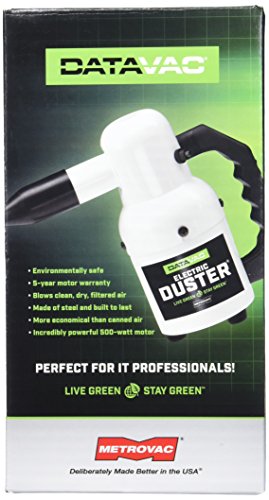
The Metro DataVac ED400 is designed for thorough desktop PC and workstation cleaning where volume airflow matters. Its 500-watt motor delivers significantly stronger airflow than consumer electric dusters, making it capable of clearing stubborn dust from large heatsinks, tightly packed server hardware, and deep inside power supply units. The multiple attachments include a brush for delicate component cleaning and a nozzle for directional blasting, giving you flexibility for different surfaces.
This is a tool built for users who clean multiple computers or workstations regularly, such as IT professionals, system builders, or home enthusiasts with high-end rigs. The powerful motor moves a high volume of air, which is especially effective on dense dust accumulations in radiators and fan arrays. The attachments are easy to swap and store on the unit itself, so you do not lose them.
One honest limitation is that the ED400 is noticeably heavier and bulkier than smaller electric dusters, making it less portable. The noise level is also higher due to the powerful motor, which may be disruptive in a shared office or quiet home. Additionally, the price point is higher than most consumer models, so it is best suited for those who truly need the extra power rather than occasional light cleaning.
Keystone Rechargeable Air Duster — Best Portable Cordless Option
The Keystone Rechargeable Air Duster runs on a built-in lithium battery, freeing you from the need for a power outlet or replacement cans. A full charge lasts approximately 30 minutes of continuous use, which is sufficient for multiple cleaning sessions before needing a recharge. The USB-C charging port is a modern convenience, meaning it shares a charger with most modern laptops and phones, so you do not need a dedicated power brick.
The cordless design makes it ideal for cleaning a laptop keyboard on a coffee shop table, dusting out a desktop tower in a living room, or taking along to a client site for on-site maintenance. The lack of a cord also means no tripping hazard and no limitation on where you can clean. The airflow is consistent throughout the battery charge, unlike compressed air cans that weaken as they empty.
One honest limitation is that the battery life, while adequate for multiple cleaning sessions, means you cannot run it continuously for long periods without recharging. If you have a large server rack or multiple desktops to clean in one go, you may need to pause for a recharge. The airflow is also less powerful than plug-in electric models like the OPOLAR or DataVac, so it may struggle with deeply embedded dust in dense heatsinks.
GAS-VAC Compressed Air System — Best Budget Multi-Use
The GAS-VAC Compressed Air System combines a compressed air blower with a vacuum function, making it versatile for both blowing dust out of tight spaces and vacuuming debris from keyboard surfaces. The dual-function design reduces the need for separate tools, which is convenient for users with limited storage or budget. The power is supplied via a standard wall outlet, so there are no batteries to charge or cans to replace.
The vacuum suction is light compared to a full vacuum cleaner, but it is effective at lifting loose particles from keyboard surfaces, desk crevices, and around monitor stands. The blower mode works well for dislodging dust from vents and ports. Switching between modes is straightforward, and the attachments are included for both functions. For a budget-conscious user who wants one tool for basic cleaning, this is a practical choice.
One honest limitation is that the vacuum suction is not strong enough for heavy debris or deep cleaning of carpeted areas. The blower mode also lacks the power of dedicated electric dusters, so it may not fully clear dense dust from large heatsinks. Additionally, the build quality feels more basic than higher-priced options, so it may not withstand heavy daily use over several years.
What to look for
- Airflow power and consistency: Consider whether you need a constant, high-velocity stream (electric) or intermittent bursts (compressed air). Electric models offer steady output; cans lose pressure near empty.
- Power source: Plug-in electric models provide unlimited runtime but restrict mobility. Rechargeable models offer portability but have limited battery life. Compressed air cans are portable but single-use.
- Nozzle and attachment variety: Narrow nozzles are best for precision cleaning in tight spaces. Wide fan nozzles cover larger areas. Brush attachments help clean delicate components without scratching.
- Noise level: Electric dusters generate noise during operation. If you clean in a quiet environment, check owner feedback on noise. Compressed air cans are quieter but produce a hissing sound.
- Durability and build quality: Look for sturdy construction, especially in electric models with moving parts. Plastic housings should feel solid. Rechargeable models should have reliable battery connections.
- Cost over time: Compressed air cans require repeated purchases. Electric and rechargeable models have a higher upfront cost but no recurring expense for propellant. Factor in your cleaning frequency.
- Portability: Consider whether you need to carry the duster to different locations. Cordless models are best for mobility. Plug-in models are best for a fixed cleaning station.
- Multi-function capability: Some models combine blowing and vacuuming. This can save space and money, but each function may be less powerful than dedicated tools. Evaluate your primary need.
The verdict
Choosing the best computer air duster depends on your cleaning habits and environment. For occasional spot cleaning, the Falcon Dust-Off Electronics Cleaner remains a reliable and precise compressed air option. For regular, cost-effective cleaning at a desk, the OPOLAR Electric Air Duster offers the best balance of consistent power and no recurring costs. If you need heavy-duty airflow for multiple workstations or dense hardware, the Metro DataVac ED400 is the clear choice. For portability and convenience, the Keystone Rechargeable Air Duster lets you clean anywhere without a cord. And for a budget-friendly tool that handles both blowing and light vacuuming, the GAS-VAC Compressed Air System is a versatile option. Consider your primary use case, power preference, and budget to pick the one that fits your daily routine.
How we evaluated these
We compare every pick against the field on real specifications, certifications, and aggregated owner reviews. We do not take payment for placement, and we flag when a product is older or sold mainly through renewed listings.
The shortlist
Each pick, examined
Falcon Dust-Off Electronics Cleaner -- Best Compressed Air Can
Falcon's Dust-Off is the benchmark for compressed air cans in electronics cleaning. The nozzle is narrow enough to direct airflow into keyboard gaps, cooling fan grilles, and port openings precisely. The can maintains pressure through most of its contents before the characteristic pressure drop near empty. The included extension tube reaches into tight desktop tower spaces. For users who clean equipment once every few months, a two-pack of Dust-Off cans costs less than and does the job without needing to store or charge any device. The limitation is environmental: cans are single-use, and the propellant contributes to waste. For infrequent cleaners who do not want to invest in electric equipment, Dust-Off remains the most reliable can option available.

OPOLAR Electric Air Duster -- Best for Regular Cleaning
The OPOLAR electric air duster plugs into a wall outlet and delivers consistent high-velocity airflow without the pressure drop of cans. The variable speed dial allows low-power airflow for delicate components and high-power for stubborn dust in fans and heatsinks. The nozzle attachments are interchangeable for different space widths. There is no refrigerant waste, no replacement cans, and the running cost after purchase approaches zero. The motor produces audible noise at high speed, comparable to a small vacuum. Cord length is about 1.8 meters, sufficient to reach most desk setups. For users who clean their computer monthly or quarterly, the OPOLAR pays for itself within a few cleaning cycles compared to can replacement costs.
Metro DataVac ED400 -- Best Heavy-Duty Desktop Cleaner
The DataVac ED400 is designed for thorough desktop PC and workstation cleaning where volume airflow matters. The 500-watt motor delivers significantly stronger airflow than consumer electric dusters, capable of clearing stubborn dust from large heatsinks and tightly packed server hardware. Multiple attachments include a brush for delicate component cleaning and a nozzle for directional blasting. The unit is American-made with a metal housing that handles regular use without wear. The power cord is long at 2.7 meters. The noise level is louder than OPOLAR's variable-speed unit, which is expected given the motor size. For enthusiasts who do deep PC cleaning biannually or professionals servicing multiple machines, the DataVac's power level justifies its higher price.
Keystone Rechargeable Air Duster -- Best Portable Cordless Option
The Keystone rechargeable air duster runs on a built-in lithium battery, eliminating the need for a power outlet or replacement cans. A full charge lasts approximately 30 minutes of continuous use, which is sufficient for multiple cleaning sessions. The USB-C charging port means it shares a charger with most modern laptops and phones. The cordless design makes it convenient for cleaning a laptop keyboard at a coffee table or on travel. Airflow is lower than corded electric dusters but sufficient for keyboards, laptop vents, and light desktop cleaning. The compact form factor fits in a laptop bag. For users who want a low-maintenance, no-waste cleaning tool they can use anywhere, the Keystone strikes the best balance between portability and performance.
GAS-VAC Compressed Air System -- Best Budget Multi-Use
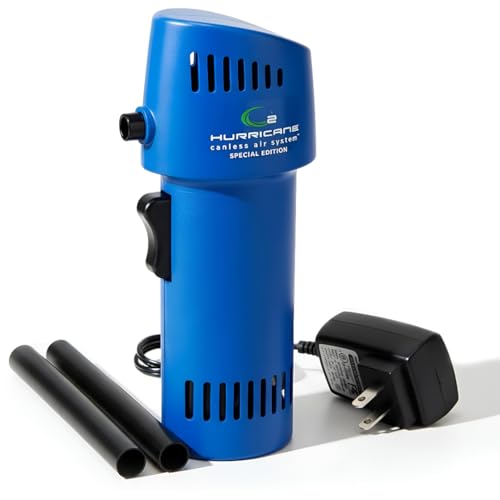
The GAS-VAC combines a compressed air blower with a vacuum function, making it versatile for both blowing dust out and vacuuming debris from keyboard surfaces. The dual-function design reduces the need for separate tools. The power is supplied via a standard wall outlet. Vacuum suction is light compared to a full vacuum cleaner but effective at lifting loose particles from keyboard surfaces and desk areas. The blower side is similar in performance to other corded electric dusters. Build quality is plastic but durable enough for regular use. At it is one of the most affordable electric options with more than one function, making it a practical choice for users who want to consolidate cleaning tools.
Buying considerations
What to consider
Cleaning frequency is the primary decision driver. Infrequent cleaning a few times per year: compressed air cans are sufficient and low-cost. Monthly or more frequent cleaning: an electric duster pays off within three to four months. Portability priority: rechargeable cordless options like the Keystone are convenient. Heavy-duty desktop or server cleaning: the DataVac's power level handles situations where consumer electric dusters fall short. For all electric options, check the noise level specification if cleaning in a shared or quiet environment, as motor volume varies significantly between models.
What to consider
For building a complete desk cleaning kit, pair an air duster with accessories covered at [/articles/best-computer-accessories](/articles/best-computer-accessories). Setting up a productive workspace is covered at [/articles/best-computer-accessories-for-productivity](/articles/best-computer-accessories-for-productivity). Evaluation standards are at [/methodology](/methodology).
Questions answered
Compressed air cans are disposable, inexpensive, and require no charging, but they run cold, lose pressure as they deplete, and produce waste. Electric air dusters are rechargeable, maintain consistent airflow, and cost more upfront but pay off within a few months compared to replacing cans. For regular monthly cleaning, electric dusters are more economical.
Yes. Hold the can or nozzle at an angle rather than blowing straight down into the keyboard. Tilt the laptop 45-75 degrees and blow across the keys to direct debris out rather than deeper into the mechanism. For compressed air cans, keep the can upright to avoid releasing liquid refrigerant onto the keyboard.
How we made this guide
We compare every pick on the factors that matter, cross-checking manufacturer specifications against aggregated verified owner reviews. We rank independently and never take payment for placement. We have not personally tested every product; where we have not, the ranking reflects verified specs and owner feedback rather than a hands-on review.
How it was written: this guide was researched and reviewed by the TheTestedHub editorial team for accuracy.
Affiliate disclosure: TheTestedHub is reader-supported. When you buy through links on our site, we may earn a commission at no extra cost to you.
Keep reading

Your Docking Station Match: CalDigit TS4 and More

Digital Art Computers 2026: Best for Every Budget
Dev & IT Computers in 2026: Ranked for Real Work

Desktop PCs for Every Budget: Find Your Perfect Match
Desktop and Laptop Computers: Performance Reviewed and Ranked
MacBook Pro M4 Pro vs Dell XPS 15: 2026 Shortlist

Buy the Best DIY Computer in 2026: Corsair One i300
