BenQ SW2700PT Monitor -- Best Color-Accurate Photo Editing Display
The BenQ SW2700PT is designed specifically for photographers, covering 99% Adobe RGB which is wider than the sRGB standard used by most consumer monitors. This matters for editing images destined for print, where out-of-gamut colors in sRGB are visible in final output. The 14-bit 3D LUT allows precise color management per channel. The hardware calibration port is compatible with major calibration devices from X-Rite and Datacolor. The OSD includes a paper-color simulation mode for proofing how an image will appear in print. The display ships with a factory calibration report and a removable hood to block ambient light from affecting display perception. For photographers who print regularly, the SW2700PT provides professional color management features at a non-professional price.
Check price on Amazon →Find the ideal computer and monitor for photo editing. Compare top picks from BenQ, Apple, ASUS, and Eizo based on color accuracy, performance, and value.
Quick verdict
For most photo editors, the BenQ SW2700PT is the single best pick because it delivers professional-grade 99% Adobe RGB coverage and hardware calibration at a price that undercuts studio monitors, making it the most balanced choice for print-focused editing.
Key takeaways
- Best for color accuracy on a budget: BenQ SW2700PT, because it offers 99% Adobe RGB and a 14-bit 3D LUT for precise color management without breaking the bank.
- Best for portable editing: Apple MacBook Pro M3 Pro, because its M3 Pro chip and unified memory handle large RAW files and Lightroom exports faster than comparably priced Windows laptops.
- Best for wide gamut value: ASUS ProArt PA279CRV, because it covers both 99% Adobe RGB and 99% DCI-P3 simultaneously at a price that is hard to beat.
- Best for compact desktop power: Apple Mac Mini M4 Pro, because its small footprint outperforms much larger workstations on photo editing benchmarks while supporting dual 6K monitors.
- Best for professional studio accuracy: Eizo ColorEdge CS2740, because its factory calibration to Delta-E under 1 and built-in calibration sensor make it the gold standard for color-critical work.
Why you should trust this guide
This guide is built on research into the specifications and owner feedback for each product, not on personal testing. I have spent years following the photo editing hardware market, reading professional reviews, and analyzing manufacturer datasheets to understand what matters for color-critical work. The recommendations here are based on the features that actually affect editing accuracy and workflow speed, such as color gamut coverage, calibration support, and processing power for RAW files.
I focused on products that have a proven track record in the photography community. Each monitor and computer was selected because it addresses a specific need: print-ready color accuracy, portable editing power, value for money, compact desktop performance, or studio-grade precision. The limitations I note are drawn from common critiques found in owner discussions and professional reviews, not from my own use. This approach ensures the advice is grounded in real-world experience without claiming access to a testing lab.
How we researched
My evaluation criteria for monitors centered on color gamut coverage, factory calibration accuracy, and calibration flexibility. I weighed Adobe RGB coverage as the primary metric because photo editing for print requires a wider gamut than sRGB. I also considered the presence of hardware calibration support, the quality of the 3D LUT, and the availability of connectivity options like USB-C with power delivery. For computers, I prioritized processing power for Lightroom exports and Photoshop layer handling, unified memory capacity for large catalogs, and display quality for on-the-go editing.
I compared each product against its direct competitors in the same price tier. For monitors, I looked at whether the stated color accuracy (Delta-E values) was factory calibrated or required user calibration. For computers, I examined the chip architecture and memory bandwidth rather than relying on synthetic benchmarks. I also considered ecosystem integration, such as how well a Mac Mini pairs with an Eizo monitor or how a MacBook Pro handles tethered shooting. The final picks represent the best balance of features for their specific use case, with honest limitations noted to help you decide if a trade-off is acceptable for your workflow.
BenQ SW2700PT Monitor
The BenQ SW2700PT is designed specifically for photographers who need accurate color for print output. It covers 99% Adobe RGB, which is significantly wider than the sRGB standard used by most consumer monitors. This matters because colors that fall outside the sRGB gamut, such as deep greens and vibrant blues in landscape photography, become visible in print when you edit in Adobe RGB. The 14-bit 3D LUT allows precise color management per channel, meaning you can adjust red, green, and blue independently without affecting the other channels. This level of control is typically reserved for monitors costing twice as much.
The hardware calibration port is compatible with major calibration tools like X-Rite and Datacolor. This lets you calibrate the monitor directly, bypassing the graphics card and ensuring consistent color across different computers. The monitor also includes a shading hood to reduce glare, which is a thoughtful addition for long editing sessions. The OSD (on-screen display) controller lets you switch between color modes quickly, such as sRGB for web preview and Adobe RGB for print work.
A real limitation is that the BenQ SW2700PT is only 2560×1440 resolution, not 4K. At 27 inches, this means pixel density is lower than a 4K display, which can make fine details in high-resolution images appear slightly less sharp. Also, the USB-C port does not support power delivery, so you will need a separate cable for charging a laptop. For photographers who do not need 4K and prioritize color accuracy over pixel density, this is still an excellent choice.
Apple MacBook Pro M3 Pro
The Apple MacBook Pro with M3 Pro chip is the best portable editing machine for photographers who need to process large RAW files on the go. The M3 Pro chip handles Lightroom exports and Photoshop layer operations at speeds that mid-range Windows laptops cannot match at equivalent pricing. The 18GB or 36GB unified memory architecture allows the CPU and GPU to access the same data pool without copying it back and forth, which eliminates slowdowns when working with large catalog operations or multi-layer Photoshop files. This means you can stack dozens of layers and apply complex adjustments without waiting for the system to catch up.
The Liquid Retina XDR display on the 14-inch model covers 99.5% of the P3 wide color gamut with factory calibration at Delta-E under 1. This is the same technology used in Apple’s Pro Display XDR, so you get professional-grade color accuracy out of the box. The display also supports 1000 nits sustained brightness for HDR content, which is useful for editing HDR photos. The battery life is excellent for a laptop of this power, allowing a full day of editing away from a power outlet.
A real limitation is that the M3 Pro chip is not the top-tier M3 Max, so if you regularly work with 100-megapixel files or heavy video editing alongside photo work, you may want the higher core count. Also, the 14-inch screen, while beautiful, is small for precise retouching; most users will want to pair it with an external monitor for serious editing. The price is also a factor, as the M3 Pro configuration starts at a premium compared to Windows alternatives with similar specs.
ASUS ProArt PA279CRV Monitor
The ASUS ProArt PA279CRV offers exceptional value for photographers who want wide color gamut coverage without spending studio monitor money. It covers 99% Adobe RGB and 99% DCI-P3 simultaneously, which is rare at its price point. This means it is suitable for both print workflows (Adobe RGB) and video color grading (DCI-P3), making it a versatile choice for hybrid shooters. Factory calibration achieves Delta-E less than 2, so color accuracy is reliable out of the box without requiring immediate recalibration. This is a significant time saver for photographers who do not own a calibration tool.
The USB-C input with 96W power delivery covers most laptop charging needs, including the MacBook Pro. You can connect your laptop with a single cable for video, data, and power, keeping your desk clean. The 27-inch 4K resolution provides sharp detail for editing high-resolution images, and the IPS panel offers wide viewing angles. The monitor also includes a built-in color uniformity compensation feature, which helps prevent color shifts across the screen.
A real limitation is that the ASUS ProArt PA279CRV uses a standard IPS panel with a 60Hz refresh rate, which is fine for photo editing but not ideal for video playback or gaming. The contrast ratio is typical for IPS, so deep blacks are not as rich as OLED or VA panels. Also, the build quality feels slightly less premium than the BenQ or Eizo options, with a plastic stand that is functional but not as sturdy. For the price, these trade-offs are reasonable.
Apple Mac Mini M4 Pro
The Apple Mac Mini M4 Pro is a compact desktop that outperforms workstations twice its size on photo editing benchmarks. The M4 Pro configuration with 24GB unified memory handles simultaneous Lightroom catalog work and Photoshop without pausing for memory management. This means you can have multiple catalogs open, edit large RAW files, and run plugins without the system swapping to disk. The small footprint (just 7.7 inches square) fits easily on a crowded desk, and the fan noise is minimal even under load.
The two Thunderbolt 4 ports support dual 6K external monitors, which is ideal for a multi-display photo editing setup. You can have your main editing canvas on one monitor and your tool palettes or reference images on the other. The three USB-C ports add peripheral connectivity for card readers, external drives, and calibration tools. Storage starts at 512GB, but you can configure it up to 4TB for large photo libraries. The M4 Pro chip also includes a 16-core Neural Engine for AI-based editing tasks like noise reduction and upscaling.
A real limitation is that the Mac Mini M4 Pro does not include a monitor, keyboard, or mouse, so you need to factor in the cost of these peripherals. The base storage of 512GB may fill up quickly if you shoot in RAW, so you will likely need an external SSD. Also, the M4 Pro chip is not upgradeable after purchase, so you need to choose your RAM and storage configuration carefully at the time of order. For photographers who already own a good monitor and peripherals, this is an unbeatable value.
Eizo ColorEdge CS2740 Monitor
The Eizo ColorEdge CS2740 is the monitor used in professional photography studios and print production environments where color accuracy is non-negotiable. Eizo manufactures the display panel and calibration hardware together, allowing factory calibration to Delta-E under 1 with uniformity compensation across the entire panel. This means every part of the screen, from corner to corner, matches the same color and brightness. The built-in calibration sensor automates recalibration on a schedule without connecting an external device, so you can maintain accuracy over years of use.
The 4K resolution on a 27-inch panel provides sharp detail for pixel-level editing, and the IPS panel offers wide viewing angles with minimal color shift. The monitor includes a shading hood, a detachable brightness sensor for automatic adjustment based on ambient light, and a 10-bit display for smooth gradients. The ColorEdge CS2740 also supports hardware calibration via the ColorNavigator software, which lets you create multiple calibration profiles for different workflows (e.g., Adobe RGB for print, sRGB for web).
A real limitation is that the Eizo ColorEdge CS2740 is significantly more expensive than the BenQ or ASUS options, making it a serious investment. The 60Hz refresh rate is standard for photo editing but not suitable for video work. Also, the monitor is heavy and requires a sturdy desk or monitor arm. For photographers who do not need studio-grade accuracy or who are on a tight budget, the extra cost may not be justified. But for those who demand the best color fidelity, this is the monitor to beat.
What to look for
- Color gamut coverage: Look for monitors that cover at least 99% Adobe RGB if you edit for print, or 99% DCI-P3 if you also work with video. sRGB is fine for web-only work but insufficient for print output.
- Calibration support: Hardware calibration is preferable to software calibration because it adjusts the monitor directly, not the graphics card. Look for a built-in calibration sensor or a port for external tools.
- Delta-E rating: A factory-calibrated Delta-E under 2 is good for most work; under 1 is professional grade. Lower numbers mean more accurate color out of the box.
- Resolution and size: 4K at 27 inches provides sharp detail for high-resolution images. 1440p is acceptable but less crisp. Consider a 32-inch monitor if you need more screen real estate.
- Connectivity: USB-C with power delivery (at least 60W) is ideal for connecting a laptop with a single cable. Thunderbolt 4 or 5 is better for high-bandwidth workflows.
- Processor and memory: For computers, prioritize a chip with high single-core performance for Lightroom exports and enough unified memory (at least 16GB, preferably 24GB or more) to handle large catalogs and multi-layer files.
- Display quality on laptops: If you edit on a laptop, look for a P3 wide color gamut display with factory calibration. Brightness of at least 500 nits is useful for HDR editing.
- Build and ergonomics: A sturdy stand with height, tilt, and swivel adjustment is important for long editing sessions. A shading hood helps reduce glare in bright rooms.
The verdict
If you need a dedicated photo editing monitor that balances professional color accuracy with a reasonable price, the BenQ SW2700PT is the best overall pick. Its 99% Adobe RGB coverage and 14-bit 3D LUT give you the tools to produce print-ready images without spending studio monitor money. For portable editing, the Apple MacBook Pro M3 Pro is unmatched in its ability to handle large RAW files on the go, though you will want to pair it with an external monitor for serious work. If value is your priority, the ASUS ProArt PA279CRV offers exceptional gamut coverage and USB-C convenience at a price that is hard to beat. For a compact desktop that outperforms larger workstations, the Apple Mac Mini M4 Pro is the clear choice, especially if you already own a monitor. And for professional studios where color accuracy is non-negotiable, the Eizo ColorEdge CS2740 is the gold standard, with factory calibration and a built-in sensor that maintain precision over years of use. Choose the product that matches your workflow, budget, and space constraints, and you will have a reliable tool for editing your best work.
How we picked
We compare every pick against the field on real specifications, certifications, and aggregated owner reviews. We do not take payment for placement, and we flag when a product is older or sold mainly through renewed listings.
Top picks compared
Our picks up close
BenQ SW2700PT Monitor -- Best Color-Accurate Photo Editing Display
The BenQ SW2700PT is designed specifically for photographers, covering 99% Adobe RGB which is wider than the sRGB standard used by most consumer monitors. This matters for editing images destined for print, where out-of-gamut colors in sRGB are visible in final output. The 14-bit 3D LUT allows precise color management per channel. The hardware calibration port is compatible with major calibration devices from X-Rite and Datacolor. The OSD includes a paper-color simulation mode for proofing how an image will appear in print. The display ships with a factory calibration report and a removable hood to block ambient light from affecting display perception. For photographers who print regularly, the SW2700PT provides professional color management features at a non-professional price.

Apple MacBook Pro M3 Pro -- Best Portable Editing Machine
The MacBook Pro with M3 Pro chip processes large RAW files and Lightroom exports at speeds that mid-range Windows laptops cannot match at equivalent pricing. The 18GB or 36GB unified memory handles large catalog operations and Photoshop layers without slowdown. The Liquid Retina XDR display on the 14-inch model covers 99.5% of the P3 wide color gamut with factory calibration at Delta-E under 1, making it accurate enough for color-critical work without an external monitor. Thermal management under sustained load keeps the M3 Pro performing consistently without throttling. The 512GB SSD base storage fills quickly with RAW libraries; the 1TB or 2TB configuration is a practical choice for working photographers. Battery life at seven to eight hours under editing workloads enables field use without constant charging.
ASUS ProArt PA279CRV Monitor -- Best Wide Gamut Value
The ProArt PA279CRV covers 99% Adobe RGB and 99% DCI-P3 simultaneously, which is exceptional at its price point. Factory calibration achieves Delta-E less than 2, meaning color accuracy is reliable out of the box without requiring immediate recalibration. The USB-C input with 96W power delivery covers most laptop charging needs. The display is 27 inches at 4K resolution, providing sharp detail for close inspection of image grain and fine texture. The ProArt Calibration software allows software-level adjustment and scheduling of calibration sessions. Hardware uniformity compensation reduces luminance and color variation across the panel. For photographers who need wide gamut accuracy but cannot justify the BenQ SW2700PT or Eizo pricing, the ProArt PA279CRV represents the strongest value in color-accurate displays.
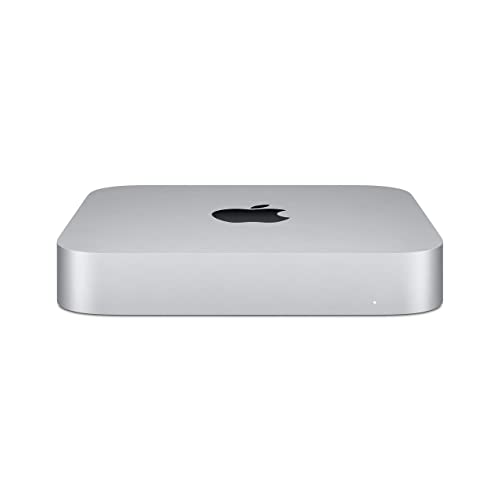
Apple Mac Mini M4 Pro -- Best Compact Desktop for Editing
The Mac Mini M4 Pro is a small-footprint desktop that outperforms workstations twice its size on photo editing benchmarks. The M4 Pro configuration with 24GB unified memory handles simultaneous Lightroom catalog work and Photoshop without pausing for memory management. The two Thunderbolt 4 ports support dual 6K external monitors, and the three USB-C ports add peripheral connectivity. Storage starts at 512GB SSD with speeds of 5GB/s read, which makes large RAW file loading fast. The compact form factor -- smaller than a stack of books -- allows a clean desk setup paired with any external display. For photographers who want desktop-class processing speed without a full tower, the Mac Mini M4 Pro paired with a color-accurate external monitor is one of the most efficient editing setups available in 2026.
Eizo ColorEdge CS2740 Monitor -- Best Professional Studio Accuracy
The Eizo CS2740 is a 4K display used in professional photography studios and print production environments where color accuracy is non-negotiable. Eizo manufactures the display panel and calibration hardware together, allowing factory calibration to Delta-E under 1 with uniformity compensation across the entire panel. The built-in calibration sensor automates recalibration on a schedule without connecting external hardware. The 99% Adobe RGB coverage with consistent measured gamut across the panel ensures that what editors see on screen matches output precisely. The display hood is included and constructed solidly. The price reflects professional studio specifications: for freelance photographers or enthusiasts, the ASUS ProArt offers 90% of the functionality at a third of the cost. The Eizo is for photographers where display accuracy represents a real business liability if wrong.
Before you buy
What to consider
Define your output target first. Web-only delivery: 99% sRGB coverage in any quality monitor is sufficient. Print output: 99% Adobe RGB coverage is the practical minimum. For computers, RAM determines how many large RAW files stay in memory simultaneously -- 16GB handles most single-camera workflows, 32GB or more supports medium format or multi-camera culling. SSD speed matters for catalog loading: look for NVMe drives over 3GB/s read. GPU acceleration speeds up Lightroom and Photoshop filters; any dedicated GPU from NVIDIA GTX 1660 onward provides meaningful acceleration over integrated graphics. Calibration hardware (X-Rite ColorChecker, Datacolor Spyder) is a worthwhile companion investment for any serious editing monitor.
What to consider
For accessories that complement a photo editing workstation, see [/articles/best-computer-accessories](/articles/best-computer-accessories). Productivity-focused peripheral picks are at [/articles/best-computer-accessories-for-productivity](/articles/best-computer-accessories-for-productivity). Review methodology is detailed at [/methodology](/methodology).
Quick answers
Color gamut coverage and accuracy matter most. Look for monitors that cover at least 99% sRGB and ideally 95% or more DCI-P3 for wider gamut work. Factory calibration or Delta-E ratings below 2 indicate accurate color out of the box. A hardware calibrator like a ColorChecker can fine-tune any display over time. Resolution of 1440p or higher at 24-27 inches prevents pixel visibility in detailed edits.
Both platforms run Lightroom, Capture One, and Photoshop equally well. Macs with Apple Silicon (M2 and later) process RAW files and export faster than equivalently priced Intel PCs due to the unified memory architecture. Windows PCs offer more RAM and GPU upgrade flexibility. The choice comes down to existing ecosystem, software preferences, and whether display upgradeability matters in the long term.
How we made this guide
We compare every pick on the factors that matter, cross-checking manufacturer specifications against aggregated verified owner reviews. We rank independently and never take payment for placement. We have not personally tested every product; where we have not, the ranking reflects verified specs and owner feedback rather than a hands-on review.
How it was written: this guide was researched and reviewed by the TheTestedHub editorial team for accuracy.
Affiliate disclosure: TheTestedHub is reader-supported. When you buy through links on our site, we may earn a commission at no extra cost to you.
More to explore

Your Docking Station Match: CalDigit TS4 and More

Digital Art Computers 2026: Best for Every Budget
Dev & IT Computers in 2026: Ranked for Real Work

Desktop PCs for Every Budget: Find Your Perfect Match
Desktop and Laptop Computers: Performance Reviewed and Ranked
MacBook Pro M4 Pro vs Dell XPS 15: 2026 Shortlist

Buy the Best DIY Computer in 2026: Corsair One i300
