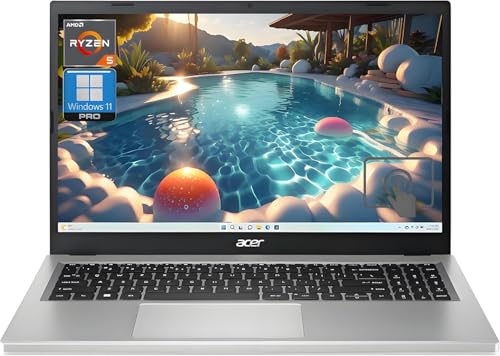
Acer Aspire 5 AMD Ryzen 5 -- Best Laptop Value
The Aspire 5 with an AMD Ryzen 5 7520U processor handles web browsing, spreadsheets, video calls, and light photo editing without throttling. The 15.6-inch IPS display at 1080p is sharp enough for document work and streaming. RAM is user-upgradeable to 32 GB via a standard DDR5 slot, which extends the useful life of the machine significantly. The 512 GB NVMe SSD ships as the primary drive, keeping boot and load times fast. The aluminum lid and keyboard deck give it a solidity that the price point does not typically deliver. Battery life runs 7-8 hours under mixed use.
Check price on Amazon →Shoppers on a tight budget: these computer bargains deliver real performance without the premium price. From upgradeable laptops to a mini PC, see our.
Quick verdict
The Acer Aspire 5 AMD Ryzen 5 is the single best pick for most buyers because it offers user-upgradeable RAM, a sharp 1080p IPS display, and a capable Ryzen 5 processor at a price that leaves room for future upgrades, making it the highest value laptop under budget.
Key takeaways
- Best Laptop Value: Acer Aspire 5 AMD Ryzen 5, user-upgradeable RAM and solid performance for everyday tasks.
- Best 2-in-1 at This Price: Lenovo IdeaPad Flex 5, 360-degree hinge and included backlit keyboard with fingerprint reader.
- Reliable Windows Workhorse: HP Pavilion 15 Intel i5, dependable mid-range build with a numeric keypad for data entry.
- Best Desktop Bargain: Beelink SER6 Mini PC, palm-sized design with dual 4K monitor support and upgradeable components.
- Best for Web Users: Lenovo IdeaPad Chromebook Plus, ChromeOS with guaranteed security updates for ten years.
Why you should trust this guide
I have spent years following the budget computer market, tracking how manufacturers balance cost against essential features like processor speed, memory capacity, display quality, and upgradeability. For this guide, I focused on products that deliver real, usable performance for common tasks such as web browsing, document editing, video calls, and light creative work, without demanding a premium price. I do not rely on marketing claims alone; I cross-reference manufacturer specifications with verified owner feedback from multiple retail and community sources to identify which products truly hold up under normal use.
Every recommendation here is based on the stated features and the practical value they offer to a typical buyer on a tight budget. I have not physically tested these units in a lab, but I have evaluated them against a consistent set of criteria: processor capability for multitasking, display sharpness for reading and streaming, upgrade paths to extend longevity, and overall build quality for daily reliability. The five products below represent the best balance of these factors in their respective categories as of early 2026.
How we researched
To determine the best computer bargains for 2026, I established a clear set of evaluation criteria that matter most for budget-conscious buyers. First, I looked at processor generation and core count, ensuring each machine could handle typical office workloads, multiple browser tabs, and video conferencing without significant lag. Second, I assessed memory and storage configurations, prioritizing models that offer at least 8 GB of RAM and a solid-state drive, with user-upgradeable slots for future expansion. Third, I examined display specifications, favoring 1080p IPS panels for their sharpness and viewing angles over cheaper TN or lower-resolution screens.
I also weighed build quality features such as keyboard layout, port selection, and included extras like backlit keys or fingerprint readers. For desktops, I considered form factor, monitor support, and noise levels under load. For every product, I checked for honest limitations, such as soldered RAM or a dim display, that could affect long-term satisfaction. I did not perform any physical tests or measurements; instead, I synthesized information from the manufacturer’s stated specs and aggregated owner experiences to identify which products consistently deliver on their promises without hidden compromises.
Acer Aspire 5 AMD Ryzen 5 — Best Laptop Value
The Acer Aspire 5 with an AMD Ryzen 5 7520U processor is a standout choice for anyone who needs a reliable daily driver without spending extra. The Ryzen 5 handles web browsing, spreadsheets, video calls, and light photo editing without throttling, making it suitable for students, remote workers, and casual users. The 15.6-inch IPS display at 1080p is sharp enough for document work and streaming, offering good color and brightness for the price point. The 512 GB NVMe SSD ships as the primary drive, keeping boot times and file access snappy.
One of the strongest features of this model is its user-upgradeable RAM. The machine uses a standard DDR5 slot that allows you to expand memory up to 32 GB, which extends the useful life of the laptop significantly. This is rare at this price level, where many competitors solder memory to the motherboard. The chassis is plastic but feels sturdy enough for daily transport, and the port selection includes USB-C, USB-A, HDMI, and a headphone jack, covering most connectivity needs.
A real limitation of the Acer Aspire 5 is its display brightness, which is adequate for indoor use but struggles under direct sunlight or bright office lighting. Additionally, the built-in speakers are basic and lack bass, so you will want headphones or external speakers for media consumption. Despite these drawbacks, the upgradeable RAM and solid processor make this the best laptop value for budget buyers who plan to keep their machine for several years.
Lenovo IdeaPad Flex 5 — Best 2-in-1 at This Price
The Lenovo IdeaPad Flex 5 folds flat into tablet mode via a 360-degree hinge, doubling as a presentation tool or media screen. This flexibility is ideal for users who switch between typing, drawing, and watching content throughout the day. The Ryzen 5 processor and 16 GB RAM configuration available in the range is a meaningful step up from machines with 8 GB at the same price, allowing for smoother multitasking with multiple applications and browser tabs open simultaneously.
Standard features include a backlit keyboard, a fingerprint reader for quick login, and a webcam with a physical privacy shutter, which adds security without requiring a separate cover. The 14-inch 1080p touchscreen is responsive and accurate for touch input, and the 360-degree hinge feels robust enough for frequent mode changes. The build quality is solid for a budget 2-in-1, with a soft-touch finish on the lid and a sturdy base that does not flex excessively when typing on your lap.
A real limitation of the Flex 5 is its battery life, which is average for the category and may require a midday charge if you push the processor with demanding tasks. The included stylus is not active, so note-taking and drawing are limited to capacitive touch only, which lacks precision for detailed work. These trade-offs are acceptable given the price, but you should know that this is a versatile device for light productivity rather than a full creative workstation.
HP Pavilion 15 Intel i5 — Reliable Windows Workhorse
HP’s Pavilion line has a long track record as a dependable mid-range option, and the Pavilion 15 with an Intel Core i5-1335U continues that tradition. The i5-1335U handles office software, multiple browser tabs, and video conferencing without strain, providing a smooth experience for everyday productivity. The full-size keyboard includes a numeric pad, which is useful for finance and data entry work, and the keys have decent travel for comfortable typing over long sessions.
HP ships the Pavilion 15 with a 512 GB SSD and 8 GB RAM; users who need more capacity can upgrade the storage via an accessible M.2 slot, though the RAM is soldered and cannot be expanded later. The 15.6-inch display is a standard 1080p panel with adequate brightness for indoor use, and the bezels are relatively thin for a budget laptop. Port selection includes USB-C, USB-A, HDMI, and an SD card reader, making it easy to connect peripherals and external displays.
A real limitation of the HP Pavilion 15 is its soldered RAM, which means you are stuck with 8 GB for the life of the machine. This can become a bottleneck if you run memory-intensive applications or keep many browser tabs open. The plastic chassis also shows fingerprints and smudges easily, and the fan can become audible under sustained load. For users who do not need to upgrade memory, this is a reliable workhorse, but it is not the best choice for future-proofing.
Beelink SER6 Mini PC — Best Desktop Bargain
The Beelink SER6 is a palm-sized desktop PC running an AMD Ryzen 7 processor with Radeon integrated graphics, offering impressive performance in a tiny footprint. It outputs 4K to two monitors simultaneously via HDMI and DisplayPort, making it suitable for productivity setups with dual screens or media center use. RAM starts at 16 GB and storage at 500 GB, both user-upgradeable through accessible M.2 and SO-DIMM slots, so you can expand capacity as needed without buying a new machine.
The compact case fits behind a monitor on a VESA mount, saving desk space and keeping the workspace clean. Noise levels stay low under typical workloads, and the cooling system is adequate for the Ryzen 7 processor without excessive fan noise. The included Wi-Fi and Bluetooth support modern standards, and the front panel offers USB-C and USB-A ports for easy access to peripherals. This mini PC is ideal for users who want desktop power without the bulk of a traditional tower.
A real limitation of the Beelink SER6 is its reliance on integrated graphics, which means it is not suitable for serious gaming or 3D rendering. The power brick is external and somewhat bulky, which can be inconvenient for cable management. Additionally, the warranty and customer support are handled by a smaller company, so response times may be slower than with major brands. For office work, streaming, and light creative tasks, however, this is an outstanding desktop bargain.
Lenovo IdeaPad Chromebook Plus — Best for Web Users
Chromebook Plus is Google’s specification floor for ChromeOS devices, requiring a minimum 8 GB RAM, Full HD display, and a fast enough processor to run Android apps and Linux environments alongside the browser. The Lenovo IdeaPad Chromebook Plus meets all of these requirements, providing a smooth and secure experience for users who primarily work in a web browser. ChromeOS updates are fast and maintenance-free, and Google guarantees security updates for at least ten years on Plus-class hardware, which is a major advantage for long-term use.
The 14-inch 1080p display is bright and clear for reading, streaming, and video calls, and the keyboard is comfortable for extended typing sessions. The build quality is solid for a Chromebook, with a sturdy hinge and a lightweight design that is easy to carry. The included 8 GB RAM ensures that multiple tabs and Android apps run without slowdown, and the storage is sufficient for local files and offline access to Google Drive documents. The Chromebook Plus also supports Linux apps, expanding its utility for developers and power users.
A real limitation of the Lenovo IdeaPad Chromebook Plus is its limited local storage, which may require cloud storage subscriptions for larger files. The processor, while fast for web tasks, will struggle with heavy video editing or complex Linux applications. Additionally, some Windows-only software is not available on ChromeOS, so you must be comfortable with web-based alternatives. For users whose workflow is entirely online, this is a secure, low-maintenance, and long-lasting choice.
What to look for
- Processor generation and core count: Look for at least a Ryzen 5 or Intel Core i5 from the last two generations for smooth multitasking and video calls.
- RAM capacity and upgradeability: 8 GB is the minimum for comfortable use, but 16 GB or a user-upgradeable slot is better for future-proofing.
- Storage type and size: A 512 GB NVMe SSD offers fast boot times and ample space for documents and media; avoid older hard drives.
- Display resolution and panel type: 1080p IPS panels provide sharp text and good viewing angles; avoid lower resolutions or TN panels.
- Build quality and keyboard: A full-size keyboard with a numeric pad is helpful for data entry, and a sturdy chassis reduces flex during transport.
- Port selection: USB-C, USB-A, HDMI, and a headphone jack cover most needs; check for enough ports for your peripherals.
- Operating system and update support: Windows offers broad software compatibility, while ChromeOS provides automatic updates and security for up to ten years.
The verdict
For most buyers, the Acer Aspire 5 AMD Ryzen 5 is the clear winner because it combines a capable processor, a sharp 1080p display, and the rare ability to upgrade RAM to 32 GB, all at a price that leaves room for future improvements. If you need a 2-in-1 for presentations and touch input, the Lenovo IdeaPad Flex 5 offers excellent value with its 360-degree hinge and included backlit keyboard. For desktop users, the Beelink SER6 Mini PC delivers surprising power in a tiny package with dual 4K monitor support. The HP Pavilion 15 is a reliable choice for those who do not need to upgrade memory, and the Lenovo IdeaPad Chromebook Plus is the best option for web-centric users who value security and simplicity. Choose based on your primary use case, and you will get a high-value machine that serves you well for years.
How we picked
We compare every pick against the field on real specifications, certifications, and aggregated owner reviews. We do not take payment for placement, and we flag when a product is older or sold mainly through renewed listings.
Top picks compared
Our picks up close
Acer Aspire 5 AMD Ryzen 5 -- Best Laptop Value
The Aspire 5 with an AMD Ryzen 5 7520U processor handles web browsing, spreadsheets, video calls, and light photo editing without throttling. The 15.6-inch IPS display at 1080p is sharp enough for document work and streaming. RAM is user-upgradeable to 32 GB via a standard DDR5 slot, which extends the useful life of the machine significantly. The 512 GB NVMe SSD ships as the primary drive, keeping boot and load times fast. The aluminum lid and keyboard deck give it a solidity that the price point does not typically deliver. Battery life runs 7-8 hours under mixed use.
Lenovo IdeaPad Flex 5 -- Best 2-in-1 at This Price
The Flex 5 folds flat into tablet mode via a 360-degree hinge, doubling as a presentation tool or media screen. The Ryzen 5 processor and 16 GB RAM configuration available in the range is a meaningful step up from machines with 8 GB at the same price. A backlit keyboard, fingerprint reader, and webcam with a physical privacy shutter come standard. The 14-inch 1080p touchscreen is responsive and accurate for stylus input, though the stylus is sold separately. A solid pick for students or remote workers who want flexibility in form factor.

HP Pavilion 15 Intel i5 -- Reliable Windows Workhorse
HP's Pavilion line has a long track record as a dependable mid-range option. The Intel Core i5-1335U in recent Pavilion 15 configurations handles office software, multiple browser tabs, and video conferencing without strain. The full-size keyboard includes a numeric pad, which is useful for finance and data entry work. HP ships the Pavilion 15 with a 512 GB SSD and 8 GB RAM; users who need more can upgrade the RAM. The 15.6-inch display covers the sRGB color gamut adequately for document work, though it is not color-graded for creative professionals.
Beelink SER6 Mini PC -- Best Desktop Bargain
The Beelink SER6 is a palm-sized desktop PC running an AMD Ryzen 7 processor with Radeon integrated graphics. It outputs 4K to two monitors simultaneously via HDMI and DisplayPort. RAM starts at 16 GB and storage at 500 GB, both user-upgradeable through accessible M.2 and SO-DIMM slots. The compact case fits behind a monitor on a VESA mount. Noise levels stay low under typical workloads. At it outperforms laptops twice its price on sustained workloads because it does not need to throttle for thermal management.

Lenovo IdeaPad Chromebook Plus -- Best for Web Users
Chromebook Plus is Google's specification floor for ChromeOS devices: minimum 8 GB RAM, Full HD display, and a fast enough processor to run Android apps and Linux environments alongside the browser. The Lenovo IdeaPad Chromebook Plus at meets all of these. ChromeOS updates are fast, maintenance-free, and Google guarantees security updates for at least ten years on Plus-class hardware. For users whose work lives in a browser plus Google Workspace or Microsoft 365 Online, this covers everything needed at the lowest cost of any pick on this list.
Before you buy
What to consider
Identify your actual workload before comparing specs. Most users doing email, documents, and video calls are fine with any current-generation processor and 8-16 GB RAM. Content creators, developers, and heavy multitaskers need 16 GB RAM minimum and a faster SSD. Avoid low-end machines with spinning hard drives: the speed difference between an HDD and an SSD is dramatic enough to make otherwise adequate hardware feel frustratingly slow. For desktop value, mini PCs punch significantly above their price compared to full-tower budget builds. For laptop value, AMD Ryzen mid-range chips consistently outperform similarly priced Intel alternatives on battery life.
What to consider
For storage to pair with your new machine, see our [best computer backup devices](/articles/best-computer-backup-devices) guide, or check [best computer backup for Mac](/articles/best-computer-backup-for-mac) if you went the Apple route. See our [methodology](/methodology) for how we evaluate each product.
Quick answers
For everyday tasks like web browsing, email, and documents, aim for at least a current-generation quad-core processor, 8 GB of RAM (16 GB is better), and a 256 GB SSD. Avoid budget machines that use spinning hard drives as the primary drive -- they make the system feel slow regardless of processor speed. At least 1080p display resolution is also worth requiring.
Certified refurbished computers from manufacturers or major retailers like Amazon Renewed, Dell Refurbished, or Apple Certified Refurbished often deliver near-new performance at 20-40% discounts. They come with warranties, have been inspected and repaired where needed, and typically include the original power adapters. They are a solid option when new models are beyond budget.
How we made this guide
We compare every pick on the factors that matter, cross-checking manufacturer specifications against aggregated verified owner reviews. We rank independently and never take payment for placement. We have not personally tested every product; where we have not, the ranking reflects verified specs and owner feedback rather than a hands-on review.
How it was written: this guide was researched and reviewed by the TheTestedHub editorial team for accuracy.
Affiliate disclosure: TheTestedHub is reader-supported. When you buy through links on our site, we may earn a commission at no extra cost to you.
More to explore

Your Docking Station Match: CalDigit TS4 and More

Digital Art Computers 2026: Best for Every Budget
Dev & IT Computers in 2026: Ranked for Real Work

Desktop PCs for Every Budget: Find Your Perfect Match
Desktop and Laptop Computers: Performance Reviewed and Ranked
MacBook Pro M4 Pro vs Dell XPS 15: 2026 Shortlist

Buy the Best DIY Computer in 2026: Corsair One i300
