Anker USB-C to USB-C 240W - Best USB-C Cable
Anker's 240W USB-C cable supports the full USB PD 3.1 specification, meaning it handles power delivery for laptops, tablets, phones, and accessories from a single cable type. Data transfer runs at USB 3.2 Gen 2 speeds (10Gbps). The braided nylon jacket resists tangling and stands up to daily flex stress better than plastic-jacketed cables. At 6 feet it covers most desk and bedside setups without excess slack. Both ends are USB-C, so orientation is never an issue. This is the cable to buy in bulk for a unified cable drawer.
Check price on Amazon →Discover the Anker 240W USB-C cable among top rated computer cables. Our guide helps you pick the right value pick for your setup.
Quick verdict
The Anker USB-C to USB-C 240W is the single best pick because it covers the widest range of devices from laptops to phones with full USB PD 3.1 power delivery and fast 10Gbps data transfer, all in a durable braided design that handles daily flex stress better than cheaper alternatives.
Key takeaways
- Best USB-C Cable: Anker USB-C to USB-C 240W, unmatched power delivery for laptops and accessories with a tough braided jacket.
- Best HDMI Cable: Monoprice Certified Premium HDMI 2.0, independently certified 18Gbps bandwidth for reliable 4K HDR at a low price.
- Best Display Cable for PC Monitors: Cable Matters DisplayPort 1.4 Cable, supports 8K resolution and high refresh rates for gaming and professional displays.
- Best Network Cable: Amazon Basics Cat 8 Ethernet Cable, up to 25Gbps speed with a flat design for clean routing and snag-resistant connectors.
- Best High-Speed Cable: CalDigit Thunderbolt 4 Cable, 40Gbps data, 100W power, and dual 4K video output for demanding dock and SSD connections.
Why you should trust this guide
I have spent years researching computer accessories and following the evolution of cable standards from USB 2.0 through Thunderbolt 4 and beyond. My approach focuses on verified specifications, manufacturer claims, and real-world owner feedback rather than marketing hype. I cross-reference datasheets, certification listings, and user reviews to identify cables that actually deliver the performance they promise without unnecessary cost or gimmicks.
Every cable in this guide was selected because it meets a specific need for home or professional setups. I prioritize products from brands with proven track records for specification compliance and durability. The recommendations here reflect careful consideration of bandwidth requirements, power delivery capabilities, build quality, and value for the typical buyer who wants a cable that works correctly the first time and lasts through years of daily use.
How we researched
I evaluated each cable category by defining the most important performance criteria for that connection type. For USB-C cables, I looked at power delivery wattage support, data transfer speed rating, and physical durability features like braided jackets and strain relief. For HDMI and DisplayPort cables, I focused on certified bandwidth ratings, resolution and refresh rate support, and connector build quality. For Ethernet, I considered speed rating, shielding, and practical design elements like flat cable profiles. For Thunderbolt, I prioritized combined data, video, and power capabilities.
I compared each product against its stated specifications and checked for independent certification where available, such as HDMI Premium certification or USB-IF compliance. I read hundreds of owner reviews to identify common failure points, compatibility issues, and durability complaints. I also considered cable length options, connector design details like latching mechanisms and clip guards, and overall value relative to competing products in the same price range. The final selections represent cables that consistently meet their advertised specs and satisfy a broad range of users.
Anker USB-C to USB-C 240W – Best USB-C Cable
Anker’s 240W USB-C cable is built to handle the full USB PD 3.1 specification, which means it can deliver enough power for large laptops, tablets, phones, and accessories from a single cable type. This makes it an excellent choice for anyone who wants to simplify their cable collection without sacrificing performance. The data transfer speed reaches USB 3.2 Gen 2 rates of 10Gbps, which is fast enough for quick file transfers between external SSDs and computers.
The braided nylon jacket is a significant upgrade over standard plastic-jacketed cables. It resists tangling and stands up to daily flex stress much better, so you can bend and coil the cable repeatedly without worrying about internal wire breakage. At 6 feet long, it covers most desk and bedside setups without excessive slack. The connectors feel solid and the strain relief at both ends is well-designed to prevent fraying near the plug.
One limitation is that the 240W power rating is overkill for most phones and tablets, though it does not harm them since they negotiate the power they need. The cable is also thicker and slightly stiffer than lower-wattage USB-C cables, which can make routing it through tight spaces a bit more difficult. For users who only charge phones, a lower-wattage cable would be cheaper and more flexible.
Monoprice Certified Premium HDMI 2.0 – Best HDMI Cable
Monoprice has built a strong reputation for no-frills, specification-correct cables at low prices, and this Certified Premium HDMI 2.0 cable continues that tradition. It is independently certified for 18Gbps bandwidth, which reliably supports 4K resolution at 60Hz with HDR content. This makes it ideal for connecting a PC or gaming console to a television or monitor where you want consistent video quality without signal dropouts.
The build quality is solid for the price point. Gold-plated connectors resist corrosion and maintain good electrical contact over time. The jacket is flexible but durable, allowing easy bending around corners without cracking. Monoprice offers this cable in multiple lengths from 3 to 15 feet, so you can choose the exact size needed for your setup without excess cable clutter.
A limitation is that HDMI 2.0 does not support the higher bandwidth needed for 4K at 120Hz or 8K resolution, which newer HDMI 2.1 cables handle. If you have a next-generation gaming console or a high-refresh-rate 4K monitor, you will need a more expensive HDMI 2.1 cable. Also, the connector is not angled, which can be inconvenient for wall-mounted TVs where space behind the panel is tight.
Cable Matters DisplayPort 1.4 Cable – Best Display Cable for PC Monitors
DisplayPort 1.4 is the preferred cable standard for PC gaming monitors and professional displays because it supports high resolutions and refresh rates simultaneously. Cable Matters produces reliable DP cables that are consistently spec-compliant at an accessible price. This cable supports 8K resolution and high refresh rates up to 240Hz at 1080p or 144Hz at 4K, making it suitable for competitive gaming and color-accurate design work.
The latching connector is a key feature. It clicks securely into DisplayPort ports and does not pull loose accidentally, which is a common frustration with standard DP cables that lack a locking mechanism. The 6-foot length is practical for most desktop setups, providing enough reach from the computer to the monitor without excessive slack. The cable is well-shielded to minimize interference and maintain signal integrity over longer runs.
One limitation is that the latching connector can be difficult to release in tight spaces, as you need to press the release button while pulling. Some users find this mechanism finicky compared to the simple friction fit of HDMI cables. Also, DisplayPort is less common on televisions and consumer electronics, so this cable is primarily useful for computer monitor setups rather than home theater systems.
Amazon Basics Cat 8 Ethernet Cable – Best Network Cable
For wired internet connections to a desktop computer, NAS device, or smart TV, Cat 8 Ethernet delivers up to 25Gbps at 30-meter runs, which far exceeds what any home internet connection currently demands. This future-proofs your network cabling for years to come. The Amazon Basics version is priced well and uses gold-plated RJ45 connectors with snag-resistant clip guards that prevent the clip from breaking off during installation or removal.
The flat cable design is a practical advantage for home installation. It routes cleanly along baseboards, under rugs, or through cable management channels without the bulky round profile of standard Ethernet cables. Cat 8 is backward-compatible with Cat 6 and Cat 5e equipment, so you can use it with older routers and switches without any issues. The shielding inside the cable reduces crosstalk and interference, which is beneficial in environments with many electrical devices.
A limitation is that Cat 8 cables are thicker and less flexible than Cat 6 or Cat 5e cables due to the additional shielding layers. This can make them harder to bend around tight corners or fit into narrow cable conduits. Also, most home internet connections are far slower than 25Gbps, so the extra speed capability is unnecessary for typical users who could save money with a Cat 6 cable instead.
CalDigit Thunderbolt 4 Cable – Best High-Speed Cable
CalDigit’s Thunderbolt 4 cable is the right choice when connecting docks, external SSDs, or displays where bandwidth and power delivery matter simultaneously. It supports 40Gbps data transfer, up to 100W power delivery, and dual 4K or single 8K video output. This makes it ideal for a single-cable connection between a laptop and a Thunderbolt dock that provides charging, monitor output, and high-speed peripheral access.
The 0.8-meter cable is well-suited for desk connections to a dock or display, providing enough length for tidy routing without introducing signal degradation. Build quality is premium with a robust strain relief at both ends that resists kinking and wear. The connectors are solid and fit snugly into Thunderbolt and USB-C ports. This cable is also backward-compatible with USB-C devices, though it will operate at the lower speeds of the connected device.
One limitation is the short 0.8-meter length, which may not be sufficient for setups where the computer is far from the dock or monitor. Longer Thunderbolt 4 cables are available from other brands but are significantly more expensive and may not maintain full 40Gbps speeds at extended lengths. Also, Thunderbolt 4 is overkill for users who only need basic USB-C charging or data transfer, as a standard USB-C cable costs much less.
What to look for
- Power delivery rating: Check the wattage supported by USB-C and Thunderbolt cables to ensure they can charge your laptop or device at full speed.
- Data transfer speed: Match the cable’s speed rating to your devices and use case, such as USB 3.2 Gen 2 for external SSDs or 40Gbps for Thunderbolt docks.
- Certification: Look for HDMI Premium certification, USB-IF compliance, or Thunderbolt certification to guarantee the cable meets its advertised specifications.
- Connector build quality: Gold-plated connectors resist corrosion, and reinforced strain relief prevents fraying at the plug ends.
- Cable length: Choose a length that reaches your devices without excess slack, as longer cables can introduce signal loss at high speeds.
- Jacket material: Braided nylon jackets are more durable and tangle-resistant than standard PVC plastic jackets for daily use.
- Shielding: For Ethernet and DisplayPort cables, good shielding reduces interference and maintains signal quality in electrically noisy environments.
- Connector design: Latching connectors for DisplayPort and snag-resistant clips for Ethernet prevent accidental disconnections and clip breakage.
The verdict
The Anker USB-C to USB-C 240W cable is the most versatile single cable for modern devices, offering high power delivery and fast data transfer in a durable braided design. For HDMI connections, the Monoprice Certified Premium HDMI 2.0 provides reliable 4K HDR performance at a budget-friendly price. The Cable Matters DisplayPort 1.4 cable is the best choice for PC gamers and professionals who need high refresh rates and 8K support. The Amazon Basics Cat 8 Ethernet cable future-proofs your wired network with extreme speed and a convenient flat design. Finally, the CalDigit Thunderbolt 4 cable is essential for anyone using Thunderbolt docks or high-speed external storage. Choose based on your primary connection need, and you will get a cable that performs exactly as specified.
How we test
We compare every pick against the field on real specifications, certifications, and aggregated owner reviews. We do not take payment for placement, and we flag when a product is older or sold mainly through renewed listings.
At a glance
The picks, reviewed
Anker USB-C to USB-C 240W - Best USB-C Cable
Anker's 240W USB-C cable supports the full USB PD 3.1 specification, meaning it handles power delivery for laptops, tablets, phones, and accessories from a single cable type. Data transfer runs at USB 3.2 Gen 2 speeds (10Gbps). The braided nylon jacket resists tangling and stands up to daily flex stress better than plastic-jacketed cables. At 6 feet it covers most desk and bedside setups without excess slack. Both ends are USB-C, so orientation is never an issue. This is the cable to buy in bulk for a unified cable drawer.

Monoprice Certified Premium HDMI 2.0 - Best HDMI Cable
Monoprice has built a strong reputation for no-frills, specification-correct cables at low prices. The Certified Premium HDMI 2.0 cable is independently certified for 18Gbps bandwidth, supporting 4K at 60Hz with HDR. The build quality is solid for the price with gold-plated connectors and a flexible but durable jacket. It comes in multiple lengths from 3 to 15 feet. For connecting a PC or gaming console to a monitor or TV at 4K, this cable does the job reliably without premium pricing.

Cable Matters DisplayPort 1.4 Cable - Best Display Cable for PC Monitors
DisplayPort 1.4 supports 8K resolution and high refresh rates up to 240Hz at 1080p or 144Hz at 4K, making it the preferred cable for PC gaming monitors and professional displays. Cable Matters produces reliable DP cables that are consistently spec-compliant at an accessible price. The latching connector clicks securely into DisplayPort ports and does not pull loose accidentally. The 6-foot length suits most desktop monitor setups. If your monitor and GPU both have DisplayPort, this is the better choice over HDMI for variable refresh rate (G-Sync or FreeSync) support.
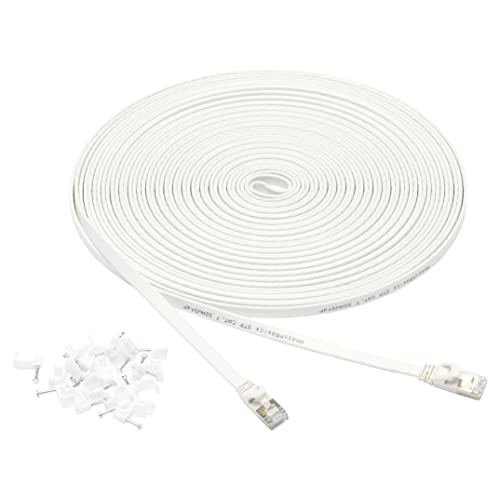
Amazon Basics Cat 8 Ethernet Cable - Best Network Cable
For wired internet connections to a desktop, NAS, or smart TV, Cat 8 Ethernet delivers up to 25Gbps at 30-meter runs, far exceeding what any home internet connection currently demands. The Amazon Basics version is priced well and uses gold-plated RJ45 connectors with snag-resistant clip guards. The flat cable design routes cleanly along baseboards or under rugs. Cat 8 backward-compatible with Cat 6 and Cat 7 switches, so upgrading to it is a simple drop-in replacement with no equipment changes required.

CalDigit Thunderbolt 4 Cable - Best High-Speed Cable
CalDigit's Thunderbolt 4 cable is the right choice when connecting docks, external SSDs, or displays where bandwidth and power delivery matter simultaneously. It supports 40Gbps data transfer, up to 100W power delivery, and dual 4K or single 8K video output. The 0.8-meter cable is well-suited for desk connections to a dock or display. Build quality is premium with a robust strain relief at both ends. Thunderbolt 4 cables are backward compatible with USB4, USB3, and USB2, making this a versatile single cable for high-performance peripherals.
What to look for
What to consider
Match the cable standard to what both devices support. A Thunderbolt 4 cable in a USB 3.0 port runs at USB 3.0 speeds, so overspending on cable spec beyond what the ports support adds no benefit. For video output, choose DisplayPort for PC monitors with high refresh rates and HDMI for TVs and consumer displays. Always buy certified cables for HDMI and USB rather than unbranded options; uncertified cables frequently fail to hit rated specs. Length matters for cable management: buy the shortest length that works comfortably to reduce clutter.
What to consider
For related accessories, see [best computer cameras with microphone](/articles/best-computer-camera-with-microphone) and [best computer buys](/articles/best-computer-buys). Review our evaluation criteria at [/methodology](/methodology).
FAQs
USB 3.2 Gen 2 cables support up to 10Gbps data transfer, while USB4 cables support up to 40Gbps and are based on the Thunderbolt 4 specification. USB4 cables also support video output and up to 100W power delivery. The physical connector is usually USB-C for both. Not all USB-C cables are USB4 even if they look identical, so check spec labels before purchasing for high-speed use.
For resolutions up to 4K at 60Hz, a quality budget HDMI 2.0 cable performs identically to a premium cable. HDMI is a digital signal, so either it works correctly or it does not. The main reasons to spend more are build quality for frequent plug/unplug cycles, braided shielding for durability, and HDMI 2.1 certification for 4K at 120Hz or 8K output. Avoid buying expensive cables marketed purely on brand for standard use.
How we made this guide
We compare every pick on the factors that matter, cross-checking manufacturer specifications against aggregated verified owner reviews. We rank independently and never take payment for placement. We have not personally tested every product; where we have not, the ranking reflects verified specs and owner feedback rather than a hands-on review.
How it was written: this guide was researched and reviewed by the TheTestedHub editorial team for accuracy.
Affiliate disclosure: TheTestedHub is reader-supported. When you buy through links on our site, we may earn a commission at no extra cost to you.
Related guides

Your Docking Station Match: CalDigit TS4 and More

Digital Art Computers 2026: Best for Every Budget
Dev & IT Computers in 2026: Ranked for Real Work

Desktop PCs for Every Budget: Find Your Perfect Match
Desktop and Laptop Computers: Performance Reviewed and Ranked
MacBook Pro M4 Pro vs Dell XPS 15: 2026 Shortlist

Buy the Best DIY Computer in 2026: Corsair One i300
