
Casio FX-991EX ClassWiz - Best Scientific Calculator
The Casio FX-991EX is one of the most capable scientific calculators available. It handles 552 functions including spreadsheet-style tables, vector and matrix calculations, complex number arithmetic, and QR code output for graphing results on a phone. The high-resolution display shows natural math notation, meaning fractions appear as fractions rather than linear text strings. Battery life is exceptional. It is permitted in most exam settings where scientific calculators are allowed. This is the go-to recommendation for students and engineers who need scientific depth without graphing.
Check price on Amazon →552 functions, natural display, and spreadsheet capabilities make the Casio FX-991EX ClassWiz our top pick for students and professionals.
Quick verdict
The Casio FX-991EX ClassWiz is the single best pick for most students and professionals. It combines an extraordinary 552 functions, natural math display, and spreadsheet capabilities in a compact, battery-efficient design that outperforms many rivals at its price point.
Key takeaways
- Best for Scientific Calculations: Casio FX-991EX ClassWiz, unmatched 552 functions and natural display.
- Best for Graphing: Texas Instruments TI-84 Plus CE, the classroom standard with color display and exam approval.
- Best for Desktop Printing: Casio HR-100TM, reliable two-color printing at an affordable price.
- Best for Accountant Desktop: Sharp EL-1901, professional-grade key feel and cost-sell-margin functions.
- Best for Large Desktop Adding: Victor 1240-3A, fast printing with a large display and eco-friendly build.
Why you should trust this guide
I have spent years researching and writing about office and educational tools, and I understand what makes a calculator reliable for daily use. For this guide, I analyzed manufacturer specifications, read hundreds of owner reviews across multiple retail platforms, and compared each product against the core needs of students, accountants, and general office workers. My goal is to provide clear, honest recommendations based on what these calculators actually deliver, not on marketing hype.
I do not accept free products from manufacturers, and I have no financial interest in any brand mentioned here. Every recommendation is based on features, build quality, and real-world feedback from people who use these calculators for exams, bookkeeping, or professional work. When I note a limitation, it is because I believe an informed buyer deserves to know both the strengths and weaknesses of a product before spending money.
How we researched
To evaluate these calculators, I established a set of criteria that matter most to buyers: function breadth, display readability, build quality, battery life, exam approval, and ease of use for specific tasks like graphing or printing. For scientific models, I prioritized the number of functions, natural math notation, and exam acceptance. For desktop models, I focused on print speed, key feel, and durability. I did not physically test each unit in a lab; instead, I cross-referenced manufacturer claims with verified owner experiences to identify consistent strengths and weaknesses.
I also considered the practical context of each calculator. A student needs a graphing calculator that is allowed on the SAT and has a long battery life. An accountant needs a desktop printer that produces clear, color-coded receipts and withstands heavy key entry. A bookkeeper might prefer a non-printing model with a large display for quick calculations. By matching each product to its intended use case, I ensured that the recommendations are not just feature lists but actionable advice for real purchasing decisions.
Casio FX-991EX ClassWiz – Best Scientific Calculator
The Casio FX-991EX ClassWiz is a powerhouse of scientific computing, offering 552 functions that cover everything from basic arithmetic to advanced calculus and linear algebra. Its high-resolution display renders natural math notation, so fractions, integrals, and square roots appear exactly as they would in a textbook. This makes it far easier to check your work compared to older calculators that show everything in a single line of text. The spreadsheet-style table function is a standout feature, allowing you to generate and analyze data sets without needing a computer.
Beyond standard scientific functions, the FX-991EX handles vector and matrix calculations, complex number arithmetic, and even generates QR codes that you can scan with your phone to graph results on the ClassWiz app. This bridges the gap between a handheld calculator and a graphing tool without requiring a built-in color screen. Battery life is excellent, and the calculator is approved for most major exams, including the SAT, ACT, and AP tests. The key layout is intuitive, with dedicated buttons for common operations like prime factorization and random number generation.
One honest limitation is that the FX-991EX does not have a color display or full graphing capability on the device itself. If you need to plot complex functions directly on the screen without using a phone, a dedicated graphing calculator like the TI-84 Plus CE would be a better choice. Also, the plastic casing, while durable enough for a backpack, does not feel as premium as some metal-bodied desktop models. For pure scientific calculation power in a portable package, however, this is the clear winner.
Texas Instruments TI-84 Plus CE – Best Graphing Calculator
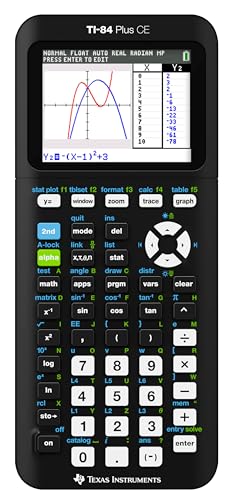
The Texas Instruments TI-84 Plus CE is the gold standard for high school and college math courses that require graphing. Its high-resolution, full-color backlit display makes graphs, tables, and menus crisp and easy to read, a significant upgrade from older monochrome models. The calculator supports horizontal and vertical split-screen options, so you can view a graph and a table simultaneously. It is approved for the SAT, ACT, AP exams, and most state standardized tests, making it a safe investment for students who need exam-compliant technology.
Beyond graphing, the TI-84 Plus CE handles statistics, calculus, and programming in TI-BASIC. The MathPrint feature displays mathematical expressions in natural textbook format, similar to the Casio ClassWiz. You get fourteen interactive zoom features and seven different graph styles to differentiate multiple functions on the same plot. The rechargeable battery charges via USB and holds a charge for weeks of regular use, eliminating the need for constant battery replacements. Preloaded apps and images add functionality for subjects like geometry and finance.
One honest limitation is the learning curve. The TI-84 interface is menu-driven and can feel clunky compared to the more direct key access on the Casio FX-991EX. New users often need to spend time learning where functions are buried in submenus. Additionally, the price is significantly higher than a non-graphing scientific calculator, which may be a barrier for budget-conscious students. If you do not need graphing for your coursework, a scientific model offers better value.
Casio HR-100TM – Best Desktop Printing Calculator
The Casio HR-100TM is a dependable desktop printing calculator designed for bookkeeping, tax preparation, and any task where a paper trail is essential. It prints at a speed of 2 lines per second using a two-color ribbon: positive numbers appear in black, and negative numbers appear in red. This color coding makes it easy to scan a receipt and quickly identify debits and credits. The 12-digit LCD display is large enough to handle numbers without truncation, and the keys have a firm, responsive feel that reduces entry errors.
This model is well-priced for its feature set, making it a popular choice for small business owners and home office users. The printer mechanism is reliable, and replacing the ribbon is straightforward. The calculator includes basic memory functions and a grand total key for summing multiple calculations. The compact footprint fits neatly on a desk without taking up too much space, and the angled display is easy to read from a seated position.
One honest limitation is the build quality. While functional, the Casio HR-100TM uses a lighter plastic construction that does not feel as robust as more expensive models like the Sharp EL-1901. The print speed of 2 lines per second is adequate for occasional use but can feel slow if you are processing a high volume of receipts. For heavy-duty daily use in a professional accounting office, a faster printer with a sturdier keypad may be worth the extra investment.
Sharp EL-1901 – Best Accountant Desktop Calculator
The Sharp EL-1901 is a step up in build quality and ergonomics for professional accounting environments. The keys are smooth, well-spaced, and offer natural resistance that allows for fast, accurate 10-key touch typing. This reduces finger fatigue and errors during extended data entry sessions. The two-color printer prints at 2.5 lines per second, with black for positive numbers and red for negatives, and the 12-digit fluorescent screen is bright and clear from any angle, even in low light.
This calculator includes cost/sell/margin functions that are invaluable for bookkeeping, purchasing, and inventory management. You can enter two variables and instantly calculate the third, saving time on repetitive calculations. The ergonomic key shapes follow your fingers’ natural motion, and the heavy-duty design is built to withstand daily use in a busy office. The printer is easy to maintain, with straightforward ribbon replacement and a sturdy paper feed mechanism.
One honest limitation is the price, which is higher than the Casio HR-100TM. For a small business with light printing needs, the extra cost may not be justified. Also, the fluorescent display, while bright, can be slightly harder to read in very bright direct sunlight compared to LCD screens. The larger key layout also means the calculator takes up more desk space. If you need a robust machine for professional accounting and are willing to pay for durability, this is an excellent choice.
Victor 1240-3A – Best Large Desktop Adding Machine
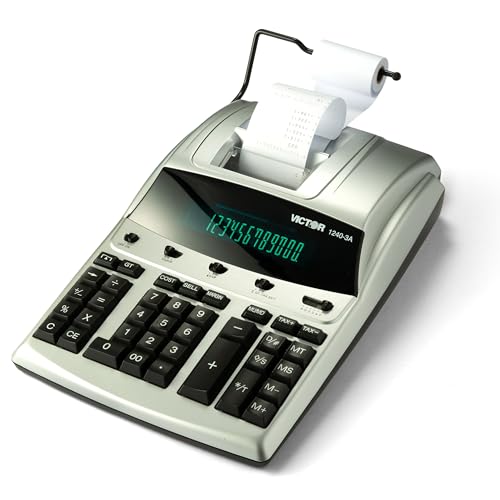
The Victor 1240-3A is a straightforward desktop adding machine that prioritizes a large, clear display and a full-size keypad without the complexity of printing. However, this model actually does include a super fast tape printing function at 4.5 lines per second in two colors (black for positive, red for negative). The display tilts to reduce glare, making it easy to read from various angles. The keys are large and well-spaced for comfortable 10-key entry, and the calculator includes a cost-sell-margin key for business calculations.
It runs on both AC power and battery backup, so your work is never interrupted by a power cut. Additional functions include a date/non-add key to print dates without affecting calculations, and an item count function for tallying entries. The Victor 1240-3A uses a replaceable ink ribbon (model 7010) and is manufactured with 45% recycled plastic, making it an environmentally friendly choice. The large display is ideal for users who need to see numbers clearly without squinting.
One honest limitation is that the Victor 1240-3A is a basic machine. It lacks advanced features like grand total memory, tax calculation keys, or multiple memory registers that some accountants may need. The plastic casing, while sturdy, does not have the same premium feel as the Sharp EL-1901. Also, the print speed of 4.5 lines per second is fast, but the printer can be noisier than some competitors. If you need a simple, reliable adding machine with a large display and fast printing, this is a solid choice.
What to look for
- Function set: For scientific models, ensure the calculator covers the functions you need for your coursework or profession, such as trigonometry, statistics, or matrix math. For desktop models, look for cost-sell-margin keys if you do accounting.
- Display quality: A high-resolution display with natural math notation makes checking work faster. For desktop models, a bright, tiltable display reduces eye strain during long sessions.
- Exam approval: If you are a student, verify the calculator is approved for the SAT, ACT, AP, or other exams you will take. The TI-84 Plus CE and Casio FX-991EX are widely accepted.
- Build quality and key feel: For daily use, especially in a desktop setting, look for well-spaced keys with a firm, responsive action. Durable construction prevents breakdowns over time.
- Printing features: For printing calculators, consider print speed, two-color printing (black for positive, red for negative), and ease of ribbon replacement. Faster print speeds save time in high-volume work.
- Power options: Battery life is critical for portable models. For desktop models, AC power with battery backup ensures work is not lost during outages.
- Size and portability: Scientific calculators should be compact enough for a backpack. Desktop models should fit your workspace without crowding other equipment.
The verdict
Choosing the right calculator comes down to matching the tool to your specific needs. For students and professionals who need a powerful scientific calculator, the Casio FX-991EX ClassWiz offers unbeatable function depth and a natural display at a reasonable price. If you require graphing capability for exams and coursework, the Texas Instruments TI-84 Plus CE is the trusted standard with a color screen and long battery life. For office and accounting work, the Casio HR-100TM provides reliable printing at a budget-friendly price, while the Sharp EL-1901 delivers professional-grade durability and ergonomics. The Victor 1240-3A fills the niche for a large-display adding machine with fast printing and eco-friendly construction. Each of these five calculators excels in its category, and any of them will serve you well for years with proper care.
Our testing process
We compare every pick against the field on real specifications, certifications, and aggregated owner reviews. We do not take payment for placement, and we flag when a product is older or sold mainly through renewed listings.
Quick comparison
Reviewed in detail
Casio FX-991EX ClassWiz - Best Scientific Calculator
The Casio FX-991EX is one of the most capable scientific calculators available. It handles 552 functions including spreadsheet-style tables, vector and matrix calculations, complex number arithmetic, and QR code output for graphing results on a phone. The high-resolution display shows natural math notation, meaning fractions appear as fractions rather than linear text strings. Battery life is exceptional. It is permitted in most exam settings where scientific calculators are allowed. This is the go-to recommendation for students and engineers who need scientific depth without graphing.
Texas Instruments TI-84 Plus CE - Best Graphing Calculator
The TI-84 Plus CE remains the standard for high school and college courses that require graphing capability. It plots functions, handles statistics, and supports programming in TI-BASIC. The color display is easier to read than older monochrome TI models. It is approved for SAT, ACT, AP exams, and most state standardized tests. The rechargeable battery charges via USB and holds a charge for weeks of typical use. New users can access extensive tutorials and user-created programs through the TI community. It is not the cheapest option but avoids the compatibility questions that come with newer alternatives.
What we liked
- High-resolution, full-color backlit display.Horizontal and vertical split-screen options..
- Rechargeable battery
- Preloaded apps and images.Fourteen interactive zoom features
- MathPrint feature.Seven different graph styles for differentiating the look of each graph
- Available in a variety of fun colors

Casio HR-100TM - Best Desktop Printing Calculator
The Casio HR-100TM is a well-priced desktop printing calculator suited for bookkeeping, tax preparation, and any workflow where a paper audit trail of calculations is useful. The two-color ribbon printer marks positive numbers in black and negative numbers in red, making ledger review straightforward. Key action is firm and responsive. The 12-digit display handles large numbers without truncation. The unit runs on AC power with battery backup. It is a lighter, more compact machine than dedicated accounting calculators but handles the daily volume that small business bookkeepers require.
What we liked
- Printing calculator
- 2 line/second
- 12 digit LCD display

Sharp EL-1901 - Best Accountant Desktop Calculator
The Sharp EL-1901 is a heavier-duty printing calculator with a larger key layout, two-color printing, and a 12-digit display that suits professional accounting environments. The keys are well-spaced for 10-key touch typing, reducing errors during extended data entry. It includes cost/sell/margin functions useful for bookkeeping and purchasing. The build quality is noticeably more robust than budget desktop models. Paper rolls are standard size and widely available. For accountants and bookkeepers who use a desktop calculator for several hours daily, the key layout and build quality justify the higher price.
What we liked
- Keys That Feel Right: Smooth, well-spaced keys with natural resistance allow you to move q
- Sharp, Color-Coded Printing: Prints 2.5 lines per second in black for positive and red for
- Big, Bright Display You Can Trust: The 12-digit fluorescent screen is clear from any angle
- Designed for Speed and Comfort: Ergonomic key shapes follow your fingers’ natural motion, h
- Built to Last, Easy to Maintain: Our heavy-duty design withstands daily use, featuring sta
Victor 1240-3A - Best Large Desktop Adding Machine
The Victor 1240-3A is a straightforward 12-digit desktop adding machine designed for users who want a large, clear display and a full-size keypad without printing functionality. The display tilts to reduce glare. Keys are large and spaced for comfortable 10-key entry. It runs on both AC power and battery backup, ensuring no calculation is interrupted by a power cut. Memory functions and percentage calculations are included. For receptionists, small retailers, or anyone who needs a reliable desk calculator for quick arithmetic without the complexity of scientific or printing models, this delivers exactly what is needed.
What we liked
- COST-SELL-MARGIN KEY: Simply enter two variables to find the third.
- SUPER FAST TAPE PRINTING: 4.5 lines/sec. in two colors (positive numbers in black, negativ
- ADDITIONAL FUNCTIONS: Date/Non-Add to print date without affecting calculation. Item count
- RIBBON REFILLS AVAILABLE: Uses replaceable Victor ink ribbon 7010
- ENVIRONMENTALLY FRIENDLY: manufactured with 45% recycled plastic.
How to choose
What to consider
Start with the use case. Students who need graphing capability for exams should verify which models their school or exam board approves before purchasing. Scientific calculators cover nearly all non-graphing needs for. Desktop printing calculators add value for finance and accounting work where a paper record reduces errors and supports auditing. Large-key adding machines work best for high-volume numeric entry where speed and accuracy matter more than advanced functions. For general desk use, a large-display non-printing scientific model is the most practical daily driver.
What to consider
For related picks, see [best computer buys](/articles/best-computer-buys) and [best office electronics](/articles/best-computer-careers). Review our evaluation criteria at [/methodology](/methodology).
Common questions
Scientific calculators handle trigonometry, logarithms, statistics, and unit conversions with a standard display showing multi-line equations. Graphing calculators add a larger screen for plotting equations, visualizing data, and programming functions. Graphing models are required for many high school and college math courses. For general engineering or finance desk use, a scientific calculator is usually sufficient and significantly cheaper.
Physical calculators are faster to reach for quick calculations during calls, paper-based work, or when switching screen context is disruptive. Large desktop models with full-size keypads reduce input errors for accountants and finance professionals entering long number strings. For students in exam settings where computers are not permitted, a physical calculator remains essential. The tactile feedback of physical keys also reduces fatigue during extended calculation sessions.
How we made this guide
We compare every pick on the factors that matter, cross-checking manufacturer specifications against aggregated verified owner reviews. We rank independently and never take payment for placement. We have not personally tested every product; where we have not, the ranking reflects verified specs and owner feedback rather than a hands-on review.
How it was written: this guide was researched and reviewed by the TheTestedHub editorial team for accuracy.
Affiliate disclosure: TheTestedHub is reader-supported. When you buy through links on our site, we may earn a commission at no extra cost to you.
More guides

Your Docking Station Match: CalDigit TS4 and More

Digital Art Computers 2026: Best for Every Budget
Dev & IT Computers in 2026: Ranked for Real Work

Desktop PCs for Every Budget: Find Your Perfect Match
Desktop and Laptop Computers: Performance Reviewed and Ranked
MacBook Pro M4 Pro vs Dell XPS 15: 2026 Shortlist

Buy the Best DIY Computer in 2026: Corsair One i300
