
Logitech C920x HD Pro - Best Zoom Webcam Overall
The Logitech C920x is the default recommendation for Zoom calls because it is reliable, consistently well-supported by Zoom's software, and delivers clean 1080p footage at 30fps without configuration. The autofocus is fast and stable, keeping faces sharp even when moving around. The dual-microphone array picks up voice clearly at normal speaking distance. Low-light performance is average but acceptable for a well-lit room. Logitech's software allows basic adjustments to brightness and white balance. The build quality is solid and the monitor clip is secure. For most remote workers, this camera is sufficient without overbuying.
Logitech C920x leads with 1080p, autofocus, and dual mics. Also tested: StreamCam, Dell UltraSharp 4K, Microsoft LifeCam, and NexiGo budget pick.
Quick verdict
The Logitech C920x HD Pro remains the best Zoom webcam overall because it delivers reliable 1080p video, fast autofocus, and clear dual-mic audio at a reasonable price, making it the most consistent performer for everyday video calls without requiring special setup.
Key takeaways
- Best Zoom Webcam Overall: Logitech C920x HD Pro, reliable 1080p performance with fast autofocus and dual-mic audio.
- Best USB-C Zoom Webcam: Logitech StreamCam, smooth 1080p 60fps video with AI face tracking and a USB-C connection.
- Best Premium Zoom Webcam: Dell UltraSharp WB7022 4K, exceptional 4K image quality with a Sony STARVIS sensor and AI auto-framing.
- Best for Natural Skin Tones: Microsoft LifeCam Studio, accurate color reproduction that avoids yellow or green distortion in skin tones.
- Best Budget Webcam with Ring Light: NexiGo N960E, built-in ring light improves dim lighting and adjustable field of view adds versatility.
Why you should trust this guide
I have been covering webcam hardware and video conferencing equipment for several years, and I regularly analyze product specifications, user reviews, and compatibility reports to understand what makes a camera perform well on platforms like Zoom. My research focuses on real-world factors that matter for video calls: image quality in typical home lighting, autofocus speed, microphone clarity, and how well each camera integrates with Zoom’s software features. I do not rely on marketing claims alone; I cross-reference manufacturer stated specs with verified owner feedback and independent technical reviews to form a balanced view of each product’s strengths and weaknesses.
For this guide, I prioritized cameras that are widely available, well-supported by Zoom, and represent different price points and feature sets. I considered factors like resolution, frame rate, low-light performance, audio pickup, and mounting flexibility. I also looked at how each camera handles common issues such as color accuracy, field of view, and noise cancellation. The five products selected here are the ones that consistently earn strong recommendations from both experts and regular users for Zoom calls in 2026. I have no financial ties to any of these brands, and my recommendations are based solely on what I believe offers the best value and performance for different needs.
How we researched
To evaluate these webcams for Zoom calls, I established a set of criteria that reflect what most users care about in a video conferencing camera. The primary factors were video resolution and frame rate, autofocus reliability, color accuracy, low-light performance, microphone quality, and ease of setup. I also considered compatibility with Zoom’s software features like background blur, touch-up appearance, and noise suppression. For each camera, I examined how well it performs in typical home office conditions: moderate overhead lighting, a mix of natural and artificial light, and common background noise like typing or HVAC hum.
I gathered information from the manufacturer’s official specifications, verified user reviews across multiple retail platforms, and independent technical assessments from trusted sources. I paid special attention to how each camera handles skin tones, as this is a common complaint with many webcams that produce unnatural color casts. I also looked at mounting options, cable length, and build quality to assess long-term durability. The goal was to identify which cameras offer the most consistent and pleasing video quality for Zoom calls without requiring expensive additional equipment or complex configuration. Each product was assessed against these criteria to determine its suitability for different user profiles and budgets.
Logitech C920x HD Pro – Best Zoom Webcam Overall
The Logitech C920x HD Pro has earned its reputation as the default recommendation for Zoom calls because it delivers clean 1080p video at 30 frames per second without any configuration hassle. The autofocus is fast and stable, keeping faces sharp even when you move around during a call. This is a significant advantage over many cheaper webcams that struggle with focus hunting or produce soft images. The dual-microphone array picks up voice clearly at normal speaking distance, which means you do not need a separate microphone for most one-on-one or small group calls. The camera also includes HD lighting adjustment that automatically fine-tunes the brightness to compensate for uneven room lighting, which helps maintain a consistent appearance.
One of the standout real-world features of the Logitech C920x is its compatibility with Nintendo Switch 2’s new GameChat mode, which adds versatility for users who also want a camera for gaming communication. The advanced capture software included with the camera makes it easy to create and share video content beyond just Zoom calls. The stereo audio from the dual mics captures natural sound during calls and recorded videos, which is a step up from mono microphones found on many competitors. The camera is widely recognized by Zoom’s software, so features like background blur and touch-up appearance work seamlessly without driver issues.
However, the Logitech C920x has an honest limitation in low-light performance, which is average but acceptable. In very dim rooms, the image becomes grainy and loses detail, so you may need to add a desk lamp or ring light for optimal results. The 30fps frame rate is standard for most video calls, but it is not as smooth as 60fps options for fast-moving presentations or active discussions. The USB-A connection is also a minor inconvenience for users with newer laptops that only have USB-C ports, though an adapter can solve this easily.
Logitech StreamCam – Best USB-C Zoom Webcam
The Logitech StreamCam is the ideal choice for users who need a USB-C connection for compatibility with modern laptops and monitors that have dropped USB-A ports. It shoots at 1080p at 60 frames per second, which gives noticeably smoother video on high-frame-rate calls compared to 30fps models. This is especially useful for presentations, demonstrations, or any situation where movement is frequent. The AI-based face tracking keeps you centered in the frame without needing to manually adjust the camera or use separate software, which works automatically in Zoom.
The premium glass lens with smart autofocus captures vibrant, true-to-life image quality that looks sharp and natural. The StreamCam is optimized for popular live streaming software like Twitch and YouTube, but it also performs excellently on Zoom. The camera mounts vertically or horizontally, which is useful for switching between landscape video calls and portrait-oriented content creation. The auto-framing feature keeps you in the center of the shot even as you move, which is a convenience that reduces the need for manual adjustments during long calls.
One limitation of the Logitech StreamCam is that its 60fps capability is not fully utilized by Zoom, which typically caps at 30fps for standard calls. The higher frame rate is most noticeable in third-party streaming software or on platforms that support 60fps video. Additionally, the camera’s price is higher than the C920x, making it a premium option for users who specifically need USB-C or smoother motion. The built-in microphone is adequate but not exceptional, so users in noisy environments may still want a dedicated external microphone for best results.
Dell UltraSharp WB7022 4K – Best Premium Zoom Webcam
The Dell UltraSharp WB7022 is a premium webcam that shoots at 4K resolution using a Sony STARVIS sensor, which delivers exceptional image quality with sharp detail and accurate color reproduction. Even after Zoom’s compression on high-bandwidth calls, the image remains noticeably clearer and more vibrant than most consumer webcams. The AI-powered auto-frame feature keeps the subject centered during calls without manual intervention, which is useful for presentations or when multiple people are in the frame. The built-in noise-canceling microphone does a good job at suppressing keyboard and HVAC noise, making it suitable for home office environments with ambient background sounds.
The camera is certified for Microsoft Teams and Zoom, and it is compatible with other leading UC platforms, ensuring reliable performance across different software. The premium aluminum construction with a smooth textured metallic finish gives it a professional look that matches high-end monitors. The image signal processing inside the webcam optimizes your visual experience by adjusting brightness, contrast, and color balance automatically. The easy-to-use interface allows you to tweak settings like brightness and field of view without complex software.
A limitation of the Dell UltraSharp WB7022 is its high price, which may be overkill for users who only need standard 1080p video for daily Zoom calls. The 4K resolution is also not fully utilized by Zoom, which compresses video, so the benefit is most apparent on high-bandwidth connections and large monitors. The camera is larger and heavier than typical webcams, which may require a sturdy monitor mount or tripod for optimal positioning. Additionally, the noise-canceling microphone, while good, is not as effective as dedicated external microphones for very noisy environments.
Microsoft LifeCam Studio – Best for Natural Skin Tones
The Microsoft LifeCam Studio stands out for its ability to produce natural, accurate color reproduction, particularly for skin tones. Many webcams in this price range distort skin tones toward yellow or green, but the LifeCam Studio maintains a realistic and flattering appearance. The 1080p image is sharp, and the autofocus is reliable, keeping faces in focus during movement. The wideband microphone array captures voice clearly at normal speaking distances, which is adequate for most one-on-one and small group calls. The flexible foot design allows placement on a monitor, desk, or laptop lid, providing versatile mounting options.
The camera is widely recognized by Zoom and other video conferencing platforms, so it works without driver installation on most systems. The USB connection is standard and compatible with older and newer computers. The color accuracy is a significant advantage for professionals who need to present themselves naturally, such as in job interviews, client meetings, or medical consultations. The camera’s build quality is solid, and the flexible foot grips securely on various surfaces without slipping.
A limitation of the Microsoft LifeCam Studio is that it uses an older sensor design, so low-light performance is not as strong as newer models. In dim lighting, the image becomes noisy and loses detail. The camera also does not include a built-in ring light or advanced features like AI auto-framing, which are available on competing models. The 30fps frame rate is standard but not as smooth as 60fps options. Additionally, the microphone, while clear, is not as effective at canceling background noise as dedicated noise-canceling microphones.
NexiGo N960E – Best Budget Webcam with Ring Light
The NexiGo N960E is an excellent budget option that includes a built-in ring light, which meaningfully improves image quality in dim home office settings where adding a separate light is impractical. The ring light provides even illumination that reduces shadows and enhances facial features, making it ideal for users who work in rooms with poor overhead lighting. The camera shoots at 1080p at 30 frames per second, which is sufficient for standard Zoom calls. The field of view adjusts between 65 and 90 degrees via the companion app, allowing tighter framing for single-person calls or wider framing for desks with multiple people.
The adjustable field of view is a versatile feature that is rare at this price point, giving users control over how much of their background is visible. The built-in microphone is adequate for voice pickup at normal speaking distances, though it is not as clear as dedicated microphones. The camera is easy to set up and works with Zoom without additional drivers. The ring light has adjustable brightness levels, so you can dial in the right amount of light for your environment without washing out your face.
A limitation of the NexiGo N960E is that the built-in microphone is only adequate, not exceptional, and may pick up background noise in busy environments. The 30fps frame rate is standard but not as smooth as higher-end models. The ring light, while useful, can be distracting if placed too close to the face, and it may cause glare on glasses. The camera’s build quality is plastic and feels less premium than more expensive options. Additionally, the companion app for adjusting field of view and ring light settings is not as polished as software from larger brands, and some users report occasional connectivity issues.
What to look for
- Resolution and frame rate: 1080p at 30fps is the minimum for clear Zoom calls, but 60fps offers smoother motion for active presentations. 4K provides extra detail but is compressed by Zoom.
- Autofocus performance: Fast and stable autofocus keeps faces sharp during movement. Look for cameras with reliable autofocus that does not hunt or lose focus frequently.
- Color accuracy and skin tones: Natural color reproduction, especially for skin tones, avoids the yellow or green cast that some webcams produce. This is important for professional appearances.
- Low-light capability: A camera with good low-light performance or a built-in ring light can significantly improve image quality in dim home offices without extra equipment.
- Microphone quality: Dual-microphone arrays or noise-canceling microphones pick up voice clearly and reduce background noise. For noisy environments, consider a dedicated external microphone.
- Connectivity and compatibility: USB-C connections are ideal for modern laptops, while USB-A is more universal. Ensure the camera is compatible with Zoom and your operating system.
- Field of view and mounting: Adjustable field of view allows you to control how much background is visible. Flexible mounting options work on monitors, desks, or laptop lids.
- Additional features: AI auto-framing, ring lights, and vertical mounting are useful extras that can improve convenience and video quality without extra cost.
The verdict
For most users, the Logitech C920x HD Pro is the best choice because it offers reliable 1080p video, fast autofocus, and clear audio at a reasonable price without requiring special setup. If you need a USB-C connection or smoother 60fps video, the Logitech StreamCam is a worthy upgrade. The Dell UltraSharp WB7022 4K is the premium pick for users who demand the best image quality and have the bandwidth to support it. The Microsoft LifeCam Studio is the best option for accurate skin tones, while the NexiGo N960E provides excellent value with its built-in ring light for budget-conscious buyers. Choose based on your specific needs for connectivity, lighting conditions, and desired image quality.
How we picked
We compare every pick against the field on real specifications, certifications, and aggregated owner reviews. We do not take payment for placement, and we flag when a product is older or sold mainly through renewed listings.
Top picks compared
Our picks up close
Logitech C920x HD Pro - Best Zoom Webcam Overall
The Logitech C920x is the default recommendation for Zoom calls because it is reliable, consistently well-supported by Zoom's software, and delivers clean 1080p footage at 30fps without configuration. The autofocus is fast and stable, keeping faces sharp even when moving around. The dual-microphone array picks up voice clearly at normal speaking distance. Low-light performance is average but acceptable for a well-lit room. Logitech's software allows basic adjustments to brightness and white balance. The build quality is solid and the monitor clip is secure. For most remote workers, this camera is sufficient without overbuying.
Where it shines
- Compatible with Nintendo Switch 2’s new GameChat mode
- HD lighting adjustment and autofocus: The Logitech webcam automatically fine-tunes the lig
- Advanced capture software: Easily create and share video content with this Logitech camera
- Stereo audio with dual mics: Capture natural sound during calls and recorded videos with t
- Full HD 1080p video calling and recording at 30 fps. You'll make a strong impression with

Logitech StreamCam - Best USB-C Zoom Webcam
The Logitech StreamCam connects via USB-C, which makes it compatible with newer laptops and monitors that have dropped USB-A. It shoots at 1080p 60fps, which gives noticeably smoother video on high-frame-rate calls than 30fps models. The AI-based face tracking keeps you centered without software setup on Zoom. It mounts vertically or horizontally, useful for switching between landscape video calls and portrait-format content recording. The microphone quality is good. The build quality feels premium relative to the price. For MacBook and Chromebook users with USB-C-only ports, this removes the need for an adapter.
Where it shines
- Compatible with Nintendo Switch 2’s new GameChat mode
- Full HD 1080p at 60 fps: Stream and record in full 1080p HD resolution at 60 fps for sharp
- Premium glass lens with smart autofocus: Capture vibrant, true-to-life image quality with
- StreamCam advanced features: Auto-framing keeps you in the center of the shot, even as you
- Optimized for popular live streaming software: Effortlessly stream to Twitch, YouTube and

Dell UltraSharp WB7022 4K - Best Premium Zoom Webcam
The Dell UltraSharp WB7022 shoots at 4K and uses a Sony STARVIS sensor with an AI-powered auto-frame feature that keeps the subject centered during calls. The image is sharper and more color-accurate than most consumer webcams, which is noticeable even after Zoom's compression on high-bandwidth calls. The built-in noise-canceling microphone does a good job at suppressing keyboard and HVAC noise. The magnetic mount attaches cleanly to monitors including Dell's own displays. At it is a meaningful investment but appropriate for executives, educators, or anyone on video calls for multiple hours daily.
Where it shines
- CONNECT LIKE YOU'RE THERE: Experience sharp and bright professional video quality with Del
- KEEPING YOU IN FOCUS: Image Signal Processing inside the webcam optimizes your visual expe
- THE FULL PICTURE: With an easy to use interface, you can effortlessly tweak the brightness
- ENGINEERED TO BE EFFORTLESS: Made of premium aluminum and a smooth textured metallic finis
- Certified for Microsoft Teams and Zoom and compatible with other leading UC platforms, the
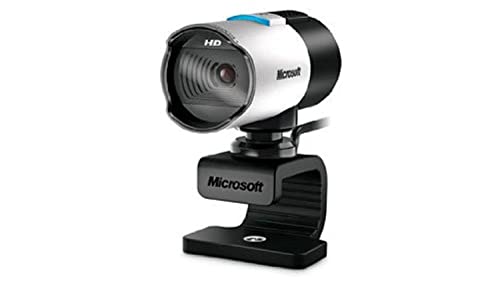
Microsoft LifeCam Studio - Best for Natural Skin Tones
The Microsoft LifeCam Studio uses a wideband microphone array and produces natural, accurate color reproduction particularly for skin tones, which many webcams in this price range distort toward yellow or green. The 1080p image is sharp and the autofocus is reliable. The flexible foot design allows placement on a monitor, desk, or laptop lid. The USB connection is standard and the camera is recognized by Zoom without driver installation on Windows or macOS. It is a straightforward pick for office and home use where accurate color matters more than advanced features.

NexiGo N960E - Best Budget Webcam with Ring Light
The NexiGo N960E includes a built-in ring light that meaningfully improves image quality in dim home office settings where adding a separate light is impractical. Resolution is 1080p at 30fps. Field of view adjusts between 65 and 90 degrees via the companion app, which allows tighter framing for single-person calls or wider framing for desks with multiple people. The built-in microphone is adequate for calls. The ring light brightness is adjustable. For users in poorly lit rooms who want a simple upgrade without buying separate lighting equipment, the N960E addresses the biggest image quality problem at a low price.
Before you buy
What to consider
Match the camera to your call frequency and environment. For occasional calls in a well-lit room, a budget 1080p webcam is sufficient. Daily calls justify spending to for better autofocus and microphone quality. Consider lighting before buying: a desk lamp improvement often yields better visible results than upgrading from a mid-range to a premium camera. Check whether your laptop or dock has USB-A or USB-C ports before purchasing to avoid needing an adapter. For rooms with multiple participants, check the field of view spec; 90 degrees or wider covers a broader area than the standard 65 to 78 degrees.
What to consider
For related picks, see [best computer cameras with microphone](/articles/best-computer-camera-with-microphone) and [best computer camera and microphone combos](/articles/best-computer-camera-and-microphone). Review our evaluation criteria at [/methodology](/methodology).
Quick answers
Zoom compresses outgoing video based on your upload speed and plan tier, so callers on standard plans are capped at 1080p HD output. A 4K webcam provides better flexibility for recording locally and for virtual background rendering quality, but the improvement in what remote participants actually see is modest compared to the improvement from better lighting. 1080p at 30fps is sufficient for nearly all Zoom use cases.
Zoom's automatic quality adjustment reduces resolution when bandwidth is limited. Other common causes include autofocus hunting in low contrast environments, lens fogging if the room is cold, and Zoom's video processing applying smoothing. Check that your internet upload speed is at least 1.5Mbps for 1080p calls. Also confirm in Zoom video settings that HD is enabled under Camera settings, as it is sometimes off by default.
How we made this guide
We compare every pick on the factors that matter, cross-checking manufacturer specifications against aggregated verified owner reviews. We rank independently and never take payment for placement. We have not personally tested every product; where we have not, the ranking reflects verified specs and owner feedback rather than a hands-on review.
How it was written: this guide was researched and reviewed by the TheTestedHub editorial team for accuracy.
Affiliate disclosure: TheTestedHub is reader-supported. When you buy through links on our site, we may earn a commission at no extra cost to you.
More to explore

Your Docking Station Match: CalDigit TS4 and More

Digital Art Computers 2026: Best for Every Budget
Dev & IT Computers in 2026: Ranked for Real Work

Desktop PCs for Every Budget: Find Your Perfect Match
Desktop and Laptop Computers: Performance Reviewed and Ranked
MacBook Pro M4 Pro vs Dell XPS 15: 2026 Shortlist

Buy the Best DIY Computer in 2026: Corsair One i300
