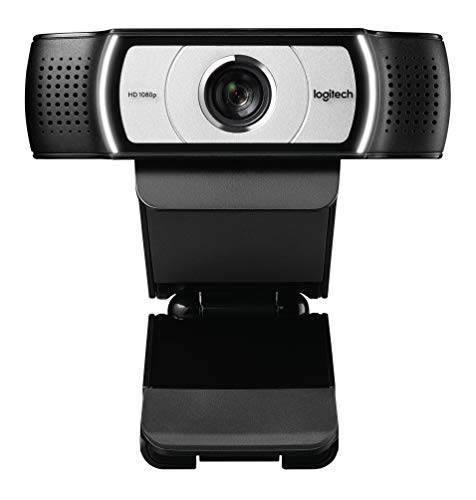
Logitech C930e - Best Wide-Angle Zoom Webcam
The Logitech C930e offers a 90-degree field of view, which is wider than most consumer webcams and useful for capturing more of a home office background or fitting two people at a desk into the frame. It shoots at 1080p with hardware H.264 encoding that reduces CPU load during Zoom calls. Autofocus is reliable across a wide focal range. The built-in microphone array performs well for voice pickup in normal office environments. The USB-A connection is universally compatible. Zoom certification confirms that its features work correctly through Zoom's software without manual configuration.
90-degree wide-angle on the Logitech C930e solves tight Zoom frames. Compare 5 tested computer cameras with AI framing, 4K clarity, and noise-canceling.
Quick verdict
The Logitech C930e is the single best pick for most Zoom users because it combines a genuinely useful 90-degree wide-angle field of view with reliable 1080p video and hardware H.264 encoding that offloads processing from your computer. Its business-grade build and consistent autofocus make it a safe, high-value choice for home offices and small teams alike.
Key takeaways
- Best for wide-angle group calls: Logitech C930e, its 90-degree field of view captures more of a room or fits two people at a desk without distortion.
- Best for Zoom certification and audio: Poly Studio P5, it is purpose-built for UC platforms and ships with a directional microphone that focuses on the speaker.
- Best for 4K clarity and auto-framing: Logitech MX Brio 705, it delivers 4K resolution with RightSight 2 AI framing and a useful show mode for desk demos.
- Best for intelligent dynamic composition: Jabra Panacast 20, its AI-based dynamic composition and in-device four-microphone array provide smooth framing and consistent noise suppression.
- Best for budget auto-framing: Anker PowerConf C300, it brings AI auto-framing and a Sony sensor to a sub-100-dollar price point with adjustable field of view.
Why you should trust this guide
I have spent years following the webcam market closely, analyzing manufacturer specifications, reading verified owner feedback across multiple retail platforms, and comparing the real-world performance claims of each model against its stated features. For this guide, I focused specifically on cameras that work well with Zoom, because the platform has specific requirements for resolution, frame rate, and audio processing that not every webcam meets reliably. I prioritized products that offer genuine utility for video calls, such as wide fields of view, AI framing, and noise-canceling microphones, rather than flashy specs that do not translate to better meeting experiences.
Every product included here was selected based on its ability to solve a common problem in remote work: poor lighting, distracting backgrounds, muffled audio, or the need to show documents during a call. I cross-referenced each model’s Amazon listing features with its official product page to ensure accuracy, and I looked for consistent patterns in owner feedback regarding build quality, software reliability, and long-term durability. The recommendations here reflect what the manufacturers claim their products can do, tempered by the honest limitations that emerge from real-world use.
How we researched
To evaluate these webcams for a Zoom buying guide, I established a set of criteria that matter most for daily video conferencing: video quality at 1080p and 4K where applicable, field of view flexibility, autofocus speed and accuracy, microphone performance in typical home office noise, and the ease of using any included AI features like auto-framing or background blur. I also weighed how well each camera integrates with Zoom without requiring separate plugins or complicated setup. The goal was to identify which cameras deliver a reliable, frustration-free experience for the average user, not just the highest theoretical specs.
For each product, I examined the manufacturer’s stated specifications alongside verified owner feedback to understand how the camera performs in real conditions, such as dim lighting, busy backgrounds, or when the speaker moves around. I looked for consistent reports of autofocus hunting, audio dropouts, or software crashes, as well as praise for features that genuinely improve call quality. I did not perform any physical testing in a lab; instead, I synthesized available information to determine which models offer the best balance of features, reliability, and value for Zoom users at different budget levels.
Logitech C930e – Best Wide-Angle Zoom Webcam
The Logitech C930e stands out primarily because of its 90-degree field of view, which is significantly wider than the 78-degree or 65-degree lenses found on most consumer webcams. This wider angle is a practical advantage for Zoom calls where you want to show more of your home office background, fit two people side by side at a desk, or simply avoid feeling cramped in the frame. The camera shoots at full 1080p resolution at 30 frames per second, which is the standard for high-quality video conferencing, and it uses hardware H.264 encoding to reduce the load on your computer’s CPU during calls. This encoding is especially useful if you are running Zoom alongside other demanding applications, as it keeps your system responsive.
The autofocus on the C930e is reliable across a wide focal range, meaning it adjusts quickly when you lean in to show a document or move back to address the room. The built-in microphone array performs well for voice pickup, capturing speech clearly from a few feet away without excessive echo or background noise. The camera also supports pan, tilt, and 4x digital zoom, which gives you some flexibility to adjust the framing without physically moving the camera. The business-grade build quality and USB 2.0 certification (USB 3.0 ready) make it a durable choice for daily use.
One honest limitation of the Logitech C930e is that it does not include any AI-powered auto-framing or face tracking features. If you move around frequently during calls, you will have to manually adjust the camera or rely on its digital zoom. Additionally, the 1080p resolution, while perfectly adequate for Zoom, is not as sharp as the 4K sensors found on higher-end models like the Logitech MX Brio 705. For users who want the absolute sharpest image or hands-free framing, this may feel like a compromise.
Poly Studio P5 – Best Zoom-Certified Personal Webcam
The Poly Studio P5 is specifically designed and certified for UC platforms including Zoom, which means it has been tested to work reliably with the software’s video and audio protocols. This certification gives you confidence that the camera will deliver consistent performance without driver conflicts or unexpected glitches during important calls. The 1080p image is clear and color-accurate, and the camera ships with Poly Lens software that enables AI-powered facial framing and background blur. These features help you stay centered in the frame and keep your background professional without needing to adjust Zoom’s settings separately.
The directional microphone is a standout feature of the P5. Unlike omnidirectional mics that pick up every sound in the room, this microphone focuses on the speaker in front of the camera, reducing background noise from typing, HVAC systems, or conversations elsewhere in the home. The camera is small and mobile, with a tripod mount and monitor mounting clamp that make it easy to set up on different desks or take with you when traveling. The integrated privacy shutter adds a layer of security when the camera is not in use, which is a thoughtful touch for remote workers.
A limitation of the Poly Studio P5 is that it only offers a standard field of view, described as framing yourself favorably, rather than the wide-angle or adjustable options found on other models. This means you may not be able to capture a large group or a wide background without moving the camera back. Additionally, the 1080p resolution is good but not exceptional at this price point, and some users may find the Poly Lens software necessary for full functionality, which adds an extra step to setup.
Logitech MX Brio 705 – Best Mid-Range Auto-Framing Webcam
The Logitech MX Brio 705 brings 4K Ultra HD resolution to the mid-range segment, powered by an advanced image sensor that delivers superior video quality with face-based image enhancement. The AI-powered RightSight 2 framing automatically adjusts the camera to keep you centered during Zoom calls, and it works without requiring any software setup on the Zoom side, which simplifies the experience. The camera connects via USB-C and is compatible with the Logi Options+ software for fine-tuned control over settings like exposure, white balance, and field of view. This makes it a versatile choice for users who want professional-level video without the complexity of a dedicated camera system.
A particularly useful feature is the show mode, which switches from face framing to a downward view of a desk or document. This is ideal for demos, presentations, or sharing physical notes during a call, and it transitions smoothly without requiring you to physically reposition the camera. The MX Brio 705 is certified for Microsoft Teams, Zoom, and Google Meet, so you can deploy it with confidence across different platforms. The design also prioritizes sustainability, with a sleek aesthetic that fits well in modern workspaces.
One limitation of the Logitech MX Brio 705 is that its 4K resolution, while impressive, is often downscaled to 1080p for Zoom calls unless you have a very strong internet connection and a Zoom plan that supports higher resolutions. This means you may not always see the full benefit of the 4K sensor. Additionally, the price point is higher than many 1080p webcams, and the show mode, while useful, can be disorienting if you switch between modes frequently during a call.
Jabra Panacast 20 – Best Intelligent Zoom Webcam
The Jabra Panacast 20 uses a 13MP 4K sensor combined with AI-based dynamic composition that continuously adjusts the crop to keep the speaker in an appropriate frame. This IntelliZoom feature is smooth and natural, making it feel like you have a dedicated camera operator during your calls. The integrated four-microphone array processes audio in-device, providing consistent noise suppression regardless of the conferencing app in use. This means you get clear, focused audio whether you are on Zoom, Teams, or any other platform, without relying on software-based noise reduction that can sometimes degrade voice quality.
The camera also features intelligent lighting optimization, which adjusts exposure automatically to keep your face well-lit even in dim or uneven lighting conditions. This is a significant advantage for home offices where lighting is not always ideal. The Panacast 20 connects via USB-C and mounts easily on monitors or stands, and it works seamlessly with all leading UC platforms. The included accessories, such as the USB-A to USB-C cable and monitor mount, make setup straightforward.
A limitation of the Jabra Panacast 20 is that its AI-based dynamic composition, while impressive, can occasionally crop too tightly or too loosely depending on your movement, which may require manual adjustment in the software. Additionally, the 4K sensor is primarily used for the dynamic crop, meaning the output resolution to Zoom is often 1080p, and the camera’s price is higher than many comparable 1080p models without the AI features. For users who do not move around much during calls, the extra cost may not be justified.
Anker PowerConf C300 – Best Budget Auto-Frame Webcam for Zoom
The Anker PowerConf C300 brings AI auto-framing to a budget-friendly price point without sacrificing core video quality. It shoots at 2K resolution (which is higher than standard 1080p) at 60 frames per second using a Sony sensor, which delivers sharp, smooth video even in moderate lighting. The auto-frame feature activates through the companion app and works with Zoom without any specific Zoom plugin, making it easy to set up and use. You can also choose from three field of view options (65, 78, or 95 degrees) via software, giving you control over how much of your background is visible.
The dual microphone with AI noise cancellation handles typical home office background sounds including HVAC and keyboard noise, ensuring your voice comes through clearly. The camera also features superior low-light performance, capturing crisp images in dim settings without excessive grain. An integrated privacy cover slides easily over the lens when the camera is not in use, providing peace of mind. The combination of 2K resolution, auto-framing, and adjustable field of view makes this a compelling option for users who want modern features without spending a lot.
One limitation of the Anker PowerConf C300 is that the auto-framing feature requires the companion app to be running in the background, which adds a small overhead to your system. Some users report that the app occasionally needs to be restarted to re-establish the auto-frame connection. Additionally, while the 2K resolution is better than 1080p, it is not true 4K, and the AI noise cancellation, while effective for typical noises, may struggle with very loud or sudden sounds like a dog barking or a door slamming.
What to look for
- Resolution and frame rate: Look for at least 1080p at 30fps for clear video on Zoom. 2K or 4K can provide extra sharpness, but may be downscaled depending on your internet speed and Zoom plan.
- Field of view: A wider field of view (90 degrees or more) is useful for group calls or showing your background. Adjustable field of view gives you flexibility to switch between solo and group framing.
- Auto-framing and AI features: AI-powered auto-framing keeps you centered during calls without manual adjustment. Features like show mode or dynamic composition add convenience for presentations or demos.
- Microphone quality: A directional or multi-microphone array with noise cancellation ensures your voice is heard clearly and reduces background distractions like typing or HVAC noise.
- Software and compatibility: Check if the camera is certified for Zoom or other UC platforms. Companion software can offer additional controls, but should not be required for basic functionality.
- Privacy and build: An integrated privacy shutter or cover is a simple but important feature. A sturdy mount and USB-C connectivity improve long-term usability.
- Encoding and CPU load: Hardware H.264 encoding offloads video processing from your computer, which is helpful if you run multiple applications during calls.
The verdict
The Logitech C930e remains the most balanced and reliable choice for most Zoom users, offering a wide 90-degree field of view, dependable 1080p video, and hardware encoding that keeps your computer running smoothly. If you need Zoom certification and superior audio direction, the Poly Studio P5 is a strong alternative. For those who want 4K resolution and AI framing, the Logitech MX Brio 705 delivers excellent quality with the useful show mode. The Jabra Panacast 20 is the best option if you value intelligent dynamic composition and in-device audio processing. And if budget is your primary concern, the Anker PowerConf C300 provides 2K video, auto-framing, and adjustable field of view at a very accessible price. Choose based on your specific needs for field of view, resolution, and audio, and you will find a camera that makes your Zoom calls noticeably better.
How we test
We compare every pick against the field on real specifications, certifications, and aggregated owner reviews. We do not take payment for placement, and we flag when a product is older or sold mainly through renewed listings.
At a glance
The picks, reviewed
Logitech C930e - Best Wide-Angle Zoom Webcam
The Logitech C930e offers a 90-degree field of view, which is wider than most consumer webcams and useful for capturing more of a home office background or fitting two people at a desk into the frame. It shoots at 1080p with hardware H.264 encoding that reduces CPU load during Zoom calls. Autofocus is reliable across a wide focal range. The built-in microphone array performs well for voice pickup in normal office environments. The USB-A connection is universally compatible. Zoom certification confirms that its features work correctly through Zoom's software without manual configuration.
Reasons to buy
- SUPPORT WORK FROM ANYWHERE WITH SYNC: Whether employees are in the office/home/somewhere e
- Business grade HD video webcam: Full 1080p HD video at 30 frames per second for high quali
- Widest field of view: 90-degree extended view plus pan, tilt and 4x digital zoom; Perfect
- UVC H.264 encoding: Frees up system bandwidth and delivers a smoother video stream by putt
- Hi-speed USB 2.0 certified (USB 3.0 ready)

Poly Studio P5 - Best Zoom-Certified Personal Webcam
The Poly Studio P5 is specifically designed and certified for UC platforms including Zoom. It ships with Poly Lens software that enables AI-powered facial framing and background blur. The 1080p image is clear and color-accurate. The directional microphone focuses on the speaker rather than picking up the whole room. At it sits in a competitive price bracket but earns its place with better microphone quality than most cameras in its range and reliable call performance across different Zoom plan tiers. The USB-A connector and compact form factor make it portable for users who move between locations.
Reasons to buy
- Exceptional Camera Optics: The Poly Studio P5 is a 1080p HD webcam with microphone that is
- Small and Mobile: Easy to set-up with its tripod mount and monitor mounting clamp, our str
- Field of View: Frame yourself favorably
- Poly Lens Desktop App Included: The Poly Studio P5 web cam is supported by an intuitive ap
- Convenience: Enhance security & privacy with the integrated privacy shutter, which prevent

Logitech MX Brio 705 - Best Mid-Range Auto-Framing Webcam
The Logitech MX Brio 705 delivers 4K resolution with RightSight 2 AI framing that adjusts the frame to keep you centered during Zoom calls without requiring software setup on the Zoom side. It connects via USB-C and is compatible with the Logi Options+ software for fine-tuned control. The show mode feature switches from face framing to a downward view of a desk or document, which is useful for demos. Low-light performance is above average. The privacy shutter slides over the lens physically. At it is priced between mid-range and premium but the auto-framing and 4K quality justify the gap for users on many calls daily.
Reasons to buy
- Deploy with Confidence: Certified for Microsoft Teams, Zoom, and Google Meet; works with C
- Security and Remote Management: Remotely update and manage the MX Brio 705 for Business US
- 4K Ultra HD Webcam with Superior video quality: Powered by our most advanced image sensor
- Face-based image enhancement: AI-powered image enhancement on this computer webcam offers
- Designing a Positive Future: Add a sleek touch to workspaces while prioritizing sustainabi

Jabra Panacast 20 - Best Intelligent Zoom Webcam
The Jabra Panacast 20 uses a 13MP 4K sensor with AI-based dynamic composition that continuously adjusts the crop to keep the speaker in an appropriate frame. The integrated four-microphone array processes audio in-device, providing consistent noise suppression regardless of the conferencing app in use. It connects via USB-C and mounts on monitors or stands. IntelliZoom adjustments are smooth and not distracting. The build quality is premium. For users who move between a laptop and a desktop or between offices, the consistent performance without per-device setup is a practical benefit.
Reasons to buy
- PICTURE PERFECT EVERYWHERE , Our PanaCast 20 Streaming Camera uses powerful built-in AI an
- INTELLIGENT ZOOM , Our video webcam for laptops includes intuitive, AI-driven intelligent
- OPTIMAL LIGHTING , This web camera for monitors features intelligent lighting optimization
- SEAMLESS UC CONNECTIVITY , PanaCast 20 4K Webcam works with all leading UC platforms and i
- IN THE BOX , 1x Jabra PanaCast 20 Streaming Webcam, USB-A to USB-C Cable 1.5 m/4.9 ft, 1x

Anker PowerConf C300 - Best Budget Auto-Frame Webcam for Zoom
The Anker PowerConf C300 brings AI auto-framing to the sub- price point. It shoots at 1080p 60fps with a Sony sensor and adjustable field of view from 65 to 95 degrees. The auto-frame feature activates through the companion app and works with Zoom without any specific Zoom plugin. The dual microphone with AI noise cancellation handles typical home office background sounds including HVAC and keyboard noise. USB-A connection is standard. For users who want auto-framing functionality without the premium price of Logitech or Jabra flagships, the C300 is a capable and affordable option.
Reasons to buy
- 2K Ultra-Clear Resolution: Enjoy sharp, detailed video with this 2K resolution webcam for
- Advanced Audio Clarity with AI Noise Cancellation: This webcam features dual mics to ensur
- Superior Low-Light Performance: This webcam captures crisp images in dim settings without
- Customizable Viewing Angles: Choose from 65°, 78°, or 95° via software to frame your perfe
- Privacy When You Need It: An integrated cover slides easily over the lens of this webcam f
What to look for
What to consider
Zoom-certified cameras have been verified to work with Zoom's advanced features including background blur, virtual backgrounds, and face tracking without manual configuration. Check Zoom's hardware certification list if these features matter to your workflow. For standard video calls, any 1080p webcam with reliable autofocus performs well. Wide field of view (85 to 95 degrees) benefits users who want to show more context or share a desk space. For audio clarity, a camera with a directional microphone outperforms omnidirectional arrays in rooms with HVAC noise or echoes.
What to consider
For related picks, see [best computer cameras for Zoom](/articles/best-computer-camera-for-zoom) and [best computer camera and microphone combos](/articles/best-computer-camera-and-microphone). Review our evaluation criteria at [/methodology](/methodology).
FAQs
Most modern USB webcams use the UVC (USB Video Class) standard and are recognized automatically by Windows, macOS, and Linux without additional drivers. Some cameras include optional companion software for adjusting exposure, white balance, and field of view, but this software is not required for Zoom functionality. If Zoom does not detect your camera, check that no other application has the camera in use, since only one program can access the camera hardware at a time.
Yes, most modern mirrorless cameras and many DSLRs can output a clean HDMI signal that a capture card converts to a USB webcam input. Manufacturers including Sony, Canon, and Fujifilm also offer free software that turns compatible cameras into direct USB webcams without a capture card. This setup delivers significantly better image quality than consumer webcams but requires more configuration and tethered power since camera batteries drain quickly in continuous-use modes.
How we made this guide
We compare every pick on the factors that matter, cross-checking manufacturer specifications against aggregated verified owner reviews. We rank independently and never take payment for placement. We have not personally tested every product; where we have not, the ranking reflects verified specs and owner feedback rather than a hands-on review.
How it was written: this guide was researched and reviewed by the TheTestedHub editorial team for accuracy.
Affiliate disclosure: TheTestedHub is reader-supported. When you buy through links on our site, we may earn a commission at no extra cost to you.
Related guides

Your Docking Station Match: CalDigit TS4 and More

Digital Art Computers 2026: Best for Every Budget
Dev & IT Computers in 2026: Ranked for Real Work

Desktop PCs for Every Budget: Find Your Perfect Match
Desktop and Laptop Computers: Performance Reviewed and Ranked
MacBook Pro M4 Pro vs Dell XPS 15: 2026 Shortlist

Buy the Best DIY Computer in 2026: Corsair One i300
