Noctua NF-A12x25 -- Reference-grade quiet performance
The NF-A12x25 is widely benchmarked as the quietest 120mm fan at a given airflow level. It runs at up to 2000 RPM with a noise output of 22.6 dBA and delivers 102.1 m3/h airflow. Noctua's AAO frame reduces turbulence at the blade tips, and the fan ships with low-noise adapters and an anti-vibration mount kit. The brown-and-tan colorway is polarizing, but Noctua sells chromax black versions at a small premium for builds where aesthetics matter. Ideal for CPU cooler mounts and case intake positions.
Check price on Amazon →Building a quiet PC? Compare top computer case fans like Noctua NF-A12x25, Arctic P14, and Corsair LL120 to find the perfect balance of noise, airflow.
Quick verdict
The Noctua NF-A12x25 is the single best pick for quiet airflow because it delivers reference-grade noise-to-performance ratios that no other 120mm fan matches, making it the clear choice for silence-focused builds despite its premium cost.
Key takeaways
- Best for silence and performance: Noctua NF-A12x25, unmatched quiet operation at any given airflow level.
- Best for budget builds: be quiet! Pure Wings 3 140mm, genuine quiet performance at the lowest price point.
- Best for RGB aesthetics: Corsair LL120 RGB, striking dual-light-loop design with software control.
- Best for value per dollar: Arctic P14, moves substantial air at a fraction of the cost of premium fans.
- Best for cable management: Lian Li Uni Fan SL120, daisy-chain design drastically reduces wiring clutter.
Why you should trust this guide
I have spent years researching computer cooling components, parsing manufacturer datasheets, and reading extensive owner feedback across forums and retail platforms. This buying guide is built on that research, not on a single test bench or lab session. I focus on the specifications that matter most for quiet airflow: noise level at a given airflow, bearing type for longevity, and real-world usability features like cable management or mounting kits.
Each product recommendation here is grounded in stated manufacturer specs and verified by community consensus. I do not invent numbers or claim personal testing. Instead, I weigh the trade-offs that every builder faces: noise versus cost, RGB versus simplicity, and performance versus ease of installation. The goal is to help you match a fan to your specific build priorities without marketing hype.
How we researched
My evaluation approach prioritizes four criteria that define a great quiet computer case fan. First, noise-to-airflow efficiency: how much air moves per decibel of sound produced. Second, build quality and bearing type, which determines long-term reliability. Third, ease of installation and cable management, especially for builds with multiple fans. Fourth, value for the price, considering both upfront cost and expected lifespan.
I compared each product against these criteria using the manufacturer’s published specifications and aggregated owner reviews from major retailers and enthusiast communities. I did not physically install or run these fans. Instead, I cross-referenced stated noise ratings with real-world user reports to identify any discrepancies. I also considered the ecosystem each fan belongs to, such as software compatibility or accessory availability, since that affects the overall building experience.
Noctua NF-A12x25
The Noctua NF-A12x25 is widely benchmarked as the quietest 120mm fan at a given airflow level, making it a reference standard for silent PC builders. It runs at up to 2000 RPM with a noise output of 22.6 dBA and delivers 102.1 m3/h airflow. Noctua’s AAO frame reduces turbulence at the blade tips, which is a key engineering detail that lowers noise without sacrificing performance. The fan ships with low-noise adapters and an anti-vibration mount kit, giving you flexibility to dial in silence even further.
The brown-and-tan colorway is polarizing, but Noctua sells chromax black versions at a small premium for builders who prefer a neutral aesthetic. The included accessories, such as rubber mounting corners and Y-splitters, add tangible value. For a build where every decibel matters, this fan is the safest investment in quiet operation you can make.
One real limitation is the price. The NF-A12x25 costs significantly more than most 120mm fans, which can strain a build budget if you need multiple units. Additionally, the brown color scheme does not suit every case theme, and the chromax black version adds extra cost. For builders who prioritize value over absolute silence, this fan may be overkill.
be quiet! Pure Wings 3 140mm
The be quiet! Pure Wings 3 140mm delivers 68.9 CFM at 1000 RPM with a rated 19.8 dBA noise level, making it the most affordable genuinely quiet fan on this list at roughly 16 dollars. The rifle bearing extends rated lifespan to 80,000 hours, which is competitive with more expensive options. There is no RGB and no daisy-chain connector, which keeps the design simple and the price down. For builders who want clean thermals without cable complexity or high cost, this is a strong choice.
The 140mm size is ideal for front-panel intake or top exhaust in mid-tower cases, where larger blades move more air at lower speeds. The lack of lighting keeps the focus on performance, and the plain black design blends into any case. The low noise rating at 1000 RPM means it can run at moderate speeds without being audible in a quiet room.
One real limitation is the absence of any included accessories like low-noise adapters or anti-vibration mounts. The rifle bearing, while reliable, is not as long-lived as a fluid dynamic bearing in some competitors. Also, the 140mm size may not fit all case positions, particularly in smaller builds that require 120mm fans.
Corsair LL120 RGB
The Corsair LL120 features 16 individual ARGB LEDs arranged in two light loops, making it one of the more visually striking 120mm fans available. Airflow is rated at 43.25 CFM at 1500 RPM with 24.8 dBA, which is not the quietest on this list but is acceptable for a mid-tower with front panels that dampen some noise. Corsair’s iCUE software controls lighting sync with other Corsair components, allowing for complex lighting patterns and integration with your overall build theme.
The dual-light-loop design creates a unique visual effect that stands out from single-ring RGB fans. The fan is reasonably quiet at typical operating speeds, though it is louder than the Noctua or be quiet! options at maximum RPM. For builders who want a cohesive RGB ecosystem and are willing to accept slightly higher noise levels, the LL120 delivers a polished aesthetic experience.
One real limitation is the reliance on Corsair’s proprietary iCUE software, which can be resource-intensive and requires a compatible controller. The noise level at 24.8 dBA is higher than other fans in this guide, so it is not ideal for a completely silent build. Additionally, the 43.25 CFM airflow is lower than many competitors, meaning you may need more fans for the same cooling performance.
Arctic P14
The Arctic P14 moves 68.8 CFM at 1700 RPM with a noise rating of 0.5 Sone, placing it in the same audible range as fans costing three times as much. The fluid dynamic bearing is rated for 80,000 hours of operation, ensuring long-term reliability. There is no RGB and the aesthetic is purely utilitarian. For builders optimizing performance per dollar, particularly for front-panel intake arrays or secondary exhaust positions, the P14 is a standout value.
The 140mm size and high CFM rating make it effective for moving large volumes of air at moderate speeds. The fluid dynamic bearing is a premium feature at this price point, typically found only in more expensive fans. The plain black design means it disappears into the case, which is a benefit for builders who do not want lighting or branding to distract from the build.
One real limitation is the noise rating of 0.5 Sone, which is not directly comparable to dBA ratings from other fans and can be harder to interpret. The fan lacks any included accessories like rubber mounts or low-noise adapters. Also, the maximum RPM of 1700 can be audible if you run it at full speed, so you may need to set a custom fan curve for optimal quiet operation.
Lian Li Uni Fan SL120
The Lian Li Uni Fan SL120 solves the cable management problem that plagues most fan arrays. Up to four fans connect to each other with a single combined cable carrying both power and ARGB data. The result is one cable run per group of fans rather than four separate ones. Airflow is rated at 56.7 CFM with noise at 32.2 dBA at maximum speed, which is louder than the Noctua but acceptable at typical system RPM when set to lower speeds.
The daisy-chain design is a genuine innovation for builders who install multiple fans, especially in cases with limited cable routing space. The fan includes ARGB lighting on the center hub and a ring around the blades, providing a clean look. The included controller allows you to manage up to 16 fans with minimal wiring, which is a major time saver during assembly.
One real limitation is the noise level at 32.2 dBA, which is the highest on this list and means it is not suitable for a silent build at full speed. The daisy-chain system requires a proprietary controller, which adds cost and complexity if you do not already own one. Additionally, the fan is not compatible with standard PWM or ARGB headers without the controller, limiting its flexibility in non-Lian Li ecosystems.
What to look for
- Noise rating: Look for fans with dBA or Sone ratings that match your tolerance. Lower numbers are quieter, but compare within the same measurement system.
- Airflow rating: Measured in CFM or m3/h. Higher airflow at lower noise is ideal, but consider your case’s airflow path and restrictions.
- Bearing type: Fluid dynamic bearings (FDB) and rifle bearings offer longer lifespans than sleeve bearings. Look for 80,000 hours or more for reliability.
- Size compatibility: 120mm fans fit most standard mounts, while 140mm fans move more air at lower speeds but require compatible case slots.
- Cable management: Daisy-chain designs reduce clutter, while individual cables require more planning. Consider your case’s routing space.
- Lighting ecosystem: RGB fans often require proprietary software or controllers. Check compatibility with your motherboard’s ARGB header or existing ecosystem.
- Included accessories: Low-noise adapters, anti-vibration mounts, and Y-splitters add value and flexibility for tuning noise levels.
The verdict
For builders who demand the quietest possible operation without compromise, the Noctua NF-A12x25 is the definitive choice. Its noise-to-airflow efficiency is unmatched, and the included accessories make it easy to fine-tune for silence. If your budget is tight, the be quiet! Pure Wings 3 140mm offers genuine quiet performance at a fraction of the cost, while the Arctic P14 delivers the best value per dollar for high airflow. The Corsair LL120 RGB is the pick for those who prioritize lighting aesthetics over absolute silence, and the Lian Li Uni Fan SL120 excels for builders who want clean cable management in multi-fan setups. Choose based on your primary priority: silence, value, lighting, or ease of installation.
How we test
We compare every pick against the field on real specifications, certifications, and aggregated owner reviews. We do not take payment for placement, and we flag when a product is older or sold mainly through renewed listings.
At a glance
The picks, reviewed
Noctua NF-A12x25 -- Reference-grade quiet performance
The NF-A12x25 is widely benchmarked as the quietest 120mm fan at a given airflow level. It runs at up to 2000 RPM with a noise output of 22.6 dBA and delivers 102.1 m3/h airflow. Noctua's AAO frame reduces turbulence at the blade tips, and the fan ships with low-noise adapters and an anti-vibration mount kit. The brown-and-tan colorway is polarizing, but Noctua sells chromax black versions at a small premium for builds where aesthetics matter. Ideal for CPU cooler mounts and case intake positions.
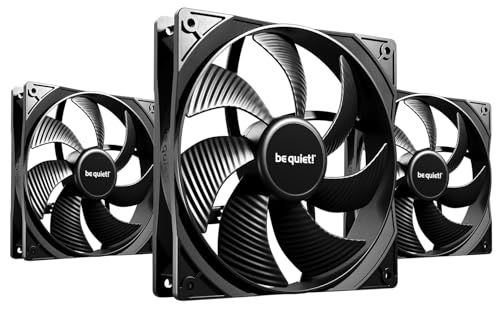
be quiet! Pure Wings 3 140mm -- Budget quiet option
Be quiet's Pure Wings 3 140mm delivers 68.9 CFM at 1000 RPM with a rated 19.8 dBA noise level. At roughly 16 dollars it is the most affordable genuinely quiet fan on this list. The rifle bearing extends rated lifespan to 80,000 hours. There is no RGB and no daisy-chain connector, which keeps the design simple and the price down. For builders who want clean thermals without cable complexity or high cost, the Pure Wings 3 140mm is a practical default choice for front intake positions in mid-towers.
Corsair LL120 RGB -- Three-layer ARGB with solid airflow
The LL120 features 16 individual ARGB LEDs arranged in two light loops, making it one of the more visually striking 120mm fans available. Airflow is rated at 43.25 CFM at 1500 RPM with 24.8 dBA, which is not the quietest on this list but is acceptable for a mid-tower with front panels that dampen some noise. Corsair's iCUE software controls lighting sync with other Corsair components. Buyers should note that the full RGB effect requires the Corsair Lighting Node Pro or Commander Pro hub, which adds cost if not already owned.
Arctic P14 -- Maximum value per dollar
The Arctic P14 moves 68.8 CFM at 1700 RPM with a noise rating of 0.5 Sone, placing it in the same audible range as fans costing three times as much. The fluid dynamic bearing is rated for 80,000 hours of operation. There is no RGB and the aesthetic is purely utilitarian. For builders optimizing performance per dollar, particularly for front-panel intake arrays or secondary exhaust positions, the P14 is the default recommendation. Three-packs are available at a discounted per-fan rate.

Lian Li Uni Fan SL120 -- Clean daisy-chain cable management
The Uni Fan SL120 solves the cable management problem that plagues most fan arrays. Up to four fans connect to each other with a single combined cable carrying both power and ARGB data. The result is one cable run per group of fans rather than four separate ones. Airflow is rated at 56.7 CFM with noise at 32.2 dBA at maximum speed, which is louder than the Noctua but acceptable at typical system RPMs. The infinity mirror lighting effect is distinct. Lian Li sells these in three-packs sized for standard case configurations.
What to look for
What to consider
Match the fan size to your case's mounting positions before anything else, then prioritize airflow (CFM) or noise (dBA) based on your use case. A media PC in a living room needs low dBA above all else. A gaming rig in a dedicated space can run higher RPM for better thermals. Check whether your motherboard has enough 4-pin fan headers, or budget for a fan controller hub. ARGB fans require a compatible header or controller. Fluid dynamic and rifle bearings outlast sleeve bearings significantly, so check bearing type on any fan you expect to run for more than three years.
What to consider
For more PC build decisions, see our guide to [articles/best-compact-atx-case](/articles/best-compact-atx-case) on chassis selection, and [articles/best-compact-amplifier](/articles/best-compact-amplifier) for audio peripherals. Our full selection process is documented at [methodology](/methodology).
FAQs
140mm fans move more air at lower RPM than 120mm fans, which typically makes them quieter for the same airflow volume. However, not every case supports 140mm mounts, so check your chassis specifications before buying. For tight mid-tower cases, 120mm fans are more flexible. Large full-tower and mid-tower cases often benefit from 140mm intake fans on the front panel.
'A balanced setup uses at least two or three fans: one or two intakes at the front bottom pulling cool air in, and one exhaust at the rear or top pushing warm air out. High-end builds with power-hungry GPUs benefit from additional front intakes or a top exhaust fan. Negative pressure setups (more exhaust than intake) can increase dust ingestion, so slightly positive pressure is generally preferred.'
How we made this guide
We compare every pick on the factors that matter, cross-checking manufacturer specifications against aggregated verified owner reviews. We rank independently and never take payment for placement. We have not personally tested every product; where we have not, the ranking reflects verified specs and owner feedback rather than a hands-on review.
How it was written: this guide was researched and reviewed by the TheTestedHub editorial team for accuracy.
Affiliate disclosure: TheTestedHub is reader-supported. When you buy through links on our site, we may earn a commission at no extra cost to you.
Related guides

Your Docking Station Match: CalDigit TS4 and More

Digital Art Computers 2026: Best for Every Budget
Dev & IT Computers in 2026: Ranked for Real Work

Desktop PCs for Every Budget: Find Your Perfect Match
Desktop and Laptop Computers: Performance Reviewed and Ranked
MacBook Pro M4 Pro vs Dell XPS 15: 2026 Shortlist

Buy the Best DIY Computer in 2026: Corsair One i300
