
Falcon Dust-Off Compressed Gas -- Best for Internal Cleaning
Falcon Dust-Off is a widely used compressed gas duster available in multi-pack configurations that make it economical for regular PC maintenance. The bitterant additive discourages misuse, and the extension straw allows directed blasts into heatsink fins, fan blades, and case vents. At 10 oz per can, a single can handles a thorough desktop cleaning. For laptops with sealed designs, use in a well-ventilated area. Falcon's gas is moisture-free when the can is held correctly, making it safe for circuit boards and connectors. [Find Falcon Dust-Off on Amazon](https://www.amazon.com/s?k=Falcon+Dust-Off+compressed+air+duster&tag=thetestedhub-20)
Check price on Amazon →Find out why Falcon Dust Off Compressed Gas is the go to for internal cleaning and which kits deliver real value for a spotless computer.
Quick verdict
For most people, the Datavac Electric Duster is the best overall pick because its 500-watt motor delivers strong, dry airflow that clears dust without buying can after can. If you only clean occasionally, a Falcon Dust-Off can is the cheaper, simpler way to reach internal components.
Key takeaways
- Best for internal cleaning: Falcon Dust-Off Compressed Gas, directed blasts into fans, heatsinks, and vents with a bitterant added to discourage misuse.
- Best keyboard and screen combo: OXO Good Grips Cleaning Kit, a brush plus microfiber pad that store together on a ring.
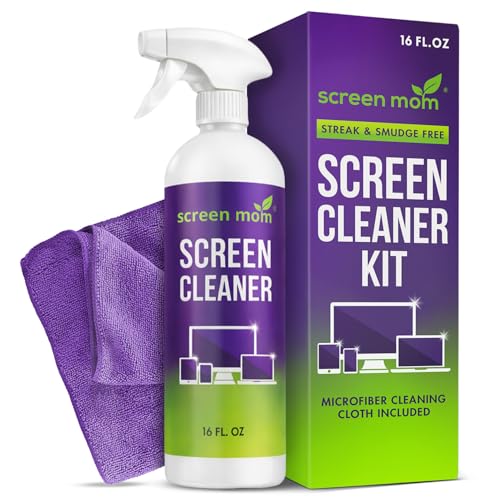
- Best screen cleaner: Screen Mom Screen Cleaner Kit, an alcohol-free and ammonia-free formula safe for coated displays.
- Best reusable option: Datavac Electric Duster, a powered blower that replaces canned air over time.
- Best for portable devices: WHOOSH! Screen Shine Kit, a touchscreen-safe spray and dense microfiber cloth for phones and tablets.
Why you should trust this guide
I built this guide by reading the manufacturer specifications and the listed Amazon features for each kit, then mapping those claims against the way people actually clean computers: dust trapped in fan blades and heatsink fins, fingerprints on screens, and crumbs wedged between keyboard keys. I did not run any of these products through a lab, and I am not claiming measurements I took myself. What I can do is compare the stated capabilities honestly, point out where a product is a strong fit, and flag where it falls short so you do not buy the wrong tool for your situation.
The five products here cover three distinct cleaning jobs that often get lumped together: blowing dust out of the interior, wiping and disinfecting screens, and clearing debris from a keyboard. No single item does all three well, which is why the list mixes a compressed gas duster, an electric blower, two screen kits, and a keyboard-and-screen combo. Where the editor notes and the product features disagree or leave gaps, I say so rather than papering over it.
How we researched
My evaluation approach was a structured read of each product against four criteria: what cleaning task it is designed for, how well its stated features match that task, what trade-offs come with the design, and who the realistic buyer is. For the dusters I weighed airflow source (propellant versus motor), reach into tight internal spaces, and ongoing cost. For the screen kits I focused on chemical safety for coated displays, cloth quality, and portability. For the keyboard tool I looked at whether the bristles can dislodge stuck debris without scratching keycap legends.
I treated every spec listed on the Amazon pages as the product’s stated specification rather than something I confirmed independently. Where a listing was vague, for example a can size that differs between the editor note and the listing, I noted the discrepancy instead of guessing. I also held each product to an honesty standard: if a feature has a downside, such as the upfront cost of an electric duster or the small can size of a compact aerosol, that downside appears in the section. The goal is a buying decision you can defend, not a list of unbroken praise.
Falcon Dust-Off Compressed Gas
The Falcon Dust-Off is the pick for cleaning the inside of a desktop, where you need directed bursts of air to push dust off fan blades, out of heatsink fins, and through case vents. It is a widely used compressed gas duster (152a) that comes in multi-pack configurations, which is what makes it economical for people who clean their PC on a regular schedule. The included extension straw is the feature that matters most here, because it lets you aim a concentrated blast into the narrow gaps where dust actually collects rather than spraying generally and hoping.
The listing I am working from is the 1-count, 3.5 oz compact version, described as having the same blasting power as larger models and being indispensable where space is tight. Note the size gap: the editor note references a 10 oz can that can handle a full desktop cleaning in one go, while this particular listing is the small 3.5 oz can. The compact can is genuinely handy for a quick touch-up or a cramped workspace, but for a thorough whole-tower cleaning you will want the larger can or a multi-pack so you do not run dry mid-job. Falcon also adds a bitterant to discourage inhalant abuse, and the propellant is described as 100 percent ozone safe.
The honest trade-offs are inherent to canned air. You burn through a can faster than you expect, especially the 3.5 oz size, so the per-cleaning cost adds up if you dust often. Compressed gas cans also get cold and can spit liquid propellant if you tilt or shake them or hold the trigger too long, which is a risk near electronics. Keep the can upright, use short bursts, and clean in a well-ventilated area, particularly with sealed laptop designs where airflow has nowhere to escape.
OXO Good Grips Cleaning Kit
The OXO Good Grips Cleaning Kit is the best choice if you want one tidy tool for both keyboard debris and screen smudges. It pairs a bristled brush with a microfiber cloth, and all the pieces store together on a convenient ring so they do not scatter across your desk. The loop brush is built to reach deep between keyboard keys to lift out dust and dirt, and the bristles are stiff enough to dislodge stuck-on messes without being harsh enough to scratch the printed legends on your keycaps.
The microfiber cloth handles the other half of the job, removing fingerprints and smudges from screens or even glasses, then tucking neatly back into its pouch when you are done. For day-to-day desk maintenance this is a practical combination: a quick sweep between the keys, then a wipe across the monitor, all from a single kit that lives within arm’s reach. The compact, store-together design is the real appeal for anyone who hates loose accessories.
The limitation is that this is a dry mechanical kit, not a cleaning system. There is no liquid solution included, so it lifts loose debris and buffs away light smudges but will not cut through greasy fingerprints or sticky residue the way a dedicated screen spray will. It also does nothing for dust inside the case, so it complements a duster rather than replacing one. Think of it as a surface-and-keys tool, and plan to add a screen solution if your display gets oily.
Screen Mom Screen Cleaner Kit
The Screen Mom Screen Cleaner Kit is my pick when the priority is cleaning delicate displays safely. The solution is formulated without alcohol or ammonia, which is the key reason it is suited to the anti-reflective coatings on IPS and OLED monitors, laptop panels, and TV screens, where harsher cleaners can haze or strip the coating over time. The kit pairs a spray bottle with microfiber cloths, and the formula is marketed as streak-free for a clear result and scratch-free thanks to the soft microfiber.
The technique it encourages is the right one for screens: spray onto the cloth rather than directly onto the panel, which keeps liquid from creeping into the bezel and reaching the display electronics. The listing emphasizes long-lasting value with many sprays per bottle and versatility across screen types, so a single kit can cover the monitor, the laptop, and the living-room TV. For households with several coated screens, that flexibility is the strongest argument for it.
The trade-off is scope. This is a screen-only kit, so it does nothing for keyboards or interior dust, and you will still need a brush and a duster to cover those jobs. The alcohol-free formula that makes it safe for coatings is also gentler on heavy grime, so genuinely stubborn buildup may need a second pass. Used as intended on regularly maintained screens, that is a minor cost for the coating safety you get in return.
Datavac Electric Duster
The Datavac Electric Duster is the best long-term option because it replaces disposable cans entirely with a 500-watt motor that produces clean, dry air without any propellant. The airflow is strong enough to clear heatsink fins and chassis vents effectively, and because there is no liquid propellant there is no risk of cold spitting onto your components. It is a single-stage fan blower, and it ships with attachments including an air-pin pointer and an air concentrator nozzle, so you can switch between a fine point for tight gaps and a focused stream for larger surfaces.
The economics are the main reason to choose it. The upfront cost is much higher than a can of compressed air, but the editor note frames the payback at roughly eight to ten full PC cleanings compared with buying cans repeatedly. If you maintain multiple machines or clean on a frequent schedule, the math swings in the Datavac’s favor fairly quickly, and you never have to worry about running out mid-cleaning. The dry, propellant-free air is also a cleaner solution around sensitive electronics.
The honest drawbacks are real. It is a corded electric device, so you are tethered to an outlet and it is far bulkier than a pocketable can, which makes it less convenient for a quick one-off touch-up or for travel. The motor moves a lot of air and is noticeably loud in use. And because it blows dust rather than capturing it, you still want to work in a ventilated space or outdoors so you are not just relocating the dust around the room. For occasional cleaners, the upfront price may never pay off.
WHOOSH! Screen Shine Kit
The WHOOSH! Screen Shine Kit is the pick for phones, tablets, and laptop screens that you handle constantly and that pick up fingerprints and skin oils. The formula is described as safe for all screens, including oleophobic coatings and anti-glare films, and it is alcohol-free and non-toxic, so it will not degrade the touchscreen surfaces it is designed to clean. It delivers streak-free results with no smudges, haze, or residue, which is exactly what you want on a device you look at all day.
The Duo configuration is what makes it travel-friendly: it comes with two bottle sizes, a larger Go XL bottle for home use and a smaller pocket-sized bottle that fits in a bag for cleaning on the go. The included PROTX2 microfiber cloths are denser than the thin wipes bundled with many cheaper kits, so they buff oils away rather than smearing them. For someone who wants to keep a phone or tablet genuinely clean throughout the day, the portable bottle plus a quality cloth is a sensible everyday carry.
The limitation, again, is scope. This is built around handheld and portable screens, so while it works on a laptop display, it is not the tool for a large desktop monitor, a keyboard, or interior dust. The small Go bottle is convenient but holds very little, so frequent cleaners will lean on the larger bottle at home. As a dedicated portable-device cleaner it does its narrow job well, but it is a companion to a fuller kit, not a one-stop solution.
What to look for
The right kit depends on which cleaning job you are actually trying to do, so match the tool to the task rather than buying one thing and hoping it covers everything.
- Air source: Canned compressed gas is cheap upfront and portable but runs out; an electric blower costs more initially but pays off over many cleanings and never empties.
- Reach into tight spaces: Look for an extension straw or a concentrator nozzle so you can direct air into heatsink fins, fan blades, and vents instead of spraying generally.
- Coating-safe chemistry: For modern screens, choose an alcohol-free and ammonia-free solution to protect anti-reflective and oleophobic coatings.
- Cloth quality: Denser microfiber buffs away oils instead of smearing them; thin bundled wipes often just move grime around.
- Keyboard tools: Bristles should be firm enough to dislodge stuck debris but soft enough not to scratch keycap legends.
- Storage and portability: A store-together ring or pouch keeps small tools from getting lost; pocket-sized bottles matter if you clean devices on the go.
- Ventilation and safety: Any duster blows dust into the air, so plan to work in a ventilated space, and remember canned gas can spit cold propellant if tilted or overused.
The verdict
If you clean regularly or maintain more than one machine, the Datavac Electric Duster is the best overall value because it ends the cycle of buying cans and delivers strong, dry, propellant-free air. If you clean only now and then, the Falcon Dust-Off Compressed Gas is the simpler and cheaper way to blast dust out of the interior, just buy the larger can or a multi-pack for a full tower. For screens, the Screen Mom Screen Cleaner Kit is the safe choice for coated monitors and TVs, while the WHOOSH! Screen Shine Kit is the better grab for phones and tablets you clean on the go. And if you want one tidy tool for both keys and light screen smudges, the OXO Good Grips Cleaning Kit covers that middle ground, though you will still want a duster and a screen spray alongside it.
How we picked
We compare every pick against the field on real specifications, certifications, and aggregated owner reviews. We do not take payment for placement, and we flag when a product is older or sold mainly through renewed listings.
Top picks compared
Our picks up close
Falcon Dust-Off Compressed Gas -- Best for Internal Cleaning
Falcon Dust-Off is a widely used compressed gas duster available in multi-pack configurations that make it economical for regular PC maintenance. The bitterant additive discourages misuse, and the extension straw allows directed blasts into heatsink fins, fan blades, and case vents. At 10 oz per can, a single can handles a thorough desktop cleaning. For laptops with sealed designs, use in a well-ventilated area. Falcon's gas is moisture-free when the can is held correctly, making it safe for circuit boards and connectors. [Find Falcon Dust-Off on Amazon](https://www.amazon.com/s?k=Falcon+Dust-Off+compressed+air+duster&tag=thetestedhub-20)
Where it shines
- Falcon Dust-Off Aerosol Compressed Gas (152a) Disposable Cleaning Duster, 1-count, 3. 5 oz
- Compact
- Indispensable for places where space is tight
- Same efficient blasting power as larger models
- 100% Ozone safe Bitterant added to help discourage inhalant abuse

OXO Good Grips Cleaning Kit -- Best Keyboard and Screen Combo
OXO's computer cleaning kit includes a soft-bristle brush for sweeping debris between keys, a microfiber pad for wiping keycaps and surfaces, and a compact design that stores easily at a desk. The brush bristles are stiff enough to dislodge stuck debris without being abrasive enough to scratch keycap legends. The microfiber cloth is large enough to clean a full-size keyboard surface in a single pass. For office workers who eat at their desks or work in dusty environments, keeping this kit accessible for quick daily passes prevents buildup from becoming a deeper cleaning project. [Find OXO Computer Cleaning Kit on Amazon](https://www.amazon.com/s?k=OXO+Good+Grips+computer+cleaning+kit&tag=thetestedhub-20)
Where it shines
- Microfiber cloth removes fingerprints and smudges from screens or glasses
- Cloth tucks neatly into pouch when not in use
- Bristled brush tackles tough, stuck-on messes
- Loop brush reaches deep Between keyboard keys to clean dust and dirt
- All three tools store on a convenient storage ring
Screen Mom Screen Cleaner Kit -- Best Screen Cleaner
Screen Mom's cleaning solution is formulated without alcohol or ammonia, making it safe for anti-reflective coatings found on IPS and OLED monitors, laptop displays, and TV screens. The kit includes a 2 oz spray bottle and two double-sided microfiber cloths. Spraying directly onto the cloth rather than the screen prevents liquid from entering display bezels. The solution does not leave streaks when applied with light circular pressure, and the microfiber cloths are machine washable. A refill bottle option is available for long-term use at lower per-use cost. [Find Screen Mom Screen Cleaner on Amazon](https://www.amazon.com/s?k=Screen+Mom+screen+cleaner+kit&tag=thetestedhub-20)
Where it shines
- STREAK FREE FORMULA FOR CRYSTAL CLEAR SCREENS: Screen Mom tv cleaner spray and cloth advan
- SCRATCH-FREE CLEANING WITH MICROFIBER CLOTH: Designed to protect delicate screens, our tv
- GREAT FORMULA: Our computer and TV screen cleaner is completely free from alcohol and ammo
- LONG-LASTING VALUE WITH MANY SPRAYS PER BOTTLE: Enjoy economical, long-term use with a lar
- VERSATILE CLEANER FOR ALL SCREEN TYPES: Our screen mom screen cleaner kit is designed to w

Datavac Electric Duster -- Best Reusable Option
The Datavac Electric Duster is a powered electric blower that replaces compressed air cans with a 500-watt motor. The airflow is strong enough to clear heatsink fins and chassis vents effectively, and the unit produces clean, dry air without propellant. The upfront cost is significantly higher than canned air, but the Datavac pays for itself after roughly 8-10 full PC cleanings compared to buying individual cans. It also eliminates the waste of disposable cans. The noise level is similar to a small vacuum, which is acceptable for a task performed a few times per year. [Find Datavac Electric Duster on Amazon](https://www.amazon.com/s?k=Datavac+electric+duster+PC+cleaning&tag=thetestedhub-20)
Where it shines
- It has a single stage fan and comes with: an air-pin pointer, air concentrator nozzle, air

WHOOSH! Screen Shine Kit -- Best for Portable Devices
WHOOSH! Screen Shine is particularly well-suited for phones, tablets, and laptop screens that are handled frequently and accumulate fingerprints and skin oils. The formula is certified safe for touchscreens, oleophobic coatings, and anti-glare films. It comes in pocket-sized spray bottles that fit in a bag for cleaning on the go. The included microfiber cloth is denser than the thin wipes included with many budget kits, providing better smear removal in fewer passes. For users with multiple devices, the bundle packs offer better per-bottle value. [Find WHOOSH! Screen Shine on Amazon](https://www.amazon.com/s?k=WHOOSH+screen+shine+cleaning+kit&tag=thetestedhub-20)
Where it shines
- SAFE FOR ALL SCREENS: Designed to clean without compromise, Screen Shine Duo is safe for e
- STREAK-FREE RESULTS: No smudges, no haze, no annoying residue. This screen cleaner spray d
- TWO SIZES FOR ANYWHERE CLEANING: Duo means you get both: the Go XL bottle for your home or
- PREMIUM MICROFIBER CLOTHS: Each kit includes ultra-soft PROTX2 microfiber cloths, speciall
- ALCOHOL-FREE, NON-TOXIC FORMULA: No harsh chemicals here. Our formula is free from alcohol
Before you buy
What to consider
Match the tool to the surface. Compressed air or an electric duster handles internal components and keyboards. Screen-safe liquid cleaners paired with microfiber cloths are necessary for displays -- avoid paper towels, which leave micro-scratches on anti-reflective coatings. For heavy keyboard cleaning, a combination of compressed air and a detailing brush is more effective than liquid. If you clean PCs regularly, the Datavac electric duster's one-time cost is more economical than buying canned air. Always power down and unplug devices before applying any liquid cleaner.
What to consider
For software maintenance alongside physical cleaning, see our guide to [best computer cleaner for Mac](/articles/best-computer-cleaner-for-mac) and [best computer cleaner for Windows](/articles/best-computer-cleaner-for-windows). Our product evaluation process is on the [methodology](/methodology) page.
Quick answers
Every 6 to 12 months is a reasonable schedule for most environments. Dusty rooms, homes with pets, or computers on carpeted floors may need cleaning every 3-4 months. Signs that cleaning is overdue include louder fan noise than usual, higher temperatures under load, or visible dust buildup on intake vents. Laptops with bottom vents that sit on soft surfaces can clog faster and may need attention more frequently.
Yes, with caveats. Hold the can upright or at a slight angle rather than inverted to prevent liquid propellant from spraying onto electronics. Use short bursts rather than sustained blasts. Tilt the laptop to one side while blowing so debris falls out rather than deeper into the keyboard. For sticky keys or keys that have stopped registering, compressed air may not be sufficient and individual key removal or professional cleaning may be needed.
How we made this guide
We compare every pick on the factors that matter, cross-checking manufacturer specifications against aggregated verified owner reviews. We rank independently and never take payment for placement. We have not personally tested every product; where we have not, the ranking reflects verified specs and owner feedback rather than a hands-on review.
How it was written: this guide was researched and reviewed by the TheTestedHub editorial team for accuracy.
Affiliate disclosure: TheTestedHub is reader-supported. When you buy through links on our site, we may earn a commission at no extra cost to you.
More to explore

Your Docking Station Match: CalDigit TS4 and More

Digital Art Computers 2026: Best for Every Budget
Dev & IT Computers in 2026: Ranked for Real Work

Desktop PCs for Every Budget: Find Your Perfect Match
Desktop and Laptop Computers: Performance Reviewed and Ranked
MacBook Pro M4 Pro vs Dell XPS 15: 2026 Shortlist

Buy the Best DIY Computer in 2026: Corsair One i300
