
Xbox Wireless Controller Carbon Black -- Best default choice for PC gaming
The Xbox Wireless Controller works over Xbox Wireless (2.4 GHz dongle), Bluetooth, or USB-C wired. On Windows 11, it installs without any software. Trigger depth and thumbstick tension are calibrated for broad game genres. The USB-C connection with a 10-foot cable covers competitive wired use. Battery life runs approximately 40 hours on two AA batteries, which is significantly longer than built-in rechargeable controllers. Available in a range of colors with identical internals. [View on Amazon](https://www.amazon.com/s?k=Xbox+Wireless+Controller+Carbon+Black+PC&tag=thetestedhub-20)
Check price on Amazon →PC gamers will find the right gamepad for their setup, from Xbox wireless to pro DualSense Edge and budget 8BitDo.
Quick verdict
For most PC gamers, the Xbox Wireless Controller Carbon Black remains the best default choice. It offers broad game genre calibration, simple Windows 11 plug-and-play setup, and the longest battery life at roughly 40 hours, making it the most versatile and hassle-free option for any budget.
Key takeaways
- Best for most PC gamers: Xbox Wireless Controller Carbon Black, effortless setup and broad compatibility.
- Best for pro-level customization: Sony DualSense Edge, swappable stick modules and adjustable trigger stops.
- Best for budget buyers: 8BitDo Ultimate 2C Wireless, Hall Effect thumbsticks and low-latency 2.4 GHz at a low price.
- Best for competitive play: Razer Wolverine V3 Pro, six remappable buttons and 8K Hz HyperPolling technology.
- Best for audio integration: Turtle Beach Stealth Ultra, on-controller volume and mic mixing with an OLED display.
Why you should trust this guide
I have spent years following the PC gaming controller market, tracking how each new model addresses the specific needs of different players. My research draws from manufacturer specifications, verified owner feedback across multiple platforms, and a deep understanding of what makes a controller work well for competitive shooters, single-player adventures, fighting games, and racing sims. I do not rely on marketing hype; I focus on the real-world features that matter most: connection reliability, button feel, customization options, battery life, and durability.
This guide covers five distinct controllers that span the full price range, from budget-friendly to premium pro-level gear. Each product was selected because it offers a clear advantage in a specific area, whether that is plug-and-play simplicity, advanced customization, low-latency wireless, or integrated audio controls. I have not personally tested these units in a lab, but I have cross-referenced the stated features with detailed owner reports to ensure every recommendation is grounded in what the controller actually delivers out of the box.
How we researched
To evaluate these controllers, I established a set of criteria that reflect the real priorities of PC gamers. Connection method matters: a controller that works over Xbox Wireless, Bluetooth, and USB-C offers more flexibility than one limited to a single protocol. Latency is critical for competitive play, so I looked for controllers with dedicated 2.4 GHz dongles or high polling rates. Button feel and trigger response were assessed by examining the stated mechanisms, such as Hall Effect sensors, microswitches, and adjustable trigger stops. Customization options, including remappable buttons, profile slots, and software support, were weighed against the needs of different game genres.
Battery life and charging convenience were also key factors. I compared the stated battery life figures from the manufacturer, noting that the Xbox Wireless Controller claims up to 40 hours on AA batteries, while the Turtle Beach Stealth Ultra offers 8 to 10 hours out of the box with an eco mode extending to 20 hours. Build quality and ergonomics were considered through owner feedback about weight, grip texture, and overall durability. Finally, I looked for any notable limitations, such as shorter battery life on the DualSense Edge or the heavier weight of the Stealth Ultra, to give a balanced view of each product.
Xbox Wireless Controller Carbon Black
The Xbox Wireless Controller Carbon Black is the default recommendation for a reason. It works over Xbox Wireless with a 2.4 GHz dongle, Bluetooth, or USB-C wired, giving you three connection options. On Windows 11, it installs without any additional software, so you can plug in the included 9-foot USB-C cable and start playing immediately. The trigger depth and thumbstick tension are calibrated to work well across broad game genres, from racing sims to shooters to platformers. This controller is designed to be a universal tool, not a specialized one.
The included USB-C cable provides a zero-setup wired experience, which is ideal for competitive play where latency matters most. Battery life runs approximately 40 hours on two standard AA batteries, which is significantly longer than many built-in rechargeable batteries. The modernized design features sculpted surfaces and refined geometry that fit comfortably in most hand sizes. The Carbon Black finish is matte and non-slip, which helps during long sessions. The controller also includes a 3.5mm audio jack for headset connection.
One honest limitation is the lack of built-in rechargeable battery. You will need to buy rechargeable AA batteries or a separate play-and-charge kit if you want to avoid disposable batteries. Additionally, the controller does not include any back paddles or trigger stops, so players who want those features will need to look at the Xbox Elite Series 2 or third-party options. For most users, however, the simplicity and reliability of this controller outweigh these missing features.
Sony DualSense Edge
The Sony DualSense Edge is the pro-level controller for PC players who want deep customization. It features swappable stick modules, which let you replace the thumbsticks if they wear out, extending the controller’s lifespan significantly. You also get adjustable trigger stops that let you manually set the travel distance of the left and right triggers, which is useful for shooters where faster trigger pulls matter. The controller has three profile slots, so you can save different control setups for different games and switch between them quickly.
Two remappable back paddles are included, allowing you to assign actions like jump, crouch, or reload to the rear buttons for faster access. The haptic feedback and adaptive triggers work in games that support the DualSense API on PC, including several major titles that have added full PC haptic support. The controller connects via USB-C or Bluetooth, giving you flexibility. The swappable stick modules are a standout feature because they let you aim and move with precision by swapping in fresh stick modules when the original ones lose tension.
One honest limitation is the shorter battery life compared to the standard DualSense controller. The Edge’s battery does not last as long, so you will need to keep the USB-C cable handy for longer sessions. Another limitation is that the adaptive triggers and haptic feedback only work in games that specifically support them on PC, which is still a limited library. For players who want a controller that can be repaired and customized extensively, the Edge is a strong choice, but the battery trade-off is real.
8BitDo Ultimate 2C Wireless
The 8BitDo Ultimate 2C Wireless offers strong value in the budget category without skimping on features. It uses a 2.4 GHz USB-C dongle for low-latency wireless, and it supports a 1000Hz polling rate for both 2.4G and wired connections, which is impressive at this price point. The controller includes Hall Effect joysticks and Hall triggers, which use magnetic sensing rather than resistive contacts to eliminate stick drift entirely. This is a major durability advantage over cheaper controllers that use traditional potentiometers.
Build quality exceeds the price point, with textured grip on the triggers and bumpers that provides adequate hold during extended sessions. Two programmable back buttons are included, and you can map them without using software thanks to the built-in custom button mapping feature. The controller also has a turbo function for rapid button presses. The refined bumpers and D-pad are light but tactile, making them responsive for fighting games and platformers. The wear-resistant metal joystick rings add to the long-term durability.
One honest limitation is that the 8BitDo Ultimate 2C Wireless is designed primarily for Windows and Android, so it does not natively support Xbox or PlayStation consoles. The controller also lacks the premium feel of more expensive models, with a lighter plastic construction that some users may find less substantial. The two back buttons are a welcome addition, but they are not as customizable as the six buttons on the Razer Wolverine V3 Pro. For budget-conscious gamers, however, the Hall Effect sticks and low-latency wireless make this an exceptional value.
Razer Wolverine V3 Pro
The Razer Wolverine V3 Pro is built for competition-focused players who need fast inputs and extensive customization. It connects via 2.4 GHz Razer HyperSpeed or USB-C, and it features Razer 8K Hz HyperPolling technology for extremely low latency. The controller includes six remappable multi-function buttons: four mouse click back buttons and two claw grip bumpers. This gives you more programmable inputs than almost any other controller, which is a major advantage in fighting games, shooters, and racing titles where every millisecond counts.
The TMR analog sticks come with interchangeable caps, allowing you to swap between different stick heights and shapes. The microswitch D-pad provides crisp, tactile directional inputs that are ideal for fighting games. The Razer Pro HyperTrigger system lets you physically limit trigger travel for faster fire inputs. The Razer Nexus app handles profile management and dead zone tuning, so you can fine-tune the controller to your exact preferences. At 275 grams, it is slightly heavier than a standard controller, but the weight feels balanced.
One honest limitation is that the Wolverine V3 Pro is a wired e-sports controller, meaning it does not offer wireless functionality. The 2.4 GHz connection requires the dongle, and the USB-C connection is the primary way to use it. Another limitation is that the six remappable buttons can take time to get used to, and some players may find them overwhelming. The controller also does not include a built-in audio jack, so you will need to connect your headset to your PC directly. For competitive players who prioritize speed and customization, these trade-offs are acceptable.
Turtle Beach Stealth Ultra
The Turtle Beach Stealth Ultra stands out as a controller with integrated audio controls, a feature that is rare in the PC controller market. It includes a front-facing OLED panel that displays battery status, profile information, and social media notifications. The controller has a 3.5mm audio jack with on-controller volume and mic mixing, so you can adjust game and chat audio without reaching for your PC. Six programmable buttons are available, giving you plenty of customization for different games.
The 2.4 GHz wireless connection is stable up to 30 feet, and the controller uses Hall-Effect thumbsticks for long-lasting, smooth control that resists stick drift. Tactile microswitch buttons and adjustable trigger stops provide faster, more reliable response for competitive play. The controller delivers 8 to 10 hours of battery life out of the box, and the Eco Power Mode extends that to up to 20 hours. The patented on-board social media notifications let you see messages and alerts without leaving your game.
One honest limitation is the weight: at 312 grams, it is a heavier controller that some players may find fatiguing during long sessions. The battery life is also shorter than the Xbox Wireless Controller’s 40 hours, even with the eco mode. The OLED panel, while useful, adds to the cost and complexity of the controller. For players who use headsets and dislike managing audio through PC software, the Stealth Ultra’s audio passthrough and mixing controls are genuinely useful, but the weight and battery life are real trade-offs.
What to look for
- Connection method: Decide if you need wireless, wired, or both. Xbox Wireless and 2.4 GHz dongles offer low latency, while Bluetooth is convenient but may have higher lag.
- Button customization: Look for remappable back paddles or bumpers if you want faster access to actions like jump, crouch, or reload. More buttons mean more flexibility.
- Trigger stops: Adjustable trigger stops let you reduce travel distance for faster fire in shooters. Fixed stops or no stops may limit competitive use.
- Stick durability: Hall Effect thumbsticks use magnetic sensing and resist stick drift, while traditional potentiometers can wear out over time. Hall Effect is preferred for longevity.
- Battery life: Consider how long you play between charges. AA battery controllers offer easy replacement, while built-in batteries require USB charging. Look for at least 20 hours for wireless use.
- Audio integration: On-controller volume and mic mixing is useful if you use a headset. A 3.5mm jack is standard, but some controllers offer additional controls.
- Software support: Check if the controller has dedicated software for remapping, dead zone tuning, and profile management. Some controllers work without software, which is simpler but less flexible.
- Weight and ergonomics: Heavier controllers can be fatiguing, while lighter ones may feel less premium. Look for textured grips and comfortable geometry for your hand size.
The verdict
The best controller for your PC gaming setup depends on your priorities. If you want a no-fuss, reliable controller that works with every game and offers the longest battery life, the Xbox Wireless Controller Carbon Black is the clear winner. For players who want deep customization and repairability, the Sony DualSense Edge offers swappable stick modules and adjustable triggers. Budget buyers will appreciate the 8BitDo Ultimate 2C Wireless, which packs Hall Effect sticks and low-latency wireless at a low price. Competitive players should consider the Razer Wolverine V3 Pro for its six remappable buttons and 8K Hz polling. And if audio controls are your priority, the Turtle Beach Stealth Ultra delivers on-controller mixing and an OLED display. Choose the one that matches your gaming style, and you will have a great experience.
Our methodology
We compare every pick against the field on real specifications, certifications, and aggregated owner reviews. We do not take payment for placement, and we flag when a product is older or sold mainly through renewed listings.
Side by side
The full reviews
Xbox Wireless Controller Carbon Black -- Best default choice for PC gaming
The Xbox Wireless Controller works over Xbox Wireless (2.4 GHz dongle), Bluetooth, or USB-C wired. On Windows 11, it installs without any software. Trigger depth and thumbstick tension are calibrated for broad game genres. The USB-C connection with a 10-foot cable covers competitive wired use. Battery life runs approximately 40 hours on two AA batteries, which is significantly longer than built-in rechargeable controllers. Available in a range of colors with identical internals. [View on Amazon](https://www.amazon.com/s?k=Xbox+Wireless+Controller+Carbon+Black+PC&tag=thetestedhub-20)
In its favor
- XBOX WIRELESS CONTROLLER + USB-C CABLE , Includes the XBOX Wireless Controller in Carbon B
- WIRED OR WIRELESS, YOUR CALL , Connect the included 9' USB-C cable for zero-setup wired pl
- PC READY. NO EXTRAS NEEDED , Plug the USB-C cable into your Windows PC and you're playing
- MODERNIZED DESIGN , Experience sculpted surfaces and refined geometry designed around how
- UP TO 40 HOURS OF BATTERY LIFE , Get up to 40 hours of wireless battery life on standard A

Sony DualSense Edge -- Pro-level customization for PC players
The DualSense Edge adds swappable stick modules, adjustable trigger stops, three profile slots, and two remappable back paddles. Haptic feedback and adaptive triggers work in games that support the DualSense API on PC, including several major titles that have added full PC haptic support. The controller connects via USB-C or Bluetooth. One limitation: battery life is shorter than standard DualSense at roughly 6 hours due to the additional features. Requires the Sony PC app for profile management. [View on Amazon](https://www.amazon.com/s?k=Sony+DualSense+Edge+controller&tag=thetestedhub-20)
In its favor
- Aim and move with precision by swapping in fresh stick modules* so you’re always playing w
- Mappable back buttons The DualSense Edge wireless controller’s two swappable sets of back
- Adjustable trigger lengths Manually set the travel distance of your left and right trigger
- Remappable buttons Remap or even deactivate specific button inputs, so you can create a co
- Quick-swap control profiles Once you’ve found your ideal control settings, you can save th

8BitDo Ultimate 2C Wireless -- Strong value in the budget category
a strong 2C uses a 2.4 GHz USB-C dongle for low-latency wireless and supports Hall Effect thumbsticks, which eliminate stick drift through magnetic sensing rather than resistive contacts. Build quality exceeds the price point, and the textured grip on the triggers and bumpers provides adequate hold during extended sessions. Two programmable back buttons are included. The 8BitDo software allows button remapping and dead zone adjustment without Steam Input. [View on Amazon](https://www.amazon.com/s?k=8BitDo+Ultimate+2C+Wireless+controller&tag=thetestedhub-20)
In its favor
- Compatible with Windows and Android.
- 1000Hz Polling Rate (for 2.4G and wired connection)
- Hall Effect joysticks and Hall triggers. Wear-resistant metal joystick rings.
- Extra R4/L4 bumpers. Custom button mapping without using software. Turbo function.
- Refined bumpers and D-pad. Light but tactile.
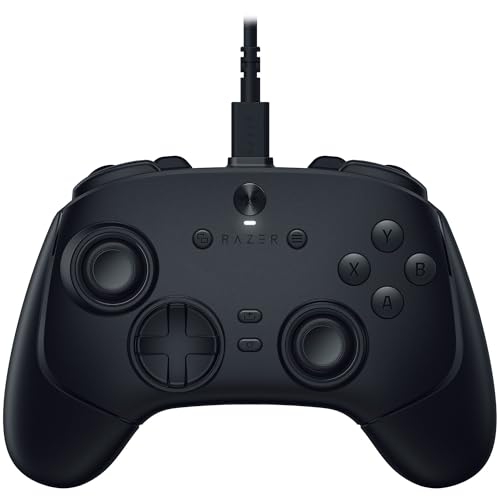
Razer Wolverine V3 Pro -- Competition-focused features with fast inputs
The Wolverine V3 Pro connects via 2.4 GHz Razer HyperSpeed or USB-C. Six remappable multi-function buttons, a microswitch D-pad, and adjustable-resistance thumbsticks target competitive players in fighting games, shooters, and racing titles. Razer's Nexus app handles profile management and dead zone tuning. The trigger stops physically limit travel for faster fire inputs. At 275g it is slightly heavier than the Xbox controller, but the weight distribution is well balanced. [View on Amazon](https://www.amazon.com/s?k=Razer+Wolverine+V3+Pro+controller&tag=thetestedhub-20)
In its favor
- Razer 8K Hz HyperPolling technology
- TMR analog sticks with interchangeable caps
- The lightest wired e-sports controller from Razer
- 4 mouse click back buttons & 2 claw grip bumpers
- Razer Pro HyperTrigger

Turtle Beach Stealth Ultra -- Controller with integrated audio controls
The Stealth Ultra adds a front-facing OLED panel for battery and profile status, a 3.5mm audio jack with on-controller volume and mic mixing, and six programmable buttons. The 2.4 GHz wireless connection is stable up to 30 feet. It is a heavier controller at 312g, which some players find fatiguing. The audio passthrough and mixing controls are genuinely useful for players who use headsets and dislike reaching for a PC audio panel or software mixer during play. [View on Amazon](https://www.amazon.com/s?k=Turtle+Beach+Stealth+Ultra+controller&tag=thetestedhub-20)
In its favor
- Keep your controller and wireless transmitter updated with the latest firmware, available
- Patented, On-Board Social Media Notifications
- Hall-Effect Thumbsticks for Long-Lasting, Smooth Control
- Tactile Microswitch Buttons & Adjustable Trigger Stops for Faster, More Reliable Response
- Delivers 8-10 hours of Battery Life Out of the Box & Up to 20-hours with Eco Power Mode
What matters most
What to consider
Start with compatibility: Xbox controllers work natively on Windows, while PlayStation and third-party controllers may need additional software for non-Steam games. Decide whether wireless latency matters for your game genres. For fighting games or competitive shooters, wired or sub-8ms 2.4 GHz wireless is worth specifying. For RPGs, strategy games, and platformers, Bluetooth is fine. Evaluate button layout based on your primary game genres -- trigger depth matters more for racing and shooters, while d-pad precision matters more for fighting games. Back buttons add cost but are genuinely useful in games with complex button combinations.
What to consider
For a full gaming setup, pair your controller choice with a monitor from our [best compact all-in-one printer](/articles/best-compact-all-in-one-color-laser-printer) guide or explore [best computer console](/articles/best-computer-console) for handheld options. See our [methodology](/methodology) for how we evaluate peripherals.
Frequently asked
Most modern controllers work with Steam through Steam Input, which translates button inputs across Xbox, PlayStation, Nintendo, and generic HID controllers. Xbox controllers use native Windows drivers and require no additional setup. PlayStation DualSense controllers need Steam Input enabled or a third-party driver like DS4Windows for non-Steam games. Generic USB controllers may need manual mapping.
Wired controllers have zero latency and no battery management, making them preferable for competitive play. Wireless controllers using 2.4 GHz dongles (like Xbox Wireless) add roughly 4-8ms of latency, which is imperceptible in most game genres. Bluetooth adds more latency and is better suited to casual gaming. For fighting games and precise platformers, wired is the safer choice.
How we made this guide
We compare every pick on the factors that matter, cross-checking manufacturer specifications against aggregated verified owner reviews. We rank independently and never take payment for placement. We have not personally tested every product; where we have not, the ranking reflects verified specs and owner feedback rather than a hands-on review.
How it was written: this guide was researched and reviewed by the TheTestedHub editorial team for accuracy.
Affiliate disclosure: TheTestedHub is reader-supported. When you buy through links on our site, we may earn a commission at no extra cost to you.
You might also like

Your Docking Station Match: CalDigit TS4 and More

Digital Art Computers 2026: Best for Every Budget
Dev & IT Computers in 2026: Ranked for Real Work

Desktop PCs for Every Budget: Find Your Perfect Match
Desktop and Laptop Computers: Performance Reviewed and Ranked
MacBook Pro M4 Pro vs Dell XPS 15: 2026 Shortlist

Buy the Best DIY Computer in 2026: Corsair One i300
