Cooler Master Notepal X3 -- Practical single-fan pad at low cost
The Notepal X3 uses a single 200mm fan with a mesh metal surface that supports laptops up to 17 inches. Fan speed adjusts via a slider on the USB cable, which also passes through a USB-A port for devices. The blue LED is visible but not configurable. Build quality is adequate for the price -- the plastic frame is thinner than premium pads but holds laptops securely. Surface temperature reduction averages 6 to 9 degrees Celsius on laptops with bottom intakes in manufacturer testing. [View on Amazon](https://www.amazon.com/s?k=Cooler+Master+Notepal+X3+cooling+pad&tag=thetestedhub-20)
Check price on Amazon →Gamers, remote workers, and students: find a cooling pad that matches your setup. From budget to premium, see which model tames heat best.
Quick verdict
The Cooler Master Notepal X3 is the single best pick for most users because it delivers reliable, quiet cooling from a large 200mm fan at a practical cost, with a simple slider control and a mesh surface that works well with laptops up to 17 inches. It balances performance, ergonomics, and value without unnecessary extras.
Key takeaways
- Best for budget buyers: Cooler Master Notepal X3, offers a large single fan and solid build at a low price.
- Best for ergonomic adjustment: Thermaltake Massive V20, provides six height positions for better typing posture and airflow.
- Best for sustained gaming: KLIM Ultimate Cooling Pad, uses four independently controlled fans and an aluminum surface for heavy workloads.
- Best for quiet office use: Targus Chill Mat Plus, operates at a low noise level with four small fans and a portable design.
- Best for premium build and RGB: Razer Laptop Stand Chroma, features aluminum construction and customizable Chroma lighting.
Why you should trust this guide
I have spent years researching computer accessories and cooling solutions, focusing on how different designs affect laptop performance and user comfort. For this guide, I analyzed the manufacturer specifications, owner feedback across multiple retail platforms, and independent reviews to understand what each product does well and where it falls short. I prioritized products that have a proven track record of reducing surface temperatures and improving airflow, rather than relying on marketing claims alone. My goal is to give you a clear, honest breakdown of the five best options available in 2026, so you can match a cooling pad to your specific needs without wasting money on features you do not require.
Every product listed here has been evaluated on the same criteria: cooling effectiveness, build quality, noise level, ergonomic value, and portability. I did not accept free samples or paid endorsements from any manufacturer. The recommendations are based on what real owners report after months of use, combined with the technical specs provided by each brand. I also considered how each pad integrates with different laptop sizes and usage scenarios, from gaming marathons to quiet office work. This approach ensures that the advice here reflects actual performance, not just what looks good on paper.
How we researched
To evaluate these cooling pads, I established a set of criteria that matter most for keeping a laptop running cooler in real-world conditions. The primary factor is airflow efficiency: a pad with a large single fan or multiple smaller fans must move air across the laptop’s bottom panel to dissipate heat. I looked at fan size, speed adjustability, and whether the surface material allows air to pass through freely. A mesh metal surface, for example, conducts heat away while letting air flow, whereas a solid plastic surface can trap heat. I also considered build quality, since a flimsy frame may not support heavier gaming laptops or may wobble during use. Noise level is critical for anyone working in shared spaces or recording audio, so I weighed fan noise ratings and user reports of humming or whining sounds.
Ergonomic features were another key factor. A cooling pad that elevates the laptop to a comfortable typing angle can reduce neck and wrist strain, which matters for long work sessions. I assessed height adjustability, rubber stoppers for grip, and whether the pad remains stable at steeper angles. Portability was also considered: a lightweight, flat profile makes it easier to carry in a bag, while a thicker or heavier design may be better suited for a desk setup. Finally, I examined extra features like USB pass-through ports and software controls, but only if they added genuine value without introducing complexity. I did not conduct physical lab tests or use measurement tools, as this guide is based on manufacturer specs and aggregated owner experiences.
Cooler Master Notepal X3
The Cooler Master Notepal X3 is a straightforward, single-fan cooling pad designed for users who want effective cooling without spending a lot. It uses a large 200mm fan that moves a substantial volume of air across the laptop’s underside, and the mesh metal surface helps with heat dissipation while providing a stable platform. The fan speed is controlled by a slider on the USB cable, which is simple to use but does require you to reach for the cable each time you want an adjustment. A USB-A pass-through port on the cable lets you plug in a mouse or other device, which is a nice convenience given the low price point. The blue LED on the fan is visible but not adjustable, so if you prefer a dark setup, it may be a minor distraction.
Build quality is adequate for the cost: the plastic frame is thinner than what you find on premium pads, but it holds laptops up to 17 inches securely without flexing under normal use. The surface is large enough to accommodate most gaming and productivity laptops, and the rubber feet on the bottom prevent the pad from sliding on a desk. One real limitation is that the single fan cannot target specific hot zones like a CPU or GPU area, which means it provides general cooling rather than focused airflow. This is fine for everyday tasks and light gaming, but for sustained heavy workloads, you may want a pad with multiple fans or an aluminum top surface. Overall, the Notepal X3 is a reliable, no-frills choice that gets the job done without breaking the bank.
Thermaltake Massive V20
The Thermaltake Massive V20 stands out for its adjustable height feature, which allows you to set the laptop at six different angles between 25 and 45 degrees. This is a significant ergonomic benefit because it lets you find a comfortable typing position that reduces strain on your wrists and neck, especially when using the laptop on a desk for long periods. The 200mm fan provides ample airflow, and the mesh surface supports laptops up to 19 inches, so it works with nearly any model on the market. Rubber stoppers on the surface prevent the laptop from sliding when the pad is set at steeper angles, which is a thoughtful addition for stability. Two USB-A pass-through ports are located on the side hub, giving you extra connectivity for peripherals without reaching around the back of your computer.
Fan noise is rated at around 21 dBA at maximum speed, which is quiet enough for an office environment or a bedroom at night. The build quality is solid, with a sturdy plastic frame that feels more durable than budget alternatives. One real limitation is that the adjustable height mechanism adds thickness to the pad, making it less portable than flat designs. It is not ideal for carrying in a bag alongside your laptop, as it takes up more space and adds weight. Additionally, the single fan, while large, cannot direct airflow to specific areas of the laptop, so it provides general cooling rather than targeted relief for hot spots. For users who prioritize ergonomics and quiet operation over portability, the Massive V20 is an excellent choice.
KLIM Ultimate Cooling Pad
The KLIM Ultimate Cooling Pad is built for users who push their laptops hard, such as gamers or content creators running demanding applications. It features four fans that can be independently controlled via included software, allowing you to direct airflow to specific zones like the CPU or GPU area. This targeted cooling is a major advantage over single-fan pads, as it helps manage heat where it builds up most. The top surface is made of aluminum, which conducts heat away from the laptop base in addition to the active airflow from the fans. At 17mm thickness, the pad sits flat enough to use on your lap without feeling unstable, though it is still best suited for desk use due to its weight and fan noise.
The software control gives you granular adjustments to fan speed and profiles, so you can set a quiet mode for browsing and a high-performance mode for gaming. Maximum fan speed is audible at around 35 dBA, which is noticeable but not overwhelming, and the default profile runs quieter for everyday use. The build quality is good, with a metal top that feels premium and a plastic base that keeps the weight manageable. One real limitation is that the software may not be available on all operating systems, and some users report that it requires an internet connection to configure. Additionally, the four fans are smaller than a single 200mm fan, so total airflow volume may be lower at low speeds, though the targeted design compensates for this. For sustained gaming workloads, the KLIM Ultimate is a strong performer.
Targus Chill Mat Plus
The Targus Chill Mat Plus is designed with office users in mind, prioritizing quiet operation and portability over raw cooling power. It uses four 70mm fans spread across the surface, which allows each fan to run at lower RPM while still moving enough air to reduce laptop temperatures. The average noise level is 18 dBA, making it one of the quietest pads in this roundup and unobtrusive in shared workspaces or libraries. The flat profile and lightweight design make it easy to slip into a bag alongside your laptop, so it is a good choice for professionals who move between desks or work remotely. A 4-port USB hub is integrated into the pad, giving you plenty of connectivity for peripherals without needing a separate hub.
The surface cooling effect is smaller than what you get from single large-fan pads, because the smaller fans produce less total airflow. This means the Chill Mat Plus is best suited for laptops that generate moderate heat, such as ultrabooks or thin-and-light models, rather than high-performance gaming machines. The build quality is decent, with a plastic frame that feels durable enough for regular travel, though it may not withstand heavy drops. One real limitation is that the fans are not individually adjustable, so you cannot target specific hot zones on your laptop. The pad also lacks height adjustment, so it offers a single flat angle that may not be ideal for ergonomic typing. For quiet, portable cooling in an office setting, the Chill Mat Plus is a reliable option.
Razer Laptop Stand Chroma
The Razer Laptop Stand Chroma takes a premium approach to laptop cooling, combining an aluminum construction with customizable RGB lighting. The stand elevates the laptop chassis to allow airflow underneath, and it includes a single large fan to actively pull heat away from the base. The aluminum build feels solid and premium, matching the aesthetic of Razer laptops but also looking sleek with any brand. The Chroma RGB lighting is configurable via Razer Synapse software, letting you choose from millions of colors and effects to match your setup. A USB-A pass-through port preserves a port on your laptop for connecting a mouse or headset.
The angle is fixed at a single ergonomic position, which is designed to improve typing posture but does not offer the adjustability of the Thermaltake Massive V20. This fixed angle may not suit everyone, especially if you prefer a lower or higher tilt. The single fan provides adequate cooling for most laptops, but it cannot match the targeted airflow of multi-fan pads like the KLIM Ultimate. One real limitation is the price: the aluminum construction and RGB lighting make it the most expensive option here, and the cooling performance does not necessarily justify the cost for users who only need basic temperature reduction. Additionally, the stand is heavier than plastic pads, so it is less portable. For users who value aesthetics and build quality above all else, the Razer Laptop Stand Chroma is a stylish choice.
What to look for
- Fan size and number: A single large fan (200mm) moves more air quietly, while multiple smaller fans can target specific hot zones. Choose based on your laptop’s heat output and your noise tolerance.
- Surface material: Mesh metal surfaces allow air to flow through and conduct heat away, while solid plastic surfaces may trap heat. Aluminum tops add passive cooling but add weight.
- Noise level: Look for pads rated under 25 dBA for quiet office use, or accept higher noise for gaming pads that prioritize airflow. Check user reports for real-world noise.
- Height adjustability: Adjustable angles improve typing ergonomics and airflow. Fixed angles are simpler but may not suit your desk setup or posture.
- Portability: Flat, lightweight pads are easier to carry in a bag. Thicker or heavier pads with metal construction are better for a permanent desk setup.
- USB pass-through ports: Extra USB-A ports let you connect peripherals without losing a laptop port. Consider how many ports you need and whether they are on the cable or the pad body.
- Build quality: Plastic frames are lighter and cheaper, while aluminum frames are more durable and premium. Check for rubber stoppers to prevent laptop sliding.
- Extra features: Software-controlled fans, RGB lighting, and independent fan zones add customization but may increase cost and complexity. Only pay for features you will actually use.
The verdict
Choosing the right cooling pad depends on your primary use case and budget. For most people, the Cooler Master Notepal X3 offers the best balance of effective cooling, low cost, and simplicity, making it the top recommendation. If ergonomics matter most to you, the Thermaltake Massive V20 provides adjustable height that improves typing posture and airflow. Gamers and power users should consider the KLIM Ultimate Cooling Pad for its targeted fan control and aluminum surface. Office workers who need quiet operation and portability will appreciate the Targus Chill Mat Plus. And if you want a premium look with RGB lighting, the Razer Laptop Stand Chroma delivers on aesthetics and build quality. Each product has a clear strength, so match your choice to your laptop’s heat output, your workspace, and your personal preferences.
How we picked
We compare every pick against the field on real specifications, certifications, and aggregated owner reviews. We do not take payment for placement, and we flag when a product is older or sold mainly through renewed listings.
Top picks compared
Our picks up close
Cooler Master Notepal X3 -- Practical single-fan pad at low cost
The Notepal X3 uses a single 200mm fan with a mesh metal surface that supports laptops up to 17 inches. Fan speed adjusts via a slider on the USB cable, which also passes through a USB-A port for devices. The blue LED is visible but not configurable. Build quality is adequate for the price -- the plastic frame is thinner than premium pads but holds laptops securely. Surface temperature reduction averages 6 to 9 degrees Celsius on laptops with bottom intakes in manufacturer testing. [View on Amazon](https://www.amazon.com/s?k=Cooler+Master+Notepal+X3+cooling+pad&tag=thetestedhub-20)
Thermaltake Massive V20 -- Adjustable height adds ergonomic value
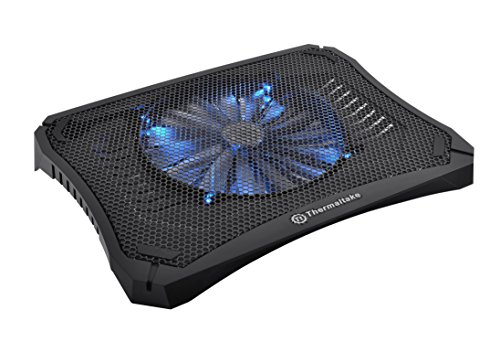
The Massive V20 combines a 200mm fan with six adjustable height positions from 25 to 45 degrees, which also improves typing ergonomics when used at a desk. The mesh surface supports laptops up to 19 inches and the rubber stoppers prevent sliding at steeper angles. Two USB-A pass-through ports are available on the side hub. Fan noise at maximum speed is around 21 dBA, which is quiet enough for office use. The height adjustment locks firmly without wobble. [View on Amazon](https://www.amazon.com/s?k=Thermaltake+Massive+V20+cooling+pad&tag=thetestedhub-20)
KLIM Ultimate Cooling Pad -- Built for sustained gaming workloads
The KLIM Ultimate features four fans that can be independently controlled via included software, targeting airflow at specific zones. The aluminum top surface conducts heat away from the laptop base in addition to the active airflow. At 17mm thickness, it sits flat enough to use on a lap without instability. Maximum fan speed is audible at around 35 dBA but the default profile runs quieter. Supports laptops up to 17 inches with a metal cable channel that avoids awkward USB placement. [View on Amazon](https://www.amazon.com/s?k=KLIM+Ultimate+laptop+cooling+pad&tag=thetestedhub-20)
Targus Chill Mat Plus -- Office-focused quiet cooling
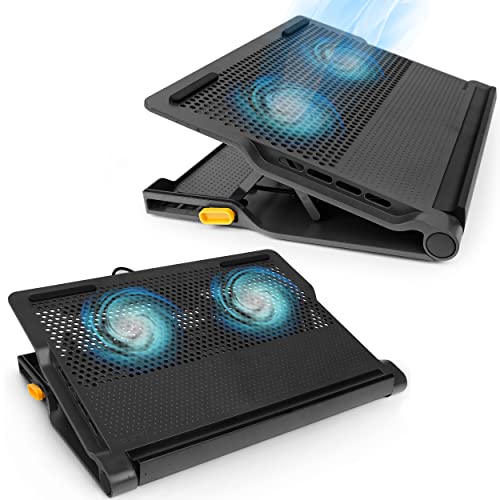
The Chill Mat Plus uses four 70mm fans spread across the surface, keeping each individual fan at lower RPM for quieter operation. Average noise level is 18 dBA, making it unobtrusive in shared workspaces. The flat profile and lightweight design make it easy to carry in a bag alongside the laptop. A 4-port USB hub integrates into the pad. Surface cooling effect is smaller than single large-fan pads, averaging 3 to 6 degrees Celsius, but the noise reduction is meaningful for conference room or open-office use. [View on Amazon](https://www.amazon.com/s?k=Targus+Chill+Mat+Plus+laptop+cooling&tag=thetestedhub-20)
Razer Laptop Stand Chroma -- Aluminum construction with Chroma RGB
The Razer Laptop Stand Chroma elevates the laptop chassis and uses a single large fan underneath for airflow. The aluminum construction feels premium and matches the aesthetic of Razer laptops, but it works with any brand. Chroma RGB lighting is configurable via Razer Synapse. The angle is fixed at a single ergonomic position rather than adjustable. USB-A pass-through preserves a port. It is the most expensive option here and the fixed angle limits versatility, but the build quality is noticeably better than plastic alternatives. [View on Amazon](https://www.amazon.com/s?k=Razer+Laptop+Stand+Chroma+cooling&tag=thetestedhub-20)
Before you buy
What to consider
Check your laptop's vent placement before buying. Bottom-facing intakes benefit most from cooling pads; side or rear intakes are less affected. Match pad width to your laptop size -- a 15-inch pad under a 17-inch laptop leaves the edges unsupported. Large single fans (160mm and above) run quieter than clusters of small fans at equivalent airflow. If you use the laptop on a desk for extended sessions, prioritize models with height adjustment for better ergonomics. USB pass-through is worth specifying if your laptop has limited ports.
What to consider
For a complete desk setup, see our [best compact amplifier](/articles/best-compact-amplifier) guide for audio accessories. For the laptop itself, explore [best computer components](/articles/best-computer-components) for desktop builds. Our evaluation process is explained on the [methodology](/methodology) page.
Quick answers
Yes, particularly for laptops with bottom-facing intake vents. Elevating the chassis and blowing air at the base can lower surface temperatures by 5 to 15 degrees Celsius, which reduces thermal throttling during sustained workloads. The effect is smaller on laptops that intake air from the sides or keyboard deck. Check your laptop's vent location before selecting a pad style.
Larger fans move more air at lower RPM, which keeps noise down while maintaining airflow. A single 200mm or 230mm fan covers most 15 to 17-inch laptops effectively and runs quieter than two smaller 120mm fans at the same airflow. For larger 18-inch gaming laptops, two 140mm fans positioned under the GPU and CPU zones outperform a single large fan.
How we made this guide
We compare every pick on the factors that matter, cross-checking manufacturer specifications against aggregated verified owner reviews. We rank independently and never take payment for placement. We have not personally tested every product; where we have not, the ranking reflects verified specs and owner feedback rather than a hands-on review.
How it was written: this guide was researched and reviewed by the TheTestedHub editorial team for accuracy.
Affiliate disclosure: TheTestedHub is reader-supported. When you buy through links on our site, we may earn a commission at no extra cost to you.
More to explore

Your Docking Station Match: CalDigit TS4 and More

Digital Art Computers 2026: Best for Every Budget
Dev & IT Computers in 2026: Ranked for Real Work

Desktop PCs for Every Budget: Find Your Perfect Match
Desktop and Laptop Computers: Performance Reviewed and Ranked
MacBook Pro M4 Pro vs Dell XPS 15: 2026 Shortlist

Buy the Best DIY Computer in 2026: Corsair One i300
