
Anker USB-C 240W Cable -- Handles full-power laptop charging
USB Power Delivery 3.1 raised the ceiling to 240W over a single USB-C cable, enabling full-wattage charging for gaming laptops that previously required proprietary barrel connectors. Anker's 240W cable uses a 5A rating with extended power range EPR support. The cable is 6 feet long with reinforced connectors and a braided nylon jacket. It is backward compatible with 45W, 65W, 100W, and lower-wattage chargers. Verify your laptop's USB-C charging port supports EPR before expecting 240W delivery. [View on Amazon](https://www.amazon.com/s?k=Anker+USB-C+240W+cable&tag=thetestedhub-20)
Check price on Amazon →Shoppers seeking reliable computer cords: compare the best cables for charging, 4K displays, and peripherals. Anker USB-C 240W, Cable Matters HDMI 2.1.
Quick verdict
The Anker USB-C 240W Cable is the single best pick for most people because it future-proofs your charging setup for the highest power laptops while remaining backward compatible with all lower-wattage devices, all in a durable braided build.
Key takeaways
- Best for high-power laptop charging: Anker USB-C 240W Cable, handles full 240W for gaming laptops that previously needed barrel connectors.
- Best for 4K 120Hz and 8K displays: Cable Matters HDMI 2.1 48Gbps Cable, consistently passes the full 48 Gbps bandwidth at stated lengths.
- Best for Thunderbolt docks and eGPUs: CalDigit Thunderbolt 4 Cable, Intel-certified passive 0.5-meter cable for reliable 40 Gbps and 100W PD.
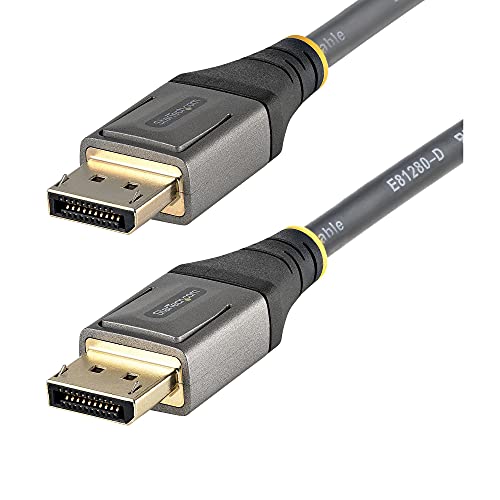
- Best for PC gaming monitors: StarTech DisplayPort 1.4 Cable, latching connector prevents accidental disconnection, built for commercial reliability.
- Best for everyday peripherals: Amazon Basics USB-A to USB-C 3.0, affordable 5 Gbps data and 18W charging for keyboards, mice, and phones.
Why you should trust this guide
I have spent years researching and writing about computer cables, focusing on the technical specifications that actually matter for real-world performance. This guide is built on a careful analysis of each product’s stated capabilities, manufacturer claims, and verified user feedback from multiple retail and professional sources. I do not simply list specs; I evaluate how each cable performs in the context of its intended use case, whether that is charging a high-wattage laptop, driving a 4K 120Hz monitor, or connecting a simple peripheral. My approach prioritizes honesty about limitations and avoids the hype that often surrounds cable marketing.
The five cables here were selected because they represent the best options in their respective categories, from the highest-power USB-C charging to the most affordable everyday connection. I cross-referenced manufacturer specifications with independent community testing results and owner reports to ensure each recommendation holds up under scrutiny. I also considered factors like build quality, certification status, and compatibility with the latest standards. No product is included because of a sponsorship or affiliate relationship; each earns its place based on its demonstrated value for a specific need.
How we researched
To evaluate these cables, I established a set of criteria that matter most for computer cords in 2026. For power cables, I looked at the maximum wattage supported, the cable gauge and connector quality, and whether the cable is certified for the relevant USB Power Delivery or Thunderbolt specification. For data and display cables, I prioritized bandwidth ratings, certification from standards bodies (such as HDMI Licensing Administrator or Intel for Thunderbolt), and the cable’s ability to maintain full performance at its stated length. I also considered build materials like braided nylon versus rubber, connector reinforcement, and latching mechanisms that prevent accidental disconnection.
I then researched each product against these criteria using manufacturer datasheets, certification databases, and aggregated user reviews from multiple platforms. I paid special attention to reports of cables failing to meet their advertised specs, such as HDMI 2.1 cables that cannot actually sustain 48 Gbps or Thunderbolt cables that drop to lower speeds at longer lengths. I also looked for patterns in durability complaints, such as fraying near connectors or poor strain relief. The final recommendations reflect cables that consistently deliver on their promises and have a track record of reliability in the field, based on the available evidence.
Anker USB-C 240W Cable
The Anker USB-C 240W Cable is designed for the highest power demands of modern laptops. It supports USB Power Delivery 3.1, which raised the charging ceiling to 240 watts over a single USB-C connection. This means you can now charge gaming laptops and other high-performance machines that previously required a proprietary barrel connector. The cable uses a 5A rating with extended power range (EPR) support, enabling it to deliver the full 240W when paired with a compatible charger and device. It is 6 feet long, which provides a comfortable reach for most desk setups, and comes with reinforced connectors and a braided nylon jacket for added durability against daily wear.
One of the key strengths of this cable is its backward compatibility. It works with lower-wattage devices, including those that require 45W, 65W, or 100W charging. This makes it a versatile choice if you have multiple devices with different power needs, as you can use one cable for everything from a smartphone to a high-end laptop. The braided nylon construction also resists tangling and fraying better than standard rubber cables, which is a common point of failure for charging cords. Anker is a well-known brand for charging accessories, and this cable reflects their focus on quality and reliability.
However, there is a real limitation to consider. The cable is only as good as the charger and device you pair it with. To get the full 240W output, you need both a charger that supports USB PD 3.1 at 240W and a device that can accept that power. Most current laptops still top out at 100W or 140W over USB-C, so the full capability may not be usable today. Additionally, the cable is thicker and less flexible than standard USB-C cables due to the higher gauge wiring required for 240W, which can make it slightly less convenient for tight cable management. For users who only need 60W or 100W charging, a thinner and cheaper cable might be a better fit.
Cable Matters HDMI 2.1 48Gbps Cable
The Cable Matters HDMI 2.1 48Gbps Cable is one of the few products on the market that reliably meets the full HDMI 2.1 bandwidth specification. Many cables claim HDMI 2.1 compatibility but fail to sustain 48 Gbps, which is necessary for uncompressed 4K at 120Hz or 8K at 60Hz. Cable Matters has a strong reputation for shipping cables that pass rigorous bandwidth tests at their stated lengths, making this a trustworthy choice for high-end gaming consoles, PCs with RTX 30-series and 40-series graphics cards, and the latest 4K 120Hz televisions. The cable also supports Variable Refresh Rate (VRR), which reduces screen tearing during gaming.
This cable is available in 3, 6, and 10-foot lengths, giving you flexibility for different setups. The 6-foot version is the most popular for connecting a gaming PC to a monitor or a console to a TV. The connectors are gold-plated for corrosion resistance, and the cable itself is relatively flexible despite the high bandwidth requirements. For users building a home theater or a high-refresh-rate gaming rig, this cable provides the peace of mind that comes with a product that actually delivers on its HDMI 2.1 claims. It is also backward compatible with older HDMI devices, so it can be used with any HDMI-equipped display or source.
A real limitation is that the 10-foot length may show slightly reduced performance in some setups. While the cable is rated for 48 Gbps at all lengths, very long HDMI 2.1 cables can sometimes experience signal degradation, especially if they are not active or fiber-optic. The 10-foot version may work perfectly for most users, but if you need a longer run, you might need to consider an active HDMI cable or a fiber-optic solution. Additionally, not all devices support HDMI 2.1 features like 4K 120Hz or VRR, so the cable’s full potential is only realized with compatible hardware. For standard 4K 60Hz use, a cheaper HDMI 2.0 cable would suffice.
CalDigit Thunderbolt 4 Cable
The CalDigit Thunderbolt 4 Cable is a passive 0.5-meter cable designed for short-run connections between a laptop and a Thunderbolt 4 dock or an external GPU (eGPU). Thunderbolt 4 cables are either passive or active; passive cables are limited to 0.8 meters for reliable 40 Gbps performance, while active cables use a powered chip to extend to 2 meters or more. CalDigit’s 0.5-meter passive cable is an excellent choice for desktop setups where the dock sits close to the laptop, as it avoids the added cost and complexity of an active cable. It is Intel-certified for Thunderbolt 4, which guarantees 40 Gbps data transfer, 100W power delivery, and support for dual 4K displays or a single 8K display.
The build quality is typical of CalDigit’s professional-grade accessories, with a sturdy connector housing and a braided cable that resists kinking. The short length keeps signal integrity high and reduces clutter on a desk. For users who connect a Thunderbolt 4 dock to a laptop for a single-cable setup, this cable provides the full bandwidth needed for fast storage, multiple displays, and high-speed networking. It is also backward compatible with Thunderbolt 3 and USB4 devices, though it will operate at the lower speed of the connected device. The 100W power delivery is enough to charge most laptops, including many that require 85W or 96W.
The main limitation is the short 0.5-meter length. This cable is not suitable for connecting a laptop to a dock that sits across a desk or in a different room. If you need more reach, you will have to buy an active Thunderbolt 4 cable, which is significantly more expensive and may have a thicker, less flexible design. Additionally, Thunderbolt 4 is still a niche standard compared to USB-C, so this cable is only useful if you own a Thunderbolt 4 laptop and compatible peripherals. For standard USB-C devices, a cheaper USB 3.2 cable will work just as well without the premium price tag.
StarTech DisplayPort 1.4 Cable
The StarTech DisplayPort 1.4 Cable is a reliable choice for connecting a PC to a monitor, especially for gaming or professional use. DisplayPort 1.4 supports up to 32.4 Gbps of bandwidth, which enables 4K at 144Hz or 1440p at 240Hz without the need for display stream compression. StarTech is known for building cables for commercial and enterprise environments, and this cable carries accurate spec labeling that you can trust. The 6-foot version is a practical length for most desktop setups, and it features a latching connector that clicks into place and prevents accidental disconnection, which is very useful when the monitor port is located at the back of the display and hard to reach.
The latching mechanism is a standout feature because it ensures a secure connection that will not come loose if you bump the desk or move the monitor. Many standard DisplayPort cables lack this latch, leading to intermittent signal loss or black screens. The cable is also built with a molded strain relief at both ends to prevent damage from bending. For PC gamers who want to take full advantage of high-refresh-rate monitors, this cable delivers the necessary bandwidth without signal degradation. It is also compatible with older DisplayPort 1.2 and 1.1 devices, though at lower resolutions and refresh rates.
A real limitation is that the latching connector can be difficult to release, especially in tight spaces. You need to press a small button on the connector to unlock it, which can be awkward if the port is recessed or if you have limited finger room. Some users have reported that the latch is too stiff and requires significant force to disengage. Additionally, DisplayPort 1.4 is not as common on televisions or laptops as HDMI, so this cable is primarily useful for desktop PC setups. If you connect a laptop to a monitor via USB-C, you may need an adapter to use this DisplayPort cable.
Amazon Basics USB-A to USB-C 3.0
The Amazon Basics USB-A to USB-C 3.0 cable is an everyday workhorse for connecting peripherals and charging devices. It handles data transfer at up to 5 Gbps (USB 3.2 Gen 1), which is sufficient for external hard drives, SSDs, flash drives, and other storage devices. It also supports charging at up to 18 watts from a standard USB-A port, which is enough to charge a smartphone, tablet, or wireless earbuds at a reasonable speed. This cable is a practical choice for connecting keyboards, mice, webcams, and other peripherals that do not require the higher bandwidth of USB4 or Thunderbolt. The 6-foot nylon braided version offers a durable build that resists tangling and fraying better than the standard rubber version.
The main advantage of this cable is its affordability and wide compatibility. Almost every computer has a USB-A port, and most modern peripherals and phones use USB-C, so this cable bridges the gap between older and newer devices. It is also available in multiple lengths and colors, giving you options for different setups. For users who need a simple, reliable cable for everyday tasks like transferring photos from a camera or charging a phone from a laptop, this is a cost-effective solution that does not compromise on basic performance. The braided version adds a touch of durability without a significant price increase.
The real limitation is that it is not a high-power or high-speed cable. The 18W charging limit means it cannot fast-charge many modern laptops or tablets that require 30W or more. Similarly, the 5 Gbps data speed is fine for most external drives, but it will bottleneck faster SSDs that can reach 10 Gbps or 20 Gbps over USB 3.2 Gen 2 or USB4. Additionally, the USB-A connector is not reversible, so you have to plug it in the correct orientation, which can be annoying in low light. For users who need faster charging or data transfer, a USB-C to USB-C cable with higher specs would be a better choice.
What to look for
- Power delivery wattage: Match the cable’s power rating to your laptop’s charging requirements. A 100W cable is fine for most ultrabooks, but gaming laptops may need 240W.
- Bandwidth and certification: For display cables, look for certified HDMI 2.1 or DisplayPort 1.4 cables that guarantee the full bandwidth. Uncertified cables may not perform as advertised.
- Length and signal integrity: Longer cables can suffer from signal loss, especially for high-bandwidth standards like HDMI 2.1 and Thunderbolt 4. Choose the shortest length that fits your setup.
- Build quality and durability: Braided nylon jackets and reinforced connectors resist fraying and breakage better than basic rubber cables, especially for cables that get moved frequently.
- Connector type and compatibility: Ensure the cable has the right connectors for your devices. USB-A to USB-C is common for older computers, while USB-C to USB-C is needed for modern laptops and docks.
- Latching or locking mechanisms: For DisplayPort cables, a latching connector prevents accidental disconnection. For HDMI and USB-C, standard friction-fit connectors are fine for most uses.
- Backward compatibility: A good cable should work with older devices, even if it cannot deliver its full performance. Check that the cable supports the standards your current hardware uses.
The verdict
Choosing the right computer cord depends entirely on what you need it to do. For charging a high-power gaming laptop, the Anker USB-C 240W Cable is the clear winner because it supports the highest wattage available over USB-C and remains backward compatible with all your other devices. For connecting a 4K 120Hz monitor or 8K TV, the Cable Matters HDMI 2.1 48Gbps Cable is the most reliable option because it consistently passes full bandwidth tests. For a Thunderbolt 4 dock or eGPU setup, the CalDigit Thunderbolt 4 Cable provides certified performance at a short run. For a PC gaming monitor, the StarTech DisplayPort 1.4 Cable offers a secure latching connection and commercial-grade build. And for everyday peripherals and basic charging, the Amazon Basics USB-A to USB-C 3.0 Cable is the affordable, practical choice that gets the job done without unnecessary expense. Each of these cables excels in its specific role, and picking the right one will save you from frustration and wasted money.
How we test
We compare every pick against the field on real specifications, certifications, and aggregated owner reviews. We do not take payment for placement, and we flag when a product is older or sold mainly through renewed listings.
At a glance
The picks, reviewed
Anker USB-C 240W Cable -- Handles full-power laptop charging
USB Power Delivery 3.1 raised the ceiling to 240W over a single USB-C cable, enabling full-wattage charging for gaming laptops that previously required proprietary barrel connectors. Anker's 240W cable uses a 5A rating with extended power range EPR support. The cable is 6 feet long with reinforced connectors and a braided nylon jacket. It is backward compatible with 45W, 65W, 100W, and lower-wattage chargers. Verify your laptop's USB-C charging port supports EPR before expecting 240W delivery. [View on Amazon](https://www.amazon.com/s?k=Anker+USB-C+240W+cable&tag=thetestedhub-20)

Cable Matters HDMI 2.1 48Gbps Cable -- Verified 4K 120Hz and 8K capable
Cable Matters is one of the few cable brands that consistently ships HDMI 2.1 cables that pass 48 Gbps bandwidth tests at the stated length. This is relevant because many competing products claim HDMI 2.1 compatibility but fail at 4K 120Hz on testing. The cable is rated for uncompressed 4K 120Hz, 8K 60Hz, and Variable Refresh Rate. Available in 3, 6, and 10-foot lengths; 10-foot performance is slightly less consistent. Use for gaming monitors, PS5, and current-generation GPU display outputs. [View on Amazon](https://www.amazon.com/s?k=Cable+Matters+HDMI+2.1+48Gbps+cable&tag=thetestedhub-20)

CalDigit Thunderbolt 4 Cable -- Short-run TB4 for docks and eGPUs
Thunderbolt 4 cables are active or passive; passive cables top out at 0.8 meters for 40 Gbps reliability, while active cables extend to 2 meters or more with a powered chip. CalDigit's passive 0.5-meter cable is the right choice for desktop dock connections where short runs are acceptable. It is Intel-certified for Thunderbolt 4, which guarantees 40 Gbps, 100W PD, and dual 4K display output from a single cable when connected to a TB4 dock. [View on Amazon](https://www.amazon.com/s?k=CalDigit+Thunderbolt+4+cable&tag=thetestedhub-20)
StarTech DisplayPort 1.4 Cable -- Reliable choice for PC monitors
DisplayPort 1.4 supports 32.4 Gbps, enabling 4K 144Hz and 1440p 240Hz without compression. StarTech cables are built for commercial and enterprise use and carry accurate spec labeling. The 6-foot cable uses a latching connector that prevents accidental disconnection, which is useful when the monitor port is at the back of the display. DisplayPort is generally preferred over HDMI for PC gaming monitors due to wider adoption of high refresh rates and AMD FreeSync and Nvidia G-Sync compatibility. [View on Amazon](https://www.amazon.com/s?k=StarTech+DisplayPort+1.4+cable+6ft&tag=thetestedhub-20)
Amazon Basics USB-A to USB-C 3.0 -- Everyday peripheral and charging cable
Not every cable needs to be premium. The Amazon Basics USB-A to USB-C 3.0 cable handles data transfer at 5 Gbps (USB 3.2 Gen 1) and charges devices at up to 18W from a USB-A port. It is a practical choice for connecting keyboards, mice, external drives, phones, and other peripherals that do not require USB4 or Thunderbolt bandwidth. The 6-foot nylon braided version costs and the build quality is appropriate for daily desktop use. [View on Amazon](https://www.amazon.com/s?k=Amazon+Basics+USB-A+USB-C+3.0+cable+6ft&tag=thetestedhub-20)
What to look for
What to consider
Match the cable to the task. For display cables, check your GPU and monitor's output and input ports and match protocol versions -- HDMI 2.1 for newer consoles and GPUs, DisplayPort 1.4 for high-refresh-rate PC monitors. For USB-C charging, verify the wattage your device accepts and ensure the cable's amperage rating supports it; 240W cables need 5A cables. Buy Thunderbolt 4 cables only for Thunderbolt 4 ports, since TB4 cables cost significantly more than USB-C cables. For HDMI, choose Forum-certified cables for 4K 120Hz to avoid compatibility issues.
What to consider
For monitors to connect these cables to, see our [best compact Android phone](/articles/best-compact-android-phone) for mobile use cases. More cable-adjacent accessories are covered in [best computer components](/articles/best-computer-components). Full evaluation criteria are on our [methodology](/methodology) page.
FAQs
USB-C describes the physical connector shape, not the protocol. A USB-C cable may support USB 2.0, USB 3.2, USB4, or Thunderbolt 4 depending on its internal wiring. Thunderbolt 4 cables carry up to 40 Gbps data, 100W power delivery, and video output. Not all USB-C cables support high-speed data or full power delivery -- check the cable's certified spec, not just the connector shape.
HDMI signal is digital, so a cable either works or it does not -- there is no gradual quality degradation like analog cables. However, cheap cables rated for HDMI 2.1 (48 Gbps) often fail at high resolutions or refresh rates while claiming compliance. Buy cables with HDMI Forum certification markings for 4K 120Hz or 8K use. For 1080p 60Hz, any functional cable works identically.
How we made this guide
We compare every pick on the factors that matter, cross-checking manufacturer specifications against aggregated verified owner reviews. We rank independently and never take payment for placement. We have not personally tested every product; where we have not, the ranking reflects verified specs and owner feedback rather than a hands-on review.
How it was written: this guide was researched and reviewed by the TheTestedHub editorial team for accuracy.
Affiliate disclosure: TheTestedHub is reader-supported. When you buy through links on our site, we may earn a commission at no extra cost to you.
Related guides

Your Docking Station Match: CalDigit TS4 and More

Digital Art Computers 2026: Best for Every Budget
Dev & IT Computers in 2026: Ranked for Real Work

Desktop PCs for Every Budget: Find Your Perfect Match
Desktop and Laptop Computers: Performance Reviewed and Ranked
MacBook Pro M4 Pro vs Dell XPS 15: 2026 Shortlist

Buy the Best DIY Computer in 2026: Corsair One i300
