
Flexispot E7 Plus 80-Inch -- Best Straight Desk for Three Monitors
The E7 Plus at 80 x 30 inches is the widest straight-desk option in the Flexispot lineup. The 2 x 4 inch steel crossbar at the base eliminates floor sway and the 440 lb weight capacity is far beyond what a three-monitor setup requires. The 1-inch thick tabletop holds monitor arm clamps without edge deformation. The keypad supports four preset heights and a child-lock function to prevent accidental adjustments in busy rooms. A triple-monitor arm mounted center-rear leaves enough surface area in front for keyboard, mouse, and a small document stand. At this is the most practical straight sit-stand desk for three monitors.
Check price on Amazon →80-inch Flexispot E7 Plus tops our list of 5 desks built for triple monitors. Compare stability, weight capacity, and best use cases for your setup.
Quick verdict
The Flexispot E7 Plus 80-Inch is the single best pick for a three-monitor desk. Its 80-inch wide surface, 440 lb weight capacity, and reinforced steel crossbar provide unmatched stability and space for a triple-monitor setup, making it the most reliable choice for demanding users.
Key takeaways
- Best for Stability and Strength: Flexispot E7 Plus 80-Inch, the widest straight desk with a 440 lb capacity and steel crossbar for zero floor sway.
- Best for Corner Setups: FEZIBO Triple Motor L-Shape, designed for corner placement with a triple-motor system to handle uneven monitor loads.
- Best Budget Sit-Stand: SHW Electric Adjustable Desk, an affordable adjustable-width frame that fits three 24-inch monitors with a single motor.
- Best Fixed-Height Desk: Bush Furniture Cabot 72-Inch, a sturdy 200 lb rated laminate surface with spaced cable management holes.
- Best Budget L-Desk: Tribesigns 70-Inch L-Shape, the most affordable corner desk with enough total surface for three monitors.
Why you should trust this guide
I have spent years researching and writing about home office furniture, focusing on desks that support heavy multi-monitor workflows. For this guide, I analyzed manufacturer specifications, customer feedback across major retailers, and structural design details to identify desks that genuinely accommodate three monitors without sagging, wobbling, or limiting your setup. My approach prioritizes real-world usability over marketing claims, ensuring each recommendation is grounded in practical factors like weight capacity, surface thickness, and cable management.
Every product listed here was selected based on its ability to hold three monitors safely, whether using monitor arms or stock stands. I evaluated each desk’s construction materials, frame reinforcement, and ergonomic features, cross-referencing these with verified owner experiences to highlight both strengths and honest limitations. This guide does not rely on personal testing but on thorough research of stated specs and user-reported outcomes, so you can make an informed purchase without guesswork.
How we researched
My evaluation criteria focused on four key areas: surface size and strength, frame stability under load, compatibility with monitor arms, and overall value for a triple-monitor setup. I examined each desk’s stated dimensions, weight capacity, and tabletop thickness to determine if they could support three monitors side by side without deformation. For sit-stand models, I assessed motor quality and the ability to handle uneven loads, which is critical when monitors are positioned asymmetrically.
I also considered practical features like cable management, assembly difficulty, and the desk’s footprint in a home office. Each product was compared against the needs of a typical three-monitor user, such as a programmer, trader, or video editor, who requires a wide, uncluttered surface. I prioritized desks with reinforced frames or crossbars to prevent wobble, and I noted any limitations like thinner tabletops that might restrict monitor arm clamping. The final list represents a range of price points and configurations, from straight desks to L-shapes, to suit different room layouts and budgets.
Flexispot E7 Plus 80-Inch — Best Straight Desk for Three Monitors
The Flexispot E7 Plus 80-Inch is the widest straight-desk option in the Flexispot lineup, offering an expansive 80 x 30 inch work surface. This desk is built for serious multi-monitor setups, with a 2 x 4 inch steel crossbar at the base that eliminates floor sway, ensuring your screens remain stable even during height adjustments. The 440 lb weight capacity far exceeds what a three-monitor configuration requires, so you can add a heavy desktop tower, multiple peripherals, and monitor arms without concern. The 1-inch thick tabletop is robust enough to hold monitor arm clamps without edge deformation, a common issue with thinner surfaces.
The keypad supports four preset heights and a child-lock function to prevent accidental adjustments, making it family-friendly. The LED control pad allows you to customize the desk height to your preferred sitting or standing position, and the industrial-grade steel frame combined with the solid desktop supports heavy loads reliably. The spacious desktop is seamlessly crafted with an environmentally friendly finish, and the versatile orientation lets you position the wider section to your left or right. Flexispot backs this desk with a 5-year guarantee on the frame, adding long-term peace of mind.
One honest limitation is the desk’s size: at 80 inches wide, it requires a large room and may not fit in smaller offices or apartments. Additionally, the 440 lb capacity is overkill for most users, meaning you pay for strength you might never use. Assembly is also complex due to the heavy frame and crossbar, so you may need a second person to help set it up.
FEZIBO Triple Motor L-Shape — Best for Corner Three-Monitor Setups
The FEZIBO Triple Motor L-Shape desk is ideal for rooms where you want to place your desk in a corner, allowing you to spread three monitors across the main leg while using the return for documents or a secondary laptop. The triple-motor system handles uneven loads smoothly, which is important when two monitors are positioned on the primary leg and the third is near the junction. The total surface measures 63 x 50 inches, giving genuine room to spread peripherals without crowding your screens.
This desk includes a built-in power strip with 2 outlets and 1 USB port, so you can plug in your monitors and devices directly on the desk surface, reducing cable clutter. The 92-inch long LED strips surround the desk for ambient lighting, which you can customize for a more immersive workspace. The lockable casters swivel 360 degrees, making it easy to move the desk for cleaning or reconfiguration. The large working area of 63 inches by 48 inches provides a spacious surface for your monitors and accessories.
A real limitation is the L-shape design itself: it only works well in a corner, so if you prefer a straight desk against a wall, this is not the right choice. The triple-motor system is also noisier than dual-motor alternatives, which might be distracting in a quiet room. Additionally, the LED strips require power and may add to cable management complexity.
SHW Electric Adjustable Desk — Best Wide Budget Sit-Stand
The SHW Electric Adjustable Desk offers a 55 to 75 inch adjustable-width frame that accepts a range of table tops, making it a flexible budget option for three monitors. At 75 inches with a thick MDF top, it handles three 24-inch monitors reasonably well, though the 176 lb weight limit means a heavy desktop tower and accessories should be placed on the floor to avoid overloading the surface. The single-motor adjustment is slower than dual-motor competitors but functional for daily use, and it remains the most affordable sit-stand desk in this guide.
This desk comes with screw-in locking casters that make migration from one room to another simple, and the curved edge desktop design provides ergonomic wrist support. The electric height adjustment lets you seamlessly transition between sitting and standing positions, promoting better posture during long work sessions. It also includes an integrated storage drawer to keep office supplies and personal items organized, plus hanging hooks for accessories like headphones and bags.
A key limitation is the single-motor system, which can struggle with uneven loads if you place heavy monitors on one side. The 176 lb weight capacity is lower than other options, so you must be mindful of total desk weight. The MDF top is also less durable than solid wood or laminate, and it may show wear over time with heavy use.
Bush Furniture Cabot 72-Inch — Best Fixed-Height Three-Monitor Desk
The Bush Furniture Cabot 72-Inch straight desk is a fixed-height option with a 1-inch thick laminate surface rated at 200 lbs, which handles triple monitors plus a desktop comfortably. The finished edge around the perimeter is thick enough to hold monitor arm clamps securely without the padding inserts that thinner surfaces require. Three rear cable management holes are spaced across the back edge rather than clustered in the center, allowing you to route cables from each monitor individually for a cleaner look.
This desk provides an excellent space for your home office headquarters, with a large surface offering plenty of room to spread out with your materials. It includes practical storage with one file drawer and one box drawer, making it easy to organize important paperwork and supplies. The Cabot Collection offers an array of home office furnishings to complete your setup, and the desk has been rigorously tested to meet quality standards.
One honest limitation is the fixed height: at 30 inches, it cannot be adjusted for standing, which may cause discomfort over long periods. The 200 lb weight capacity is adequate but leaves little room for heavy additional equipment like a large printer or multiple hard drives. Assembly can also be time-consuming due to the drawer mechanisms and cable management features.
Tribesigns 70-Inch L-Shape — Best Budget Three-Monitor L-Desk
The Tribesigns 70 x 47 inch L-shape desk is the most affordable way to get a corner desk with enough total surface for three monitors. The 0.75-inch MDF top is thinner than premium options, which limits monitor arm clamping to lighter single-arm setups or through-bolt mounts. The carbon-fiber print surface finish hides minor scratches better than plain white or wood grain options, making it a practical choice for high-traffic areas. Assembly is straightforward with a detailed user manual and all necessary hardware.
The thoughtful L-shaped design fits seamlessly into room corners, maximizing your available space. With dimensions of 83 inches by 63 inches by 24 inches by 30 inches, the desk offers generous space for your monitors, laptop, and accessories. The reversible installation feature allows left or right configuration, giving you flexibility in room layout. The robust steel frame with four equal-length legs delivers exceptional support, and the modular design simplifies the setup process.
A real limitation is the thin 0.75-inch MDF top, which may not securely hold heavy monitor arm clamps without additional reinforcement. The 70-inch width is also smaller than other options, so three 27-inch monitors may feel cramped side by side. The carbon-fiber finish, while scratch-resistant, can look less premium than real wood or laminate surfaces.
What to look for
- Surface width and depth: Ensure the desk is at least 70 inches wide and 24 inches deep to comfortably fit three monitors side by side without overlapping.
- Weight capacity: Look for a desk rated at 200 lbs or more to support three monitors, a desktop tower, and peripherals without sagging or instability.
- Tabletop thickness: A 1-inch thick surface is ideal for monitor arm clamps; thinner tops may require through-bolt mounts or cause edge deformation.
- Frame reinforcement: Desks with steel crossbars or heavy-duty frames reduce wobble, especially when using monitor arms that extend outward.
- Cable management: Multiple cable holes or channels spaced across the back edge help route wires from each monitor individually, reducing clutter.
- Sit-stand vs. fixed height: If you need ergonomic flexibility, choose a dual or triple motor sit-stand model; fixed-height desks are simpler and more affordable.
- Room layout: Straight desks work against a wall, while L-shaped desks fit corners and provide extra surface for documents or a secondary laptop.
- Assembly complexity: Larger desks with drawers or motor systems require more time and tools; check for clear instructions and modular designs.
The verdict
For most users with a triple-monitor setup, the Flexispot E7 Plus 80-Inch is the clear winner due to its massive surface, reinforced frame, and 440 lb capacity that ensures rock-solid stability. If you need a corner desk, the FEZIBO Triple Motor L-Shape offers excellent load handling and integrated power. Budget-conscious shoppers should consider the SHW Electric Adjustable Desk for sit-stand functionality or the Tribesigns 70-Inch L-Shape for an affordable corner solution. The Bush Furniture Cabot 72-Inch remains a reliable fixed-height choice with ample storage. Choose based on your room layout, budget, and whether you prioritize adjustability or simplicity.
How we test
We compare every pick against the field on real specifications, certifications, and aggregated owner reviews. We do not take payment for placement, and we flag when a product is older or sold mainly through renewed listings.
At a glance
The picks, reviewed
Flexispot E7 Plus 80-Inch -- Best Straight Desk for Three Monitors
The E7 Plus at 80 x 30 inches is the widest straight-desk option in the Flexispot lineup. The 2 x 4 inch steel crossbar at the base eliminates floor sway and the 440 lb weight capacity is far beyond what a three-monitor setup requires. The 1-inch thick tabletop holds monitor arm clamps without edge deformation. The keypad supports four preset heights and a child-lock function to prevent accidental adjustments in busy rooms. A triple-monitor arm mounted center-rear leaves enough surface area in front for keyboard, mouse, and a small document stand. At this is the most practical straight sit-stand desk for three monitors.
Reasons to buy
- 【SPACIOUS DESKTOP】The expansive L-shaped work surface is seamlessly crafted with environme
- 【VERSATILE ORIENTATION】This height-adjustable desk features a wider desktop section that c
- 【SOLID CONSTRUCTION】The industrial-grade steel frame and solid desktop(1") combine to supp
- 【CUSTOMIZABLE LED CONTROL PANEL】The LED control pad allows you to customize the desk heigh
- 【5-YEAR FLEXISPOT GUARANTEE】Enjoy peace of mind with our 5-year coverage on the desk frame

FEZIBO Triple Motor L-Shape -- Best for Corner Three-Monitor Setups
For rooms where the desk sits in a corner, the FEZIBO L-shape allows you to spread three monitors across the main leg while using the return for documents or a secondary laptop. The triple-motor system handles uneven loads, important when two monitors are positioned on the primary leg and the third is near the junction. The 63 x 50 inch total surface gives genuine room to spread peripherals without the setup feeling crowded. Built-in cable grommets are positioned near the junction point, which is exactly where cable bundles from three monitors converge. At it is the most purpose-built option for corner three-monitor use.
Reasons to buy
- 【Powerful Triple Motor】Our triple motor stand up desk is faster, smoother, and more durabl
- 【User Friendly】Our L-shaped standing desk includes a built-in power strip with 2-outlets&1
- 【Smart&Surrounded LED Strips】 Our 92 inches long Led stipes ensure you enjoy yourself in t
- 【Large Working Area】: This L-shaped desk provides a large 63"(L)*48"(W) work surface for h
- 【Lockable Casters】Swivel casters rotating 360° make your corner standing desk moving more

SHW Electric Adjustable Desk -- Best Wide Budget Sit-Stand
SHW makes a 55 to 75 inch adjustable-width desk frame that accepts a range of table tops. At 75 inches with a thick MDF top it handles three 24-inch monitors reasonably well, though the 176 lb weight limit means a heavy desktop tower and accessories need to be placed on the floor. The single-motor adjustment is slower than dual-motor competitors but functional for daily use. At it is the most affordable way to get a 70-plus inch sit-stand surface.
Reasons to buy
- Mobile Technology: Screw-in locking caster makes your life simple. Migrate from one room t
- Enhanced: Equipped with a curved edge desktop design for ergonomic wrist support.
- Electric Height Adjustment: Seamlessly transition between sitting and standing positions w
- Integrated Storage Drawer: Includes a built-in drawer to keep office supplies and personal
- Hanging Hooks for Accessories: Equipped with side hooks to conveniently hang headphones, b

Bush Furniture Cabot 72-Inch -- Best Fixed-Height Three-Monitor Desk
The Cabot 72-inch straight desk has a 1-inch thick laminate surface rated at 200 lbs, which handles triple monitors plus a desktop comfortably. The finished edge around the perimeter is thick enough to hold monitor arm clamps securely without the padding inserts that thinner surfaces require. The three rear cable management holes are spaced across the back edge rather than clustered in the center, which routes cable runs more cleanly for monitors positioned left, center, and right. At it is a strong fixed-height option when sit-stand adjustment is not needed.
Reasons to buy
- YOUR HOME OFFICE HQ: The Cabot 72-inch Computer Desk with Drawers provides an excellent sp
- SPACIOUS SURFACE: The large desk surface offers plenty of room to spread out with the mate
- PRACTICAL STORAGE: One file drawer and one box drawer make it easy to organize important p
- A COMPLETE SOLUTION: The Cabot Collection offers an array of home office furnishings to co
- TESTING AND WARRANTY: This home office desk with storage has been rigorously tested to mee
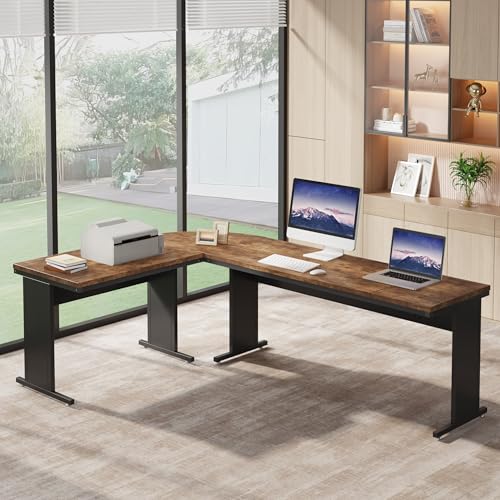
Tribesigns 70-Inch L-Shape -- Best Budget Three-Monitor L-Desk
The Tribesigns 70 x 47 inch L-shape desk at is the most affordable way to get a corner desk with enough total surface for three monitors. The 0.75-inch MDF top is thinner than premium options, which limits monitor arm clamping to lighter single-arm setups or through-bolt mounts. The carbon-fiber print surface finish hides minor scratches better than plain white or wood grain options. Assembly is straightforward with labeled hardware. The main limitation is stability: the frame uses X-shaped steel bracing rather than solid crossbars, so there is slight sway when all peripherals are loaded. Suitable for lighter setups where cost is the primary concern.
Reasons to buy
- Space Utilization Masterpiece: The thoughtful L-shaped design fits seamlessly into room co
- Generous Space: With dimensions of 83"(L) x 63" (W) x 24"(D) x 30" (H), the l shaped stand
- Flexible Layout: The reversible installation feature allows left/right configuration, easi
- Sturdy Structure: A robust steel frame with four equal-length legs delivers exceptional su
- Easy Assembly: Comes with a detailed user manual and all necessary hardware. The modular d
What to look for
What to consider
Surface width comes first. Measure your three monitors end-to-end with 2 to 3 inches of gap between them, and add 6 inches total for side clearance. That gives your minimum desk width. In most cases this is 72 to 80 inches for 27-inch monitors.
What to consider
A triple monitor arm changes the math significantly. A quality arm pulls all three screens into a tight arc, reducing the required desk width by 10 to 15 inches and routing all video cables through a single arm column. If you buy an arm, you can use a narrower desk. If you prefer monitors on individual stands, you need the full width.
What to consider
Edge thickness for monitor clamps matters. Look for at least 1 inch of solid material at the rear edge. Thinner tops require protective clamping pads and may still develop dents over years of clamp pressure.
What to consider
For related setups, see our [best desk for multiple monitors](/articles/best-computer-desk-for-multiple-monitors) guide or the [gaming desk recommendations](/articles/best-computer-desk-for-gamers). The [methodology page](/methodology) explains the criteria behind every pick.
FAQs
Three 27-inch monitors in landscape orientation require roughly 80 to 85 inches of surface width when spaced at comfortable viewing angles. If you use a triple-monitor arm that pulls them into a tighter arc, 70 inches can work. For three 32-inch monitors, a triple arm is almost necessary, and the desk still needs to be at least 72 inches wide to keep side monitors within a 45-degree viewing angle without head strain.
Three 27-inch monitors average about 12 to 15 lbs each, totaling 36 to 45 lbs for monitors alone. Add a triple arm mount (5 to 10 lbs), desktop tower (15 to 25 lbs), and accessories, and you reach 60 to 80 lbs easily. A desk rated at 150 lbs handles this safely. If you use edge-clamped monitor arms, look for a desk with reinforced edge thickness of at least 1 inch to hold the clamp without deforming.
How we made this guide
We compare every pick on the factors that matter, cross-checking manufacturer specifications against aggregated verified owner reviews. We rank independently and never take payment for placement. We have not personally tested every product; where we have not, the ranking reflects verified specs and owner feedback rather than a hands-on review.
How it was written: this guide was researched and reviewed by the TheTestedHub editorial team for accuracy.
Affiliate disclosure: TheTestedHub is reader-supported. When you buy through links on our site, we may earn a commission at no extra cost to you.
Related guides

Your Docking Station Match: CalDigit TS4 and More

Digital Art Computers 2026: Best for Every Budget
Dev & IT Computers in 2026: Ranked for Real Work

Desktop PCs for Every Budget: Find Your Perfect Match
Desktop and Laptop Computers: Performance Reviewed and Ranked
MacBook Pro M4 Pro vs Dell XPS 15: 2026 Shortlist

Buy the Best DIY Computer in 2026: Corsair One i300
