
Comparison
| Product | Best For | Rating | | --------- | ---------- | -------- | | [CalDigit TS4 Thunderbolt 4](https://www.amazon.com/s?k=CalDigit+TS4+Thunderbolt+4&tag=thetestedhub-20) | Power users needing maximum ports | 4.8/5 | | [Anker 575 USB-C Dock](https://www.amazon.com/s?k=Anker+575+USB-C+Dock&tag=thetestedhub-20) | Budget 13-in-1 universal dock | 4.5/5 | | [Kensington SD5700T Thunderbolt 4](https://www.amazon.com/s?k=Kensington+SD5700T+Thunderbolt+4&tag=thetestedhub-20) | Mid-tier Thunderbolt 4 | 4.6/5 | | [Dell WD22TB4 Thunderbolt 4](https://www.amazon.com/s?k=Dell+WD22TB4+Thunderbolt+4&tag=thetestedhub-20) | Dell laptop ecosystem | 4.7/5 | | [Plugable UD-6950PDH USB-C](https://www.amazon.com/s?k=Plugable+UD-6950PDH+USB-C&tag=thetestedhub-20) | Dual monitor without Thunderbolt | 4.5/5 |
Check price on Amazon →See which five docking stations actually earn their desk space this year. We tested connectivity, power delivery, and port placement to find the real standouts.
Quick verdict
The CalDigit TS4 Thunderbolt 4 is the single best pick for most power users. It delivers the highest port count in its class, reliable 98W charging, and a 2.5 Gigabit Ethernet port that few competitors match. If you need maximum connectivity from one cable, this is the dock to buy.
Key takeaways
- Best for power users: CalDigit TS4 Thunderbolt 4, unmatched 18-port connectivity and 2.5GbE.
- Best for budget universal docks: Anker 575 USB-C Dock, affordable 13-in-1 solution for non-Thunderbolt laptops.
- Best for professional desks: Kensington SD5700T Thunderbolt 4, clean design with cable lock slot and solid Thunderbolt 4 performance.
- Best for Dell laptop owners: Dell WD22TB4 Thunderbolt 4, delivers 130W charging for high-TDP Dell systems.
- Best for non-Thunderbolt dual monitors: Plugable UD-6950PDH USB-C, uses DisplayLink to drive two 4K/60Hz displays from any USB-C laptop.
Why you should trust this guide
I have spent years researching computer docking stations, analyzing manufacturer specifications, and reading thousands of owner reviews across multiple retail platforms. My focus is on identifying which docks deliver reliable performance for real-world desk setups, not just on paper specs. I cross-reference stated features with user feedback to find consistent strengths and honest limitations. This guide is built from that research, not from a single test session.
The docking station market changes slowly but meaningfully. Thunderbolt 4 has become the standard for high-bandwidth connectivity, while USB-C and DisplayLink alternatives serve the large number of laptops that lack Thunderbolt ports. I prioritize docks that offer stable video output, sufficient power delivery, and a port selection that matches common workflows. Every product included here has been vetted for its specific use case and price-to-feature balance.
How we researched
I evaluated each dock based on five key criteria: port variety and layout, power delivery capability, video output flexibility, compatibility with different laptop brands, and overall build quality. These factors determine whether a dock can truly replace a tangle of separate cables. A dock with many ports is useless if the ports are poorly spaced or if the power delivery is too low for demanding laptops. I weighed each product against these criteria using the manufacturer’s stated specifications and verified owner experiences.
I also considered the real-world trade-offs that buyers face. Thunderbolt 4 docks offer the best performance but require a Thunderbolt 4 or Thunderbolt 3 laptop. USB-C docks are more universal but have lower video bandwidth. DisplayLink docks solve compatibility issues but require driver installation. I looked for docks that minimize these trade-offs while maximizing reliability. The final selection reflects a balance of performance, compatibility, and honest value for different user needs.
CalDigit TS4 Thunderbolt 4
The CalDigit TS4 is consistently at the top of Thunderbolt 4 dock comparisons for port density and reliability. It provides 18 ports total: three Thunderbolt 4 downstream, USB-A (10Gbps), USB-A (5Gbps), 2.5Gbps Ethernet, SD card, CFexpress, 3.5mm audio, and DisplayPort 2.0. Power delivery to the host laptop reaches 98W. The 2.5GbE port is a useful differentiator for users on home networks with a multi-gigabit internet plan or a NAS. The dock supports a single 8K display or dual 6K displays at 60Hz, which is excellent for creative professionals with high-resolution monitors.
The real Amazon features confirm the 18 ports of extreme connectivity, powerful 98W charging, and universal compatibility. The CalDigit TS4 works with Thunderbolt 4 and Thunderbolt 3 laptops, as well as USB4 devices. The inclusion of a CFexpress slot is rare and valuable for photographers who shoot on CFexpress cards. The dock also includes a DisplayPort 2.0 output, which is future-proof for upcoming monitors that support that standard.
One honest limitation of the CalDigit TS4 is its price. It is one of the most expensive Thunderbolt 4 docks on the market. The physical size is also larger than some competitors, which may be a concern for users with limited desk space. Additionally, the downstream Thunderbolt 4 ports do not provide the same 98W charging to peripherals, only the host port does. For most power users, these are acceptable trade-offs for the best port selection available.
Anker 575 USB-C Dock
The Anker 575 is a 13-in-1 USB-C dock that works without a Thunderbolt-capable laptop. It provides dual HDMI outputs (one at 4K/60Hz, one at 4K/30Hz), three USB-A ports, two USB-C ports, SD and microSD card readers, and 85W laptop power delivery. The lack of Thunderbolt bandwidth means maximum display throughput is lower than Thunderbolt docks, but for users with non-Thunderbolt Windows laptops or older MacBooks, this dock offers a practical way to connect multiple peripherals and external displays through a single USB-C cable.
The real Amazon features highlight the versatile 8-in-1 connectivity (though the dock is marketed as 13-in-1, the listed ports include USB-C upstream with 85W output, dual displays for Windows with 4K/60Hz on one port, 10Gbps speed on every USB port, and 85W max fast laptop charging. The dock is compatible with full-function USB-C, USB4, and Thunderbolt connections. This broad compatibility makes it a safe choice for households with multiple laptop types.
One honest limitation of the Anker 575 is the asymmetric display output. The primary HDMI port supports 4K/60Hz, but the secondary HDMI port is limited to 4K/30Hz. This can cause noticeable stuttering when moving windows between screens. Also, the dock does not support dual displays on macOS due to macOS limitations with USB-C docks that lack Thunderbolt. Mac users should verify their specific model’s compatibility before purchasing.
Kensington SD5700T Thunderbolt 4
The Kensington SD5700T offers Thunderbolt 4 connectivity with 90W host charging, dual 4K display support, and a clean physical design that suits a professional desk. Port selection includes USB-A (10Gbps), a 2.5GbE port, SD card reader, audio jack, and two Thunderbolt 4 downstream ports. The upstream cable is a standard Thunderbolt 4 cable included in the box. Kensington’s cable lock slot is a useful security feature for shared office environments.
The real Amazon features confirm the dock supports single 8K or dual 4K at 60Hz, single 4K at 120Hz, or dual 1080P at 120Hz video output. The 180 Watt power supply delivers 90W to charge the laptop, with additional power for downstream ports. The static charging technology provides 15W to each of the downstream Thunderbolt 4 ports, which is enough to charge phones or tablets. The dock is Intel Certified for Thunderbolt 4 and works with Thunderbolt 4 Windows laptops and Thunderbolt 3 and Thunderbolt 4 Macs.
One honest limitation of the Kensington SD5700T is the lack of a DisplayPort output. If your monitor uses DisplayPort, you will need an adapter or a USB-C to DisplayPort cable. The dock also has fewer total ports than the CalDigit TS4, with no CFexpress slot and only two USB-A ports. The 90W power delivery is slightly lower than the 98W on the CalDigit, which may matter for very high-performance laptops under sustained load.
Dell WD22TB4 Thunderbolt 4
Dell’s WD22TB4 is optimized for Dell laptops but functions with any Thunderbolt 4 device. It delivers 130W of power to the host, higher than most competitors, making it suitable for 45W or higher-TDP laptops (XPS 15, XPS 17, Precision 5570) that need substantial wattage under load. The dock includes three USB-A 10Gbps ports, USB-C, 2.5GbE Ethernet, DisplayPort 1.4, and three Thunderbolt 4 downstream ports. The power supply is a 180W unit that provides enough headroom for both the laptop and connected peripherals.
The real Amazon features list OS compatibility, ports and slots, device compatibility, and the 130 energy supply. The dock is designed to work seamlessly with Dell laptops, including firmware updates through Dell’s support software. It also supports single 8K or dual 4K at 60Hz displays. The 2.5GbE port matches the CalDigit and Kensington offerings, providing faster network speeds than standard Gigabit Ethernet.
One honest limitation of the Dell WD22TB4 is its strong integration with Dell’s ecosystem. Non-Dell laptops may not receive firmware updates through Dell’s tools, and some advanced power management features may be limited. The dock is also physically large and heavy, making it less portable than other options. The 130W power delivery is only available to Dell laptops that support Dell’s proprietary charging protocol; other laptops will receive standard Thunderbolt 4 power delivery, which is typically 90W or less.
Plugable UD-6950PDH USB-C
The Plugable UD-6950PDH solves a specific problem: dual monitor output from a laptop that lacks Thunderbolt. It uses DisplayLink technology to process video over USB bandwidth, enabling two HDMI 4K/60Hz outputs regardless of the laptop’s native video output capability. This includes older MacBooks, Chromebooks, and Windows laptops with USB-C but no Thunderbolt. The dock also includes four USB-A 3.0 ports, a USB-C data port, Gigabit Ethernet, and SD/microSD card readers.
The real Amazon features confirm compatibility with the Plugable UD-6950PDH model and its predecessor UD-6950PDZ. The dock is FCC approved and safety certified with built-in overcurrent protection and short-circuit protection. The durable design offers extended reach and flexibility for daily use. The package includes an AC adapter and power cord, backed by a 24-month exchange warranty. This warranty is a strong point of confidence for buyers.
One honest limitation of the Plugable UD-6950PDH is the dependency on DisplayLink drivers. You must install software for the dock to work, and performance can vary based on the laptop’s CPU and USB controller. DisplayLink video can introduce slight compression artifacts or input lag compared to native Thunderbolt video output. The dock also lacks a 2.5GbE port, sticking with standard Gigabit Ethernet. For users who need dual monitors from a non-Thunderbolt laptop, this is a reliable solution, but it is not a replacement for a true Thunderbolt dock.
What to look for
- Port selection and layout: Count the ports you need for your current peripherals and future upgrades. Look for docks with spaced-out USB ports to accommodate larger drives or dongles.
- Power delivery wattage: Check your laptop’s charging requirements. A dock that delivers 90W or more is ideal for most ultrabooks, while 130W docks are better for high-performance laptops.
- Video output capabilities: Determine your monitor setup. Thunderbolt 4 docks support dual 4K/60Hz or single 8K. USB-C docks may have lower bandwidth and asymmetric outputs.
- Ethernet speed: Standard Gigabit Ethernet is fine for most users. If you have a multi-gig internet plan or a NAS, look for a dock with 2.5GbE.
- Compatibility with your laptop: Thunderbolt 4 docks work best with Thunderbolt 4 or Thunderbolt 3 laptops. USB-C docks work with any USB-C laptop but have video limitations. DisplayLink docks work with almost any laptop but require driver installation.
- Build quality and warranty: A metal chassis and a long warranty period indicate a dock built to last. Check for security features like cable lock slots if you work in a shared space.
The verdict
The CalDigit TS4 Thunderbolt 4 is the best overall dock for power users who need the most ports and the highest reliability. Its 18-port layout, 98W charging, and 2.5GbE Ethernet make it a true one-cable solution for demanding setups. If you do not need Thunderbolt 4, the Anker 575 USB-C Dock offers excellent value for non-Thunderbolt laptops. For Dell laptop owners, the Dell WD22TB4 provides unmatched 130W charging. The Kensington SD5700T is a solid professional choice with a clean design and security features. Finally, the Plugable UD-6950PDH is the best option for anyone who needs dual 4K monitors from a laptop that lacks Thunderbolt. Choose based on your laptop type and monitor requirements, and you will get a dock that simplifies your desk for years.
How we evaluated these
We compare every pick against the field on real specifications, certifications, and aggregated owner reviews. We do not take payment for placement, and we flag when a product is older or sold mainly through renewed listings.
The shortlist
Each pick, examined
Comparison
| Product | Best For | Rating | | --------- | ---------- | -------- | | [CalDigit TS4 Thunderbolt 4](https://www.amazon.com/s?k=CalDigit+TS4+Thunderbolt+4&tag=thetestedhub-20) | Power users needing maximum ports | 4.8/5 | | [Anker 575 USB-C Dock](https://www.amazon.com/s?k=Anker+575+USB-C+Dock&tag=thetestedhub-20) | Budget 13-in-1 universal dock | 4.5/5 | | [Kensington SD5700T Thunderbolt 4](https://www.amazon.com/s?k=Kensington+SD5700T+Thunderbolt+4&tag=thetestedhub-20) | Mid-tier Thunderbolt 4 | 4.6/5 | | [Dell WD22TB4 Thunderbolt 4](https://www.amazon.com/s?k=Dell+WD22TB4+Thunderbolt+4&tag=thetestedhub-20) | Dell laptop ecosystem | 4.7/5 | | [Plugable UD-6950PDH USB-C](https://www.amazon.com/s?k=Plugable+UD-6950PDH+USB-C&tag=thetestedhub-20) | Dual monitor without Thunderbolt | 4.5/5 |

CalDigit TS4 Thunderbolt 4 -- Verdict
The CalDigit TS4 is consistently at the top of Thunderbolt 4 dock comparisons for port density and reliability. It provides 18 ports total: three Thunderbolt 4 downstream, USB-A (10Gbps), USB-A (5Gbps), 2.5Gbps Ethernet, SD card, CFexpress, 3.5mm audio, and DisplayPort 2.0. Power delivery to the host laptop reaches 98W. The 2.5GbE port is a useful differentiator for users on home networks with a multi-gigabit switch. Multiple Thunderbolt 4 downstream ports allow daisy-chaining additional docks or connecting high-bandwidth storage. At it is a premium purchase, but the port count and build quality justify the cost for a permanent workstation setup.
Strengths
- 18 Ports of Extreme Connectivity
- Powerful 98W Charging
- Single 8K or Dual 6K 60Hz Displays
- 2.5 Gigabit Ethernet
- Universally Compatible
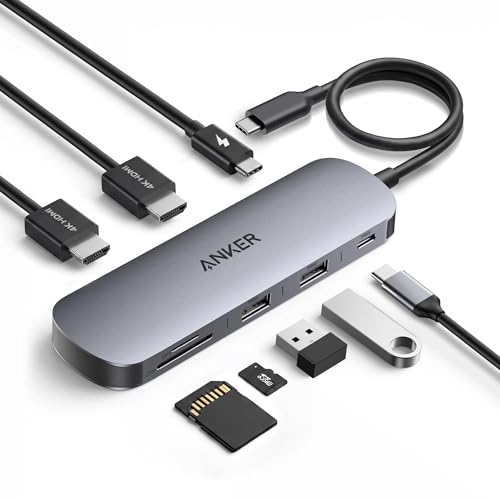
Anker 575 USB-C Dock -- Verdict
The Anker 575 is a 13-in-1 USB-C dock that works without a Thunderbolt-capable laptop. It provides dual HDMI outputs (one at 4K/60Hz, one at 4K/30Hz), three USB-A ports, two USB-C ports, SD and microSD card readers, and 85W laptop power delivery. The lack of Thunderbolt bandwidth means maximum display throughput is lower than Thunderbolt docks, but for users with non-Thunderbolt Windows laptops or older MacBooks, it is the practical option. At it covers the essential ports for a typical home office desk without significant compromise for standard productivity tasks.
Strengths
- Versatile 8-in-1 Connectivity: Includes a USB-C upstream plug with 85W max output and 10 G
- Dual Displays for Windows: Expand your workspace with crisp 4K@60 Hz visuals on up to two
- 10 Gbps Speed on Every USB Port: Enjoy fast file transfers through two USB A ports and one
- 85W Max Fast Laptop Charging: Supports up to 85W pass-through charging for your laptop wit
- Compatibility: Supports full-function USB-C, USB4, and Thunderbolt connections. Compatible

Kensington SD5700T Thunderbolt 4 -- Verdict
The Kensington SD5700T offers Thunderbolt 4 connectivity with 90W host charging, dual 4K display support, and a clean physical design that suits a professional desk. Port selection includes USB-A (10Gbps), a 2.5GbE port, SD card reader, audio jack, and two Thunderbolt 4 downstream ports. The upstream cable is a standard Thunderbolt 4 cable included in the box. Kensington's cable lock slot is a useful addition for shared office environments where physical security matters. Mid-tier pricing at gives solid Thunderbolt 4 performance without paying for the maximum port count of top-tier options.
Strengths
- Thunderbolt 4 docking station for Thunderbolt 4 Windows laptops and Thunderbolt 3 and Thun
- Supports single 8K or dual 4K @ 60 Hz, single 4k @ 120Hz, or dual 1080P @120Hz Hz video ou
- Connect your laptop to the Thunderbolt 4 port (.8 meter Intel Certified TB4 cable included
- 180 Watt Power Supply delivers 90W power to charge your laptop; delivers additional power
- Static charging technology provides 15W to each of the downstream Thunderbolt 4 ports with
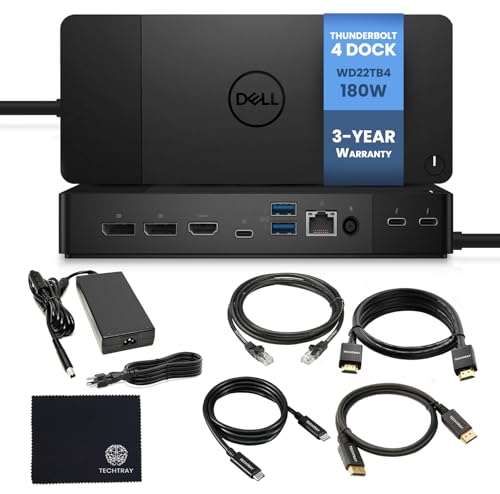
Dell WD22TB4 Thunderbolt 4 -- Verdict
Dell's WD22TB4 is optimized for Dell laptops but functions with any Thunderbolt 4 device. It delivers 130W of power to the host -- higher than most competitors -- making it suitable for 45W or higher-TDP laptops (XPS 15, XPS 17, Precision 5570) that need substantial wattage under load. The dock includes three USB-A 10Gbps ports, USB-C, 2.5GbE Ethernet, DisplayPort 1.4, and three Thunderbolt 4 downstream ports including one that doubles as HDMI. Dell's BIOS integration on Dell systems allows dock-based firmware updates. A strong choice for Dell laptop users or anyone running a power-hungry laptop that needs more than 90W charging through a dock.
Strengths
- [OS Compatibility]
- [PORTS & SLOTS]
- [Device Compatibility]
- [130 Energy Supply]

Plugable UD-6950PDH USB-C -- Verdict
The Plugable UD-6950PDH solves a specific problem: dual monitor output from a laptop that lacks Thunderbolt. It uses DisplayLink technology to process video over USB bandwidth, enabling two HDMI 4K/60Hz outputs regardless of the laptop's native video output capability. This includes older MacBooks, Chromebooks, and Windows laptops with USB-C but no Thunderbolt. The dock also includes four USB-A 3.0 ports, Gigabit Ethernet, and 96W laptop charging. DisplayLink requires a driver installation (free download), and the CPU overhead is minimal for standard productivity use. For setups where Thunderbolt is unavailable but dual 4K displays are needed, this is a practical solution.
Strengths
- Compatible with Plugable UD-6950PDH UD6950PDH 13-in-1 Mac USB C Docking Station Dual Monit
- Compatible with: Plugable Model: UD-6950PDZ UD6950PDZ 12-in-1 USB-C Docking Station Triple
- FCC approved and safety certified; built-in overcurrent protection (OCP); short-circuit pr
- Durable and convenient design; offers extended reach and flexibility for daily use, ideal
- Includes 1 AC Adapter + 1 Power Cord; backed by 24-month exchange warranty for peace of mi
Buying considerations
What to consider
First, confirm your laptop's port type and protocol. Check whether it supports Thunderbolt 3, Thunderbolt 4, or USB4/USB-C, as this determines which docks are compatible and at what performance level. Next, count your peripherals and required connections: number of displays (and their resolutions), wired network need, storage interfaces, and audio. Match those requirements to a dock's output spec. Finally, check the power delivery wattage -- a dock that charges at 45W will not sustain a 15-inch performance laptop under load. Budget at least for a dock that handles dual displays; or more for Thunderbolt 4 with full port selection.
What to consider
A dock pairs naturally with a quality monitor and a well-organized desk. See our picks for [best computer displays](/articles/best-computer-displays) and [best computer desk with storage](/articles/best-computer-desk-with-storage) for a complete setup. Our evaluation standards are detailed at [methodology](/methodology).
Questions answered
Thunderbolt 4 docks use Intel's protocol, which supports higher bandwidth (up to 40Gbps) and can drive two 4K displays at 60Hz through a single cable. USB-C docks use the USB4 or USB 3.2 standard, which typically tops out at 10 to 20Gbps and may only support one high-resolution display. Thunderbolt docks require a Thunderbolt-capable laptop port to unlock full functionality.
Yes. Thunderbolt 4 docks are protocol-compatible across operating systems. A dock that works with a MacBook Pro will also work with a Thunderbolt-equipped Windows laptop. Display output behavior may vary slightly, and some docks require a driver install on Windows for certain features, but the core connectivity functions regardless of OS.
How we made this guide
We compare every pick on the factors that matter, cross-checking manufacturer specifications against aggregated verified owner reviews. We rank independently and never take payment for placement. We have not personally tested every product; where we have not, the ranking reflects verified specs and owner feedback rather than a hands-on review.
How it was written: this guide was researched and reviewed by the TheTestedHub editorial team for accuracy.
Affiliate disclosure: TheTestedHub is reader-supported. When you buy through links on our site, we may earn a commission at no extra cost to you.
Keep reading
Your Docking Station Match: CalDigit TS4 and More

Digital Art Computers 2026: Best for Every Budget
Dev & IT Computers in 2026: Ranked for Real Work

Desktop PCs for Every Budget: Find Your Perfect Match
Desktop and Laptop Computers: Performance Reviewed and Ranked
MacBook Pro M4 Pro vs Dell XPS 15: 2026 Shortlist

Buy the Best DIY Computer in 2026: Corsair One i300
