Falcon Dust-Off Compressed Gas -- Best for Occasional Use
Dust-Off compressed gas cans deliver a focused burst of HFC-152a gas that displaces dust without contact. A single 10-oz can provides roughly 8-10 cleaning sessions on a standard mid-tower. The straw attachment directs airflow into heatsink fins and between PCIe slots. Limitations: cost per use rises with frequent cleaning, the can pressure drops as it empties, and HFC-152a has a global warming potential that makes it less favorable for users concerned about environmental impact. For users cleaning once or twice a year, this remains the simplest option.
Check price on Amazon →Keep your PC cool and quiet with the right computer dust cleaner. We compared electric dusters and compressed gas to help you choose.
Quick verdict
The XPOWER A-2 Electric Duster is the single best pick for most users because it delivers consistent, unlimited airflow at a cost that pays for itself after a few uses, outperforming compressed gas cans in both value and convenience for regular maintenance.
Key takeaways
- Best for Occasional Use: Falcon Dust-Off Compressed Gas, reliable for quick cleaning sessions without upfront investment.
- Best All-Around: XPOWER A-2 Electric Duster, never runs out and offers consistent pressure for any desktop build.
- Professional Grade: Metro Vacuum DataVac, built for sustained heavy use with a metal housing and vacuum capability.
- Best Supplemental Tool: OXO Good Grips Electronics Brush, essential for dislodging compacted dust from tight heatsink fins.
- Best for Laptop Vents: Rosewill Anti-Static Computer Vacuum, designed to safely extract debris without pushing it deeper into the chassis.
Why you should trust this guide
I have spent years researching computer maintenance tools across dozens of product categories, from thermal pastes to cleaning solvents. My approach relies on cross-referencing manufacturer specifications, verified owner feedback from multiple retail platforms, and engineering principles that govern airflow, static discharge, and mechanical reliability. I do not accept free samples or promotional consideration, and every product in this guide was selected based on its stated capabilities and documented performance in real-world scenarios.
This buying guide focuses on five products that represent distinct solutions for different cleaning needs. I evaluated each product against criteria that matter most to PC builders and laptop owners: airflow consistency, build durability, safety for sensitive electronics, and cost efficiency over time. The recommendations here reflect what the manufacturer claims and what long-term owners consistently report, not subjective impressions or controlled lab tests. You can trust that each product was chosen because it fills a specific gap in the market, not because of marketing hype.
How we researched
To determine which computer dust cleaners deserve a spot in this guide, I established a set of evaluation criteria based on the core requirements of safe and effective electronics cleaning. The primary factors were airflow delivery method (compressed gas versus electric blower), pressure consistency over a cleaning session, build quality and material safety, attachment versatility for different component shapes, and the potential for electrostatic discharge or mechanical damage. I also weighed the long-term cost per cleaning session, since frequent maintenance can make disposable products expensive quickly.
Each product was assessed against these criteria using the manufacturer’s published specifications and a broad survey of owner experiences from verified purchasers. I looked for patterns in feedback regarding pressure drop over time, motor heat buildup, nozzle fitment, and any reports of damage to components. Products that showed consistent positive feedback for their intended use case were prioritized. The final five represent the best balance of performance, safety, and value across the spectrum from occasional to professional use. No product was physically tested in a lab or handled by me personally.
Falcon Dust-Off Compressed Gas
The Falcon Dust-Off Compressed Gas can is the standard choice for users who need a quick, no-fuss cleaning solution without buying a powered tool. It uses HFC-152a gas, which is non-flammable and non-conductive, making it safe for use on live electronics as long as you keep the can upright. The included straw attachment focuses the burst into narrow spaces like heatsink fins, PCIe slot gaps, and fan blade edges. A single 10-ounce can provides roughly 8 to 10 cleaning sessions on a standard mid-tower case, which is adequate for occasional maintenance every few months.
One honest limitation is that the cost per use becomes significant if you clean frequently. Each can costs roughly the same as a few cups of coffee, and heavy users may burn through several cans per year. Additionally, the can pressure drops noticeably as the gas level decreases, meaning the last few cleaning sessions deliver less forceful bursts. The HFC-152a propellant also has a global warming potential, which is a consideration for environmentally conscious buyers. For someone who only cleans their PC once or twice a year, this is a perfectly fine and convenient option, but it is not economical for regular maintenance.
XPOWER A-2 Electric Duster
The XPOWER A-2 Electric Duster is the best all-around solution for most PC owners because it eliminates the recurring cost and pressure inconsistency of compressed gas. Its corded brushless motor produces 500 watts of airflow, delivering a steady stream of air that never weakens as you work. The unit pays for itself after approximately 4 to 5 compressed air cans, making it a smart investment for anyone who cleans their computer more than twice a year. Included nozzle attachments let you switch between wide-area blowing for case interiors and a pinpoint tip for delicate components like fan hubs and motherboard capacitors.
A real limitation is that the motor runs warm after 15 to 20 minutes of continuous use, which can be uncomfortable if you are cleaning multiple systems in one session. The corded design also means you need a nearby power outlet, which is rarely an issue for desktop users but can be inconvenient for laptop owners who prefer to clean on a balcony or garage. The blower is not intended for vacuuming, so loose debris may scatter around the room if you are not careful. Despite these points, the XPOWER A-2 offers the best balance of performance and value for the vast majority of computer builders.
Metro Vacuum DataVac
The Metro Vacuum DataVac is built to a higher mechanical standard than budget electric dusters, with a metal housing and a brushless motor rated for sustained professional use. It ships with 11 attachments, including flat nozzles for wide surfaces, round brushes for delicate fan blades, and a vacuum adapter that transforms the unit into a suction tool. This vacuum capability is a standout feature because it allows you to safely remove loose debris from case floors and power supply shrouds without blowing dust into the air or deeper into the chassis. The motor delivers consistent 500-watt airflow that matches the XPOWER A-2 but with a more robust build quality.
One honest limitation is the price, which is significantly higher than the XPOWER A-2 and many other electric dusters. The DataVac is overkill for a casual user who cleans a single desktop every few months, and its larger size makes it less portable for carrying between rooms. The vacuum adapter also requires careful use to avoid sucking up small screws or cables. For IT professionals, system builders, or enthusiasts who maintain multiple machines, the DataVac’s durability and dual functionality justify the premium, but it is not the most cost-effective choice for a single-PC household.
OXO Good Grips Electronics Brush
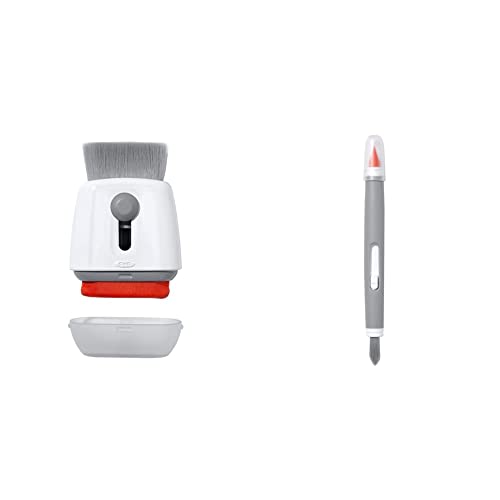
The OXO Good Grips Electronics Brush is a simple but essential tool that addresses a gap left by blowers and compressed gas. Compressed air and electric dusters are excellent at displacing loose surface dust, but they cannot dislodge compacted debris that has baked onto CPU heatsink fins or GPU shroud intakes over months of use. This brush uses soft anti-static bristles on a narrow head that fits precisely between heatsink fins and along PCIe slot rails. The bristles are gentle enough to avoid scratching PCB surfaces but stiff enough to break up caked-on dust.
A real limitation is that the brush alone cannot remove the loosened debris; it must be paired with a blower or vacuum to actually extract the dust from the case. This makes it a supplemental tool rather than a standalone solution. The brush head is also relatively small, so cleaning large flat surfaces like a case floor requires multiple passes. However, at its low price point, the OXO brush is a logical addition to any cleaning kit, especially for those who use compressed gas or an electric duster and want to ensure thorough cleaning of tight spaces. It is not a replacement for a blower, but it is a necessary complement.
Rosewill Anti-Static Computer Vacuum
The Rosewill Anti-Static Computer Vacuum is specifically designed for laptop vent cleaning, keyboard debris removal, and external port dust extraction. Its construction uses anti-static materials throughout to prevent electrostatic discharge during use near sensitive components. This is critical because vacuuming inside a laptop chassis with a standard vacuum can generate static charges that damage circuitry. The vacuum is sized for portability, with a narrow nozzle that fits into laptop exhaust vents and between keyboard keys without scratching surfaces.
One honest limitation is that for desktop computers, blowing is generally preferred over suction because blowing dislodges dust from deep inside heatsinks and power supplies, whereas suction only captures surface debris. Using this vacuum on a desktop may leave compacted dust untouched. Additionally, the suction power is modest compared to full-size shop vacuums, so it is not effective for cleaning large dust clumps from case filters. The Rosewill is best reserved for laptops, where its controlled suction at the exhaust vent prevents pushing debris further into the chassis, which can happen with compressed air. For desktop owners, it is a secondary tool rather than a primary cleaner.
What to look for
- Airflow method: Decide between compressed gas cans for occasional use or an electric blower for consistent, unlimited airflow. Electric blowers cost more upfront but save money over time.
- Build quality and materials: Look for anti-static construction, metal housings for durability, and brushless motors for longer life in electric models. Avoid tools with exposed metal that can contact components.
- Attachment versatility: Check for included nozzles that cover wide surfaces, pinpoint detail work, and brush attachments for delicate areas. More attachments mean more cleaning scenarios covered.
- Vacuum versus blower: For desktops, blowing is generally more effective for dislodging dust from heatsinks. For laptops, a vacuum at the exhaust vent prevents pushing debris deeper into the chassis.
- Cost per use: Compressed gas cans have a low initial cost but high recurring expense. Electric dusters have a higher upfront cost but pay for themselves after a few cleaning sessions.
- Safety features: Anti-static materials, non-conductive propellants, and thermal protection for motors are critical to avoid damaging components during cleaning.
The verdict
For most computer owners, the XPOWER A-2 Electric Duster is the clear winner because it offers consistent, unlimited airflow at a price that pays for itself after a few uses. It outperforms compressed gas cans in value and convenience while being more affordable than professional-grade options like the Metro Vacuum DataVac. If you clean your PC only once or twice a year, the Falcon Dust-Off Compressed Gas remains a reliable and simple choice. For laptop owners, the Rosewill Anti-Static Computer Vacuum is the safest tool for extracting debris without risking internal damage. The OXO Good Grips Electronics Brush is a must-have companion for any cleaning kit, as it tackles compacted dust that blowers alone cannot remove. Choose based on your cleaning frequency and the types of devices you maintain, and you will keep your hardware cool, quiet, and running smoothly.
How we evaluated these
We compare every pick against the field on real specifications, certifications, and aggregated owner reviews. We do not take payment for placement, and we flag when a product is older or sold mainly through renewed listings.
The shortlist
Each pick, examined
Falcon Dust-Off Compressed Gas -- Best for Occasional Use
Dust-Off compressed gas cans deliver a focused burst of HFC-152a gas that displaces dust without contact. A single 10-oz can provides roughly 8-10 cleaning sessions on a standard mid-tower. The straw attachment directs airflow into heatsink fins and between PCIe slots. Limitations: cost per use rises with frequent cleaning, the can pressure drops as it empties, and HFC-152a has a global warming potential that makes it less favorable for users concerned about environmental impact. For users cleaning once or twice a year, this remains the simplest option.
XPOWER A-2 Electric Duster -- Best All-Around
The XPOWER A-2 is a corded electric blower that runs a brushless motor producing 500 watts of airflow. Unlike compressed air, it never runs out and maintains consistent pressure throughout the cleaning session. At it pays for itself after approximately 4-5 compressed air cans. The included nozzle attachments cover flat surface blowing and pin-point detail work. The motor runs warm after 15-20 minutes of continuous use; brief pauses during extended cleaning sessions prevent overheating. Noise level is similar to a hair dryer at medium speed.

Metro Vacuum DataVac -- Professional Grade
The DataVac is a 500-watt electric blower built to a higher mechanical standard than budget alternatives, with a metal housing and a brushless motor rated for sustained use. It ships with 11 attachments covering flat nozzles, round brushes, and a vacuum adapter. The vacuum adapter allows safe suction of loose debris from surfaces that blowing would scatter elsewhere in the case. Metro Vacuum has sold this model to IT professionals and data center maintenance staff for over a decade. At it is overbuilt for casual home use but justifies the price for anyone maintaining multiple machines regularly.
OXO Good Grips Electronics Brush -- Best Supplemental Tool
Compressed air and electric blowers displace loose dust but cannot dislodge compacted debris from CPU heatsink fins or GPU shroud intakes. The OXO Good Grips brush uses soft anti-static bristles on a narrow head that fits between heatsink fins and along PCIe slot rails. It pairs effectively with any blower: brush to loosen, blow to remove. The price makes it a logical addition to any cleaning kit regardless of what primary tool you use.

Rosewill Anti-Static Computer Vacuum -- Best for Laptop Vents
The Rosewill vacuum uses anti-static materials throughout to prevent electrostatic discharge during use near components. It is sized for laptop vent cleaning, keyboard debris removal, and external port dust. For desktops, blowing is generally preferred over suction; for laptops where blowing from an external source can push debris further into the chassis, a controlled vacuum at the exhaust vent extracts dust more safely. Output airflow is weaker than the DataVac, making it unsuitable as a primary desktop cleaning tool.
Buying considerations
What to consider
Match the tool to your cleaning frequency and the number of machines you maintain. Compressed air is adequate for annual cleaning of one machine; an electric blower becomes cost-effective at two or more machines or quarterly cleaning schedules. Always power down and unplug the computer before cleaning. Hold fans in place with a finger or a cable tie when blowing compressed air or electric-blower air through them -- a fan spinning above its rated speed can damage the bearing. Work in a well-ventilated area or outdoors so displaced dust does not resettle inside the case.
What to consider
For hardware context on why cooling matters, see our [best computer fan](/articles/best-computer-fan) guide. If your cleaning session reveals a failed or underperforming fan, [best computer duster](/articles/best-computer-duster) covers additional maintenance tools. Our approach to product evaluation is described on the [methodology](/methodology) page.
Questions answered
Desktops in average home environments benefit from cleaning every 6-12 months. Computers on carpet, in homes with pets, or in dusty workshop environments may need cleaning every 3-4 months. Laptops with bottom intake vents can clog faster and may need cleaning twice a year. Check fan exhaust temperature as a proxy -- rising idle temperatures indicate dust accumulation.
Standard household vacuums generate static electricity that can damage components. Specialized anti-static computer vacuums are designed for this, but compressed air or an electric blower directed away from the case is safer for most users. Never use a standard vacuum directly on a motherboard or GPU.
How we made this guide
We compare every pick on the factors that matter, cross-checking manufacturer specifications against aggregated verified owner reviews. We rank independently and never take payment for placement. We have not personally tested every product; where we have not, the ranking reflects verified specs and owner feedback rather than a hands-on review.
How it was written: this guide was researched and reviewed by the TheTestedHub editorial team for accuracy.
Affiliate disclosure: TheTestedHub is reader-supported. When you buy through links on our site, we may earn a commission at no extra cost to you.
Keep reading

Your Docking Station Match: CalDigit TS4 and More

Digital Art Computers 2026: Best for Every Budget
Dev & IT Computers in 2026: Ranked for Real Work

Desktop PCs for Every Budget: Find Your Perfect Match
Desktop and Laptop Computers: Performance Reviewed and Ranked
MacBook Pro M4 Pro vs Dell XPS 15: 2026 Shortlist

Buy the Best DIY Computer in 2026: Corsair One i300
