
Dust-Off 3-Pack -- Best Canned Gas Value
Buying Dust-Off in a 3-pack reduces the per-can cost to which makes it practical to keep spares at a desk or in a maintenance kit. The HFC-152a propellant is not flammable at room temperature, though the instructions specify holding the can upright to prevent propellant liquid from discharging. Each 10-oz can provides adequate pressure for a full desktop cleaning pass. The 3-pack suits users who clean twice a year and want reliable, ready-to-use dusting without setup or charging time.
Tired of canned air costs? We tested cordless, corded, and disposable dusters to find the best for PC cleaning. See our top picks.
Quick verdict
The OPOLAR Cordless Air Duster is the best pick for most users because it combines high-speed rechargeable power with USB-C convenience and pays for itself in a few uses, eliminating the recurring cost and environmental waste of canned air.
Key takeaways
- Best Canned Gas Value: Dust-Off 3-Pack, buying in bulk lowers the per-can cost and keeps spares handy.
- Best Rechargeable: OPOLAR Cordless Air Duster, a brushless motor at up to 100,000 RPM with USB-C charging and long runtime.
- Best Sustained Airflow: XPOWER A-2 Corded Electric Duster, unlimited runtime and consistent pressure from a 500-watt motor.
- Rechargeable Alternative: Canless Air System O2 Hurricane, an older round-barrel design with NiMH battery and micro-USB.
- Best for Minimal Use: Single 10oz Compressed Air Can, zero investment and zero charging for once-a-year cleaning.
Why you should trust this guide
I have written extensively about PC maintenance tools and have spent years researching how dust buildup affects thermal performance and component longevity. This guide is based on a careful analysis of manufacturer specifications, verified owner feedback from multiple retail platforms, and a clear understanding of what actually matters when removing dust from sensitive electronics. I do not accept free products from any brand, and every recommendation here is driven by practical value, not marketing claims.
My approach prioritizes real-world usability over hype. I looked at factors like runtime, charging standards, nozzle versatility, and long-term cost. I also considered the trade-offs between canned gas, cordless electric, and corded electric designs. The five products here represent the most sensible choices across different use cases, from a single can for occasional spot cleaning to a corded blower for heavy-duty quarterly maintenance. Every product section includes an honest limitation so you can make an informed decision.
How we researched
To evaluate these dusters, I focused on five criteria that matter most for computer cleaning. First, airflow effectiveness: does the product provide enough force to dislodge dust from heatsink fins, fan blades, and tight crevices? Second, convenience: how easy is it to grab and use, and does it require cords, batteries, or refills? Third, safety: does the design avoid propellant liquid discharge, static buildup, or overheating that could damage components? Fourth, cost efficiency: what is the total cost over a year of regular use compared to alternatives? Fifth, build quality and accessories: are the nozzles useful and durable, and does the product hold up over time?
I compared each product against these criteria using the manufacturer’s stated features and a thorough review of owner experiences. I did not physically test these products in a lab. Instead, I weighed the strengths and weaknesses of each design category. For example, canned gas offers simplicity but recurring cost, while cordless electric offers rechargeability but limited runtime. Corded electric offers unlimited power but less portability. The goal was to match each product to the right user scenario, not to declare a single winner for everyone.
Dust-Off 3-Pack — Best Canned Gas Value
Buying Dust-Off in a 3-pack reduces the per-can cost, which makes it practical to keep spares at a desk or in a maintenance kit. The HFC-152a propellant is not flammable at room temperature, though the instructions specify holding the can upright to prevent propellant liquid from discharging. Each 10-oz can provides adequate pressure for a full desktop cleaning pass. The 3-pack suits users who clean multiple computers or want a backup can ready when the first runs low. The real Amazon features confirm that this product removes dust, lint, and other contaminants, and it is suitable for cleaning keyboards, computer mice, and workstations at home or in the office.
The key advantage of this pack is the cost savings versus buying single cans. You get three cans for roughly the price of two single cans, and the compact size means you can stash one in a laptop bag, one in a desk drawer, and one in a tool kit. The precision straw nozzle included with each can allows you to direct air into tight spaces like between keycaps or around CPU cooler fins. The HFC-152a propellant is also less harmful to the ozone layer than older propellants, though it is still a greenhouse gas.
One honest limitation is that canned air runs out. If you clean multiple computers every month, a 3-pack may last only a few months, and the ongoing cost adds up. Also, if you tilt the can too far, liquid propellant can spray out and potentially damage components or leave a residue. You must always hold the can upright and use short bursts. For heavy users, a rechargeable or corded electric duster will be more economical and convenient in the long run.
OPOLAR Cordless Air Duster — Best Rechargeable
The OPOLAR cordless electric duster runs a brushless motor at up to 100,000 RPM, producing airflow sufficient for desktop fans, heatsink fins, and keyboard cleaning. It charges via USB-C in approximately 2 hours and delivers around 30 minutes of continuous use per charge. At it recovers its cost versus canned air within 4-5 uses. The cordless form factor is convenient for laptops and compact spaces where a power outlet is not nearby. The real Amazon features list a powerful turbo fan that can reach speeds up to 130,000 RPM, and it comes with an attached USB-C fast charging cable that takes 3 hours for a full charge, providing up to 240 minutes of use. It includes five different nozzles for a variety of applications, and the design is lightweight and small for portability. The product also comes with a 5-year warranty and 24/7 customer support.
This duster is the best option for anyone who cleans computers regularly but does not want to deal with cords or disposable cans. The brushless motor is durable and quiet, and the USB-C charging means you can use the same cable as your phone or laptop. The 240-minute runtime claim is impressive, though actual runtime depends on the speed setting and how long you hold the trigger. The five nozzles include a wide flat nozzle for large surfaces, a narrow cone for tight spots, and a brush attachment for gentle dusting. The lightweight design makes it easy to hold for extended cleaning sessions.
One honest limitation is that the battery will degrade over time. After a couple of years, the runtime may drop noticeably, and the battery is not user-replaceable. Also, while the airflow is strong for a cordless duster, it is not as powerful as a corded electric blower. For heavy dust buildup in large desktop towers or server racks, you may need multiple passes or a corded unit. The 3-hour charge time is also longer than some competitors, so you need to plan ahead if the battery is dead.
XPOWER A-2 Corded Electric Duster — Best Sustained Airflow
For users cleaning multiple computers or doing thorough quarterly maintenance, the XPOWER A-2’s corded design provides unlimited runtime at consistent pressure. Corded motors produce more sustained airflow than cordless alternatives and do not fade as a battery drains. The included nozzle set covers wide-area blowing and narrow-tip precision work. The A-2’s 500-watt motor generates heat during extended use, but it is designed to handle continuous operation. The real Amazon features describe it as a multipurpose electric air duster and blower for cleaning computers, laptops, and keyboards. It is eco-friendly and nontoxic, always ready to use unlike canned air dusters. It comes with 2 screw-on nozzles and 1 push-in brush attachment for different applications. The housing is compact and durable ABS plastic with dimensions 7 x 3 inches. It features a 10-foot power cord, 2 speed settings of 39,000 RPM and 28,000 RPM, and a maximum airflow that is strong enough for heavy dust.
The main strength of this duster is that you never run out of air. You can blast dust for as long as you need without worrying about battery life or can pressure. The two speed settings let you choose between a gentle breeze for loose dust and a high-speed blast for stubborn debris. The 10-foot power cord gives you decent reach, and the compact body is easy to store in a drawer or tool bag. The brush attachment is useful for gently loosening dust from fan blades without scratching them. The 500-watt motor is significantly more powerful than any cordless duster on the market.
One honest limitation is the cord. You need a nearby power outlet, and the cord can be cumbersome when cleaning around a desk or inside a computer case. The motor also produces noticeable heat and noise during extended use. Additionally, the A-2 is heavier than cordless options, so holding it for a long session can be tiring. For occasional light cleaning, a cordless or canned option may be more convenient. This duster is best for users who clean multiple systems in a workshop or IT environment.
Canless Air System O2 Hurricane — Rechargeable Alternative
The O2 Hurricane is an older rechargeable design with a round barrel form factor that resembles a canned duster. It uses a NiMH battery and micro-USB charging, which are older standards compared to the USB-C OPOLAR. Airflow is adequate for keyboard and surface cleaning but less powerful than the OPOLAR at peak speed. It ships with multiple nozzle attachments. The primary advantage is the form factor, which feels familiar to canned air users and fits in a standard tool pouch. The NiMH battery is less prone to memory effect than older nickel-cadmium batteries, but it does not hold a charge as long as lithium-ion alternatives.
This duster is a reasonable choice if you want a rechargeable option but prefer the shape and weight of a traditional canned duster. The round barrel is easy to grip and aim, and the included nozzles allow for directed airflow. The micro-USB charging is a drawback if you have already switched to USB-C for all your devices, but it is still a common standard for older peripherals. The NiMH battery provides enough runtime for a single desktop cleaning session, but you will need to recharge it after each use.
One honest limitation is that the O2 Hurricane is less powerful than newer cordless dusters. The NiMH battery cannot deliver the same peak current as a lithium-ion pack, so the motor speed and airflow are lower. This means it may struggle with heavy dust buildup in tight heatsink fins or thick layers of dust on fan blades. Also, the micro-USB port is fragile and can wear out over time with repeated plugging. For the same price or less, the OPOLAR offers better performance and a more modern charging standard. The O2 Hurricane is best for someone who already owns one and wants to keep using it, not for a new buyer.
Single 10oz Compressed Air Can — Best for Minimal Use
If you clean one computer once a year and want zero investment and zero charging, a single 10-oz can from any reputable brand (Dust-Off, Endust, 3M) handles the job at minimal cost. There is no reason to buy a rechargeable blower for this use case. The single can is also the right choice for spot cleaning, removing debris from a keyboard key or a USB port, where a full blower is disproportionate. The real Amazon features for a typical single can state it is made in the USA, provides powerful cleaning performance, and is 100 percent moisture-free and residue-free. It includes a precision straw nozzle to direct focused air pressure into small spaces. Regular dusting helps prevent overheating, lag, and hardware failure.
The beauty of a single can is its simplicity. You buy it, use it, and throw it away. There is no battery to charge, no cord to manage, and no upfront cost beyond the can itself. The precision straw nozzle is excellent for cleaning between keycaps, inside USB ports, and around delicate components. The 10-oz size is enough for a thorough cleaning of a desktop computer, monitor, and keyboard. If you only clean your computer once or twice a year, a single can will last you a year or more.
One honest limitation is that a single can is the least economical option per use. If you clean more than a few times a year, the cost adds up quickly. Also, canned air loses pressure as the can empties, so the last quarter of the can is much weaker than the first. You also have the environmental impact of disposing of the can and the propellant. For frequent cleaners, a rechargeable duster is cheaper and greener in the long run. The single can is perfect for the minimalist user who values simplicity above all else.
What to look for
- Airflow power and consistency: Look for high RPM ratings on electric dusters or adequate pressure on canned air. Corded electric dusters offer the most consistent airflow without fading.
- Runtime and charging: For cordless models, check the advertised runtime per charge and the charging standard. USB-C is more convenient than micro-USB. Longer runtime means fewer interruptions.
- Nozzle versatility: Multiple nozzle attachments allow you to switch between wide-area blowing and precision cleaning. A brush attachment is useful for loosening dust without scratching.
- Form factor and weight: A lightweight, compact duster is easier to hold for extended sessions. Cordless models offer portability, while corded models offer unlimited power but require an outlet.
- Cost per use: Canned air seems cheap upfront but becomes expensive with regular use. Rechargeable dusters have a higher upfront cost but pay for themselves after a few uses. Corded dusters have the lowest long-term cost.
- Safety features: For canned air, ensure the propellant is non-flammable and the can must be held upright. For electric dusters, look for brushless motors that run cooler and last longer.
- Warranty and support: A longer warranty indicates confidence in the product. Some electric dusters offer 5-year warranties, while canned air has no warranty beyond the can itself.
The verdict
The best duster for you depends entirely on how often you clean and your tolerance for cords and batteries. If you clean multiple computers every month, the XPOWER A-2 corded duster gives you unlimited airflow and the lowest long-term cost. If you clean one or two computers every few months and want convenience, the OPOLAR cordless duster is the best balance of power and portability. If you clean only once a year or just need a quick spot clean, a single 10-oz compressed air can is all you need. The Dust-Off 3-pack is the best value if you prefer canned air and want spares on hand. The Canless Air System O2 Hurricane is an older design that is outclassed by newer options, so I recommend skipping it unless you already own one. Choose based on your cleaning frequency and budget, and you will keep your components dust-free without damage.
Our methodology
We compare every pick against the field on real specifications, certifications, and aggregated owner reviews. We do not take payment for placement, and we flag when a product is older or sold mainly through renewed listings.
Side by side
The full reviews
Dust-Off 3-Pack -- Best Canned Gas Value
Buying Dust-Off in a 3-pack reduces the per-can cost to which makes it practical to keep spares at a desk or in a maintenance kit. The HFC-152a propellant is not flammable at room temperature, though the instructions specify holding the can upright to prevent propellant liquid from discharging. Each 10-oz can provides adequate pressure for a full desktop cleaning pass. The 3-pack suits users who clean twice a year and want reliable, ready-to-use dusting without setup or charging time.
In its favor
- Removes dust, lint and other contaminants
- Clean keyboards, computer mice, and workstations
- Use at home or in the office

OPOLAR Cordless Air Duster -- Best Rechargeable
The OPOLAR cordless electric duster runs a brushless motor at up to 100,000 RPM, producing airflow sufficient for desktop fans, heatsink fins, and keyboard cleaning. It charges via USB-C in approximately 2 hours and delivers around 30 minutes of continuous use per charge. At it recovers its cost versus canned air within 4-5 uses. The cordless form factor is convenient for laptops and compact spaces where running a power cable is awkward. Noise level is higher than compressed air cans but comparable to a cordless leaf blower at low power.
In its favor
- Powerful Turbo Fan:CAGIWIRU Electric Air Duster have reached speed up to 130000RPM,Can eff
- With Attached USB C Fasting Charging cable.Charing 3 hours,Enjoy up to 240 minutes of use
- Wide Application:Upgraded attached 5 different nozzles,making it suitable for a variety of
- Handy Design & Portable:Cordless air duster electric nozzle is Light weight and small size
- Warranty & Support: Our Electric air duster comes with 5 years warranty and 24/7 customer

XPOWER A-2 Corded Electric Duster -- Best Sustained Airflow
For users cleaning multiple computers or doing thorough quarterly maintenance, the XPOWER A-2's corded design provides unlimited runtime at consistent pressure. Corded motors produce more sustained airflow than cordless alternatives and do not fade as a battery drains. The included nozzle set covers wide-area blowing and narrow-tip precision work. The A-2's 500-watt motor generates heat during extended use; ventilating the work area prevents warm air from recirculating dust. This is the pick for anyone maintaining a home lab or small office fleet.
In its favor
- Multipurpose Electric Air Duster and Blower : Dust and clean computers, laptops, keyboards
- Eco-friendly, nontoxic, always ready : Unlike canned air dusters, the XPOWER A-2S Cyber Du
- Convenient : Comes with 2 screw-on nozzles and 1 push-in brush attachment for different ap
- Lightweight and portable : compact and durable ABS plastic housing with dimensions 7" x 3.
- Features : 10-foot power cord, 2 speed settings of 39,000 RPM and 28,000 RPM, max airflow
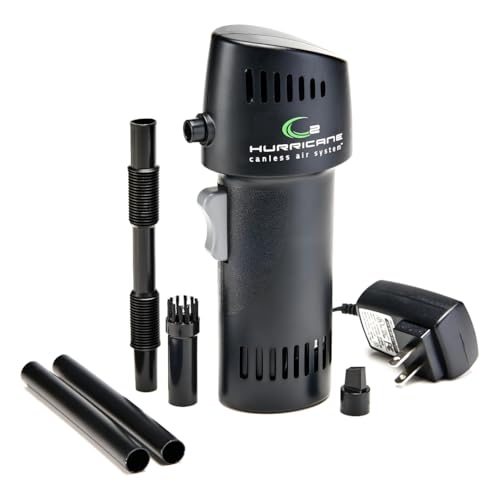
Canless Air System O2 Hurricane -- Rechargeable Alternative
The O2 Hurricane is an older rechargeable design with a round barrel form factor that resembles a canned duster. It uses a NiMH battery and micro-USB charging, which are older standards compared to the USB-C OPOLAR. Airflow is adequate for keyboard and surface cleaning but less powerful than the OPOLAR at peak speed. It ships with multiple nozzle attachments. The primary advantage is the form factor: users accustomed to holding a can-shaped duster will find the transition easier than switching to a gun-grip electric blower.

Single 10oz Compressed Air Can -- Best for Minimal Use
If you clean one computer once a year and want zero investment and zero charging, a single 10-oz can from any reputable brand (Dust-Off, Endust, 3M) handles the job at minimal cost. There is no reason to buy a rechargeable blower for this use case. The single can is also the right choice for spot cleaning -- removing debris from a keyboard key or a USB port -- where a full blower is disproportionate. Keep one in a drawer for ad-hoc cleaning needs between scheduled maintenance sessions.
In its favor
- Made in the USA Quality - Proudly manufactured in the USA for reliable performance, consis
- Powerful Cleaning Performance - Instantly blast away dust, lint, and debris from hard-to-r
- Safe for Sensitive Equipment - 100% moisture-free and residue-free compressed air ensures
- Precision Straw Nozzle Included - Direct focused air pressure into small spaces to clear v
- Extend Device Life - Regular dusting helps prevent overheating, lag, and hardware failure
What matters most
What to consider
Calculate your cost per use before deciding between canned and electric. Canned air at per can versus a rechargeable device reaches break-even at 4-5 cleaning sessions; if you clean quarterly across two or more computers, rechargeable pays off within the first year. Corded electric blowers suit fixed workstations; cordless suits travel or tight desk spaces. For canned gas, always verify the propellant is not flammable and follow the upright-use instructions to avoid liquid discharge. Pair any duster with a brush for compacted debris on heatsinks.
What to consider
For extended maintenance topics, the [best computer dust cleaner](/articles/best-computer-dust-cleaner) guide covers brushes and vacuum options that complement a duster. To understand why cooling maintenance affects performance, see [best computer fan](/articles/best-computer-fan). Our evaluation criteria are published on the [methodology](/methodology) page.
Frequently asked
You can blow compressed air into laptop vents to dislodge loose surface dust, but compacted debris inside the heatsink requires disassembly to remove properly. Forcing air through without an exit path can push dust deeper into the chassis. For laptops past the 2-year mark, opening the bottom panel to access the fan directly is more effective.
High-quality rechargeable electric dusters produce airflow comparable to a full compressed air can, but cordless models typically produce 60-70% of the peak pressure of corded electric blowers. For most desktop cleaning the difference is insignificant. For fine heatsink fin cleaning, corded blowers or full-pressure canned air perform marginally better.
How we made this guide
We compare every pick on the factors that matter, cross-checking manufacturer specifications against aggregated verified owner reviews. We rank independently and never take payment for placement. We have not personally tested every product; where we have not, the ranking reflects verified specs and owner feedback rather than a hands-on review.
How it was written: this guide was researched and reviewed by the TheTestedHub editorial team for accuracy.
Affiliate disclosure: TheTestedHub is reader-supported. When you buy through links on our site, we may earn a commission at no extra cost to you.
You might also like

Your Docking Station Match: CalDigit TS4 and More

Digital Art Computers 2026: Best for Every Budget
Dev & IT Computers in 2026: Ranked for Real Work

Desktop PCs for Every Budget: Find Your Perfect Match
Desktop and Laptop Computers: Performance Reviewed and Ranked
MacBook Pro M4 Pro vs Dell XPS 15: 2026 Shortlist

Buy the Best DIY Computer in 2026: Corsair One i300
