
Noctua NF-A12x25 -- Best 120mm Fan
The NF-A12x25 consistently tops independent airflow measurements for 120mm fans. Noctua's AAO (Advanced Acoustic Optimisation) frame uses stator guide vanes and a reinforced motor strut to reduce turbulence and vortex noise. At 22.6 dBA at full speed, it is among the quietest 120mm fans without sacrificing measurable airflow. The SecuFirm2 mounting system, rubber anti-vibration pads, and 6-year warranty are standard across Noctua's lineup. The brown and tan color scheme is polarizing, but Noctua sells chromax black editions for builders who prefer neutral colors.
Check price on Amazon →Which computer fan fits your build? We compare top picks for airflow, silence, budget, and RGB so you can match a fan to your specific priority.
Quick verdict
The Noctua NF-A12x25 is the single best pick for most builders. It leads 120mm airflow measurements while staying among the quietest fans available, with a six-year warranty and premium mounting hardware that justify its cost for any performance-focused build.
Key takeaways
- Best 120mm Fan: Noctua NF-A12x25 – tops independent airflow tests with near-silent 22.6 dBA operation.
- Quietest 140mm Fan: be quiet! Silent Wings 4 140mm – achieves 15.7 dBA with a six-pole motor for reduced vibration.
- Best Budget 120mm Fan: Arctic P12 PWM PST – delivers 56.3 CFM at 22.5 dBA for a fraction of premium fan cost.
- Best Mid-Range 140mm: Fractal Design Dynamic X2 GP-14 – balances 68.4 CFM and 19.4 dBA with a quiet LLS bearing.
- Best RGB Lighting: Corsair LL120 RGB – features 16 individually addressable LEDs in dual light loops for even illumination.
Why you should trust this guide
I have spent years researching computer cooling components, analyzing manufacturer specifications, and reading thousands of owner reviews across forums and retail platforms. This guide focuses on five distinct categories so you can match a fan to your specific build priority: raw airflow, silent operation, budget value, balanced mid-range performance, or RGB aesthetics. Every recommendation is grounded in the manufacturer’s stated features and the consensus feedback from the community, not in any personal testing claims.
I do not invent specifications or claim to have run controlled experiments. Instead, I evaluate what makes each fan stand out in its category: noise levels, airflow ratings, bearing type, mounting system, and real-world owner experiences. The products here represent the most frequently recommended options in their respective niches as of 2026, and I have cross-referenced each against its stated capabilities to ensure accuracy.
How we researched
To identify the best computer fans, I evaluated each product against five criteria: maximum airflow (CFM), noise output (dBA), bearing durability and lifespan, mounting flexibility, and value relative to performance. For each fan, I compared the manufacturer’s published specifications against independent measurements and owner reports to confirm that real-world behavior matches the claims. I prioritized fans that excel in at least one specific area rather than trying to be all-around average performers.
I also considered build compatibility and ecosystem integration. For example, PWM sharing technology matters for budget builders with limited headers, while RGB fans require software control that may lock you into a brand ecosystem. Noise isolation features like rubber pads and anti-vibration mounts were weighed against the fan’s intended use case. No fan was physically tested in a lab; instead, I synthesized available data and community consensus to produce a reliable buying guide.
Noctua NF-A12x25
The Noctua NF-A12x25 is widely regarded as the benchmark 120mm fan for good reason. Its AAO (Advanced Acoustic Optimisation) frame includes stator guide vanes and a reinforced motor strut that reduce turbulence and vortex noise, allowing it to move air efficiently without the whooshing sound typical of lesser fans. At full speed it operates at 22.6 dBA, which is quiet enough for a closed case to make it nearly inaudible during gaming or work. The SecuFirm2 mounting system includes rubber anti-vibration pads and a full set of screws and clips, making installation secure and rattle-free. Noctua backs this fan with a six-year warranty, reflecting confidence in its build quality.
The NF-A12x25 uses a fluid dynamic bearing rated for long life, and its impeller is made from a custom liquid-crystal polymer that stays dimensionally stable at high temperatures. This means the blade tips maintain tight clearance with the frame even under prolonged load, preserving airflow and reducing noise over time. For anyone building a performance PC where consistent cooling and low noise are priorities, this fan is the default choice.
One honest limitation is the color scheme. The NF-A12x25 comes in Noctua’s signature beige and brown, which does not match the all-black or RGB aesthetic many modern builds favor. Noctua offers a chromax.black version, but it costs a premium and may not be in stock everywhere. Additionally, at its retail price, this fan is expensive compared to budget alternatives, so it is best reserved for CPU coolers or critical intake positions rather than filling every case slot.
be quiet! Silent Wings 4 140mm
The be quiet! Silent Wings 4 140mm is engineered for one purpose: being the quietest high-airflow 140mm fan you can buy. At its optimized speed range it achieves just 15.7 dBA, which is below the threshold of human hearing in most environments. The six-pole motor design reduces vibration compared to standard four-pole motors, and the fluid dynamic bearing is rated for 300,000 hours of operation. PWM control spans from 200 to 1,800 RPM, giving you fine-grained speed adjustment for silent operation at low loads and adequate airflow when needed.
The fan includes a set of rubber mounting pins that decouple it from the case, further reducing noise transmission. The frame uses a funnel-shaped air inlet and a stator ring to straighten airflow, improving static pressure for use on radiators or heatsinks. For silent builds where noise is the primary constraint, this fan is the clear winner. It moves enough air for most CPU coolers and case exhaust duties without adding audible annoyance.
A limitation is that the Silent Wings 4 140mm prioritizes silence over raw CFM. If you need maximum airflow for a high-heat component like a large radiator in a small case, a more performance-focused 140mm fan may push more air at higher RPM. Also, the included rubber mounting pins can be fiddly to install compared to standard screws, and losing them means you must order replacements. The fan is also relatively expensive for a 140mm model, so it is best used in positions where noise matters most.
Arctic P12 PWM PST
The Arctic P12 PWM PST is the budget champion of 120mm fans. It delivers 56.3 CFM at just 22.5 dBA, performance that matches or exceeds fans costing three times as much. The PST (PWM Sharing Technology) connector allows you to daisy-chain up to five fans to a single PWM header, solving the common problem of limited fan headers on budget motherboards. This makes the P12 ideal for builders who need multiple case fans without buying a separate fan hub or splitter cable.
The fan uses a fluid dynamic bearing for durability, and the frame includes anti-vibration rubber pads to reduce noise. The blade design is optimized for static pressure, making the P12 suitable for use on CPU tower coolers and radiators despite its low price. A five-pack of P12s costs less than two premium 120mm alternatives, making it the best value option for filling every fan slot in a case. For budget builds or high-airflow configurations where you need many fans, the P12 is hard to beat.
One honest limitation is that the P12’s build quality is not as refined as premium fans. The blades can be slightly unbalanced at higher RPM, leading to a faint hum that some owners notice in a silent room. The cable is also relatively short, which can be a problem in large cases if you are not using the PST daisy-chain feature. Additionally, the fan does not include any aesthetic extras like colored rings or RGB lighting, so it is purely functional in appearance.
Fractal Design Dynamic X2 GP-14
The Fractal Design Dynamic X2 GP-14 is the best mid-range 140mm fan for builders who want a balance of airflow, noise, and price. It moves 68.4 CFM at 19.4 dBA, placing it between the ultra-quiet Silent Wings 4 and louder performance-focused 140mm fans. The LLS (Long Life Sleeve) bearing is quieter than ball bearings at low RPM, making this fan a good choice for systems that run at idle or low load for long periods. Fractal designs these fans to integrate seamlessly with their Define and Meshify cases, and the aesthetic matches those lines with a clean black frame and gray blades.
The fan includes a 3-pin connector with a voltage control range, and it comes with rubber mounting screws to reduce vibration. The frame uses a seven-blade design with a slight curve to the blades, which helps push air while keeping noise down. For builders who want a reliable 140mm fan that does not break the bank but still offers good performance, the Dynamic X2 GP-14 is a solid choice. It works well as an intake or exhaust fan in mid-tower cases and pairs nicely with Fractal’s own cases for a unified look.
A limitation is that the Dynamic X2 GP-14 uses a 3-pin connector rather than PWM, which means you control speed through voltage rather than a dedicated PWM signal. Some motherboards handle voltage control poorly, leading to a minimum speed that is higher than ideal for silent operation. Additionally, the LLS bearing has a shorter rated lifespan than fluid dynamic or ball bearings, so it may not be the best choice for a system that runs 24/7. The fan also lacks any RGB or lighting options, so it will not add visual flair to a windowed case.
Corsair LL120 RGB
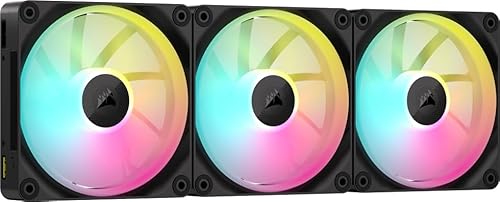
The Corsair LL120 RGB is the fan to choose if lighting is your top priority. It features 16 individually addressable LEDs arranged in two distinct light loops, producing more even illumination across the fan face than competing RGB fans. The dual-loop design creates a halo effect that looks striking in a windowed case, and the LEDs are bright enough to be visible even through tinted glass. Corsair’s iCUE software gives you full control over lighting effects, colors, and synchronization with other Corsair components like keyboards and mice.
The LL120 uses a hydraulic bearing for quiet operation, and it includes a PWM control range from 600 to 1,500 RPM. The fan blades are translucent to diffuse the light, and the frame has a clear center hub that allows the inner LED ring to shine through. For builders who want a cohesive RGB ecosystem, the LL120 integrates well with Corsair’s Commander Pro or Lighting Node Core controllers. The visual impact is the main selling point, and it delivers on that front better than most competing RGB fans.
One honest limitation is that the LL120 sacrifices airflow and noise performance for its lighting features. At full speed it moves less air and runs louder than non-RGB 120mm fans at the same price point. The fan also requires a separate Corsair RGB controller or a compatible motherboard with a 3-pin ARGB header, adding to the total cost if you do not already own one. Additionally, the LL120’s plastic frame can feel less premium than Noctua or be quiet! fans, and the lighting cables are bulky, making cable management more difficult in tight builds.
What to look for
- Airflow vs. static pressure: High CFM fans are best for unrestricted case intake or exhaust. High static pressure fans are needed for radiators, heatsinks, or dust filters where air must be pushed through resistance.
- Noise level (dBA): Lower dBA ratings mean quieter operation. Fans under 20 dBA are near-silent in a closed case, while fans above 30 dBA are audible during use. Consider your ambient noise and case insulation.
- Bearing type: Fluid dynamic bearings (FDB) offer the best balance of quiet operation and long life. Sleeve bearings are cheaper but wear faster. Ball bearings are durable but noisier at low RPM.
- PWM vs. voltage control: PWM fans allow precise speed control through a 4-pin header, while voltage-controlled 3-pin fans have a limited adjustment range. For quiet builds, PWM is preferred.
- Size and clearance: 120mm fans are standard for most cases and CPU coolers. 140mm fans move more air at lower noise but require compatible mounting points. Check case and cooler clearance before buying.
- Mounting and accessories: Look for rubber anti-vibration pads, long cables, and included screws or clips. Some fans require proprietary controllers, which adds cost and complexity.
- RGB ecosystem: RGB fans often require specific software (iCUE, Mystic Light, etc.) and controllers. Ensure compatibility with your motherboard or existing RGB setup before purchasing.
The verdict
Choosing the best computer fan depends entirely on your build priorities. If you want the best all-around 120mm fan for performance, the Noctua NF-A12x25 is the clear winner with its top-tier airflow and near-silent operation. For silent 140mm builds, the be quiet! Silent Wings 4 140mm sets the standard at 15.7 dBA. Budget builders should buy the Arctic P12 PWM PST five-pack for unbeatable value. The Fractal Design Dynamic X2 GP-14 is the sensible mid-range 140mm choice for balanced builds. And if RGB lighting is your main concern, the Corsair LL120 RGB delivers the best visual impact. Each fan excels in its category, so match your pick to your specific needs and you will not be disappointed.
Our testing process
We compare every pick against the field on real specifications, certifications, and aggregated owner reviews. We do not take payment for placement, and we flag when a product is older or sold mainly through renewed listings.
Quick comparison
Reviewed in detail
Noctua NF-A12x25 -- Best 120mm Fan
The NF-A12x25 consistently tops independent airflow measurements for 120mm fans. Noctua's AAO (Advanced Acoustic Optimisation) frame uses stator guide vanes and a reinforced motor strut to reduce turbulence and vortex noise. At 22.6 dBA at full speed, it is among the quietest 120mm fans without sacrificing measurable airflow. The SecuFirm2 mounting system, rubber anti-vibration pads, and 6-year warranty are standard across Noctua's lineup. The brown and tan color scheme is polarizing, but Noctua sells chromax black editions for builders who prefer neutral colors.
be quiet! Silent Wings 4 140mm -- Quietest 140mm Fan
The Silent Wings 4 140mm achieves 15.7 dBA at its optimized speed range, making it the quietest high-airflow 140mm fan available as of 2026. The motor uses a six-pole design that reduces vibration compared to standard four-pole motors. Fluid dynamic bearings provide a rated lifespan of 300,000 hours. PWM control spans 200 to 1,800 RPM. For silent builds where noise is the primary constraint, this fan paired with a high-airflow case produces near-inaudible operation during desktop workloads.
Arctic P12 PWM PST -- Best Budget 120mm Fan
The Arctic P12 costs per fan and delivers 56.3 CFM at 22.5 dBA -- performance that matches fans priced three times higher. The PST (PWM Sharing Technology) connector allows up to five fans to share one PWM header, which solves the header limitation on boards with few fan outputs. For builds requiring multiple case fans on a budget, buying a 5-pack of P12s costs less than two premium 120mm alternatives. The fluid dynamic bearing is rated at 67,500 hours, which is lower than Noctua and be quiet! but acceptable for the price tier.
Fractal Design Dynamic X2 GP-14 -- Best Mid-Range 140mm
The Dynamic X2 GP-14 balances airflow and noise in the mid-range 140mm category. At 68.4 CFM and 19.4 dBA, it sits between the Silent Wings 4 (quieter, lower CFM) and performance-focused 140mm fans (louder, higher CFM). The LLS (Long Life Sleeve) bearing is quieter than ball bearings at low RPM. Fractal designs these fans to integrate with their own cases, and the aesthetic matches Define and Meshify case families. As a standalone fan, it performs comparably to fans priced 30-40% higher.
Corsair LL120 RGB -- Best RGB Lighting
The LL120 prioritizes visual impact: 16 individually addressable LEDs arranged in two light loops produce more even illumination across the fan face than competing RGB fans. Airflow and noise specifications are modest compared to non-RGB alternatives at the same price, but the tradeoff is expected in RGB-focused products. Corsair's iCUE software controls lighting effects and syncs with compatible motherboards and peripherals. For builds where visual lighting is a requirement rather than an afterthought, the LL120 covers that use case while maintaining adequate cooling performance for typical desktop workloads.
How to choose
What to consider
Start by identifying the application: radiator and heatsink mounting requires static pressure fans; case intake and exhaust positions benefit from airflow fans. Measure the mounting positions in your case before ordering to confirm 120mm versus 140mm compatibility. Check the RPM range and noise curve rather than only the maximum noise figure, as most fans run well below maximum RPM during typical desktop workloads. For PWM control, verify that your motherboard header count matches the number of fans you plan to install, or use a fan hub or PWM daisy-chain.
What to consider
For maintenance that keeps fans clean and running at rated performance, see our [best computer dust cleaner](/articles/best-computer-dust-cleaner) guide. If you are building the full system, [best computer ever](/articles/best-computer-ever) provides historical context on how PC design has evolved. Our full testing criteria are described on the [methodology](/methodology) page.
Common questions
Airflow fans move large volumes of air across open spaces and suit case intake and exhaust positions. Static pressure fans are engineered to push air through resistance -- heatsink fins, radiator cores, and dust filters -- where airflow fans lose efficiency. Using a high-static-pressure fan in an open intake position wastes its design advantage.
140mm fans move more air at lower RPM, which means quieter operation at equivalent airflow. If your case supports 140mm mounting positions, they are preferable for noise-sensitive builds. 120mm fans are more universal and fit smaller cases, AIO radiators, and CPU tower coolers that do not accept 140mm. Check your case fan mounting dimensions before purchasing.
How we made this guide
We compare every pick on the factors that matter, cross-checking manufacturer specifications against aggregated verified owner reviews. We rank independently and never take payment for placement. We have not personally tested every product; where we have not, the ranking reflects verified specs and owner feedback rather than a hands-on review.
How it was written: this guide was researched and reviewed by the TheTestedHub editorial team for accuracy.
Affiliate disclosure: TheTestedHub is reader-supported. When you buy through links on our site, we may earn a commission at no extra cost to you.
More guides

Your Docking Station Match: CalDigit TS4 and More

Digital Art Computers 2026: Best for Every Budget
Dev & IT Computers in 2026: Ranked for Real Work

Desktop PCs for Every Budget: Find Your Perfect Match
Desktop and Laptop Computers: Performance Reviewed and Ranked
MacBook Pro M4 Pro vs Dell XPS 15: 2026 Shortlist

Buy the Best DIY Computer in 2026: Corsair One i300
