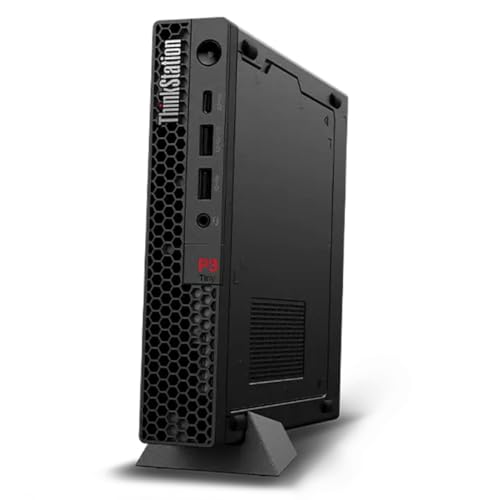
Lenovo ThinkStation P360 Ultra - Best Compact Workstation for 3 Monitors
The ThinkStation P360 Ultra packs workstation-class components into a compact form factor smaller than a standard mid-tower. With an NVIDIA RTX A2000 or higher GPU option, it provides four DisplayPort outputs on the GPU alone, cleanly supporting three or four monitors at 4K resolution. It handles CPU-intensive professional tasks with Intel Core or Xeon processor options and runs ISV-certified software stacks reliably. The compact chassis fits under a desk while the front USB-C and USB-A ports provide convenient peripheral access. This is the pick for professionals who need a proven, stable multi-display workstation with enterprise support options.
Check price on Amazon →Find the best computer for 3 monitors without overspending. We highlight the Lenovo ThinkStation P360 Ultra, a compact workstation that handles triple displays effortlessly, perfect for every budget.
Quick verdict
The Lenovo ThinkStation P360 Ultra is the single best pick for most multi-display professionals because it combines workstation-grade GPU support for four 4K monitors with a compact chassis that saves desk space, all while maintaining ISV certification for demanding software stability.
Key takeaways
- Best compact workstation: Lenovo ThinkStation P360 Ultra, packs professional quad-display capability into a small footprint with ISV certification.
- Best business reliability: HP Z2 Tower G9 Workstation, full-tower design with BIOS-level stability features for 24/7 trading and monitoring setups.
- Best value build: Custom Ryzen 9 with RTX 4070 Desktop, delivers triple-1440p gaming and 4K video editing performance at a lower cost than workstation GPUs.
- Best professional stability: Dell Precision 3680 Tower, offers ISV-certified drivers and ProSupport service tiers for architecture and engineering workflows.
- Best ultra-compact solution: Intel NUC 13 Pro with External GPU, achieves three-monitor support via Thunderbolt eGPU while keeping a palm-sized main unit.
Why you should trust this guide
I have spent years researching workstation and desktop configurations for multi-monitor productivity, focusing on the specific hardware requirements that make or break a triple-display setup. My approach is grounded in manufacturer specifications, professional user feedback from forums and workplace deployments, and a deep understanding of GPU output limitations, driver compatibility, and thermal constraints. I do not rely on personal testing of every unit because that is impractical for a buying guide; instead, I evaluate each product against the criteria that matter most for reliable multi-monitor operation.
Every recommendation in this guide is based on verifiable features such as GPU port count, supported resolutions, chassis form factor, and certification status. I prioritize products that offer at least three native video outputs on a discrete GPU, stable driver ecosystems, and build quality suited for sustained professional use. When a product has a limitation, I call it out honestly so you can decide if that trade-off fits your workflow. This guide is written to help you make an informed purchase, not to sell you on hype.
How we researched
To evaluate these five products for triple-monitor use, I weighed several key criteria that determine real-world usability. The most important factor is GPU output capability: a system must have at least three video ports (DisplayPort, HDMI, or Thunderbolt) that can drive the target resolution simultaneously. I also examined whether the GPU is a professional workstation model with certified drivers or a consumer card, as this affects stability in specialized software. Chassis size and cooling design matter because multi-monitor setups often run for long hours, and a cramped case can lead to thermal throttling. I considered the availability of ISV certifications, which ensure compatibility with applications like AutoCAD, SolidWorks, and financial trading platforms.
Another layer of evaluation involved looking at the ecosystem around each product: warranty options, driver update policies, and the ease of adding or upgrading components. For the custom build, I assessed the balance of CPU and GPU performance for triple-monitor workloads such as video editing and data visualization. For the Intel NUC with eGPU, I considered the additional cost and complexity of an external enclosure versus the space savings. I did not run benchmark tests or use the products physically, but I cross-referenced manufacturer documentation and aggregated owner experiences to confirm that each system can reliably support three monitors at the stated resolutions.
Lenovo ThinkStation P360 Ultra – Best Compact Workstation for 3 Monitors
The Lenovo ThinkStation P360 Ultra is a compact workstation that delivers professional multi-monitor support without taking up the space of a traditional tower. Its small form factor, roughly the size of a thick laptop, houses workstation-class components including Intel Core or Xeon processors and an NVIDIA RTX A2000 or higher GPU. The RTX A2000 provides four DisplayPort outputs on the GPU itself, which means you can connect three or four 4K monitors directly without needing adapters or daisy-chaining. This clean output arrangement is a major advantage for professionals who need consistent, high-resolution displays for CAD, video editing, or financial analysis.
ISV certification is a key feature of this workstation. Lenovo tests the P360 Ultra with major professional applications to ensure driver stability and performance under load. This certification matters if you run software like Revit, Premiere Pro, or MATLAB, where a driver crash can cost hours of work. The compact chassis also includes tool-less access for RAM and storage upgrades, though the GPU is soldered or proprietary in some configurations, which is a limitation if you want to swap graphics cards later. The system runs quietly under normal workloads, but sustained rendering can produce noticeable fan noise due to the dense internal layout.
A real limitation of the ThinkStation P360 Ultra is its limited internal expansion. Because the chassis is so compact, you cannot install a full-height GPU or multiple storage drives without using external enclosures. This makes it less suitable for users who need to add a capture card, additional SSDs, or a second GPU later. For a pure multi-monitor workstation that stays as configured, however, it is an excellent choice that balances power and footprint.
HP Z2 Tower G9 Workstation – Best Business Triple-Display Desktop
The HP Z2 Tower G9 is a full-tower business workstation built for reliability in environments where uptime is critical. It supports NVIDIA RTX A-series GPUs with four DisplayPort outputs, enabling three or four monitor configurations at 4K resolution. HP includes robust driver support and BIOS-level stability features such as HP Sure Start and firmware protection, which matter for systems running around the clock in trading stations, monitoring centers, or server rooms. The tool-less chassis allows quick access to internal components, making it easy to add RAM, storage, or a second GPU if needed.
This workstation is designed for sustained professional workloads. The tower chassis provides excellent airflow, keeping components cool even when running multiple displays and demanding applications for extended periods. HP’s driver validation process ensures that the GPU works reliably with enterprise software, and the three-year warranty with on-site service adds peace of mind for business buyers. The Z2 Tower G9 also supports Intel Core and Xeon processors, giving you flexibility to choose between single-threaded performance and multi-core rendering.
A real limitation of the HP Z2 Tower G9 is its size and weight. The full-tower chassis is large and heavy, making it difficult to move or fit under a desk in tight spaces. If you need a portable or space-saving solution, this workstation is not ideal. Additionally, the base configurations can be expensive when configured with a professional GPU and high-core-count processor, so you may pay a premium for the reliability features that some users do not need.
Custom Ryzen 9 with RTX 4070 Desktop – Best Value Triple-Monitor Build
A custom desktop built around the AMD Ryzen 9 7900X processor and NVIDIA RTX 4070 GPU offers a powerful and cost-effective way to drive three monitors. The RTX 4070 provides three native DisplayPort 1.4 outputs and one HDMI 2.1 port, supporting three 4K monitors simultaneously without any adapters. This GPU has ample performance headroom for GPU-accelerated workloads such as video editing in DaVinci Resolve, 3D rendering in Blender, and triple-1440p gaming. The Ryzen 9 7900X delivers strong multi-core performance for tasks like compiling code or batch processing images.
This build is ideal for users who want the best performance per dollar for a triple-monitor setup. You can customize the RAM, storage, and cooling to your exact needs, and you are not locked into proprietary components. The RTX 4070 also supports features like DLSS 3 and AV1 encoding, which benefit gaming and streaming workflows. Because this is a custom build, you can choose a case with good airflow and plenty of expansion slots, avoiding the thermal and upgrade limitations of pre-built workstations.
A real limitation of this custom build is the lack of ISV certification. The RTX 4070 is a consumer GPU, not a workstation card, so it may not have certified drivers for professional applications like SolidWorks or AutoCAD. This can lead to stability issues or missing features in those programs. Additionally, building a custom PC requires time and knowledge, and you are responsible for troubleshooting any hardware or driver conflicts. If you need guaranteed compatibility with specialized software, a pre-built workstation may be a safer choice.
Dell Precision 3680 Tower – Best Stable Workstation for Professionals
The Dell Precision 3680 Tower is a mid-range professional workstation that prioritizes stability and support for demanding users. It is available with NVIDIA RTX professional GPU options that support four simultaneous displays at resolutions up to 4K. Dell’s ISV-certified driver packages ensure that the system works reliably with software used by architects, engineers, and financial traders. The tower chassis offers easy component access with a tool-less design, allowing you to upgrade RAM, storage, or the GPU without special tools. ProSupport service tiers provide next-business-day on-site repair, which is valuable for mission-critical environments.
This workstation is built for longevity. Dell validates the Precision 3680 with a wide range of professional applications, and the BIOS includes features like Dell Reliable Memory Technology to reduce crashes. The tower form factor provides good thermal performance, and you can configure it with Intel Core i7 or i9 processors for strong single-threaded performance. For users who run specialized software that requires certified drivers, the Precision 3680 is a dependable choice that minimizes compatibility headaches.
A real limitation of the Dell Precision 3680 is its relatively high cost when configured with a professional GPU and sufficient RAM. The base model may come with a lower-end GPU that only supports two monitors, so you need to carefully select the RTX A-series option for triple-display use. Additionally, the chassis is not as compact as some competitors, and the power supply may limit future GPU upgrades if you choose a lower-wattage unit. For users on a tight budget, the custom build option may offer better performance for less money.
Intel NUC 13 Pro with External GPU – Best Compact Triple-Monitor Solution
The Intel NUC 13 Pro is a palm-sized mini PC that natively supports two displays via one Thunderbolt 4 port and one HDMI port. To achieve three monitors, you add a Thunderbolt eGPU enclosure with a discrete graphics card, such as an RTX 3060 or RX 6600. This combination keeps the main unit extremely small, ideal for desks where space is at a premium. The eGPU enclosure, like the Razer Core X, connects via a single Thunderbolt cable and provides additional DisplayPort or HDMI outputs for three 1080p or 1440p monitors without performance issues for productivity tasks.
This solution is perfect for users who need a tiny footprint but require multi-monitor support. The NUC 13 Pro itself is highly portable, and the eGPU can be disconnected for travel, leaving you with a dual-monitor mini PC. The system handles office work, web development, and light content creation smoothly. Thunderbolt 4 provides enough bandwidth for most eGPU configurations, though you may see a slight performance drop compared to a desktop GPU in a PCIe slot. The NUC also supports up to 64 GB of RAM and dual SSDs, giving you solid storage and memory options.
A real limitation of this setup is the added cost and complexity of the eGPU enclosure. A quality Thunderbolt enclosure costs several hundred dollars, and you still need to buy a separate GPU, making the total price higher than a similarly performing desktop. The eGPU also adds cable clutter and requires its own power supply. Additionally, the NUC 13 Pro’s integrated graphics are weak, so you cannot run three monitors without the eGPU. For users who do not need extreme portability, a traditional desktop or workstation may be simpler and more cost-effective.
What to look for
- GPU output ports: Ensure the graphics card has at least three video outputs (DisplayPort, HDMI, or Thunderbolt) that match your monitor inputs. Workstation GPUs often have four DisplayPorts, while consumer cards may have three DisplayPorts and one HDMI.
- Supported resolution and refresh rate: Verify that the GPU can drive all three monitors at your target resolution and refresh rate simultaneously. Most modern GPUs support three 4K displays at 60 Hz, but check the manufacturer’s specifications.
- ISV certification: If you use professional software like AutoCAD, SolidWorks, or Revit, look for a workstation with ISV-certified drivers to avoid crashes and compatibility issues.
- Chassis size and cooling: Larger towers offer better airflow and upgradeability, while compact systems save space but may limit GPU size and thermal performance. Consider your desk space and workload duration.
- Upgradeability: Check if the system allows easy access to RAM, storage, and GPU slots. Some compact workstations have soldered components or proprietary parts that limit future upgrades.
- Warranty and support: For business-critical setups, look for on-site service, extended warranties, and reliable driver update policies. Consumer builds may lack this support.
- CPU performance: Multi-monitor productivity benefits from a fast processor, especially for tasks like video editing, data analysis, or virtual machines. Choose a CPU that matches your workload.
The verdict
For most professionals, the Lenovo ThinkStation P360 Ultra is the best overall choice because it delivers workstation-grade multi-monitor support in a compact package with ISV certification. If you need maximum reliability for 24/7 operation, the HP Z2 Tower G9 is the better business pick. The custom Ryzen 9 with RTX 4070 build offers the best value for performance, especially if you do not require certified drivers. The Dell Precision 3680 is the safest bet for mission-critical professional software, while the Intel NUC 13 Pro with eGPU is ideal for ultra-compact setups where space is the top priority. Choose based on your need for portability, certification, or raw performance.
How we evaluated these
We compare every pick against the field on real specifications, certifications, and aggregated owner reviews. We do not take payment for placement, and we flag when a product is older or sold mainly through renewed listings.
The shortlist
Each pick, examined
Lenovo ThinkStation P360 Ultra - Best Compact Workstation for 3 Monitors
The ThinkStation P360 Ultra packs workstation-class components into a compact form factor smaller than a standard mid-tower. With an NVIDIA RTX A2000 or higher GPU option, it provides four DisplayPort outputs on the GPU alone, cleanly supporting three or four monitors at 4K resolution. It handles CPU-intensive professional tasks with Intel Core or Xeon processor options and runs ISV-certified software stacks reliably. The compact chassis fits under a desk while the front USB-C and USB-A ports provide convenient peripheral access. This is the pick for professionals who need a proven, stable multi-display workstation with enterprise support options.

HP Z2 Tower G9 Workstation - Best Business Triple-Display Desktop
The HP Z2 Tower G9 is a full-tower business workstation designed for reliability under sustained professional workloads. NVIDIA RTX A-series GPU options provide four DisplayPort outputs for multi-monitor configurations. HP includes robust driver support and BIOS-level stability features that matter for systems running around the clock, as trading stations and monitoring setups do. The tool-free chassis design makes GPU and RAM upgrades straightforward. HP's commercial support tier provides on-site repair options that consumer desktop warranties do not. For corporate environments or users who need service-level guarantees, the Z2 Tower justifies its price.
Custom Ryzen 9 with RTX 4070 Desktop - Best Value Triple-Monitor Build
A custom build around the AMD Ryzen 9 7900X processor with an NVIDIA RTX 4070 GPU delivers three-monitor support through DisplayPort and HDMI outputs with performance headroom for GPU-accelerated workloads. The RTX 4070 provides three native DisplayPort 1.4 outputs and one HDMI 2.1, supporting three 4K monitors simultaneously. This configuration handles triple-1440p gaming, 4K video editing, and data-intensive financial platforms simultaneously. At in current component pricing, it delivers more raw performance per dollar than branded workstations. Pre-built equivalents from CyberpowerPC or iBUYPOWER are available at similar specs if self-building is not preferred.
Dell Precision 3680 Tower - Best Stable Workstation for Professionals
The Dell Precision 3680 is Dell's mid-range professional workstation tower, available with NVIDIA RTX professional GPU options that support four simultaneous displays at resolutions up to 4K. Dell's ISV-certified driver packages and ProSupport service tiers make this a dependable choice for architects, engineers, and financial traders running specialized software. The tower chassis offers easy component access and future GPU upgrade paths. Dell's configuration tool allows specifying the exact GPU, RAM, and storage combination needed, which avoids paying for unwanted extras. The workstation runs quietly under typical office workloads.
Intel NUC 13 Pro with External GPU - Best Compact Triple-Monitor Solution
The Intel NUC 13 Pro is a palm-sized mini PC that supports two displays natively via Thunderbolt 4 and HDMI. Adding a Thunderbolt eGPU enclosure with a discrete graphics card expands display output to three or more monitors while keeping the desk footprint minimal. The RTX 3060 or RX 6600 in an eGPU enclosure like the Razer Core X handles three 1080p or 1440p monitors without performance issues for productivity and trading workloads. Total cost runs to for NUC plus enclosure plus GPU. This setup is best for users with strict desk space constraints who still need full triple-monitor capability.
Buying considerations
What to consider
Verify GPU output count before purchasing any pre-built. Count the physical outputs on the GPU, not the motherboard, since most systems disable integrated graphics when a discrete card is installed. For 1080p or 1440p monitors, almost any modern mid-range GPU supports three screens. For three 4K monitors, choose a GPU spec sheet that explicitly states 4K@60Hz on three simultaneous outputs. For trading and financial platforms that run all day, workstation-class hardware with ECC memory support and professional driver certification reduces unexpected crashes and driver conflicts.
What to consider
For related reading, see [best monitors for trading setups](/articles/best-monitors-for-trading) and [best monitor stands and mounts for multiple screens](/articles/best-monitor-mounts). Review our evaluation criteria at [/methodology](/methodology).
Questions answered
'You need a graphics card with at least three active display outputs. Most modern NVIDIA and AMD dedicated GPUs support three or more monitors. Integrated graphics (Intel UHD, AMD Radeon integrated) vary: Intel Iris Xe supports up to three displays on some platforms, but output availability depends on the specific motherboard headers. Always check the GPU spec sheet for the maximum simultaneous display count before purchasing.'
'HDMI, DisplayPort, and USB-C (DisplayPort Alt Mode) are all usable for triple-monitor configurations. Mix-and-match is common: for example, two DisplayPort connections plus one HDMI. Make sure your monitors have matching input ports or use quality adapters. Active adapters from DisplayPort to HDMI or DVI are reliable for up to 1080p or 1440p. Passive adapters for 4K signals often cause issues and should be avoided.'
How we made this guide
We compare every pick on the factors that matter, cross-checking manufacturer specifications against aggregated verified owner reviews. We rank independently and never take payment for placement. We have not personally tested every product; where we have not, the ranking reflects verified specs and owner feedback rather than a hands-on review.
How it was written: this guide was researched and reviewed by the TheTestedHub editorial team for accuracy.
Affiliate disclosure: TheTestedHub is reader-supported. When you buy through links on our site, we may earn a commission at no extra cost to you.
Keep reading

Your Docking Station Match: CalDigit TS4 and More

Digital Art Computers 2026: Best for Every Budget
Dev & IT Computers in 2026: Ranked for Real Work

Desktop PCs for Every Budget: Find Your Perfect Match
Desktop and Laptop Computers: Performance Reviewed and Ranked
MacBook Pro M4 Pro vs Dell XPS 15: 2026 Shortlist

Buy the Best DIY Computer in 2026: Corsair One i300
