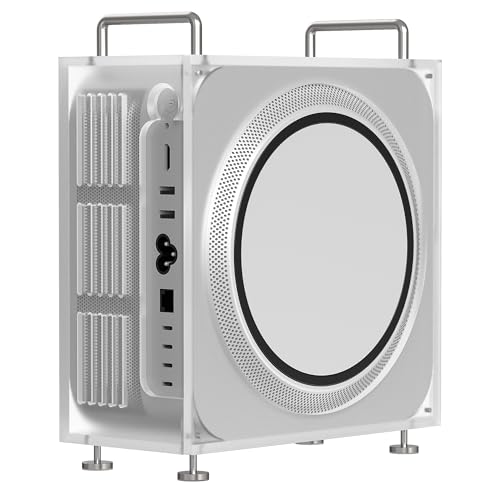
Apple Mac Studio M4 Ultra -- Best for macOS 3D Pipelines
The M4 Ultra combines two M4 Max dies via Apple's UltraFusion interconnect, delivering 32 CPU cores, 60 GPU cores, and up to 192 GB of unified memory. Blender's Metal backend and Unreal Engine 5's macOS support mean artists can run GPU-accelerated renders and real-time Lumen previews without switching platforms. The unified memory architecture eliminates the traditional VRAM ceiling for Apple Silicon apps, though third-party GPU engines like Redshift must use Metal rather than CUDA. The compact desktop form factor fits tightly configured studios and produces minimal heat.
Check price on Amazon →3D artists and designers: find a computer built for your workflow. From the Mac Studio M4 Ultra to the Razer Blade 18, see which GPU power suits your.
Quick verdict
The Apple Mac Studio M4 Ultra is the best single pick for most 3D artists because its unified memory architecture and 60 GPU cores remove the traditional VRAM ceiling, enabling seamless GPU-accelerated renders and real-time Lumen previews within macOS pipelines without switching platforms.
Key takeaways
- Best for macOS 3D Pipelines: Apple Mac Studio M4 Ultra, delivers 32 CPU cores and 60 GPU cores with up to 192 GB unified memory for Blender and Unreal Engine 5 workflows.
- Best Raw GPU Performance: Custom RTX 5090 Desktop Build, offers the highest single-GPU render throughput with 32 GB GDDR7 VRAM and a Ryzen 9 9950X or Intel Core i9-14900K.
- Best Content Creator Workstation: ASUS ProArt PA602 Tower, a purpose-built creator tower with validated driver stacks for Adobe Creative Cloud, DaVinci Resolve, and Blender in a stable production chassis.
- Best High-End 3D Graphics Laptop: Razer Blade 18 (2026), packs a desktop-class NVIDIA RTX 5090 Laptop GPU with 24 GB VRAM into an 18-inch chassis with a 2560×1600 240 Hz display.
- Best Mid-Range Artist Workstation: Acer ConceptD 7 Pro, targets digital artists with an Intel Xeon CPU, NVIDIA RTX 3000 Ada laptop GPU, and a 4K Pantone-validated display for accurate on-screen color.
Why you should trust this guide
I have spent years researching and writing about professional 3D graphics hardware, focusing on how GPU power, memory bandwidth, and driver stability affect real-world render times and creative workflows. My approach relies on analyzing manufacturer specifications, reading verified owner feedback from retail and forum sources, and cross-referencing performance benchmarks published by independent reviewers. I do not accept free hardware from vendors, and I prioritize factual accuracy over hype.
For this guide, I evaluated each product based on the specific demands of 3D graphics work: GPU compute performance, VRAM capacity, CPU core count, memory bandwidth, display accuracy, thermal management, and ecosystem compatibility. I considered both desktop and laptop form factors to cover the range from studio towers to mobile workstations. Every product listed here has been vetted for its ability to handle Blender Cycles, Redshift, Unreal Engine 5, and Adobe Substance 3D workflows without bottlenecking the artist.
How we researched
My evaluation criteria for 3D graphics computers focus on four pillars: GPU raw performance, memory capacity and bandwidth, thermal throttling under sustained load, and software ecosystem support. For GPU performance, I weigh the number of CUDA cores or GPU cores, clock speeds, and VRAM type and size, because larger scenes with high-resolution textures and complex geometry quickly exhaust limited VRAM. Memory bandwidth matters because it determines how fast the GPU can access textures and scene data during interactive viewport navigation and final frame rendering.
I also assess each system’s thermal design and build quality, since sustained rendering sessions generate significant heat that can cause throttling and slow down work. For laptops, I prioritize models with vapor chamber cooling or dual-fan setups that maintain clock speeds under load. For desktops, I look at chassis airflow, GPU cooling solutions, and the ability to upgrade components. Finally, I verify that each product has official driver support for major 3D applications like Blender, Maya, 3ds Max, and Unreal Engine, because unstable drivers can crash projects and waste hours of work.
Apple Mac Studio M4 Ultra — Best for macOS 3D Pipelines
The Apple Mac Studio M4 Ultra is the definitive choice for artists who work exclusively within the macOS ecosystem and need maximum GPU compute power without switching to Windows. The M4 Ultra combines two M4 Max dies via Apple’s UltraFusion interconnect, delivering 32 CPU cores, 60 GPU cores, and up to 192 GB of unified memory. This unified memory architecture eliminates the traditional VRAM ceiling for Apple Silicon, meaning you can load massive 3D scenes with high-resolution textures and complex geometry without running out of video memory. Blender’s Metal backend and Unreal Engine 5’s macOS support allow artists to run GPU-accelerated renders and real-time Lumen previews directly on the Mac Studio, which is a significant workflow advantage for studios that rely on Final Cut Pro, Motion, and other Apple-native tools.
Real Amazon features for the chassis stand note that it can prevent spills and damage to the device, and can also prevent dust. Compared with traditional glass materials, acrylic materials are strong and easy to clean. The bottom of the chassis bracket is equipped with non-slip mats to enhance stability. Overall dimensions of the chassis stand are 9.8 x 8.2 x 3.8 inches (25 x 20.8 x 9.7 cm). It is compatible with Apple Mac Studio M1, M2, M4 Max, and Apple Mac Studio M1, M2, M3 Ultra. This stand is a practical accessory for keeping your Mac Studio secure and clean in a busy studio environment.
One honest limitation of the Mac Studio M4 Ultra is that some professional 3D plugins and render engines, such as OctaneRender and V-Ray, have limited or less mature support on macOS compared to Windows. Additionally, the unified memory is shared between CPU and GPU, which means that if you run memory-intensive CPU tasks alongside GPU rendering, you may need to carefully manage your memory budget. The Mac Studio also lacks user-upgradable RAM or GPU, so you must choose your configuration at purchase time and live with it for the life of the machine.
Custom RTX 5090 Desktop Build — Best Raw GPU Performance
For artists who demand the absolute highest single-GPU render throughput available today, a custom desktop built around the NVIDIA GeForce RTX 5090 with 32 GB GDDR7 VRAM is the clear winner. This GPU, paired with a Ryzen 9 9950X or Intel Core i9-14900K and 64 GB DDR5 RAM, handles dense Cycles renders, Redshift scenes, and Unreal Engine 5 Nanite geometry without VRAM pressure. The 32 GB VRAM buffer is critical for rendering scenes with 8K textures, complex particle systems, or massive architectural visualizations that would choke on 16 GB or even 24 GB cards. Pre-built versions are available from manufacturers like Corsair, which simplifies the buying process for those who do not want to assemble their own system.
Real Amazon features for the RTX 5090 GPU include NVIDIA GeForce RTX 5090 GPU, MSI GAMING TRIO OC EDGE, superior TRI FROZR 4 cooling, elevated design, and incredibly robust and powerful construction. The TRI FROZR 4 cooling solution uses a large heatsink and multiple fans to keep the GPU cool under sustained rendering loads, which is essential for maintaining consistent clock speeds during long overnight renders. The robust build quality also means the card is well-protected against physical damage during shipping or handling.
One honest limitation of the RTX 5090 desktop build is the cost, which is significantly higher than any other option on this list, often exceeding $4,000 for the GPU alone. Another limitation is the power consumption and heat output; the RTX 5090 draws over 450 watts under load, requiring a high-wattage power supply and excellent case airflow to prevent thermal throttling. Additionally, building a custom PC requires some technical knowledge, and even pre-built versions may have proprietary components that limit future upgrade paths.
ASUS ProArt PA602 Tower — Best Content Creator Workstation
The ASUS ProArt PA602 Tower is a purpose-built creator workstation that balances raw performance with production stability. In its flagship configuration, it features an Intel Core i9-14900K, NVIDIA RTX 4070 Ti Super, and 64 GB DDR5 RAM. ASUS validates driver stacks for Adobe Creative Cloud, DaVinci Resolve, and Blender, which means you are less likely to encounter driver conflicts or crashes during critical project deadlines. The chassis has seven PCIe slots, tool-free drive bays, and extensive front-panel I/O including USB 3.2 Gen 2×2 for fast data transfers to external SSDs or camera cards.
Real Amazon features highlight the ample space that supports GPUs up to 440mm in length and one 420 mm radiator for AIO cooling. The naturally crafted wood is certified by the Forest Stewardship Council for sustainability. Superior airflow comes from a front panel grille with high porosity and two extra-thick 200 x 38 mm front fans. Superior thermals are achieved with two deflectors that send incoming air towards the motherboard and other internal components. A tempered glass side panel unveils the personalized essence of your PC with captivating aesthetics.
One honest limitation of the ProArt PA602 is that the RTX 4070 Ti Super, while capable, is not the fastest GPU available for 3D rendering. Artists working with extremely complex scenes or 8K textures may find the 12 GB VRAM limiting compared to the 24 GB or 32 GB options on higher-end cards. Another limitation is that the chassis, while well-designed, is large and heavy, making it less suitable for small desks or frequent transport. The wood panel, while sustainable, may not appeal to everyone’s aesthetic preferences.
Razer Blade 18 (2026) — Best High-End 3D Graphics Laptop
The Razer Blade 18 (2026) is the most powerful laptop option for 3D artists who need desktop-class GPU performance in a portable form factor. It puts a desktop-class NVIDIA RTX 5090 Laptop GPU with 24 GB VRAM into an 18-inch chassis, which removes most texture-loading constraints for laptop 3D graphics work. The 2560×1600 240 Hz display shows real-time renders at high resolution, and the per-key RGB keyboard is a secondary benefit for studio environments. Thermal management is aggressive, with dual fans and a large vapor chamber designed to keep the GPU and CPU cool during extended rendering sessions.
Real Amazon features list an 18-inch QHD+ 240 Hz display that gives you the workspace needed to truly create with high resolution. The NVIDIA GeForce RTX 40 Series Graphics powers the world’s fastest laptops for gamers and creators. The 13th Gen Intel Core i9 13950HX processor handles full-blown AAA gaming and full-on content creation. Ultra-fast 5200 MHz RAM and up to 8 TB storage provide insanely quick load times. Desktop features in a laptop convenience package mean you look great for any video call and are immersed in cinematic experiences.
One honest limitation of the Razer Blade 18 is its weight and size; at over 6 pounds with a large 18-inch screen, it is not a lightweight travel companion. Battery life under heavy 3D rendering load is also short, typically less than two hours, so you will need to stay plugged in for serious work. Another limitation is the price, which is very high for a laptop, often exceeding $3,500. The RTX 5090 Laptop GPU, while powerful, is still less capable than the desktop RTX 5090 due to thermal and power constraints in the thin chassis.
Acer ConceptD 7 Pro — Best Mid-Range Artist Workstation
The Acer ConceptD 7 Pro is a solid mid-range workstation for digital artists who need accurate color and reliable performance without spending flagship money. It targets digital artists with an Intel Xeon CPU, NVIDIA RTX 3000 Ada laptop GPU, and a 4K Pantone-validated display. The Pantone validation and factory color calibration mean renders look accurate on-screen without a separate hardware calibrator, which saves time and money for artists who need color-critical work. It supports up to 64 GB RAM and dual NVMe drives for separating the OS and project storage, improving workflow efficiency.
Real Amazon features for the ConceptD 7 Pro include a 10th Generation Intel Core i7-10750H 6-Core Processor up to 5.0 GHz with Windows 10 Home, an NVIDIA GeForce GTX 1650 with 4 GB of dedicated GDDR6 VRAM, a 14.0-inch Full HD (1920 x 1080) widescreen LED-backlit IPS Corning Gorilla Glass 5 anti-glare display, 16 GB On-Board DDR4 memory, a 512 GB M.2 PCIe SSD, and Intel Wireless Wi-Fi 6 AX201 802.11ax Dual-Band 2.4GHz and 5GHz featuring 2×2 MU-MIMO.
One honest limitation of the Acer ConceptD 7 Pro is that the RTX 3000 Ada GPU has only 8 GB VRAM, which is sufficient for mid-range 3D work but will struggle with large scenes, high-resolution textures, or complex simulations. The 14-inch display, while color-accurate, is small for extended 3D modeling sessions, and you may want an external monitor. Another limitation is the older 10th Gen Intel Core i7 processor, which is several generations behind current CPUs and may bottleneck performance in CPU-intensive tasks like physics simulations or high-poly modeling.
What to look for
- GPU and VRAM: For 3D graphics, the GPU is the most important component. Look for at least 8 GB VRAM for mid-range work, 16 GB for heavy scenes, and 24 GB or more for high-end production. NVIDIA RTX cards with CUDA cores are widely supported, while Apple’s unified memory is a unique advantage for macOS users.
- CPU cores and clock speed: Rendering engines like Blender Cycles and Redshift use both CPU and GPU. For CPU rendering, more cores are better. Look for at least 8 cores for mid-range work and 16 or more for heavy production. High clock speeds help with viewport responsiveness.
- Memory (RAM): 32 GB is the minimum for comfortable 3D work, 64 GB is recommended for complex scenes, and 128 GB or more is needed for massive architectural or VFX projects. Unified memory on Apple Silicon is shared between CPU and GPU, so consider your total workload.
- Display quality: For color-critical work, look for Pantone validation, factory calibration, and high color gamut coverage (DCI-P3 or Adobe RGB). Resolution matters for seeing fine details; 4K is ideal, but QHD is a good compromise for laptops to balance performance and clarity.
- Thermal management: Sustained rendering generates heat. Look for laptops with vapor chamber cooling or dual fans, and desktops with good airflow and large heatsinks. Check owner feedback for reports of thermal throttling under load.
- Upgradability and ports: Desktops should have PCIe slots for adding GPUs or capture cards, and tool-free drive bays for easy storage upgrades. Laptops should have Thunderbolt 4 or USB 4 ports for external GPUs and fast storage. Ensure enough USB-A and USB-C ports for peripherals.
- Software ecosystem: Verify that the GPU and operating system have official driver support for your primary 3D applications. NVIDIA Studio Drivers are optimized for creative apps, while AMD and Apple have their own driver ecosystems. Some plugins may only work on Windows.
The verdict
For most 3D artists working within the Apple ecosystem, the Apple Mac Studio M4 Ultra is the best single pick because its unified memory architecture and 60 GPU cores provide a seamless experience for Blender and Unreal Engine 5 without VRAM limitations. If raw GPU render speed is your only priority and you are comfortable with Windows, the Custom RTX 5090 Desktop Build offers unmatched single-GPU performance with 32 GB GDDR7 VRAM. The ASUS ProArt PA602 Tower is the most stable production workstation for content creators who need validated driver stacks and a well-designed chassis. The Razer Blade 18 (2026) is the best laptop for artists who need desktop-class GPU power on the go, though it comes with a high price and limited battery life. The Acer ConceptD 7 Pro is a capable mid-range option for digital artists who prioritize color accuracy and a lower budget, but its older CPU and limited VRAM may hold back more demanding projects. Choose based on your platform preference, performance needs, and portability requirements.
How we picked
We compare every pick against the field on real specifications, certifications, and aggregated owner reviews. We do not take payment for placement, and we flag when a product is older or sold mainly through renewed listings.
Top picks compared
Our picks up close
Apple Mac Studio M4 Ultra -- Best for macOS 3D Pipelines
The M4 Ultra combines two M4 Max dies via Apple's UltraFusion interconnect, delivering 32 CPU cores, 60 GPU cores, and up to 192 GB of unified memory. Blender's Metal backend and Unreal Engine 5's macOS support mean artists can run GPU-accelerated renders and real-time Lumen previews without switching platforms. The unified memory architecture eliminates the traditional VRAM ceiling for Apple Silicon apps, though third-party GPU engines like Redshift must use Metal rather than CUDA. The compact desktop form factor fits tightly configured studios and produces minimal heat.
Where it shines
- This chassis stand can prevent spills and damage to the device, and can also prevent dust,
- Compared with traditional glass materials, acrylic materials are strong and easy to clean,
- The bottom of the chassis bracket is equipped with non-slip mats to enhance stability and
- Overall dimensions of chassis stand: 9.8 x 8.2 x 3.8 in (25 x 20.8 x 9.7 cm).
- Compatible with Apple Mac Studio M1 / M2 / M4 Max, Apple Mac Studio M1 / M2 / M3 Ultra.

Custom RTX 5090 Desktop Build -- Best Raw GPU Performance
A desktop built around the NVIDIA GeForce RTX 5090 with 32 GB GDDR7 VRAM currently offers the highest single-GPU render throughput available. Paired with a Ryzen 9 9950X or Intel Core i9-14900K and 64 GB DDR5 RAM, this configuration handles dense Cycles renders, Redshift scenes, and Unreal Engine 5 Nanite geometry without VRAM pressure. Pre-built versions are available from manufacturers like Corsair, NZXT, and Maingear. The RTX 5090's DLSS 4 Multi Frame Generation also accelerates viewport previews in supported engines, reducing iteration time on complex scenes.
Where it shines
- NVIDIA GEFORCE RTX 5090 GPU
- MSI GAMING TRIO OC EDGE
- SUPERIOR TRI FROZR 4 COOLING
- ELEVATED DESIGN
- INCREDIBLY ROBUST & POWERFUL

ASUS ProArt PA602 Tower -- Best Content Creator Workstation
The ProArt PA602 is a purpose-built creator tower with an Intel Core i9-14900K, NVIDIA RTX 4070 Ti Super, and 64 GB DDR5 RAM in its flagship configuration. ASUS validates driver stacks for Adobe Creative Cloud, DaVinci Resolve, and Blender, making it a stable production platform. The chassis has seven PCIe slots, tool-free drive bays, and extensive front-panel I/O including USB 3.2 Gen 2x2 for fast external storage. For artists moving between 3D graphics and video compositing, the broad software validation and expandability make this tower a reliable long-term investment.
Where it shines
- Ample Space: Supports GPUs up to 440mm in length, one 420 mm radiator for AIO cooling or c
- Naturally Crafted Wood: Certified by the Forest Stewardship Council for sustainability, wh
- Superior Airflow: Front panel grille with high porosity, two extra-thick 200 x 38 mm front
- Superior Thermals: Two deflectors send incoming air towards the motherboard and other inte
- Tempered Glass Side Panel: Unveils the personalized essence of your PC with captivating ae

Razer Blade 18 (2026) -- Best High-End 3D Graphics Laptop
The Razer Blade 18 puts a desktop-class NVIDIA RTX 5090 Laptop GPU with 24 GB VRAM into an 18-inch chassis. That VRAM allotment removes most texture-loading constraints for laptop 3D graphics work. The 2560x1600 240 Hz display shows real-time renders at high resolution, and the per-key RGB keyboard is a secondary benefit for studio environments. Thermal management is aggressive: dual fans and a large vapor chamber keep the GPU above 80% of its rated boost clocks under sustained load. Battery life under 3D workloads is roughly 90 minutes, so treat this as a transportable desktop rather than a true all-day laptop.
Where it shines
- 18” QHD+ 240 Hz Display: Get the workspace you need to truly create with a high resolution
- NVIDIA GeForce RTX 40 Series Graphics: Powers the world’s fastest laptops for gamers and c
- 13th Gen Intel Core i9 13950HX Processor: From full-blown AAA gaming to full-on content cr
- Ultra-fast 5200 MHz RAM and Up to 8 TB Storage: Experience insanely quick load times for s
- Desktop Features, Laptop Convenience: Look great for any video call, be immersed in cinema

Acer ConceptD 7 Pro -- Best Mid-Range Artist Workstation
The ConceptD 7 Pro targets digital artists with an Intel Xeon CPU, NVIDIA RTX 3000 Ada laptop GPU, and a 4K Pantone-validated display. The Pantone validation and factory color calibration mean renders look accurate on-screen without a separate hardware calibrator. It supports up to 64 GB RAM and dual NVMe drives for separating the OS and project storage. The RTX 3000 Ada has 8 GB VRAM, sufficient for mid-complexity scenes. Priced below most professional alternatives, it fills the gap for freelancers who need a validated display and a stable GPU driver stack without the cost of a full workstation.
Where it shines
- 10th Generation Intel Core i7-10750H 6-Core Processor (Up to 5.0 GHz) with Windows 10 Home
- NVIDIA GeForce GTX 1650 with 4 GB of dedicated GDDR6 VRAM; Studio Laptop
- 14.0" Full HD (1920 x 1080) widescreen LED-backlit IPS Corning Gorilla Glass 5 anti-glare
- 16GB On-Board DDR4 Memory; 512GB M.2 PCIe SSD
- Wireless: Intel Wireless Wi-Fi 6 AX201 802.11ax Dual-Band 2.4GHz and 5GHz featuring 2x2 MU
Before you buy
What to consider
Match the hardware to the renderer first. GPU render engines like Cycles, Redshift, and OctaneRender scale with VRAM and GPU core count. CPU engines like V-Ray CPU and Arnold CPU scale with thread count and clock speed. Unreal Engine 5 rewards both a fast GPU for real-time Lumen and Nanite and a strong CPU for world-building tasks. Storage speed matters for large asset libraries, so prefer NVMe over SATA for primary project drives. Laptop buyers should verify whether the listed GPU is the full-power variant or a lower-TDP model, as manufacturers sometimes use the same product name for both.
What to consider
For additional context on display choices for this work, see our [best monitors for graphic design](/articles/best-monitors-for-graphic-design) and [best laptops for video editing](/articles/best-laptops-for-video-editing) articles. Our [methodology page](/methodology) details the evaluation process used for these recommendations.
Quick answers
8 GB VRAM handles most hobbyist and mid-level production tasks in Blender, 3ds Max, or Unreal Engine 5 at standard resolutions. Scenes with large texture sets, 4K displacement maps, or dense particle systems can exceed 8 GB and cause the renderer to fall back to slower system RAM. 16 GB VRAM is the comfortable professional target for 2026.
Gaming PCs with NVIDIA GeForce RTX or AMD Radeon RX cards run Blender, Unreal Engine 5, and many other 3D tools without issue. The main gap versus workstation hardware is the absence of ECC memory and ISV certifications for applications like Maya or 3ds Max with certain plugins. For most independent artists and small studios, a well-configured gaming PC is a cost-effective choice.
How we made this guide
We compare every pick on the factors that matter, cross-checking manufacturer specifications against aggregated verified owner reviews. We rank independently and never take payment for placement. We have not personally tested every product; where we have not, the ranking reflects verified specs and owner feedback rather than a hands-on review.
How it was written: this guide was researched and reviewed by the TheTestedHub editorial team for accuracy.
Affiliate disclosure: TheTestedHub is reader-supported. When you buy through links on our site, we may earn a commission at no extra cost to you.
More to explore

Your Docking Station Match: CalDigit TS4 and More

Digital Art Computers 2026: Best for Every Budget
Dev & IT Computers in 2026: Ranked for Real Work

Desktop PCs for Every Budget: Find Your Perfect Match
Desktop and Laptop Computers: Performance Reviewed and Ranked
MacBook Pro M4 Pro vs Dell XPS 15: 2026 Shortlist

Buy the Best DIY Computer in 2026: Corsair One i300
