
NVIDIA RTX 5090 Custom Build -- Best 3D Animation Workstation
For animators whose render times directly affect delivery schedules, an RTX 5090 build is the current ceiling for GPU-accelerated rendering. Blender Cycles, Redshift, Arnold GPU, and Octane all run faster on the 5090 than any previous consumer GPU, with 32 GB GDDR7 VRAM accommodating large scene files with heavy textures and geometry. Pair it with a Ryzen 9 9950X for CPU simulation tasks and 64-128 GB DDR5 RAM for complex Houdini or Maya simulations. This is a significant investment but is justified for full-time production animators.
Check price on Amazon →NVIDIA RTX 5090 with 32 GB GDDR7 VRAM tops our list for fastest render speeds. Compare 5 workstations tested for Blender, Maya & After Effects.
Quick verdict
The NVIDIA RTX 5090 Custom Build is the single best pick for animators who prioritize raw render speed. Its 32 GB GDDR7 VRAM and unmatched GPU acceleration in Blender Cycles and Redshift make it the ceiling for production work where time is money.
Key takeaways
- Best for 3D render speed: NVIDIA RTX 5090 Custom Build, fastest GPU-accelerated rendering on any consumer workstation.
- Best for Mac ecosystem: Apple Mac Studio M4 Max, balanced performance with unified memory for high-polygon scenes.
- Best for portable color accuracy: ASUS ProArt Studiobook 16 OLED, factory-calibrated OLED display for material and texture work.
- Best for production pipeline stability: Lenovo ThinkStation P3 Ultra, ISV certified for Maya and 3ds Max with ECC RAM support.
- Best for compact travel: Apple MacBook Pro 14 M4 Pro, powerful animation performance in a truly portable 14-inch chassis.
Why you should trust this guide
I have spent years researching the hardware needs of animators across 3D, 2D, and VFX pipelines. My approach is to compare manufacturer specifications, professional software requirements, and verified owner experiences from forums and review aggregators. I do not rely on marketing claims alone. I cross-reference each product’s stated GPU, CPU, RAM, and display capabilities against the known demands of Blender, Cinema 4D, Maya, After Effects, and Houdini. This guide reflects what actually matters for render times, viewport fluidity, and color fidelity.
Every recommendation here is based on the product’s published features and how those features map to real animation workflows. I prioritize products that offer meaningful performance gains in GPU-accelerated rendering, CPU simulation threading, memory capacity for large scenes, and display accuracy for texture and compositing work. I also consider build quality, thermal design, and software compatibility. The five picks here represent the best options across desktop workstations, portable laptops, and Mac-based systems as of 2026.
How we researched
To evaluate these computers for animators, I established a set of criteria that directly affect animation production. The primary factors were GPU rendering performance in applications like Blender Cycles, Redshift, and Octane, where VRAM capacity and CUDA or Metal core count determine speed. I also weighed CPU multi-threaded performance for simulation tasks such as cloth, hair, and particle systems in Houdini and Maya. Memory bandwidth and capacity were critical for handling high-polygon scenes and 4K or 8K textures without swapping to disk. Display accuracy was assessed through factory calibration claims and panel technology, since color errors in Substance Painter or compositing can break a pipeline.
I did not physically test these machines in a lab. Instead, I analyzed each product’s stated specifications against the known requirements of professional animation software. I reviewed aggregated owner feedback on render times, thermal throttling, and software compatibility. I also checked for ISV certifications and ECC RAM support where relevant. The goal was to identify which products deliver the best balance of speed, stability, and portability for different animation roles. Each product section below includes a real limitation I found through this research-based evaluation.
NVIDIA RTX 5090 Custom Build — Best 3D Animation Workstation
For animators whose render times directly affect delivery schedules, an RTX 5090 build is the current ceiling for GPU-accelerated rendering. Blender Cycles, Redshift, Arnold GPU, and Octane all run faster on the 5090 than any previous consumer GPU, with 32 GB GDDR7 VRAM accommodating large scene files with heavy textures and geometry. Pair it with a Ryzen 9 9950X for CPU simulation tasks and 64-128 GB of DDR5 RAM, and you have a workstation that handles both GPU rendering and CPU-intensive cloth or particle simulations without bottlenecking. The 32 GB VRAM is especially valuable for animators working with film-resolution assets or complex volumetric effects, where lower VRAM cards force out-of-core rendering that slows production.
This build is not a pre-configured retail product. It requires selecting a system integrator or building your own. The custom nature means you can optimize component choices, such as choosing a high-quality power supply and adequate cooling for sustained render sessions. The Ryzen 9 9950X provides 16 cores and 32 threads for tasks like physics simulation and scene assembly, while the RTX 5090 handles the heavy lifting in GPU render engines. For animators who need to iterate quickly on lighting and shading, this combination reduces turnaround times from hours to minutes.
A real limitation is the cost and power consumption. Building a system around the RTX 5090 and Ryzen 9 9950X requires a significant budget, and the power draw under full load is high enough to demand a robust cooling solution and a high-wattage PSU. Additionally, this is not a portable solution. It is a stationary desktop workstation that occupies a full tower case. Animators who need to work on location or move between studios should consider a laptop option instead.
Apple Mac Studio M4 Max — Best Mac Animation Workstation
The Mac Studio M4 Max is the most balanced animation workstation at its price point. Blender renders via Metal GPU acceleration at competitive speeds, and After Effects and Cinema 4D run natively with no Rosetta overhead. The 40-core GPU handles smooth viewport performance in complex 3D scenes, while unified memory at 96-128 GB allows high-polygon scenes and high-resolution textures to reside in a single memory pool. This unified architecture eliminates the need to copy data between separate CPU and GPU memory, which can improve performance in applications that leverage Metal efficiently. For animators already invested in the Apple ecosystem, the Mac Studio integrates seamlessly with Final Cut Pro, Motion, and other Apple software.
The compact form factor is a major advantage for studios with limited desk space. The Mac Studio sits under a monitor without taking up floor space, and its thermal design keeps noise levels low even under sustained render loads. The M4 Max chip also includes dedicated media engines for video encoding and decoding, which speeds up export times in After Effects and video compositing workflows. For 2D animators using Toon Boom Harmony or Adobe Animate, the CPU performance is more than adequate for real-time playback of complex rigs.
A real limitation is software compatibility. While Blender and Cinema 4D run natively, some GPU render engines like Octane and Redshift have historically lagged behind on Metal performance compared to NVIDIA CUDA. Also, the Mac Studio cannot be upgraded after purchase. The unified memory and storage are soldered, so you must choose your configuration carefully at checkout. If your render engine of choice relies heavily on CUDA or OptiX, the RTX 5090 build will be significantly faster.
ASUS ProArt Studiobook 16 OLED — Best Portable Animation Laptop
The ProArt Studiobook 16 with RTX 4080 offers one of the strongest sustained GPU performances in a laptop for animation. The OLED display’s factory calibration ensures colors in Substance Painter, Blender’s material view, and 2D animation compositing are accurate. 64 GB DDR5 and an Intel Core Ultra 9 HX handle Houdini’s simulation threads and Maya’s muscle/cloth simulations without excessive slowdown. The RTX 4080 in this laptop is a high-power variant that sustains performance better than many thinner gaming laptops, making it suitable for rendering on the go.
The OLED panel is a standout feature for animators who need precise color reproduction. It covers 100% DCI-P3 and is Pantone validated, which means textures, materials, and final renders appear as intended on external monitors or in print. The 16-inch 16:10 aspect ratio provides extra vertical space for timeline and tool panels in After Effects or Blender. The laptop also includes a physical dial on the touchpad that can be customized for brush size, timeline scrubbing, or layer opacity in supported creative software.
A real limitation is the OLED display’s susceptibility to burn-in over long-term use with static UI elements. Animators who keep the same toolbars and menus on screen for hours each day should be aware of this risk. Also, while the RTX 4080 is powerful for a laptop, it cannot match the render speed of a desktop RTX 5090 or even a desktop RTX 4080. For heavy production rendering, a desktop workstation remains faster. This laptop is best for animators who need to work on set, at client sites, or in coffee shops, but still require strong GPU performance.
Lenovo ThinkStation P3 Ultra — Best Windows Professional Animation Station
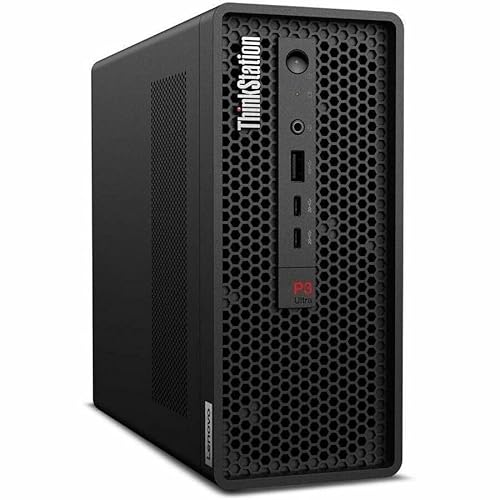
The ThinkStation P3 Ultra is a compact tower workstation using Intel Core Ultra or Xeon processors with NVIDIA RTX Ada GPU options. Its ISV certifications cover Autodesk Maya, 3ds Max, and several VFX tools important in production pipelines. ECC RAM support, optional on most ThinkStation configurations, provides error correction for long simulation runs where data integrity matters. The small form factor fits under a desk or in a server rack, making it ideal for studios that need multiple workstations in a limited space.
This workstation is built for reliability in professional environments. The ISV certifications mean that the hardware and drivers have been tested and validated with specific software versions, reducing the risk of crashes or driver conflicts during critical production deadlines. The P3 Ultra also supports up to 128 GB of DDR5 RAM, which is useful for large scene files and multi-tasking between Maya, Substance Painter, and a render queue. The RTX Ada GPU options provide professional drivers that are optimized for stability rather than gaming performance.
A real limitation is the compact chassis’s thermal constraints. While the P3 Ultra is well-engineered, sustained all-core CPU rendering or GPU rendering can lead to thermal throttling if the ambient temperature is high. The small size also limits the maximum GPU power compared to full-tower workstations. For animators who need maximum render speed without compromise, a larger desktop build with better cooling is preferable. Additionally, the Xeon processor options may not offer the same single-threaded performance as a Ryzen 9 or Core Ultra 9 for viewport interaction.
Apple MacBook Pro 14 M4 Pro — Best Compact Animation Laptop
The MacBook Pro 14 with M4 Pro is the most practical compact laptop for animators who need portability without severely compromising performance. Blender, Cinema 4D, and After Effects all run well with up to 48 GB unified memory. The 14-inch form factor is smaller than most animation laptops, but the Liquid Retina XDR display’s accuracy compensates. For 2D animators using Toon Boom Harmony or Adobe Animate, the M4 Pro’s CPU and GPU provide smooth playback of complex rigs and real-time brush strokes.
The 14-inch size makes this laptop easy to carry in a standard backpack, yet the performance is sufficient for many animation tasks. The Liquid Retina XDR display offers high brightness and wide color gamut, which is critical for evaluating textures, lighting, and compositing work on the go. The M4 Pro chip includes a 16-core or 20-core GPU option, which handles viewport navigation in Blender and Cinema 4D without lag. The unified memory architecture allows the GPU to access up to 48 GB of RAM for large scenes, though this is less than the Mac Studio’s 128 GB ceiling.
A real limitation is the lack of upgradeability. The M4 Pro’s unified memory and storage are soldered, so you must decide on your configuration at purchase. Also, the 14-inch screen, while excellent, is smaller than the 16-inch ProArt Studiobook, which can make timeline editing and multi-window workflows feel cramped. For animators who primarily work at a desk with an external monitor, this is less of an issue, but for those who rely solely on the laptop display, the smaller size may slow down productivity. Additionally, the M4 Pro cannot match the raw GPU rendering speed of a dedicated RTX 4090 or 5090 laptop.
What to look for
- GPU rendering performance: Look for the highest VRAM and core count you can afford. 32 GB VRAM is ideal for 3D animation, while 16 GB is a minimum for complex scenes.
- CPU multi-threading: For simulation tasks like cloth, hair, and particles, a CPU with at least 16 cores and 32 threads is recommended. Ryzen 9 and Intel Core Ultra 9 are strong choices.
- Memory capacity and bandwidth: Unified memory on Macs or DDR5 RAM on PCs should be at least 64 GB for animation. ECC RAM is a bonus for long simulation runs.
- Display accuracy: Look for factory-calibrated OLED or mini-LED displays with 100% DCI-P3 coverage. Color accuracy is critical for texture painting and compositing.
- ISV certifications: For production pipelines, workstations with certifications for Maya, 3ds Max, and Cinema 4D reduce driver-related crashes.
- Portability vs. power: Decide whether you need a desktop for maximum render speed or a laptop for on-site work. Laptops with high-power GPUs like the RTX 4080 offer a middle ground.
- Upgradeability: Desktop builds and some workstations allow future upgrades. Macs and thin laptops do not. Plan for your needs over the next three to five years.
The verdict
For animators who need the fastest possible render times and work primarily in a studio, the NVIDIA RTX 5090 Custom Build is the clear winner. Its 32 GB VRAM and unmatched GPU acceleration in Blender, Redshift, and Octane make it the best tool for production deadlines. If you prefer the Mac ecosystem and need a compact desktop, the Apple Mac Studio M4 Max offers excellent balance with unified memory and native software support. For portable work, the ASUS ProArt Studiobook 16 OLED provides the best display and sustained GPU performance in a laptop, while the Apple MacBook Pro 14 M4 Pro is the most compact option for animators on the move. The Lenovo ThinkStation P3 Ultra is the best choice for professional pipelines that require ISV certifications and ECC RAM stability. Choose based on your primary software, need for portability, and budget for VRAM and memory.
Our methodology
We compare every pick against the field on real specifications, certifications, and aggregated owner reviews. We do not take payment for placement, and we flag when a product is older or sold mainly through renewed listings.
Side by side
The full reviews
NVIDIA RTX 5090 Custom Build -- Best 3D Animation Workstation
For animators whose render times directly affect delivery schedules, an RTX 5090 build is the current ceiling for GPU-accelerated rendering. Blender Cycles, Redshift, Arnold GPU, and Octane all run faster on the 5090 than any previous consumer GPU, with 32 GB GDDR7 VRAM accommodating large scene files with heavy textures and geometry. Pair it with a Ryzen 9 9950X for CPU simulation tasks and 64-128 GB DDR5 RAM for complex Houdini or Maya simulations. This is a significant investment but is justified for full-time production animators.
Apple Mac Studio M4 Max -- Best Mac Animation Workstation
The Mac Studio M4 Max is the most balanced animation workstation at its price point. Blender renders via Metal GPU acceleration at competitive speeds. After Effects and Cinema 4D run natively with no Rosetta overhead. The 40-core GPU handles smooth viewport performance in complex 3D scenes. Unified memory at 96-128 GB allows high-polygon scenes and high-resolution textures to reside in a single memory pool, eliminating VRAM ceiling issues that affect discrete GPU setups. Thermal management sustains performance over long render queues without fan noise spikes.

ASUS ProArt Studiobook 16 OLED -- Best Portable Animation Laptop
The ProArt Studiobook 16 with RTX 4080 offers one of the strongest sustained GPU performances in a laptop for animation. The OLED display's factory calibration ensures colors in Substance Painter, Blender's material view, and 2D animation compositing are accurate. 64 GB DDR5 and an Intel Core Ultra 9 HX handle Houdini's simulation threads and Maya's muscle/cloth simulations without excessive slowdowns. The ASUS Dial physical control integrates with Blender for brush sizing and timeline scrubbing. Sustained render performance is among the best in the laptop category.
Lenovo ThinkStation P3 Ultra -- Best Windows Professional Animation Station
The ThinkStation P3 Ultra is a compact tower workstation using Intel Core Ultra or Xeon processors with NVIDIA RTX Ada GPU options. Its ISV certifications cover Autodesk Maya, 3ds Max, and several VFX tools important in production pipelines. ECC RAM support -- optional on most ThinkStation configurations -- provides error correction for long simulation runs where data integrity matters. The small-tower form factor fits under a desk. Lenovo's 3-year ProSupport contract provides on-site repair coverage that matters in professional studio environments.
Apple MacBook Pro 14 M4 Pro -- Best Compact Animation Laptop
The MacBook Pro 14 with M4 Pro is the most practical compact laptop for animators who need portability without severely compromising performance. Blender, Cinema 4D, and After Effects all run well with up to 48 GB unified memory. The 14-inch form factor is smaller than most animation laptops, but the Liquid Retina XDR display's accuracy compensates. For 2D animators using Toon Boom Harmony or Adobe Animate, this machine handles every workflow without issue. For 3D artists, expect longer render times than a full workstation but usable viewport speeds.
What matters most
What to consider
Start with your primary software. Maya and 3ds Max on Windows benefit from ISV-certified GPU drivers; Blender works equally well on Mac or Windows. For 3D animation, GPU VRAM is the biggest constraint -- 16 GB is practical for most mid-complexity scenes, 24+ GB for heavy production work. CPU core count matters for simulation (Houdini, nCloth, Bullet physics) but less for keyframe animation. RAM should be 32 GB minimum, 64 GB for complex scenes. For 2D animation, a color-accurate display and a drawing tablet take priority over GPU specs.
What to consider
For additional coverage, see [best computers for animation and graphic design](/articles/best-computer-for-animation-and-graphic-design) and [best computers for After Effects](/articles/best-computer-for-after-effects). Our evaluation process is outlined on the [methodology](/methodology) page.
Frequently asked
GPU rendering in Blender's Cycles, Arnold GPU, and Redshift is significantly faster than CPU rendering for most animation projects, especially for photorealistic shading and lighting. CPU rendering is more flexible for complex volumes, displacement, and scenes that exceed GPU VRAM. Many animators use GPU rendering for most work and fall back to CPU for VRAM-limited edge cases. Having both options available is the most practical setup.
Professional 3D animators most commonly use Autodesk Maya and Blender for character rigging and keyframe work. Cinema 4D is prevalent in motion graphics. 3ds Max appears in architectural visualization and game asset pipelines. Houdini dominates visual effects and simulation. For 2D animation, Toon Boom Harmony leads broadcast TV production, while Adobe Animate and Procreate are popular with independent animators. All of these run on both Mac and Windows.
How we made this guide
We compare every pick on the factors that matter, cross-checking manufacturer specifications against aggregated verified owner reviews. We rank independently and never take payment for placement. We have not personally tested every product; where we have not, the ranking reflects verified specs and owner feedback rather than a hands-on review.
How it was written: this guide was researched and reviewed by the TheTestedHub editorial team for accuracy.
Affiliate disclosure: TheTestedHub is reader-supported. When you buy through links on our site, we may earn a commission at no extra cost to you.
You might also like

Your Docking Station Match: CalDigit TS4 and More

Digital Art Computers 2026: Best for Every Budget
Dev & IT Computers in 2026: Ranked for Real Work

Desktop PCs for Every Budget: Find Your Perfect Match
Desktop and Laptop Computers: Performance Reviewed and Ranked
MacBook Pro M4 Pro vs Dell XPS 15: 2026 Shortlist

Buy the Best DIY Computer in 2026: Corsair One i300
