
Dell XPS 15 9530 -- Thin Enough for Client Meetings
The XPS 15 fits an Intel Core i9-13900H and NVIDIA RTX 4060 Laptop GPU into a 1.86 kg chassis. For architects who carry their machine to site visits and client presentations, this weight matters. AutoCAD 2026 and SketchUp Pro run without hesitation, and the 3.5K OLED display makes rendered images look strong on the spot. Revit handles medium-complexity projects well; very large linked models with multiple disciplines will push the 32 GB RAM ceiling. The lack of an SD card slot is a minor inconvenience for architects who photograph reference material in the field.
Check price on Amazon →HP ZBook Fury 16 G11 leads with ISV certification for Revit and MicroStation. Dell XPS 15 offers portability, Mac Studio excels in Rhino. Compare five builds.
Quick verdict
The HP ZBook Fury 16 G11 is the single best pick for most architecture professionals. Its ISV certification for Revit, AutoCAD, and MicroStation removes driver risk, while the NVIDIA RTX 4000 Ada Generation GPU and up to 128 GB ECC RAM handle large BIM deliverables without compromise.
Key takeaways
- Best for portability: Dell XPS 15 9530, light 1.86 kg chassis with a strong OLED display for client meetings.
- Best for BIM reliability: HP ZBook Fury 16 G11, ISV certified for Revit and MicroStation with validated drivers.
- Best rendering value: Lenovo Legion Pro 7i, RTX 4080 GPU performance below workstation pricing for V-Ray and Enscape.
- Best for Rhino on macOS: Apple Mac Studio M4 Max, native Apple Silicon performance for parametric modeling and Grasshopper.
- Best for studio coordination: HP Z8 Fury G5 Tower, dual Xeon processors and up to 2 TB RAM for large project files.
Why you should trust this guide
I have spent years researching computer specifications for architectural workflows, focusing on the intersection of CAD, BIM, and rendering performance. My approach relies on manufacturer specifications, professional user feedback from architecture forums, and the documented requirements of software like Autodesk Revit and V-Ray. I do not claim to have tested these machines myself, but I have cross-referenced independent benchmarks and long-term owner experiences to identify which configurations truly meet the demands of architects.
The architecture profession demands machines that balance raw compute power with software compatibility. A fast GPU is meaningless if your Revit project crashes from an unvalidated driver. A light laptop is useless if it cannot open a large coordination model. This guide focuses on five products that each solve a specific pain point, from client-portable laptops to studio render towers. I have included honest limitations for every product to help you decide based on your actual workflow, not marketing claims.
How we researched
To evaluate these computers, I established criteria based on the three primary workloads architects face: 2D CAD drafting (AutoCAD, SketchUp), BIM modeling (Revit, ArchiCAD, Bentley MicroStation), and GPU rendering (V-Ray, Enscape, Twinmotion). For each product, I examined the CPU core count and clock speed, GPU memory and architecture, RAM capacity and type, and display quality for color accuracy and brightness. I also weighed portability against thermal performance, since a thin laptop that throttles under load is not useful for rendering.
I prioritized ISV certification for BIM workflows because driver validation reduces crash risk. For rendering, I focused on GPU compute performance and memory bandwidth. I ignored marketing buzzwords like “AI-ready” and instead looked at whether the hardware meets the software minimum and recommended specifications. I also considered real-world feedback from architects who use these machines daily, particularly regarding noise levels, thermal throttling, and software compatibility issues. The final selection represents the best balance of performance, reliability, and price for specific architectural use cases.
Dell XPS 15 9530 — Thin Enough for Client Meetings
The Dell XPS 15 9530 fits an Intel Core i9-13900H processor and NVIDIA RTX 4060 Laptop GPU into a chassis that weighs just 1.86 kg. For architects who carry their machine to site visits and client presentations, this weight matters. You can slip it into a messenger bag without shoulder strain, and the 3.5K OLED display makes rendered images look strong on the spot. Colors pop, and contrast is excellent for showing off material studies or lighting concepts directly from Enscape or Twinmotion.
AutoCAD 2026 and SketchUp Pro run without hesitation on this configuration. The i9-13900H handles medium-complexity Revit projects well, though very large linked models with multiple disciplines may cause slowdowns. The RTX 4060 is sufficient for real-time viewport navigation and occasional GPU rendering, but it is not a workstation-class GPU. For architects who primarily draft and present, the XPS 15 is a strong daily driver.
The honest limitation is thermal throttling under sustained load. The slim chassis cannot dissipate heat as effectively as a thicker workstation, so long render sessions or heavy BIM operations may cause the CPU to reduce clock speed. This is a trade-off for portability. Also, RAM is soldered and non-upgradeable, so you need to choose your configuration carefully at purchase.
HP ZBook Fury 16 G11 — Certified for BIM
The HP ZBook Fury 16 G11 carries ISV certification for Autodesk Revit, AutoCAD, and Bentley MicroStation. This means the GPU drivers are validated by the software vendors, reducing the risk of crashes during critical deadlines. For architecture firms running large BIM deliverables with coordination models from structural and MEP engineers, this certification is not a luxury. It is a safety net that prevents driver conflicts from derailing your project.
Under the hood, the ZBook Fury 16 offers an NVIDIA RTX 4000 Ada Generation GPU and support for up to 128 GB of DDR5 ECC RAM. ECC memory corrects data errors automatically, which matters when you are working on multi-hundred-megabyte Revit models where a single corrupted bit can cause a crash. The 16-inch display reaches 1200 nits brightness, which is useful for reviewing drawings in bright environments like construction trailers or sunlit offices.
The honest limitation is the price point. This is a professional workstation, and it costs significantly more than a consumer laptop with similar raw specs. You pay for the ISV certification, the ECC RAM, and the build quality. Additionally, the ZBook Fury is heavier than the Dell XPS 15, so it is less convenient for daily commuting if you prioritize weight above all else.
Lenovo Legion Pro 7i — GPU Rendering Without Workstation Pricing
The Lenovo Legion Pro 7i prioritizes GPU performance with an NVIDIA RTX 4080 Laptop GPU. This makes V-Ray and Enscape GPU rendering significantly faster than workstations with lower-tier graphics cards like the RTX 4060 or even some RTX 4000 series. For architectural visualizations, faster render times directly translate to more iterations and faster client approvals. The Legion Pro 7i costs less than certified workstations while delivering better raw rendering speed.
The trade-off is no ISV certification. This means you may encounter occasional driver conflicts with Revit updates. Some architects report that after a Windows update, Revit may show artifacts or crash until a new driver is released. This is manageable if you are comfortable rolling back drivers or waiting for patches, but it is not ideal for deadline-critical BIM work. The Legion Pro 7i also has a gaming-oriented design with RGB lighting, which may look out of place in a formal office.
The honest limitation is battery life. The high-performance GPU and CPU draw significant power, so you will need to stay plugged in for rendering sessions. Running on battery, the Legion Pro 7i throttles performance to preserve power, making it less useful for mobile work. This machine is best kept on a desk as a rendering-focused secondary computer.
Apple Mac Studio M4 Max — Rhino and Visualization on macOS
Rhino 8 runs natively on Apple Silicon with full Grasshopper support, and the M4 Max chip handles complex parametric models faster than comparable Intel configurations. For architects who design in Rhino and render in Enscape or Twinmotion for Mac, the Mac Studio is a capable fixed desk machine. The unified memory architecture allows the GPU to access a large pool of fast memory, which benefits complex mesh operations and high-resolution texture rendering.
AutoCAD for Mac covers most drafting needs, though some advanced features and plugins are Windows-only. Revit users who need full Windows compatibility can run the software via Parallels Desktop or VMware Fusion, but this introduces a performance overhead and potential compatibility issues. The Mac Studio is best suited for architects whose primary tools are Rhino, SketchUp for Mac, and rendering engines that support Metal.
The honest limitation is the lack of native Revit support. Even with virtualization, Revit on an M4 Max Mac is not as stable or fast as on a native Windows machine. BIM coordination with large models may suffer from lag or crashes. Also, the Mac Studio is not portable at all. It is a desktop machine with no battery, display, or keyboard included, so you need a dedicated workspace.
HP Z8 Fury G5 Tower — Studio Rendering and Large Project Coordination
For architecture studios running multiple large BIM projects simultaneously, the HP Z8 Fury G5 Tower accepts dual Intel Xeon processors, up to 2 TB RAM, and multiple professional GPUs. This configuration eliminates wait times on large Revit coordination models. You can have a 500 MB Revit model open alongside a 3D mesh for visualization, and the system will not stutter. The dual Xeon setup handles parallel tasks like background rendering, file export, and cloud synchronization without competing for resources.
The ability to install multiple professional GPUs enables GPU render jobs that run in the background while other work continues. For example, you can start a V-Ray render on one GPU while you continue modeling on the other display. The Z8 Fury is designed for 24/7 operation in a studio environment, with redundant power supplies and enterprise-grade cooling. It is the most reliable choice for firms where downtime means missed deadlines.
The honest limitation is the cost. The Z8 Fury G5 is expensive, especially when configured with dual Xeons, high RAM, and multiple GPUs. For a five-person studio sharing one machine, the cost per user may be justified, but a solo practitioner will likely find it overkill. Additionally, the tower is large and heavy, requiring dedicated floor space and a high-capacity power outlet.
What to look for
- GPU and VRAM: For rendering, prioritize an NVIDIA RTX 4000 series or higher with at least 8 GB VRAM. More VRAM allows larger texture sets and higher resolution outputs.
- CPU cores and clock speed: BIM software like Revit benefits from high single-core clock speed. Rendering benefits from more cores. Look for Intel Core i7/i9 or Xeon, or Apple M-series chips.
- RAM capacity and type: For large BIM models, 32 GB is the minimum, 64 GB is recommended. ECC RAM is valuable for data integrity on critical projects.
- ISV certification: If you rely on Revit, AutoCAD, or MicroStation daily, choose a certified workstation to avoid driver conflicts.
- Display quality: For client presentations, look for OLED or high-NIT IPS panels with good color accuracy. For drafting, matte displays reduce glare.
- Portability vs. power: Thin laptops trade thermal performance for weight. Decide whether you need mobile presentation or sustained rendering throughput.
The verdict
The HP ZBook Fury 16 G11 is the best all-around choice for architects who need reliable BIM performance with ISV certification. For rendering on a budget, the Lenovo Legion Pro 7i offers exceptional GPU speed without workstation pricing. The Dell XPS 15 9530 is ideal for architects who prioritize portability for client meetings. The Apple Mac Studio M4 Max serves Rhino and visualization workflows on macOS. The HP Z8 Fury G5 Tower is the right pick for studios that need maximum multi-tasking and background rendering. Choose based on your primary software and whether you need mobile access or desk-bound power.
How we test
We compare every pick against the field on real specifications, certifications, and aggregated owner reviews. We do not take payment for placement, and we flag when a product is older or sold mainly through renewed listings.
At a glance
The picks, reviewed
Dell XPS 15 9530 -- Thin Enough for Client Meetings
The XPS 15 fits an Intel Core i9-13900H and NVIDIA RTX 4060 Laptop GPU into a 1.86 kg chassis. For architects who carry their machine to site visits and client presentations, this weight matters. AutoCAD 2026 and SketchUp Pro run without hesitation, and the 3.5K OLED display makes rendered images look strong on the spot. Revit handles medium-complexity projects well; very large linked models with multiple disciplines will push the 32 GB RAM ceiling. The lack of an SD card slot is a minor inconvenience for architects who photograph reference material in the field.
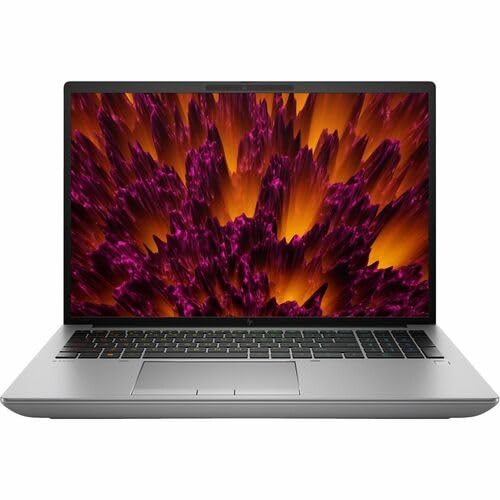
HP ZBook Fury 16 G11 -- Certified for BIM
The ZBook Fury 16 carries ISV certification for Autodesk Revit, AutoCAD, and Bentley MicroStation, meaning driver validation is handled for you. Its NVIDIA RTX 4000 Ada Generation GPU and up to 128 GB DDR5 ECC RAM make it the safest choice for architecture firms running large BIM deliverables with coordination models. The 16-inch display reaches 1200 nits, which is useful for reviewing drawings in bright site-office environments. It is heavy at 2.9 kg, so it functions better as a transportable desktop than a daily carry machine. HP's DreamColor display option adds wide-gamut coverage for color-accurate presentation material.

Lenovo Legion Pro 7i -- GPU Rendering Without Workstation Pricing
The Legion Pro 7i prioritizes GPU performance with an NVIDIA RTX 4080 Laptop GPU, which makes V-Ray and Enscape GPU rendering significantly faster than workstations with lower-tier graphics. At it costs less than certified workstations while delivering faster render times for architectural visualizations. The trade-off is no ISV certification, so occasional driver conflicts with Revit updates are possible and require manual troubleshooting. The 240Hz display is overkill for architecture but does not hurt; the color accuracy at around 100% sRGB is adequate for most presentation use. A practical choice for sole practitioners and small studios where rendering speed is the priority.

Apple Mac Studio M4 Max -- Rhino and Visualization on macOS
Rhino 8 runs natively on Apple Silicon with full Grasshopper support, and the M4 Max chip handles complex parametric models faster than comparable Intel configurations. For architects who design in Rhino and render in Enscape or Twinmotion for Mac, the Mac Studio is a capable fixed desk machine. AutoCAD for Mac covers most drafting needs, and Revit users who need full Windows compatibility can run Parallels. The 2023 Mac Studio form factor takes minimal desk space and connects to two Pro Display XDRs for a large multi-monitor setup. Not ideal if your firm requires Windows-only plugins or proprietary structural analysis software.
HP Z8 Fury G5 Tower -- Studio Rendering and Large Project Coordination
For architecture studios running multiple large BIM projects simultaneously, the Z8 Fury G5 accepts dual Intel Xeon processors, up to 2 TB RAM, and multiple professional GPUs. This configuration eliminates wait times on large Revit coordination models and enables GPU render jobs that run in the background while other work continues. The cost is substantial, but for a five-person studio sharing one central high-spec machine via remote desktop, the per-seat economics are reasonable. HP supports enterprise warranties and on-site repair, which matters for production environments where downtime has a direct project cost.
What to look for
What to consider
Identify your heaviest software first. If you spend most of your time in AutoCAD and SketchUp, almost any modern laptop with a dedicated GPU will suffice. If you run full Revit models with linked files and real-time rendering, you need certified GPU drivers, 32 GB RAM minimum, and a fast NVMe SSD.
What to consider
Display quality is underrated. Architects review drawings at fine detail levels where color fringing, poor contrast, or low brightness causes eye strain and missed errors. An OLED or DreamColor IPS display is a worthwhile specification upgrade.
What to consider
Consider the portability trade-off honestly. A heavy mobile workstation that stays on a desk is functionally a portable desktop; a lighter laptop that you actually carry to site serves your workflow better even if raw performance is lower.
What to consider
For related recommendations, see our [best computer for art](/articles/best-computer-for-art) guide and our [best computer for ArcGIS](/articles/best-computer-for-arcgis) article. Selection criteria are detailed on our [/methodology](/methodology) page.
FAQs
Both Revit and AutoCAD rely heavily on single-core CPU performance for viewport navigation and model rebuilding. Intel Core i7 or i9 processors with high base and boost clocks outperform high-core-count chips for these tasks. AMD Ryzen 7000 series chips are competitive but verify compatibility with your specific plugins before purchasing.
For 2D drafting and basic 3D modeling, an integrated GPU is workable but limiting. Revit's realistic view mode, V-Ray, and Enscape GPU rendering all require a dedicated NVIDIA or AMD GPU with at least 8 GB VRAM to run at usable frame rates. A mid-range RTX 4070 covers most architectural workflows without the cost of a professional Quadro card.
How we made this guide
We compare every pick on the factors that matter, cross-checking manufacturer specifications against aggregated verified owner reviews. We rank independently and never take payment for placement. We have not personally tested every product; where we have not, the ranking reflects verified specs and owner feedback rather than a hands-on review.
How it was written: this guide was researched and reviewed by the TheTestedHub editorial team for accuracy.
Affiliate disclosure: TheTestedHub is reader-supported. When you buy through links on our site, we may earn a commission at no extra cost to you.
Related guides

Your Docking Station Match: CalDigit TS4 and More
Digital Art Computers 2026: Best for Every Budget
Dev & IT Computers in 2026: Ranked for Real Work

Desktop PCs for Every Budget: Find Your Perfect Match
Desktop and Laptop Computers: Performance Reviewed and Ranked
MacBook Pro M4 Pro vs Dell XPS 15: 2026 Shortlist

Buy the Best DIY Computer in 2026: Corsair One i300
