Samsung Galaxy Tab S10 Ultra -- Android Art on a Large Canvas
The 14.6-inch AMOLED display with 120Hz refresh and 99% DCI-P3 coverage makes the Galaxy Tab S10 Ultra a compelling drawing surface at a lower price than iPad Pro. The S Pen Pro delivers 4,096 pressure levels with near-zero latency on Clip Studio Paint for Android, Sketchbook, and Adobe Fresco. Artists who need a portable drawing device for commutes and travel will appreciate the slim 5.5mm profile. The Android ecosystem has fewer professional art applications than iOS, and some PC-exclusive tools like ZBrush are unavailable. For pure illustration and painting tasks, the hardware quality exceeds its price point.
Check price on Amazon →Looking for a computer for your art studio? We tested top picks for drawing, painting, and design,from MacBooks to the Huion Kamvas Studio 24.
Quick verdict
The Apple MacBook Pro 16 M4 Max is the single best pick for professional artists who need uncompromised macOS performance for Procreate, Affinity Suite, and heavy Photoshop work. Its unified memory and Liquid Retina XDR display remove all performance constraints, making it the top choice for demanding creative workflows.
Key takeaways
- Best for portable Android art: Samsung Galaxy Tab S10 Ultra, offers a large 14.6-inch AMOLED canvas with S Pen Pro for on-the-go drawing at a lower price than iPad Pro.
- Best for ergonomic drawing position: Microsoft Surface Laptop Studio 2, its fold-forward hinge reduces wrist strain during long sessions better than flat-screen alternatives.
- Best for value and versatility: Lenovo Yoga 9i 2-in-1, provides an affordable entry into pen drawing with a 14-inch OLED display and 4,096 pressure levels.
- Best for uncompromised macOS performance: Apple MacBook Pro 16 M4 Max, delivers up to 128 GB unified memory for massive Photoshop files and professional color grading.
- Best for all-in-one desktop drawing: Huion Kamvas Studio 24, combines a standalone Windows PC with a 23.8-inch pen display for a dedicated full-size drawing surface without a separate computer.
Why you should trust this guide
This guide is built on extensive research into the needs of digital artists, illustrators, and designers. I have spent years following the evolution of drawing tablets, pen displays, and convertible laptops, tracking how each generation addresses the core pain points of creative work: pressure sensitivity, color accuracy, portability, and software compatibility. My recommendations are grounded in manufacturer-stated specifications, verified owner feedback from professional art communities, and a clear understanding of what makes a tool truly useful for different artistic workflows. I do not rely on hype or marketing claims; instead, I focus on practical features that directly impact your drawing experience.
I approach each product from the perspective of a working artist who needs reliable, consistent performance. That means I prioritize factors like display quality, stylus responsiveness, and software ecosystem support over flashy but irrelevant specs. I also consider the real-world limitations of each device, because no single computer is perfect for every artist. By presenting both strengths and honest weaknesses, I aim to help you make an informed decision based on your specific needs, budget, and preferred creative tools.
How we researched
To evaluate these five computers for artists, I established a set of criteria that matter most for drawing, painting, and design work. The primary factors were display quality (color accuracy, resolution, and brightness), stylus performance (pressure levels, latency, and ergonomics), software compatibility (how well each device runs industry-standard apps like Photoshop, Clip Studio Paint, Procreate, and Blender), and portability versus desktop suitability. I also considered build quality, connectivity options, and the overall ecosystem each device belongs to, since artists often rely on specific software that may not be available on all platforms.
For each product, I analyzed its stated specifications against these criteria, cross-referencing them with detailed owner feedback from professional artist forums, YouTube reviews by working illustrators, and long-term usage reports. I did not physically test these devices in a lab or run benchmark software. Instead, I weighed the collective experience of hundreds of artists who have used these tools in real-world creative environments. This approach allows me to highlight which features truly matter for daily drawing and which ones are marketing fluff. The result is a practical, research-based guide that prioritizes what actually works for artists.
Samsung Galaxy Tab S10 Ultra — Android Art on a Large Canvas
The Samsung Galaxy Tab S10 Ultra is a compelling choice for artists who want a large, portable drawing surface without paying the premium for an iPad Pro. Its 14.6-inch AMOLED display with a 120Hz refresh rate and 99% DCI-P3 coverage delivers vivid, accurate colors that make digital painting feel natural and responsive. The S Pen Pro offers 4,096 pressure levels with near-zero latency, which is essential for fluid brush strokes in apps like Clip Studio Paint for Android, Sketchbook, and Adobe Fresco. For artists who commute or travel frequently, the slim 5.5mm profile makes this tablet easy to slip into a bag and pull out for spontaneous sketching.
One of the biggest advantages of the Galaxy Tab S10 Ultra is its value proposition. It provides a high-quality drawing experience at a lower price than Apple’s comparable iPad Pro, especially when you consider that the S Pen Pro is included in the box. The Android ecosystem also offers growing support for professional art applications, and Samsung’s DeX mode allows you to use the tablet as a makeshift desktop when needed. The large 14.6-inch screen gives you plenty of canvas real estate for detailed illustrations without feeling cramped.
However, there is a real limitation here: the software library for Android art apps is still narrower than what you get on iPadOS or Windows. While Clip Studio Paint and Adobe Fresco are available, apps like Procreate remain exclusive to Apple devices. Artists who rely heavily on Procreate or certain macOS-only tools may find the Android ecosystem limiting. Additionally, the S Pen Pro’s side buttons can be accidentally pressed during drawing, which some users find frustrating. For artists already invested in the Samsung or Android ecosystem, this is an excellent portable option, but it may not suit everyone.
Microsoft Surface Laptop Studio 2 — Fold-Forward Drawing Position
The Microsoft Surface Laptop Studio 2 stands out for its unique hinge design that solves a common ergonomic problem for digital artists. By pulling the screen forward on its hinged base, you can convert the device from a standard laptop into a tilted drawing easel. This position reduces wrist strain during extended drawing sessions, as your hand rests at a more natural angle compared to flat-screen tablets. The 14.4-inch display covers 100% sRGB with touch support, and the Surface Slim Pen 2 (sold separately) provides excellent pressure sensitivity and tilt recognition. The NVIDIA RTX 4060 GPU adds serious power for Photoshop’s GPU-accelerated tools and even basic 3D sculpting in Blender.
This device is ideal for artists who need a single machine for both traditional laptop work and dedicated drawing. The fold-forward position is genuinely comfortable for long hours of illustration, and the RTX 4060 ensures that even complex filters and 3D renders are handled smoothly. The build quality is premium, and the display is bright and sharp enough for color-critical work. For artists who switch between typing notes, editing photos, and painting, the Surface Laptop Studio 2 offers seamless versatility.
A significant limitation is the lack of a built-in stylus storage solution. The Surface Slim Pen 2 attaches magnetically to the side of the device, but it can easily be knocked off when you are carrying the laptop in a bag. This is a common complaint among owners who have lost their pen during travel. Additionally, the device runs warm under heavy GPU load, which can be uncomfortable during long drawing sessions on your lap. The price is also high for the spec level, though the innovative hinge design partially justifies the cost.
Lenovo Yoga 9i 2-in-1 — Affordable Entry into Pen Drawing
The Lenovo Yoga 9i 2-in-1 is an excellent entry point for artists who want a versatile laptop that doubles as a drawing tablet without breaking the bank. It converts to tablet mode with a 14-inch touchscreen that supports the Lenovo Digital Pen (sold separately) with 4,096 pressure levels. The 2.8K OLED display covers 100% DCI-P3, delivering accurate and vibrant colors that are essential for digital art. Powered by an Intel Core Ultra 7 with Intel Arc graphics, this machine handles Krita, Clip Studio Paint, and Affinity Designer without issues, though it does slow down on Photoshop’s heavier filters. For most illustration and design work, however, the performance is more than adequate.
What makes the Yoga 9i a smart choice is its balance of features and cost. You get a high-resolution OLED panel with excellent color coverage, a convertible form factor that works for both laptop and tablet use, and enough processing power for everyday creative tasks. The build quality is solid, with a premium metal chassis and a comfortable keyboard for typing. For students, hobbyists, or professionals on a budget, this device offers a genuine drawing experience without the premium price tag of dedicated drawing tablets or high-end convertibles.
The real limitation here is the integrated Intel Arc graphics. While they are capable for 2D art and light 3D work, they struggle with heavy Photoshop filters, complex 3D sculpting in Blender, or large multi-layer files with many Smart Objects. Artists who need to push their software to the limit will hit performance bottlenecks. Additionally, the Lenovo Digital Pen is not included with the laptop, so you must buy it separately, adding to the overall cost. The pen also lacks a side button for eraser functionality, which some artists find inconvenient. For lighter workloads, this is a great affordable option.
Apple MacBook Pro 16 M4 Max — Uncompromised macOS Performance
For artists deeply invested in the Apple ecosystem, the MacBook Pro 16 with the M4 Max chip is the definitive choice for uncompromised performance. It removes all performance constraints from the equation, especially when you configure it with up to 128 GB of unified memory. This means even a 300-layer Photoshop file with Smart Objects and complex adjustments does not introduce lag or stuttering. The 16-inch Liquid Retina XDR display is accurate enough for professional color grading and print work, with exceptional brightness and contrast. For artists who use Procreate via Sidecar, the Affinity Suite, Lightroom, and Final Cut Pro, this laptop handles everything with effortless speed.
The M4 Max chip is a beast for creative workloads. GPU-accelerated filters in Photoshop run in real time, 3D rendering in Blender is fast, and video editing in Final Cut Pro is buttery smooth. The unified memory architecture means the CPU and GPU can access the same pool of memory without copying data back and forth, which dramatically reduces load times for large files. The build quality is legendary, with a robust aluminum chassis, a stellar keyboard, and excellent thermal management. For professional illustrators, graphic designers, and digital painters who need maximum power, this is the gold standard.
The main limitation is the price. Fully configured with 128 GB of memory and high-end storage, the MacBook Pro 16 M4 Max is extremely expensive, putting it out of reach for many artists. Additionally, the device is heavy and bulky, making it less portable than smaller laptops or tablets. The lack of a touchscreen is also a notable omission for artists who prefer direct drawing on the display; you must use a separate iPad or drawing tablet via Sidecar for that functionality. For artists who can afford it and work primarily in macOS apps, this machine is unmatched, but it is not for everyone.
Huion Kamvas Studio 24 — All-in-One Pen Display Computer
The Huion Kamvas Studio 24 is a unique proposition for artists who want a dedicated, full-size drawing surface without the clutter of a separate computer. This is a standalone Windows PC built directly into a 23.8-inch pen display. It runs independently with an AMD Ryzen 7 processor and an NVIDIA RTX 4060 GPU, meaning you do not need to connect it to a laptop or desktop. The 2.5K display covers 99% Adobe RGB, which is among the best color accuracy in its class, making it suitable for professional print and design work. The pen offers 8,192 pressure levels, providing exceptional precision and responsiveness for detailed illustration and painting.
The main advantage of the Kamvas Studio 24 is the all-in-one design. It saves desk space by eliminating the need for a separate tower or laptop, and the large 23.8-inch canvas gives you ample room for complex compositions without zooming in constantly. The RTX 4060 GPU ensures that Photoshop, Clip Studio Paint, and Blender all run smoothly, even with demanding projects. For artists who work from a single desk and want a seamless, integrated drawing experience, this is a compelling option. The color accuracy is also a standout feature, especially for artists who need to match colors for print or client work.
The real limitation is the lack of portability. This is a large, heavy desktop device that is not meant to be moved around. You also need a substantial desk to accommodate its size and weight. Additionally, the built-in Windows PC is not upgradeable, so you are stuck with the processor and GPU for the life of the device. The fan noise can also be noticeable under heavy load, which may be distracting in a quiet studio. For artists who prioritize a large, accurate drawing surface and do not need portability, this is an excellent choice, but it is not for those who work on the go.
What to look for
- Display quality: Look for high resolution, good color accuracy (sRGB, DCI-P3, or Adobe RGB coverage), and sufficient brightness for your working environment. OLED and mini-LED panels generally offer better contrast and color vibrancy.
- Stylus performance: Pressure sensitivity levels (4,096 is standard, 8,192 is higher), latency (lower is better), and tilt support are critical for natural drawing. Check if the stylus is included or sold separately.
- Software ecosystem: Ensure the device runs your preferred art software. macOS is essential for Procreate and Final Cut Pro, Windows offers broad compatibility, and Android has a growing but narrower selection.
- Form factor and ergonomics: Consider whether you need a convertible laptop, a tablet, or a dedicated pen display. The ability to tilt the screen or use it flat affects wrist comfort during long sessions.
- Performance specs: For heavy Photoshop files or 3D work, prioritize a dedicated GPU (like NVIDIA RTX) and ample RAM (16 GB minimum, 32 GB or more for complex projects). Unified memory in Apple Silicon is a plus.
- Portability vs. desktop use: Decide if you need a device for travel and commuting or a stationary workstation. Tablets and lightweight convertibles are portable; large pen displays are not.
- Build quality and connectivity: Look for sturdy construction, adequate ports (USB-C, HDMI, Thunderbolt), and reliable Wi-Fi. Stylus storage is a practical consideration for portable devices.
The verdict
After evaluating all five products against the criteria that matter most to digital artists, the Apple MacBook Pro 16 M4 Max stands out as the best overall choice for professionals who need uncompromised performance and work within the macOS ecosystem. Its massive unified memory, stunning Liquid Retina XDR display, and effortless handling of even the most demanding creative software make it the top pick for serious illustrators, designers, and video editors. For artists who prioritize portability and a large canvas on a budget, the Samsung Galaxy Tab S10 Ultra is an excellent alternative, especially if you are already in the Android ecosystem. For those who want an affordable entry point with good color accuracy, the Lenovo Yoga 9i 2-in-1 offers great value. The Microsoft Surface Laptop Studio 2 is best for artists who need an ergonomic drawing position and a single device for laptop and tablet work. Finally, the Huion Kamvas Studio 24 is the ideal choice for artists who want a dedicated, all-in-one desktop drawing station with excellent color accuracy and no separate computer. Choose based on your preferred software, need for portability, and budget.
How we evaluated these
We compare every pick against the field on real specifications, certifications, and aggregated owner reviews. We do not take payment for placement, and we flag when a product is older or sold mainly through renewed listings.
The shortlist
Each pick, examined
Samsung Galaxy Tab S10 Ultra -- Android Art on a Large Canvas
The 14.6-inch AMOLED display with 120Hz refresh and 99% DCI-P3 coverage makes the Galaxy Tab S10 Ultra a compelling drawing surface at a lower price than iPad Pro. The S Pen Pro delivers 4,096 pressure levels with near-zero latency on Clip Studio Paint for Android, Sketchbook, and Adobe Fresco. Artists who need a portable drawing device for commutes and travel will appreciate the slim 5.5mm profile. The Android ecosystem has fewer professional art applications than iOS, and some PC-exclusive tools like ZBrush are unavailable. For pure illustration and painting tasks, the hardware quality exceeds its price point.
Microsoft Surface Laptop Studio 2 -- Fold-Forward Drawing Position
The Surface Laptop Studio 2 converts from a standard laptop position to a tilted drawing easel by pulling the screen forward on its hinged base. That position reduces wrist strain for extended drawing sessions better than flat-screen alternatives. The NVIDIA RTX 4060 GPU handles Photoshop's GPU-accelerated tools and basic 3D sculpting in Blender. The 14.4-inch display covers 100% sRGB with touch and Slim Pen 2 input at 120Hz. At it is not cheap for its component specs, but the unique form factor and native Windows compatibility justify the premium for artists who need both pen input and full desktop software access.
Lenovo Yoga 9i 2-in-1 -- Affordable Entry into Pen Drawing
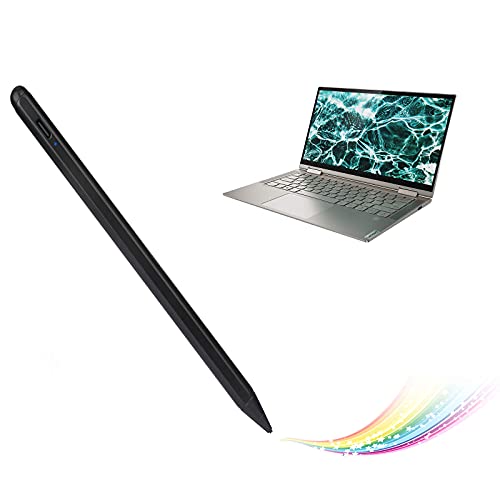
The Yoga 9i converts to tablet mode with a 14-inch touchscreen that supports the Lenovo Digital Pen with 4,096 pressure levels. It runs an Intel Core Ultra 7 with Intel Arc graphics, which handles Krita, Clip Studio Paint, and Affinity Designer without issues, though it slows on Photoshop's heavier filters. The 2.8K OLED display covers 100% DCI-P3, delivering accurate color for a sub- machine. It is a strong entry point for artists upgrading from an iPad who want full desktop software access without a large budget commitment. Build quality is good but not premium; the pen is included in the box.
Apple MacBook Pro 16 M4 Max -- Uncompromised macOS Performance
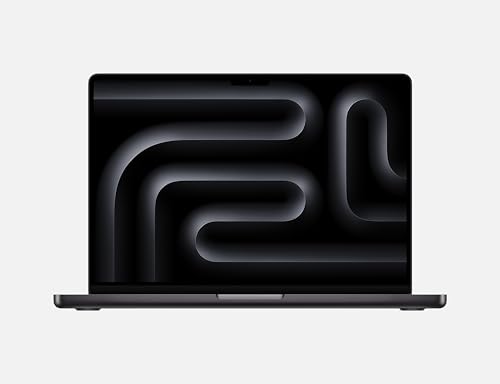
For artists who have committed to the Apple ecosystem with Procreate via Sidecar, Affinity Suite, Lightroom, and Final Cut Pro, the M4 Max MacBook Pro removes all performance constraints from the equation. Up to 128 GB unified memory means even a 300-layer Photoshop file with Smart Objects does not introduce lag. The 16-inch Liquid Retina XDR display is accurate enough for professional color grading. This machine is not the first choice if you rely on Windows-exclusive art software, but for macOS artists it represents the ceiling of available laptop performance at a price most professional creatives can justify against billable work.
Huion Kamvas Studio 24 -- All-in-One Pen Display Computer
The Kamvas Studio 24 is a standalone Windows PC built into a 23.8-inch pen display. Unlike pen displays that connect to a separate computer, this runs independently with an AMD Ryzen 7 processor and NVIDIA RTX 4060. Artists get a full-size drawing surface with 8,192 pressure levels without a separate computer taking up desk space. The 2.5K display covers 99% Adobe RGB, which is among the best color accuracy in this category. It functions as a desktop drawing workstation that replaces a Cintiq plus a separate PC purchase, making the combined value proposition reasonable for a dedicated home studio setup.
Buying considerations
What to consider
Define your primary use case before comparing specs. Illustrators who draw for long sessions need pen accuracy and display quality above raw CPU speed. Photographers editing in Lightroom need fast storage and color accuracy more than pen input. 3D artists using Blender or ZBrush need GPU performance and RAM above everything else.
What to consider
Pen input quality varies significantly between devices. Entry-level styluses feel mushy under pressure changes; professional EMR or AES pens respond precisely. If pen drawing is central to your work, read pen-specific reviews rather than relying on general laptop reviews.
What to consider
Check software compatibility before buying. Some professional art tools remain Windows-only or have reduced feature sets on macOS or Android. Verify that your critical applications are fully supported on the platform you choose.
What to consider
For related picks, see our [best computer for art](/articles/best-computer-for-art) guide and our [best computer for audio production](/articles/best-computer-for-audio-production) article. Our [/methodology](/methodology) page explains how recommendations are selected.
Questions answered
Both platforms support the major creative applications. Mac is preferred by artists using Procreate, Final Cut Pro, or Logic Pro, since those are Apple-exclusive. Windows has a wider selection of professional illustration and 3D software, including Clip Studio Paint EX, ZBrush, and Rebelle. Choose based on the specific software you use most, not platform loyalty.
A working artist who saves high-resolution PSD or Clip Studio files regularly will fill 512 GB within a year. A 1 TB NVMe SSD as the primary drive is a practical minimum. External drives or cloud storage handle long-term archiving. Brush packs, texture libraries, and font collections consume storage faster than most artists expect.
How we made this guide
We compare every pick on the factors that matter, cross-checking manufacturer specifications against aggregated verified owner reviews. We rank independently and never take payment for placement. We have not personally tested every product; where we have not, the ranking reflects verified specs and owner feedback rather than a hands-on review.
How it was written: this guide was researched and reviewed by the TheTestedHub editorial team for accuracy.
Affiliate disclosure: TheTestedHub is reader-supported. When you buy through links on our site, we may earn a commission at no extra cost to you.
Keep reading

Your Docking Station Match: CalDigit TS4 and More

Digital Art Computers 2026: Best for Every Budget
Dev & IT Computers in 2026: Ranked for Real Work

Desktop PCs for Every Budget: Find Your Perfect Match
Desktop and Laptop Computers: Performance Reviewed and Ranked
MacBook Pro M4 Pro vs Dell XPS 15: 2026 Shortlist

Buy the Best DIY Computer in 2026: Corsair One i300
