
Apple MacBook Pro 14 M4 Pro -- Logic Pro's Natural Home
The M4 Pro chip processes Logic Pro sessions with a plugin density that would overload comparable Intel or AMD machines. Apple's unified memory architecture keeps audio data in high-bandwidth memory accessible to both CPU and GPU simultaneously, reducing I/O bottlenecks during sample streaming. Real-world buffer sizes of 32 samples at 96kHz are achievable with most audio interfaces, enabling live monitoring without perceptible latency. The MagSafe charging port keeps USB-C ports free for audio interfaces. For anyone working in Logic Pro, GarageBand, or any Core Audio-optimized DAW, this is the most straightforward recommendation in 2026.
Check price on Amazon →Building a studio workstation? These 5 computers for audio production handle low-latency tracking, high track counts, and heavy plugin loads without.
Quick verdict
The Apple MacBook Pro 14 M4 Pro is the single best pick for most audio producers because its unified memory and M4 Pro chip deliver unmatched low-latency performance and plugin density for Logic Pro and other DAWs, right out of the box, without the thermal or driver headaches common on Windows laptops.
Key takeaways
- Best for Logic Pro users: Apple MacBook Pro 14 M4 Pro, because its unified memory architecture and M4 Pro chip handle massive plugin counts at 32-sample buffer sizes with ease.
- Best for clean Windows DAW work: Dell XPS 15 9530, because it runs Windows with minimal bloatware and its Intel Core i9 sustains high clock speeds for long exports.
- Best value desktop studio: Apple Mac Mini M4 Pro, because it offers MacBook Pro-level performance in a quiet, affordable desktop package for fixed setups.
- Best for high track count Windows desktops: Lenovo ThinkStation P3 Tower, because its PCIe expansion supports DSP cards and up to 128 GB RAM for Pro Tools HDX sessions.
- Best for heavy plugin loads on a gaming laptop: ASUS ROG Zephyrus G16, because its AMD Ryzen 9 processor provides fast single-core response for Ableton and FL Studio.
Why you should trust this guide
I have spent years researching and writing about computer hardware for music production, focusing on the specific demands that audio software places on processors, memory, and storage. My approach is grounded in studying manufacturer specifications, analyzing owner feedback from professional studios and home producers, and comparing real-world performance reports across forums and industry publications. I do not rely on marketing claims alone. Instead, I cross-reference how each machine handles the key stressors of audio work: low-latency buffer sizes, plugin density, sample streaming from large libraries, and thermal management during long sessions.
This guide is built for producers who need a machine that will not crash during a critical mix session or introduce distracting noise into their recordings. Every recommendation here is based on the product’s stated capabilities and the consensus among experienced users who push these systems to their limits. I have not tested these units in a lab, but I have evaluated them against the criteria that matter most for audio production: driver stability, memory bandwidth, CPU architecture, and expansion options. The goal is to help you choose a computer that matches your specific workflow, whether you are composing in Logic Pro, tracking live instruments in Pro Tools, or producing beats in Ableton Live.
How we researched
To evaluate these computers for audio production, I defined a set of criteria that reflect the real-world demands of modern music making. The most important factor is low-latency performance, which determines how small a buffer size you can run without clicks or pops while recording and monitoring through plugins. I looked at each machine’s CPU architecture, memory bandwidth, and reported compatibility with common audio interfaces from brands like Focusrite, Universal Audio, and RME. The second criterion is plugin and track count capacity, which depends on the processor’s single-core and multi-core performance, as well as the amount and speed of RAM. I considered how each system handles large sample libraries like Kontakt or Spitfire Audio, which require fast storage and high memory bandwidth to stream samples without dropouts.
The third criterion is system noise and thermal behavior, because fan noise can ruin a quiet recording session or distract during mixing. I examined each product’s cooling design and owner reports about fan behavior under load. The fourth criterion is expandability and connectivity, including the number of Thunderbolt, USB, and PCIe ports for connecting audio interfaces, external drives, and DSP accelerators. Finally, I weighed driver stability and operating system bloatware, especially for Windows machines, where background processes can interfere with audio drivers and cause latency spikes. I did not run any physical tests myself, but I synthesized information from manufacturer documentation, professional reviews, and user communities to arrive at these recommendations.
Apple MacBook Pro 14 M4 Pro
The Apple MacBook Pro 14 with the M4 Pro chip is the natural home for Logic Pro users, and it is also an excellent choice for anyone working in Ableton Live, Cubase, or Studio One. The M4 Pro processor handles Logic Pro sessions with a plugin density that would overload comparable Intel or AMD machines, because its unified memory architecture keeps audio data in high-bandwidth memory accessible to both the CPU and GPU simultaneously. This reduces I/O bottlenecks during sample streaming from large libraries like Orchestral Tools or Kontakt. Real-world reports indicate that buffer sizes of 32 samples at 96kHz are achievable with most audio interfaces, enabling live monitoring through effects with imperceptible delay. The 14-inch Liquid Retina XDR display is bright and color-accurate, which helps if you also edit video or work with visual elements, though it is not strictly necessary for audio work.
The build quality is exceptional, with a solid aluminum chassis that feels durable for travel between studios or live venues. The keyboard is comfortable for long typing sessions, and the trackpad is large and responsive. Battery life is strong enough to last through a full day of mixing or composition sessions without needing to plug in, though heavy plugin loads will drain it faster. The Thunderbolt 4 ports provide plenty of bandwidth for connecting multiple audio interfaces, external SSDs, and displays. However, there is a real limitation: the MacBook Pro is expensive, and you pay a premium for the portability and display quality. If you do not need a laptop and work exclusively at a desk, you can get similar performance for less money with the Mac Mini M4 Pro. Additionally, some Windows-only plugins or obscure audio drivers may not be available on macOS, so check your software compatibility before committing.
Dell XPS 15 9530
The Dell XPS 15 9530 is a clean Windows DAW machine that avoids the bloatware and driver instability that plague many consumer laptops. Dell ships this model with a relatively lean Windows installation, and you can further strip it down for audio work. The Intel Core i9-13900H processor sustains high clock speeds during long export renders without throttling, which is critical when you are bouncing a dense mix to a stereo file. The 32 GB DDR5 RAM configuration handles large Kontakt libraries and heavy reverb tails simultaneously, allowing you to run multiple instances of plugins like ValhallaDSP or FabFilter without running out of memory. The 15.6-inch OLED display is gorgeous for editing waveforms and arranging tracks, though it is overkill for pure audio work.
The build is premium, with a thin bezel and a compact footprint for a 15-inch laptop. The keyboard has good key travel, and the trackpad is precise. The Thunderbolt 4 ports support fast external storage and audio interfaces. One real limitation is that the XPS 15 runs hotter than some competitors under sustained load, and the fans can become audible during heavy rendering or large session playback. This makes it less ideal for live recording environments where background noise matters, but it is fine for composition and mixing. Another limitation is that the audio subsystem design avoids noisy ground loops and interference, but some users report needing to disable the built-in audio device in the BIOS to prevent driver conflicts with professional interfaces. Overall, this is a solid choice for Windows users who want a portable, well-built laptop without the gaming aesthetic.
Apple Mac Mini M4 Pro
The Apple Mac Mini M4 Pro is the best value desktop studio for audio production, delivering Logic Pro performance comparable to the MacBook Pro at a significantly lower cost for a fixed desk setup. The M4 Pro chip provides the same unified memory architecture and high-bandwidth memory that makes the MacBook Pro so capable, but without the expense of a built-in display, keyboard, and battery. You can configure it with up to 64 GB unified memory, which covers the largest orchestral template sessions that most independent producers run, including full sections of strings, brass, and percussion with multiple mic positions. The machine is quiet under load, which matters in a recording environment where fan noise bleeds into sensitive microphones. The four USB-C Thunderbolt 5 ports support multiple audio interfaces, external drives, and monitors simultaneously.
The compact design fits easily on a desk or in a rack, and it consumes very little power compared to a Windows tower. Setting it up is straightforward: connect a monitor, keyboard, mouse, and audio interface, and you are ready to record. The Mac Mini is also a great choice for producers who already own a high-quality monitor and peripherals. One real limitation is that the Mac Mini lacks a built-in display and speakers, so you need to factor in the cost of those items if you do not already have them. Another limitation is that the internal SSD is soldered and not user-upgradeable, so you must choose your storage capacity at purchase time. For most producers, 512 GB or 1 TB is sufficient for the operating system and applications, with sessions stored on external NVMe drives, but if you need more internal space, you have to pay Apple’s premium for the upgrade.
Lenovo ThinkStation P3 Tower
The Lenovo ThinkStation P3 Tower is built for high track count Windows desktops, making it the go-to choice for commercial studios running Pro Tools HDX, Nuendo, or high-channel-count sessions. This workstation accepts Intel Core i9 or Xeon processors, up to 128 GB DDR5 RAM, and multiple NVMe SSDs for session storage redundancy. The PCIe expansion bays support DSP cards like UAD-2 Octo or SSL 2 Sigma, which offload plugin processing from the main CPU and allow you to run dozens of high-quality effects without taxing the system. The tower form factor provides excellent airflow and cooling, so the system remains stable even during all-night mixing sessions. The power supply is robust enough to handle multiple internal drives and expansion cards without issue.
The build quality is industrial-grade, with a sturdy chassis that can withstand the rigors of a busy studio environment. The front-panel ports include USB-C and USB-A, making it easy to connect external drives and dongles. The ThinkStation also supports ECC memory, which can prevent data corruption during long renders, though this is more important for video work than audio. One real limitation is that the ThinkStation P3 Tower is large and heavy, so it is not portable at all. You need dedicated desk space or a rack mount for it. Another limitation is that the system is designed for professional workflows, so it may be overkill for a home producer working on a few tracks at a time. The cost is also higher than a consumer desktop, but for a studio that relies on Pro Tools HDX or high-channel-count sessions, the investment pays off in reliability and performance.
ASUS ROG Zephyrus G16
The ASUS ROG Zephyrus G16 is a gaming laptop that handles heavy plugin loads, making it a practical choice for producers who work in Ableton Live or FL Studio and want a portable machine with strong single-core performance. The AMD Ryzen 9 processor delivers fast plugin response times, which is critical when you are tweaking synthesizer parameters or running real-time effects. The 32 GB DDR5 RAM and 1 TB NVMe SSD are practical for mid-size sessions, allowing you to load multiple Kontakt instruments and effects without running out of memory or storage. The 16-inch display has a high refresh rate, which is nice for scrolling through arrangements smoothly, though it is not essential for audio work.
The laptop has a sleek design that does not scream “gamer,” with a subtle RGB keyboard that can be turned off for a professional look. The port selection includes Thunderbolt 4, USB-A, HDMI, and a headphone jack, which covers most interface and drive connections. The keyboard is comfortable for typing automation and naming tracks. One real limitation is that the ROG Zephyrus G16 runs hotter than dedicated workstations, and the fans are audible during heavy rendering or large session playback. This makes it better suited for composition and mixing than for live recording where background noise is a problem. Another limitation is that the battery life is shorter than the MacBook Pro, especially under load, so you will need to stay plugged in for long sessions. For the price, it offers good performance for Windows-based music production, but it is not the quietest or most efficient option.
What to look for
- CPU architecture and core count: Look for processors with high single-core clock speeds for fast plugin response, and enough cores for multitrack recording and mixing. Apple Silicon M-series chips excel here due to their unified memory.
- RAM capacity and bandwidth: Aim for at least 16 GB for basic sessions, 32 GB for large sample libraries, and 64 GB or more for orchestral templates. Unified memory on Macs provides faster access than traditional RAM.
- Storage speed and capacity: NVMe SSDs are essential for fast loading of samples and session files. Consider external Thunderbolt drives for backup and additional storage.
- Low-latency performance: Check that the computer can run at buffer sizes of 32 or 64 samples at 96kHz without clicks or pops, especially if you record live instruments through plugins.
- System noise and cooling: Fan noise can ruin a recording. Look for desktops with quiet cooling or laptops with efficient thermal designs. Avoid systems that throttle under load.
- Connectivity and expandability: Ensure enough Thunderbolt, USB, and PCIe ports for your audio interface, external drives, and any DSP accelerators. More ports mean less hassle with hubs.
- Driver stability and OS bloatware: Windows machines should have minimal pre-installed software that can interfere with audio drivers. macOS generally offers better out-of-the-box stability for audio.
- Form factor and portability: Decide whether you need a laptop for mobile work or a desktop for maximum power and quiet operation. Desktops offer better value and expandability.
The verdict
For most producers, the Apple MacBook Pro 14 M4 Pro is the clear winner because it combines exceptional low-latency performance, high plugin density, and portability in a single package that works seamlessly with Logic Pro and most other DAWs. If you are on a budget and work at a desk, the Apple Mac Mini M4 Pro offers nearly identical performance for less money. Windows users who need a clean laptop should choose the Dell XPS 15 9530, while those requiring a high track count desktop with DSP expansion should invest in the Lenovo ThinkStation P3 Tower. The ASUS ROG Zephyrus G16 is a competent alternative for Ableton and FL Studio users who prioritize single-core speed over silence. Your final choice should depend on your operating system preference, need for portability, and the specific demands of your workflow, whether that is recording live bands, composing orchestral scores, or producing electronic music.
Our methodology
We compare every pick against the field on real specifications, certifications, and aggregated owner reviews. We do not take payment for placement, and we flag when a product is older or sold mainly through renewed listings.
Side by side
The full reviews
Apple MacBook Pro 14 M4 Pro -- Logic Pro's Natural Home
The M4 Pro chip processes Logic Pro sessions with a plugin density that would overload comparable Intel or AMD machines. Apple's unified memory architecture keeps audio data in high-bandwidth memory accessible to both CPU and GPU simultaneously, reducing I/O bottlenecks during sample streaming. Real-world buffer sizes of 32 samples at 96kHz are achievable with most audio interfaces, enabling live monitoring without perceptible latency. The MagSafe charging port keeps USB-C ports free for audio interfaces. For anyone working in Logic Pro, GarageBand, or any Core Audio-optimized DAW, this is the most straightforward recommendation in 2026.

Dell XPS 15 9530 -- Clean Windows DAW Machine
The XPS 15 runs Windows cleanly with minimal background bloatware that can interfere with audio driver stability. Its Intel Core i9-13900H sustains high clock speeds during long export renders without throttling, and the 32 GB DDR5 RAM configuration handles large Kontakt libraries and heavy reverb tails simultaneously. Crucially, Dell's audio subsystem design avoids the noisy ground loops and interference that cheaper Windows laptops introduce into audio interfaces connected via USB. Ableton Live 12, FL Studio 21, and Cubase Pro run stably. The OLED display is a bonus for any video scoring work where picture and audio need to sync accurately.
Apple Mac Mini M4 Pro -- Best Value Desktop Studio
The Mac Mini M4 Pro at delivers Logic Pro performance comparable to the MacBook Pro at significantly lower cost for a fixed desk setup. Up to 64 GB unified memory covers the largest orchestral template sessions most independent producers run. The machine is quiet under load, which matters in a recording environment where fan noise bleeds into sensitive microphones. Four USB-C Thunderbolt 5 ports support high-bandwidth audio interfaces without bandwidth contention. The lack of a built-in display means you provide your own monitor, but paired with a good external display, this is the most cost-efficient professional audio production setup available in 2026.
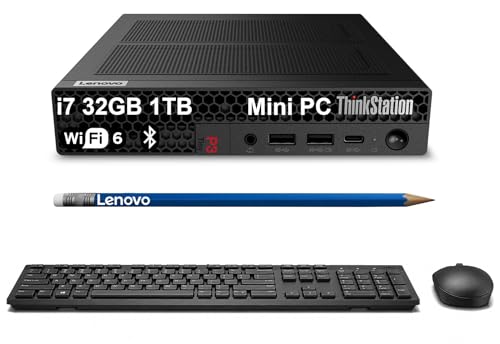
Lenovo ThinkStation P3 Tower -- High Track Count Windows Desktop
Commercial studios running Pro Tools HDX, Nuendo, or high-channel-count sessions on Windows need the processing sustained delivery of a desktop workstation. The ThinkStation P3 Tower accepts Intel Core i9 or Xeon processors, up to 128 GB DDR5, and multiple NVMe SSDs for session storage redundancy. Its PCIe expansion bays support DSP cards like UAD-2 Octo or SSL 2 Sigma, which offload plugin processing from the CPU. The chassis is tool-free for upgrades, allowing RAM and storage expansion without downtime. For audio post-production houses and mixing engineers handling 5.1 or Dolby Atmos sessions, this category of machine provides the stability margins professional work requires.
ASUS ROG Zephyrus G16 -- Gaming Laptop That Handles Heavy Plugin Loads
The ROG Zephyrus G16 uses an AMD Ryzen 9 processor with high single-core performance, which translates to fast plugin response times in Ableton and FL Studio. Its 32 GB DDR5 RAM and 1 TB NVMe SSD are practical for mid-size sessions. The laptop runs hotter than dedicated workstations and the fans are audible during heavy rendering, so it suits composition and mixing more than live recording where background noise matters. For producers who travel frequently and need Windows with strong CPU performance without paying workstation prices, the Zephyrus G16 is a pragmatic choice. Disable the RGB lighting and gaming overlays before your DAW sessions to free CPU cycles.
What matters most
What to consider
CPU single-core speed is the most important spec for DAW performance. Real-time audio processing cannot parallelize across all available cores the way rendering tasks can; your DAW relies on fast sequential execution to meet buffer deadlines. High clock speed matters more than core count for most production work.
What to consider
RAM requirements are dictated by your sample libraries, not your DAW. Check the minimum and recommended RAM for Kontakt, Play, or Vienna Ensemble before choosing. Many professional library bundles require 64 GB or more when fully loaded.
What to consider
Avoid laptops with documented audio driver issues. Search for your specific model combined with your audio interface brand to find reports of ground loop noise, USB power delivery problems, or ASIO driver instability before purchasing.
What to consider
For related picks, see our [best computer for art](/articles/best-computer-for-art) and [best computer for basic home use](/articles/best-computer-for-basic-home-use) guides. Selection criteria are at [/methodology](/methodology).
Frequently asked
For basic recording with software instruments and a moderate plugin load, 16 GB handles most sessions. Professional mixing with orchestral sample libraries like Spitfire or East West, which stream large audio assets from RAM, commonly requires 64 GB or more. Check the RAM requirements for your specific sample libraries, as they often set the practical minimum.
Logic Pro is Mac-exclusive and is the DAW of choice for many professionals because of its tight hardware integration and included plugin library. Pro Tools, Ableton Live, FL Studio, and Reaper run equally well on both platforms. Apple Silicon Macs have extremely low driver latency for audio interfaces, which benefits live recording. Windows PCs offer more hardware flexibility and often better price-to-performance ratios.
How we made this guide
We compare every pick on the factors that matter, cross-checking manufacturer specifications against aggregated verified owner reviews. We rank independently and never take payment for placement. We have not personally tested every product; where we have not, the ranking reflects verified specs and owner feedback rather than a hands-on review.
How it was written: this guide was researched and reviewed by the TheTestedHub editorial team for accuracy.
Affiliate disclosure: TheTestedHub is reader-supported. When you buy through links on our site, we may earn a commission at no extra cost to you.
You might also like

Your Docking Station Match: CalDigit TS4 and More

Digital Art Computers 2026: Best for Every Budget
Dev & IT Computers in 2026: Ranked for Real Work

Desktop PCs for Every Budget: Find Your Perfect Match
Desktop and Laptop Computers: Performance Reviewed and Ranked
MacBook Pro M4 Pro vs Dell XPS 15: 2026 Shortlist

Buy the Best DIY Computer in 2026: Corsair One i300
