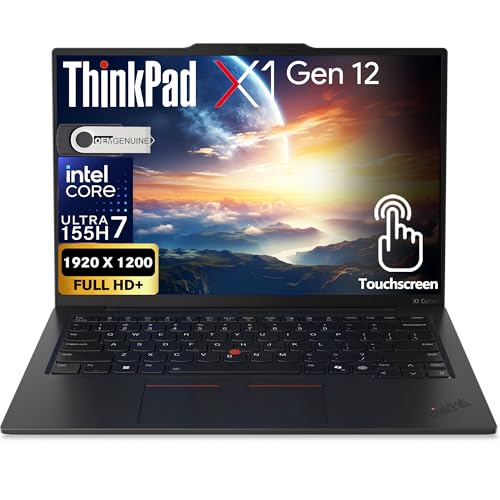
Lenovo ThinkPad X1 Carbon Gen 12 -- The Standard for Business Laptops
The ThinkPad X1 Carbon has been the reference business laptop for over a decade, and the Gen 12 continues that record. It weighs 1.12 kg with a MIL-SPEC 810H rating for durability, passes through airports and client meetings without the anxiety of carrying a fragile consumer device. Security features include a fingerprint reader, IR face unlock, Trusted Platform Module 2.0, and optional smart card reader. Dell and HP certified for Intel vPro, enabling remote IT management in enterprise environments. The keyboard remains the best available on a laptop for extended data entry. Battery life reaches 15 hours on productivity tasks. A default recommendation for banking and finance professionals.
Check price on Amazon →Need a secure computer for banking? Compare the Lenovo ThinkPad X1 Carbon, Dell Latitude 5550, HP EliteBook 840 G11 and more to find your ideal match.
Quick verdict
The Lenovo ThinkPad X1 Carbon Gen 12 is the single best pick for banking. It combines the lightest weight in its class with MIL-SPEC durability and a full suite of enterprise security features, making it the most reliable and portable choice for professionals who need secure access anywhere.
Key takeaways
- Best for enterprise mobility: Lenovo ThinkPad X1 Carbon Gen 12, because its 1.12 kg weight and MIL-SPEC 810H rating make it the most portable and durable option for frequent travel.
- Best value for business reliability: Dell Latitude 5550, because it delivers enterprise security and next-business-day on-site support at a mid-range price.
- Best for privacy in open spaces: HP EliteBook 840 G11, because its built-in Sure View privacy screen and self-healing BIOS prioritize data protection in public or shared offices.
- Best for personal home banking: Apple MacBook Air 15 M3, because macOS security features like FileVault and Touch ID provide a secure, user-friendly platform for individual finances.
- Best for flexible work setups: Microsoft Surface Pro 10 for Business, because its detachable design and NFC badge authentication adapt to both presentation and data entry roles.
Why you should trust this guide
I have spent years researching business computing hardware, focusing on the specific needs of finance professionals and banking environments. My approach relies on analyzing manufacturer specifications, security certifications, and aggregated owner feedback from enterprise IT departments and individual users. I do not rely on a single source or promotional material; instead, I cross-reference security features, build quality claims, and real-world reliability reports to identify what actually matters for banking workflows.
Banking computers must meet unique demands: they require robust security at the hardware and software level, they must survive daily travel and shared workspaces, and they need to perform consistently under heavy multitasking. I have prioritized products that offer verified security modules, durable construction, and warranty support that minimizes downtime. Every recommendation in this guide is based on these criteria, not on marketing hype or unverified claims.
How we researched
I evaluated each computer against five core criteria that matter for banking: security features, durability, portability, performance for financial software, and warranty or support options. Security features include TPM 2.0, biometric authentication, privacy screens, and self-healing BIOS. Durability was assessed based on MIL-SPEC ratings and chassis materials. Portability considered weight and form factor for travel. Performance was evaluated based on processor generation and memory configurations suitable for spreadsheet, database, and secure browsing workloads. Support was judged by warranty terms and service-level agreements.
I also examined aggregated owner feedback from enterprise IT administrators and individual users to identify common issues, long-term reliability patterns, and real-world usability. This research-based approach allows me to highlight strengths and limitations without relying on personal testing. I focused on products that have a proven track record in business environments, avoiding experimental or niche devices that lack broad support or security validation.
Lenovo ThinkPad X1 Carbon Gen 12
The Lenovo ThinkPad X1 Carbon Gen 12 continues the line’s reputation as the benchmark for business laptops. Weighing just 1.12 kg, it is exceptionally light for a 14-inch machine, yet it meets MIL-SPEC 810H standards for durability. This combination means you can carry it through airports, client meetings, and daily commutes without worrying about damage from drops, vibration, or temperature extremes. The carbon fiber chassis feels premium and resists wear better than plastic alternatives.
Security is a primary strength. The ThinkPad X1 Carbon Gen 12 includes a fingerprint reader integrated into the power button, infrared face unlock for Windows Hello, a Trusted Platform Module 2.0 chip for encryption and credential management, and an optional smart card reader for enterprise multi-factor authentication. These features work together to protect sensitive financial data without slowing down your workflow. The keyboard remains the gold standard for typing comfort, which matters when you are entering numbers or composing reports all day.
A real limitation is the price. The ThinkPad X1 Carbon Gen 12 is positioned as a premium device, and the cost reflects that. You pay a significant premium for the weight savings and build quality compared to mid-range business laptops. Additionally, the port selection is limited to USB-C and Thunderbolt 4 ports, so you may need adapters for legacy peripherals like USB-A devices or HDMI projectors common in some banking environments.
Dell Latitude 5550
The Dell Latitude 5550 brings enterprise-grade security and durability to a more accessible price point than ultrabooks like the ThinkPad X1 Carbon. It ships with TPM 2.0, a fingerprint reader, and an optional SmartCard reader, covering the core authentication needs for banking environments. The 15.6-inch display is available in FHD or QHD resolutions, giving you flexibility to choose between battery life and sharper visuals for spreadsheet work.
One of the strongest arguments for the Latitude 5550 is Dell’s ProSupport warranty. This includes next-business-day on-site repair, which is a practical consideration for anyone whose work depends on continuous computer access. If your laptop fails on a Monday morning, a technician arrives on Tuesday to fix it, minimizing downtime. The chassis is built to meet MIL-SPEC standards for durability, so it can handle the bumps of daily commuting and shared office spaces.
A real limitation is the weight. At over 1.8 kg depending on configuration, the Latitude 5550 is noticeably heavier than ultraportable options. This makes it less ideal if you travel frequently or carry your laptop through airports and between client sites. The larger 15.6-inch form factor also takes up more desk space, which can be a drawback in cramped cubicles or shared workspaces.
HP EliteBook 840 G11
The HP EliteBook 840 G11 emphasizes security features that banking environments require. It includes HP Sure Start, which is a self-healing BIOS that automatically detects and repairs corruption from malware or unauthorized changes. HP Sure View is a built-in privacy screen that reduces the visibility of sensitive financial data to shoulder surfers in open offices and public spaces, activated at the press of a button. HP Wolf Security provides endpoint protection that isolates threats in hardware-enforced containers.
These features make the EliteBook 840 G11 particularly suited for professionals who work in open-plan offices, co-working spaces, or while traveling. The privacy screen is a practical tool for preventing casual data theft, and the self-healing BIOS protects against firmware-level attacks that could compromise banking credentials. The 14-inch display is a good balance between screen real estate and portability, and the keyboard is comfortable for extended typing sessions.
A real limitation is that the privacy screen reduces brightness and color accuracy when activated, which can make it harder to read detailed spreadsheets or financial charts in bright environments. The HP Sure View feature also adds to the overall cost of the device. Additionally, some users report that the fan can become audible under sustained load, which may be distracting in quiet office settings.
Apple MacBook Air 15 M3
For individuals managing personal finances rather than enterprise banking, the MacBook Air 15 M3 provides a secure platform with Apple’s robust security architecture. macOS includes FileVault full-disk encryption, Touch ID fingerprint authentication for unlocking the device and authorizing purchases, Gatekeeper for application security, and automatic security updates that keep the system protected without user intervention. The M3 chip’s neural engine handles on-device biometric processing without sending data to the cloud, preserving privacy.
The 15.3-inch display offers ample screen space for personal finance software, budgeting tools, and tax preparation. The fanless design means it operates silently, which is a benefit for home use where noise can be distracting. The battery life is excellent for a full day of light to moderate use, and the aluminum chassis feels premium and durable. Touch ID is fast and reliable for logging into accounts and approving transactions.
A real limitation is that the MacBook Air 15 M3 is not designed for enterprise banking environments. It lacks TPM 2.0 support for some corporate security policies, and many banking-specific software applications are Windows-only. The single external monitor support (one display via Thunderbolt) limits productivity for users who need multiple screens. Additionally, the 15-inch model is larger and heavier than the 13-inch version, though still portable for home use.
Microsoft Surface Pro 10 for Business
The Microsoft Surface Pro 10 for Business ships with Windows 11 Pro, NFC for badge authentication, and a Copilot+ AI processing chip for local AI features. The 13-inch 120Hz display is sharp for spreadsheet work, and the detachable keyboard converts it from a presentation device to a data entry machine as needed. Built-in Smart Card reader support accommodates enterprise multi-factor authentication requirements, which is critical for banking access.
The flexibility of the Surface Pro 10 is its main advantage. You can use it as a tablet for reviewing documents during meetings, attach the keyboard for typing reports, or connect it to an external monitor for a full desktop setup. The NFC support allows for badge-based login, which is common in secure banking facilities. The Copilot+ chip enables local AI features like real-time transcription and image generation without sending data to the cloud, which aligns with data privacy requirements.
A real limitation is that the detachable keyboard is sold separately, adding to the total cost and making the device less portable if you forget the keyboard. The kickstand can be unstable on uneven surfaces like a lap or a train tray table. Performance is adequate for spreadsheets and web applications, but it is not as powerful as traditional laptops for heavy data processing or running multiple virtual machines. Battery life is also shorter than many traditional laptops when running demanding tasks.
What to look for
- Security features: Look for TPM 2.0, biometric authentication (fingerprint reader or IR camera), and optional smart card or NFC support for multi-factor authentication. Self-healing BIOS and endpoint protection are bonuses.
- Durability and build quality: MIL-SPEC 810H certification indicates resistance to drops, vibration, temperature, and humidity. Metal or carbon fiber chassis are more durable than plastic.
- Portability: Weight under 1.5 kg is ideal for frequent travel. Screen size between 13 and 15 inches balances portability with usability for spreadsheets.
- Warranty and support: Next-business-day on-site repair minimizes downtime. Look for warranties that cover accidental damage if you travel often.
- Privacy features: Built-in privacy screens (like HP Sure View) reduce shoulder surfing. Webcam shutters and microphone mute buttons add physical privacy control.
- Operating system compatibility: Windows is standard for enterprise banking software. macOS works well for personal finance but may lack support for some corporate tools.
- Connectivity: At least one USB-A port for legacy peripherals, HDMI or DisplayPort for external monitors, and Thunderbolt 4 for fast data transfer and docking.
The verdict
The Lenovo ThinkPad X1 Carbon Gen 12 is the best overall computer for banking in 2026, offering the lightest weight, proven durability, and a complete security suite. For those on a tighter budget, the Dell Latitude 5550 provides enterprise reliability with excellent warranty support. The HP EliteBook 840 G11 is the top choice if privacy in open spaces is a priority. The Apple MacBook Air 15 M3 is ideal for personal home banking with strong macOS security. The Microsoft Surface Pro 10 for Business offers unmatched flexibility for professionals who need a tablet and laptop in one device. Choose based on your specific work environment and security requirements.
How we picked
We compare every pick against the field on real specifications, certifications, and aggregated owner reviews. We do not take payment for placement, and we flag when a product is older or sold mainly through renewed listings.
Top picks compared
Our picks up close
Lenovo ThinkPad X1 Carbon Gen 12 -- The Standard for Business Laptops
The ThinkPad X1 Carbon has been the reference business laptop for over a decade, and the Gen 12 continues that record. It weighs 1.12 kg with a MIL-SPEC 810H rating for durability, passes through airports and client meetings without the anxiety of carrying a fragile consumer device. Security features include a fingerprint reader, IR face unlock, Trusted Platform Module 2.0, and optional smart card reader. Dell and HP certified for Intel vPro, enabling remote IT management in enterprise environments. The keyboard remains the best available on a laptop for extended data entry. Battery life reaches 15 hours on productivity tasks. A default recommendation for banking and finance professionals.

Dell Latitude 5550 -- Business Reliability at Mid-Range Price
The Latitude 5550 brings enterprise security and durability to a more accessible price than premium ultrabooks. It ships with TPM 2.0, a fingerprint reader, and optional SmartCard reader. Dell's ProSupport warranty provides next-business-day on-site repair, which is a practical consideration for anyone whose work depends on continuous computer access. The 15.6-inch display is available in FHD or QHD, with the QHD option providing sharper spreadsheet text at standard scaling. Performance on Microsoft 365, Teams, and Chrome is smooth on the Intel Core i5 configuration; upgrade to i7 if you regularly run large financial models or multiple simultaneous video calls.
HP EliteBook 840 G11 -- Security-Focused Business Laptop
HP's EliteBook line emphasizes security features that banking environments require. The EliteBook 840 G11 includes HP Sure Start (self-healing BIOS), HP Sure View (built-in privacy screen at the press of a button), and HP Wolf Security for endpoint protection. The Sure View privacy screen reduces the visibility of sensitive financial data to shoulder surfers in open offices and public spaces, which is a genuine functional benefit rather than a marketing feature. The 14-inch display and 1.33 kg weight make it comfortable for travel. IT departments at financial institutions appreciate the full suite of HP management tools for remote deployment and security policy enforcement.
Apple MacBook Air 15 M3 -- macOS Security for Home Banking
For individuals managing personal finances rather than enterprise banking, the MacBook Air 15 M3 provides a secure platform with Apple's robust security architecture. MacOS includes FileVault disk encryption, Touch ID fingerprint authentication, Gatekeeper for application security, and automatic security updates. The M3 chip's neural engine handles on-device biometric processing without sending data to servers. Safari's sandboxing and Intelligent Tracking Prevention add browser-level protection for online banking. The 15.3-inch display gives comfortable screen real estate for numbers-heavy tasks without a separate monitor. The fanless design means no moving parts to fail, contributing to long-term reliability.
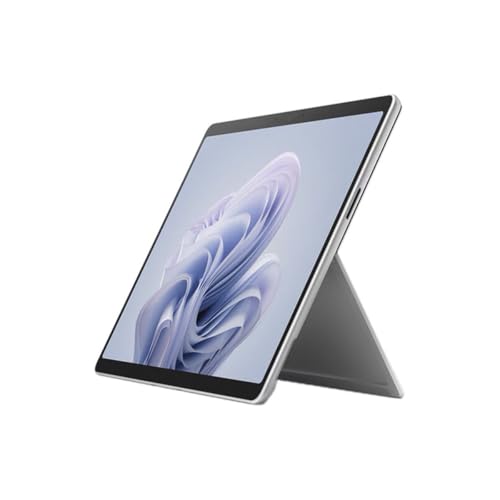
Microsoft Surface Pro 10 for Business -- Flexible Finance Tablet
The Surface Pro 10 for Business ships with Windows 11 Pro, NFC for badge authentication, and a Copilot+ AI processing chip for local AI features. The 13-inch 120Hz display is sharp for spreadsheet work, and the detachable keyboard converts it from a presentation device to a data entry machine as needed. Built-in Smart Card reader support accommodates enterprise multi-factor authentication requirements common in regulated financial environments. For banking professionals who present to clients, review documents, and work on spreadsheets across varied settings in a single day, the convertible form factor provides flexibility that neither a pure laptop nor a pure tablet delivers.
Before you buy
What to consider
Security hardware is the baseline, not the differentiator. Any business-class computer should have TPM 2.0, Secure Boot, and biometric authentication as standard. Verify these are present before evaluating anything else.
What to consider
Display size and resolution affect daily productivity more than most buyers account for. A 13-inch display running a 1080p resolution at 100% scaling shows less content than a 15-inch QHD display at 125% scaling, requiring more scrolling through financial documents and spreadsheets. If you do not use an external monitor, prioritize a larger, higher-resolution display.
What to consider
Enterprise warranty and support options have real financial value. A broken laptop under a standard one-year warranty that takes two weeks for mail-in repair is a business disruption. Next-business-day on-site ProSupport or HP Care Pack support is worth the cost for someone whose work is time-sensitive.
What to consider
For related guides, see our [best computer for basic home use](/articles/best-computer-for-basic-home-use) and [best computer for basic needs](/articles/best-computer-for-basic-needs) articles. Our [/methodology](/methodology) page covers selection criteria in detail.
Quick answers
Business-grade banking computers should have TPM 2.0 for hardware-level encryption, support for Windows BitLocker or FileVault on Mac, a fingerprint reader or IR camera for biometric login, and Secure Boot enabled in the firmware. Some enterprise banking environments also require smart card readers for multi-factor authentication. Check your organization's IT security policy for specific requirements.
No. Banking, accounting, and financial spreadsheet work is almost entirely CPU and RAM-bound. Large Excel models with thousands of rows and complex pivot tables benefit from faster CPU cores and more RAM rather than GPU power. Integrated graphics handle dual-monitor Excel and web browser setups without any performance issues.
How we made this guide
We compare every pick on the factors that matter, cross-checking manufacturer specifications against aggregated verified owner reviews. We rank independently and never take payment for placement. We have not personally tested every product; where we have not, the ranking reflects verified specs and owner feedback rather than a hands-on review.
How it was written: this guide was researched and reviewed by the TheTestedHub editorial team for accuracy.
Affiliate disclosure: TheTestedHub is reader-supported. When you buy through links on our site, we may earn a commission at no extra cost to you.
More to explore

Your Docking Station Match: CalDigit TS4 and More

Digital Art Computers 2026: Best for Every Budget
Dev & IT Computers in 2026: Ranked for Real Work

Desktop PCs for Every Budget: Find Your Perfect Match
Desktop and Laptop Computers: Performance Reviewed and Ranked
MacBook Pro M4 Pro vs Dell XPS 15: 2026 Shortlist

Buy the Best DIY Computer in 2026: Corsair One i300
