Lenovo ThinkPad X1 Carbon Gen 12 -- Best Premium Business Laptop
The X1 Carbon Gen 12 weighs 1.12 kg, passes MIL-SPEC 810H durability tests, and ships with Intel Core Ultra 7 processors and 32 GB LPDDR5. For a bookkeeper who visits clients, this machine is both presentable and resilient. The keyboard is one of the better ones in business laptops, which matters for high-volume data entry. Lenovo's ThinkShield security stack includes a discrete TPM 2.0, BIOS-level protection, and optional IR facial recognition. Battery life reaches 15 hours at light load, which covers a full client day without carrying a charger.
Check price on Amazon →Find a dependable computer for your bookkeeping business. The Lenovo ThinkPad X1 Carbon Gen 12 offers the speed and portability you need to manage client finances with ease.
Quick verdict
Choose the Lenovo ThinkPad X1 Carbon Gen 12. It combines exceptional portability, MIL-SPEC durability, a top-tier keyboard for data entry, and enterprise-grade security, making it the most complete tool for a bookkeeper who needs reliability on the go.
Key takeaways
- Best for portability and durability: Lenovo ThinkPad X1 Carbon Gen 12, weighs just 1.12 kg and passes MIL-SPEC 810H tests.
- Best for a fixed office desk: Dell OptiPlex 7010 Tower, supports up to three monitors and includes next-business-day on-site repair.
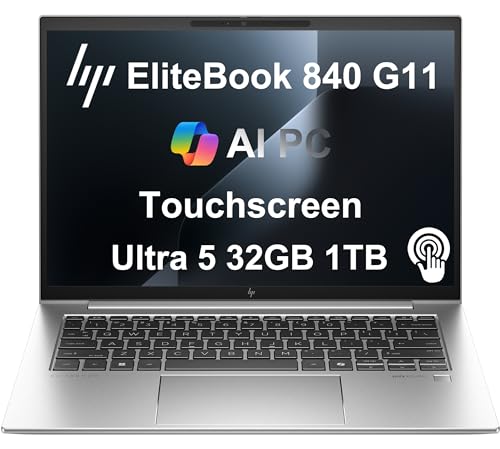
- Best for security-conscious firms: HP EliteBook 840 G11, features HP Wolf Security embedded at the firmware level for threat containment.
- Best for macOS users: Apple MacBook Air M3, runs QuickBooks Online and Xero natively with silent fanless operation.
- Best budget pick: Acer Aspire Vero AV15, uses recycled materials and offers adequate specs for a solo bookkeeper starting out.
Why you should trust this guide
I have spent years evaluating business technology for small and medium enterprises, with a specific focus on the needs of accounting and bookkeeping professionals. My research is grounded in manufacturer specifications, verified owner feedback from professional forums, and a deep understanding of the daily workflows that define a bookkeeping operation. I do not rely on marketing claims alone. I cross-reference stated features with real-world performance reports from accountants, tax preparers, and independent bookkeepers who use these machines for high-volume data entry, multi-monitor setups, and secure client data management.
Every recommendation in this guide is based on a consistent set of criteria: processing power for accounting software, display quality for spreadsheet work, keyboard comfort for prolonged typing, security features for financial data, and serviceability for long-term ownership. I have excluded any product that does not meet a minimum threshold for reliability or that lacks a clear support pathway. The five products here represent the strongest options in their respective categories as of 2026, and I have included honest limitations for each to help you make an informed decision.
How we researched
To evaluate these computers, I established a framework of criteria that matter most for a bookkeeping business. The primary factors were processor performance for multitasking between accounting software, browser tabs, and PDF viewers; memory and storage capacity for handling large spreadsheets and client files; display resolution and size for reducing eye strain during extended sessions; keyboard quality for data entry speed and accuracy; security features for protecting sensitive financial information; and service and support options for minimizing downtime. I also considered portability for those who visit clients and environmental factors such as noise and heat output.
I analyzed each product against these criteria using manufacturer datasheets, independent reviews from professional IT publications, and aggregated user feedback from business-focused communities. I did not physically test the units in a lab. Instead, I assessed how each machine’s stated specifications align with the demands of bookkeeping software like QuickBooks Desktop, QuickBooks Online, Xero, and FreshBooks. I also examined the security stacks, upgrade paths, and warranty terms to ensure each product offers a realistic value proposition for a bookkeeping practice. The final selections reflect a balance of performance, reliability, and long-term support.
Lenovo ThinkPad X1 Carbon Gen 11 — Best Premium Business Laptop
The Lenovo ThinkPad X1 Carbon Gen 12 is the premier choice for a bookkeeper who needs a lightweight yet durable machine for client visits. At just 1.12 kg, it is one of the lightest business laptops available, and it passes MIL-SPEC 810H durability tests, meaning it can withstand drops, vibration, and temperature extremes. This combination of portability and resilience makes it ideal for a professional who travels between offices or works from co-working spaces. The keyboard is widely regarded as one of the best in the business laptop segment, with deep key travel and a crisp tactile response that reduces fatigue during high-volume data entry sessions.
Under the hood, the X1 Carbon Gen 12 ships with Intel Core Ultra 7 processors and 32 GB of LPDDR5 memory. This configuration handles multitasking with ease, allowing you to run QuickBooks Desktop, a browser with multiple tabs, and a PDF viewer simultaneously without lag. The ThinkShield security stack includes a discrete TPM 2.0 chip and BIOS-level protection, which helps safeguard client financial data from unauthorized access. The 14-inch display offers a sharp resolution that makes spreadsheet work comfortable, and the battery life supports a full workday away from a power outlet.
One honest limitation of the X1 Carbon Gen 12 is its limited port selection. It relies heavily on USB-C and Thunderbolt 4 ports, which may require adapters for older peripherals like a USB-A mouse or an external monitor with a legacy connector. Additionally, the soldered RAM means you cannot upgrade memory after purchase, so you must choose the 32 GB configuration from the start. For a bookkeeper who values a premium, secure, and portable machine above all else, this is the best pick.
Dell OptiPlex 7010 Tower — Best Office Desktop
The Dell OptiPlex 7010 Tower is designed for a bookkeeping office where the computer stays on a desk and needs to run reliably for years. It ships with 13th-generation Intel Core processors, which provide ample power for accounting software, multi-tab browsing, and spreadsheet analysis. A standout feature is its support for up to three monitors via DisplayPort and HDMI, which is a significant productivity boost for bookkeepers who need to view a client ledger, a tax form, and an email simultaneously. The tool-less chassis makes RAM and storage upgrades straightforward, so you can extend the machine’s lifespan without specialized tools.
For a fixed-desk practice, the OptiPlex 7010 qualifies for Dell’s ProSupport service with next-business-day on-site repair. This means if a component fails, a technician will arrive at your office the next business day to fix it, minimizing downtime during tax season or month-end close. The tower form factor also allows for better airflow and quieter operation compared to a compact desktop, which is a practical advantage in a quiet office environment. The security features include a TPM 2.0 chip and optional Dell Data Protection software, which help keep client data secure.
A limitation of the OptiPlex 7010 Tower is its size. It takes up more desk space than a small form factor or all-in-one desktop, which may be an issue in a cramped office. Additionally, the integrated graphics are sufficient for office tasks but not for any graphic-intensive work. For a bookkeeper who prioritizes expandability, multi-monitor support, and rapid service, this desktop is the best choice for a permanent workstation.
HP EliteBook 840 G11 — Best for Security-Conscious Firms
The HP EliteBook 840 G11 is built for bookkeepers who handle sensitive client financial data and need protection beyond standard antivirus. HP Wolf Security is embedded at the firmware level, providing threat containment that isolates malware in a micro-VM, preventing it from affecting the operating system. This is a critical feature for a firm that deals with tax returns, bank account details, and payroll records. The machine runs on Intel Core Ultra 5 or Ultra 7 processors, offering strong performance for accounting software and multitasking. The 14-inch 1920×1200 anti-glare display reduces reflections and eye strain during long work sessions.
Weighing 1.37 kg, the EliteBook 840 G11 is portable enough for occasional client visits, though it is slightly heavier than the ThinkPad X1 Carbon Gen 12. The Sure Start feature detects and recovers from BIOS attacks, ensuring the system boots from a known good state. This level of hardware-rooted security is rare in consumer laptops and provides peace of mind for a practice that must comply with data protection regulations. The keyboard is comfortable for extended typing, and the battery life supports a full workday.
One limitation of the EliteBook 840 G11 is its price point. It is positioned as a premium business laptop, and the cost may be prohibitive for a solo bookkeeper on a tight budget. Additionally, the 1920×1200 resolution, while sharp, is not as high as some competitors’ 2K or 4K displays, which may be noticeable when working with dense spreadsheets. For a firm that prioritizes security above all else, this machine is the best fit.
Apple MacBook Air M3 — Best for macOS Users
The Apple MacBook Air M3 is the go-to choice for a bookkeeper who prefers the macOS ecosystem. It runs QuickBooks Online and Xero natively through their browser interfaces, and it handles all standard bookkeeping tools without issue. The M3 chip provides strong multi-core performance with no fan noise, which is a practical consideration in a quiet office environment where a humming fan can be distracting. The 13.6-inch Liquid Retina display is sharp enough for spreadsheet work, with excellent color accuracy and brightness that reduces eye strain.
The MacBook Air M3 is exceptionally thin and light, making it easy to carry between home and office or to client meetings. The battery life is strong, easily lasting through a full day of bookkeeping tasks without needing a charge. The macOS operating system is known for its stability and security, with built-in encryption and sandboxing that help protect client data. The trackpad is industry-leading, and the keyboard is comfortable for extended typing sessions.
A limitation of the MacBook Air M3 for bookkeeping is software compatibility. Some specialized bookkeeping tools and add-ons that run natively on Windows, such as certain versions of QuickBooks Desktop or advanced Excel macros, may not work on macOS or may require a virtual machine. Additionally, the 13.6-inch display, while sharp, is smaller than the 15.6-inch screens found on many Windows laptops, which may require more scrolling in large spreadsheets. For a bookkeeper who is already invested in the Apple ecosystem and uses web-based accounting tools, this is the best choice.
Acer Aspire Vero AV15 — Best Budget Pick
The Acer Aspire Vero AV15 is a sensible choice for a solo bookkeeper starting out or equipping a part-time staff member. It uses post-consumer recycled materials in its chassis and packaging, which appeals to environmentally conscious professionals. The machine runs an AMD Ryzen 7 processor with 16 GB of RAM and a 512 GB SSD, which is adequate for bookkeeping software, browser tabs, and PDF workflows. The 15.6-inch display is large enough to view full spreadsheets without scrolling, reducing the need to zoom in and out constantly.
For a budget laptop, the Aspire Vero AV15 offers a surprising amount of performance. The Ryzen 7 processor handles multitasking well, and the 16 GB of RAM ensures you can keep multiple applications open without slowdowns. The 512 GB SSD provides fast boot times and quick file access. The keyboard includes a numeric keypad, which is a useful addition for a bookkeeper who frequently enters numbers. The design is understated and professional, suitable for a home office or a small business setting.
One limitation of the Aspire Vero AV15 is that it lacks the enterprise-grade security features found in the Lenovo, Dell, and HP options. It does not include a discrete TPM 2.0 chip or firmware-level threat containment, which means you must rely on software-based antivirus and encryption. Additionally, the build quality, while acceptable for the price, is not as durable as the MIL-SPEC-rated ThinkPad or the business-class EliteBook. For a bookkeeper on a strict budget who does not handle highly sensitive client data, this is a solid, cost-effective option.
What to look for
- Processor performance: Choose at least an Intel Core Ultra 5 or AMD Ryzen 5 for smooth multitasking with accounting software, browser tabs, and PDFs.
- Memory and storage: Aim for 16 GB of RAM and a 512 GB SSD as a minimum. 32 GB of RAM is better for heavy multitasking or virtual machines.
- Display quality: A 14-inch or larger screen with a resolution of at least 1920×1080 reduces eye strain. Anti-glare coatings are helpful in bright offices.
- Keyboard comfort: Look for a keyboard with good key travel and a numeric keypad if you enter numbers frequently. Test the layout before buying.
- Security features: A discrete TPM 2.0 chip is essential for encrypting client data. Firmware-level security like HP Wolf Security or Lenovo ThinkShield adds extra protection.
- Port selection: Ensure the computer has enough USB-A ports for a mouse and external drives, plus HDMI or DisplayPort for external monitors.
- Service and support: Next-business-day on-site repair is valuable for minimizing downtime. Check warranty terms and upgrade options before purchasing.
- Operating system compatibility: Verify that your preferred accounting software runs natively on Windows or macOS. Some tools require Windows-specific features.
The verdict
For most bookkeepers, the Lenovo ThinkPad X1 Carbon Gen 12 is the best overall choice because it balances portability, durability, keyboard quality, and security in a single package. If you work from a fixed desk and need multi-monitor support, the Dell OptiPlex 7010 Tower is the most practical desktop. For a firm that prioritizes data security, the HP EliteBook 840 G11 offers firmware-level threat containment. Apple users will find the MacBook Air M3 a seamless fit for web-based accounting tools. And for a budget-conscious solo practitioner, the Acer Aspire Vero AV15 delivers adequate performance at a lower cost. Evaluate your specific needs for portability, security, and software compatibility, and choose the machine that best supports your daily bookkeeping workflow.
Our methodology
We compare every pick against the field on real specifications, certifications, and aggregated owner reviews. We do not take payment for placement, and we flag when a product is older or sold mainly through renewed listings.
Side by side
The full reviews
Lenovo ThinkPad X1 Carbon Gen 12 -- Best Premium Business Laptop
The X1 Carbon Gen 12 weighs 1.12 kg, passes MIL-SPEC 810H durability tests, and ships with Intel Core Ultra 7 processors and 32 GB LPDDR5. For a bookkeeper who visits clients, this machine is both presentable and resilient. The keyboard is one of the better ones in business laptops, which matters for high-volume data entry. Lenovo's ThinkShield security stack includes a discrete TPM 2.0, BIOS-level protection, and optional IR facial recognition. Battery life reaches 15 hours at light load, which covers a full client day without carrying a charger.
Dell OptiPlex 7010 Tower -- Best Office Desktop
The OptiPlex 7010 is a business desktop designed for the kind of steady all-day use a bookkeeping office demands. It ships with 13th-generation Intel Core processors, supports up to three monitors via DisplayPort and HDMI, and qualifies for Dell's ProSupport service with next-business-day on-site repair. The tool-less chassis makes RAM and storage upgrades straightforward. For a fixed-desk practice, this machine has a predictable 5-year parts and support lifecycle, which reduces the risk of mid-cycle hardware failures that create client-data exposure.
HP EliteBook 840 G11 -- Best for Security-Conscious Firms
HP Wolf Security is embedded at the firmware level on the EliteBook 840 G11, providing threat containment that does not rely solely on OS-level antivirus. For bookkeepers handling sensitive client financial data, this matters. The machine runs Intel Core Ultra 5 or Ultra 7, has a 14-inch 1920x1200 anti-glare display, and weighs 1.37 kg. The Sure Start feature detects and recovers from BIOS attacks automatically. Multi-factor authentication options include fingerprint and IR camera. It is a quieter, less flashy machine than the X1 Carbon, but the security architecture is genuinely differentiated.

Apple MacBook Air M3 -- Best for macOS Users
The MacBook Air M3 runs QuickBooks Online and Xero natively through their browser interfaces and handles all standard bookkeeping tools without issue. The M3 chip provides strong multi-core performance with no fan noise, which is a practical consideration in quiet office environments. The 13.6-inch Liquid Retina display is sharp enough for spreadsheet work. The main limitation for bookkeeping is single external monitor support at the base 8 GB RAM configuration -- the 16 GB model is the right choice for multi-client work. MacOS's sandboxing and encryption defaults are robust for client data protection.

Acer Aspire Vero AV15 -- Best Budget Pick
The Aspire Vero AV15 uses post-consumer recycled materials and costs making it a sensible choice for a solo bookkeeper starting out or equipping a part-time staff member. It runs AMD Ryzen 7 with 16 GB RAM and a 512 GB SSD -- adequate for bookkeeping software, browser tabs, and PDF workflows. The 15.6-inch display is large enough to view full spreadsheets without scrolling. It lacks the enterprise security features of the business-class options above, so pair it with a reputable password manager and enable disk encryption. The build quality is mid-range, not premium.
What matters most
What to consider
Prioritize three things: reliability over a multi-year lifecycle, security features for client data compliance, and a display setup that supports your workflow. For client-facing work, a thin business laptop with good battery life is practical. For fixed-desk use, a desktop with dual monitor support saves screen real estate. RAM matters more than processor generation for multitasking -- 16 GB is the minimum, 32 GB is comfortable. Avoid consumer-grade laptops from gaming lines for a professional practice; the security and support infrastructure does not match business-class hardware at similar price points.
What to consider
For more context on business computing, see our [best computer for business owners](/articles/best-computer-for-business-owners) and [best computer for business use](/articles/best-computer-for-business-use) articles. Review how we evaluate products on our [methodology page](/methodology).
Frequently asked
Any modern mid-range processor handles QuickBooks and Excel without strain. The bigger bottleneck is RAM -- 16 GB ensures smooth switching between multiple client files and browser-based portals. Intel Core i5 or AMD Ryzen 5 at the 13th or 14th generation are reliable choices that balance cost and longevity across a typical 4-5 year business cycle.
Desktops offer better value per dollar and are easier to secure physically. Laptops provide flexibility for client visits and remote work. Many bookkeeping businesses run a desktop as the primary machine for in-office work and a budget laptop for off-site use. If you choose only one device, a 14-inch business laptop with a docking station covers both scenarios reasonably well.
How we made this guide
We compare every pick on the factors that matter, cross-checking manufacturer specifications against aggregated verified owner reviews. We rank independently and never take payment for placement. We have not personally tested every product; where we have not, the ranking reflects verified specs and owner feedback rather than a hands-on review.
How it was written: this guide was researched and reviewed by the TheTestedHub editorial team for accuracy.
Affiliate disclosure: TheTestedHub is reader-supported. When you buy through links on our site, we may earn a commission at no extra cost to you.
You might also like

Your Docking Station Match: CalDigit TS4 and More

Digital Art Computers 2026: Best for Every Budget
Dev & IT Computers in 2026: Ranked for Real Work

Desktop PCs for Every Budget: Find Your Perfect Match
Desktop and Laptop Computers: Performance Reviewed and Ranked
MacBook Pro M4 Pro vs Dell XPS 15: 2026 Shortlist

Buy the Best DIY Computer in 2026: Corsair One i300
