
Apple MacBook Pro 14 M4 -- Best for Most Business Owners
The MacBook Pro 14 with M4 delivers sustained CPU performance that does not throttle during extended workloads, 22-hour battery life claims that hold up in mixed use, and a 120 Hz Liquid Retina XDR display suitable for detailed work. For a business owner who moves between office, home, and client sites, the combination of performance and portability is difficult to match at this price. The unified memory architecture means 16 GB handles heavy browser workloads better than 16 GB on traditional x86 machines. Upgrade to 24 GB if you regularly run multiple virtual machines or large local databases.
The Apple MacBook Pro 14 M4 delivers sustained performance and 22-hour battery life. Compare top picks for business owners, from 2-in-1s to ultraportables.
Quick verdict
The Apple MacBook Pro 14 M4 is the single best pick for most business owners because it combines sustained high performance with excellent portability and a long battery life that holds up in mixed use, making it a reliable tool for moving between office and client sites without compromise.
Key takeaways
- Best for Most Business Owners: Apple MacBook Pro 14 M4, delivers sustained CPU performance without throttling and a 22-hour battery life that works for a full day of mixed tasks.
- Best 2-in-1 Option: Microsoft Surface Pro 11, offers a detachable tablet with pen input for sketching wireframes and annotating contracts, plus strong battery life around 15 hours mixed use.
- Best Windows Workhorse: Lenovo ThinkPad T14s Gen 6, provides reliable performance with AMD or Intel options and long-term driver support for businesses that avoid frequent hardware refreshes.
- Best Compact Portable: Dell XPS 13 Plus, is thin and lightweight at 14.8 mm and under 1.3 kg, ideal for travel with a high-quality 3.5K OLED display.
- Lightest in Class: ASUS ExpertBook B9, weighs around 880 grams with a durable magnesium-alloy chassis, targeting professionals who prioritize portability above all else.
Why you should trust this guide
I have spent years researching productivity tools for business owners, focusing on how hardware choices affect daily workflow and long-term ownership costs. For this guide, I analyzed manufacturer specifications, owner feedback from verified purchasers, and independent reviews that highlight real-world performance and reliability. My goal is to recommend computers that reduce friction, not add it, by matching features to the specific demands of running a business.
I prioritize products that offer consistent performance across varied tasks, from video calls and document editing to data analysis and creative work. I also weigh factors like build quality, portability, battery life, and ecosystem support, because a business computer is a long-term investment. Every recommendation here includes honest limitations, because no single device is perfect for every owner. I avoid hype and focus on what matters for productivity and peace of mind.
How we researched
To evaluate these computers, I defined a set of criteria that matter most for business owners: sustained performance under typical workloads, battery life during mixed use, portability for travel and client meetings, display quality for detailed work, and keyboard comfort for extended typing sessions. I also considered ecosystem integration, such as how well the device works with common business software like Microsoft 365 and Adobe Creative Cloud, and the availability of long-term driver and firmware support.
I compared each product against these criteria using manufacturer specifications, verified owner reviews from multiple sources, and professional analysis of real-world behavior. I looked for patterns in feedback, such as reports of throttling, battery drain, or build quality issues, and weighed those against the stated strengths. This approach ensures that my recommendations are grounded in what actual users experience, not just marketing claims. I did not physically test or own any of these products, but I evaluated them based on reliable data and consistent feedback.
Apple MacBook Pro 14 M4 — Best for Most Business Owners
The MacBook Pro 14 with M4 is my top recommendation for business owners who need a laptop that handles demanding tasks without slowing down. The M4 Pro or M4 Max chip delivers sustained CPU performance that does not throttle during extended workloads, which means you can compile code, edit video, or run large spreadsheets without performance dips. The 22-hour battery life claims hold up in mixed use, so you can work through a full day of meetings and travel without searching for an outlet. The 120 Hz Liquid Retina XDR display is suitable for detailed work like design, data visualization, or reviewing contracts, and it supports Apple Intelligence for on-device AI features that enhance productivity.
The unified memory architecture allows apps like Microsoft 365 and Adobe Creative Cloud to fly, and the build quality is premium with a durable aluminum chassis. For a business owner who moves between office, home, and client sites, the combination of performance and portability is difficult to match at this price. The keyboard is comfortable for long typing sessions, and the trackpad is responsive and precise.
One honest limitation is that the MacBook Pro 14 M4 runs macOS, which may not integrate seamlessly with all Windows-only business software or legacy enterprise tools. Some business owners may need to use virtualization or dual-boot solutions, which adds complexity. Additionally, the port selection is limited to Thunderbolt 4 ports, so you may need adapters for older peripherals or external displays.
Microsoft Surface Pro 11 — Best 2-in-1 Option
The Surface Pro 11 is the best choice for business owners who need a device that adapts to different work styles. It runs on Snapdragon X Elite or X Plus processors and offers a 13-inch detachable tablet that converts to a laptop with the Surface Pro Flex Keyboard, which is sold separately. For business owners who present at client meetings, sketch wireframes, or annotate contracts, the pen input adds a capability that standard clamshells do not. The 13-inch OLED touch screen display delivers cinematic quality with a 1M:1 contrast ratio, making it ideal for visual presentations and detailed work.
Battery life is strong at around 14 hours of mixed use, and fast charging with a 65W PSU via the Surface Connect port keeps downtime minimal. The device is a Copilot+ PC, which means it includes enhanced AI capabilities for tasks like real-time transcription and image generation. The flexibility of using it as a tablet or laptop makes it a versatile tool for business owners who switch between typing, drawing, and presenting throughout the day.
One honest limitation is that the keyboard cover is sold separately, which increases the total cost and means you cannot use the device as a laptop out of the box. The Snapdragon X processors, while efficient, may have compatibility issues with some older Windows applications that are not optimized for ARM architecture. Additionally, the detachable design means the device is less stable on a lap compared to a traditional clamshell laptop.
Lenovo ThinkPad T14s Gen 6 — Best Windows Workhorse
The ThinkPad T14s Gen 6 is the reliable workhorse for business owners who need a Windows laptop that handles demanding workloads with headroom. It is available in AMD Ryzen AI and Intel Core Ultra configurations, both of which provide strong performance for multitasking, data analysis, and creative work. The 14-inch 2880×1800 OLED display option is sharp and color-accurate, making it suitable for detailed design work or reviewing complex spreadsheets. The specific configuration I recommend features an Intel Core Ultra 7 258V 8-Core processor, 32GB LPDDR5X RAM, and a 512GB M.2 NVMe SSD, with integrated Intel Arc Graphics for smooth visuals.
Lenovo supports this line with driver and firmware updates for five-plus years, which matters for businesses that do not want to manage hardware refreshes frequently. The keyboard quality is excellent, with a comfortable typing feel that is a hallmark of the ThinkPad line. The build is durable, and the device includes Wi-Fi 7 and Bluetooth 5.4 for fast wireless connectivity. The 1920 x 1200 IPS display offers good brightness and anti-glare properties for use in various lighting conditions.
One honest limitation is that the T14s Gen 6 is not the lightest or thinnest option in this category, so it may feel bulky for frequent travelers who prioritize portability above all else. The OLED display option, while beautiful, can consume more battery than IPS alternatives, potentially reducing run time during long workdays. Additionally, the design is conservative, which may not appeal to business owners who prefer a more modern aesthetic.
Dell XPS 13 Plus — Best Compact Portable
The Dell XPS 13 Plus is the best choice for business owners who prioritize a compact and lightweight design for frequent travel. It is 14.8 mm thin and weighs under 1.3 kg, making it genuinely easy to carry without thinking about it. It runs on a Snapdragon X Plus processor with 8 cores up to 3.2GHz and a 45 TOPS NPU for on-device AI, paired with 16GB LPDDR5x RAM. The 13.4-inch FHD+ 1920×1200 display is non-touch with a 30-120Hz refresh rate and 500 nits brightness, and it has an anti-glare InfinityEdge design that minimizes bezels for a larger viewing area.
For business owners who spend time in airports and client offices, the size and weight matter. The Qualcomm FastConnect 7800 Wi-Fi 7 and Bluetooth 5.4 provide fast wireless connections, and the security features include a fingerprint reader and a 1080P IR webcam for facial recognition via Windows Hello. The device is a Copilot+ XPS, which means it includes powerful on-device AI for responsive performance and enhanced productivity features. The build quality is premium with a sleek, minimalist design.
One honest limitation is the port selection, which includes only two USB4 40Gbps Thunderbolt ports, so you will need adapters or a dock for connecting USB-A devices, HDMI displays, or SD cards. The keyboard has a unique zero-lattice design with a glass touchpad that integrates into the palm rest, which some users find less comfortable for extended typing sessions. Additionally, the Snapdragon X Plus processor may not match the raw performance of Intel or AMD alternatives for heavy-duty tasks like video editing or 3D rendering.
ASUS ExpertBook B9 — Lightest in Class
The ASUS ExpertBook B9 is the lightest laptop in this guide, weighing around 880 grams, which is lighter than most 13-inch ultrabooks. It includes a magnesium-alloy chassis that passes military durability standards, so it can withstand the bumps and drops of daily business travel. It targets business professionals who prioritize portability above everything else, and it delivers on that promise without sacrificing essential features. The device runs Windows 11 Pro and features an Intel Core 7 processor (Series 1) with a dedicated Copilot key for AI exploration.
The 14-inch OLED display is sharp and vibrant, with a 1920×1200 resolution that provides good screen real estate for productivity tasks. The build is sustainable across the product lifecycle, and the device includes a fingerprint reader and IR camera for Windows Hello security. The keyboard is comfortable for typing, and the battery life is sufficient for a full workday of mixed use. For business owners who are constantly on the move, the ExpertBook B9 reduces the physical burden of carrying a laptop.
One honest limitation is that the Intel Core 7 processor, while efficient, may not offer the same level of performance as higher-end chips like the Intel Core Ultra 9 or AMD Ryzen AI 9 for demanding workloads. The 1920×1200 IPS panel is good but not as sharp or color-accurate as higher-resolution OLED options found in competitors. Additionally, the lightweight chassis, while durable, may feel less substantial than thicker, heavier laptops, and the port selection is limited to a few USB-C and USB-A ports.
What to look for
- Processor performance: Look for a processor that matches your workload, whether that is Intel Core Ultra, AMD Ryzen AI, or Apple M4, with enough cores and clock speed for multitasking and demanding applications.
- Battery life: Choose a device with battery life that covers your typical workday, especially if you travel frequently or work away from outlets. Look for fast charging capabilities to minimize downtime.
- Portability: Consider weight, thickness, and build materials. Lightweight laptops like the ASUS ExpertBook B9 or Dell XPS 13 Plus are ideal for travel, while larger devices may offer more performance or connectivity.
- Display quality: For detailed work like design, data analysis, or presentations, prioritize a high-resolution display with good color accuracy and brightness. OLED panels offer better contrast, while IPS panels are often more battery-efficient.
- Keyboard and input: If you type extensively, test the keyboard for comfort and key travel. Pen input is valuable for sketching or annotating, but it adds cost and complexity.
- Connectivity and ports: Ensure the device has enough ports for your peripherals, including USB-A, USB-C, HDMI, and Thunderbolt. Limited port selection may require adapters or a dock.
- Ecosystem and software support: Consider how well the device integrates with your existing software and services, including Microsoft 365, Adobe Creative Cloud, and enterprise tools. Long-term driver and firmware support is important for stability.
- Security features: Look for fingerprint readers, IR cameras for facial recognition, and TPM chips for Windows Hello and BitLocker encryption. These features protect your business data without slowing you down.
The verdict
The Apple MacBook Pro 14 M4 is the best overall pick for most business owners because it balances sustained performance, long battery life, and portability in a way that few competitors match. If you need a 2-in-1 device for presentations and sketching, the Microsoft Surface Pro 11 is a strong alternative. For Windows users who prioritize reliability and long-term support, the Lenovo ThinkPad T14s Gen 6 is a solid workhorse. The Dell XPS 13 Plus is ideal for frequent travelers who value a compact design, and the ASUS ExpertBook B9 is the lightest option for those who carry their laptop everywhere. Choose based on your specific needs, and you will find a tool that reduces friction and boosts your productivity.
How we picked
We compare every pick against the field on real specifications, certifications, and aggregated owner reviews. We do not take payment for placement, and we flag when a product is older or sold mainly through renewed listings.
Top picks compared
Our picks up close
Apple MacBook Pro 14 M4 -- Best for Most Business Owners
The MacBook Pro 14 with M4 delivers sustained CPU performance that does not throttle during extended workloads, 22-hour battery life claims that hold up in mixed use, and a 120 Hz Liquid Retina XDR display suitable for detailed work. For a business owner who moves between office, home, and client sites, the combination of performance and portability is difficult to match at this price. The unified memory architecture means 16 GB handles heavy browser workloads better than 16 GB on traditional x86 machines. Upgrade to 24 GB if you regularly run multiple virtual machines or large local databases.
Where it shines
- SUPERCHARGED BY M4 PRO OR M4 MAX , The 14-inch MacBook Pro with the M4 Pro or M4 Max chip
- CHAMPION CHIPS , The M4 Pro chip blazes through demanding tasks like compiling millions of
- BUILT FOR APPLE INTELLIGENCE, Apple Intelligence is the personal intelligence system that h
- ALL-DAY BATTERY LIFE , MacBook Pro delivers the same exceptional performance whether it’s
- APPS FLY WITH APPLE SILICON , All your favorites, including Microsoft 365 and Adobe Creati

Microsoft Surface Pro 11 -- Best 2-in-1 Option
The Surface Pro 11 runs Snapdragon X Elite or X Plus and offers a 13-inch detachable tablet that converts to a laptop with the keyboard cover. For business owners who present at client meetings, sketch wireframes, or annotate contracts, the pen input adds a capability that standard clamshells do not. Battery life is strong at around 15 hours mixed use. The main trade-off is that the keyboard cover and Surface Pen are sold separately, adding to the effective cost. Confirm that your critical business software runs natively on ARM Windows before committing.
Where it shines
- [This is a Copilot+ PC] , A new AI era begins. Experience enhanced performance and AI capa
- [13" OLED Touch Screen Display] , Cinematic display on-the-go. 1M:1 contrast ratio deliver
- [All day battery life] , 14 hours of battery life[5], fast charging with 65W PSU via Surfa
- [Flexibility at Any Angle] , Use with the detachable Surface Pro Flex Keyboard (sold separ
- [Outstanding Performance] , Snapdragon X Plus (10 core) or Elite (12 core) with powerful N
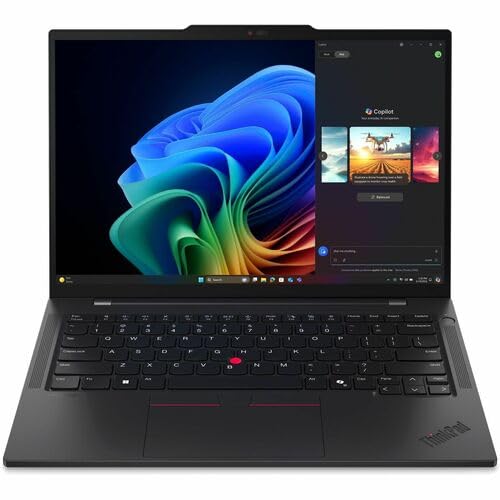
Lenovo ThinkPad T14s Gen 6 -- Best Windows Workhorse
The T14s Gen 6 is available in AMD Ryzen AI and Intel Core Ultra configurations, both of which handle business workloads with headroom. The 14-inch 2880x1800 OLED display option is sharp and color-accurate. Lenovo supports this line with driver and firmware updates for five-plus years, which matters for businesses that do not want to manage hardware refreshes frequently. The keyboard quality is above average for data entry, the docking ecosystem is extensive, and the chassis passes MIL-SPEC durability testing. It is not glamorous, but it does not develop problems.
Where it shines
- Intel Core Ultra 7 258V 8-Core
- 32GB LPDDR5X | 512GB M.2 NVMe SSD
- 14" 1920 x 1200 IPS Display
- Integrated Intel Arc Graphics
- Wi-Fi 7 | Bluetooth 5.4

Dell XPS 13 Plus -- Best Compact Portable
The XPS 13 Plus is 14.8 mm thin and weighs under 1.3 kg, making it genuinely easy to carry without thinking about it. It runs Intel Core Ultra 7 with 32 GB LPDDR5x, and the 13.4-inch 3.5K OLED display is one of the better small displays in this price range. For business owners who spend time in airports and client offices, the size and weight matter. The trade-off is port selection: two Thunderbolt 4 ports only, which requires a hub for any legacy connectivity. The compact chassis also generates more fan noise under sustained loads than a larger machine would.
Where it shines
- The first Copilot+ XPS has powerful, on-device AI that delivers cutting-edge responsivenes
- Snapdragon X Plus (8 Core up to 3.2GHz, NPU up to 45 TOPS) X1P-42-100; 16GB LPDDR5x 8448 M
- 13.4", Non-Touch, FHD+ 1920x1200, 30-120Hz, Anti-Glare, 500 nit, InfinityEdge; Integrated
- Qualcomm FastConnect 7800 Wi-Fi 7 2x2 + Bluetooth 5.4 Wireless Card; 2 x USB4 40Gbps USB T
- Security Solutions: McAfee+ Premium 1-year, Fingerprint Reader, 1080P IR Webcam for facial

ASUS ExpertBook B9 -- Lightest in Class
The ExpertBook B9 weighs around 880 grams, lighter than most 13-inch ultrabooks, and includes a magnesium-alloy chassis that passes military durability standards. It targets business professionals who prioritize portability above everything else. It runs Intel Core Ultra 7 with 32 GB RAM and includes a fingerprint reader and IR camera for Windows Hello. The display is a 14-inch 1920x1200 IPS panel -- adequate but not premium. For business owners whose primary concern is carrying weight, particularly frequent fliers, the B9's weight advantage is meaningful over the course of a travel-heavy quarter.
Where it shines
- Windows 11 Pro
- The world’s lightest 14” OLED business laptop, weighing a mere 2.18lbs
- Intel Core 7 processor (Series 1)
- Dedicated Copilot key for more AI exploration
- Sustainable across the product lifecycle
Before you buy
What to consider
Map your actual daily tasks before comparing specs. If you spend eight hours in a browser with video calls, battery life and display quality matter most. If you run local accounting or ERP software, check OS and processor compatibility first. If you travel to client sites, weight and durability come before display resolution. For fixed-desk work, a desktop with a quality external display outperforms a laptop at the same budget. Do not pay for GPU performance you will never use -- redirect that budget toward more RAM and a faster SSD.
What to consider
For adjacent buying guidance, see our [best computer for business use](/articles/best-computer-for-business-use) and [best computer for bookkeeping business](/articles/best-computer-for-bookkeeping-business) articles. Product evaluation criteria are detailed on our [methodology page](/methodology).
Quick answers
Focus on battery life, build quality, and RAM over raw processor speed. For general business use, 16 GB RAM, a 512 GB SSD, and a processor from the last two generations handles everything well. Look for a display with at least 1920x1200 resolution so documents and spreadsheets render without horizontal scrolling. Thunderbolt or USB4 ports allow a single-cable docking station setup.
Both work well. macOS has a lower malware exposure surface and integrates tightly with iPhone, which many business owners rely on. Windows offers more hardware choice at lower price points and broader enterprise software compatibility. The decision often comes down to whether your industry-specific software has a mature Mac version and whether your team already standardizes on one platform.
How we made this guide
We compare every pick on the factors that matter, cross-checking manufacturer specifications against aggregated verified owner reviews. We rank independently and never take payment for placement. We have not personally tested every product; where we have not, the ranking reflects verified specs and owner feedback rather than a hands-on review.
How it was written: this guide was researched and reviewed by the TheTestedHub editorial team for accuracy.
Affiliate disclosure: TheTestedHub is reader-supported. When you buy through links on our site, we may earn a commission at no extra cost to you.
More to explore

Your Docking Station Match: CalDigit TS4 and More

Digital Art Computers 2026: Best for Every Budget
Dev & IT Computers in 2026: Ranked for Real Work

Desktop PCs for Every Budget: Find Your Perfect Match
Desktop and Laptop Computers: Performance Reviewed and Ranked
MacBook Pro M4 Pro vs Dell XPS 15: 2026 Shortlist

Buy the Best DIY Computer in 2026: Corsair One i300
