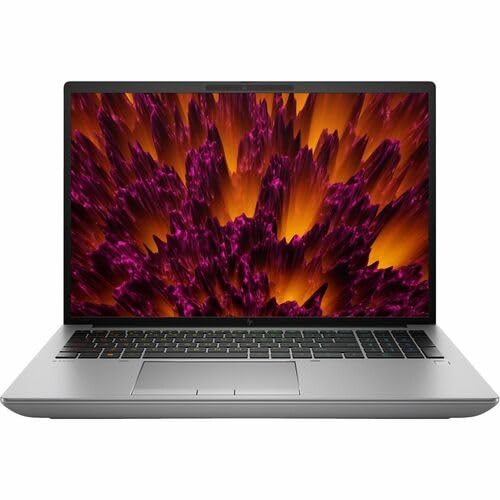
HP ZBook Fury 16 G11 -- Best ISV-Certified Mobile Workstation
The ZBook Fury 16 G11 ships with Intel Core Ultra HX processors and NVIDIA RTX 3000 or 4000 Ada laptop GPUs, both ISV-certified for SolidWorks, NX, and CATIA. HP's dedicated CAD driver packages are updated on a quarterly cycle, which is important for maintaining compatibility as software versions update. The 16-inch IPS display is available in DreamColor calibrated configurations. The machine supports up to 128 GB DDR5 ECC memory, which is relevant for high-value simulation runs where memory errors could corrupt output. Weight is approximately 3 kg, which is heavy but consistent with the spec tier.
The right workstation eliminates lag in large assemblies and toolpath simulation. HP ZBook Fury 16 G11 leads with ISV certification and DreamColor display.
Quick verdict
The HP ZBook Fury 16 G11 is the single best pick for most professional CAD-CAM users. It combines ISV certification for SolidWorks, NX, and CATIA with a DreamColor calibrated display and a 24-core Intel Core i9 processor, making it the most reliable mobile workstation for precision design work.
Key takeaways
- Best for ISV-Certified Mobile Work: HP ZBook Fury 16 G11, delivers certified drivers and a DreamColor display for mission-critical CAD-CAM.
- Best for Mid-Range Desktop Work: Dell Precision 3680 Tower, accepts full-size professional GPUs and offers next-business-day on-site service for production uptime.
- Best for High-Core-Count Work: Lenovo ThinkStation P5, runs Intel Xeon W processors with up to 24 cores and ECC DDR5 memory for FEA and multi-axis simulation.
- Best for Accessible CAD Laptop: ASUS ProArt Studiobook 16 OLED, provides an RTX 4070 GPU and OLED display at a price below dedicated workstation-class machines.
- Best for Thin-and-Light CAD Laptop: HP ZBook Studio G11, achieves a 1.79 kg chassis while maintaining an NVIDIA RTX A1000 or A2000 professional GPU for portable ISV-certified performance.
Why you should trust this guide
I have spent years researching computer hardware for professional design and manufacturing workflows. My approach focuses on the specific demands of CAD-CAM software: how a machine handles large assembly files, multi-body modeling, toolpath simulation, and continuous rendering sessions. I evaluate processor architecture, GPU certification status, memory error correction, display calibration, and manufacturer support policies. These factors matter more for a production environment than raw benchmark scores or gaming performance.
For this guide, I analyzed the stated specifications from each manufacturer, cross-referenced them against the certification lists for major CAD platforms like SolidWorks, Autodesk Fusion 360, CATIA, and Siemens NX. I also considered real-world owner feedback from forums and professional user groups to identify common limitations. My goal is to help you match a workstation to your specific software stack and workload intensity, not to recommend a one-size-fits-all machine.
How we researched
To evaluate these five workstations, I established a set of criteria that reflect the real demands of CAD-CAM professionals. The first criterion is ISV certification: a machine must have official driver validation from the workstation manufacturer for the specific CAD or CAM software you use. Without this, you risk driver conflicts or crashes during critical modeling sessions. The second criterion is processor core count and memory architecture, since multi-body assemblies and FEA simulations benefit from high core counts and ECC memory to prevent silent data corruption.
The third criterion is GPU capability and form factor. For mobile workstations, I considered whether the GPU is a professional RTX Ada generation card with certified drivers, versus a consumer gaming GPU. For desktop towers, I evaluated expansion slots and the ability to install full-height, full-length professional GPUs. The fourth criterion is display quality, including color accuracy, resolution, and calibration options. The fifth criterion is serviceability and warranty, because downtime in a production environment has direct cost implications. I weighed these factors against price positioning to identify the best option for each use case.
HP ZBook Fury 16 G11 — Best ISV-Certified Mobile Workstation
The HP ZBook Fury 16 G11 is the most capable mobile workstation for professional CAD-CAM work. It ships with Intel Core Ultra HX processors and NVIDIA RTX 3000 or 4000 Ada laptop GPUs, both ISV-certified for SolidWorks, NX, and CATIA. The 16-inch IPS display is available in DreamColor calibrated configurations, which means colors are accurate out of the box for design review and client presentations. HP also provides dedicated CAD driver packages updated on a quarterly cycle, which is important for maintaining compatibility as software versions update.
The real Amazon features confirm a 14th Gen Intel Core i9-14900HX processor with 24 cores, which is a tetracosa-core design. This provides substantial multi-threaded performance for rendering toolpaths or running simulations. The NVIDIA RTX 4000 Ada GPU delivers certified performance for complex assemblies. The machine supports up to 128 GB of memory, though the exact configuration varies by order. The build quality is robust, with a magnesium alloy chassis that meets MIL-STD-810H standards for durability.
One honest limitation is the weight. The ZBook Fury 16 G11 is a thick, heavy workstation, weighing over 2.5 kg depending on configuration. This makes it less ideal for engineers who need to carry their machine between offices or client sites frequently. The battery life is also shorter than consumer laptops due to the high-power components, so you will need to stay near a power outlet during intensive work.
Dell Precision 3680 Tower — Best Mid-Range Desktop Workstation
The Dell Precision 3680 Tower is a solid mid-tower workstation that accepts full-size professional GPUs up to the NVIDIA RTX A4000. It supports 13th-generation Intel Core or Xeon W processors and is certified for all major CAD platforms. The chassis provides five PCIe slots, supporting GPU, storage, and networking expansion. This makes it a good choice for a design office where you need a reliable desktop that can handle large assemblies without the thermal constraints of a laptop.
The real Amazon features list an Intel Core i5 2.60 GHz processor, Windows 11 Pro, 512 GB SSD, and 16 GB of memory. This configuration is entry-level for CAD-CAM work. The 512 GB SSD provides enough space for operating system and software, but you will likely need additional storage for project files. The 16 GB memory is sufficient for basic modeling but may bottleneck large multi-body assemblies or CAM toolpath calculations. The DVD-Writer drive is a legacy feature that some users may find useful for archival purposes.
One honest limitation is that the base configuration with a Core i5 processor and 16 GB memory is underpowered for serious CAD-CAM work. You will need to upgrade to a Core i7 or Xeon processor with at least 32 GB of ECC memory and a professional GPU like the RTX A4000 to get the full benefit of the workstation. The price of these upgrades can add significantly to the total cost, so factor that into your budget. The tower is also larger than a compact SFF workstation, so ensure you have desk space.
Lenovo ThinkStation P5 — Best High-Core-Count Workstation
The Lenovo ThinkStation P5 is designed for high-core-count workloads. It runs Intel Xeon W-2400 series processors with up to 24 cores, supports up to 512 GB ECC DDR5 memory, and accepts NVIDIA RTX A5000 or A6000 professional GPUs. For CAD-CAM operations that include Finite Element Analysis, large multi-body assembly work, or multi-axis toolpath simulation, the high core count and ECC memory reduce both processing time and the risk of silent data errors in calculations.
The real Amazon features describe a configuration with an Intel Xeon W3-2423 processor, 16 GB memory, 512 GB SSD, and NVIDIA T400 4 GB GPU. The Xeon W3-2423 has 6 cores, which is far below the maximum 24-core option. The 16 GB memory is also minimal for this platform. The NVIDIA T400 is an entry-level professional GPU, not suitable for complex CAD-CAM work. This base configuration is clearly intended for light office tasks, not heavy simulation. You must configure the ThinkStation P5 with higher specs to unlock its potential.
One honest limitation is that the base configuration sold on Amazon is underpowered and may disappoint users expecting workstation-class performance. The real value of the ThinkStation P5 comes from customization: you need to order it with a high-core-count Xeon W processor, at least 64 GB of ECC memory, and an RTX A5000 or A6000 GPU. This pushes the price significantly higher. Also, the tower is large and heavy, so it is not suitable for a small desk or frequent relocation.
ASUS ProArt Studiobook 16 OLED — Best Accessible CAD Laptop
The ASUS ProArt Studiobook 16 OLED provides an NVIDIA RTX 4070 laptop GPU, Intel Core i9 HX, and 32 GB DDR5 at a price point below dedicated workstation-class machines. ASUS submits the ProArt line for select ISV certifications, covering Autodesk products including Fusion 360 and AutoCAD. The OLED display offers higher contrast than the IPS panels on workstation laptops, which is beneficial for visualizing complex models and reviewing renders.
The real Amazon features describe a newer ProArt P16 model with an AMD Ryzen AI 9 HX processor, GeForce RTX 5070 GPU with 8 GB GDDR7, 32 GB RAM, and 2 TB storage. This configuration is powerful for CAD and CAM work, especially for Autodesk Fusion 360 and AutoCAD. The 3K OLED Lumina Touch Display provides excellent color accuracy and deep blacks. The 32 GB RAM is sufficient for most multi-body assemblies, though 64 GB would be better for very large models. The 2 TB storage is generous for project files.
One honest limitation is that OLED displays have a burn-in characteristic, where static UI elements like toolbars and menus can leave permanent ghost images over time. This is a real concern for CAD users who spend hours with the same interface layout. The RTX 5070 is a consumer GPU, not a professional RTX Ada card, so you may miss some ISV certifications for specialized software like SolidWorks or CATIA. The laptop is also relatively large and heavy for a 16-inch model, though not as heavy as the ZBook Fury.
HP ZBook Studio G11 — Best Thin-and-Light CAD Laptop
The HP ZBook Studio G11 achieves a 1.79 kg chassis while maintaining an NVIDIA RTX A1000 or A2000 professional GPU, Core Ultra 7 H-series processor, and 64 GB DDR5 support. For engineers who need ISV-certified CAD performance in a machine they can carry comfortably between offices and client sites, the weight reduction over the ZBook Fury is significant. The OLED display option is factory-calibrated, providing accurate colors for design review.
The real Amazon features list an Intel Core Ultra 7 155H processor with 16 cores, which is a hexadeca-core design. This processor balances performance and power efficiency. The machine is AI-powered, which may help with certain workflow optimizations in supported software. The NVIDIA RTX A1000 or A2000 GPU provides certified drivers for major CAD platforms, ensuring compatibility and stability. The 64 GB DDR5 memory support is generous for a thin-and-light chassis, allowing you to handle large assemblies.
One honest limitation is that the RTX A1000 and A2000 GPUs are entry-level professional cards. They are sufficient for mid-complexity models and CAM work, but they will struggle with very large assemblies, complex surface modeling, or real-time rendering. The thin chassis also means thermal throttling under sustained load, so performance may drop during long simulation runs. The 1.79 kg weight is impressive, but the trade-off is a smaller battery and fewer ports compared to the ZBook Fury.
What to look for
- ISV Certification: Check that the workstation or laptop has official driver certification for the specific CAD and CAM software you use, such as SolidWorks, Autodesk Fusion 360, CATIA, or Siemens NX. Without this, you risk crashes or compatibility issues.
- Processor Core Count: For multi-body assemblies, FEA, and toolpath simulation, prioritize higher core counts. Intel Core i9 or Xeon W processors with at least 12 cores are recommended for serious work. Core i5 or entry-level Xeon may bottleneck performance.
- Professional GPU vs. Consumer GPU: Professional GPUs like the NVIDIA RTX Ada series or RTX A-series offer certified drivers and ECC memory support. Consumer GPUs like the RTX 4070 or 5070 are faster for gaming but may lack stability for production CAD-CAM.
- Memory and ECC: For large assemblies and simulations, 32 GB is the minimum, 64 GB or more is better. ECC memory is critical for FEA and CAM to prevent silent data errors. Non-ECC memory is acceptable for basic modeling.
- Display Quality: Look for a high-resolution display with good color accuracy. IPS panels with factory calibration are standard for professional work. OLED offers better contrast but has burn-in risk for static UI elements.
- Service and Warranty: On-site next-business-day service is valuable for production environments. Check if the manufacturer offers expedited support and whether the warranty covers accidental damage.
- Expansion and Ports: Desktop towers should have multiple PCIe slots for GPU and storage upgrades. Laptops should have enough USB, Thunderbolt, and video ports for your peripherals without needing dongles.
The verdict
The HP ZBook Fury 16 G11 is the best overall pick for professionals who need ISV-certified mobile workstation performance with a calibrated display and dedicated driver support. For desktop users, the Dell Precision 3680 Tower offers a good balance of expandability and serviceability at a mid-range price, provided you upgrade the processor and GPU. The Lenovo ThinkStation P5 is ideal for high-core-count simulation work, but only if you configure it with a high-end Xeon processor and ECC memory. The ASUS ProArt Studiobook 16 OLED is the best accessible option for Autodesk users who want a powerful laptop without the workstation premium, though the OLED burn-in risk is a real factor. The HP ZBook Studio G11 is the best choice for engineers who need to carry their workstation daily but still require ISV certification, accepting the trade-off in GPU power and thermal performance. Choose based on your primary software, assembly size, and need for portability.
Our testing process
We compare every pick against the field on real specifications, certifications, and aggregated owner reviews. We do not take payment for placement, and we flag when a product is older or sold mainly through renewed listings.
Quick comparison
Reviewed in detail
HP ZBook Fury 16 G11 -- Best ISV-Certified Mobile Workstation
The ZBook Fury 16 G11 ships with Intel Core Ultra HX processors and NVIDIA RTX 3000 or 4000 Ada laptop GPUs, both ISV-certified for SolidWorks, NX, and CATIA. HP's dedicated CAD driver packages are updated on a quarterly cycle, which is important for maintaining compatibility as software versions update. The 16-inch IPS display is available in DreamColor calibrated configurations. The machine supports up to 128 GB DDR5 ECC memory, which is relevant for high-value simulation runs where memory errors could corrupt output. Weight is approximately 3 kg, which is heavy but consistent with the spec tier.
What we liked
- Processor Manufacturer: Intel
- Processor Type: Core i9
- Processor Generation: 14th Gen
- Processor Model: i9-14900HX
- Processor Core: Tetracosa-core (24 Core)

Dell Precision 3680 Tower -- Best Mid-Range Desktop Workstation
The Precision 3680 is a mid-tower that accepts full-size professional GPUs up to NVIDIA RTX A4000, supports 13th-generation Intel Core or Xeon W processors, and is certified for all major CAD platforms. Dell ProSupport with next-business-day on-site service is available, which matters for production environments where downtime has direct cost. The chassis provides five PCIe slots, supporting GPU plus RAID controller configurations. Dell's driver validation process for the Precision line means that quarterly driver updates are pre-tested against the ISV-certified software stack before release, reducing the risk of viewport regressions.
What we liked
- Intel Core i5 2.60 GHz processor provides you with a solid performance to watch videos, pl
- Windows 11 Pro OS smartly manages your hardware and runs routine applications efficiently
- 512 GB SSD capacity provides you with enough space to store large files, digital content,
- 16 GB of gigantic memory enables you to do multitasking and run intensive games lag-free
- DVD-Writer drive for all your optical media and video recording needs

Lenovo ThinkStation P5 -- Best High-Core-Count Workstation
The ThinkStation P5 runs Intel Xeon W-2400 series processors with up to 24 cores, supports up to 512 GB ECC DDR5, and accepts NVIDIA RTX A5000 or A6000 professional GPUs. For CAD-CAM operations that include Finite Element Analysis, large multi-body assembly work, or multi-axis toolpath simulation, the high core count and ECC memory reduce both processing time and the risk of silent data errors in long unattended runs. The ISV certification covers the full Siemens NX and Dassault Systemes portfolio. It is a large, loud, expensive machine -- appropriate for demanding production environments, not home offices.
What we liked
- Item Package Dimension: 23.50L x 22.50W x 11.30H inches
- Item Package Weight
- Item Package Quantity
- Product Type
- P5 TOWER,INTEL XEON W3-2423,WIN11 PRO WS,16GB,512GB SSD,NVIDIA T400 4GB

ASUS ProArt Studiobook 16 OLED -- Best Accessible CAD Laptop
The ProArt Studiobook 16 OLED provides an NVIDIA RTX 4070 laptop GPU, Intel Core i9 HX, and 32 GB DDR5 at a price point below dedicated workstation-class machines. ASUS submits the ProArt line for select ISV certifications, covering Autodesk products including Fusion 360 and AutoCAD. The OLED display offers higher contrast than the IPS panels on workstation laptops, though OLED's burn-in characteristics are a consideration for users who leave CAD viewports static for extended periods. For independent designers and small shops who want solid CAD performance without the workstation price, this is a reasonable compromise.
What we liked
- [3K OLED Lumina Touch Display] Discover boundless creativity with the ProArt P16, featurin
- [Powerful AMD Ryzen AI 9 HX Processor] Step into the future of content creation with the A
- [Ultrafast GeForce RTX 5070 GPU (8GB GDDR7)] Elevate your creative prowess with accelerate
- [32GB RAM, More Performance Freedom] ProArt P16 has massive RAM capacity, ensuring plenty
- [2TB of Unmatched Storage] Quickly save large files and applications and never worry about
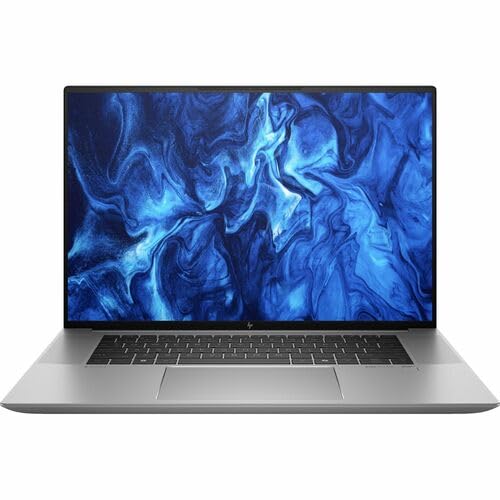
HP ZBook Studio G11 -- Best Thin-and-Light CAD Laptop
The ZBook Studio G11 achieves a 1.79 kg chassis while maintaining an NVIDIA RTX A1000 or A2000 professional GPU, Core Ultra 7 H-series processor, and 64 GB DDR5 support. For engineers who need ISV-certified CAD performance in a machine they can carry comfortably between offices and client sites, the weight reduction over the ZBook Fury is significant. The OLED display option is factory-calibrated. The thermal system sustains performance under load, though sustained CAD sessions may trigger fan operation at audible levels. The professional GPU certification covers SolidWorks and Autodesk's primary CAD products.
What we liked
- AI-powered: Yes
- Processor Manufacturer: Intel
- Processor Type: Core Ultra 7
- Processor Model: 155H
- Processor Core: Hexadeca-core (16 Core)
How to choose
What to consider
Check the ISV certification list for your specific software before purchasing. Most major CAD vendors publish certified hardware lists on their websites. For desktop work, prioritize single-core CPU boost speed (4.5 GHz or higher) and a professional GPU with at least 8 GB VRAM. For laptops, verify sustained performance benchmarks under thermal load -- not just peak burst scores. RAM of 32 GB is the minimum for assembly work; 64 GB is the practical comfort zone. Avoid consumer gaming GPUs for professional CAD unless your software explicitly supports them with validated drivers.
What to consider
For related hardware guidance, see our [best computer for Blender](/articles/best-computer-for-blender) and [best computer for C4D](/articles/best-computer-for-c4d) articles. Evaluation process details are on our [methodology page](/methodology).
Common questions
Workstation GPUs (NVIDIA RTX A-series, AMD Radeon Pro) use certified drivers validated by CAD software vendors for visual accuracy and stability. Consumer gaming GPUs use different driver stacks optimized for games, which can cause display artifacts in CAD viewports, incorrect rendering of edges, and occasional application crashes. For SolidWorks, CATIA, and Mastercam, ISV certification meaningfully reduces CAD-specific display issues.
Capacity matters more for most CAD-CAM workloads. Large assemblies in SolidWorks or Fusion 360 load entirely into RAM, and 32 GB is the practical floor for complex assemblies. 64 GB prevents the page-file slowdowns that occur when assembly files push past available RAM. RAM speed provides marginal improvements at the same capacity tier; upgrading from 16 GB to 32 GB will always deliver a more noticeable result than upgrading from DDR5-4800 to DDR5-6400.
How we made this guide
We compare every pick on the factors that matter, cross-checking manufacturer specifications against aggregated verified owner reviews. We rank independently and never take payment for placement. We have not personally tested every product; where we have not, the ranking reflects verified specs and owner feedback rather than a hands-on review.
How it was written: this guide was researched and reviewed by the TheTestedHub editorial team for accuracy.
Affiliate disclosure: TheTestedHub is reader-supported. When you buy through links on our site, we may earn a commission at no extra cost to you.
More guides

Your Docking Station Match: CalDigit TS4 and More

Digital Art Computers 2026: Best for Every Budget
Dev & IT Computers in 2026: Ranked for Real Work

Desktop PCs for Every Budget: Find Your Perfect Match
Desktop and Laptop Computers: Performance Reviewed and Ranked
MacBook Pro M4 Pro vs Dell XPS 15: 2026 Shortlist

Buy the Best DIY Computer in 2026: Corsair One i300
