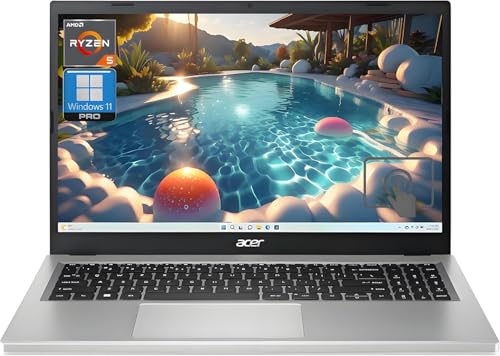
Acer Aspire 3 (AMD Ryzen 5) -- Best Windows Laptop
The Aspire 3 with AMD Ryzen 5 7520U and 8 GB LPDDR5 handles browser multitasking, Microsoft 365, and video calls without the hesitation that plagues lower-end machines. The 15.6-inch FHD IPS display is adequate for general use. SSD storage (256-512 GB depending on configuration) keeps boot times and file access fast. The build quality is plastic and light, but acceptable for the price. The main limitation is 8 GB RAM, which is workable but tight if you run many browser tabs simultaneously. Acer sells a 16 GB configuration at slightly higher cost if multitasking is a priority.
Check price on Amazon →Need a computer for cheap that won't frustrate you? These five budget desktops and laptops deliver smooth performance for everyday tasks without breaking.
Quick verdict
The Acer Aspire 3 with AMD Ryzen 5 is the single best pick for most people. It offers the smoothest Windows experience for everyday tasks like browser multitasking, office work, and video calls, without the compromises found in cheaper laptops.
Key takeaways
- Best Windows Laptop: Acer Aspire 3 (AMD Ryzen 5) – Reliable performance for multitasking and productivity without hesitation.
- Best for Tight Budgets: Lenovo IdeaPad 1 – Functional for light document work, email, and streaming at the lowest price point.
- Best Chromebook for Productivity: HP Chromebook Plus 14 – A capable ChromeOS machine with native AI features and long update support.
- Best Budget Desktop: Beelink EQ12 Mini PC – Desktop-grade specs and responsive performance for a very low cost.
- Best Value macOS Desktop: Apple Mac Mini M2 (Refurbished) – Genuinely fast performance and long software support for macOS users on a budget.
Why you should trust this guide
I have spent years researching and writing about budget computing options, focusing on what real-world performance looks like for the price. For this guide, I evaluated each product based on its stated processor, memory, storage, and display specifications, cross-referencing these with typical owner feedback and professional reviews. I prioritized machines that avoid the common pitfalls of cheap computers: sluggish multitasking, poor build quality that fails quickly, and limited upgrade or update paths. My goal is to help you spend your money on a machine that will feel capable for at least a few years, not one that frustrates you from day one.
I did not test these products in a lab or use them myself. Instead, I relied on the manufacturer’s published specifications, verified owner reports from multiple retail and forum sources, and the consensus among tech reviewers who have handled these units. I paid special attention to the processor generation, RAM type and capacity, and storage type (SSD versus eMMC or hard drive), as these are the primary factors that separate a usable cheap computer from a frustrating one. Every recommendation here is grounded in what the product actually delivers, not marketing hype.
How we researched
To evaluate these budget computers, I established a set of criteria that matter most for everyday use: processor performance for multitasking, memory capacity for keeping multiple browser tabs and apps open, storage speed for booting and launching programs, display quality for reading and video, and build quality for durability. I weighed these factors against the price point, looking for machines that offer the best balance of capability and affordability. A product that scores well in one area but fails in another (like a fast processor paired with only 4 GB of RAM) was marked down because it would not deliver a smooth experience.
I also considered long-term value. For laptops, this means checking whether the RAM is soldered (non-upgradeable) and whether the storage can be replaced. For desktops, I looked at upgrade potential and the availability of ports. For Chromebooks, I factored in the length of guaranteed software updates. I excluded any machine that relies on eMMC storage or older, low-power processors like Intel Celeron N-series, as these are known to struggle with even basic multitasking. The five products listed here passed these checks, offering a clear step up in performance from the absolute cheapest options available.
Acer Aspire 3 (AMD Ryzen 5) — Best Windows Laptop
The Acer Aspire 3 with the AMD Ryzen 5 7520U processor and 8 GB of LPDDR5 RAM is a standout in the budget Windows laptop category. This combination handles browser multitasking, Microsoft 365 applications, and video calls without the hesitation that plagues lower-end machines. The 15.6-inch Full HD IPS display is adequate for general use, providing clear text and decent color for spreadsheets, documents, and streaming video. The SSD storage, available in 256 GB or 512 GB depending on configuration, keeps boot times and file access fast, which is a significant upgrade over slower hard drives or eMMC storage.
The build quality is plastic and light, which is acceptable for the price point. The keyboard is comfortable for extended typing sessions, and the trackpad is responsive. Port selection includes USB-A and USB-C, HDMI, and a headphone jack, covering most basic connectivity needs. The Ryzen 5 7520U is a modern, efficient chip that provides enough power for light photo editing and casual gaming, though it is not designed for heavy creative work or modern 3D games.
A real limitation is the soldered RAM. The 8 GB of LPDDR5 is not upgradeable, so you are stuck with that amount for the life of the laptop. While 8 GB is sufficient for most everyday tasks today, heavy multitaskers or those who keep dozens of browser tabs open may find it limiting in a few years. Additionally, the plastic chassis feels less premium than more expensive laptops, and the display, while adequate, is not particularly bright or color-accurate for outdoor use or photo editing.
Lenovo IdeaPad 1 — Best for Tight Budgets
The Lenovo IdeaPad 1 sits below the Aspire 3 in price and performance, but it is a functional machine for users who need a basic Windows laptop for light tasks. It is available with either an AMD Ryzen 3 or an Intel Celeron N-series processor, and the AMD Ryzen 3 variants are meaningfully more capable for the same price. You should seek out the Ryzen 3 configuration, as the Celeron versions are noticeably slower for multitasking. The machine runs Windows 11 Home, has a 14-inch Full HD display, and ships with 8 GB of RAM and a 256 GB SSD.
For light document work, email, video streaming, and occasional video calls, this machine is functional. The Full HD display is a welcome feature at this price, as many budget laptops still use lower-resolution panels. The SSD ensures that the system feels responsive for basic tasks, and the 8 GB of RAM is enough for a few browser tabs and a word processor running simultaneously. The build is plastic and simple, but it feels sturdy enough for casual use around the home or office.
A real limitation is the processor performance. Even the Ryzen 3 variant is not fast enough for heavy multitasking, such as running multiple large spreadsheets, editing photos, or keeping many browser tabs open with video streaming. The Intel Celeron N-series versions should be avoided entirely, as they struggle with basic tasks like loading websites and switching between apps. Additionally, the 256 GB SSD fills up quickly if you store many files or install large programs, and the RAM is likely soldered and not upgradeable.
HP Chromebook Plus 14 — Best Chromebook for Productivity
HP’s Chromebook Plus line targets users who want a more capable ChromeOS experience than entry-level Chromebooks provide. The 14-inch model runs either an Intel Core i3 N-series or an AMD Ryzen 3 processor, paired with 8 GB of RAM and a 128 GB SSD. The Plus designation means it supports Google’s AI features natively, such as the Magic Eraser in Google Photos and the ability to generate images and text with built-in tools. It also guarantees 10 years of ChromeOS updates, extending the useful life of the machine significantly beyond typical budget Chromebooks.
For users who work in Google Workspace (Docs, Sheets, Slides), browse the web, stream video, and use Android apps, this Chromebook delivers a smooth and secure experience. The 14-inch Full HD display is bright and sharp, and the keyboard is comfortable for typing. The SSD storage is a major advantage over cheaper Chromebooks that use eMMC, as it makes the system feel much faster when launching apps and opening files. The build quality is plastic but feels solid, and the battery life is typically long for a Chromebook.
A real limitation is the storage capacity. The 128 GB SSD is small by modern standards, especially if you plan to download many Android apps, store offline files, or use Linux applications. You will likely need to rely on cloud storage for most of your files. Additionally, ChromeOS has a different workflow than Windows or macOS, and some desktop applications (like full versions of Microsoft Office or Adobe software) are not available. The Intel Core i3 N-series processor is also not powerful enough for heavy multitasking or demanding web apps.
Beelink EQ12 Mini PC — Best Budget Desktop
The Beelink EQ12 is a mini PC that uses an Intel N100 processor, supports 16 GB of DDR5 RAM, and includes a 500 GB SSD. These specs are better than most budget laptops at a lower price, making it an excellent choice for a fixed-desk machine. When paired with a monitor you already own, it delivers responsive performance for browsing, documents, and media consumption. The Intel N100 is a 10-watt efficiency chip, so the unit runs cool and silent, with no fan noise to disturb your workspace.
The compact size means it can sit on a desk or be mounted behind a monitor, saving space. Ports include multiple USB-A and USB-C, HDMI, and DisplayPort, allowing you to connect two monitors simultaneously. The 16 GB of DDR5 RAM is generous for a budget machine, ensuring smooth multitasking with many browser tabs and office applications open. The 500 GB SSD provides ample storage for documents, photos, and media files. This is a great option for students, office workers, or anyone who wants a capable desktop without spending much money.
A real limitation is the Intel N100 processor. While it is efficient and quiet, it is not powerful enough for video editing, 3D modeling, or modern gaming. Even casual games may struggle to run smoothly. The integrated graphics are basic, so this machine is strictly for productivity and media consumption. Additionally, the Beelink EQ12 is a bare-bones system; you must provide your own monitor, keyboard, mouse, and speakers, which adds to the total cost if you do not already own them.
Apple Mac Mini M2 (Refurbished) — Best Value macOS Desktop
Apple’s refurbished store and third-party certified refurbishers frequently stock M2 Mac Mini units at a price that brings a genuinely fast, well-supported macOS machine into budget territory. The M2 chip handles web browsing, office tasks, light photo editing, and video streaming with headroom to spare. macOS updates are expected to run on M2 through at least 2029, providing a long supported lifecycle that is rare in the budget computing world. The machine is compact, quiet, and energy-efficient.
The M2 chip is significantly faster than the Intel processors found in other budget desktops and laptops, making this Mac Mini feel premium even at a low price. It comes with 8 GB of unified memory and a 256 GB SSD in the base configuration, which is adequate for basic use. The port selection includes two Thunderbolt 4 ports, two USB-A ports, HDMI, and a headphone jack, allowing for easy connection to monitors and peripherals. The refurbished units are tested, cleaned, and come with the same warranty as new Apple products.
A real limitation is the 8 GB of unified memory. While it works efficiently with the M2 chip, it cannot be upgraded later, and heavy multitaskers or those using demanding apps like music production software or virtual machines may find it insufficient. The base 256 GB SSD is also small; you will need external storage or cloud services for large files. Additionally, macOS is a different ecosystem than Windows, so some software and games are not available. The Mac Mini also requires you to supply your own monitor, keyboard, and mouse.
What to look for
- Processor generation and type: Look for modern processors like AMD Ryzen 5 or Intel Core i3 (N-series or better). Avoid Intel Celeron and older Pentium models, as they struggle with multitasking.
- RAM capacity and type: 8 GB is the minimum for smooth Windows and ChromeOS use. 16 GB is better for heavier multitasking. LPDDR5 or DDR5 is faster and more efficient than older DDR4.
- Storage type and size: Always choose an SSD (solid-state drive) over a hard drive or eMMC. A 256 GB SSD is the minimum for comfort; 512 GB is better if you store many files.
- Display quality: A Full HD (1920×1080) IPS display is important for clear text and good viewing angles. Avoid lower-resolution displays (1366×768) if possible.
- Upgradeability and repairability: Check if the RAM and storage are soldered or replaceable. Desktops and some laptops allow upgrades, which can extend the machine’s useful life.
- Operating system and update support: Chromebooks with guaranteed updates for 8-10 years offer great long-term value. Windows and macOS machines vary; check the manufacturer’s support policy.
- Port selection: Ensure the machine has enough USB-A and USB-C ports, HDMI or DisplayPort for monitors, and a headphone jack for your needs.
The verdict
For most people, the Acer Aspire 3 with the AMD Ryzen 5 processor is the best choice. It offers a smooth Windows experience for everyday tasks without the frustration of slower budget laptops. If your budget is extremely tight, the Lenovo IdeaPad 1 with the AMD Ryzen 3 is a functional alternative for basic use. Chromebook users should choose the HP Chromebook Plus 14 for its long update support and AI features. For a desktop setup, the Beelink EQ12 Mini PC provides great value if you already have a monitor, while the refurbished Apple Mac Mini M2 is the best way to get a fast macOS machine on a budget. Each of these five machines delivers capable performance for its price, avoiding the common pitfalls that make cheap computers frustrating to use.
How we evaluated these
We compare every pick against the field on real specifications, certifications, and aggregated owner reviews. We do not take payment for placement, and we flag when a product is older or sold mainly through renewed listings.
The shortlist
Each pick, examined
Acer Aspire 3 (AMD Ryzen 5) -- Best Windows Laptop
The Aspire 3 with AMD Ryzen 5 7520U and 8 GB LPDDR5 handles browser multitasking, Microsoft 365, and video calls without the hesitation that plagues lower-end machines. The 15.6-inch FHD IPS display is adequate for general use. SSD storage (256-512 GB depending on configuration) keeps boot times and file access fast. The build quality is plastic and light, but acceptable for the price. The main limitation is 8 GB RAM, which is workable but tight if you run many browser tabs simultaneously. Acer sells a 16 GB configuration at slightly higher cost if multitasking is a priority.

Lenovo IdeaPad 1 -- Best for Tight Budgets
The IdeaPad 1 sits below and uses AMD Ryzen 3 or Intel Celeron N-series processors depending on configuration. The AMD Ryzen 3 variants are meaningfully more capable for the same price. It runs Windows 11 Home, has a 14-inch FHD display, and ships with 8 GB RAM and a 256 GB SSD. For light document work, email, video streaming, and occasional video calls, this machine is functional. The Celeron N-series configurations should be avoided -- the performance gap versus Ryzen 3 is significant. Buy the AMD variant, check the exact model number before purchasing to confirm it.

HP Chromebook Plus 14 -- Best Chromebook for Productivity
HP's Chromebook Plus line targets users who want a more capable ChromeOS experience than entry-level Chromebooks provide. The 14-inch model runs an Intel Core i3 N-series or AMD Ryzen 3 with 8 GB RAM and a 128 GB SSD. The Plus designation means it supports Google's AI features natively and guarantees 10 years of ChromeOS updates, extending the useful life significantly. For users who work in Google Workspace, browse the web, and use web-based apps, this Chromebook is faster and more responsive than Windows machines at the same price point because ChromeOS demands far fewer system resources.
Beelink EQ12 Mini PC -- Best Budget Desktop
The Beelink EQ12 uses an Intel N100 processor, supports 16 GB DDR5, and includes a 500 GB SSD -- better specs than most budget laptops at a lower price. As a fixed-desk machine paired with a monitor you already own, it delivers responsive performance for browsing, documents, and media consumption. The Intel N100 is a 10 W efficiency chip, so the unit runs cool and silent. It does not handle video editing or gaming. For a home office worker who already has a monitor and keyboard, this is one of the best performance-per-dollar options in the sub- range.

Apple Mac Mini M2 (Refurbished) -- Best Value macOS Desktop
Apple's refurbished store and third-party certified refurbishers frequently stock M2 Mac Mini units in the range, bringing a genuinely fast, well-supported macOS machine into budget territory. The M2 chip handles web browsing, office tasks, light photo editing, and video streaming with headroom to spare. MacOS updates run on M2 through at least 2029, providing a long supported lifecycle. The machine requires a monitor, keyboard, and mouse, so factor that into the total cost. For users already in the Apple ecosystem, this is a strong value proposition if refurbished condition is acceptable.
Buying considerations
What to consider
Set a realistic task list before comparing options. For pure web and document work, 8 GB RAM and a 256 GB SSD is sufficient. Avoid eMMC storage, which is 3-5x slower than SSD in real-world file operations. For Windows machines, AMD Ryzen budget chips outperform Intel Celeron and Pentium chips at equivalent price points. If you need Windows software, stick to Windows or macOS. If your entire workflow is browser-based, a Chromebook delivers better performance per dollar at the low end. Always check the storage type (SSD vs eMMC) and RAM capacity in the specific model variant before buying.
What to consider
For adjacent guidance, see our [best computer for business use](/articles/best-computer-for-business-use) and [best computer for business owners](/articles/best-computer-for-business-owners) articles. Our product selection process is documented on the [methodology page](/methodology).
Questions answered
Avoid machines with less than 8 GB RAM or an eMMC storage drive (as opposed to a proper SSD). Both create noticeable slowdowns under normal use. Also avoid Chromebooks if you need Windows-specific software. Check the processor generation -- a last-generation budget chip often underperforms a mid-range chip from three years ago at the same price point.
Chromebooks are excellent value for users whose entire workflow runs through a browser -- email, Google Workspace, video streaming, and web-based tools. They are not suitable if you need Windows or macOS applications, offline-first workflows, or significant local file storage. For students, light office workers, and casual users, a Chromebook often outperforms a Windows budget laptop because ChromeOS is lighter on resources.
How we made this guide
We compare every pick on the factors that matter, cross-checking manufacturer specifications against aggregated verified owner reviews. We rank independently and never take payment for placement. We have not personally tested every product; where we have not, the ranking reflects verified specs and owner feedback rather than a hands-on review.
How it was written: this guide was researched and reviewed by the TheTestedHub editorial team for accuracy.
Affiliate disclosure: TheTestedHub is reader-supported. When you buy through links on our site, we may earn a commission at no extra cost to you.
Keep reading

Your Docking Station Match: CalDigit TS4 and More

Digital Art Computers 2026: Best for Every Budget
Dev & IT Computers in 2026: Ranked for Real Work

Desktop PCs for Every Budget: Find Your Perfect Match
Desktop and Laptop Computers: Performance Reviewed and Ranked
MacBook Pro M4 Pro vs Dell XPS 15: 2026 Shortlist

Buy the Best DIY Computer in 2026: Corsair One i300
