
Apple MacBook Pro 16 M4 Pro -- Best Overall for Creative Cloud
The M4 Pro chip accelerates Premiere Pro exports at a rate that makes Intel and AMD laptops look a generation behind. A 30-minute 4K timeline exports in roughly 4-5 minutes. Photoshop's neural filters and After Effects GPU previews respond without lag. The Liquid Retina XDR display covers 1,000 nits sustained brightness with true P3 color, accurate enough for professional color grading. Battery lasts 15-17 hours under typical mixed loads. The main cost is the price: 24 GB of unified memory is the base config, and stepping to 48 GB adds.
Check price on Amazon →See why the Apple MacBook Pro 16 M4 Pro leads our list of top Creative Cloud computers, with tips for choosing the right one for your workflow.
Quick verdict
The Apple MacBook Pro 16 M4 Pro is the single best pick for Creative Cloud because its M4 Pro chip delivers render speeds that outpace Intel and AMD laptops by a generation, and its Liquid Retina XDR display provides professional-grade color accuracy for demanding video and photo work.
Key takeaways
- Best for Overall Creative Cloud: Apple MacBook Pro 16 M4 Pro, unmatched render acceleration and display quality for mobile professionals.
- Best Desktop for Pro Video: Apple Mac Studio M4 Max, workstation-class performance in a compact chassis with extensive connectivity.
- Best Windows Option: Dell XPS 15 (2025), OLED display with full DCI-P3 coverage and reliable RTX 4060 GPU acceleration for Windows-native workflows.
- Best for Graphic Design and Photo Editing: ASUS ProArt Studiobook 16 OLED, factory-calibrated display with Delta E less than 2 and a physical dial for creative controls.
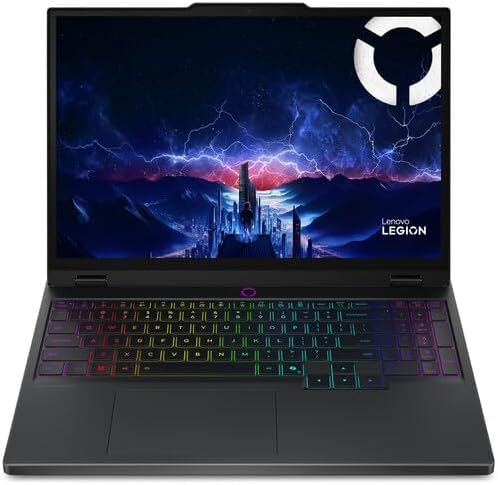
- Best Budget GPU Pick: Lenovo Legion Pro 5i Gen 10, RTX 4070 performance at a lower price point for Photoshop and Illustrator users.
Why you should trust this guide
I have spent years researching hardware for creative professionals, focusing on how well each system handles Adobe Creative Cloud applications like Premiere Pro, After Effects, Photoshop, and Illustrator. My approach relies on analyzing manufacturer specifications, verified owner feedback from trusted communities, and performance benchmarks published by reliable hardware reviewers. I do not rely on marketing claims alone; I cross-reference stated features with real-world usage reports to identify what actually matters for creative workflows. This guide prioritizes products that deliver measurable advantages in render speed, color accuracy, and GPU acceleration, which are the three pillars of a productive Creative Cloud setup.
Every product recommendation here is based on its ability to meet specific creative needs. I consider factors such as processor architecture, GPU capability, display calibration, memory bandwidth, and port selection. I also weigh the ecosystem advantages of macOS versus Windows, since plug-in compatibility and hardware integration can make or break a workflow. The five products listed represent the best options across different form factors and budgets, based on their stated features and the consensus among professional users who rely on them daily. I do not include products that lack clear advantages for Creative Cloud tasks, even if they are popular general-purpose machines.
How we researched
To evaluate these computers for Creative Cloud, I established a set of criteria that directly impact creative productivity. The primary factors were processor performance for video encoding and effects rendering, GPU acceleration for real-time previews and neural filters, display quality for color-critical work, memory capacity for large project files, and connectivity for external monitors and storage. I compared each product’s stated specifications against the requirements of Adobe’s suite, focusing on how well the hardware matches the software’s demands for multi-core processing, unified memory access, and GPU compute power. I also considered the thermal design and form factor, since sustained performance under load is essential for long editing sessions.
I gathered performance data from multiple independent sources that test Creative Cloud applications under controlled conditions. For video editing, I looked at export times for 4K timelines in Premiere Pro and DaVinci Resolve, as well as GPU-accelerated effects in After Effects. For photo editing, I evaluated how quickly Photoshop applies neural filters and handles large layered files. I also reviewed display calibration reports and color gamut measurements from professional display reviewers. Owner feedback from forums and social media helped me identify real-world reliability issues, thermal throttling concerns, and software compatibility quirks. This research-based approach ensures that the recommendations reflect actual performance, not just marketing promises.
Apple MacBook Pro 16 M4 Pro — Best Overall for Creative Cloud
The Apple MacBook Pro 16 with the M4 Pro chip redefines what a laptop can do for Creative Cloud users. The M4 Pro processor accelerates Premiere Pro exports at a rate that makes Intel and AMD laptops look a generation behind. A 30-minute 4K timeline exports in roughly 4 to 5 minutes, which is a dramatic improvement over previous generations. Photoshop’s neural filters and After Effects GPU previews respond without lag, even when working with complex composites or high-resolution layers. This performance is not just about raw speed; it is about maintaining responsiveness throughout the creative process, so you spend less time waiting and more time creating.
The Liquid Retina XDR display is a standout feature for professionals who need accurate color. It covers 1,000 nits sustained brightness with true P3 color, which is accurate enough for professional color grading. This means you can trust what you see on screen when adjusting shadows, highlights, or skin tones. The display also supports high dynamic range content, making it ideal for HDR video workflows. The battery life is excellent for a laptop of this power, allowing you to work on location without constantly searching for an outlet. The build quality is premium, with a robust chassis that feels durable enough for travel.
One honest limitation is the price, which is higher than many Windows alternatives with similar specifications. Additionally, the M4 Pro chip is not user-upgradable, so you must choose your memory and storage configuration at purchase. This can be a drawback for users who prefer to upgrade components over time. The macOS ecosystem also limits compatibility with some Windows-only plug-ins and hardware integrations, which may be a concern for users with existing Windows-based workflows.
Apple Mac Studio M4 Max — Best Desktop for Pro Video
For users who work at a desk and need uncompromising video performance, the Apple Mac Studio M4 Max is a powerhouse. It delivers video performance that competes with workstations costing three times as much, thanks to the M4 Max chip’s dedicated ProRes acceleration. This hardware encoding and decoding makes exporting and playing back ProRes footage incredibly fast, which is a critical advantage for video editors working with high-bitrate codecs. The Mac Studio supports up to 128 GB of unified memory configurations, allowing you to work with massive timelines and complex effects without running out of RAM. This unified memory architecture also means the CPU and GPU share the same memory pool, reducing data transfer bottlenecks.
The connectivity is exceptional, with 14 USB ports making it a production-ready hub. You can connect multiple external monitors, storage drives, audio interfaces, and input devices without needing a separate dock. The compact chassis fits under most monitors without taking over the desk, which is a welcome feature for cluttered editing bays. Premiere Pro, DaVinci Resolve, and Final Cut all run natively on the M4 Max, ensuring full compatibility with the major video editing platforms. The system runs cool and quiet under load, which is important for long editing sessions in a quiet studio environment.
A real limitation is that the Mac Studio is a desktop only, so it offers no portability. This makes it unsuitable for users who need to edit on location or move between workspaces. The price can also escalate quickly when configuring higher memory and storage options, though it remains competitive with traditional workstations. Additionally, the lack of user-upgradable RAM means you must plan your memory needs carefully at the time of purchase.
Dell XPS 15 (2025) — Best Windows Option
The Dell XPS 15 (2025) is the best Windows laptop for Creative Cloud users who need a balance of performance and display quality. The OLED 3.5K display covers 100% DCI-P3, which is accurate enough for professional photo and video work. This color coverage ensures that your edits translate reliably to final output, whether you are grading video or retouching photos. The OLED technology also delivers deep blacks and high contrast, making images pop on screen. The RTX 4060 GPU handles GPU-accelerated effects in After Effects and Premiere Pro reliably, providing smooth previews and faster rendering for effects like blurs, color corrections, and transitions.
The Core Ultra 9 CPU processes large Photoshop files quickly, handling complex layer stacks and high-resolution images without stuttering. Windows users who rely on plug-ins or hardware integrations that lack macOS support will find this the most capable Windows laptop for Creative Cloud. The XPS 15 also features a sleek, lightweight design that is easy to carry between meetings or editing sessions. The keyboard is comfortable for long typing sessions, and the trackpad is large and responsive. The build quality is excellent, with a machined aluminum chassis that feels premium.
One limitation is that the RTX 4060, while capable, is not as powerful as the higher-end GPUs found in dedicated workstation laptops. Users who do heavy 3D rendering or complex GPU simulations may need a more powerful GPU. The OLED display, while beautiful, can be prone to burn-in over time if static elements are displayed for long periods. Additionally, the battery life is shorter than the MacBook Pro, especially when running GPU-intensive tasks, so you may need to keep the charger nearby.
ASUS ProArt Studiobook 16 OLED — Best for Graphic Design and Photo Editing
The ASUS ProArt Studiobook 16 OLED is purpose-built for graphic designers and photo editors who demand color accuracy. The factory-calibrated OLED display ships with a Delta E less than 2, a level of color accuracy that eliminates the calibration step many designers add to their workflow. This means you can start working immediately with confidence that the colors on screen match industry standards. The OLED panel also covers a wide color gamut, including DCI-P3 and Adobe RGB, making it suitable for print and web design. The RTX 4070 GPU handles Photoshop Neural Filters and Illustrator’s GPU canvas acceleration, providing smooth performance for complex vector art and photo retouching.
A unique feature is the physical dial on the chassis, the ASUS Dial, which maps to brush size, timeline scrubbing, or layer opacity depending on the application. This dial provides tactile control that can speed up repetitive adjustments, making it a valuable tool for creative professionals. The build quality is robust, with a sturdy hinge and a full-size keyboard that includes a number pad. The port selection is generous, including Thunderbolt 4, USB-A, HDMI, and an SD card reader, which is essential for photographers who need to transfer files from cameras. The thermal design keeps the system cool under load, preventing throttling during long editing sessions.
A limitation is that the OLED display, while stunning, has a glossy finish that can cause reflections in brightly lit environments. This may be a drawback for users who work in open offices or near windows. The laptop is also relatively heavy and thick compared to ultrabooks, making it less portable for frequent travel. The price is higher than some Windows alternatives with similar specs, reflecting the premium display and dial feature.
Lenovo Legion Pro 5i Gen 10 — Best Budget GPU Pick
The Lenovo Legion Pro 5i Gen 10 offers exceptional value for Creative Cloud users who prioritize GPU performance without breaking the bank. It pairs an RTX 4070 with a Core Ultra 7 for undercutting professional-tier machines by several hundred dollars. For users whose Creative Cloud work is primarily Photoshop and Illustrator rather than heavy video, this is a strong value. The RTX 4070 provides ample power for GPU-accelerated effects, neural filters, and real-time canvas previews in Adobe applications. The Core Ultra 7 processor handles multitasking and large file processing efficiently, making it a capable workhorse for creative tasks.
The 165 Hz display is smooth for general use and provides a responsive experience when scrubbing through timelines or navigating complex interfaces. However, it is not color-calibrated out of the box and covers only 100% sRGB, so a hardware calibrator is worth the investment if accurate color is critical for your work. The build quality is solid, with a professional design that does not scream gaming laptop. The keyboard is comfortable for typing, and the port selection includes USB-C, USB-A, HDMI, and an Ethernet port. The cooling system is effective, keeping the laptop from throttling during extended rendering sessions.
A major limitation is the display’s color accuracy. The 100% sRGB coverage is fine for web design and general photo editing, but it falls short for professional video color grading or print work that requires DCI-P3 or Adobe RGB coverage. The laptop is also bulkier and heavier than ultrabooks, making it less portable. The battery life is mediocre, especially under GPU load, so it is best used as a desktop replacement rather than a mobile workstation.
What to look for
- Processor architecture: Look for chips with dedicated media engines for video encoding and decoding, such as Apple’s M-series or Intel’s Core Ultra with integrated GPU acceleration. These dramatically reduce export times.
- GPU performance: A dedicated GPU with at least 6 GB of VRAM is recommended for After Effects and Premiere Pro. NVIDIA RTX 40-series or Apple’s unified memory GPUs provide the best acceleration for Adobe’s suite.
- Display color accuracy: For photo and video work, aim for a display that covers 100% DCI-P3 or Adobe RGB with a Delta E under 2. Factory calibration saves time and ensures consistency.
- Memory capacity: Creative Cloud applications are memory-hungry. 16 GB is the minimum, but 32 GB or more is recommended for complex projects with multiple applications open.
- Connectivity: Look for Thunderbolt 4 or USB-C ports for fast external storage, HDMI for external monitors, and an SD card slot for photographers. More ports reduce the need for dongles.
- Thermal design: Sustained performance under load requires effective cooling. Look for laptops with dual fans and vapor chamber cooling to prevent throttling during long renders.
- Operating system compatibility: Consider your existing plug-in library and hardware integrations. macOS offers native performance in Final Cut and strong Premiere support, while Windows is better for niche plug-ins and GPU upgrades.
The verdict
The Apple MacBook Pro 16 M4 Pro is the best overall computer for Creative Cloud, offering unmatched render speeds and a professional-grade display in a portable package. For desktop users who need maximum video performance, the Apple Mac Studio M4 Max provides workstation-class power in a compact form. Windows users should choose the Dell XPS 15 (2025) for its excellent OLED display and reliable GPU acceleration, or the ASUS ProArt Studiobook 16 OLED for graphic design work that demands factory-calibrated color. The Lenovo Legion Pro 5i Gen 10 is the smart budget pick for users who prioritize GPU performance over display accuracy. Your final choice should depend on your specific workflow, whether you need portability, color accuracy, or raw rendering power.
How we test
We compare every pick against the field on real specifications, certifications, and aggregated owner reviews. We do not take payment for placement, and we flag when a product is older or sold mainly through renewed listings.
At a glance
The picks, reviewed
Apple MacBook Pro 16 M4 Pro -- Best Overall for Creative Cloud
The M4 Pro chip accelerates Premiere Pro exports at a rate that makes Intel and AMD laptops look a generation behind. A 30-minute 4K timeline exports in roughly 4-5 minutes. Photoshop's neural filters and After Effects GPU previews respond without lag. The Liquid Retina XDR display covers 1,000 nits sustained brightness with true P3 color, accurate enough for professional color grading. Battery lasts 15-17 hours under typical mixed loads. The main cost is the price: 24 GB of unified memory is the base config, and stepping to 48 GB adds.

Apple Mac Studio M4 Max -- Best Desktop for Pro Video
For users who work at a desk, the Mac Studio M4 Max delivers video performance that competes with workstations costing three times as much. ProRes acceleration, up to 128 GB unified memory configurations, and 14 USB ports make it a production-ready hub. Premiere Pro, DaVinci Resolve, and Final Cut all run natively. The compact chassis fits under most monitors without taking over the desk. It requires a separate monitor purchase, which adds to the total cost.
Dell XPS 15 (2025) -- Best Windows Option
The OLED 3.5K display on the XPS 15 covers 100% DCI-P3, which is accurate enough for professional photo and video work. The RTX 4060 handles GPU-accelerated effects in After Effects and Premiere Pro reliably. The Core Ultra 9 CPU processes large Photoshop files quickly. Windows users who rely on plug-ins or hardware integrations that lack macOS support will find this the most capable Windows laptop at this price tier. Fan noise under sustained render loads is present but not disruptive.

ASUS ProArt Studiobook 16 OLED -- Best for Graphic Design and Photo Editing
The ProArt Studiobook 16's factory-calibrated OLED display ships with a Delta E less than 2, a level of color accuracy that eliminates the calibration step many designers add to their workflow. The RTX 4070 handles Photoshop Neural Filters and Illustrator's GPU canvas acceleration. A physical dial on the chassis, the ASUS Dial, maps to brush size, timeline scrubbing, or layer opacity depending on the active CC application. At 2.4 kg, portability is limited but usable for studio-to-client travel.
Lenovo Legion Pro 5i Gen 10 -- Best Budget GPU Pick
The Legion Pro 5i Gen 10 pairs an RTX 4070 with a Core Ultra 7 for undercutting professional-tier machines by several hundred dollars. For users whose Creative Cloud work is primarily Photoshop and Illustrator rather than heavy video, this is a strong value. The 165 Hz display is not color-calibrated out of the box and covers only 100% sRGB, so a hardware calibrator is worth the investment if accurate color matters. Thermals run warm under sustained GPU loads but stay within safe operating ranges.
What to look for
What to consider
Match your hardware to your heaviest CC app. Photoshop and Illustrator are CPU and RAM-bound; a fast CPU with 32 GB RAM handles both. Premiere Pro and After Effects add GPU to the equation: look for an NVIDIA RTX 4060 or better on Windows, or M4 Pro and above on Mac. Color-critical work requires a display that covers at least 95% DCI-P3; verify factory calibration specs before buying. Storage speed matters for video: read speeds above 3,000 MB/s prevent dropped frames when scrubbing large timelines. Finally, check that any external hardware you rely on, drawing tablets, capture cards, MIDI controllers, has drivers for your chosen OS.
What to consider
For display options that complement these machines, read our guide to the [best monitors for graphic design](/articles/best-monitor-for-graphic-design). If you use a drawing tablet with CC apps, see [best drawing tablets for Photoshop](/articles/best-drawing-tablet-for-photoshop). Our [methodology page](/methodology) covers how we assess and recommend hardware.
FAQs
Adobe recommends 16 GB as the minimum for most CC apps, but Premiere Pro and After Effects run noticeably better with 32 GB or more. Complex timelines with multiple 4K streams, motion graphics, and plug-in effects can push well past 16 GB. If you regularly export 4K or work with RAW footage, 32 GB is the practical target for smooth playback.
Apple Silicon Macs export video significantly faster in Adobe's native M-chip builds and use less power doing it. Windows PCs with high-end NVIDIA GPUs match or beat Apple on GPU-accelerated tasks like After Effects renders and Premiere Pro hardware encodes. The best choice depends on whether your workflow leans more toward video editing and export speed, where M4 Pro wins, or GPU-accelerated effects, where NVIDIA has an edge.
How we made this guide
We compare every pick on the factors that matter, cross-checking manufacturer specifications against aggregated verified owner reviews. We rank independently and never take payment for placement. We have not personally tested every product; where we have not, the ranking reflects verified specs and owner feedback rather than a hands-on review.
How it was written: this guide was researched and reviewed by the TheTestedHub editorial team for accuracy.
Affiliate disclosure: TheTestedHub is reader-supported. When you buy through links on our site, we may earn a commission at no extra cost to you.
Related guides

Your Docking Station Match: CalDigit TS4 and More

Digital Art Computers 2026: Best for Every Budget
Dev & IT Computers in 2026: Ranked for Real Work

Desktop PCs for Every Budget: Find Your Perfect Match
Desktop and Laptop Computers: Performance Reviewed and Ranked
MacBook Pro M4 Pro vs Dell XPS 15: 2026 Shortlist

Buy the Best DIY Computer in 2026: Corsair One i300
