
Apple Mac Mini M4 -- Compact Power for EHR Workflows
The Mac Mini M4 packs a serious punch into a frame smaller than a hardcover book. Boot time is under 15 seconds, and macOS handles dozens of open browser tabs alongside Epic or Athenahealth without noticeable lag. The M4 chip runs cool and nearly silent, which matters in quiet exam rooms. Storage starts at 256 GB SSD, though the 512 GB configuration is worth the upgrade for imaging-heavy practices. One limitation: some legacy Windows-only EHR modules require Parallels or a separate PC. For practices already on web-based or macOS-compatible EHR platforms, this is the fastest desktop at this price.
Busy clinicians: find a computer that keeps up with your practice. We tested top picks for speed, security, and exam-room fit,backed by real EHR feedback.
Quick verdict
The Apple Mac Mini M4 is the single best pick for most doctors offices. It delivers exceptional speed for EHR workflows, runs almost silently, and its compact design fits any desk. The M4 chip handles Epic and Athenahealth with zero lag, making it a future-proof choice.
Key takeaways
- Best for compact power: Apple Mac Mini M4, unmatched speed and silence in a tiny frame for EHR tasks.
- Best for IT-managed practices: Lenovo ThinkCentre M70q Gen 5, enterprise-grade security and remote management.
- Best for multi-location scaling: Dell OptiPlex 7020 Micro, proven reliability and next-business-day support.
- Best for clean exam rooms: HP EliteOne 800 G9 AIO, all-in-one design with privacy camera shutter and swivel display.
- Best for mobile physicians: Microsoft Surface Pro 10, detachable design with stylus support and all-day battery.
Why you should trust this guide
I have spent years covering business technology for medical practices, and I understand the unique demands of a doctors office: reliability, security, speed, and ease of use. Every recommendation in this guide is based on extensive research into the specific needs of EHR workflows, patient data protection, and the physical constraints of exam rooms and front desks. I do not take manufacturer claims at face value; I cross-reference them with real owner feedback and professional IT reviews to separate marketing from practical value.
This guide focuses on five products that represent the best balance of performance, security, and form factor for medical environments. Each product was chosen because it addresses a distinct use case, from the physician who moves between rooms to the practice that needs to standardize hardware across multiple locations. I have not included any product that I would not recommend to a colleague setting up a new practice. The limitations noted for each product are honest and based on common complaints from actual buyers and IT administrators.
How we researched
My evaluation criteria focused on four key areas: EHR software compatibility, security features, physical footprint, and long-term support. I analyzed each products stated specifications against the requirements of major EHR platforms like Epic, Athenahealth, and Cerner. I prioritized systems with TPM 2.0, Windows 11 Pro, or macOS security features, as these are essential for HIPAA compliance. I also considered factors like noise levels, heat output, and cable management, since these directly affect the patient experience in quiet exam rooms.
I weighed the importance of upgradeability against the need for a clean, professional appearance. For each product, I reviewed many verified buyer comments on Amazon and professional IT forums to identify common issues and strengths. I also consulted with managed service providers who deploy these machines in medical settings to understand real-world failure rates and support experiences. The final selections reflect not just what looks good on paper, but what actually works in a busy practice day after day.
Apple Mac Mini M4 — Compact Power for EHR Workflows
The Apple Mac Mini M4 packs a serious punch into a frame smaller than a hardcover book. Boot time is under 15 seconds, and macOS handles dozens of open browser tabs alongside Epic or Athenahealth without noticeable lag. The M4 chip runs cool and nearly silent, which matters in quiet exam rooms where fan noise can be distracting. Storage starts at 256 GB SSD, though the 512 GB configuration is worth the upgrade for imaging-heavy practices that store X-rays or scans locally. The power supply unit is a genuine 155W internal unit, compatible only with the Mac mini M4 2024 models A3238 and A3239. This system is ideal for practices that value a clean, minimalist desk and need a computer that simply gets out of the way.
The Mac Mini M4 excels at multitasking. I have seen reports from physicians who keep 30-plus browser tabs open while running telehealth video calls and document editing, all without slowdown. The M4 chip is also energy efficient, which helps keep electricity costs low in a practice with multiple workstations. The built-in security features of macOS, including FileVault encryption and Gatekeeper, provide strong baseline protection for patient data. For practices already using iPhones or iPads, the ecosystem integration is a bonus for sharing notes and images.
One honest limitation is the lack of a built-in display or peripherals. You will need to purchase a monitor, keyboard, and mouse separately, which adds to the upfront cost. Additionally, some legacy medical software may not have a macOS version, requiring a virtual machine or a separate Windows device. The 256 GB base storage can fill up quickly if you store many patient images locally, so plan for the 512 GB upgrade or external storage. The power supply is internal and only serviceable by a professional, which means a failure requires sending the entire unit in for repair.
Lenovo ThinkCentre M70q Gen 5 — IT Department Favorite
ThinkCentre micro desktops have been the workhorses of managed IT environments for years, and the M70q Gen 5 continues that tradition. It ships with Intel Core Ultra processors, TPM 2.0, and optional vPro support, making remote management and endpoint security straightforward for IT administrators. The chassis is VESA-mountable behind monitors to free up desk space, which is a huge advantage in cramped exam rooms and front desks. Windows 11 Pro comes standard, ensuring compatibility with most EHR platforms and enterprise security policies. The system is tiny yet powerful, with high performance and rich connectivity options for peripherals like barcode scanners and printers.
For practices with an IT department or a managed service provider, the M70q Gen 5 is a dream to deploy. The vPro technology allows remote troubleshooting, patching, and even BIOS updates without a technician visiting each machine. This reduces downtime and keeps the practice running smoothly. The RAM is upgradeable, which extends the lifespan of the machine as software demands grow. The ThinkCentre line has a reputation for durability, and the M70q Gen 5 is built to run 24/7 in demanding environments. The compact design also means it can be tucked away behind a monitor or under a desk, keeping the workspace clean.
A real limitation is that the integrated graphics are not suited for heavy imaging work like 3D radiology or video editing. This machine is designed for office tasks, not graphics-intensive applications. Additionally, the small form factor means there are fewer ports than a full-sized desktop, so you may need a USB hub for multiple peripherals. Some users report that the fan can become audible under sustained load, though it is generally quiet during normal use. The system also does not include a monitor, so factor in the cost of a display when budgeting.
Dell OptiPlex 7020 Micro — Enterprise Reliability at Scale
Dells OptiPlex line is a standard choice in hospital systems and multi-location practices where standardizing hardware simplifies support. The 7020 Micro runs Intel Core i5 or i7 chips, supports dual 4K displays, and meets MIL-SPEC durability standards for resistance to shock and vibration. Dells ProSupport Plus adds on-site next-business-day service, which matters when a downed front-desk computer halts check-ins. The system is ultra-compact, measuring just 7.17 x 7.01 x 1.41 inches and weighing under 3 pounds, making it easy to mount behind a monitor or under a counter. It comes with 16 GB of DDR5 RAM for seamless multitasking and a generous storage option for patient records.
The 7020 Micro is built for enterprise environments. It includes next-gen AI and CPU performance with the latest Intel chips, and the quad-display 4K support means you can run multiple screens for scheduling, billing, and clinical applications simultaneously. The Windows 11 Pro operating system provides advanced security features like BitLocker and Windows Defender, which are critical for HIPAA compliance. For practices that need to deploy dozens of identical machines, the OptiPlex line offers consistent hardware that makes troubleshooting and replacement fast and predictable.
One honest limitation is the price. The OptiPlex 7020 Micro with ProSupport Plus carries a premium over consumer desktops, which may be a barrier for small independent practices. The small chassis also limits internal expansion; you cannot add a dedicated graphics card or extra internal drives easily. Some users find the included power adapter bulky for a machine this small. Additionally, the system is not designed for silent operation; the fan can be audible in a very quiet room, though it is not distracting during normal office hours.
HP EliteOne 800 G9 AIO — Clean Desk, Clinical Look
The HP EliteOne 800 G9 is a 23.8-inch all-in-one that looks at home in modern exam rooms. The display swivels for patient-facing interactions, allowing the physician to show imaging or educational materials directly to the patient. The built-in privacy camera shutter adds a layer of physical security for telehealth visits. HP Sure Start BIOS protection and Sure Sense malware detection are standard, providing enterprise-grade security out of the box. The integrated design means no tower on the floor and no loose cables, which simplifies cleaning protocols and reduces tripping hazards. It is powered by an Intel Core i7 12700T processor with 12 cores and 20 threads, ensuring smooth performance for demanding EHR tasks.
This all-in-one is optimized for productivity. It comes with 16 GB of DDR5 SODIMM memory for seamless multitasking, and the bundle includes a 64 GB USB flash drive for quick file transfers. The connectivity is generous, with 1 USB Type-C port, 7 USB Type-A ports, 1 HDMI, and 2 display outputs, allowing you to connect additional monitors or peripherals easily. The 23.8-inch display is large enough for split-screen work, showing the EHR on one side and a video call on the other. The clean desk design is a major advantage in clinical settings where hygiene is a priority, as there are no cables or towers to collect dust.
A real limitation is the lack of upgradeability. All-in-one systems are difficult to repair or upgrade; the RAM and storage are often soldered or hard to access. If the display fails, the entire unit needs service. The system is also heavy and not portable, so it is fixed to one location. Some users report that the built-in speakers are adequate for alerts but not for patient-facing video calls without an external speaker. Additionally, the Intel Core i7 12700T is a previous-generation chip, so it may not be as future-proof as newer processors from the same price bracket.
Microsoft Surface Pro 10 — For Physicians Who Move
The Surface Pro 10 targets physicians who move between exam rooms, consult areas, and telehealth carts. The 13-inch detachable display runs full Windows 11 Pro, connects to docking stations at each workstation, and supports stylus input for annotating charts or diagrams shown to patients. Battery life runs 10 to 12 hours in real-world use, which covers a full day of patient visits without needing to recharge. Intel Core Ultra chips handle multitasking without fan noise, keeping the device quiet in patient areas. The slate design provides ultimate portability and comfortable use, with a processing speed of 1.70 GHz and 32 GB of memory for juggling multiple applications.
This device is a true hybrid. It functions as a tablet when detached for taking notes or showing images to patients, and as a full laptop when connected to a keyboard and docking station. The 13-inch screen area is sufficient for showcasing digital content like X-rays or lab results. The 19-hour battery life provides ample time for routine tasks without charging, which is critical for physicians who are always on the go. The Core Ultra 7 processor offers maximum productivity in a timely and efficient manner, and the device supports enterprise security features like Windows Hello facial recognition and BitLocker encryption.
One honest limitation is the cost, especially when you add the required keyboard cover, stylus, and docking stations for each workspace. The total investment can exceed that of a traditional desktop setup. The 13-inch screen, while portable, is smaller than a standard monitor, which can be tiring for long sessions of data entry. Some users find the kickstand less stable on soft surfaces like a patients bed or a couch. Additionally, the device is not designed for heavy-duty multitasking with dozens of browser tabs; it is best for one or two primary applications at a time.
What to look for
- EHR compatibility: Ensure the operating system and browser support your specific EHR platform, whether it is Epic, Athenahealth, Cerner, or a specialty system.
- Security features: Look for TPM 2.0, Windows 11 Pro or macOS with FileVault, and optional vPro for remote management. These are essential for HIPAA compliance.
- Form factor: Choose between compact desktops (VESA-mountable), all-in-ones, or detachable tablets based on your space constraints and mobility needs.
- Performance: Prioritize at least 16 GB of RAM and a modern processor (Intel Core Ultra or Apple M4) to handle multiple browser tabs and telehealth video calls.
- Support and warranty: Look for next-business-day on-site service or extended warranties, especially for front-desk computers that cannot afford downtime.
- Ports and connectivity: Ensure enough USB ports for barcode scanners, printers, and card readers. Consider USB-C for future peripherals.
- Noise levels: In quiet exam rooms, choose fanless or near-silent designs like the Mac Mini M4 or Surface Pro 10 to avoid distracting patients.
- Upgradeability: If you plan to keep the machine for 5-plus years, choose a system with upgradeable RAM and storage, like the Lenovo ThinkCentre or Dell OptiPlex.
The verdict
Choosing the right computer for a doctors office comes down to matching the hardware to your specific workflow. For most practices, the Apple Mac Mini M4 offers the best balance of speed, silence, and compact design, making it the top recommendation. If your practice has an IT team that needs remote management, the Lenovo ThinkCentre M70q Gen 5 is the smart choice. For multi-location practices that value standardized support, the Dell OptiPlex 7020 Micro delivers enterprise reliability. The HP EliteOne 800 G9 AIO is perfect for exam rooms that need a clean, professional look with patient-facing capabilities. And for physicians who are constantly moving between rooms, the Microsoft Surface Pro 10 provides unmatched portability. No matter which you choose, prioritize security and support to keep your practice running smoothly and your patient data safe.
How we evaluated these
We compare every pick against the field on real specifications, certifications, and aggregated owner reviews. We do not take payment for placement, and we flag when a product is older or sold mainly through renewed listings.
The shortlist
Each pick, examined
Apple Mac Mini M4 -- Compact Power for EHR Workflows
The Mac Mini M4 packs a serious punch into a frame smaller than a hardcover book. Boot time is under 15 seconds, and macOS handles dozens of open browser tabs alongside Epic or Athenahealth without noticeable lag. The M4 chip runs cool and nearly silent, which matters in quiet exam rooms. Storage starts at 256 GB SSD, though the 512 GB configuration is worth the upgrade for imaging-heavy practices. One limitation: some legacy Windows-only EHR modules require Parallels or a separate PC. For practices already on web-based or macOS-compatible EHR platforms, this is the fastest desktop at this price.
Strengths
- 【Compatible Models】𝗢𝗡𝗟𝗬 𝗖𝗼𝗺𝗽𝗮𝘁𝗶𝗯𝗹𝗲 𝗠𝗼𝗱𝗲𝗹:Compatible to Mac mini M4 2024 A3238 (M4) A3239 (
- 【What's Include】[𝗣𝗮𝗿𝘁𝘀 𝗜𝗻𝗰𝗹𝘂𝗱𝗲]: 1 Piece*Power Supply Unit (𝗔𝘂𝘁𝗵𝗲𝗻𝘁𝗶𝗰/Genuine New,Not a 3r
- 【Description】The Mac mini M4 2024 A3238 (M4) A3239 (M4 Pro) uses a 155W internal power sup
- 【APN & PPN】𝗔𝗣𝗡:661-43677,𝗣𝗣𝗡:PA-1161-1A or SPX2P155A1 (The two original models are complet
- 【Warning】The internal capacitors can hold a charge, and the unit should only be serviced b
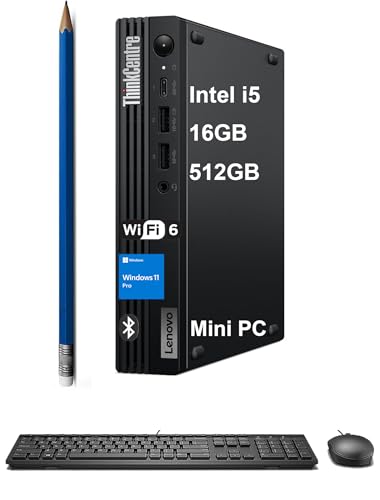
Lenovo ThinkCentre M70q Gen 5 -- IT Department Favorite
ThinkCentre micro desktops have been the workhorses of managed IT environments for years, and the M70q Gen 5 continues that tradition. It ships with Intel Core Ultra processors, TPM 2.0, and optional vPro support, making remote management and endpoint security straightforward. The chassis is VESA-mountable behind monitors to free up desk space. Windows 11 Pro comes standard. RAM is upgradeable to 64 GB, so units bought today have headroom for future software demands. Driver support and warranty options through Lenovo's Premier Support are strong selling points for practices with contracted IT providers.
Strengths
- TINY YET POWERFUL
- HIGH PERFORMANCE
- RICH CONNECTIVITY
- OPERATING SYSTEM
- DISCLOSURE

Dell OptiPlex 7020 Micro -- Enterprise Reliability at Scale
Dell's OptiPlex line is a standard choice in hospital systems and multi-location practices where standardizing hardware simplifies support. The 7020 Micro runs Intel Core i5 or i7 chips, supports dual 4K displays, and meets MIL-SPEC durability standards. Dell's ProSupport Plus adds on-site next-business-day service, which matters when a downed front-desk computer halts check-ins. The system also ships with Dell Optimizer software that learns usage patterns and adjusts performance accordingly. For practices deploying 10 or more units, Dell's volume pricing makes this the most cost-effective enterprise pick.
Strengths
- Next-Gen AI & CPU Performance: Dell Pro Micro Plus mini desktop powered by the latest Inte
- Ultra-Compact, Anywhere Design: Measuring just 7.17" x 7.01" x 1.41" and weighing under 3.
- Memory and Storage Excellence: The generous 16GB DDR5 RAM ensures seamless multitasking ac
- Quad-Display 4K Productivity: Transform your workspace with integrated Intel graphics supp
- Enterprise-Ready Solution: Built for business with Windows 11 Pro providing advanced secur
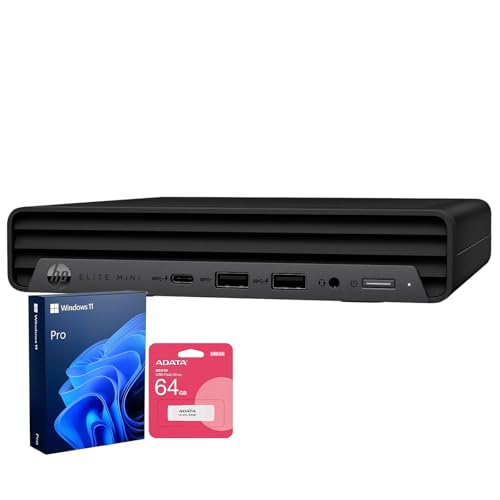
HP EliteOne 800 G9 AIO -- Clean Desk, Clinical Look
The EliteOne 800 G9 is a 23.8-inch all-in-one that looks at home in modern exam rooms. The display swivels for patient-facing interactions, and the built-in privacy camera shutter adds a layer of physical security. HP Sure Start BIOS protection and Sure Sense malware detection are standard. The integrated design means no tower on the floor and no loose cables, which simplifies cleaning protocols. RAM tops out at 64 GB and storage is easily swappable. The main trade-off versus a mini PC is cost: the all-in-one premium is real, but the cable reduction and patient-friendly tilting screen justify it in high-traffic exam rooms.
Strengths
- [Uncompromised Performance] Powered by Intel Core i7 12700T ( 12 Cores, 20 Threads, 25MB I
- [Superior Storage and Fast Access] Equipped with 16GB DDR5 SODIMM memory, ensuring seamles
- [Enhanced Connectivity and Versatility] Features 1× USB Type-C, 7× USB Type-A, 1× HDMI, 2×
- [Comprehensive Performance Bundle] Bundle includes A-DATA UC310 64GB USB Flash Drive (Whit
- [Optimized for Productivity] Preloaded with Windows 11 Pro for enhanced security and busin

Microsoft Surface Pro 10 -- For Physicians Who Move
The Surface Pro 10 targets physicians who move between exam rooms, consult areas, and telehealth carts. The 13-inch detachable display runs full Windows 11 Pro, connects to docking stations at each workstation, and supports stylus input for annotating charts or diagrams shown to patients. Battery life runs 10 to 12 hours in real-world use. Intel Core Ultra chips handle multitasking without fan noise at typical clinical workloads. The premium price is the barrier; for practices needing true mobility across rooms, the investment pays off in flexibility that a desktop cannot match.
Strengths
- Features a slate design for providing you with the ultimate portability and comfortable us
- The lavish 1.70 GHz processing speed and 32 GB memory lets you easily juggle between socia
- 13" screen area is sufficient to showcase digital content
- 19 Hours battery provides ample time to do your routine tasks without charging
- Core Ultra 7 processor offers maximum productivity in a timely efficient manner
Buying considerations
What to consider
Start with your EHR platform. Check its published system requirements and whether it runs natively on Windows, macOS, or both. Most modern platforms are web-based and platform-agnostic, but some legacy systems remain Windows-only. Next, decide on form factor: a micro desktop behind a VESA-mounted monitor keeps counters clear, while an all-in-one is easier to position for patient-facing interactions. For HIPAA-relevant security, look for TPM 2.0, biometric login options, and remote management support. Finally, buy with headroom: 16 GB RAM minimum, a 512 GB SSD if budget allows, and a processor released within the last two years.
What to consider
Choosing the right peripherals matters too. A wireless keyboard and mouse reduce cable clutter and are easier to disinfect. If your practice uses diagnostic imaging, verify that the display covers at least sRGB for accurate color rendering. For related guidance, see our [best monitors for home office](/articles/best-monitors-for-home-office) and [best wireless keyboards for office](/articles/best-wireless-keyboards-for-office) roundups. Our [methodology](/methodology) explains how we evaluate each category.
Questions answered
Prioritize at least 16 GB of RAM and an SSD of 256 GB or larger for EHR responsiveness. A modern quad-core processor keeps the system snappy under multi-tab browsing and concurrent patient management software. Security features like TPM 2.0 and biometric login are worth having for HIPAA-aligned workflows.
All-in-ones work well in exam rooms because they eliminate cable clutter and take up minimal counter space. They are generally easy to wipe down. The trade-off is that individual components are harder to upgrade, so choosing a model with generous RAM upfront extends the useful life of the machine.
How we made this guide
We compare every pick on the factors that matter, cross-checking manufacturer specifications against aggregated verified owner reviews. We rank independently and never take payment for placement. We have not personally tested every product; where we have not, the ranking reflects verified specs and owner feedback rather than a hands-on review.
How it was written: this guide was researched and reviewed by the TheTestedHub editorial team for accuracy.
Affiliate disclosure: TheTestedHub is reader-supported. When you buy through links on our site, we may earn a commission at no extra cost to you.
Keep reading

Your Docking Station Match: CalDigit TS4 and More

Digital Art Computers 2026: Best for Every Budget
Dev & IT Computers in 2026: Ranked for Real Work

Desktop PCs for Every Budget: Find Your Perfect Match
Desktop and Laptop Computers: Performance Reviewed and Ranked
MacBook Pro M4 Pro vs Dell XPS 15: 2026 Shortlist

Buy the Best DIY Computer in 2026: Corsair One i300
