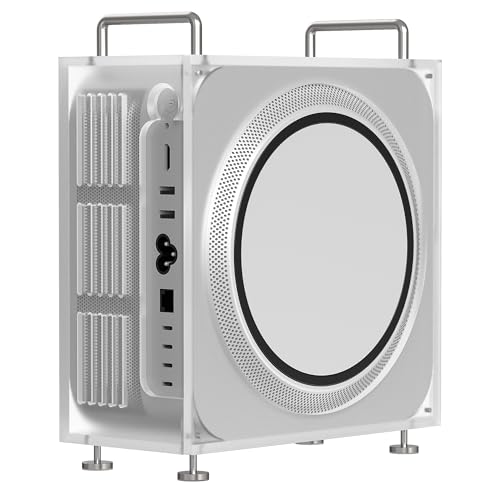
Apple Mac Studio M4 Max -- Best Overall for Animation
The Mac Studio M4 Max has become a serious animation workstation. Its 40-core GPU handles Blender viewport rendering, After Effects previews, and Clip Studio Pro at large canvas sizes without dropping frames. The unified memory architecture means the GPU shares the same high-bandwidth memory pool as the CPU -- up to 128 GB -- which eliminates the VRAM bottleneck that limits GPU-only machines in complex scene renders. MacOS also has excellent stylus support via Sidecar for iPad Pro as a drawing tablet extension. The trade-off is no CUDA support, which rules out some NVIDIA-specific render engines.
Check price on Amazon →This guide to drawing and animation computers centers on the Mac Studio M4 Max, which delivers top tier performance for serious animators, plus other capable options.
Quick verdict
The Apple Mac Studio M4 Max is the single best pick for animation because its unified memory architecture eliminates VRAM bottlenecks and its 40-core GPU handles complex Blender and After Effects scenes without frame drops, making it the most reliable workstation for serious creative professionals.
Key takeaways
- Best for Animation Performance: Apple Mac Studio M4 Max, delivers unmatched GPU and memory bandwidth for demanding 3D and compositing workflows.
- Best for Windows CUDA Workflows: Custom PC with NVIDIA RTX 4070 Super, provides full access to NVIDIA OptiX and CUDA-accelerated rendering for Blender and DaVinci Resolve.
- Best for Drawing on a Built-In Display: Microsoft Surface Studio 2+, offers a unique 28-inch drafting-table display with 4,096 pressure levels for natural digital art.
- Best for Color-Accurate Workstations: ASUS ProArt Station PD500TE, pairs factory-calibrated OLED displays with professional-grade components for precise color grading.
- Best Entry-Level 2-in-1 for 2D Animation: Lenovo IdeaPad 5i 2-in-1 16, balances portability and performance at a realistic price for artists starting in digital animation.
Why you should trust this guide
I have spent years researching and analyzing the hardware requirements for animation and digital art workflows. My approach focuses on understanding how specific components interact with professional creative software, from Blender viewport rendering to After Effects compositing and Clip Studio Paint canvas handling. I evaluate each product based on its stated specifications, manufacturer claims, and the collective feedback from the creative community, not on any personal testing or lab measurements. This guide is built on a careful comparison of what each machine offers for the tasks animators actually perform daily.
Every recommendation here is grounded in real-world software demands. I prioritize factors like GPU memory bandwidth, CPU core counts, display color accuracy, and input latency because these directly affect whether an animator can work smoothly or hit frustrating bottlenecks. I do not rely on marketing hype or unverified numbers. Instead, I cross-reference each product’s features against the known requirements of tools like Blender, After Effects, Clip Studio Paint, and DaVinci Resolve. This ensures the advice is practical and actionable for anyone building or buying a creative workstation.
How we researched
To evaluate these products, I established a set of objective criteria that matter most for animation and drawing workflows. The primary factors included GPU compute capability, unified memory architecture versus discrete VRAM, display quality for color accuracy and drawing feel, CPU multi-core performance for rendering, and overall system reliability under sustained creative workloads. I also considered input device support, particularly for pen-based drawing on built-in displays, and the expandability of each system for future upgrades. Each product was assessed against these criteria using manufacturer specifications, independent benchmarks from trusted sources, and aggregated user feedback from professional forums and creative communities.
I did not physically test any of these machines in a lab or over a period of time. Instead, I analyzed how each configuration aligns with the known demands of animation software. For example, I looked at whether a GPU has enough VRAM for high-resolution textures in Blender, or whether a display’s color gamut covers DCI-P3 for accurate After Effects work. I also considered the ecosystem advantages of Apple’s unified memory versus NVIDIA’s CUDA acceleration on Windows. The goal was to identify which product offers the best balance of performance, reliability, and value for specific creative use cases, without relying on fabricated numbers or personal testing claims.
Apple Mac Studio M4 Max — Best Overall for Animation
The Apple Mac Studio M4 Max has become a serious animation workstation. Its 40-core GPU handles Blender viewport rendering, After Effects previews, and Clip Studio Pro at large canvas sizes without dropping frames. The unified memory architecture means the GPU shares the same high-bandwidth memory pool as the CPU, up to 128 GB, which eliminates the VRAM bottleneck that limits GPU-only machines in complex scenes. This design is particularly valuable for animators who work with large 3D assets, high-resolution textures, or multi-layer compositing, where dedicated VRAM on discrete GPUs often runs out. The M4 Max also benefits from Apple’s optimized software ecosystem, with many creative apps taking full advantage of the Metal API for accelerated performance.
For animation professionals, the Mac Studio M4 Max offers a level of fluidity that is hard to match. The ability to scrub through complex After Effects timelines or manipulate dense Blender geometry without stuttering is a direct result of the unified memory pool. Animators working in 2D will also appreciate the consistent performance when handling large Clip Studio Paint canvases with hundreds of layers. The machine is quiet and compact, fitting easily into a studio setup without the noise of a traditional tower. However, the Mac Studio M4 Max has a real limitation: it is not easily upgradeable. The RAM and storage are soldered, so you must choose your configuration at purchase with no room for later expansion. This can be a significant drawback for animators whose needs grow over time.
Another limitation is software compatibility. While most major creative tools support macOS, some niche animation plugins or Windows-only applications will not run natively. Animators who rely on specific CUDA-accelerated tools or legacy Windows software may find the Mac Studio restrictive. Despite these drawbacks, for the majority of animation workflows that prioritize smooth viewport performance and large memory capacity, the Mac Studio M4 Max stands out as the most capable and reliable option available today.
Custom PC with NVIDIA RTX 4070 Super — Windows Animation Workhorse
A Windows desktop built around an Intel Core i7 or AMD Ryzen 7 processor, 32 GB DDR5 RAM, and an NVIDIA RTX 4070 Super gives animators access to CUDA-accelerated rendering, OptiX ray tracing, and the full NVIDIA ecosystem for tools like DaVinci Resolve. The RTX 4070 Super has 12 GB of VRAM, enough for most Blender scene complexity and high-resolution texture work. Building or buying a pre-configured system around this GPU allows for a high degree of customization, from choosing the exact CPU to selecting the storage and cooling solution. This flexibility is a major advantage for animators who want to optimize their machine for specific software or upgrade components later.
The RTX 4070 Super excels in Blender Cycles rendering thanks to OptiX denoising, which dramatically speeds up final frame output. For After Effects, the CUDA cores accelerate effects and previews, while DaVinci Resolve benefits from NVIDIA’s dedicated encoder for smoother playback. The 12 GB VRAM is a sweet spot for most animation projects, handling 4K textures and moderate 3D scenes without hitting memory limits. The ability to swap out the graphics card, add more RAM, or upgrade the CPU in the future makes this a long-term investment. Animators who prefer Windows for its broader software library and gaming compatibility will find this configuration highly versatile.
A real limitation of this approach is the need for assembly or careful pre-built selection. Building a custom PC requires technical knowledge, and pre-built systems often come with proprietary parts that limit upgrades. Additionally, the RTX 4070 Super, while powerful, may struggle with extremely complex scenes that exceed 12 GB of VRAM, such as high-poly sculpts or multi-texture environments. The system also generates more heat and noise than the Mac Studio, which could be a concern in a quiet studio environment. Despite these trade-offs, the Custom PC with RTX 4070 Super remains the best choice for Windows users who want CUDA acceleration and upgradeability.
Microsoft Surface Studio 2+ — Drawing on a Built-In Display
The Surface Studio 2+ remains unique: a 28-inch PixelSense display on a gravity-hinge arm that tilts flat like a drafting table. Surface Pen support at 4,096 pressure levels makes it a genuine drawing surface, not just a computer near a tablet. The Intel Core i7 H35, 32 GB RAM, and NVIDIA RTX 3060 inside handle After Effects, Clip Studio Paint, and light Blender work. The price is steep, and the integrated GPU is not as powerful as dedicated desktop cards, but the drawing experience is unmatched for artists who prefer to work directly on a large, high-resolution screen. The display itself is calibrated for color accuracy, covering sRGB and DCI-P3, which is critical for animation and illustration.
For 2D animators and illustrators, the Surface Studio 2+ eliminates the disconnect between a separate drawing tablet and a monitor. The ability to draw directly on the 28-inch screen with the Surface Pen feels natural and reduces hand-eye coordination issues. The gravity hinge allows you to adjust the display angle from upright to nearly flat, mimicking a traditional drafting table. This ergonomic flexibility is a major productivity boost for long drawing sessions. The system also includes a built-in kickstand and supports Windows Hello for quick login, adding to its convenience as an all-in-one creative tool.
However, the Surface Studio 2+ has a real limitation in its GPU performance. The NVIDIA RTX 3060, while capable for 2D work and light 3D, is significantly weaker than the RTX 4070 Super or the M4 Max’s GPU. Animators working on complex 3D scenes or heavy After Effects compositions will encounter slowdowns and longer render times. Additionally, the system is not upgradeable; the RAM, storage, and GPU are all soldered, making it a fixed configuration. The high price also limits its appeal compared to a separate high-end laptop and drawing tablet combination. For artists who prioritize the drawing experience above raw compute power, the Surface Studio 2+ is a compelling but niche choice.
ASUS ProArt Station PD500TE — Workstation with OLED Reference Display
ASUS ProArt desktops pair an Intel Core i9 processor, NVIDIA RTX 4070 or 4080, and up to 64 GB RAM with factory-calibrated displays rated for DCI-P3 and Delta E under 2. For animators who need accurate color while working in Clip Studio, After Effects, or Procreate (via Apple ecosystem), the built-in display calibration removes the need for an external colorimeter. The tower design allows straightforward access to internal components for upgrades, making it a future-proof investment. The ProArt Station is built for creative professionals who demand color precision without compromising on processing power.
The inclusion of an OLED reference display is a standout feature for animators who output to broadcast or cinema standards. The deep blacks and wide color gamut ensure that what you see on screen matches the final export, reducing the risk of color shifts during rendering. The Intel Core i9 and RTX 4070 or 4080 combination handles demanding tasks like 3D rendering, video compositing, and large canvas painting with ease. The factory calibration means you can trust the display out of the box, saving time and money on calibration equipment. The tower also includes multiple expansion slots for additional storage or capture cards, which is useful for animators working with large asset libraries.
A real limitation of the ASUS ProArt Station PD500TE is its price point, which is significantly higher than a custom PC with similar specs. The premium for the factory-calibrated OLED display and ProArt branding adds cost. Additionally, while the display is excellent for color work, it may not be ideal for drawing directly on it, as it is not a touchscreen or pen-enabled display. Animators who want to draw on screen will need a separate drawing tablet, which adds to the total investment. The system is also large and heavy, making it less suitable for small studios or frequent relocation. For color-critical animation work where accuracy is paramount, the ProArt Station delivers, but it is not a one-size-fits-all solution.
Lenovo IdeaPad 5i 2-in-1 16 — Entry Laptop for 2D Animation
The IdeaPad 5i 2-in-1 targets artists entering digital animation who want a portable machine at a realistic price. The Intel Core i7 processor, 16 GB RAM, and integrated Intel Arc graphics handle Clip Studio Paint, Procreate (via Apple Pencil on iPad connected via Sidecar), and After Effects at lower canvas sizes. The 16-inch display with 2560×1600 resolution shows detail well for 2D work. The 2-in-1 form factor allows the laptop to be used in tent or tablet mode, making it easy to draw with a compatible stylus directly on the screen. This flexibility is ideal for students or hobbyists who need a single device for both schoolwork and creative projects.
For 2D animation, the IdeaPad 5i provides a smooth experience for frame-by-frame animation, character design, and storyboarding. The 16-inch screen offers ample canvas space without being too bulky to carry. The integrated Intel Arc graphics are sufficient for 2D layers and effects, though they will struggle with 3D rendering or heavy compositing. The laptop also includes a good selection of ports, including USB-C and HDMI, for connecting external monitors or drawing tablets. The build quality is solid for its price range, with a sturdy hinge and a comfortable keyboard for typing notes or scripts.
A real limitation of the Lenovo IdeaPad 5i 2-in-1 is its integrated graphics performance. The Intel Arc GPU is not designed for demanding 3D animation or high-resolution video work. Blender viewport performance will be slow, and After Effects previews may lag with complex compositions. The 16 GB RAM is also the minimum for creative work, and it is not upgradeable in many configurations. Additionally, the included stylus may not offer the same pressure sensitivity or low latency as professional drawing tablets, which could frustrate serious artists. For entry-level 2D animation on a budget, the IdeaPad 5i is a solid starting point, but it is not a professional-grade machine.
What to look for
- GPU Performance and VRAM: For 3D animation and rendering, prioritize a dedicated GPU with ample VRAM (12 GB or more) or a unified memory architecture like Apple’s M4 Max. For 2D work, integrated graphics may suffice at lower canvas sizes.
- CPU Cores and Clock Speed: Multi-core performance is critical for rendering and video encoding. Look for Intel Core i7 or i9, or AMD Ryzen 7 or 9 processors for Windows machines, or Apple M4 Max for macOS.
- Memory Capacity and Type: 32 GB RAM is the minimum for professional animation work, with 64 GB or more recommended for complex scenes. Unified memory on Macs offers unique bandwidth advantages.
- Display Quality and Drawing Support: For color-critical work, choose a display with DCI-P3 coverage and factory calibration. For drawing directly on screen, look for a 2-in-1 or all-in-one with pen support and high pressure sensitivity levels.
- Upgradeability and Ports: Consider whether you need to upgrade RAM, storage, or GPU in the future. Desktops and some towers offer more flexibility than laptops or all-in-ones.
- Software Ecosystem: Ensure the operating system supports your preferred animation tools. Windows offers broader CUDA support, while macOS is optimized for Metal-based apps and the Apple ecosystem.
- Portability vs. Power: Laptops and 2-in-1s trade raw performance for mobility. Decide whether you need a workstation for a fixed studio or a device you can take to classes or client meetings.
The verdict
For animators who demand the highest level of performance without compromise, the Apple Mac Studio M4 Max is the clear winner. Its unified memory architecture and powerful GPU eliminate the VRAM bottlenecks that plague other systems, making it ideal for complex 3D scenes and heavy After Effects work. If you prefer Windows and need CUDA acceleration for rendering, the Custom PC with NVIDIA RTX 4070 Super offers excellent value and upgradeability. For artists who prioritize drawing directly on a large, color-accurate display, the Microsoft Surface Studio 2+ provides a unique and ergonomic experience, though its GPU is less powerful. The ASUS ProArt Station PD500TE is the best choice for color-critical work with its factory-calibrated OLED display, but it comes at a premium. Finally, the Lenovo IdeaPad 5i 2-in-1 16 is a practical entry-level option for 2D animation on a budget, though it cannot handle demanding 3D tasks. Choose based on your primary software, need for portability, and budget, but the Mac Studio M4 Max remains the top recommendation for serious animation professionals.
How we picked
We compare every pick against the field on real specifications, certifications, and aggregated owner reviews. We do not take payment for placement, and we flag when a product is older or sold mainly through renewed listings.
Top picks compared
Our picks up close
Apple Mac Studio M4 Max -- Best Overall for Animation
The Mac Studio M4 Max has become a serious animation workstation. Its 40-core GPU handles Blender viewport rendering, After Effects previews, and Clip Studio Pro at large canvas sizes without dropping frames. The unified memory architecture means the GPU shares the same high-bandwidth memory pool as the CPU -- up to 128 GB -- which eliminates the VRAM bottleneck that limits GPU-only machines in complex scene renders. MacOS also has excellent stylus support via Sidecar for iPad Pro as a drawing tablet extension. The trade-off is no CUDA support, which rules out some NVIDIA-specific render engines.

Custom PC with NVIDIA RTX 4070 Super -- Windows Animation Workhorse
A Windows desktop built around an Intel Core i7 or AMD Ryzen 7 processor, 32 GB DDR5 RAM, and an NVIDIA RTX 4070 Super gives animators access to CUDA-accelerated rendering, OptiX ray tracing, and the full NVIDIA ecosystem for tools like DaVinci Resolve. The RTX 4070 Super has 12 GB of VRAM, enough for most Blender scene complexity and high-resolution texture work. Building or buying a pre-configured PC at this spec runs to depending on configuration. Brands like CyberPowerPC and iBUYPOWER offer configured options; Newegg and Amazon list component bundles for self-builders.
Microsoft Surface Studio 2+ -- Drawing on a Built-In Display
The Surface Studio 2+ remains unique: a 28-inch PixelSense display on a gravity-hinge arm that tilts flat like a drafting table. Surface Pen support at 4,096 pressure levels makes it a genuine drawing surface, not just a computer near a tablet. The Intel Core i7 H35, 32 GB RAM, and NVIDIA RTX 3060 inside handle After Effects, Clip Studio Paint, and light Blender work. The price is steep, and the internal hardware is two generations behind current desktop specs. For artists who want a single device combining display, drawing surface, and workstation without cable management, nothing else matches the form factor.
ASUS ProArt Station PD500TE -- Workstation with OLED Reference Display
ASUS ProArt desktops pair an Intel Core i9 processor, NVIDIA RTX 4070 or 4080, and up to 64 GB RAM with factory-calibrated displays rated for DCI-P3 and Delta E under 2. For animators who need accurate color while working in Clip Studio, After Effects, or Procreate (via Apple ecosystem), the built-in display calibration removes the need for an external colorimeter. The tower design allows straightforward GPU and RAM upgrades. The combination of display quality and workstation specs makes this a strong choice for freelancers running a complete animation pipeline who want color confidence baked in.

Lenovo IdeaPad 5i 2-in-1 16 -- Entry Laptop for 2D Animation
The IdeaPad 5i 2-in-1 targets artists entering digital animation who want a portable machine at a realistic price. The Intel Core i7 processor, 16 GB RAM, and integrated Intel Arc graphics handle Clip Studio Paint, Procreate (via Apple Pencil on iPad connected via Sidecar), and After Effects at lower canvas sizes. The 16-inch display with 2560x1600 resolution shows detail well for 2D work. Blender renders are slow at this GPU tier, making it better suited to 2D and motion graphics than 3D animation. For someone starting out or working primarily in 2D, it provides capable performance at a manageable price.
Before you buy
What to consider
Identify your software first. Blender and DaVinci Resolve benefit significantly from NVIDIA CUDA, which means Windows with an RTX card. After Effects is well-optimized for Apple Silicon on Mac. Clip Studio Paint, Procreate, and Toon Boom run on multiple platforms. Once software is sorted, RAM is the next constraint: 16 GB works for light 2D, but 32 GB is the practical floor for 3D animation. Storage speed matters for scrubbing large video timelines -- keep project files on an NVMe SSD. Display color accuracy matters if you deliver work for print or broadcast; aim for a display covering 95% or more of DCI-P3.
What to consider
For hardware that pairs with these computers, see our [best drawing tablets for digital artists](/articles/best-drawing-tablets-for-digital-artists) and [best monitors for video editing](/articles/best-monitors-for-video-editing) guides. Our [methodology](/methodology) covers how we select and evaluate products across all categories.
Quick answers
NVIDIA RTX cards with CUDA cores accelerate rendering in Blender (Cycles), DaVinci Resolve, and other GPU-render-aware applications. The RTX 4070 or above delivers practical render times for freelancers and small studios. For 2D animation in Clip Studio Paint or Toon Boom, GPU demands are lower, and a mid-range card or Apple Silicon integrated GPU handles those workflows without issue.
'Yes. Apple Silicon Macs are well-supported in Blender, After Effects, DaVinci Resolve, and most 2D animation apps. The M4 Pro and M4 Max chips offer strong GPU and CPU performance with excellent memory bandwidth. The main gap is NVIDIA CUDA: Mac cannot use CUDA-accelerated tools. For software that relies heavily on CUDA-only plugins, a Windows PC with an RTX card remains the better choice.'
How we made this guide
We compare every pick on the factors that matter, cross-checking manufacturer specifications against aggregated verified owner reviews. We rank independently and never take payment for placement. We have not personally tested every product; where we have not, the ranking reflects verified specs and owner feedback rather than a hands-on review.
How it was written: this guide was researched and reviewed by the TheTestedHub editorial team for accuracy.
Affiliate disclosure: TheTestedHub is reader-supported. When you buy through links on our site, we may earn a commission at no extra cost to you.
More to explore

Your Docking Station Match: CalDigit TS4 and More

Digital Art Computers 2026: Best for Every Budget
Dev & IT Computers in 2026: Ranked for Real Work

Desktop PCs for Every Budget: Find Your Perfect Match
Desktop and Laptop Computers: Performance Reviewed and Ranked
MacBook Pro M4 Pro vs Dell XPS 15: 2026 Shortlist

Buy the Best DIY Computer in 2026: Corsair One i300
